Connecting pc and laptop through network?

archz2

New member
Member
Local time
3:36 AM
Messages
55
I have a PC with a 22 inches monitor. My laptop has a small screen. So in order to enjoy a big screen experience, I pull*off the monitor VGA plug from my PC and connect it to my laptop to work. Now sometimes I need files from my PC's*hard disk. In order to do that, I have to disconnect the monitor from my laptop and re attach it to my PC in order to*view the file on my PC and copy it to my pen drive then access my laptop and use them. Then I have to shut down my*pc all over again and reattach the monitor.*


Is there a faster way to do this ? I mean I want to switch on my CPU of my PC, however, I want to access the CPU from*my laptop without having to reconnect the monitor all over again to my PC. How is it possible?


My laptop is running windows 8.1 and my pc is running windows 7 - 64 bit ultimate. Both have 64 bit versions. My pc is attached to a wifi modem through a cable. It does not have *a facility to receive wifi signals. However, my laptop can connect to Internet through wifi.*


I can connect them through a network but how*would I turn off my PC after my file copying completes, *without a monitor being attached to it?*


Please post links to relevant tutorials.*
 

My Computer

Computer type
PC/Desktop
OS
Windows 7 64 bit Ultimate
CPU
i3( Pc), i5 (lappy)
Memory
4Gb
Graphics Card(s)
Intel hd graphics (PC), Ati sunpro (lappy)
Hard Drives
500GB SATA
Antivirus
Kaspersky Internet Security
Browser
Chrome and firefox
I would suggest you try to use Remote Desktop that is built into windows. As long as the computer you want to connect to is running either Windows pro or ultimate it should work great.

Other programs that work are TeamViewer (free version for home use) or VNC (not free) works great too.
 

My Computer

Computer type
PC/Desktop
Computer Manufacturer/Model Number
Compac
OS
Microsoft Windows 7 Ultimate 32-bit 7601
CPU
Intel(R) Pentium(R) Dual CPU E2160 @ 1.80GHz
Motherboard
MSI Boston
Memory
4.00 GB
Graphics Card(s)
(1) VNC Mirror Driver (2) Intel(R) G33/G31 Express Chipset
Sound Card
Disabled
Monitor(s) Displays
Headless
Screen Resolution
1280 x 960 x 32 bits (4294967296 colors) @ 60 Hz
Hard Drives
ST3320820AS ATA Device
Keyboard
Headless
Mouse
Headless
Antivirus
Malwarebytes pro
Other Info
Also
Windows 8.1 Laptop and Desktop both Acer
I have used team viewer before. But for that, my Pc must be connected to the monitor. Please give a detailed tutorial (or links) for Remote Desktop function specifically for my case
 

My Computer

Computer type
PC/Desktop
OS
Windows 7 64 bit Ultimate
CPU
i3( Pc), i5 (lappy)
Memory
4Gb
Graphics Card(s)
Intel hd graphics (PC), Ati sunpro (lappy)
Hard Drives
500GB SATA
Antivirus
Kaspersky Internet Security
Browser
Chrome and firefox
I have used team viewer before. But for that, my Pc must be connected to the monitor. Please give a detailed tutorial (or links) for Remote Desktop function specifically for my case

You don't need a monitor on the computer that you are connecting to, Once you setup TeamViewer disconnect the monitor and connect to it with another computer there is no tutorial needed.

You could try this tutorial from SevenForums to setup Remote desktop
http://www.sevenforums.com/tutorials/3922-remote-desktop-connection-rdc-network.html

And again setup whatever way you want to use to connect to the computer, Make sure it works then disconnect the monitor you don't need it.
 

My Computer

Computer type
PC/Desktop
Computer Manufacturer/Model Number
Compac
OS
Microsoft Windows 7 Ultimate 32-bit 7601
CPU
Intel(R) Pentium(R) Dual CPU E2160 @ 1.80GHz
Motherboard
MSI Boston
Memory
4.00 GB
Graphics Card(s)
(1) VNC Mirror Driver (2) Intel(R) G33/G31 Express Chipset
Sound Card
Disabled
Monitor(s) Displays
Headless
Screen Resolution
1280 x 960 x 32 bits (4294967296 colors) @ 60 Hz
Hard Drives
ST3320820AS ATA Device
Keyboard
Headless
Mouse
Headless
Antivirus
Malwarebytes pro
Other Info
Also
Windows 8.1 Laptop and Desktop both Acer
But, using TeamViewer for transferring files would be like downloading an attachment from the Internet. Is it? It would have slow transfer speed. Yeah?

I'm looking for normal file transfer speed like we do from external USB drive to my laptop, etc.
 

My Computer

Computer type
PC/Desktop
OS
Windows 7 64 bit Ultimate
CPU
i3( Pc), i5 (lappy)
Memory
4Gb
Graphics Card(s)
Intel hd graphics (PC), Ati sunpro (lappy)
Hard Drives
500GB SATA
Antivirus
Kaspersky Internet Security
Browser
Chrome and firefox
But, using TeamViewer for transferring files would be like downloading an attachment from the Internet. Is it? It would have slow transfer speed. Yeah?

I'm looking for normal file transfer speed like we do from external USB drive to my laptop, etc.

You can connect with your lan connection with TeamViewer or Remote desktop and get the speed of your home network.

EG:
connect to 192.168.0.100

You can find your home network ip with the command
Code:
ipconfig
 

My Computer

Computer type
PC/Desktop
Computer Manufacturer/Model Number
Compac
OS
Microsoft Windows 7 Ultimate 32-bit 7601
CPU
Intel(R) Pentium(R) Dual CPU E2160 @ 1.80GHz
Motherboard
MSI Boston
Memory
4.00 GB
Graphics Card(s)
(1) VNC Mirror Driver (2) Intel(R) G33/G31 Express Chipset
Sound Card
Disabled
Monitor(s) Displays
Headless
Screen Resolution
1280 x 960 x 32 bits (4294967296 colors) @ 60 Hz
Hard Drives
ST3320820AS ATA Device
Keyboard
Headless
Mouse
Headless
Antivirus
Malwarebytes pro
Other Info
Also
Windows 8.1 Laptop and Desktop both Acer
But, using TeamViewer for transferring files would be like downloading an attachment from the Internet. Is it? It would have slow transfer speed. Yeah?

I'm looking for normal file transfer speed like we do from external USB drive to my laptop, etc.

You can connect with your lan connection with TeamViewer or Remote desktop and get the speed of your home network.

EG:
connect to 192.168.0.100

You can find your home network ip with the command
Code:
ipconfig
Okay, how do I connect my laptop and Pc with that method (TeamViewer) without inserting any LAN cable in my PC ? I know how to connect two machines for file-sharing located as far as in distant cities using TeamViewer.

Please elaborate on your method.
 

My Computer

Computer type
PC/Desktop
OS
Windows 7 64 bit Ultimate
CPU
i3( Pc), i5 (lappy)
Memory
4Gb
Graphics Card(s)
Intel hd graphics (PC), Ati sunpro (lappy)
Hard Drives
500GB SATA
Antivirus
Kaspersky Internet Security
Browser
Chrome and firefox
But, using TeamViewer for transferring files would be like downloading an attachment from the Internet. Is it? It would have slow transfer speed. Yeah?

I'm looking for normal file transfer speed like we do from external USB drive to my laptop, etc.

You can connect with your lan connection with TeamViewer or Remote desktop and get the speed of your home network.

EG:
connect to 192.168.0.100

You can find your home network ip with the command
Code:
ipconfig


Where do I enter the ip address here in teamviewer in order to connect?
 

Attachments

  • teamview.jpg
    teamview.jpg
    64.7 KB · Views: 1

My Computer

Computer type
PC/Desktop
OS
Windows 7 64 bit Ultimate
CPU
i3( Pc), i5 (lappy)
Memory
4Gb
Graphics Card(s)
Intel hd graphics (PC), Ati sunpro (lappy)
Hard Drives
500GB SATA
Antivirus
Kaspersky Internet Security
Browser
Chrome and firefox
Okay, how do I connect my laptop and Pc with that method (TeamViewer) without inserting any LAN cable in my PC ? I know how to connect two machines for file-sharing located as far as in distant cities using TeamViewer.

Please elaborate on your method.

Now you are confusing me.

Are your computers connected to the same network. If not there is nothing you can do
 

My Computer

Computer type
PC/Desktop
Computer Manufacturer/Model Number
Compac
OS
Microsoft Windows 7 Ultimate 32-bit 7601
CPU
Intel(R) Pentium(R) Dual CPU E2160 @ 1.80GHz
Motherboard
MSI Boston
Memory
4.00 GB
Graphics Card(s)
(1) VNC Mirror Driver (2) Intel(R) G33/G31 Express Chipset
Sound Card
Disabled
Monitor(s) Displays
Headless
Screen Resolution
1280 x 960 x 32 bits (4294967296 colors) @ 60 Hz
Hard Drives
ST3320820AS ATA Device
Keyboard
Headless
Mouse
Headless
Antivirus
Malwarebytes pro
Other Info
Also
Windows 8.1 Laptop and Desktop both Acer
where do i enter the ip address here in teamviewer in order to connect?

teamview.jpg

teamviewer2.jpg

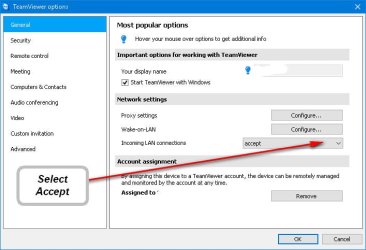
Also you have to first go into Extras then Options and accept Lan connections,

teamviewr accept lan.jpg

Normally if you do not have a registered version of TeamViewer it will only allow you to connect for half an hour, But if you connect with your Lan you have an unlimited time to stay connected.
 
Last edited:

My Computer

Computer type
PC/Desktop
Computer Manufacturer/Model Number
Compac
OS
Microsoft Windows 7 Ultimate 32-bit 7601
CPU
Intel(R) Pentium(R) Dual CPU E2160 @ 1.80GHz
Motherboard
MSI Boston
Memory
4.00 GB
Graphics Card(s)
(1) VNC Mirror Driver (2) Intel(R) G33/G31 Express Chipset
Sound Card
Disabled
Monitor(s) Displays
Headless
Screen Resolution
1280 x 960 x 32 bits (4294967296 colors) @ 60 Hz
Hard Drives
ST3320820AS ATA Device
Keyboard
Headless
Mouse
Headless
Antivirus
Malwarebytes pro
Other Info
Also
Windows 8.1 Laptop and Desktop both Acer
Okay, how do I connect my laptop and Pc with that method (TeamViewer) without inserting any LAN cable in my PC ? I know how to connect two machines for file-sharing located as far as in distant cities using TeamViewer.

Please elaborate on your method.

Now you are confusing me.

Are your computers connected to the same network. If not there is nothing you can do


I'm sorry. I should have written "without inserting any LAN cable in my laptop"

Yes, my pc and laptop are connected to the same network. My pc is connected to a wifi modem through a lan cable and my laptop connects to the modem to access the internet through wifi.
 

My Computer

Computer type
PC/Desktop
OS
Windows 7 64 bit Ultimate
CPU
i3( Pc), i5 (lappy)
Memory
4Gb
Graphics Card(s)
Intel hd graphics (PC), Ati sunpro (lappy)
Hard Drives
500GB SATA
Antivirus
Kaspersky Internet Security
Browser
Chrome and firefox
where do i enter the ip address here in teamviewer in order to connect?

View attachment 388424

View attachment 388428

Also you have to first go into Extras then Options and accept Lan connections,

View attachment 388427

Normally if you do not have a registered version of TeamViewer it will only allow you to connect for half an hour, But if you connect with your Lan you have an unlimited time to stay connected.
Thanks a lot! I'll try it out tomorrow and inform you [emoji2] [emoji106]
 

My Computer

Computer type
PC/Desktop
OS
Windows 7 64 bit Ultimate
CPU
i3( Pc), i5 (lappy)
Memory
4Gb
Graphics Card(s)
Intel hd graphics (PC), Ati sunpro (lappy)
Hard Drives
500GB SATA
Antivirus
Kaspersky Internet Security
Browser
Chrome and firefox
A 'KVM' switch & a thumb drive??

-c-
 

My Computer

Computer type
Laptop
Computer Manufacturer/Model Number
toshiba 505
OS
Windows 7 Home Premium bit
CPU
amd?
Motherboard
?
Memory
4 gig
Monitor(s) Displays
Samsung S27D360 &S24D300 - Acer K222HQL - Eizo 21" (4x3)
Screen Resolution
1280 x 720 -1600x900 - (eizo 1024x768
Hard Drives
240 ssd
PSU
amd (?)
Mouse
logitech tackball
Antivirus
360 total security
Browser
firefox portable 29.0.1
I'm sorry. I should have written "without inserting any LAN cable in my laptop"

Yes, my pc and laptop are connected to the same network. My pc is connected to a wifi modem through a lan cable and my laptop connects to the modem to access the internet through wifi.

Typically when you connect your computer to a router whether it is with a Lan cable or WiFi they will be on the same subnet and TeamViewer and Remote Desktop will be able to connect on the local network IP.

EG:
192.168.0.1

If you set your WiFi as a Guest WiFi in the settings of the router you might not be able to connect to the other computers if you set it up to separate the networks.

EG:
192.168.22.1
 

My Computer

Computer type
PC/Desktop
Computer Manufacturer/Model Number
Compac
OS
Microsoft Windows 7 Ultimate 32-bit 7601
CPU
Intel(R) Pentium(R) Dual CPU E2160 @ 1.80GHz
Motherboard
MSI Boston
Memory
4.00 GB
Graphics Card(s)
(1) VNC Mirror Driver (2) Intel(R) G33/G31 Express Chipset
Sound Card
Disabled
Monitor(s) Displays
Headless
Screen Resolution
1280 x 960 x 32 bits (4294967296 colors) @ 60 Hz
Hard Drives
ST3320820AS ATA Device
Keyboard
Headless
Mouse
Headless
Antivirus
Malwarebytes pro
Other Info
Also
Windows 8.1 Laptop and Desktop both Acer
Back
Top