
Hey Guys,
I'm going insane over here. I initially noticed today that my PC fan was running like there was a load on the CPU. After looking at the task manager, I found out the CPU had a very constant usage of about 40% when everything was closed and the cursor had that little circle by it the entire time like it was waiting for a process. I went into processes and closed just about everything I could possibly close and it was still a constant 30-40% on all 4 cores (I have a Phenom II X4 965). First thing I tried was a restart and that works for about 5-10 minutes. After that, something starts up and the 30-40% CPU utilization comes back. I scan for viruses and malware with Security Essentials and Malwarebytes (only two programs I use) and they both find nothing.
So I started doing tons of google-foo on just about every process I can find on the top of the usage charts/resource monitor. I find a forum suggesting it was Security Essentials so I uninstalled it, nothing. Forum suggesting it was Windows Defender so I disabled it, nothing. I found forums suggesting to do this and that with no avail. I did a system restore to a point a few days back and it still happens. I checked the memory and the hard disk for errors and both passed. I literally cannot figure out how to solve this beyond just doing a format and reinstall, which I don't want to do if possible. I have quite a bit of stuff on this computer that I'd like not to have to lose or move around.
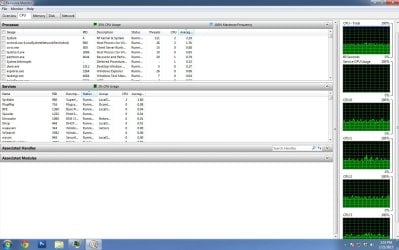
I appreciate any help I can get...I have never encountered an issue that I couldn't fix with a good Google search term, but after putting in around 5 hours troubleshooting this, I need some suggestions. I've attached an image of my resource monitor for anybody that's curious, if that helps. Thanks again.
I'm going insane over here. I initially noticed today that my PC fan was running like there was a load on the CPU. After looking at the task manager, I found out the CPU had a very constant usage of about 40% when everything was closed and the cursor had that little circle by it the entire time like it was waiting for a process. I went into processes and closed just about everything I could possibly close and it was still a constant 30-40% on all 4 cores (I have a Phenom II X4 965). First thing I tried was a restart and that works for about 5-10 minutes. After that, something starts up and the 30-40% CPU utilization comes back. I scan for viruses and malware with Security Essentials and Malwarebytes (only two programs I use) and they both find nothing.
So I started doing tons of google-foo on just about every process I can find on the top of the usage charts/resource monitor. I find a forum suggesting it was Security Essentials so I uninstalled it, nothing. Forum suggesting it was Windows Defender so I disabled it, nothing. I found forums suggesting to do this and that with no avail. I did a system restore to a point a few days back and it still happens. I checked the memory and the hard disk for errors and both passed. I literally cannot figure out how to solve this beyond just doing a format and reinstall, which I don't want to do if possible. I have quite a bit of stuff on this computer that I'd like not to have to lose or move around.
I appreciate any help I can get...I have never encountered an issue that I couldn't fix with a good Google search term, but after putting in around 5 hours troubleshooting this, I need some suggestions. I've attached an image of my resource monitor for anybody that's curious, if that helps. Thanks again.
Attachments
My Computer
- Computer type
- PC/Desktop
- Computer Manufacturer/Model Number
- Custom
- OS
- Windows 7 Home Premium 64 bit
- CPU
- AMD Phenom II X4 965 BE
- Memory
- 8 GB


