
Constant Download

Thanks for trying to help me with this. In the beginning, I didn't want to bore you with the history. One thing I do have is a 2 years warranty on htis one. I do have a history of letter writing to key people and getting what is due and right. Looks like I am going to have to do that. This was running fairly predictable for several months until this thing came up.
Can you answer one general question? How does things like ppcore.dll just go away? Most of the issues I figured out on my own and fixed. One of the benefits of being retired.
And what are the dangers of using third party "fixes" that claim they can restore ppcore.dll? There are several sites out there.

Take care and thanks again.
Files "disappear" for several reasons. Someone shuts their system down when a file is being updated and it ends up never being updated; the file then goes 'missing' because it was supposed to have been replaced on a reboot. It's not really missing, it was unregistered during the update process. Or, there's a hardware issue that results in a missing file.
Files can become corrupted, which equates to them being missing.

As to third party fixes, don't do it ! It's not that hard to extract files from updates and manually replace a missing .dll file. They can also be replaced from the installation DVD or from back ups.These sites that claim they can replace .dll files are highly suspect. They either push unneeded, miracle one fix "programs" that don't deliver as promised or malware.

I'm sorry I couldn't help you out of this quagmire yet. What you could try is to register the missing .dll from an Elevated Command Prompt.

Click the Start orb > in the Search programs and files field type in cmd
Right click command.exe and choose 'Run as administrator'.
Agree to the UAC prompt.

At the prompt, type in the below exactly as written including the space between the 2 and the p, pressing Enter after each command. Allow some time after the first command to see what the resulting message is

regsvr32 ppcore.dll
exit

What was the message after the first command ?

EDIT: I have a copy of ppcore.dll that was extracted from the update. Please let me know if you want to try replacing the missing .dll.
 
Last edited:

My Computer

OS
Windows 7 Ultimate x86; Windows XP Pro SP3 x86; Windows Vista Ultimate x86
This is what I got:
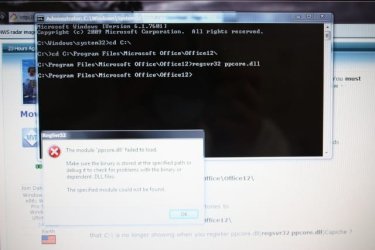
"The module "ppcore.dll" failed to load. Make sure the binary is stored at the specific path or debug it to check for problems with the binary or dependent .DLL files. The specific module could not be found".

I first ran each command separattly, like you indicated. It said I did not specify a file. So I ran it again together and the above message is what I got.
 
Last edited:

My Computer

Computer Manufacturer/Model Number
HP Pavillion
OS
Windows 7 64 bit
This morning, I did a regedit search for ppcore.dll In several places, I found C:\Program Files (x86)\Common Files\muvee Technologies\071203\mvappcore.dll I found it first at : HKEY_LOCAL_MACHINE\SOFTWARE\Classes\Wow6432Node\TypeLib\{C8C05A65-DF7F-422A-97D4-73887CED1297}
Also at : D009F3923473CC8A64DAA5BFFFE892FC ComponentVersion 6.0.58.9792 ProductVersion 7.0.40
And at : HKEY_LOCAL_MACHINE\SOFTWARE\Wow6432Node\Classes\CLSID\{124886BC-5EFB-49bb-9D37-2F0C69D86855} InprocServer32
And : HKEY_LOCAL_MACHINE\SOFTWARE\Wow6432Node\Classes\CLSID\{1CF68BD2-44CC-4f6e-882E-DB0DC6F036AA}
And : HKEY_LOCAL_MACHINE\SOFTWARE\Wow6432Node\Classes\CLSID\{FFA51F68-C118-4380-8698-1CA8CF84E75D}

In all of them, under "Permissions", it showed Creator/Owner permission was special . Not Allowed or Full.

Does this help?
 

My Computer

Computer Manufacturer/Model Number
HP Pavillion
OS
Windows 7 64 bit
For some reason, during a McAfee update restart, the computer locked up. It would not fully load programs, connect to the internet, etc. I am on a backup compter now. I thought of just backing it up, then reload W7. I plugged in my external hard drive I use, and the computer could not find it. I am now doing a system restore. System Restore would not open in the normal mode. It did open in Safe Mode.

What in the bleep is going on?
 

My Computer

Computer Manufacturer/Model Number
HP Pavillion
OS
Windows 7 64 bit
For some reason, during a McAfee update restart, the computer locked up. It would not fully load programs, connect to the internet, etc. I am on a backup compter now. I thought of just backing it up, then reload W7. I plugged in my external hard drive I use, and the computer could not find it. I am now doing a system restore. System Restore would not open in the normal mode. It did open in Safe Mode.

What in the bleep is going on?
When System Restore is used from within Safe Mode their is no option to Undo it. But, you can choose another restore point if the first one fails to restore the system's stability.

mvappcore.dll is not the missing file, ppcore.dll is but, that's the least of your problems now. AFAIK, a definitions update for McAfee may have caused the new issues. Just checked the McAfee forums and there are not enough posts to indicate that those defs are problematic.

If you can restore the system's stability, suggest you uninstall McAfee, restart, and then run their removal tool, then restart once again. Please, do not reinstall McAfee after you've removed it so we can see if that is the cause of the instability -

How to uninstall or reinstall supported McAfee consumer products using the McAfee Consumer Products Removal tool (MCPR.exe)

If McAfee includes a firewall component, then ensure that the native Windows 7 firewall is On after it's been uninstalled.
Open Control Panel.
If it's set to View by: Category at the top right of the window, set it to Small or Large icons to be able to access the Windows Firewall icon.
 

My Computer

OS
Windows 7 Ultimate x86; Windows XP Pro SP3 x86; Windows Vista Ultimate x86
Under the Safe Mode, I was able to do a system restore. I only went baack a week. Then I restarted in Normal startup and backed up the computer. After the backup, it downloaded some updates, both Microsoft and McAfee.

Tha computer appears stable now. And the McAfee updates also loaded on my wife's laptop and my backup laptop, both without issue.

I did look at the W7 Firewall. It is off. I clicked recommended settings and got error code 0x80070422. I have used McAfee for several years and perhaps this is the second time it caused a problem, but it appears that it is stable and working properly now. So now we are back to the ppcore.dll issue.
 

My Computer

Computer Manufacturer/Model Number
HP Pavillion
OS
Windows 7 64 bit
80070422 The service cannot be started, either because it is disabled or because it has no enabled devices associated with it.

Which edition of McAfee are we talking about here ? If it does include a firewall then that message is to be expected as the native Win 7 firewall service is Disabled so as not to conflict with McAfee's firewall and associated service.

Can PowerPoint be opened in it's Safe Mode ( not Windows Safe Mode ) by holding down the CTRL key when you start PP; hold the CTRL key down until you see a message asking if you want to start in Safe Mode.
Answer Yes.

As to the location of ppcore.dll in PP2007, see if there's a copy at this location -

Program Files\Microsoft Office\Officexx\PPCORE.DLL

xx represents the edition of Office.
I think that Office 2007 uses the Office12 subfolder above. It may differ so check any other Office subfolders under Microsoft Office, too.

I'm not sure that there are any other locations that it would be in. PP may place a copy of it Windows\system32

I could attach the file but it needs to be enclosed in a compressed file, .zip or .rar, as one can not attach .dll files here.
But, it appears that your system fails to open .zip files, is that correct ?

If so, suggest you try to install 7zip - Download 7-Zip for Windows

I'll ask around to see where PPCORE.DLL should be located as the only system I have the PowerPoint Viewer 2007 installed on has no ppcore.dll present.
 

My Computer

OS
Windows 7 Ultimate x86; Windows XP Pro SP3 x86; Windows Vista Ultimate x86
Never had a problem with zip files. In fact I created a few 3 weeks ago. Now, perhaps I may have found the? problem. I just noticed I have Microsoft Power Point and a separate Power Point Viewer. I checked the program I have that runs on PP and in Viewer, it opens. It does not open in regular PP.

And I tried the ctrl key thing, same error message. I also looked for that program file, no results. All the Office programs are 2007.

So was I chasing my tail because I didn't realize there were 2 versions of PP?

McAfee Internet security Suite Ver. 11.0, Build 11.0.555, Vius scan Ver. 15.0, Build 15.0.288; Firewall Ver. 12.0

I do have Windows firewall off, per McAfee. My router, Cisco Valet also has a virus/site adviser that has saved me a few times.
 
Last edited:

My Computer

Computer Manufacturer/Model Number
HP Pavillion
OS
Windows 7 64 bit
Never had a problem with zip files. In fact I created a few 3 weeks ago. Now, perhaps I may have found the? problem. I just noticed I have Microsoft Power Point and a separate Power Point Viewer. I checked the program I have that runs on PP and in Viewer, it opens. It does not open in regular PP.

And I tried the ctrl key thing, same error message. I also looked for that program file, no results. All the Office programs are 2007.

So was I chasing my tail because I didn't realize there were 2 versions of PP?
I was under the impression that extracting .zip files was not working.

And, YES, you were chasing your tail as there are 2 versions of PP present.
The PP Viewer does not need PPCORE.DLL .
If you do not create PP presentations, then suggest you keep the Viewer and dump PP.
If you need PP to create PP presentations, then hang on and I'll find out the specific location(s) that ppcore.dll needs to be in.


From what I've been reading, the PPCORE.DLL message sometimes comes from the PowerPoint presentation file being blocked.
To unblock them locate the file, right click it, choose Properties.
Towards the bottom right of the window there's an Unblock button.
Click that, click Apply, then OK.
 

My Computer

OS
Windows 7 Ultimate x86; Windows XP Pro SP3 x86; Windows Vista Ultimate x86
I never noticed that there were 2 PP programs. I am sorry I spent your valuable time chasing my tail.

I do have items I could make a PP presentation, just have never gotten around to trying to make a PP program. I am retired and have been looking for a part time teaching/leacture job, where the PP is important. No jobs yet, so no hurry to make a PP program. So yes, if you can find the ppcore.dll file, I would appreciate that.

I am still finding out new features in Arcsoft MediaImpression.

I hate when the answers are in plain site.
 

My Computer

Computer Manufacturer/Model Number
HP Pavillion
OS
Windows 7 64 bit
Attached is PPCORE.zip.
Extract it and move PPCORE.DLL to

Program Files (x86)\Microsoft Office\Office12\

Follow the previous posted steps to register it with an Elevated Command Prompt except that you will need to change directories to register it.

If Program Files is on the C:\ drive and the prompt opens to C:\Windows\system32>
Type in the following bolded commands, pressing Enter after each one. The commands must contain the spaces shown below.

C:\Windows\system32>cd C:\
C:\>cd C:\Program Files\Microsoft Office\Office12\
regsvr32 ppcore.dll
exit


Attachments

My Computer

OS
Windows 7 Ultimate x86; Windows XP Pro SP3 x86; Windows Vista Ultimate x86
Ok. I downloaded the file, but I could not extract it alone. Unzip was not an option. As I said, I didn't think I had a zip problem, as I made soem zip files and I can open them, and the person I sent them to also could open them.
But I did get it to the actual tool file, dragged and dropped into my Program Files. Ran the elevated prompt. Wasn't clear if there was a space between ppcore.dll and exit. Ran it both ways. Got the no such path in the prompt.
 

My Computer

Computer Manufacturer/Model Number
HP Pavillion
OS
Windows 7 64 bit
The commands are in bold; The commands shown below are all on their own line; You must press Enter after each command; all exit does is close the Command Prompt window -

cd C:\
cd C:\Program Files\Microsoft Office\Office12\
regsvr32 ppcore.dll
exit

What you will see when you open the Command Prompt is not in bold.
I put what you'll see in italic so you will know where to enter the ( bold ) commands

So, it will look like this

C:\Windows\system32>cd C:\
C:\>cd C:\Program Files\Microsoft Office\Office12\
regsvr32 ppcore.dll
exit


Notice that after you've switched directories to

C:\Program Files\Microsoft Office\Office12\

that C:\ is no longer showing when you register ppcore.dll(regsvr32 ppcore.dll)Capiche ?
 

My Computer

OS
Windows 7 Ultimate x86; Windows XP Pro SP3 x86; Windows Vista Ultimate x86
Ok. And the big question is: How do you make the commands I enter bold?
 

My Computer

Computer Manufacturer/Model Number
HP Pavillion
OS
Windows 7 64 bit
Ok. And the big question is: How do you make the commands I enter bold?

Hello!

Good question! You don't actually need to write them in bold. You just need to copy and paste them, or write them out normally in Command Prompt, and then press enter. The bold was just to stress to you which bits were Commands for you to type out, and which bits were instructions.

The very best of luck!

Richard
 

My Computer

Computer Manufacturer/Model Number
Dell XPS 420
OS
Vista Home Premium x86 SP2
CPU
Intel Core 2 Quad Q9300 2.50GHz
Motherboard
Stock Dell 0TP406
Memory
4 gb (DDR2 800) 400MHz
Graphics Card(s)
ATI Radeon HD 3870 (512 MBytes)
Monitor(s) Displays
1 x Dell 2007FP and 1 x (old) Sonic flat screen
Screen Resolution
1600 x 1200 and 1280 x 1204
Hard Drives
1 x 640Gb (SATA 300) Western Digital: WDC WD6400AAKS-75A7B0 1 x 1Tb (SATA 600) Western Digital: Caviar Black, SATA 6GB/S, 64Mb cache, 8ms Western Digital: WDC WD1002FAEX-00Z3A0 ATA Device
Case
Dell XPS 420
Cooling
Stock Fan
Keyboard
Dell Bluetooth
Mouse
Advent Optical ADE-WG01 (colour change light up)
Internet Speed
Varies from 10kb/s to 170kb/s. So unreliable it is not funny
Other Info
ASUS USB 3.0 5Gbps/SATA 6Gbps - PCI-Express Combo Controller Card (U3S6)
I was trying to make this simple and apparently made it more difficult.

I put the text that you will see in italics when you first open the Elevated Command Prompt' and after you switch directories to C:\
The commands you type in are shown in bold .
You do not need to bold any text you enter.

As Richard posted

" The bold was just to stress to you which bits were Commands for you to type out, and which bits were instructions. "

So, just forget about bold and type in the following, including the spaces
(Ex: after the d and before the C, there's a space ), then press Enter after typing in each Command

cd C:\
cd C:\Program Files\Microsoft Office\Office12\
regsvr32 ppcore.dll
exit
 

My Computer

OS
Windows 7 Ultimate x86; Windows XP Pro SP3 x86; Windows Vista Ultimate x86
Ok. I ran it again. I made sure the ppcore file was in the directory for MS Office 12.
cd C:\
cd C:\Program Files\Microsoft Office\Office12\ When I got this far, I hit Enter. The Commpand Prompt went to:
cd C:\Program Files\Microsoft Office\Office12\

So I still typed the rest of it. Still could not find the file, "Module failed to load"
 

My Computer

Computer Manufacturer/Model Number
HP Pavillion
OS
Windows 7 64 bit
Ok. I think finally got the download into the tight file. I put it in:
C:\Program Files (x86)\Microsoft Office\Office12\PPCORE

When I get to this point, it does show I can extract the file. It will not extract, says it cannot create that file path.
 

My Computer

Computer Manufacturer/Model Number
HP Pavillion
OS
Windows 7 64 bit
Ok. I think finally got the download into the tight file. I put it in:
C:\Program Files (x86)\Microsoft Office\Office12\PPCORE

When I get to this point, it does show I can extract the file. It will not extract, says it cannot create that file path.
Please try this:

Move PPCORE.zip to the Desktop.
Right click it and choose 'Extract'.
A new folder with the name of PPCORE will now be present on the Desktop.

PPCORE.DLL is in that new folder.
Move PPCORE.DLL to

C:\Program Files (x86)\Microsoft Office\Office12

In other words, in the Office12 folder. Do not put it in any subfolders of Office12, such as 1003.
Then run the commands to register it.

If the file can not be extracted then try to use 7zip .
 

My Computer

OS
Windows 7 Ultimate x86; Windows XP Pro SP3 x86; Windows Vista Ultimate x86
OK. there should be 2 screen shots attached. Never did that before. I followed the instructions. Still did not work. I have noticed another issue since we started all this.

I am editing pictures in Live Essentials 2011 and when I click forward to the next picture, all is well. But when I get to the LAST picture, and click, instead of rotating to the first picture, the file goes blank. I search C: for jpg pics, and eventually find them. I got to properties and theyy are now Hidden. I unclick that box, and it returns to the picture file. Takes about 2 hours for 5 pics.
 

Attachments

  • {E65ECAE5-03BF-4126-988E-9BC3C2FD784F}-005 (427x640) (2).jpg
    {E65ECAE5-03BF-4126-988E-9BC3C2FD784F}-005 (427x640) (2).jpg
    68.1 KB · Views: 2
  • smallcmd.jpg
    smallcmd.jpg
    59.9 KB · Views: 3

My Computer

Computer Manufacturer/Model Number
HP Pavillion
OS
Windows 7 64 bit
Back
Top