contacts

fatguy

New member
Local time
9:12 PM
Messages
29
i recently had my old drive crash. reinsatlled windows 7 64 on an old drive. up and running fine. tried to locate my contacts from a back up, says folder is empty. properties says folder has 13 files and 4 folders. what am i missing?
thanks in advance,
michael
 

My Computer

OS
windows 7 64bit
CPU
intel core(tm)2 quad processor q4800 2.66GHz
Motherboard
ASUS p5e-v hdmi
Memory
8 gigs- 4x2gigs
Graphics Card(s)
intel g35 express chipset family (microsoft corperation wddm
Monitor(s) Displays
smasung syncmaster 940s
Hard Drives
hitachi hdt721010sla360
Case
antec
Keyboard
logitech
Mouse
logitech
Internet Speed
not fast enough
What mail client/software this is backed up from?

What's the file extension?

Did you try importing this file back into your address/contacts?

.csv files are quite common
 

My Computer

OS
Windows 7
...tried to locate my contacts from a back up, says folder is empty. properties says folder has 13 files and 4 folders. what am i missing?...
If you're talking about WLM, and if you had been "signing-in", your contacts should have been maintained at the contacts.live.com website and would not have needed a backup. If you were not signing in, and therefore needed a backup, how did you make the backup? Export/Import would be how to backup/restore. Did you instead save the "Windows Live Contacts" folder which is under "<username>/appdata" folder tree? Hope you did not just save the "<username>/contacts" folder since that is not where WLM puts the contacts.
 
Last edited:

My Computer

Computer type
PC/Desktop
Computer Manufacturer/Model Number
OQO 2+
OS
Windows 8 Pro w/MC 32-bit
CPU
Intel Atom 1.86 GHz
Motherboard
OQO 2+
Memory
2 GB
Graphics Card(s)
Intel GMA 500
Sound Card
IDT
Monitor(s) Displays
LCD
Screen Resolution
800 x 480 (portable) 1280 x 1024 (docked)
Hard Drives
64 GB SSD
PSU
9 Ah Battery (portable) or OQO Brick (docked)
Case
Shirt Pocket Sized
Cooling
Tiny Fan
Keyboard
Slide out (portable) DiNovo Edge (docked)
Mouse
Eraser head (portable) Logitech Bluetooth (docked)
Internet Speed
WWAN or 802.11G (portable) T1 (docked)
Browser
IE 10
Other Info
DVD-RW OQO Docking Station
yes, its windows live mail. and i was not signing in. "back up" was actually the old drive that had crashed. a friend put it in his computer and was able to get it to spin again. i have a new drive and new cpoy of windows 7.
when i try and import the files using the browse button, the folder is not there. so i made a copy of the folder and placed it on the desktop. now it finds the folder, but thinks the folder is empty. if i open the folder, it says it is empty. but if i open the properties of the folder it tells me that there are 13 items and 4 folders.

thanks michael
 

My Computer

OS
windows 7 64bit
CPU
intel core(tm)2 quad processor q4800 2.66GHz
Motherboard
ASUS p5e-v hdmi
Memory
8 gigs- 4x2gigs
Graphics Card(s)
intel g35 express chipset family (microsoft corperation wddm
Monitor(s) Displays
smasung syncmaster 940s
Hard Drives
hitachi hdt721010sla360
Case
antec
Keyboard
logitech
Mouse
logitech
Internet Speed
not fast enough
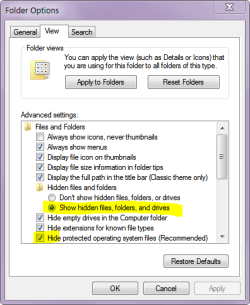
maybe you overlooked this
 

Attachments

  • Capture.PNG
    Capture.PNG
    14.4 KB · Views: 4

My Computer

Computer Manufacturer/Model Number
Gateway/NV7923u & NV79C52u Laptops
OS
windows 7 professional & ultimate 64bit laptops
CPU
2.27 boost to 2.53 & 2.53 boost to 2.80
Motherboard
Mobile Intel® HM55 Express Chipset ???
Memory
4GB
Graphics Card(s)
Intel® Graphics Media Accelerator HD
Sound Card
realtek High-definition audio support
Monitor(s) Displays
17.3 " HD 1600 x 900
Hard Drives
hatachi Travelstar 5400 500GB & west digital 500GB
Internet Speed
35MB fios
...when i try and import the files using the browse button, the folder is not there. so i made a copy of the folder and placed it on the desktop. now it finds the folder, but thinks the folder is empty. if i open the folder, it says it is empty. but if i open the properties of the folder it tells me that there are 13 items and 4 folders...
If you saved the "Windows Live Contacts" folder, it should be the right one. But you won't be able to see the contents unless you "unhide" them as suggested by pacinitaly. However you can't use import/export since you must do that from within a working copy of WLM or another mail program that exports to ".csv". Another method that works is "drag and drop" of the contents of your backed up folder to the contents of the new "Windows Live Contacts" folder within Windows Explorer. You may have to repeatedly say "try again" and "yes" when asked if you really want to do this, but eventually the new WLM contacts window will look just like it did in the old WLM program from which it came.
 
Last edited:

My Computer

Computer type
PC/Desktop
Computer Manufacturer/Model Number
OQO 2+
OS
Windows 8 Pro w/MC 32-bit
CPU
Intel Atom 1.86 GHz
Motherboard
OQO 2+
Memory
2 GB
Graphics Card(s)
Intel GMA 500
Sound Card
IDT
Monitor(s) Displays
LCD
Screen Resolution
800 x 480 (portable) 1280 x 1024 (docked)
Hard Drives
64 GB SSD
PSU
9 Ah Battery (portable) or OQO Brick (docked)
Case
Shirt Pocket Sized
Cooling
Tiny Fan
Keyboard
Slide out (portable) DiNovo Edge (docked)
Mouse
Eraser head (portable) Logitech Bluetooth (docked)
Internet Speed
WWAN or 802.11G (portable) T1 (docked)
Browser
IE 10
Other Info
DVD-RW OQO Docking Station
thank you. got the files.
roncerr,
i did a copy and paste of the back-up file into the new contacts folder. but i made a "new folder" within that folder and put the "new" contact.edb file in that folder first (to have a copy of the few contacts that i have) and then did the paste with no luck. it still just has the "new" contacts, none from the back-up copy. you say just drag and drop into the folder? i have seen posts about going into the registry and trying to fix the problem, but i am not that confident messing around there.

thanks again for all your help.
 

My Computer

OS
windows 7 64bit
CPU
intel core(tm)2 quad processor q4800 2.66GHz
Motherboard
ASUS p5e-v hdmi
Memory
8 gigs- 4x2gigs
Graphics Card(s)
intel g35 express chipset family (microsoft corperation wddm
Monitor(s) Displays
smasung syncmaster 940s
Hard Drives
hitachi hdt721010sla360
Case
antec
Keyboard
logitech
Mouse
logitech
Internet Speed
not fast enough
Back
Top