context menu platinum removal?

MollyB

New member
Local time
5:04 PM
Messages
6
Hi

I posted a question on an old thread about this darn 'context menu platinum' mystery program, but I think because the thread is really old no one saw it?

http://www.sevenforums.com/general-...ter-manage-context-menu-platinum-message.html

Anyway, I have the above program, no idea how, but now it is messing with some things and I can't find it to remove it (ie it isn't in my add/remove program screen). I am not very technically savvy so the things on the old thread about it were confusing for me. I was trying to use the backup and restore from the control panel (trying to back up onto a external drive) and it just pops up and doesn't go away.

Any idea how I can get rid of this thing?
 

My Computer

OS
windows 7 home

My Computer

Computer Manufacturer/Model Number
Hopalong/ Godzilla
OS
Windows7 Pro 64bit SP-1; Windows XP Pro 32bit
CPU
Intel Core i7-870 Lynnfield 2.93GHz LGA 1156 95W Quad-Core
Motherboard
ASUS P7P55D-E PRO
Memory
8GB@1400MHz Crucial Ballistix DDR3-1600 4x2GB
Graphics Card(s)
ASUS ENGTX460 DirectCU/2DI/1GD5 1GB 256-bit GDDR5
Sound Card
VIA Onboard
Monitor(s) Displays
Asus VS248H-P 24"; Samsung SyncMaster 941BW 19"ws
Screen Resolution
1920x1080; 1440x900
Hard Drives
Samsung 830 120GB SSD
Intel 320 120GB SSD
Western Digital Caviar Black WD7501AALS 750GB 7200 RPM SATA 3.0Gb/s
Western Digital Caviar Black WD6401AALS 640GB 7200 RPM SATA 3.0Gb/s
PSU
COOLER MASTER Silent Pro RS850-AMBAJ3-US 850W Modular
Case
COOLER MASTER HAF 932 RC-932-KKN5-GP Black
Cooling
Scythe "Mugen-2 Rev.B" (2 ScytheKaze-Jyuni PWM fans)
Keyboard
Logitech K-320
Mouse
Kensington
Antivirus
Avast Inernet Suite
Browser
IE 9 ; Chrome
If Hoppy's program isn't listed, also look for

EmailOpenView

If that is found instead, remove that as well.

Explorer Context Menu Platinum is apparently a legit program, but the behavior you describe sure sounds like malware.

Add items to Explorer Context Menu, Windows Shell Context Menu (.Net Component for C#, VB, VB DotNet, etc.) - Home

They do have a support page

Add items to Explorer Context Menu, Windows Shell Context Menu (.Net Component for C#, VB, VB DotNet, etc.) - Support

and support address

[email protected]

A Guy
 

My Computer

Computer type
PC/Desktop
OS
Windows 10 Home x64
CPU
INTEL Core i5-750 Quad-Core 3.37GHz
Motherboard
ASUS P7P55D
Memory
HyperX Fury Black Series 8GB (2 x 4GB) 1866Mhz
Graphics Card(s)
EVGA GeForce GTX 750 Superclocked 1GB 128-Bit GDDR5
Monitor(s) Displays
LG 32MA68HY 32" IPS
Screen Resolution
1920 x 1080
Hard Drives
Samsung 840 Evo 120GB, SEAGATE 500GB Barracuda® 7200.12, SATA 3 Gb/s, 7200 RPM, 16MB cache
PSU
ANTEC TruePower New TP-550, 80 PLUS, 550W
Case
ANTEC Three Hundred Illusion
Cooling
COOLER MASTER Hyper 212 Plus, 4 x 120mm 1 x 140mm Noctua's
Internet Speed
85 + Mbps
Antivirus
Avast
Browser
Vivaldi
Hi Hop and Guy

In the programs and features was where I was looking for the context menu platinum, but it wasn't there, nor in programs on start menu, so I was confused!
No file minimizer program, but there is one called EmlOpenView 2.3...could that be it? .

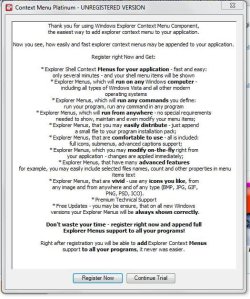
When I try to use the backup and restore, I get the attached pop up, it counts down from 80 (won't close or go behind other screens) and then if I try to choose 'continue trial' it just starts counting down again. If I click 'register' it takes me to a website

Add items to Explorer Context Menu, Windows Shell Context Menu (.Net Component for C#, VB, VB DotNet, etc.) - Get Explorer Context Menu Platinum

but there seems to be no where to register, and I don't want it anyway. I think it is the same website your links go to. I did fill in a web request form asking for help a few days ago, but they never answered.

If you say so, I will remove that emlopenview program- I don't want to until I know that I should!

Thanks to both of you for answering!
 

Attachments

  • context menu.JPG
    context menu.JPG
    77.1 KB · Views: 78

My Computer

OS
windows 7 home
Is it fixed already by uninstalling EmailOpenView ? If not ,

First, Search for FILEminimizer and uninstall it .

Then , Go to C:\Program Files\ <That program's folder> and search for the uninstaller.exe . Run it as admin .

Alternative solution : Install Download Revo Uninstaller Freeware - solve uninstall problems and selcet "advanced" while uninstalling .

I hope it will not be there anymore . It is being caused by a spy program which indicates even after uninstallation .... or even after a quick format :rolleyes:
 

My Computer

Computer type
PC/Desktop
Computer Manufacturer/Model Number
Self Assembled
OS
Microsoft Windows 10 Pro Insider Preview 64-bit
CPU
Intel(R) Core(TM) i3-4130 CPU @ 3.40GHz
Motherboard
Gigabyte Technology Co., Ltd. B85M-D3H
Memory
Corsair Vengence 4GB x2 (8.00GB Dual-Channel DDR3 @ 798MHz)
Graphics Card(s)
2047MB GeForce GTS 450 (ZOTAC International)
Sound Card
Onboard (Realtek High Definition Audio)
Monitor(s) Displays
LG Flatron E2040T
Screen Resolution
1600x900
Hard Drives
Western Digital 1 TB
Seagate 500 GB
PSU
Corsair VS550
Case
Cooler Master K380
Cooling
Cooler Master Seidon 120V Plus
Keyboard
Logitech MK260r
Mouse
Logitech MK260r
Internet Speed
PMPL Broadband
Antivirus
Windows Defender + MBAM
Browser
Firefox
Other Info
Dell Studio 15" Laptop
Hi Hop and Guy

In the programs and features was where I was looking for the context menu platinum, but it wasn't there, nor in programs on start menu, so I was confused!
No file minimizer program, but there is one called EmlOpenView 2.3...could that be it? .

When I try to use the backup and restore, I get the attached pop up, it counts down from 80 (won't close or go behind other screens) and then if I try to choose 'continue trial' it just starts counting down again. If I click 'register' it takes me to a website

Add items to Explorer Context Menu, Windows Shell Context Menu (.Net Component for C#, VB, VB DotNet, etc.) - Get Explorer Context Menu Platinum

but there seems to be no where to register, and I don't want it anyway. I think it is the same website your links go to. I did fill in a web request form asking for help a few days ago, but they never answered.

If you say so, I will remove that emlopenview program- I don't want to until I know that I should!

Thanks to both of you for answering!

Yes, you have the program I linked to. Yes, remove the EmlOpenView 2.3 program, that should do the trick. Let us know how it goes. A Guy
 

My Computer

Computer type
PC/Desktop
OS
Windows 10 Home x64
CPU
INTEL Core i5-750 Quad-Core 3.37GHz
Motherboard
ASUS P7P55D
Memory
HyperX Fury Black Series 8GB (2 x 4GB) 1866Mhz
Graphics Card(s)
EVGA GeForce GTX 750 Superclocked 1GB 128-Bit GDDR5
Monitor(s) Displays
LG 32MA68HY 32" IPS
Screen Resolution
1920 x 1080
Hard Drives
Samsung 840 Evo 120GB, SEAGATE 500GB Barracuda® 7200.12, SATA 3 Gb/s, 7200 RPM, 16MB cache
PSU
ANTEC TruePower New TP-550, 80 PLUS, 550W
Case
ANTEC Three Hundred Illusion
Cooling
COOLER MASTER Hyper 212 Plus, 4 x 120mm 1 x 140mm Noctua's
Internet Speed
85 + Mbps
Antivirus
Avast
Browser
Vivaldi
Okay, I wanted to make sure that Eml and Email were the same program...so I have uninstalled that EmlOpenView and I think it worked as I can now use things in control panel without that pop-up. I have no recall of ever installing that EmlOpenView program, but funnily enough that date is just about when I had my work had me take my laptop into a shop to have a program fixed that I needed for work...hmmm....
Thanks to all you guys for being so helpful and I am so glad that worked!

I will look around the other postings to see what is recommended to look for spy programs too....now I am all suspicious! I have a virus checker thing, but maybe it can't see spyware programs. This forum is so helpful...though a lot of what everyone is saying is way over my head!

Thanks again!!!!!!
 

My Computer

OS
windows 7 home
Use avast! Free Antivirus - Download Software for Virus Protection , that will keep you safe against such unwanted programs bundled with a download .

Once I installed Daemon tools and got "when you save now" spy /ad program .... it brought tears to remove it . Avast nicely caught that .

You need not to be suspicious at all .... the safest way of computing is to have a http://www.sevenforums.com/tutorials/663-backup-complete-computer-create-image-backup.html , so that you can restore it as and when it is needed , as and when there is a realy annoying trouble .
 

My Computer

Computer type
PC/Desktop
Computer Manufacturer/Model Number
Self Assembled
OS
Microsoft Windows 10 Pro Insider Preview 64-bit
CPU
Intel(R) Core(TM) i3-4130 CPU @ 3.40GHz
Motherboard
Gigabyte Technology Co., Ltd. B85M-D3H
Memory
Corsair Vengence 4GB x2 (8.00GB Dual-Channel DDR3 @ 798MHz)
Graphics Card(s)
2047MB GeForce GTS 450 (ZOTAC International)
Sound Card
Onboard (Realtek High Definition Audio)
Monitor(s) Displays
LG Flatron E2040T
Screen Resolution
1600x900
Hard Drives
Western Digital 1 TB
Seagate 500 GB
PSU
Corsair VS550
Case
Cooler Master K380
Cooling
Cooler Master Seidon 120V Plus
Keyboard
Logitech MK260r
Mouse
Logitech MK260r
Internet Speed
PMPL Broadband
Antivirus
Windows Defender + MBAM
Browser
Firefox
Other Info
Dell Studio 15" Laptop
Avast is what I use. That lady scares me sometimes when I hear her talking in the other room and I know no one else is home! Not as scary as the man used to be though...It was a toss up between avast and AVG, but I have used avast for years and thought it was doing a good job (though that nuclear siren that goes off always makes me jump. It has only happened a couple times, but man they are serious when they find something they want you to know!) It never caught this one, but if my suspicions are true and the shop guys added it to try to fix whatever it was they were fixing, maybe they ignored the sirens.

I was trying to make a new backup in case bad things were to happen...and that is when I found that stupid program trying to make me register instead. Going to try again later today, but I will read that link too. I just got an external drive and was trying to use that. I try to remember to make backups on a semi regular basis. I do burn disk copies of photos regularly as I know a couple people who had 'bad things' happen to computers and lost years of photos with no backups or prints or anything.

Glad this little issue of mine didn't bring me tears...just confusion...though if I had to take this to a shop and pay their hourly fees to get rid of it, that would have been tears!

Thanks again.
 

My Computer

OS
windows 7 home
I'm glad you got it sorted Molly, you're welcome. It's likely they installed it bundled with something. Avast probably wouldn't alert to it, as it is actually a legit program, it just vexed you because you never installed it, and the free trial had expired. Here are some good free programs to install, and scan with on occasion:

Malwarebytes (Download free version)

SuperAntiSpyware (Free edition download)

These 2 programs along with Avast will do you very nicely, and all are free. A Guy
 

My Computer

Computer type
PC/Desktop
OS
Windows 10 Home x64
CPU
INTEL Core i5-750 Quad-Core 3.37GHz
Motherboard
ASUS P7P55D
Memory
HyperX Fury Black Series 8GB (2 x 4GB) 1866Mhz
Graphics Card(s)
EVGA GeForce GTX 750 Superclocked 1GB 128-Bit GDDR5
Monitor(s) Displays
LG 32MA68HY 32" IPS
Screen Resolution
1920 x 1080
Hard Drives
Samsung 840 Evo 120GB, SEAGATE 500GB Barracuda® 7200.12, SATA 3 Gb/s, 7200 RPM, 16MB cache
PSU
ANTEC TruePower New TP-550, 80 PLUS, 550W
Case
ANTEC Three Hundred Illusion
Cooling
COOLER MASTER Hyper 212 Plus, 4 x 120mm 1 x 140mm Noctua's
Internet Speed
85 + Mbps
Antivirus
Avast
Browser
Vivaldi
I ran both programs, and malware found 1 item that it put into quarantine, and spy found lots of tracking cookies that I deleted. I will try to remember to run those on a regular basis too.

Thanks again for the help. I am going to post another question that my Dad has since you guys were all so helpful!
 

My Computer

OS
windows 7 home
Always glad to help :)

A Guy
 

My Computer

Computer type
PC/Desktop
OS
Windows 10 Home x64
CPU
INTEL Core i5-750 Quad-Core 3.37GHz
Motherboard
ASUS P7P55D
Memory
HyperX Fury Black Series 8GB (2 x 4GB) 1866Mhz
Graphics Card(s)
EVGA GeForce GTX 750 Superclocked 1GB 128-Bit GDDR5
Monitor(s) Displays
LG 32MA68HY 32" IPS
Screen Resolution
1920 x 1080
Hard Drives
Samsung 840 Evo 120GB, SEAGATE 500GB Barracuda® 7200.12, SATA 3 Gb/s, 7200 RPM, 16MB cache
PSU
ANTEC TruePower New TP-550, 80 PLUS, 550W
Case
ANTEC Three Hundred Illusion
Cooling
COOLER MASTER Hyper 212 Plus, 4 x 120mm 1 x 140mm Noctua's
Internet Speed
85 + Mbps
Antivirus
Avast
Browser
Vivaldi

My Computer

Computer Manufacturer/Model Number
DELL
OS
windows 7
CPU
Intel® Core™ i3-330M (3M Cache, 2.13 GHz)
Motherboard
dell inc .03C6YH
Memory
4Gb DDR3
Graphics Card(s)
ATI Mobility Radeon HD 5470
Sound Card
onboard
Monitor(s) Displays
pnp moniter
Hard Drives
samsun 300gb
Internet Speed
512kpbs
Context Menu Platinum

Just delete in Control Panel application "Movie Subtitles Searcher" and afterwards clean Registry
 

My Computer

Computer type
PC/Desktop
Computer Manufacturer/Model Number
I assembled myself
OS
windows 7 pro
CPU
AMD x644
Motherboard
A780-GM ultra
Memory
8GB
Hard Drives
2 TB
Antivirus
Avast
Browser
Firefox last version
Back
Top