Context Menu -> Remove items

Pk King X11

New member
Local time
11:30 PM
Messages
5
Hi, I am creating an app which configures a guest account to prevent all means of customizing. I call it the Ultimate Guest Account. I have restricted everything there is to be customizable using group policy. But now I have a few things which I cannot find a way to prevent users from doing.

I want to remove a few items from the context menu:
Arrange By
View
Sort By
Group By
Create Shortcut
Paste Shortcut

I know they are hiding somewhere in the registry, just can't find where.

I have managed to find where the 'New' item is, its located in: HKEY_CLASSES_ROOT\Directory\Background\shellex\ContextMenuHandlers\New

But the rest I had no luck.

Extra info:
I know that these sort of things apply to the whole computer if you delete any of those keys, but if you set permissions and add the user you want, you can prevent them from accessing the key and thus the menu will not appear in their context menus.
 
Last edited:

My Computer

OS
Windows 7 Ultimate x64
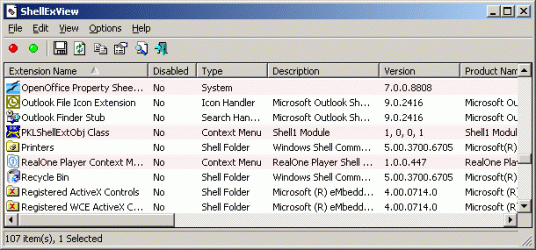
hi and welcome to the forums this may help you ShellExView v1.76 - Shell Extensions Manager ShellExView - Shell Extension Manager For Windows they have a assortment of tools on there website

Description

Shell Extensions are in-process COM objects which extends the abilities of Windows operating system. Most shell extensions are automatically installed by the operating system, but there are also many other applications that install additional shell extension components. For example: If you install WinZip on your computer, you'll see a special WinZip menu when you right-click on a Zip file. This menu is created by adding a shell extension to the system.
The ShellExView utility displays the details of shell extensions installed on your computer, and allows you to easily disable and enable each shell extension
 

Attachments

  • shexview.gif
    shexview.gif
    16.3 KB · Views: 61

My Computer

Computer Manufacturer/Model Number
packard bell IXTREME M5722
OS
Operating System : Windows 7 Home Premium Edition 6.01.7600 SP1 (x64)
CPU
Processor : Intel Core 2 Quad Q8300 @ 2500 MHz
Motherboard
Mainboard : Packard Bell (Acer EG43M )
Memory
Physical Memory :8GB Corsair4x 2GB 800MHz C5 DDR2
Graphics Card(s)
Video Card : XFX 6700 AMD
Monitor(s) Displays
Maestro 234DL - BenQ V2220 - BenQ VW2420H
Screen Resolution
Current Display :1920x1080p pixels at 60 Hz in HD LED
Hard Drives
Hard Disks : WDC (1000 GB)
Drive C: (Hard Disk) : 428 GB available on 491 GB
Drive D: (Hard Disk) : 426 GB available on 492 GB
SAMSUNG spinpoint HD103SJ 1000.2 GB
(X 2) KINGSTON SSD NOW V 30GB
PSU
XFX ProSeries 550W PSU
Case
PACKARD BELL IXTREME
Cooling
System Blower Current: 150mA Air Flow16CFM ;Akasa 90mm rear
Keyboard
Gigabyte Aivia K8100
Mouse
TRUST-Wireless Laser Mouse - Carbon edition MI-7770C
Internet Speed
TP-LINK > TL-WN951N / AV500 Gigabit Powerline Adapters
Browser
chrome dev
Other Info
EXTRA COOLING>(FAN CONTROLLER) PC Bay Cooler 3 x 40mm fans; Akasa AK-HD-BL Blue hard drive cooler 2 x 40 mm fan 4500 rpm 29.7 dBA
Bios> American Megatrends Inc.
Version : P01-A1
Date : 08/31/2009
hi and welcome to the forums this may help you ShellExView v1.76 - Shell Extensions Manager ShellExView - Shell Extension Manager For Windows they have a assortment of tools on there website

Description

Shell Extensions are in-process COM objects which extends the abilities of Windows operating system. Most shell extensions are automatically installed by the operating system, but there are also many other applications that install additional shell extension components. For example: If you install WinZip on your computer, you'll see a special WinZip menu when you right-click on a Zip file. This menu is created by adding a shell extension to the system.
The ShellExView utility displays the details of shell extensions installed on your computer, and allows you to easily disable and enable each shell extension

Hey, thanks, very nice find. I managed to find things such as Taskband pin and Startmenu pin. But I still cannot find anything in there that would do sorting, grouping, arranging and viewing unfortunately :/
 

My Computer

OS
Windows 7 Ultimate x64

My Computer

Computer type
Laptop
Computer Manufacturer/Model Number
Sager NP9170
OS
Win 7 Pro x64 / Win 10 Pro
CPU
Intel(R) Core(TM) i7-3630QM CPU @ 2.40GHz
Motherboard
CLEVO P170EM
Memory
12 GB
Graphics Card(s)
(1) Intel(R) HD Graphics 4000 (2) NVIDIA GeForce GTX 675M
Sound Card
(1) Realtek High Definition Audio (2) Intel(R) Display Aud
Monitor(s) Displays
17.3
Screen Resolution
1920x1080
Hard Drives
(1) Samsung 860 EVO 500GB(OS) (1) Samsung 860 EVO 500GB(Data)
Keyboard
Backlite
Antivirus
MSE, Malwarebytes Pro
Browser
Firefox
Other Info
DESKTOP: Custom-built.
OS: Win 10 Pro x64.
CASE: Rosewill R5.
CPU: Intel I5 4670K CPU @ 3.40GHz.
CPU COOLER: Cool Master Hyper 212 EVO.
MOTHERBOARD: Asus Z87-A.
MEMORY: Kingston HyperX 2x4 GB.
GPU: Nvidia Geforce 650 TI.
PSU: Corsair TX750.
DRIVES: (1) Samsung 840 120 GB SSD (2) Western Digital blue 500 GB 7200 RPM.

My Computer

OS
Windows 7 Ultimate x64
I would not remove Create Shortcut. That is a very useful function.
 

My Computer

Computer Manufacturer/Model Number
HP, Dell, Gateway, Toshiba - 4 laptops and 2 desktops
OS
Vista, Windows7, Mint Mate, Zorin, Windows 8
CPU
from 1.6GHz Duo to i7
Monitor(s) Displays
2x HP w2207
Hard Drives
5x HDD, 7x SSD, 12x Externals
Keyboard
with trackball - no mices
Mouse
Trackball mice
Internet Speed
DSL 6000
I would not remove Create Shortcut. That is a very useful function.

I agree, but I'm creating an ultimate guest account. Guests should not be creating shortcuts to anything or customising the PC. They should only be able to use the Internet and maybe some software on the PC.
 

My Computer

OS
Windows 7 Ultimate x64
Welcome to Seven Forums Pk King X11. Have you tried disabling right click menus for that user group all together?

http://www.sevenforums.com/tutorials/151415-group-policy-apply-specific-user-group.html

Place all the users in one group, then use this policy to disable context menus

User Configuration> Administrative Templates> Windows Components> Windows Explorer> On the right, enable this option Remove Windows Explorer’s default context menu

Disable Windows Explorer's default context menu

A Guy
 

My Computer

Computer type
PC/Desktop
OS
Windows 10 Home x64
CPU
INTEL Core i5-750 Quad-Core 3.37GHz
Motherboard
ASUS P7P55D
Memory
HyperX Fury Black Series 8GB (2 x 4GB) 1866Mhz
Graphics Card(s)
EVGA GeForce GTX 750 Superclocked 1GB 128-Bit GDDR5
Monitor(s) Displays
LG 32MA68HY 32" IPS
Screen Resolution
1920 x 1080
Hard Drives
Samsung 840 Evo 120GB, SEAGATE 500GB Barracuda® 7200.12, SATA 3 Gb/s, 7200 RPM, 16MB cache
PSU
ANTEC TruePower New TP-550, 80 PLUS, 550W
Case
ANTEC Three Hundred Illusion
Cooling
COOLER MASTER Hyper 212 Plus, 4 x 120mm 1 x 140mm Noctua's
Internet Speed
85 + Mbps
Antivirus
Avast
Browser
Vivaldi
Welcome to Seven Forums Pk King X11. Have you tried disabling right click menus for that user group all together?

http://www.sevenforums.com/tutorials/151415-group-policy-apply-specific-user-group.html

Place all the users in one group, then use this policy to disable context menus

User Configuration> Administrative Templates> Windows Components> Windows Explorer> On the right, enable this option Remove Windows Explorer’s default context menu

Disable Windows Explorer's default context menu

A Guy

I know of that, but I don't want to disable it all thogether. Just specific menus, I have managed to disable quite a few already but just can't find those last ones. I know they are hiding somewhere in the registry but I have no idea where. Thanks for the idea tho.
 

My Computer

OS
Windows 7 Ultimate x64
Back
Top