Context Menu - Right Click vs Shift Right Click

How to Expand the Windows 7 Context Menu for More Options

   Information
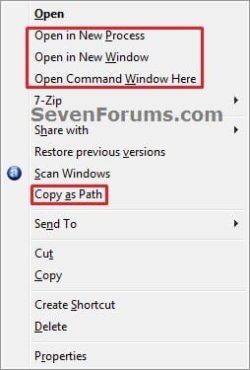
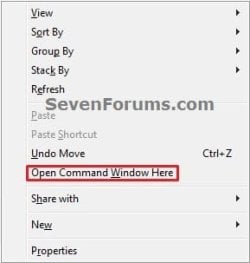
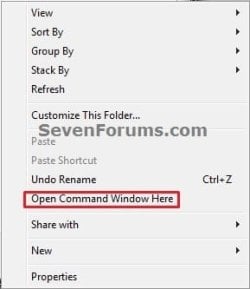
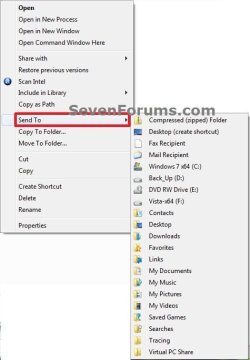
This will show you how to expand the Windows 7 context menu to see more available options to select from for a file, folder, desktop, Windows Explorer root window, Windows Explorer window, and the Send To menu.


Here's How:


   Note

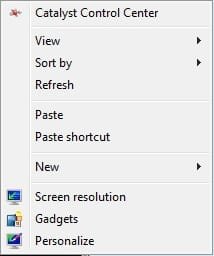
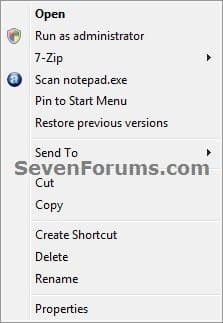
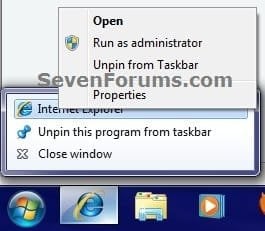
  • Default Context Menu (Left screenshots below)
    • Right click on item.
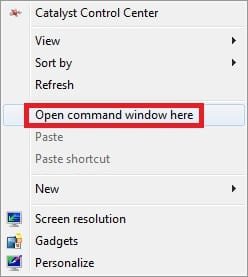
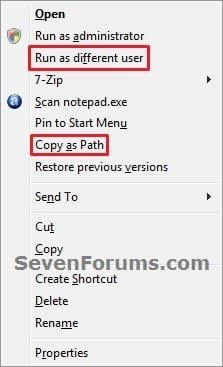
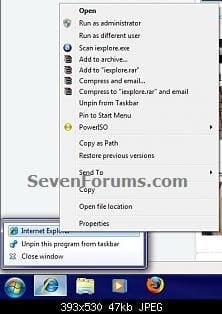
  • Expanded Context Menu (Right screenshots below)
    • Press Shift and hold while right clicking on item.
    • Select the item, and press Shift + Menu button on keyboard (if available)
      NOTE: Sometimes you may also need to press the FN (function) key along with the Menu button.
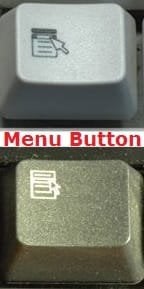
Menu-button.jpg

1. Desktop Context Menu
Desktop.jpgDesktop-Shift.jpg
2. File Context Menu
File_Right_Click.jpgFile_Shift_Right_Click.jpg
3. Folder Context Menu
Folder_Right_Click.jpgFolder_Shift_Right_Click.jpg
4. Windows Explorer Root Window Context Menu
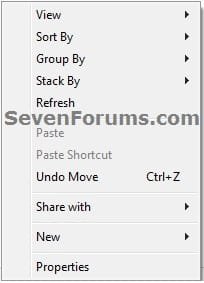
Windows-Explorer-1_Right_Click.jpgWindows-Explorer-1_Shift_Right_Click.jpg
5. Windows Explorer Window Context Menu
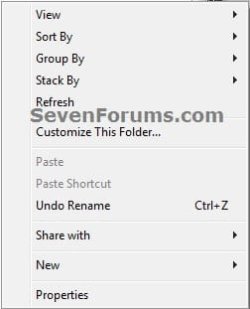
Windows-Explorer-2_Right_Click.jpgWindows-Explorer-2_Shift_Right_Click.jpg
6. File or Folder "Send To" Context Menu
Send_To.jpgSend_To_Shift.jpg
7. Taskbar Icon Context Menu
NOTE: This addition by Mr GRiM.
Right Click:
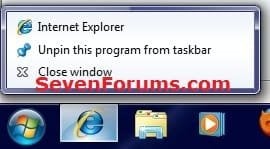
Normal.jpgnormal_2.jpg

Shift + Right Click or Shift + Menu button
Shift.jpgShift_2.jpg

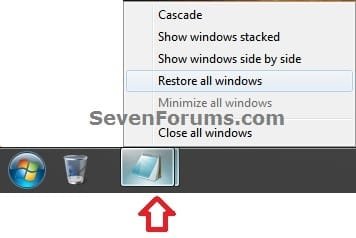
Grouped_Taskbar_Icon.jpg


Last edited:
Oops

Thank you Lehnerus. I forgot about that one. Added. :)

Sorry to be a***. :(
You missed the keyboard "Menu button" in the default section.

We need a picture of it.
A lot of people seems to be unaware of its existence.

My friend (who has used a laptop for years) didn't know about it! :shock:
 

My Computer

Computer type
PC/Desktop
Computer Manufacturer/Model Number
n/a
OS
W7 Ultimate SP1, LM19.2 MATE, W10 Home 1703, W10 Pro 1703 VM, #All 64 bit
CPU
AMD Phenom II x6 1100T, 3.3 GHz
Motherboard
ASUS M4A88T-M/USB3 (AM3)
Memory
12GB DDR3 1333 G-Skill (4GB x 2), G-Skill (2GB x 2)
Graphics Card(s)
NVIDIA GeForce GTX 660
Sound Card
Realtek?
Monitor(s) Displays
Samsung S23B350
Screen Resolution
1920x1080
Hard Drives
WD Green 2TB (SATA), WD Green 3TB (SATA), WD Blue 4TB (SATA), WD Blue 6TB (SATA)
PSU
Cooler Master
Case
Antec GX300 Tower
Cooling
3x Antec TRICOOL 120mm Fans
Mouse
Wired Optical
Internet Speed
DSL
Antivirus
Avast
Browser
Pale Moon (64 bit)
Other Info
2018-12-27 Upgraded HDDs
2015-12-10 Upgraded case, graphics card, storage
2015-08-15 Upgraded motherboard & RAM
2015-07-15 Upgraded LM17.1 to LM17.2
No problem.

Yeah, my laptop has a separate menu button, but the desktop's wireless keyboar has the menu button shared with the Print Scree button where I have to press FN key first for it.
 

My Computer

Computer type
PC/Desktop
Computer Manufacturer/Model Number
Self built custom
OS
64-bit Windows 11 Pro for Workstations
CPU
Intel i7-8700K OC'd to 5 GHz
Motherboard
ASUS ROG Maximus XI Formula Z390
Memory
64 GB (4x16GB) G.SKILL TridentZ RGB DDR4 3600 MHz
Graphics Card(s)
ASUS ROG-STRIX-GTX1080TI-O11G-GAMING
Sound Card
Integrated
Monitor(s) Displays
2 x Samsung Odyssey G7 27"
Screen Resolution
2560x1440
Hard Drives
1TB Samsung 990 PRO M.2,
4TB Samsung 990 PRO PRO M.2,
TerraMaster F8 SSD Plus NAS
PSU
Seasonic Prime Titanium 850W
Case
Thermaltake Core P3
Cooling
Corsair Hydro H115i
Keyboard
Logitech wireless K800
Mouse
Logitech MX Master 4
Internet Speed
2 Gb/s Download and 100 Mb/s Upload
Antivirus
Malwarebyte Anti-Malware Premium
Browser
Google Chrome
Other Info
Logitech Z625 speaker system,
Logitech BRIO 4K Pro webcam,
HP Color LaserJet Pro MFP M477fdn,
APC SMART-UPS RT 1000 XL - SURT1000XLI,
Galaxy S23 Plus phone
No problem.

Yeah, my laptop has a separate menu button, but the desktop's wireless keyboar has the menu button shared with the Print Scree button where I have to press FN key first for it.

I hate those keyboards.

When I was facilitating "Intro to Windows & Office" training, our PCs had old Sun keyboards, which had keys that would perform the "Windows Logo" & "Menu" key functions, but they had Sun keyboard symbols!
"Press the Windows Logo key."
"Which key?"

Nice "Menu button" pics. :)

Umm ... I actually meant the "Default Context Menu" section of your note at the top.
 

My Computer

Computer type
PC/Desktop
Computer Manufacturer/Model Number
n/a
OS
W7 Ultimate SP1, LM19.2 MATE, W10 Home 1703, W10 Pro 1703 VM, #All 64 bit
CPU
AMD Phenom II x6 1100T, 3.3 GHz
Motherboard
ASUS M4A88T-M/USB3 (AM3)
Memory
12GB DDR3 1333 G-Skill (4GB x 2), G-Skill (2GB x 2)
Graphics Card(s)
NVIDIA GeForce GTX 660
Sound Card
Realtek?
Monitor(s) Displays
Samsung S23B350
Screen Resolution
1920x1080
Hard Drives
WD Green 2TB (SATA), WD Green 3TB (SATA), WD Blue 4TB (SATA), WD Blue 6TB (SATA)
PSU
Cooler Master
Case
Antec GX300 Tower
Cooling
3x Antec TRICOOL 120mm Fans
Mouse
Wired Optical
Internet Speed
DSL
Antivirus
Avast
Browser
Pale Moon (64 bit)
Other Info
2018-12-27 Upgraded HDDs
2015-12-10 Upgraded case, graphics card, storage
2015-08-15 Upgraded motherboard & RAM
2015-07-15 Upgraded LM17.1 to LM17.2
Back
Top