Context menu's kintomaniac tut, question

xTL

New member
Member
Local time
7:01 AM
Messages
72
Location
Sweden
first of all
i'm very sorry if im posting in the wrong section,
i looked around and this seemed to be the correct section to post in :)

So on to my question, hopefully someone is able to help out :P

i was following this tutorial
http://www.sevenforums.com/tutorials/22001-new-context-menu-edit-desktop.html?filter
and i got ridd of the most junk that my " new list " had in it, thx kintomaniac =)
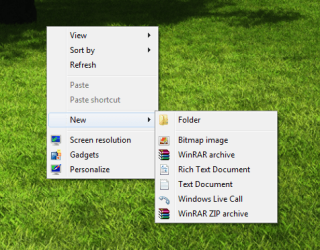
but i can't seem to remove the 2 Winrar's and the ugly windows live call,
i checked around in my regedit, but couldn't find anything, anyone know how to kill em?

Thanks in advance :)

// xTL
 

Attachments

  • Untitled.png
    Untitled.png
    100.3 KB · Views: 4

My Computer My Computer

Computer Manufacturer/Model Number
LG Notebook
OS
Windows 7 Ultimate x64
CPU
2.1Ghz
Motherboard
N/A
Memory
3Gb
Graphics Card(s)
nVidia 8600M GT
Sound Card
Realtek HD Audio
Monitor(s) Displays
17.1" TFT ( WSXGA+ ) - Glare
Screen Resolution
17.1"
Hard Drives
320Gig disc
PSU
N/A
Case
Laptop Case =)
Cooling
Laptop again xD
Keyboard
Builtin @ Laptop =)
Mouse
Razer Copperhead
Internet Speed
100/100Mb :) Swe Connection =D
Other Info
i eat metal :D

My Computer My Computer

Computer Manufacturer/Model Number
Custom
OS
Win7 HP (x64)/Win7 Ultimate (x64)
CPU
Core i7 920
Motherboard
Intel X58
Memory
6 x 2GB Corsair XMS3
Graphics Card(s)
CF HD4890
Sound Card
Asus Xonar
Monitor(s) Displays
Dell 2408WFP
Screen Resolution
1920 x 1200
Hard Drives
2 x 150GB WDC Velociraptors (Raid 0)
1 x 1TB Seagate
1 x 1.5TB Seagate
PSU
Corsair HX1000W
Case
Antec 1200
Keyboard
Razer Lycosa/N52te
Mouse
Razer Lachesis
hi Lomai :) and thx, it's good to be apart of the community :p
crap i had a feeling i posted in the wrong section, haha okey well feel free to move my post :)

Yes i followed the guide that kintomaniac posted,
i did get ridd of alot of ugly shit that was in the " new menu " like

Shortcut
Contact
Journal Document
Briefcase

but as you can see on my image, i still have 2x winrar and a windows live call that i wish to remove, and i searched my register found a few winrar items and windows live call register keys, exported them, deleted them, logged out, logged in, checked if the new menu was as i wanted, but it was unchanged, so i restarted, checked again, and coz they where still there i imported the register keys back again...

What i need to know is where the keys for those items are, or if ur not able to remove them from register, how do you kill em :p
 

My Computer My Computer

Computer Manufacturer/Model Number
LG Notebook
OS
Windows 7 Ultimate x64
CPU
2.1Ghz
Motherboard
N/A
Memory
3Gb
Graphics Card(s)
nVidia 8600M GT
Sound Card
Realtek HD Audio
Monitor(s) Displays
17.1" TFT ( WSXGA+ ) - Glare
Screen Resolution
17.1"
Hard Drives
320Gig disc
PSU
N/A
Case
Laptop Case =)
Cooling
Laptop again xD
Keyboard
Builtin @ Laptop =)
Mouse
Razer Copperhead
Internet Speed
100/100Mb :) Swe Connection =D
Other Info
i eat metal :D
Winrar right click menu cab be customized from the winrar config page. Open winrar, click on Options-> Settings. Now click on the Integration tab, then under "Shell Integration", click on "Context Menu Items", then check/ uncheck options as desired. If you want to get rid of winrar context menu items completely, just uncheck the box "Integrate winrar into shell" under "Shell Integration".
 

My Computer My Computer

Computer Manufacturer/Model Number
Too many to describe...
OS
Windows 7 x64 pro/ Windows 7 x86 Pro/ XP SP3 x86
Winrar right click menu cab be customized from the winrar config page. Open winrar, click on Options-> Settings. Now click on the Integration tab, then under "Shell Integration", click on "Context Menu Items", then check/ uncheck options as desired. If you want to get rid of winrar context menu items completely, just uncheck the box "Integrate winrar into shell" under "Shell Integration".


Hi Bill2, appreciate the help :) unfortunately the option that winrar gives only removes the context menu's on items such as, Folders, and other fileformates, not on the " new menu " the context menu's are still there,

i'll gladly try other solutions :)
 

Attachments

  • dfghj.png
    dfghj.png
    509.5 KB · Views: 12

My Computer My Computer

Computer Manufacturer/Model Number
LG Notebook
OS
Windows 7 Ultimate x64
CPU
2.1Ghz
Motherboard
N/A
Memory
3Gb
Graphics Card(s)
nVidia 8600M GT
Sound Card
Realtek HD Audio
Monitor(s) Displays
17.1" TFT ( WSXGA+ ) - Glare
Screen Resolution
17.1"
Hard Drives
320Gig disc
PSU
N/A
Case
Laptop Case =)
Cooling
Laptop again xD
Keyboard
Builtin @ Laptop =)
Mouse
Razer Copperhead
Internet Speed
100/100Mb :) Swe Connection =D
Other Info
i eat metal :D
Ok, like you I have 2 winrar entries in the New menu. I was able to get rid of the top one ("winrar archive") by first backing up, then deleting this key in the registry.

HKEY_CLASSES_ROOT\.rar\ShellNew

Try it out and lemme know. I'm trying to figure out the second entry.

Edit: For the entry "winrar zip archive", you need to backup, then delete this key.

HKEY_CLASSES_ROOT\.zip\ShellNew
 

My Computer My Computer

Computer Manufacturer/Model Number
Too many to describe...
OS
Windows 7 x64 pro/ Windows 7 x86 Pro/ XP SP3 x86
Woha :D Will try it right away Bill2 :) thx alot :)

* update * <

Both work perfect :)

Thanks so much man, really appreciate it :)
 

My Computer My Computer

Computer Manufacturer/Model Number
LG Notebook
OS
Windows 7 Ultimate x64
CPU
2.1Ghz
Motherboard
N/A
Memory
3Gb
Graphics Card(s)
nVidia 8600M GT
Sound Card
Realtek HD Audio
Monitor(s) Displays
17.1" TFT ( WSXGA+ ) - Glare
Screen Resolution
17.1"
Hard Drives
320Gig disc
PSU
N/A
Case
Laptop Case =)
Cooling
Laptop again xD
Keyboard
Builtin @ Laptop =)
Mouse
Razer Copperhead
Internet Speed
100/100Mb :) Swe Connection =D
Other Info
i eat metal :D
Back
Top