
taratata2014
New member
- Local time
- 3:03 PM
- Messages
- 1
On Windows 7 Pro 64bits,
I will make an link in ContextMenu on "Deskop" and "My Computer"
My setting have 1 Master Menu with 18 Sub-Commands and 1 Sub Menu with 5 Sub-Commands
The Sub-Menu is not available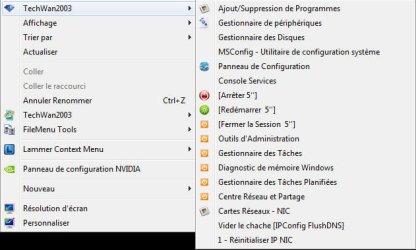
Normaly i must have that in the end of the context menu :
I make a simple test like that :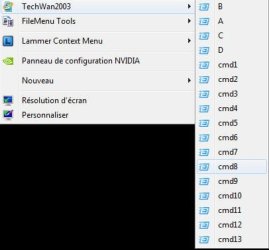
why i can have more 17 link command in a ContextMenu?
I check many informations on internet unsuvcessfull!
find my script here and thank you in advance for some answers or solution
Thank you in advance ...
I will make an link in ContextMenu on "Deskop" and "My Computer"
My setting have 1 Master Menu with 18 Sub-Commands and 1 Sub Menu with 5 Sub-Commands
The Sub-Menu is not available
Normaly i must have that in the end of the context menu :
I make a simple test like that :
why i can have more 17 link command in a ContextMenu?
I check many informations on internet unsuvcessfull!
find my script here and thank you in advance for some answers or solution
Code:
Windows Registry Editor Version 5.00

;                             Windows 7 Professionnel Service Pack 1

;===========================================================

;                                                Menu Contextuel

;===========================================================


;              ===================================
;                               Menu Perso
;              ===================================

;=========

;Menu Maitre

;=========

--> Bureau
[HKEY_CLASSES_ROOT\DesktopBackground\Shell\TechWan2003_bur]
"MUIVerb"="TechWan2003"
"Icon"="%windir%\\system32\\LIB.DLL,7"
"Position"="Top"
"ExtendedSubCommandsKey"="Menu_Tech"

;--> Poste de travail
[HKEY_CLASSES_ROOT\CLSID\{20D04FE0-3AEA-1069-A2D8-08002B30309D}\shell\TechWan2003_Ord]
"MUIVerb"="TechWan2003"
"Icon"="%windir%\\system32\\LIB.DLL,7"
"Position"="Top"
"ExtendedSubCommandsKey"="Menu_Tech"


;===============================

;                   Menu_Tech

;Sous-Command & Sous-Menu Menu Maitre

;===============================

;Sous-Command 1 - Menu Maitre
;-------------------------------
[HKEY_CLASSES_ROOT\Menu_Tech\Shell\Cmd01]
"MUIVerb"="Ajout/Suppression de Programmes"
"Icon"="%windir%\\system32\\LIB.DLL,5"
@=""

[HKEY_CLASSES_ROOT\Menu_Tech\Shell\Cmd01\Command]
@="rundll32.exe shell32.dll,Control_RunDLL \"appwiz.cpl\""

;Sous-Command 2 - Menu Maitre
;-------------------------------
[HKEY_CLASSES_ROOT\Menu_Tech\Shell\Cmd02]
"MUIVerb"="Gestionnaire de périphériques"
"Icon"="%windir%\\system32\\LIB.DLL,1"
@=""

[HKEY_CLASSES_ROOT\Menu_Tech\Shell\Cmd02\Command]
@="c:\\windows\\system32\\mmc.exe /s c:\\windows\\system32\\DevMgmt.msc"

;Sous-Command 3 - Menu Maitre
;-------------------------------
[HKEY_CLASSES_ROOT\Menu_Tech\Shell\Cmd03]
"MUIVerb"="Gestionnaire des Disques"
;ligne de séparation vers le bas
;"CommandFlags"=dword:00000040
@=""

[HKEY_CLASSES_ROOT\Menu_Tech\Shell\Cmd03\Command]
@="c:\\windows\\system32\\mmc.exe /s c:\\windows\\system32\\diskmgmt.msc"

;Sous-Command 4 - Menu Maitre
;-------------------------------
[HKEY_CLASSES_ROOT\Menu_Tech\Shell\Cmd04]
"MUIVerb"="MSConfig - Utilitaire de configuration système"
;ligne de séparation vers le bas
;"CommandFlags"=dword:00000040

[HKEY_CLASSES_ROOT\Menu_Tech\Shell\Cmd04\Command]
@="c:\\Windows\\System32\\msconfig.exe"

;Sous-Command 5 - Menu Maitre
;-------------------------------
[HKEY_CLASSES_ROOT\Menu_Tech\Shell\Cmd05]
"MUIVerb"="Panneau de Configuration"
"Icon"="%windir%\\system32\\LIB.DLL,3"
@=""

[HKEY_CLASSES_ROOT\Menu_Tech\Shell\Cmd05\Command]
@="rundll32.exe shell32.dll,Control_RunDLL"

;Sous-Command 6 - Menu Maitre
;-------------------------------
[HKEY_CLASSES_ROOT\Menu_Tech\Shell\Cmd06]
"MUIVerb"="Console Services"

[HKEY_CLASSES_ROOT\Menu_Tech\Shell\Cmd06\Command]
@="c:\\windows\\system32\\mmc.exe /s c:\\windows\\system32\\services.msc"

;Sous-Command 7 - Menu Maitre
;-------------------------------
;Arrêter le Système
[HKEY_CLASSES_ROOT\Menu_Tech\Shell\Cmd07]
"MUIVerb"="[Arrêter 5'']"
"Icon"="%windir%\\system32\\LIB.DLL,2"

[HKEY_CLASSES_ROOT\Menu_Tech\Shell\Cmd07\Command]
@="shutdown -s -f -t 5"

;Sous-Command 8 - Menu Maitre
;-------------------------------
;Redémarrer
[HKEY_CLASSES_ROOT\Menu_Tech\Shell\Cmd08]
"MUIVerb"="[Redémarrer  5'']"
"Icon"="%windir%\\system32\\LIB.DLL,6"

[HKEY_CLASSES_ROOT\Menu_Tech\Shell\Cmd08\Command]
@="shutdown -r -f -t 5"

;Sous-Command 9 - Menu Maitre
;-------------------------------
;Fermer la Session
[HKEY_CLASSES_ROOT\Menu_Tech\Shell\Cmd09]
"MUIVerb"="[Fermer la Session  5'']"
"Icon"="%windir%\\system32\\LIB.DLL,0"

[HKEY_CLASSES_ROOT\Menu_Tech\Shell\Cmd09\Command]
@="shutdown -l -f -t 5"

;Sous-Command 10 - Menu Maitre
;-------------------------------
;Outils d'Administration
[HKEY_CLASSES_ROOT\Menu_Tech\Shell\Cmd10]
"MUIVerb"="Outils d'Administration"
"Icon"="%windir%\\system32\\LIB.DLL,0"

[HKEY_CLASSES_ROOT\Menu_Tech\Shell\Cmd10\Command]
@="control admintools"

;Sous-Command 11 - Menu Maitre
;-------------------------------
;Gestionnaire des Tâches
[HKEY_CLASSES_ROOT\Menu_Tech\Shell\Cmd11]
"MUIVerb"="Gestionnaire des Tâches"
"Icon"="%windir%\\system32\\LIB.DLL,0"

[HKEY_CLASSES_ROOT\Menu_Tech\Shell\Cmd11\Command]
@="taskmgr"

;Sous-Command 12 - Menu Maitre
;-------------------------------
;Diagnostic de mémoire Windows
[HKEY_CLASSES_ROOT\Menu_Tech\Shell\Cmd12]
"MUIVerb"="Diagnostic de mémoire Windows"
"Icon"="%windir%\\system32\\LIB.DLL,0"

[HKEY_CLASSES_ROOT\Menu_Tech\Shell\Cmd12\Command]
@="mdsched"

;Sous-Command 13 - Menu Maitre
;-------------------------------
;Gestionnaire des Tâches Planifiées
[HKEY_CLASSES_ROOT\Menu_Tech\Shell\Cmd13]
"MUIVerb"="Gestionnaire des Tâches Planifiées"
"Icon"="%windir%\\system32\\LIB.DLL,0"

[HKEY_CLASSES_ROOT\Menu_Tech\Shell\Cmd13\Command]
@="c:\\windows\\system32\\mmc.exe /s c:\\windows\\system32\\taskschd.msc"

;Sous-Command 14 - Menu Maitre
;-------------------------------
;Centre Réseau et Partage
[HKEY_CLASSES_ROOT\Menu_Tech\Shell\Cmd14]
"MUIVerb"="Centre Réseau et Partage"
"Icon"="%windir%\\system32\\LIB.DLL,0"

[HKEY_CLASSES_ROOT\Menu_Tech\Shell\Cmd14\Command]
@="c:\\windows\\system32\\control.exe /name microsoft.networkandsharingcenter"

;Sous-Command 15 - Menu Maitre
;-------------------------------
[HKEY_CLASSES_ROOT\Menu_Tech\Shell\Cmd15]
"MUIVerb"="Cartes Réseaux - NIC"
"Icon"="%windir%\\system32\\LIB.DLL,5"
@=""

[HKEY_CLASSES_ROOT\Menu_Tech\Shell\Cmd15\Command]
@="rundll32.exe shell32.dll,Control_RunDLL \"ncpa.cpl\""

;Sous-Command 16 - Menu Maitre
;-------------------------------
[HKEY_CLASSES_ROOT\Menu_Tech\Shell\Cmd16]
"MUIVerb"="Vider le chache [IPConfig FlushDNS]"

[HKEY_CLASSES_ROOT\Menu_Tech\Shell\Cmd16\Command]
@="C:\\windows\\system32\\cmd.exe /k ipconfig /flushdns"

;Sous-Command 17 - Menu Maitre
;-------------------------------
[HKEY_CLASSES_ROOT\Menu_Tech\Shell\Cmd17]
"MUIVerb"="1 - Réinitialiser IP NIC"

[HKEY_CLASSES_ROOT\Menu_Tech\Shell\Cmd17\Command]
@="C:\\windows\\system32\\cmd.exe /k ipconfig /Release"

;Sous-Command 18 - Menu Maitre
;-------------------------------
[HKEY_CLASSES_ROOT\Menu_Tech\Shell\Cmd18]
"MUIVerb"="2 - Renouvellement IP NIC"

[HKEY_CLASSES_ROOT\Menu_Tech\Shell\Cmd18\Command]
@="C:\\windows\\system32\\cmd.exe /k ipconfig /Renew"


;Sous-Menu 1 - Maitre
;---------------------
[HKEY_CLASSES_ROOT\Menu_Tech\Shell\Menu1]
"MUIVerb"="MMC"
"ExtendedSubCommandsKey"="Menu_Tech.SMenu1"


;==================================

;                 Menu_Tech.SMenu1

;Sous-Command & Sous-Menu - Sous-Menu 1

;===================================

;Sous-Command 1 - Sous-Menu 1
;-------------------------------
;Stratégie de Groupe
[HKEY_CLASSES_ROOT\Menu_Tech.SMenu1\Shell\SM1]
"MUIVerb"="Stratégie de Groupe"
@=""

[HKEY_CLASSES_ROOT\Menu_Tech.SMenu1\Shell\SM1\Command]
@="c:\\windows\\system32\\mmc.exe /s c:\\windows\\system32\\gpedit.msc"

;Sous-Command 2 - Sous-Menu 1
;-------------------------------
;Gestion de l'ordinateur
[HKEY_CLASSES_ROOT\Menu_Tech.SMenu1\Shell\SM2]
"MUIVerb"="Gestion de l'ordinateur"
@=""

[HKEY_CLASSES_ROOT\Menu_Tech.SMenu1\Shell\SM2\Command]
@="c:\\windows\\system32\\mmc.exe /s c:\\windows\\system32\\Compmgmt.msc"

;Sous-Command 3 - Sous-Menu 1
;-------------------------------
;Utilisateurs et Groupes Locaux
[HKEY_CLASSES_ROOT\Menu_Tech.SMenu1\Shell\SM3]
"MUIVerb"="Utilisateurs et Groupes Locaux"
@=""

[HKEY_CLASSES_ROOT\Menu_Tech.SMenu1\Shell\SM3\Command]
@="c:\\windows\\system32\\mmc.exe /s c:\\windows\\system32\\lusrmgr.msc"

;Sous-Command 4 - Sous-Menu 1
;-------------------------------
;Gestion des Disques
[HKEY_CLASSES_ROOT\Menu_Tech.SMenu1\Shell\SM4]
"MUIVerb"="Gestion des Disques"
@=""

[HKEY_CLASSES_ROOT\Menu_Tech.SMenu1\Shell\SM4\Command]
@="c:\\windows\\system32\\mmc.exe /s c:\\windows\\system32\\diskmgmt.msc"

;Sous-Command 5 - Sous-Menu 1
;-------------------------------
;Observateur des Evénements
[HKEY_CLASSES_ROOT\Menu_Tech.SMenu1\Shell\SM5]
"MUIVerb"="Observateur des Evénements"
@=""

[HKEY_CLASSES_ROOT\Menu_Tech.SMenu1\Shell\SM5\Command]
@="c:\\windows\\system32\\mmc.exe /s c:\\windows\\system32\\eventvwr.msc"


;              ===================================
;                               Menu Perso
;              ===================================
Thank you in advance ...
My Computer
- Computer type
- Laptop
- Computer Manufacturer/Model Number
- build
- OS
- windows 7 x64
- CPU
- i7
- Motherboard
- asus
- Memory
- 16
- Graphics Card(s)
- nvidia
- Hard Drives
- ssd
- Antivirus
- kaspersky
- Browser
- chrome


