Control Panel - Add Local Group Policy Editor

How to Add "Local Group Policy Editor" to Control Panel in Windows


   Information
This will show you how to add Local Group Policy Editor, also known as gpedit.msc, to the Control Panel in Vista, Windows 7, and Windows 8.

In Windows 7, the Local Group Policy Editor will only be available in the Professional, Ultimate, and Enterprise editions.

In Windows RT, 8, and 8.1, the Local Group Policy Editor will only be available in the Pro and Enterprise editions.


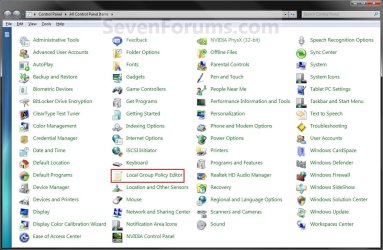
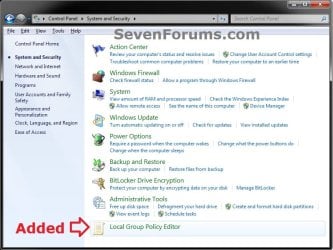
EXAMPLE: Before and After "Local Group Policy Editor" added to Control Panel
NOTE: This is the Control Panel icons and category view.
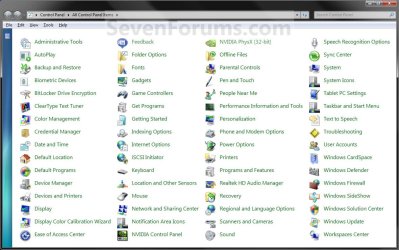
Default_Control_Panel-1.jpg

Added_Control_Panel-1.jpg

Category.jpg


Here's How:
1. To Remove "Local Group Policy Editor" from Control Panel
NOTE: This is the default setting.
A) Click/tap on the Download button below to download the file below.
Remove_GroupPolicy_ControlPanel.reg


Download


B) Go to step 3.
2. To Add "Local Group Policy Editor" to Control Panel
A) Click/tap on the Download button below to download the file below.
Add_GroupPolicy_ControlPanel.reg

Download


3. Save the .reg file to your Desktop.

4. Double click/tap on the downloaded .reg file to Merge it.

5. If prompted, click/tap on Run, Yes, Yes (UAC-Windowws 7/8) or Continue (UAC-Vista), and OK to approve the merge.

6. When finished, you can delete the .reg file if you like.

That's it,
Shawn


Attachments

Last edited:
Regedit Explaination

I completely understand that some people would like to just download a program (or zip file) and have it do all the work for them when trying to "fix" an issue.

I, however, am not one of those people. Especially since it's not a good idea to allow strangers make changes to your registry w/o knowing what they are doing.

Is there anyway you could give details as to what registry changes your zip file makes? I was hoping that by running the file the registry would open to the new entry. Alas, it did not. It worked perfectly. I'd just like to know how it worked.

Thanks,
Kinsey
 

My Computer

OS
Windows 7
Hello Kinsey,

Sure thing. I do not blame you.

You can just right click on the extracted REG file from the ZIP and click on EDIT to see what changes are made to registry and where without having to merge or run them. From there, you can manually make the changes in the registry instead. :)
 

My Computer

Computer type
PC/Desktop
Computer Manufacturer/Model Number
Self built custom
OS
64-bit Windows 11 Pro for Workstations
CPU
Intel i7-8700K OC'd to 5 GHz
Motherboard
ASUS ROG Maximus XI Formula Z390
Memory
64 GB (4x16GB) G.SKILL TridentZ RGB DDR4 3600 MHz
Graphics Card(s)
ASUS ROG-STRIX-GTX1080TI-O11G-GAMING
Sound Card
Integrated
Monitor(s) Displays
2 x Samsung Odyssey G7 27"
Screen Resolution
2560x1440
Hard Drives
1TB Samsung 990 PRO M.2,
4TB Samsung 990 PRO PRO M.2,
TerraMaster F8 SSD Plus NAS
PSU
Seasonic Prime Titanium 850W
Case
Thermaltake Core P3
Cooling
Corsair Hydro H115i
Keyboard
Logitech wireless K800
Mouse
Logitech MX Master 4
Internet Speed
2 Gb/s Download and 100 Mb/s Upload
Antivirus
Malwarebyte Anti-Malware Premium
Browser
Google Chrome
Other Info
Logitech Z625 speaker system,
Logitech BRIO 4K Pro webcam,
HP Color LaserJet Pro MFP M477fdn,
APC SMART-UPS RT 1000 XL - SURT1000XLI,
Galaxy S23 Plus phone
Awesomeness

That's great. I tried that but forgot that you need to extract the file before I can view it's contents. :rolleyes: :p Silly me.

Thanks for the help.
Kinsey
 

My Computer

OS
Windows 7
LOL, I'm glad to hear that you got it sorted Kinsey It's always the little things that catch us. :)
 

My Computer

Computer type
PC/Desktop
Computer Manufacturer/Model Number
Self built custom
OS
64-bit Windows 11 Pro for Workstations
CPU
Intel i7-8700K OC'd to 5 GHz
Motherboard
ASUS ROG Maximus XI Formula Z390
Memory
64 GB (4x16GB) G.SKILL TridentZ RGB DDR4 3600 MHz
Graphics Card(s)
ASUS ROG-STRIX-GTX1080TI-O11G-GAMING
Sound Card
Integrated
Monitor(s) Displays
2 x Samsung Odyssey G7 27"
Screen Resolution
2560x1440
Hard Drives
1TB Samsung 990 PRO M.2,
4TB Samsung 990 PRO PRO M.2,
TerraMaster F8 SSD Plus NAS
PSU
Seasonic Prime Titanium 850W
Case
Thermaltake Core P3
Cooling
Corsair Hydro H115i
Keyboard
Logitech wireless K800
Mouse
Logitech MX Master 4
Internet Speed
2 Gb/s Download and 100 Mb/s Upload
Antivirus
Malwarebyte Anti-Malware Premium
Browser
Google Chrome
Other Info
Logitech Z625 speaker system,
Logitech BRIO 4K Pro webcam,
HP Color LaserJet Pro MFP M477fdn,
APC SMART-UPS RT 1000 XL - SURT1000XLI,
Galaxy S23 Plus phone
So i downloaded the .reg file, executed it, and i do now see the local group policy editor in my control panel, but when i try to open it to disable the lock screen i get this error message:

"MMC cannot open the file C:\WINDOWS\system32\gpedit.msc This may be because the file does not exist, is not an MMC console, or was created by a later verison of MMC. This may also be because you do not have sufficient access rights to the file."

Please help! The lockscreen is by far the most annoying feature of windows8, and the fact that theres no way to disable it on my verison of windows 8 is very frustrating. I work with digital audio workstations, and its a pain in the ass to have the lockscreen pop up while im busy playing/recording an instrument yet rely on the screen to watch my recording in progress.

Im currently using windows v. 8.1

Thanks
Ryan
 

My Computer

Computer type
Laptop
Computer Manufacturer/Model Number
hp
OS
windows 8.1 x64
CPU
intel i7 4700MQ
Memory
16gb
Graphics Card(s)
nvidia GT 740
Browser
chrome
Hello Ryan, and welcome to Seven Forums.

What edition of Windows 8.1 do you have?

Unless it's the Windows 8.1 Pro or Enterprise edition, you do not have Group Policy included in your Windows. :(
 

My Computer

Computer type
PC/Desktop
Computer Manufacturer/Model Number
Self built custom
OS
64-bit Windows 11 Pro for Workstations
CPU
Intel i7-8700K OC'd to 5 GHz
Motherboard
ASUS ROG Maximus XI Formula Z390
Memory
64 GB (4x16GB) G.SKILL TridentZ RGB DDR4 3600 MHz
Graphics Card(s)
ASUS ROG-STRIX-GTX1080TI-O11G-GAMING
Sound Card
Integrated
Monitor(s) Displays
2 x Samsung Odyssey G7 27"
Screen Resolution
2560x1440
Hard Drives
1TB Samsung 990 PRO M.2,
4TB Samsung 990 PRO PRO M.2,
TerraMaster F8 SSD Plus NAS
PSU
Seasonic Prime Titanium 850W
Case
Thermaltake Core P3
Cooling
Corsair Hydro H115i
Keyboard
Logitech wireless K800
Mouse
Logitech MX Master 4
Internet Speed
2 Gb/s Download and 100 Mb/s Upload
Antivirus
Malwarebyte Anti-Malware Premium
Browser
Google Chrome
Other Info
Logitech Z625 speaker system,
Logitech BRIO 4K Pro webcam,
HP Color LaserJet Pro MFP M477fdn,
APC SMART-UPS RT 1000 XL - SURT1000XLI,
Galaxy S23 Plus phone
I downloaded and installed the registry hack for adding Local Group Policy Editor to the Control Panel: System and Security, and it worked like a charm, however I get the same pop-up Ryan got:

"MMC cannot open the file C:\WINDOWS\system32\gpedit.msc This may be because the file does not exist, is not an MMC console, or was created by a later verison of MMC. This may also be because you do not have sufficient access rights to the file."

My OS is Windows 7 Home Premium. Does this mean I cannot take advantage of the Editor?

Thanks.
 

My Computer

Computer type
PC/Desktop
Computer Manufacturer/Model Number
HP 500-281
OS
windows 7 home premium 64 bit
CPU
INTEL CORE i3-4130
Memory
4 GB
Antivirus
AVAST FREE
Browser
CHROME or FIREFOX
Hello xp4ever,

Unfortunately, the Windows 7 Home Premium edition does not include the Local Group Policy Editor MMC in it. This would be why you got the error since it's not there to find. :(
 

My Computer

Computer type
PC/Desktop
Computer Manufacturer/Model Number
Self built custom
OS
64-bit Windows 11 Pro for Workstations
CPU
Intel i7-8700K OC'd to 5 GHz
Motherboard
ASUS ROG Maximus XI Formula Z390
Memory
64 GB (4x16GB) G.SKILL TridentZ RGB DDR4 3600 MHz
Graphics Card(s)
ASUS ROG-STRIX-GTX1080TI-O11G-GAMING
Sound Card
Integrated
Monitor(s) Displays
2 x Samsung Odyssey G7 27"
Screen Resolution
2560x1440
Hard Drives
1TB Samsung 990 PRO M.2,
4TB Samsung 990 PRO PRO M.2,
TerraMaster F8 SSD Plus NAS
PSU
Seasonic Prime Titanium 850W
Case
Thermaltake Core P3
Cooling
Corsair Hydro H115i
Keyboard
Logitech wireless K800
Mouse
Logitech MX Master 4
Internet Speed
2 Gb/s Download and 100 Mb/s Upload
Antivirus
Malwarebyte Anti-Malware Premium
Browser
Google Chrome
Other Info
Logitech Z625 speaker system,
Logitech BRIO 4K Pro webcam,
HP Color LaserJet Pro MFP M477fdn,
APC SMART-UPS RT 1000 XL - SURT1000XLI,
Galaxy S23 Plus phone
Ok, thanks.
 

My Computer

Computer type
PC/Desktop
Computer Manufacturer/Model Number
HP 500-281
OS
windows 7 home premium 64 bit
CPU
INTEL CORE i3-4130
Memory
4 GB
Antivirus
AVAST FREE
Browser
CHROME or FIREFOX
Back
Top