
How to Change Default Control Panel Icons in Windows 7
Information
This will show you how to change the default icons in the All Control Panel Items small and large icons view to any custom icon that you want instead in Windows 7.
Tip
You should use a 256x256 pixel .ico (icon) files to have the best support for all icon view sizes.
Warning
This can only be done in an administrator account.
EXAMPLE: All Control Panel Items with Small and Large Icons View
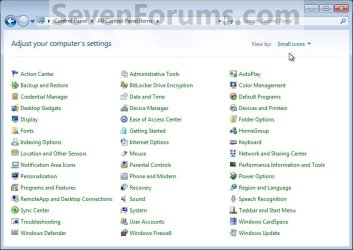
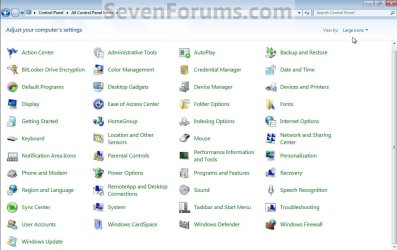
OPTION ONE
Change Control Panel Icons
2. Open the Start Menu, and type regedit in the search line and press enter.
3. If prompted by UAC, then click on Yes.
4. In regedit, navigate to HKEY_CLASSES_ROOT\CLSID and continue to the location of the Control Panel icon in the table below for the one that you want to change.
| Control Panel Icon | Registry CLSID Location |
|---|---|
| Action Center | {BB64F8A7-BEE7-4E1A-AB8D-7D8273F7FDB6}\DefaultIcon |
| Administrative Tools | {D20EA4E1-3957-11d2-A40B-0C5020524153}\DefaultIcon |
| Autoplay | {9C60DE1E-E5FC-4of4-A487-460851A8D915}\DefaultIcon |
| Biometrics | {0142e4d0-fb7a-11dc-ba4a-000ffe7ab428}\DefaultIcon |
| Backup and Restore | {B98A2BEA-7D42-4558-8BD1-832F41BAC6FD}\DefaultIcon |
| BitLocker Drive Encryption | {D9EF8727-CAC2-4e60-809E-86F80A666C91}\DefaultIcon |
| Color Management | {B2C761C6-29BC-4f19-9251-E6195265BAF1}\DefaultIcon |
| Credential Manager | {1206F5F1-0569-412C-8FEC-3204630DFB70}\DefaultIcon |
| Date and Time | {E2E7934B-DCE5-43C4-9576-7FE4F75E7480}\DefaultIcon |
| Default Programs | {17cd9488-1228-4b2f-88ce-4298e93e0966}\DefaultIcon |
| Desktop Gadgets | {37efd44d-ef8d-41b1-940d-96973a50e9eo}\DefaultIcon |
| Device Manager | {74246bfc-4c96-11d0-9bef-0020afgb0b7a}\DefaultIcon |
| Devices and Printers | {A8A91A66-3A7D-4424-8D24-04E180695C7A}\DefaultIcon |
| Display | {C555438B-3C23-4769-A71F-B6D3D9B6053A}\DefaultIcon |
| Ease of Access Center | {D555645E-D4F8-4c29-A827-D93C859C4F2A}\DefaultIcon |
| Folder Options | {6DFD7C5C-2451-11d3-A299-00C04F8EF6AF}\DefaultIcon |
| Fonts | {BD84B380-8CA2-1069-AB1D-08000948F534}\DefaultIcon |
| Getting Started | {CB1B7F8C-C50A-4176-B604-9E24DEE8D4D1}\DefaultIcon |
| HomeGroup | {67CA7650-96E6-4fDD-BB43-A8E774F73A57}\DefaultIcon |
| Indexing Options | {87D66A43-7B11-4A28-9811-C86EEE395ACF7}\DefaultIcon |
| Infared | {A0275511-0E86-4ECA-97C2-ECD8F1221D08} |
| Internet Options | {A3DD4F92-658A-410F-84FD-6FBBBEF2FFFE}\DefaultIcon |
| Keyboard | {725BE8F7-668E-4C7B-8F90-46BDB0936430}\DefaultIcon |
| Location and Other Sensors | {E9950154-C418-419e-A90A-20C5287AE24B]\DefaultIcon |
| Mouse | {6C8EEC18-8D75-41B2-A177-8831D59D2D50}\DefaultIcon |
| Network and Sharing Center | {8E908FC9-BECC-40f6-915B-F4CAOE70D03D}\DefaultIcon |
| Notification Area Icons | {05d7b0f4-2121-4eff-bf6b-ed3f69b894d9}\DefaultIcon |
| Parental Controls | {96AE8D84-A250-4520-95A5-A46A7E3C548B}\DefaultIcon |
| Pen and Touch | {F82DF8F7-8B9F-442E-A48C-818EA735FF9B}\DefaultIcon |
Performance Information and Tools | {78F3955E-3B90-4184-BD14-5397C15F1EFC}\DefaultIcon |
| Personalization | {ED834ED6-485A-4bfe-8F11-A626DCB6A921}\DefaultIcon |
| Phone and Modem | {40419485-C444-4567-851A-2DD7BFA1684D}\DefaultIcon |
| Power Options | {025A5937-A6BE-4686-A844-36FE4BEC8B6D}\DefaulIcon |
| Programs and Features | {7b81be6a-ce2b-4676-a29e-eb907a5126c5}\DefaultIcon |
| Recovery | {9FE63AFD-59CF-4419-9775-ABCC3849F861}\DefaultIcon |
| Region and Language | {62D8ED13-C9D0-4CE8-A914-47DD628FB1B0}\DefaultIcon |
RemoteApp and Desktop Connections | {241D7C96-F8BF-4F85-B01F-E2B043341A4B}\DefaultIcon |
| Sound | {F2DDFC82-8F12-4CDD-B7DC-D4FE1425AA4D]\DefaultIcon |
| Speech Recognition | {58E3C745-D971-4081-9034-86E34B30836A}\DefaultIcon |
| Sync Center | {9C73F5E5-7AE7-4E32-A8E8-8D23B85255BF}\DefaultIcon |
| System | {BB06C0E4-D293-4f75-8A90-CB05B6A77EEE}\DefaultIcon |
| Tablet PC Settings | {80F3F1D5-FECA-45F3-BC32-752C152E456E}\DefaultIcon |
| Taskbar and Start Menu | {0DF44EAA-FF21-4412-828E-260A8728E7F1}\DefaultIcon |
| Troubleshooting | {C58C4893-3BE0-4B45-ABB5-A63E4B8C8651}\DefaultIcon |
| User Accounts | {60632754-c523-4b62-b45c-4172da012619}\DefaultIcon |
| Windows Cardspace | {78CB147A-98EA-4AA6-B0DF-C8681F69341C}\DefaultIcon |
| Windows Defender | {D8559EB9-20C0-410E-BEDA-7ED416AECC2A}\DefaultIcon |
| Windows Firewall | {4026492F-2F69-46B8-B9BF-5654FC07E423}\DefaultIcon |
| Windows Live Language Setting | {2BADA6D5-9815-4f01-9957-74AF8077FD18}\DefaultIcon |
| Windows Mobility Center | {5ea4f148-308c-46d7-98a9-49041b1dd468}\DefaultIcon |
| Windows SideShow | {E95A4861-D57A-4be1-AD0F-35267E261739}\DefaultIcon |
| Windows Update | {36eef7db-88ad-4e81-ad49-0e313f0c35f8}\DefaultIcon |
5. In the left pane, right click on DefaultIcon and click on Permissions. (See screenshot below)
NOTE: This (steps 5 to 7) is to take ownership of the DefaultIcon key. It is required.

6. Click on the Advanced button. (See screenshot below)
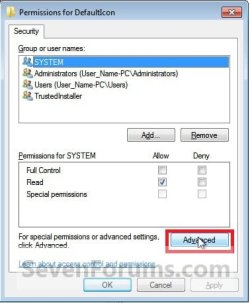
7. Click on the Owner tab, select Administrators (highlighted in blue below), and click on OK. (See screenshot below)
NOTE: If you are prompted to approve changing the owner, then approve it.
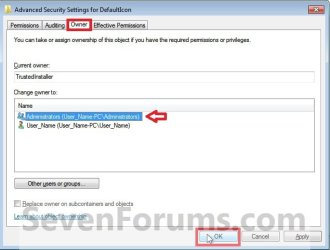
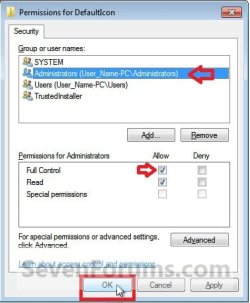
8. At the top, select Administrators (highlighted in blue below), then check the Allow box for Full Control and click on OK. (See screenshot below)
NOTE: This just allowed you (administrator) full permission to make changes to the DefaultIcon key in step 9 below.
9. In the right pane of the DefaultIcon key in regedit, right click on (Default) and click on Modify. (See screenshot below)
10. Type in the full path within quotes to the custom icon that you want to use instead of the default icon with the .ico file extension included, then click on OK. (See screenshot below)
NOTE: If you move or change this icon's location that you used in this step, then the icon will no longer work in the Control Panel until you change the path again to the new location.
For a custom icon path example: "C:\icon folder\icon file.ico"

11. Repeat steps 4 to 10 to change another default Control Panel icon.
12. When done, close regedit and open the Control Panel with small or large icons view to see your changes.
OPTION TWO
Restore Default Control Panel Icons
Note
This option assumes that you have already taken ownership and gave yourself permission of the DefaultIcon key from steps 5 to 8 in OPTION ONE above. If you have not, then you will need to do so before Windows 7 will allow you to do the ones below.
2. In the right pane of the DefaultIcon key in regedit, right click on (Default) and click on Modify. (See screenshot below)
3. Type in the default path for the Control Panel icon in the table below and click on OK. (See screenshot below)
| Control Panel Icon | Default Icon Path |
|---|---|
| Action Center | %SystemRoot%\System32\ActionCenterCPL.dll,-1 |
| Administrative Tools | %SystemRoot%\System32\imageres.dll,-114 |
| Autoplay | %SystemRoot%\System32\autoplay.dll,-1 |
| Backup and Restore | %SystemRoot%\System32\sdcpl.dll,-1 |
| Biometrics | %SystemRoot%\System32\biocpl.dll,-1 |
| BitLocker Drive Encryption | %SystemRoot%\System32\fvecpl.dll,-1 |
| Color Management | %systemroot%\system32\colorcpl.exe,-5 |
| Credential Manager | %SystemRoot%\system32\Vault.dll,-1 |
| Date and Time | %SystemRoot%\System32\timedate.cpl,-50 |
| Default Programs | %SystemRoot%\System32\imageres.dll,-24 |
| Desktop Gadgets | %ProgramFiles%\Windows Sidebar\Sidebar.exe,-100 |
| Device Manager | %SystemRoot%\system32\devmgr.dll,-201 |
| Devices and Printers | %systemroot%\system32\DeviceCenter.dll,-1 |
| Display | %SystemRoot%\System32\Display.dll,-1 |
| Ease of Access Center | %SystemRoot%\System32\accessibilitycpl.dll,-1 |
| Folder Options | %SystemRoot%\system32\imageres.dll,-166 |
| Fonts | %SystemRoot%\System32\fontext.dll |
| Getting Started | %SystemRoot%\branding\shellbrd\shellbrd.dll |
| HomeGroup | %SystemRoot%\System32\imageres.dll,-1013 |
| Indexing Options | %SystemRoot%\System32\srchadmin.dll,-201 |
| Infared | %SystemRoot%\System32\irprops.cpl,-129 |
| Internet Options | C:\Windows\System32\inetcpl.cpl,-4487 |
| Keyboard | %SystemRoot%\System32\main.cpl,-200 |
| Location and Other Sensors | %SystemRoot%\System32\SensorsCpl.dll,-1 |
| Mouse | %SystemRoot%\system32\main.cpl,-100 |
| Network and Sharing Center | %SystemRoot%\System32\netcenter.dll,-1 |
| Notification Area Icons | %SystemRoot%\System32\taskbarcpl.dll,-1 |
| Parental Controls | %SystemRoot%\System32\wpccpl.dll,-1 |
| Pen and Touch | %SystemRoot%\System32\tabletpc.cpl,-10201 |
Performance Information and Tools | %SystemRoot%\System32\PerfCenterCPL.dll,-1 |
| Personalization | %SystemRoot%\System32\themecpl.dll,-1 |
| Phone and Modem | %SystemRoot%\System32\telephon.cpl,-100 |
| Power Options | %SystemRoot%\System32\Powercpl.dll,-1 |
| Programs and Features | imageres.dll,-87 |
| Recovery | %SystemRoot%\System32\imageres.dll,-1022 |
| Region and Language | %SystemRoot%\System32\intl.cpl,-200 |
RemoteApp and Desktop Connections | %SystemRoot%\System32\tsworkspace.dll |
| Sound | %SystemRoot%\System32\mmsys.cpl,-100 |
| Speech Recognition | %SystemRoot%\System32\Speech\SpeechUX\speechuxcpl.dll,-1 |
| Sync Center | %SystemRoot%\System32\SyncCenter.dll,-1000 |
| System | %SystemRoot%\System32\imageres.dll,-149 |
| Tablet PC Settings | %SystemRoot%\System32\tabletpc.cpl,-10200 |
| Taskbar and Start Menu | %SystemRoot%\System32\imageres.dll,-80 |
| Troubleshooting | %SystemRoot%\System32\DiagCpl.dll,-1 |
| User Accounts | %SystemRoot%\System32\usercpl.dll,-1 |
| Windows Cardspace | %SystemRoot%\System32\icardres.dll,-4096 |
| Windows Defender | %ProgramFiles%\Windows Defender\MsMpRes.dll,-103 |
| Windows Firewall | C:\Windows\system32\FirewallControlPanel.dll,-1 |
Windows Live Language Setting | C:\Program Files (x86)\windows live\installer\LangSelectorRes.dll,0 |
| Windows Mobility Center | %SystemRoot%\system32\mblctr.exe,0 |
| Windows SideShow | %SystemRoot%\System32\AuxiliaryDisplayCpl.dll,-1 |
| Windows Update | %SystemRoot%\system32\wucltux.dll,-1 |
4. Repeat steps 1 to 3 to change another default Control Panel icon.
5. When done, close regedit and open the Control Panel with small or large icons view to see your changes.
That's it,
Shawn Brink
Related Tutorials
- How to Set a Default Control Panel View in Windows 7 and Windows 8
- How to Add Advanced User Accounts to the Windows 7 Control Panel
- How to Add Local Group Policy Editor to Windows 7 Control Panel
- How to Pin the Control Panel to the Windows 7 Taskbar
- How to Change a Library Icon in Windows 7
- How to Change the Windows 7 Default Folder Icon
- How to Change Windows 7 Default Folder Icons using Resource Hacker
- How to Change the Open Folder Icon in Windows 7
- How to Change the Default Libraries Icon in Windows 7
- How to Change a Drive Icon in Vista, Windows 7, and Windows 8
- How to Change Windows 7 System Icons Using Resource Hacker
- How to Change the Default Control Panel Icon in Windows 7
- How to Enable or Disable the Control Panel in Vista and Windows 7
- How to Hide or Show a Control Panel Icon in Vista and Windows 7
Last edited:


