Control Panel View Menu Greyed Out

ColTom2

New member
Local time
3:00 PM
Messages
20
Hi:

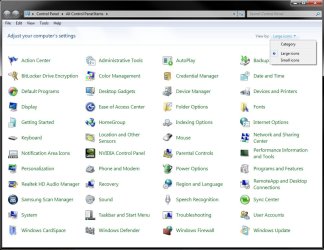
A portion of my Control Panel View Menu is greyed out. Starts at "Extra large icons and ends at Group by". All other items in Menu are fine. Also the View by: drop down arrow on the Right is OK for selections.

Is this normal for Win 7 or do I have a problem? If I do have a problem with the greyed out portion how do I correct it?

Thanks,

ColTom2
 

My Computer

Computer Manufacturer/Model Number
Toshiba L455-S5980
OS
Windows 7
CPU
1.80 gigahertz Intel Celeron Dual-Core
Motherboard
TOSHIBA NBWAA 1.00
Memory
1914 Megabytes Usable Installed Memory
Sound Card
Realtek High Definition Audio
Monitor(s) Displays
Generic PnP Monitor (15.3"vis)
Hard Drives
Hitachi HTS543225L9SA00 [Hard drive] (250.06 GB)
Hi:

A portion of my Control Panel View Menu is greyed out. Starts at "Extra large icons and ends at Group by". All other items in Menu are fine. Also the View by: drop down arrow on the Right is OK for selections.

Is this normal for Win 7 or do I have a problem? If I do have a problem with the greyed out portion how do I correct it?

Thanks,

ColTom2

Not sure I am following. Are you referring to Windows Explorer window perhaps? I do not see those things on my screen that you are referring to in the Control Panel.
 

My Computer

Computer Manufacturer/Model Number
HP Pavilion dv7
OS
Windows 7
CPU
Core i7
Memory
8 GB
Graphics Card(s)
ATI FireGL
Monitor(s) Displays
Secondary is an HP L1940T
Screen Resolution
1680x1050
Hard Drives
160 GB SSD and 500 GB SATA
Keyboard
G11 Logitech
Mouse
G7 Logitech
Internet Speed
Fiber
Other Info
My rig smegging rules!
I have the same question as above. I do not show the choices that you refer to.
 

My Computer

Computer type
PC/Desktop
Computer Manufacturer/Model Number
Dell XPS 420
OS
Windows 10, Home Clean Install
CPU
Intel Core2 processsor Q8200(2.33Ghz 1333FSB) Quad Core Tech
Motherboard
Dell
Memory
6 gb
Graphics Card(s)
ATI Radeon 256MB HD3650
Sound Card
Intergrated 7.1 Channel Audio
Monitor(s) Displays
Dell SP2009W 20"
Hard Drives
640 GB Serial ATA Hard drive
Cooling
Fan
Keyboard
Dell USB Keyboard
Mouse
Dell Premium Optical USB
Internet Speed
DSL 2.85
Hello Col. Tom,

It sounds like your folder view settings may have gotten messed up somehow. See if resetting all folder views to default, then restarting the computer will have it display properly afterwards.
CP.jpg
Hope this helps,
Shawn
 

My Computer

Computer type
PC/Desktop
Computer Manufacturer/Model Number
Self built custom
OS
64-bit Windows 11 Pro for Workstations
CPU
Intel i7-8700K OC'd to 5 GHz
Motherboard
ASUS ROG Maximus XI Formula Z390
Memory
64 GB (4x16GB) G.SKILL TridentZ RGB DDR4 3600 MHz
Graphics Card(s)
ASUS ROG-STRIX-GTX1080TI-O11G-GAMING
Sound Card
Integrated
Monitor(s) Displays
2 x Samsung Odyssey G7 27"
Screen Resolution
2560x1440
Hard Drives
1TB Samsung 990 PRO M.2,
4TB Samsung 990 PRO PRO M.2,
TerraMaster F8 SSD Plus NAS
PSU
Seasonic Prime Titanium 850W
Case
Thermaltake Core P3
Cooling
Corsair Hydro H115i
Keyboard
Logitech wireless K800
Mouse
Logitech MX Master 4
Internet Speed
2 Gb/s Download and 100 Mb/s Upload
Antivirus
Malwarebyte Anti-Malware Premium
Browser
Google Chrome
Other Info
Logitech Z625 speaker system,
Logitech BRIO 4K Pro webcam,
HP Color LaserJet Pro MFP M477fdn,
APC SMART-UPS RT 1000 XL - SURT1000XLI,
Galaxy S23 Plus phone
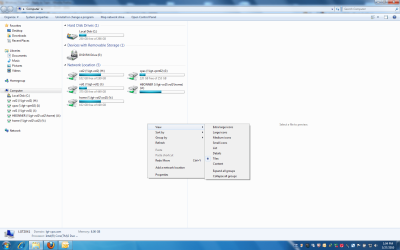
Is this what you are seeing perhaps?


Are you missing some of those menu options?

Untitled.png
 
Last edited by a moderator:

My Computer

Computer Manufacturer/Model Number
HP Pavilion dv7
OS
Windows 7
CPU
Core i7
Memory
8 GB
Graphics Card(s)
ATI FireGL
Monitor(s) Displays
Secondary is an HP L1940T
Screen Resolution
1680x1050
Hard Drives
160 GB SSD and 500 GB SATA
Keyboard
G11 Logitech
Mouse
G7 Logitech
Internet Speed
Fiber
Other Info
My rig smegging rules!
Use the "View By" option on the upper right, set it to "small icons" instead of "category" = there you go all options meant to be greyed out are visible while the "view" menu remains greyed out.....

k.r.

Chrispie :party:
 

My Computer

OS
win7
Back
Top