Convert a Basic Disk to a Dynamic Disk

How to Convert a Basic Disk to a Dynamic Disk

   Information
A disk is a separate physical hard drive. This will show you how to convert a basic disk to a dynamic, also known as "software RAID", disk in Windows Disk Manager or in a command prompt without losing anything on the disk. By default Windows uses Basic disks.

Basic and dynamic disks both support using MBR and GPT partition (volume) styles. When you convert a basic disk to a dynamic disk, any existing partitions or logical drives on the basic disk become simple volumes on the dynamic disk.

For more detailed information on basic and dynamic disks, see: Basic and Dynamic Disks (Windows)


   Note
Differences Between Basic and Dynamic Disks:
  • Basic disks are supported (readable) by all Windows operating systems since MS-DOS.
    • Dynamic disks are only supported (readable) by Windows 2000, XP Professional, Windows Server 2003, Vista Ultimate, Vista Enterprise, Windows 7, and Windows Server 2008.
  • Basic disks can have up to 128 GPT primary partitions, or 4 MBR primary partitions or or 3 MBR primary partition and 1 extended partition with up to 128 logical volumes in the extended partition.
    • Dynamic disks can have up to 2000 dynamic volumes that function like a primary partition used in basic disks.
  • Basic disks cannot share or split data with other primary or logical partitions, or basic disks. Each partitiion on a basic disk is treated as if it was a separate hard disk on the basic disk.
    • Separate dynamic disks can be combined into a single dynamic volume (spanning), split data among several dynamic disks (striping) for increased performance, or duplicate data among several dynamic disks (mirroring) for increased reliability.
  • Hard disks are basic disks by default, including removable disks and disks on a laptop (notepad).
    • Removable disks or disks on a laptop (notepad) cannot be converted to a dynamic disk.
   Warning
VERY IMPORTANT, PLEASE READ THIS FIRST.
  • You must be a administrator to do this in Windows.
  • DO NOT convert a basic disk that contains a installed operating system to a dynamic disk. Doing so will cause you to no longer be able to boot or start that operating system.
  • If you are using a basic disk as a storage area for shadow copies (System Protection) and you intend to convert the disk into a dynamic disk, it is important to take the following precaution to avoid the loss of data in the storage area. If the basic disk is a non-boot volume (partition) and is a different volume from where the original files reside, you must first dismount and take offline the volume containing the original files before you convert the disk containing shadow copies to a dynamic disk. You must bring the volume containing the original files back online within 20 minutes, otherwise, you will lose the data stored in the existing shadow copies. If the shadow copies are located on a boot volume, you can convert the disk to dynamic without losing shadow copies. You can use the mountvol command with the /p option to dismount the volume and take it offline. You can mount the volume and bring it online using the mountvol command or the Disk Management snap-in.
  • When restoring a system image from a dynamic volume, the disks on your computer cannot be formatted to match the layout of the disks on the backup. To have full functionality, select a volume (partition) on a basic disk as your backup location instead.
  • After you convert a basic disk to a dynamic disk, you cannot change the dynamic volumes back to partitions. Instead, you must delete all dynamic volumes on the dynamic disk and then convert it to a basic disk. If you want to keep your data, you must first back it up or move it to another volume.
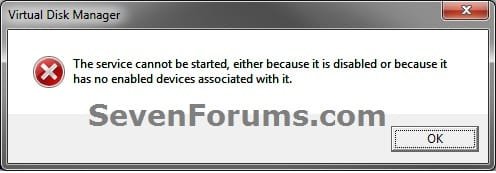
  • If you disable the Disk Defragmenter service, then you will get the error below when you try to do anything in Disk Management. If you get this error, then make sure that the Disk Defragmenter service is set to only Manual.
Error.jpg


OPTION ONE

Convert Disk from Basic to Dynamic in Disk Management


1. Open the Control Panel (Icons view), and click on the Administrative Tools icon, then close the Control Panel window.

2. Click on Computer Management in Administrative Tools, then close the Administrative Tools window.

3. If prompted by UAC, click on Yes.

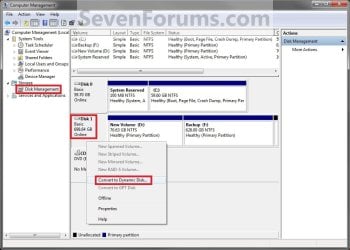
4. In the left pane under Storage, click on Disk Management. (See screenshot below)
Step1.jpg
5. Right click on the disk (ex: Disk 1) that you want to convert to a dynamic disk, and click on Convert to Dynamic Disk. (See screenshot above)

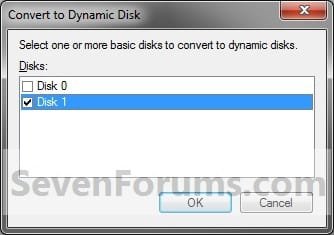
6. Make sure that the box is checked for only the disk (ex: Disk 1) that you want to convert to a dynamic disk, and click on OK. (See screenshot below)
Step2.jpg
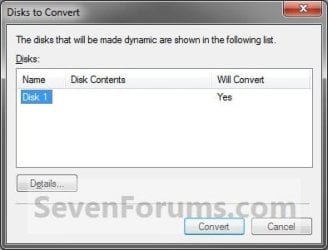
7. Click on Convert. (See left screenshot below)
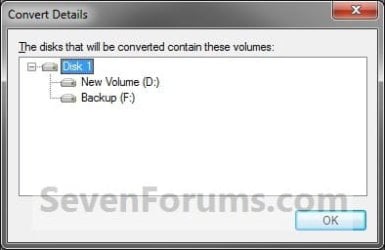
NOTE: To see more details about the disk being converted, click on the Details button first. Click on OK. when done with details. (See right screenshot below)
Step3.jpgStep3A_Details.jpg
8. Click on Yes to confirm. (See screenshot below)
Step4.jpg
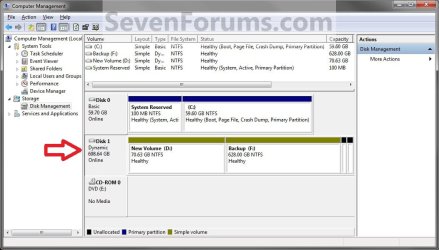
9. When done, you will notice that the disk is now a dynamic disk with your partitions from the basic disk now as simple volumes in Disk Management. (See screenshot below)
Step5.jpg
10. If this is a new HDD and it is all unallocated space, then you can now create new simple volumes with the unallocated space.

11. When done, close Disk Management.


OPTION TWO

Convert Disk from Basic to Dynamic in a Command Prompt


1. Open a elevated command prompt.
A) Go to step 3.
OR

2. Open a command prompt at boot.
Command_Dynamic.jpg
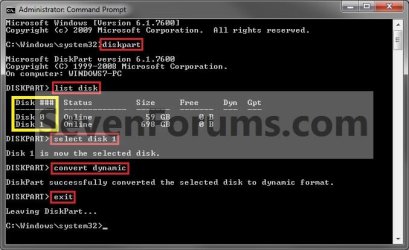
3. In the command prompt, type diskpart and press enter. (See screenshot above)

4. Type list disk and press enter.
NOTE: Make note of the disk number (ex: Disk 1) that you want to convert to a dynamic disk.

5. Type select disk # and press enter.
NOTE: Substitute # with the actual disk number that you want to convert to a dynamic disk. For example, select disk 1.

6. Type convert dynamic and press enter.

7. When done, type exit and press enter.

8. Close the command prompt.
NOTE: Restart the computer if you did step 2 instead.

That's it,
Shawn


Last edited:
Keep'em coming Shawn! :D That's another one to note and quite easy to follow in one quick glance! ;)
 

My Computers

System One System Two

  • Computer type
    PC/Desktop
    Computer Manufacturer/Model Number
    Custom builds = 2
    OS
    W7 Ultimate x64/W10 Pro x64/W11 Pro Triple Boot - Main PC W7 Remote PC Micro ATX W7 Pro x64/W11 Pro
    CPU
    AMD Phenom II X4 975 Deneb 3.6ghz - 965 2nd remote pc
    Motherboard
    Gigabyte GA-790XTA-UD4-Gigabyte GA-880GM-D2H remote pc
    Memory
    Kingston Hyper X DDR3 1600 1.5v 16gb - Hyper X Fury 8gb 2nd
    Graphics Card(s)
    MSI HD Radeon 5750 1gb - MSI HD Radeon 6450 on mini tower
    Sound Card
    Creative Labs X-Fi Xtreme Audio P - Realtek onooard 2nd case
    Monitor(s) Displays
    ASUS VW199T-P 19" HP 2082a Main-HP 2082a 20" remote pc
    Screen Resolution
    Asus 1440x900 - HP 1600x900
    Hard Drives
    WD Black 1TB HD per OS W7, W10, and pending W11 presently on 500gb OS Drive - Pending Triple 1TB HDs for Spanned Storage/backup volume
    Single 2TB external USB enclosure, single 1TB System 7 Host/Boot drive, Pending 8TB external HD for system image b
    PSU
    Corsair 750TX - primary / Corsair CX600 - second
    Case
    Antec 900-2 - SSD compatible / NZXT Vulcan mini tower
    Cooling
    Zalman CNPS9900A
    Keyboard
    AZIO L70 Backlit Letters Gaming - ONN Cordless/USB
    Mouse
    MSI DS200 Programmable, Logitech Cordless
    Internet Speed
    30mbps upgrade - primary hard wired - mini tower usb WiFi
    Antivirus
    GFI VIPRE Internet Security 2014 on W7 2016 beta on W10,
    Browser
    Cyberfox, WaterFox 64bit FF variants, FireFox x64, Pale Moon
    Other Info
    Accomdata fan cooled usb 2.0 PIDE/Sata II, III external enclosure.
    Sambient usb/eSata PATA/Sata II, III external enclosure.
  • Computer type
    PC/Desktop
    System Manufacturer/Model Number
    CUSTOM ASSEMBLY
    OS
    W7 Pro x64/W11 Pro
    CPU
    AMD Deneb 3.6ghz - 965
    Motherboard
    Gigabyte GA-880GM-D2H remote pc
    Memory
    Kingston Hyper X Fury 8gb
    Graphics Card(s)
    MSI HD Radeon 6450 DVI Output
    Sound Card
    Realtek onooard Creative or Other separate PENDING
    Monitor(s) Displays
    VIZIO 32" LCD TV Separate LCD Pending
    Screen Resolution
    1600x1080
    Hard Drives
    WD 500GB OS Host/Boot WD Green 1TB Storage/Backup
    PSU
    Corsair 600W - THERMALTAKE 600W spare case
    Case
    NZXT Vulcan mini tower
    Cooling
    Twin 120mm Top Fans - 240mm Side Cover
    Keyboard
    ONN Cordless/USB Logitech Cordless
    Mouse
    ONN USB/Cordless - Logitech Cordless
    Internet Speed
    DSL 5G
    Browser
    MS Edge, FireFox, WaterFox x64, FireFox Nightly
    Other Info
    OS Testing-Remote Access to Main TeamViewer
Thank you Night Hawk. Will do. :)
 

My Computer

Computer type
PC/Desktop
Computer Manufacturer/Model Number
Self built custom
OS
64-bit Windows 11 Pro for Workstations
CPU
Intel i7-8700K OC'd to 5 GHz
Motherboard
ASUS ROG Maximus XI Formula Z390
Memory
64 GB (4x16GB) G.SKILL TridentZ RGB DDR4 3600 MHz
Graphics Card(s)
ASUS ROG-STRIX-GTX1080TI-O11G-GAMING
Sound Card
Integrated
Monitor(s) Displays
2 x Samsung Odyssey G7 27"
Screen Resolution
2560x1440
Hard Drives
1TB Samsung 990 PRO M.2,
4TB Samsung 990 PRO PRO M.2,
TerraMaster F8 SSD Plus NAS
PSU
Seasonic Prime Titanium 850W
Case
Thermaltake Core P3
Cooling
Corsair Hydro H115i
Keyboard
Logitech wireless K800
Mouse
Logitech MX Master 4
Internet Speed
2 Gb/s Download and 100 Mb/s Upload
Antivirus
Malwarebyte Anti-Malware Premium
Browser
Google Chrome
Other Info
Logitech Z625 speaker system,
Logitech BRIO 4K Pro webcam,
HP Color LaserJet Pro MFP M477fdn,
APC SMART-UPS RT 1000 XL - SURT1000XLI,
Galaxy S23 Plus phone
Hello Ronny, and welcome to Seven Forums.

Since this is for the hard disk that you have your Windows 7 and factory recovery partitions on, then DO NOT CONVERT it to a dynamic disk. If you do, then Windows 7 will become unbootable and you will not be able to use your factory recovery partition to restore/reinstall Windows 7 with.

Could you post back a screenshot of your Disk Management (diskmgmt.msc) showing your drive layout? This way we can may be able to offer you some alternative suggestions.


Hope this helps,
Shawn
 

My Computer

Computer type
PC/Desktop
Computer Manufacturer/Model Number
Self built custom
OS
64-bit Windows 11 Pro for Workstations
CPU
Intel i7-8700K OC'd to 5 GHz
Motherboard
ASUS ROG Maximus XI Formula Z390
Memory
64 GB (4x16GB) G.SKILL TridentZ RGB DDR4 3600 MHz
Graphics Card(s)
ASUS ROG-STRIX-GTX1080TI-O11G-GAMING
Sound Card
Integrated
Monitor(s) Displays
2 x Samsung Odyssey G7 27"
Screen Resolution
2560x1440
Hard Drives
1TB Samsung 990 PRO M.2,
4TB Samsung 990 PRO PRO M.2,
TerraMaster F8 SSD Plus NAS
PSU
Seasonic Prime Titanium 850W
Case
Thermaltake Core P3
Cooling
Corsair Hydro H115i
Keyboard
Logitech wireless K800
Mouse
Logitech MX Master 4
Internet Speed
2 Gb/s Download and 100 Mb/s Upload
Antivirus
Malwarebyte Anti-Malware Premium
Browser
Google Chrome
Other Info
Logitech Z625 speaker system,
Logitech BRIO 4K Pro webcam,
HP Color LaserJet Pro MFP M477fdn,
APC SMART-UPS RT 1000 XL - SURT1000XLI,
Galaxy S23 Plus phone
Correct, you do not want to convert this to a dynamic disk.

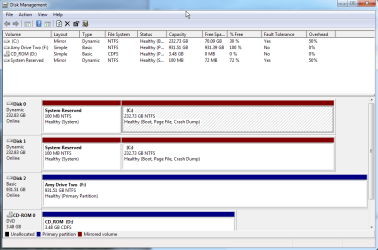
It looks like your OEM has done a lousy job of partitioning the drive. Since you have 4 primary partitions like this, you will not be able to create a new primary or logical partition on this drive with the size you want without having to delete one of them first. This is not recommended to do though since the ones without a drive letter are part of your OEM Windows 7 factory recovery. :(

I would strongly recommend getting a 2nd 2.5" drive, and installing it in your laptop to use for Linux instead. You should be able to get one pretty cheap these days. This would be your easiest option.
 

My Computer

Computer type
PC/Desktop
Computer Manufacturer/Model Number
Self built custom
OS
64-bit Windows 11 Pro for Workstations
CPU
Intel i7-8700K OC'd to 5 GHz
Motherboard
ASUS ROG Maximus XI Formula Z390
Memory
64 GB (4x16GB) G.SKILL TridentZ RGB DDR4 3600 MHz
Graphics Card(s)
ASUS ROG-STRIX-GTX1080TI-O11G-GAMING
Sound Card
Integrated
Monitor(s) Displays
2 x Samsung Odyssey G7 27"
Screen Resolution
2560x1440
Hard Drives
1TB Samsung 990 PRO M.2,
4TB Samsung 990 PRO PRO M.2,
TerraMaster F8 SSD Plus NAS
PSU
Seasonic Prime Titanium 850W
Case
Thermaltake Core P3
Cooling
Corsair Hydro H115i
Keyboard
Logitech wireless K800
Mouse
Logitech MX Master 4
Internet Speed
2 Gb/s Download and 100 Mb/s Upload
Antivirus
Malwarebyte Anti-Malware Premium
Browser
Google Chrome
Other Info
Logitech Z625 speaker system,
Logitech BRIO 4K Pro webcam,
HP Color LaserJet Pro MFP M477fdn,
APC SMART-UPS RT 1000 XL - SURT1000XLI,
Galaxy S23 Plus phone
Ok, now this is not my fault, I especially purchased this new laptop with good HDD with a view to installing two OS (windows 7 and Linux) and Oracle on linux...that was my requirement. Now who is responsible for this all mess up? Can I go back to Best Buy from where I purchased it? Or should I contact Toshiba (my laptop brand) to support any help?? Your suggestions please???
 

My Computer

OS
Windows 7 home premium 64 bit
No, it's not your fault.

It's just how Toshiba decided to set up your drive's partitions like this. On a single hard disk, you can only have up to 4 primary (Navy) partitions, or 3 Primary partitions and 1 Extended partition with up to 128 logical volumes in the extended partition.

You have basically two options. I would recommend the second one though since DVDs are not as reliable as having the factory recovery on the HDD.

1) Create a set of Toshiba recovery DVDs to be able to use for a factory restore of Windows 7 (if ever needed) instead. Delete only the 18.06 and 10.63 partitions until they are unallocated space. You can then use this unallocated for linux.

2) Get a 2nd 2.5" drive, and installing it in your laptop to use for Linux instead.
 

My Computer

Computer type
PC/Desktop
Computer Manufacturer/Model Number
Self built custom
OS
64-bit Windows 11 Pro for Workstations
CPU
Intel i7-8700K OC'd to 5 GHz
Motherboard
ASUS ROG Maximus XI Formula Z390
Memory
64 GB (4x16GB) G.SKILL TridentZ RGB DDR4 3600 MHz
Graphics Card(s)
ASUS ROG-STRIX-GTX1080TI-O11G-GAMING
Sound Card
Integrated
Monitor(s) Displays
2 x Samsung Odyssey G7 27"
Screen Resolution
2560x1440
Hard Drives
1TB Samsung 990 PRO M.2,
4TB Samsung 990 PRO PRO M.2,
TerraMaster F8 SSD Plus NAS
PSU
Seasonic Prime Titanium 850W
Case
Thermaltake Core P3
Cooling
Corsair Hydro H115i
Keyboard
Logitech wireless K800
Mouse
Logitech MX Master 4
Internet Speed
2 Gb/s Download and 100 Mb/s Upload
Antivirus
Malwarebyte Anti-Malware Premium
Browser
Google Chrome
Other Info
Logitech Z625 speaker system,
Logitech BRIO 4K Pro webcam,
HP Color LaserJet Pro MFP M477fdn,
APC SMART-UPS RT 1000 XL - SURT1000XLI,
Galaxy S23 Plus phone
Thanks Shawn, Your responses were really helpful and that will save my lots of time now. I am having one harddisk with me from my another laptop, of which mother board got crashed but the HDD is intact. One of computer repairing shop owner was saying that I can convert that HDD into USB and can continue using it. I have already linux and oracle installed on that HDD. Can I continue using that HDD as a USB with my new toshiba laptop? Thanks
 

My Computer

OS
Windows 7 home premium 64 bit
Sorry mate, but it would not work for what you are wanting to do with a USB connection.

Most laptops will have room for two 2.5" hard drives. It's usually just a small panel held in place with screws on the bottom of the laptop where you will pop in the drive at. You'll need to consult your laptop's manual for exact details on it though since each laptop will vary a bit on how it's done.
 

My Computer

Computer type
PC/Desktop
Computer Manufacturer/Model Number
Self built custom
OS
64-bit Windows 11 Pro for Workstations
CPU
Intel i7-8700K OC'd to 5 GHz
Motherboard
ASUS ROG Maximus XI Formula Z390
Memory
64 GB (4x16GB) G.SKILL TridentZ RGB DDR4 3600 MHz
Graphics Card(s)
ASUS ROG-STRIX-GTX1080TI-O11G-GAMING
Sound Card
Integrated
Monitor(s) Displays
2 x Samsung Odyssey G7 27"
Screen Resolution
2560x1440
Hard Drives
1TB Samsung 990 PRO M.2,
4TB Samsung 990 PRO PRO M.2,
TerraMaster F8 SSD Plus NAS
PSU
Seasonic Prime Titanium 850W
Case
Thermaltake Core P3
Cooling
Corsair Hydro H115i
Keyboard
Logitech wireless K800
Mouse
Logitech MX Master 4
Internet Speed
2 Gb/s Download and 100 Mb/s Upload
Antivirus
Malwarebyte Anti-Malware Premium
Browser
Google Chrome
Other Info
Logitech Z625 speaker system,
Logitech BRIO 4K Pro webcam,
HP Color LaserJet Pro MFP M477fdn,
APC SMART-UPS RT 1000 XL - SURT1000XLI,
Galaxy S23 Plus phone
Another great Tutorila Shawn. Learned something new today so that's out of the way.
Fabe
 

My Computer

Computer Manufacturer/Model Number
Self Built
OS
Windows 7 ultimate 64 bit / XP Home sp3
CPU
intel Core 2 Duo E8400 3.0ghz
Motherboard
Asus P5ND bios 1401
Memory
8 gigs 1066 OCZ Fata1ty
Graphics Card(s)
EVGA GTX 580 Call of Duty Black Ops Edition
Sound Card
Creative Soundblaster Audigy 2zs
Monitor(s) Displays
Asus 24in LCD's 2MS X2
Screen Resolution
1920x1080p @60Hz
Hard Drives
WD Caviar 500 Black/ WD Caviar 200 Blue
PSU
OCZ 700W GameXtreme
Case
NZXT Apollo
Cooling
Corsair H50 CPU/120mm x3 /60mm x2 /Corsair Dominator Ram
Keyboard
Logitech Bluetooth Wireless MX5000
Mouse
Logitech Bluetooth Wireless MX1000
Internet Speed
Download 19.83 Upload 0.97
Other Info
Logitech Z2300 Speakers/ Bose Noise Cancelling Headphones/Avermedia PCI-e Hybrid TV Bravo/Epson NX415 all in one/ 4 Port Powered USB Hub/ LG 10x Bluray Burner /TSST Corp DVDRW External
You're most welcome Eric. Thank you. :)
 

My Computer

Computer type
PC/Desktop
Computer Manufacturer/Model Number
Self built custom
OS
64-bit Windows 11 Pro for Workstations
CPU
Intel i7-8700K OC'd to 5 GHz
Motherboard
ASUS ROG Maximus XI Formula Z390
Memory
64 GB (4x16GB) G.SKILL TridentZ RGB DDR4 3600 MHz
Graphics Card(s)
ASUS ROG-STRIX-GTX1080TI-O11G-GAMING
Sound Card
Integrated
Monitor(s) Displays
2 x Samsung Odyssey G7 27"
Screen Resolution
2560x1440
Hard Drives
1TB Samsung 990 PRO M.2,
4TB Samsung 990 PRO PRO M.2,
TerraMaster F8 SSD Plus NAS
PSU
Seasonic Prime Titanium 850W
Case
Thermaltake Core P3
Cooling
Corsair Hydro H115i
Keyboard
Logitech wireless K800
Mouse
Logitech MX Master 4
Internet Speed
2 Gb/s Download and 100 Mb/s Upload
Antivirus
Malwarebyte Anti-Malware Premium
Browser
Google Chrome
Other Info
Logitech Z625 speaker system,
Logitech BRIO 4K Pro webcam,
HP Color LaserJet Pro MFP M477fdn,
APC SMART-UPS RT 1000 XL - SURT1000XLI,
Galaxy S23 Plus phone
So I would have to have 2 or more physical disks in my system to make them Dynamic disks, regardless of whether I have hardware RAID turned on or not? That seems about right, except how do you make a striped-mirrored setup?
 

My Computer

Computer type
PC/Desktop
Computer Manufacturer/Model Number
Custom
OS
Microsoft Windows 7 Home Premium 64-bit Service Pack 1
CPU
AMD A10-6800K APU with Radeon(tm)™ HD Graphics 4100
Motherboard
ASRock FM2A85X Extreme4-M
Memory
(2) G.Skill F3-12800CL10-8GBXL
Graphics Card(s)
ASUS R7 250 Series (0x6610)
Sound Card
Realtek High Definition Audio
Monitor(s) Displays
Acer X213H LCD monitor, 21"
Screen Resolution
1920 x 1080 x 32 bits @ 60 Hz
Hard Drives
WD Black, 1.0TB, WDC WD1002FAEX-00Z3A0
PSU
Rosewill Quark-650
Case
Raidmax Comet SECC Steel ATX Mid Tower Computer Case
Cooling
1 x 80mm + 2 x 120mm + Stock cooler
Mouse
Gear Head Wireless Optical 5-button mouse
Internet Speed
FTTx 6000 / 1000
Antivirus
Avast! Free Antivirus 2015.10.0.2208
Browser
Google Chrome Version 40.0.2214.115
Other Info
*AMD Dual-Graphics
*Uses OpenDNS
*Uses Folding@Home
*HP 16x Super-Multi DVD Writer
*Superspeed 74-in-1 Card Reader
*Maximum overclock has not been determined.
Hello HC,

You can make any single disk dynamic.

You can combine separate dynamic hard disks into a single dynamic volume (called spanning), split data among several hard disks (called striping) for increased performance, or duplicate data among several hard disks (called mirroring) for increased reliability.

What Are Dynamic Disks and Volumes?: Storage Services

Basic and Dynamic Disks (Windows)

Personally, I would not make them dynamic disks. You could set up a RAID 0+1 for mirrored and stripe if supported by your RAID controller. The problem is RAID 0+1 first creates a stripe set out of two or more drives, and then mirrors the whole structure onto the same number of additional hard drives. Basically, you'll need four hard drives. Two to stripe, and the other two to mirror.

RAID 0+1: Mirrored Stripe Set (Performance & Data Safety) - RAID Scaling Charts, Part 1

Hope this helps, :)
Shawn
 

My Computer

Computer type
PC/Desktop
Computer Manufacturer/Model Number
Self built custom
OS
64-bit Windows 11 Pro for Workstations
CPU
Intel i7-8700K OC'd to 5 GHz
Motherboard
ASUS ROG Maximus XI Formula Z390
Memory
64 GB (4x16GB) G.SKILL TridentZ RGB DDR4 3600 MHz
Graphics Card(s)
ASUS ROG-STRIX-GTX1080TI-O11G-GAMING
Sound Card
Integrated
Monitor(s) Displays
2 x Samsung Odyssey G7 27"
Screen Resolution
2560x1440
Hard Drives
1TB Samsung 990 PRO M.2,
4TB Samsung 990 PRO PRO M.2,
TerraMaster F8 SSD Plus NAS
PSU
Seasonic Prime Titanium 850W
Case
Thermaltake Core P3
Cooling
Corsair Hydro H115i
Keyboard
Logitech wireless K800
Mouse
Logitech MX Master 4
Internet Speed
2 Gb/s Download and 100 Mb/s Upload
Antivirus
Malwarebyte Anti-Malware Premium
Browser
Google Chrome
Other Info
Logitech Z625 speaker system,
Logitech BRIO 4K Pro webcam,
HP Color LaserJet Pro MFP M477fdn,
APC SMART-UPS RT 1000 XL - SURT1000XLI,
Galaxy S23 Plus phone
Confused!

I am confused to as what this means: "When restoring a system image from a dynamic volume, the disks on your computer cannot be formatted to match the layout of the disks on the backup. To have full functionality, select a volume (partition) on a basic disk as your backup location instead."

I have a Dell XPS8700 with Windows 8.1. I just formatted out 2 500GB drives to act as a Dynamic Disk. I would like to image my OS drive and store the image, in a folder, on the newly created Dynamic Disk. My primary OS was originally on a factory installed 500GD WD disk. I used Macrium to copy my partitions to the new SSD drive. Everything works as far as the Diagnostics Partition and the Restore Partition. Windows shows 5 partitions on the disk, Macrium shows 6. Anyway the copy went fine and all is well.

What do I need to know about storing OS images on the new dynamic volume? Can I use GPT? Should I make a few partitions on the dynamic disk?
 

My Computer

Computer Manufacturer/Model Number
Dell XPS 8300
OS
Win7 x64
CPU
Intel(R) Core(TM) i7-2600 CPU @ 3.40GHz
Memory
16GB Dual-Channel
Graphics Card(s)
NVIDIA GeForce GTS 450
Monitor(s) Displays
Viewsonic VX2753mh-LED 27" HDMI
Screen Resolution
1920x1080
Hello Randy,

It basically just means that the disk needs to be one partition at least as large as the size of the image to be able to restore the image to it. If you had it all partitioned, there may not be enough space to do so.

Personally, I would not recommend using dynamic volumes if you didn't have to, and stick with basic MBR instead. This way you are less prone to risk of data loss.

Sure GPT is fine to use for a data disk in Windows 7.

For storing multiple system images, I find renaming the WindowsImageBackup folder like in method two in the yellow tip box at the top of the tutorial below works the best.

http://www.sevenforums.com/tutorials/663-backup-complete-computer-create-image-backup.html

Hope this helps, :)
Shawn
 

My Computer

Computer type
PC/Desktop
Computer Manufacturer/Model Number
Self built custom
OS
64-bit Windows 11 Pro for Workstations
CPU
Intel i7-8700K OC'd to 5 GHz
Motherboard
ASUS ROG Maximus XI Formula Z390
Memory
64 GB (4x16GB) G.SKILL TridentZ RGB DDR4 3600 MHz
Graphics Card(s)
ASUS ROG-STRIX-GTX1080TI-O11G-GAMING
Sound Card
Integrated
Monitor(s) Displays
2 x Samsung Odyssey G7 27"
Screen Resolution
2560x1440
Hard Drives
1TB Samsung 990 PRO M.2,
4TB Samsung 990 PRO PRO M.2,
TerraMaster F8 SSD Plus NAS
PSU
Seasonic Prime Titanium 850W
Case
Thermaltake Core P3
Cooling
Corsair Hydro H115i
Keyboard
Logitech wireless K800
Mouse
Logitech MX Master 4
Internet Speed
2 Gb/s Download and 100 Mb/s Upload
Antivirus
Malwarebyte Anti-Malware Premium
Browser
Google Chrome
Other Info
Logitech Z625 speaker system,
Logitech BRIO 4K Pro webcam,
HP Color LaserJet Pro MFP M477fdn,
APC SMART-UPS RT 1000 XL - SURT1000XLI,
Galaxy S23 Plus phone
Clearing Up Some Incorrect Info On The Internet

Hi,

So I decided to mirror my wifes system partition and C:/ partition to a 2nd disk. It failed at first but I got it working after a huge ordeal. I want to post my experience here because there is a lot of misinformation about this topic in various places all over the internet and I want to share what I learned in case it is helpful to anybody. I realize a lot of info online is outdated and that may be the issue.

First some links that helped:
Bootrec: https://support.microsoft.com/en-us/kb/927392
BCD Edit: https://technet.microsoft.com/en-us/library/cc709667(v=ws.10).aspx
Bootrec 2: https://neosmart.net/wiki/bootrec/
Mark Partition as Active: http://www.sevenforums.com/tutorials/71432-partition-mark-active.html


Second the following is NOT true:
  1. This can be true sometimes but not always....that the boot information is on your OS drive/partition (like drive C) and it needs to be active.
  2. That the system drive and operating system drive can not be converted to a dynamic disk or mirrored to a 2nd disk.
  3. That you need to convert back to a basic disk if you did that.
  4. That you need to reinstall the OS.


So here are my explanations for these untrue things that lead me down the wrong path:
1. This issue ONLY APPLIES if you followed advice on setting a drive as active for a possible solution. So your boot data and config can either be on the C: (or whatever drive your os is on) or a hidden system drive which on windows 7 is exactly 100MB. If you installed w7 from scratch you likely are using the 100mb system drive. The 100mb system drive needs to be the active drive (also some people called this a boot flag but its the same as far as I can tell). When trying to fix things I changed the C drive as the active drive and that caused me hours of going in the wrong direction and I had to recover from that once I realized my error. This is helpful to fix that: see mark partition as active link above. I used method two with an installation disk and changed it to do it on the system drive. To get the system drive letter look for a 100mb partition allocated before your os drive. All other partitions that are not the system drive (whether system is c or the 100 mb) should be inactive in my case but if you are dual booting it might not be for you but my guess is that it is because I read that a dynamic disk can only have one active drive (i dont think other os boots in a converted basic drive will work an anymore without some help)....I didnt research that so I don't know. [IU]Another thing that I read that was incorrect was that only basic drive partitions can be set as active.[/U] I was able to set a partition on a dynamic drive as active. That being said I base that on the fact it took the command via diskpart and "detail partition" showed it as active when I finished. Also if you set drive c as active and you did have the 100mb system drive and you ran the bootrec commands you may have written the new boot info to the C: which technically if set as active will bypass the system drive and if you get it working this way it will negate your system drive. It would work but would not be correct. I had to backup BCD and delete the C:\boot folder on C:\ then run /RebuildBcd as explained in bootrec link I gave above. Most of the bootsec commands will operate on whatever drive you have set as active.

2. Yes you can convert the OS disk and system disk to dynamic and you can mirror both the system 100mb partition and the OS C: partition. I converted my wifes drive C: and system reserved drive to dynamic, I also converted a matching drive to dynamic then I mirrored drive c to the unallocated matching drive. At first I did not mirror the system 100mb drive because the mirror option was not available...more on that later. Now this did cause my system not to boot but I believe that was only because the main drive was on a higher sata port and the matching mirrored drive on the lower port did not have the system boot and bios wanted to boot whatever ended up at disk 0. With two drive c's it got confusing. I can't confirm that for sure (although everything worked once I fixed the port and fixed what was active) but tried the whole litany of bootrec () commands and none of them worked until I realized the bios was trying to boot the disk without the system drive (boot config) and I set the wrong drive as active.
3. The people saying this are listening to people that are saying #2. Converting back to basic does restore the drive for some people but leaves you not reaching your end goal. There is a way to restore to basic without data loss if you really want to give up.
4. Please don't ever listen to anyone that says this for 98% of computer issues until you have exhausted all options and asked an expert..paid if need be.

Mirroring System Drive: I was able to mirror the system drive (100mb drive) but I had to delete an OEM partition first as it needed to go to the beginning of the drive like the main drive. Once that was deleted and the whole drive was unallocated I was able to mirror both the system drive and os C: drive. Don't use the clean all method to delete it unless you want to wait a while or you want to zero it out.

In summary my issues and wrong steps were:
SATA PORT: System Drive (whether the os drive or the dedicated system drive) was on a higher sata port and my computer tried to boot the mirrored drive that didnt have a boot record which ended up booting into a black screen with a blinking curser. When I fixed that active drive issue the SATA port issue then had the bootrec commands say No Element Found
Active Drive: I accidentally set the C: drive as active. Then the bootrec commands complained of no system drive or 0 / no operating systems found or total identified windows installations 0.
I was running bootsec commans in vain because of the wrong active drive set.

Errors I encountered:
At boot black screen with blinking curser. Happened when sata port was wrong. Could happen for wrong active drive too I am not sure.
System partition not found when running bootrec commands. I think this was when my system drive was no longer the active drive as well and maybe when using the wrong sata port.
No OS's found when running bootrec /ScanOs and /FixBoot also same as above. See Bootrec 2 link. (Delete bcd first then rebuild)
Element not found: Wrong SATA Port see Bootrec 2 link.

When I had the wrong active drive I could tell finally because I learned about the 100mb partition and relazed I set C as active. Then I realized the sata port error due to bootrec commands giving the errors I mentioned and I had a 60 mb unallocated space on the second drive and I finally realized that was the drive at drive 0. It kept being assigned to drive 0 no matter what was set as active. Then I just did the bootrec /rebuildbcd once after manually backing up and deleted the wrong bcd and /boot on C:, then automatic system repair about 2 times. All worked after that.

Then I just destroyed the mirror, deleted the oem partition on the 2nd drive, then changed the drive to unallocated space. The mirrored the system and os partitions. Voila perfect!

Honestly if I had just tried to boot into the plex2 installation in the beginning it probably would have worked and I never would have had such a problem.

So now my wifes computer is bootable with dual mirrored dynamic disks and both the system reserved 100mb drive and the os drive C: are mirrored.

I hope my story is helpful.

mirroredsystemdriveandosdrive.png
 
Last edited:

My Computer

Computer type
PC/Desktop
OS
Windows 7
I've just "managed" to convert the partitions from basic to dynamic(without informing myself before the operation), and now the PC doesn't start anymore.
I had:

System partition 100MB
C: Windows 7 x64 34GB
D: MyData 100GB
E: MyData 100GB

Any ideas on how can I bring it back to life?

I've tried System Repair from Win7 DVD, but after a night of trying to repair, it didn't finish and it didn't look like it was actually doing something. I tried to cancel but it said that the operation cannot be cancelled. I had to force shutdown the PC.
 

My Computer

OS
Windows 7 Pro x64
Hello Expansion,

I take it you converted the OS drive to dynamic causing this?

If you have another computer that you can use, you could connect the drive to it, and use Option One in the tutorial below convert the disk back to basic without losing anything.

:ar: Convert a Dynamic Disk to a Basic Disk - Windows 7 Help Forums
 

My Computer

Computer type
PC/Desktop
Computer Manufacturer/Model Number
Self built custom
OS
64-bit Windows 11 Pro for Workstations
CPU
Intel i7-8700K OC'd to 5 GHz
Motherboard
ASUS ROG Maximus XI Formula Z390
Memory
64 GB (4x16GB) G.SKILL TridentZ RGB DDR4 3600 MHz
Graphics Card(s)
ASUS ROG-STRIX-GTX1080TI-O11G-GAMING
Sound Card
Integrated
Monitor(s) Displays
2 x Samsung Odyssey G7 27"
Screen Resolution
2560x1440
Hard Drives
1TB Samsung 990 PRO M.2,
4TB Samsung 990 PRO PRO M.2,
TerraMaster F8 SSD Plus NAS
PSU
Seasonic Prime Titanium 850W
Case
Thermaltake Core P3
Cooling
Corsair Hydro H115i
Keyboard
Logitech wireless K800
Mouse
Logitech MX Master 4
Internet Speed
2 Gb/s Download and 100 Mb/s Upload
Antivirus
Malwarebyte Anti-Malware Premium
Browser
Google Chrome
Other Info
Logitech Z625 speaker system,
Logitech BRIO 4K Pro webcam,
HP Color LaserJet Pro MFP M477fdn,
APC SMART-UPS RT 1000 XL - SURT1000XLI,
Galaxy S23 Plus phone
Yes, the conversion of the partitions from from basic to dynamic caused this.
The problem is the following now:

I took a different HDD and I've installed Windows 7 on it. I've also connected the unbootable HDD. In My Computer, the old C: and another partition that I've created after the conversion to dynamic, aren't "openable". Explorer crashes if I click on them.
Partition Wizard stays at splash-screen, with CPU at 25%(4core CPU), never gets to load, probably because of those 2 partitions.

LE: Actually, Partition Wizard has just loaded, after an hour of splash-screen. Let me see what I can do.

LE3: Partition Wizard Free doesn't allow conversion from dynamic to basic.
 

My Computer

OS
Windows 7 Pro x64
LE3: Partition Wizard Free doesn't allow conversion from dynamic to basic.
This is true for the latest version of Partition Wizard (free). The link in the tutorial is for an older version (4.2 free) which did allow dynamic to basic conversion before they moved the option to the paid version.
 

My Computer

Computer type
PC/Desktop
Computer Manufacturer/Model Number
Own build
OS
Windows 7x64 Home Premium SP1
CPU
Intel i7 2600k
Motherboard
ASUS P8Z68 Deluxe
Memory
G.Skill Ripjaws (DDR3-1600) 2x4GB
Graphics Card(s)
Nvidia GeForce GTS 450; Intel HD Graphics 3000(GT2+)
Monitor(s) Displays
Dell Ultrasharp IPS panel U2311H, Samsung SyncMaster P2350
Screen Resolution
1920x1080
Hard Drives
Samsung 850 Pro SSD 256GB, Samsung SSD 840 120GB, Seagates 1TB Barracuda ST31000528AS x2
PSU
Seasonic M12II 520W
Case
Lian Li Lancool PC-K60
Cooling
Case: 1x120mm, 3x140mm CPU: Hyper 212+
Keyboard
Logitech MK520 (wireless)
Mouse
Logitech MK520
Internet Speed
6-7 Mbps
Antivirus
Norton Security Premium, Malwarebytes on 2 (MSE on 3rd PC)
Browser
FireFox
Other Info
Audio: Logitech Z523 2.1
Back
Top