Convert a Dynamic Disk to a Basic Disk

How to Convert a Dynamic Disk to a Basic Disk

   Information
A disk is a separate physical hard drive. This will show you how to convert a dynamic, also known as "software RAID", disk to a basic disk in Windows Disk Manager or in a command prompt. By default Windows uses Basic disks.

Basic and dynamic disks both support using MBR and GPT partition (volume) styles.

For more detailed information on basic and dynamic disks, see: Basic and Dynamic Disks (Windows)


   Note
Differences Between Basic and Dynamic Disks:
  • Basic disks are supported (readable) by all Windows operating systems since MS-DOS.
    • Dynamic disks are only supported (readable) by Windows 2000, XP Professional, Windows Server 2003, Vista Ultimate, Vista Enterprise, Windows 7, and Windows Server 2008.
  • Basic disks can have up to 128 GPT primary partitions, or 4 MBR primary partitions or 3 MBR primary partitions and 1 extended partition with up to 128 logical volumes in the extended partition.
    • Dynamic disks can have up to 2000 dynamic volumes that function like a primary partition used in basic disks.
  • Basic disks cannot share or split data with other primary or logical partitions, or basic disks. Each partitiion on a basic disk is treated as if it was a separate hard disk on the basic disk.
    • Separate dynamic disks can be combined into a single dynamic volume (spanning), split data among several dynamic disks (striping) for increased performance, or duplicate data among several dynamic disks (mirroring) for increased reliability.
  • Hard disks are basic disks by default, including removable disks and disks on a laptop (notepad).
    • Removable disks cannot be converted to a dynamic disk.
   Warning
VERY IMPORTANT, PLEASE READ THIS FIRST.
  • You must be logged in as an administrator to do this inside Windows.
  • Before you convert a dynamic disk to a basic disk, be sure to backup anything that you do not want to lose on that dynamic disk. Converting the dynamic disk back to a basic disk using either OPTION 3-5 below requires that all dynamic volumes are deleted on the disk first.
  • See OPTION ONE or OPTION TWO below if you wanted to be able to convert a dynamic disk back to a basic disk without losing the data on it.
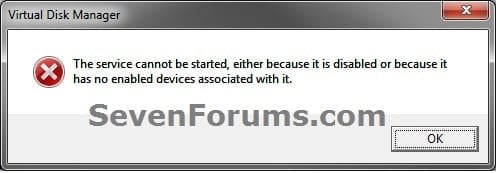
  • If you disable the Disk Defragmenter service, then you will get the error below when you try to do anything in Disk Management. If you get this error, then make sure that the Disk Defragmenter service is set to only Manual.
Error.jpg


OPTION ONE

Convert Dynamic Disk to Basic Disk using "Partition Wizard 4.2 Free"


:warn:WARNING: Even though you will not lose the data on the dynamic disk when you use this option to convert the dynamic disk back to a basic disk, be sure to backup any data on the dynamic disk that you wish to keep first just to be safe in case something happens. Say a power outage while in the middle of converting the disk.1. Do step 2 or 3 below depending on what you are able to do.

2. To Use Partition Wizard 4.2 Free at Boot
NOTE: This option can be helpful if you are unable to startup Windows if your Windows disk was made dynamic.A) Download "pwhe42.iso" file here to your desktop.
NOTE: It will take a moment for the download option to automatically appear at the link.

B) Create either a bootable CD/DVD or USB with the pwhe42.iso file.
NOTE: You could also use a free program like ImgBurn at 4x burn speed to create a bootable CD/DVD with.

C) Boot from the the CD/DVD or USB.

D) Convert the dynamic disk to basic like starting at step 3E below.

3. To Use Partition Wizard 4.2 Free in WindowsA) Download the "Partition_Wizard_4.2_free.zip" file here to your desktop.

B) Open the ZIP file, and extract (drag and drop) the PW folder to your desktop.

C) Open the PW folder, and run the PWIZ.exe file.

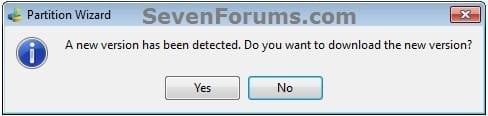
D) Click on No for the new version avialable update. (see screenshot below)PW-1.jpg

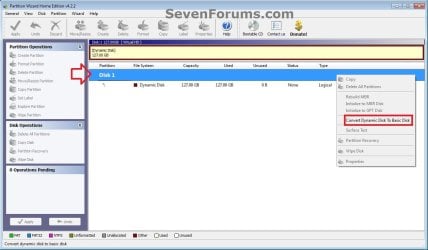
E) Right click on the Disk # (ex: Disk 1) of the dynamic disk you want to convert, then click on Convert Dynamic Disk to Basic Disk. (see screenshot below)PW-2.jpg

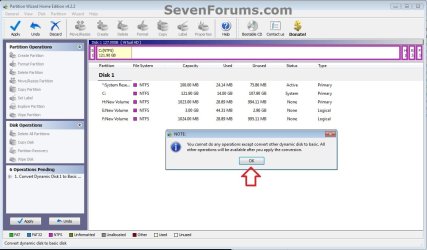
F) Click on OK. (see screenshot below)

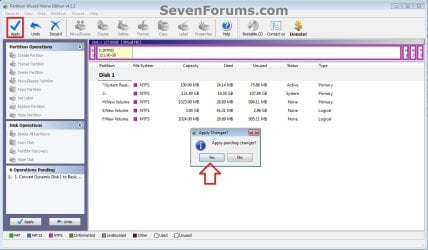
G) Click on the blue Apply check mark toolbar button at the top left corner, and click on Yes. (see screenshot below)PW-4.jpg

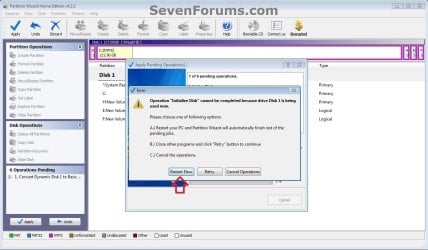
H) If prompted to restart, click on Restart Now. (see screenshot below)
NOTE: This is normal if the dynamic disk you wanted to convert to basic is the disk that the currently running Windows is installed on.PW-5.jpg


4. When finished, the selected dynamic disc will now be converted to a basic disk without losing any data on it.


OPTION TWO

To Convert Dynamic Disk to Basic Disk using Disk Management


:warn:WARNING: Be sure to read the red WARNING box above. You will lose all data on the dynamic disk using this option.1. Open the Control Panel (icons view), and click on the Administrative Tools icon, then close the Control Panel window.

2. Click on Computer Management in Administrative Tools, then close the Administrative Tools window.

3. If prompted by UAC, click on Yes.

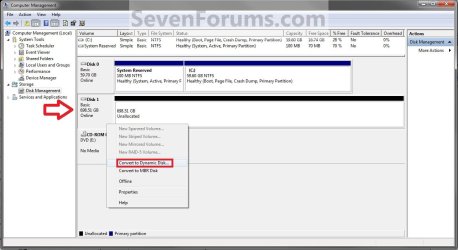
4. In the left pane under Storage, click on Disk Management. (See screenshot below)Step1.jpg

5. In the dynamic disk (ex: Disk 1) that you want to convert to a basic disk, right click on each volume on the disk and click on Delete Volume until the whole disk is unallocated space. (See screenshot above)
NOTE: If prompted, click on Yes to continue deleting the volume(s).

6. If the disk (ex: Disk 1) that you want to convert to a basic disk is still displayed has being Dynamic (left side under Disk #), then right click on the disk (ex: Disk 1) and click on Convert to Basic Disk if available. (See screenshot below)Step2.jpg

7. You can also confirm that the disk is a basic disk if it's displayed has being Basic (left side under Disk #), or if you right click on the disk # and it has Convert to Dynamic Disk instead now. (See screenshot below)Step3.jpg

8. You can now create partitions on the now basic disk if you like.

9. When done, close Disk Management.


OPTION THREE

To Convert Dynamic Disk to Basic Disk using "Clean" Command


:warn:WARNING: Be sure to read the red WARNING box above. You will lose all data on the dynamic disk using this option.1. Use the Clean command in the tutorial below on the dynamic disk that you want to wipe out and convert to be a basic disk.
NOTE: You could also use the Clean all command for this as well, but it will take much longer to do since it also does a secure erase.How to Clean or Clean All a Disk with the Diskpart Command

2. You can now create partitions on the now basic disk if you like.


OPTION FOUR

To Convert Dynamic Disk to Basic Disk using "Delete Volume" Command


:warn:WARNING: Be sure to read the red WARNING box above. You will lose all data on the dynamic disk using this option.1. Open an elevated command prompt, and go to step 3 below.

OR

2. Open a command prompt at boot, and go to step 3 below.Command_Basic.jpg

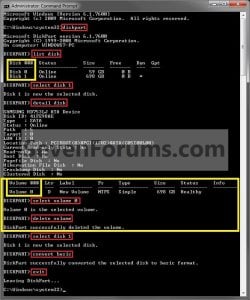
3. In the command prompt, type diskpart and press enter. (See screenshot above)

4. Type list disk and press enter.
NOTE: Make note of the disk number (ex: Disk 1) that you want to convert to a basic disk.

5. Type select disk # and press enter.
NOTE: Substitute # with the actual disk number that you want to convert to a dynamic disk. For example, select disk 1.

6. Type detail disk and press enter.
NOTE: This will give you a list of all the volume numbers on the selected disk number that you will need to delete in steps 7 and 8 below.A) If you do not have any volumes listed, then you can go to step 10.

7. Type select volume # and press enter.
NOTE: Substitute # with a volume number listed in step 6. For example, select volume 3.

8. Type delete volume and press enter.

9. Repeat steps 7 an 8 for each volume # listed in step 6 until you have deleted all volume #'s.

10. When done, type select disk # and press enter.
NOTE: You would use the same one from step 5 above. For example, select disk 1.

11. Type convert basic and press enter.

12. When done, type exit and press enter.

13. Close the command prompt.

14. You can now create partitions on the now basic disk if you like.
NOTE: Restart the computer if you did step 2 instead.

That's it,
Shawn


Attachments

Last edited:
Yeah, using any of the other methods would affect it since they would wipe the drive. You would indeed need to reinstall Windows afterwards if you went that route. :(
 

My Computer

Computer type
PC/Desktop
Computer Manufacturer/Model Number
Self built custom
OS
64-bit Windows 11 Pro for Workstations
CPU
Intel i7-8700K OC'd to 5 GHz
Motherboard
ASUS ROG Maximus XI Formula Z390
Memory
64 GB (4x16GB) G.SKILL TridentZ RGB DDR4 3600 MHz
Graphics Card(s)
ASUS ROG-STRIX-GTX1080TI-O11G-GAMING
Sound Card
Integrated
Monitor(s) Displays
2 x Samsung Odyssey G7 27"
Screen Resolution
2560x1440
Hard Drives
1TB Samsung 990 PRO M.2,
4TB Samsung 990 PRO PRO M.2,
TerraMaster F8 SSD Plus NAS
PSU
Seasonic Prime Titanium 850W
Case
Thermaltake Core P3
Cooling
Corsair Hydro H115i
Keyboard
Logitech wireless K800
Mouse
Logitech MX Master 4
Internet Speed
2 Gb/s Download and 100 Mb/s Upload
Antivirus
Malwarebyte Anti-Malware Premium
Browser
Google Chrome
Other Info
Logitech Z625 speaker system,
Logitech BRIO 4K Pro webcam,
HP Color LaserJet Pro MFP M477fdn,
APC SMART-UPS RT 1000 XL - SURT1000XLI,
Galaxy S23 Plus phone
Yeah, using any of the other methods would affect it since they would wipe the drive. You would indeed need to reinstall Windows afterwards if you went that route. :(

Okay. Thanks for you help. I'm gonna use VirtualBox instead :)
 

My Computer

Computer type
Laptop
Computer Manufacturer/Model Number
HP Pavilion dm4
OS
Windows 7 x64 (Home Premium)
CPU
Intel Corei5 2.4GHz (4 CPUs)
Memory
6144MB (6GB) RAM
Graphics Card(s)
1.6 GB Intel HD Graphic Family 3000
Sound Card
Realtek HD Audio
Monitor(s) Displays
VIA Chrome9 HC IGP Family S3 Graphics Co., Ltd.
Screen Resolution
1366x768
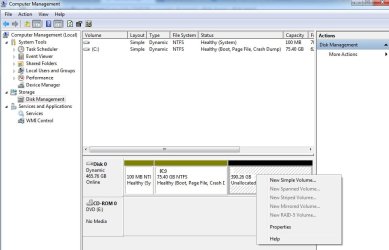
I am not able to convert drive dynamic to basic. My all drives have dynamic.
I have attached snapshot of problem.
Please give a solution.
Thanks.
 

Attachments

  • Untitled.jpg
    Untitled.jpg
    124.4 KB · Views: 270

My Computer

Computer type
Laptop
Computer Manufacturer/Model Number
Acer
OS
Windows 7 Ultimate x64
Hello Keshavdsd, and welcome to Seven Forums.

You could use step 2 in OPTION ONE on the first page of this tutorial thread to convert Disk 0 from dynamic to basic. :)
 

My Computer

Computer type
PC/Desktop
Computer Manufacturer/Model Number
Self built custom
OS
64-bit Windows 11 Pro for Workstations
CPU
Intel i7-8700K OC'd to 5 GHz
Motherboard
ASUS ROG Maximus XI Formula Z390
Memory
64 GB (4x16GB) G.SKILL TridentZ RGB DDR4 3600 MHz
Graphics Card(s)
ASUS ROG-STRIX-GTX1080TI-O11G-GAMING
Sound Card
Integrated
Monitor(s) Displays
2 x Samsung Odyssey G7 27"
Screen Resolution
2560x1440
Hard Drives
1TB Samsung 990 PRO M.2,
4TB Samsung 990 PRO PRO M.2,
TerraMaster F8 SSD Plus NAS
PSU
Seasonic Prime Titanium 850W
Case
Thermaltake Core P3
Cooling
Corsair Hydro H115i
Keyboard
Logitech wireless K800
Mouse
Logitech MX Master 4
Internet Speed
2 Gb/s Download and 100 Mb/s Upload
Antivirus
Malwarebyte Anti-Malware Premium
Browser
Google Chrome
Other Info
Logitech Z625 speaker system,
Logitech BRIO 4K Pro webcam,
HP Color LaserJet Pro MFP M477fdn,
APC SMART-UPS RT 1000 XL - SURT1000XLI,
Galaxy S23 Plus phone
HELP - Option 2

Hello,

I´ve just tried option 2. Deleted the dynamic volume, and then created a new simple volume, but didnt format (i don´t want to loose my data). Now I cant see my files.
What goes wrong?
If I format, I will lose my data. Please help.
 

My Computer

Computer type
PC/Desktop
OS
Windows 8.1
Hello Manimpz, and welcome to Seven Forums.

I guess, you didn't see this below OPTION TWO.

:warn:WARNING: Be sure to read the red WARNING box above. You will lose all data on the dynamic disk using this option.

When you created a new simple volume, it formatted the deleted volume, and now all the data is permanently gone. :(
 
Last edited:

My Computer

Computer type
PC/Desktop
Computer Manufacturer/Model Number
Self built custom
OS
64-bit Windows 11 Pro for Workstations
CPU
Intel i7-8700K OC'd to 5 GHz
Motherboard
ASUS ROG Maximus XI Formula Z390
Memory
64 GB (4x16GB) G.SKILL TridentZ RGB DDR4 3600 MHz
Graphics Card(s)
ASUS ROG-STRIX-GTX1080TI-O11G-GAMING
Sound Card
Integrated
Monitor(s) Displays
2 x Samsung Odyssey G7 27"
Screen Resolution
2560x1440
Hard Drives
1TB Samsung 990 PRO M.2,
4TB Samsung 990 PRO PRO M.2,
TerraMaster F8 SSD Plus NAS
PSU
Seasonic Prime Titanium 850W
Case
Thermaltake Core P3
Cooling
Corsair Hydro H115i
Keyboard
Logitech wireless K800
Mouse
Logitech MX Master 4
Internet Speed
2 Gb/s Download and 100 Mb/s Upload
Antivirus
Malwarebyte Anti-Malware Premium
Browser
Google Chrome
Other Info
Logitech Z625 speaker system,
Logitech BRIO 4K Pro webcam,
HP Color LaserJet Pro MFP M477fdn,
APC SMART-UPS RT 1000 XL - SURT1000XLI,
Galaxy S23 Plus phone
Hello

Hello Friend,

I didnt formatted the Data. Just mess with the partition thing.
Ive just deleted de dynamic volume, and created a new partion, but didnt formatted it.

I think there is still hope.

A program wich can try to read the HD withou looking for the partition. Can you recommend me one?
 

My Computer

Computer type
PC/Desktop
OS
Windows 8.1

My Computer

Computer type
PC/Desktop
Computer Manufacturer/Model Number
Self built custom
OS
64-bit Windows 11 Pro for Workstations
CPU
Intel i7-8700K OC'd to 5 GHz
Motherboard
ASUS ROG Maximus XI Formula Z390
Memory
64 GB (4x16GB) G.SKILL TridentZ RGB DDR4 3600 MHz
Graphics Card(s)
ASUS ROG-STRIX-GTX1080TI-O11G-GAMING
Sound Card
Integrated
Monitor(s) Displays
2 x Samsung Odyssey G7 27"
Screen Resolution
2560x1440
Hard Drives
1TB Samsung 990 PRO M.2,
4TB Samsung 990 PRO PRO M.2,
TerraMaster F8 SSD Plus NAS
PSU
Seasonic Prime Titanium 850W
Case
Thermaltake Core P3
Cooling
Corsair Hydro H115i
Keyboard
Logitech wireless K800
Mouse
Logitech MX Master 4
Internet Speed
2 Gb/s Download and 100 Mb/s Upload
Antivirus
Malwarebyte Anti-Malware Premium
Browser
Google Chrome
Other Info
Logitech Z625 speaker system,
Logitech BRIO 4K Pro webcam,
HP Color LaserJet Pro MFP M477fdn,
APC SMART-UPS RT 1000 XL - SURT1000XLI,
Galaxy S23 Plus phone
Please go ahead and post a screenshot showing this in Disk Management to help see what options you may have. :)

http://www.sevenforums.com/tutorials/274797-disk-management-post-screen-capture-image.html

Brink,

This can be usefull for someone else.

TestDisk - CGSecurity
Recover Lost or Deleted Partitions in Linux Using TestDisk | TechSource

Look at this:
https://www.youtube.com/watch?v=EncqYP1ijFg

Right now im scanning every cylinder in the harddisk. It´s very slow.

Best regards.
 

My Computer

Computer type
PC/Desktop
OS
Windows 8.1
I hope it's able to restore it for you.
 

My Computer

Computer type
PC/Desktop
Computer Manufacturer/Model Number
Self built custom
OS
64-bit Windows 11 Pro for Workstations
CPU
Intel i7-8700K OC'd to 5 GHz
Motherboard
ASUS ROG Maximus XI Formula Z390
Memory
64 GB (4x16GB) G.SKILL TridentZ RGB DDR4 3600 MHz
Graphics Card(s)
ASUS ROG-STRIX-GTX1080TI-O11G-GAMING
Sound Card
Integrated
Monitor(s) Displays
2 x Samsung Odyssey G7 27"
Screen Resolution
2560x1440
Hard Drives
1TB Samsung 990 PRO M.2,
4TB Samsung 990 PRO PRO M.2,
TerraMaster F8 SSD Plus NAS
PSU
Seasonic Prime Titanium 850W
Case
Thermaltake Core P3
Cooling
Corsair Hydro H115i
Keyboard
Logitech wireless K800
Mouse
Logitech MX Master 4
Internet Speed
2 Gb/s Download and 100 Mb/s Upload
Antivirus
Malwarebyte Anti-Malware Premium
Browser
Google Chrome
Other Info
Logitech Z625 speaker system,
Logitech BRIO 4K Pro webcam,
HP Color LaserJet Pro MFP M477fdn,
APC SMART-UPS RT 1000 XL - SURT1000XLI,
Galaxy S23 Plus phone
YES

I hope it's able to restore it for you.

Hello Brink,

This program is blessed! It did it, a recovered everything. Now I´ll be more caution.

Thanks for your attention

Greetings from Brazil!
 

My Computer

Computer type
PC/Desktop
OS
Windows 8.1
Great news. :party:
 

My Computer

Computer type
PC/Desktop
Computer Manufacturer/Model Number
Self built custom
OS
64-bit Windows 11 Pro for Workstations
CPU
Intel i7-8700K OC'd to 5 GHz
Motherboard
ASUS ROG Maximus XI Formula Z390
Memory
64 GB (4x16GB) G.SKILL TridentZ RGB DDR4 3600 MHz
Graphics Card(s)
ASUS ROG-STRIX-GTX1080TI-O11G-GAMING
Sound Card
Integrated
Monitor(s) Displays
2 x Samsung Odyssey G7 27"
Screen Resolution
2560x1440
Hard Drives
1TB Samsung 990 PRO M.2,
4TB Samsung 990 PRO PRO M.2,
TerraMaster F8 SSD Plus NAS
PSU
Seasonic Prime Titanium 850W
Case
Thermaltake Core P3
Cooling
Corsair Hydro H115i
Keyboard
Logitech wireless K800
Mouse
Logitech MX Master 4
Internet Speed
2 Gb/s Download and 100 Mb/s Upload
Antivirus
Malwarebyte Anti-Malware Premium
Browser
Google Chrome
Other Info
Logitech Z625 speaker system,
Logitech BRIO 4K Pro webcam,
HP Color LaserJet Pro MFP M477fdn,
APC SMART-UPS RT 1000 XL - SURT1000XLI,
Galaxy S23 Plus phone
Sir, I don't know who you are or what you do, but I have created an account on these forums for the sole purpose of saying: THANK YOU!:)

I had been searching through forums, websites, etc. for HOURS and attempting various methods of transforming my dynamic drive to a basic one. I found your tutorial and was immediately successful with the second method. Everything went as expected (as explained) and my drive is now a basic drive. Thank you.

I wish I had found it before I deleted a virtual volume where my computer's recovery information was located. Oh, well. If anything bad happens, I'll simply re-install Windows 7.

Now, I hope I can delete ALL three of the volumes in my drive (including the current volume where boot files etc. are located) in order to do a FRESH/CLEAN install of Windows 7 and have my entire hard drive available to me.

I'll come back to let you know if I was successful in doing so.
 

My Computer

Computer type
PC/Desktop
Computer Manufacturer/Model Number
Compaq
OS
Windows 7 Ultimate edition x86
CPU
DualCore Intel Pentium E2140, 1600 MHz (8 x 200)
Motherboard
ECS 945GCT-HM (Livermore8)
Memory
1015 MB
Graphics Card(s)
n/a
Hard Drives
Drive #1 - WDC WD1600AAJS-22PSA0 (149 GB)
Antivirus
None (No Windows Firewall)
Browser
Chrome
Thanks for this.

Hey, Brink (or another Admin) - please edit the instructions for Option One, step 3G

“G) Click on the blue Apply check mark toolbar button at the top (right) left corner, and click on Yes. (see screenshot below)”
 

My Computer

Computer type
PC/Desktop
Computer Manufacturer/Model Number
Custom
OS
Microsoft Windows 7 Home Premium 64-bit 7601 Multiprocessor Free Service Pack 1
CPU
Intel(R) Core(TM)2 Duo CPU E8400 @ 3.00GHz Wolfdale
Motherboard
Gigabyte Technology Co., Ltd. EP45-UD3R
Memory
Patriot Viper 4GB (2 x 2GB) 240-Pin DDR2 SDRAM DDR2
Graphics Card(s)
ATI Radeon HD 4600 Series (4650) +ARCTIC Accelero L2 Plus VG
Sound Card
(1) Realtek High Definition Audio (2) Unimodem Full-Duplex
Monitor(s) Displays
Dell 1908FP & P2312H - Digital
Screen Resolution
1280 x 1024 x 32 bits (4294967296 colors) @ 60 Hz
Hard Drives
(1) INTEL SSDSC2CW120A3 ATA Device (2) SanDisk SDSSDA120G ATA Device (3) ST500DM002-1BD142 ATA Device (4) WDC WD2500AAKS-22B3A0 ATA Device (5) WDC WD5000AAKS-00V1A0 ATA Device (6) Brother MFC-J875DW USB Device
PSU
Corsair VX550W
Case
Antec 300 ATX
Cooling
Xigmatek Nepartak S983 H.D.T. with 92mm fan, Yate Loon 140mm
Keyboard
Dell Wired USB Keyboard Standard 104-key Model SK-8115 E1456
Mouse
Logitech 3-Button USB Optical Wheel Mouse
Internet Speed
Down 7.7 Mbps Up 1.93 Mbps
Antivirus
MS Security Essentials
Browser
Firefox 54.0.1
Other Info
3 additional 120mm case fans SpeedFan shows following temps: #1 43C, #2-36C, #3-(-2C)?, GPU-42C Rocketfish - 2-Port USB 3.0 PCI Express Interface Card Multi Model: RF-P2USB3 Also, LSI Soft Modem
Thank you rudhawk. Corrected. :)
 

My Computer

Computer type
PC/Desktop
Computer Manufacturer/Model Number
Self built custom
OS
64-bit Windows 11 Pro for Workstations
CPU
Intel i7-8700K OC'd to 5 GHz
Motherboard
ASUS ROG Maximus XI Formula Z390
Memory
64 GB (4x16GB) G.SKILL TridentZ RGB DDR4 3600 MHz
Graphics Card(s)
ASUS ROG-STRIX-GTX1080TI-O11G-GAMING
Sound Card
Integrated
Monitor(s) Displays
2 x Samsung Odyssey G7 27"
Screen Resolution
2560x1440
Hard Drives
1TB Samsung 990 PRO M.2,
4TB Samsung 990 PRO PRO M.2,
TerraMaster F8 SSD Plus NAS
PSU
Seasonic Prime Titanium 850W
Case
Thermaltake Core P3
Cooling
Corsair Hydro H115i
Keyboard
Logitech wireless K800
Mouse
Logitech MX Master 4
Internet Speed
2 Gb/s Download and 100 Mb/s Upload
Antivirus
Malwarebyte Anti-Malware Premium
Browser
Google Chrome
Other Info
Logitech Z625 speaker system,
Logitech BRIO 4K Pro webcam,
HP Color LaserJet Pro MFP M477fdn,
APC SMART-UPS RT 1000 XL - SURT1000XLI,
Galaxy S23 Plus phone

My Computers

System One System Two

  • Computer type
    PC/Desktop
    Computer Manufacturer/Model Number
    ALWAYS UNDER CONSTRUCTION
    OS
    Windows 11 Pro
    CPU
    Ryzen 9 5900X
    Motherboard
    Asus X570 Crosshair Viii Hero
    Memory
    32GB G Skill DDR4-3600
    Graphics Card(s)
    EVGA RTX 3080 FTW 3 Ultra
    Sound Card
    On Board/Sennheiser PC37X Headset
    Monitor(s) Displays
    3 X Asus 27"
    Screen Resolution
    2560x1440
    Hard Drives
    2 X 1 TB NVME drives
    PSU
    EVGA 850
    Case
    Phanteks Eclipse P400A
    Cooling
    EVGA 280 AIO
    Keyboard
    Logitech G510s/ Logitech G13
    Mouse
    Logitech G502
    Internet Speed
    24/1
    Antivirus
    ESET/MBAM Pro/SAS Pro
    Browser
    Chrome/ Firefox/ Edge
  • Computer type
    Laptop
    System Manufacturer/Model Number
    Dell 16 Plus
    OS
    Windows 11 Pro
    CPU
    Intel Ultra 9 288V
    Memory
    32 GB LPDDR5X 8533
    Monitor(s) Displays
    16" Mini-LED HDR600 Touch 90 Hz
    Screen Resolution
    2560X1600
    Hard Drives
    1 TB NVME
Brink, contrary to the big red warning box, Option 2 is also data-destructive.
 

My Computer

Computer type
PC/Desktop
Computer Manufacturer/Model Number
dell precision t3400 tower
OS
Linux Lite 3.2 x64; Windows 7, 8.1
CPU
Core2Duo 2.4
Memory
6GB ddr2
Graphics Card(s)
nVidia
Hard Drives
120gb SSD, 1TB HD, 2TB HD; sata II
Internet Speed
12/2
Browser
Vivaldi, Slimjet (Chromium) x64
Back
Top