Convert a Dynamic Disk to a Basic Disk

How to Convert a Dynamic Disk to a Basic Disk

   Information
A disk is a separate physical hard drive. This will show you how to convert a dynamic, also known as "software RAID", disk to a basic disk in Windows Disk Manager or in a command prompt. By default Windows uses Basic disks.

Basic and dynamic disks both support using MBR and GPT partition (volume) styles.

For more detailed information on basic and dynamic disks, see: Basic and Dynamic Disks (Windows)


   Note
Differences Between Basic and Dynamic Disks:
  • Basic disks are supported (readable) by all Windows operating systems since MS-DOS.
    • Dynamic disks are only supported (readable) by Windows 2000, XP Professional, Windows Server 2003, Vista Ultimate, Vista Enterprise, Windows 7, and Windows Server 2008.
  • Basic disks can have up to 128 GPT primary partitions, or 4 MBR primary partitions or 3 MBR primary partitions and 1 extended partition with up to 128 logical volumes in the extended partition.
    • Dynamic disks can have up to 2000 dynamic volumes that function like a primary partition used in basic disks.
  • Basic disks cannot share or split data with other primary or logical partitions, or basic disks. Each partitiion on a basic disk is treated as if it was a separate hard disk on the basic disk.
    • Separate dynamic disks can be combined into a single dynamic volume (spanning), split data among several dynamic disks (striping) for increased performance, or duplicate data among several dynamic disks (mirroring) for increased reliability.
  • Hard disks are basic disks by default, including removable disks and disks on a laptop (notepad).
    • Removable disks cannot be converted to a dynamic disk.
   Warning
VERY IMPORTANT, PLEASE READ THIS FIRST.
  • You must be logged in as an administrator to do this inside Windows.
  • Before you convert a dynamic disk to a basic disk, be sure to backup anything that you do not want to lose on that dynamic disk. Converting the dynamic disk back to a basic disk using either OPTION 3-5 below requires that all dynamic volumes are deleted on the disk first.
  • See OPTION ONE or OPTION TWO below if you wanted to be able to convert a dynamic disk back to a basic disk without losing the data on it.
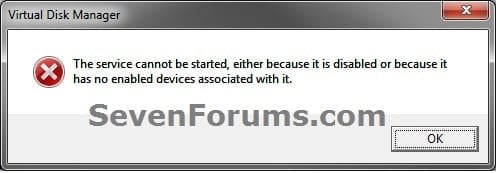
  • If you disable the Disk Defragmenter service, then you will get the error below when you try to do anything in Disk Management. If you get this error, then make sure that the Disk Defragmenter service is set to only Manual.
Error.jpg


OPTION ONE

Convert Dynamic Disk to Basic Disk using "Partition Wizard 4.2 Free"


:warn:WARNING: Even though you will not lose the data on the dynamic disk when you use this option to convert the dynamic disk back to a basic disk, be sure to backup any data on the dynamic disk that you wish to keep first just to be safe in case something happens. Say a power outage while in the middle of converting the disk.1. Do step 2 or 3 below depending on what you are able to do.

2. To Use Partition Wizard 4.2 Free at Boot
NOTE: This option can be helpful if you are unable to startup Windows if your Windows disk was made dynamic.A) Download "pwhe42.iso" file here to your desktop.
NOTE: It will take a moment for the download option to automatically appear at the link.

B) Create either a bootable CD/DVD or USB with the pwhe42.iso file.
NOTE: You could also use a free program like ImgBurn at 4x burn speed to create a bootable CD/DVD with.

C) Boot from the the CD/DVD or USB.

D) Convert the dynamic disk to basic like starting at step 3E below.

3. To Use Partition Wizard 4.2 Free in WindowsA) Download the "Partition_Wizard_4.2_free.zip" file here to your desktop.

B) Open the ZIP file, and extract (drag and drop) the PW folder to your desktop.

C) Open the PW folder, and run the PWIZ.exe file.

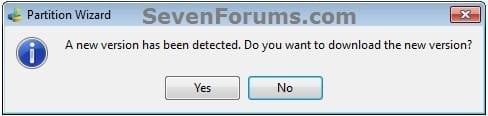
D) Click on No for the new version avialable update. (see screenshot below)PW-1.jpg

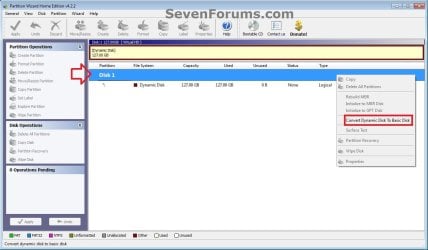
E) Right click on the Disk # (ex: Disk 1) of the dynamic disk you want to convert, then click on Convert Dynamic Disk to Basic Disk. (see screenshot below)PW-2.jpg

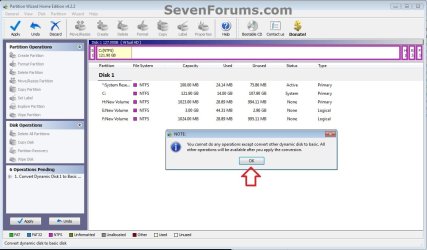
F) Click on OK. (see screenshot below)

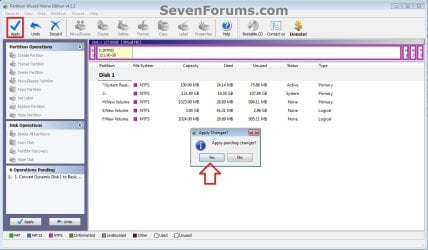
G) Click on the blue Apply check mark toolbar button at the top left corner, and click on Yes. (see screenshot below)PW-4.jpg

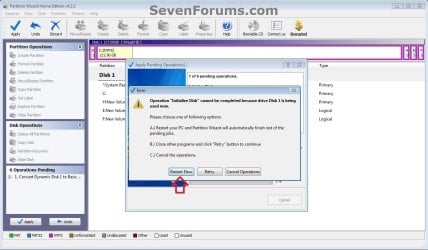
H) If prompted to restart, click on Restart Now. (see screenshot below)
NOTE: This is normal if the dynamic disk you wanted to convert to basic is the disk that the currently running Windows is installed on.PW-5.jpg


4. When finished, the selected dynamic disc will now be converted to a basic disk without losing any data on it.


OPTION TWO

To Convert Dynamic Disk to Basic Disk using Disk Management


:warn:WARNING: Be sure to read the red WARNING box above. You will lose all data on the dynamic disk using this option.1. Open the Control Panel (icons view), and click on the Administrative Tools icon, then close the Control Panel window.

2. Click on Computer Management in Administrative Tools, then close the Administrative Tools window.

3. If prompted by UAC, click on Yes.

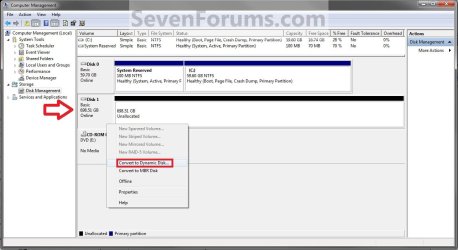
4. In the left pane under Storage, click on Disk Management. (See screenshot below)Step1.jpg

5. In the dynamic disk (ex: Disk 1) that you want to convert to a basic disk, right click on each volume on the disk and click on Delete Volume until the whole disk is unallocated space. (See screenshot above)
NOTE: If prompted, click on Yes to continue deleting the volume(s).

6. If the disk (ex: Disk 1) that you want to convert to a basic disk is still displayed has being Dynamic (left side under Disk #), then right click on the disk (ex: Disk 1) and click on Convert to Basic Disk if available. (See screenshot below)Step2.jpg

7. You can also confirm that the disk is a basic disk if it's displayed has being Basic (left side under Disk #), or if you right click on the disk # and it has Convert to Dynamic Disk instead now. (See screenshot below)Step3.jpg

8. You can now create partitions on the now basic disk if you like.

9. When done, close Disk Management.


OPTION THREE

To Convert Dynamic Disk to Basic Disk using "Clean" Command


:warn:WARNING: Be sure to read the red WARNING box above. You will lose all data on the dynamic disk using this option.1. Use the Clean command in the tutorial below on the dynamic disk that you want to wipe out and convert to be a basic disk.
NOTE: You could also use the Clean all command for this as well, but it will take much longer to do since it also does a secure erase.How to Clean or Clean All a Disk with the Diskpart Command

2. You can now create partitions on the now basic disk if you like.


OPTION FOUR

To Convert Dynamic Disk to Basic Disk using "Delete Volume" Command


:warn:WARNING: Be sure to read the red WARNING box above. You will lose all data on the dynamic disk using this option.1. Open an elevated command prompt, and go to step 3 below.

OR

2. Open a command prompt at boot, and go to step 3 below.Command_Basic.jpg

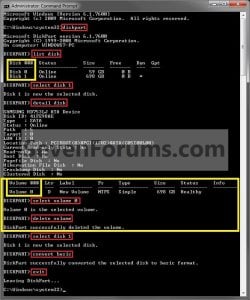
3. In the command prompt, type diskpart and press enter. (See screenshot above)

4. Type list disk and press enter.
NOTE: Make note of the disk number (ex: Disk 1) that you want to convert to a basic disk.

5. Type select disk # and press enter.
NOTE: Substitute # with the actual disk number that you want to convert to a dynamic disk. For example, select disk 1.

6. Type detail disk and press enter.
NOTE: This will give you a list of all the volume numbers on the selected disk number that you will need to delete in steps 7 and 8 below.A) If you do not have any volumes listed, then you can go to step 10.

7. Type select volume # and press enter.
NOTE: Substitute # with a volume number listed in step 6. For example, select volume 3.

8. Type delete volume and press enter.

9. Repeat steps 7 an 8 for each volume # listed in step 6 until you have deleted all volume #'s.

10. When done, type select disk # and press enter.
NOTE: You would use the same one from step 5 above. For example, select disk 1.

11. Type convert basic and press enter.

12. When done, type exit and press enter.

13. Close the command prompt.

14. You can now create partitions on the now basic disk if you like.
NOTE: Restart the computer if you did step 2 instead.

That's it,
Shawn


Attachments

Last edited:
Your post indicates that MBR is still in the system partition. This means that I need to be careful when I make the image backup; not to make the partition C as active and not to replace the MBR when restore the image
Yes, this is important to remember. And whether the little partition is called system partition or not, it is the active partition that contains the boot record and you must NOT instruct the image restore to replace the MBR.
 

My Computer

Computer Manufacturer/Model Number
HP, Dell, Gateway, Toshiba - 4 laptops and 2 desktops
OS
Vista, Windows7, Mint Mate, Zorin, Windows 8
CPU
from 1.6GHz Duo to i7
Monitor(s) Displays
2x HP w2207
Hard Drives
5x HDD, 7x SSD, 12x Externals
Keyboard
with trackball - no mices
Mouse
Trackball mice
Internet Speed
DSL 6000
Need some help with an external dynamic disk

Hi guys,

I have read the post and it looks to have many answers, yet I seemed to not find what I was looking for!

I have an dynamic hard drive that I used to have in a desktop computer. The computer crashed (not due to the hard drive) and I want to be able to get access to the data on the dynamic disk.

I got an external hard drive case for the hard drive, but I run into the classic problem of not being able to access it in Windows 7. Any advice on how I can accomplish this?

I just need to be able to get the data of the drive - I can copy all the files unto another hard drive to do that.

Any advice or help would be deeply appreciated!

Thank you!
 

My Computer

OS
Windows 7 Ultimate x64
Hi guys,

I have read the post and it looks to have many answers, yet I seemed to not find what I was looking for!

I have an dynamic hard drive that I used to have in a desktop computer. The computer crashed (not due to the hard drive) and I want to be able to get access to the data on the dynamic disk.

I got an external hard drive case for the hard drive, but I run into the classic problem of not being able to access it in Windows 7. Any advice on how I can accomplish this?

I just need to be able to get the data of the drive - I can copy all the files unto another hard drive to do that.

Any advice or help would be deeply appreciated!

Thank you!
Hello,

You will need to use a third-party tool, such as Partition Wizard 4.2.

4.2 is no longer available, and the updated version removes the ability for free users. Here is a copy of 4.2 though:
 
Last edited by a moderator:

My Computer

Computer Manufacturer/Model Number
Custom
OS
Windows 7 Professional x64
CPU
Intel i7 2600K OC'd @ 4620 MHz
Motherboard
Asus P8Z68-V Pro
Memory
16GB GSkill Sniper 2133 Mhz (4x4GB)
Graphics Card(s)
EVGA GeForce GTX 480 SuperClocked+
Sound Card
Realtek High Definition Audio
Monitor(s) Displays
2x Acer S273HLbmii 27"
Screen Resolution
2 x 1920x1080
Hard Drives
64GB Crucial M4 SSD

Storage: Hitachi 1TB 5400RPM, Samsung 1.5TB 5400RPM
PSU
Corsair HW Series 750w (modular)
Case
Cooler Master HAF 932 Advanced Blue Edition
Cooling
CM Hyper 212+ CPU cooler, 3x 230mm + 1x 140mm case fans
Keyboard
Logitech MK320 (wireless)
Mouse
Logitech MK320 (wireless)
Internet Speed
30 Mb/s : 2 Mb/s
Thank you for you help and sorry about the delay in my response!

I worked great and I was able to recover the whole disk :D

Cheers,
Jonas
 

My Computer

OS
Windows 7 Ultimate x64
Thanks for the report.

Glad it worked so well!
 

My Computer

Computer Manufacturer/Model Number
Custom
OS
Windows 7 Professional x64
CPU
Intel i7 2600K OC'd @ 4620 MHz
Motherboard
Asus P8Z68-V Pro
Memory
16GB GSkill Sniper 2133 Mhz (4x4GB)
Graphics Card(s)
EVGA GeForce GTX 480 SuperClocked+
Sound Card
Realtek High Definition Audio
Monitor(s) Displays
2x Acer S273HLbmii 27"
Screen Resolution
2 x 1920x1080
Hard Drives
64GB Crucial M4 SSD

Storage: Hitachi 1TB 5400RPM, Samsung 1.5TB 5400RPM
PSU
Corsair HW Series 750w (modular)
Case
Cooler Master HAF 932 Advanced Blue Edition
Cooling
CM Hyper 212+ CPU cooler, 3x 230mm + 1x 140mm case fans
Keyboard
Logitech MK320 (wireless)
Mouse
Logitech MK320 (wireless)
Internet Speed
30 Mb/s : 2 Mb/s
Possible alternatives which retain user data

As for any method:
Backup personal files/folders & Image all partitions
These Two methods use Partition Wizard 5.2 and don't rely on earlier versions.
Method 1 - Change Partition Type ID
In the MBR (first 512 bytes of the HDD) towards the end of the partition table are 4 bytes which define the "Partition Type ID"
In Hex
0x07 - defines a basic partition (primary/logical)
0x42 - defines a dynamic extended partition
Reference
Here is the MBR for my PC
mbr2.JPG
The 4 partition type IDs have been highlighted.
0x27 - Primary hidden partition (my factory recovery)
0x07 - 2nd primary partition (100MB system Reserved)
0x07 - 3rd primary partition (Boot, OS)
0x07 - 4th primary partition (Data)

Step 1 - Open a Hex Editor (such as HxD)
Step 2 - Select the partition entries corresponding to the type ID showing 0x42
Step 3 - Change 0x42 to 0x07.
Step 4 - Repeat for each partition up to 4.
Step 5 - Save changes in hex editor
Step 6 - Open Partition Wizard and observe partition structure
step 7 - If partitions appear deleted, use the Partition Recovery Wizard to recover deleted partitions.
step 8 - Run a "Check File System" on each partition.
step 9 - Close Partition Wizard and reboot PC.

Method 2 - Delete and Recover
Step 1 - Open Partition Wizard
Step 2 - Delete all Dynamic partitions to unallocated
Step 3 - Use the Partition Recovery Wizard to recover deleted partitions
Step 4 - Apply changes
Step 5 - Convert partitions to primary as required & apply changes
Step 6 - Close Partition Wizard and reboot PC

The general approaches have been discussed at this Reference 2
 
Last edited:

My Computer

Computer type
PC/Desktop
Computer Manufacturer/Model Number
Own build
OS
Windows 7x64 Home Premium SP1
CPU
Intel i7 2600k
Motherboard
ASUS P8Z68 Deluxe
Memory
G.Skill Ripjaws (DDR3-1600) 2x4GB
Graphics Card(s)
Nvidia GeForce GTS 450; Intel HD Graphics 3000(GT2+)
Monitor(s) Displays
Dell Ultrasharp IPS panel U2311H, Samsung SyncMaster P2350
Screen Resolution
1920x1080
Hard Drives
Samsung 850 Pro SSD 256GB, Samsung SSD 840 120GB, Seagates 1TB Barracuda ST31000528AS x2
PSU
Seasonic M12II 520W
Case
Lian Li Lancool PC-K60
Cooling
Case: 1x120mm, 3x140mm CPU: Hyper 212+
Keyboard
Logitech MK520 (wireless)
Mouse
Logitech MK520
Internet Speed
6-7 Mbps
Antivirus
Norton Security Premium, Malwarebytes on 2 (MSE on 3rd PC)
Browser
FireFox
Other Info
Audio: Logitech Z523 2.1
Thank you Michael. I believe I will only add Method 2 later tonight since it would be the easiest way. :)
 

My Computer

Computer type
PC/Desktop
Computer Manufacturer/Model Number
Self built custom
OS
64-bit Windows 11 Pro for Workstations
CPU
Intel i7-8700K OC'd to 5 GHz
Motherboard
ASUS ROG Maximus XI Formula Z390
Memory
64 GB (4x16GB) G.SKILL TridentZ RGB DDR4 3600 MHz
Graphics Card(s)
ASUS ROG-STRIX-GTX1080TI-O11G-GAMING
Sound Card
Integrated
Monitor(s) Displays
2 x Samsung Odyssey G7 27"
Screen Resolution
2560x1440
Hard Drives
1TB Samsung 990 PRO M.2,
4TB Samsung 990 PRO PRO M.2,
TerraMaster F8 SSD Plus NAS
PSU
Seasonic Prime Titanium 850W
Case
Thermaltake Core P3
Cooling
Corsair Hydro H115i
Keyboard
Logitech wireless K800
Mouse
Logitech MX Master 4
Internet Speed
2 Gb/s Download and 100 Mb/s Upload
Antivirus
Malwarebyte Anti-Malware Premium
Browser
Google Chrome
Other Info
Logitech Z625 speaker system,
Logitech BRIO 4K Pro webcam,
HP Color LaserJet Pro MFP M477fdn,
APC SMART-UPS RT 1000 XL - SURT1000XLI,
Galaxy S23 Plus phone
All done Michael. I have added this as OPTION THREE in the tutorial to convert a dynamic disk to a primary disk without losing the data on it. :party:
 

My Computer

Computer type
PC/Desktop
Computer Manufacturer/Model Number
Self built custom
OS
64-bit Windows 11 Pro for Workstations
CPU
Intel i7-8700K OC'd to 5 GHz
Motherboard
ASUS ROG Maximus XI Formula Z390
Memory
64 GB (4x16GB) G.SKILL TridentZ RGB DDR4 3600 MHz
Graphics Card(s)
ASUS ROG-STRIX-GTX1080TI-O11G-GAMING
Sound Card
Integrated
Monitor(s) Displays
2 x Samsung Odyssey G7 27"
Screen Resolution
2560x1440
Hard Drives
1TB Samsung 990 PRO M.2,
4TB Samsung 990 PRO PRO M.2,
TerraMaster F8 SSD Plus NAS
PSU
Seasonic Prime Titanium 850W
Case
Thermaltake Core P3
Cooling
Corsair Hydro H115i
Keyboard
Logitech wireless K800
Mouse
Logitech MX Master 4
Internet Speed
2 Gb/s Download and 100 Mb/s Upload
Antivirus
Malwarebyte Anti-Malware Premium
Browser
Google Chrome
Other Info
Logitech Z625 speaker system,
Logitech BRIO 4K Pro webcam,
HP Color LaserJet Pro MFP M477fdn,
APC SMART-UPS RT 1000 XL - SURT1000XLI,
Galaxy S23 Plus phone
It looks good Shawn. You added very detailed detailed easy to follow set of instructions.
 

My Computer

Computer type
PC/Desktop
Computer Manufacturer/Model Number
Own build
OS
Windows 7x64 Home Premium SP1
CPU
Intel i7 2600k
Motherboard
ASUS P8Z68 Deluxe
Memory
G.Skill Ripjaws (DDR3-1600) 2x4GB
Graphics Card(s)
Nvidia GeForce GTS 450; Intel HD Graphics 3000(GT2+)
Monitor(s) Displays
Dell Ultrasharp IPS panel U2311H, Samsung SyncMaster P2350
Screen Resolution
1920x1080
Hard Drives
Samsung 850 Pro SSD 256GB, Samsung SSD 840 120GB, Seagates 1TB Barracuda ST31000528AS x2
PSU
Seasonic M12II 520W
Case
Lian Li Lancool PC-K60
Cooling
Case: 1x120mm, 3x140mm CPU: Hyper 212+
Keyboard
Logitech MK520 (wireless)
Mouse
Logitech MK520
Internet Speed
6-7 Mbps
Antivirus
Norton Security Premium, Malwarebytes on 2 (MSE on 3rd PC)
Browser
FireFox
Other Info
Audio: Logitech Z523 2.1
Thank you. I do try to be thorough. ;)
 

My Computer

Computer type
PC/Desktop
Computer Manufacturer/Model Number
Self built custom
OS
64-bit Windows 11 Pro for Workstations
CPU
Intel i7-8700K OC'd to 5 GHz
Motherboard
ASUS ROG Maximus XI Formula Z390
Memory
64 GB (4x16GB) G.SKILL TridentZ RGB DDR4 3600 MHz
Graphics Card(s)
ASUS ROG-STRIX-GTX1080TI-O11G-GAMING
Sound Card
Integrated
Monitor(s) Displays
2 x Samsung Odyssey G7 27"
Screen Resolution
2560x1440
Hard Drives
1TB Samsung 990 PRO M.2,
4TB Samsung 990 PRO PRO M.2,
TerraMaster F8 SSD Plus NAS
PSU
Seasonic Prime Titanium 850W
Case
Thermaltake Core P3
Cooling
Corsair Hydro H115i
Keyboard
Logitech wireless K800
Mouse
Logitech MX Master 4
Internet Speed
2 Gb/s Download and 100 Mb/s Upload
Antivirus
Malwarebyte Anti-Malware Premium
Browser
Google Chrome
Other Info
Logitech Z625 speaker system,
Logitech BRIO 4K Pro webcam,
HP Color LaserJet Pro MFP M477fdn,
APC SMART-UPS RT 1000 XL - SURT1000XLI,
Galaxy S23 Plus phone
I tried doing this using the 4th option in the first post. I deleted the partition on the 2d dynamic disk successfully. Windows Disk Management shows the disk as unallocated. When I tried running the Wizard in the Partition Recovery Wizard in Partition Wizard Home Edition, the 2d drive shows up as Dynamic, not Unallocated. I am guessing that's why I cannot run the wizard on this disk. When I try, the option to click "next" is grayed out to initiate the wizard.

Am I right that the reason the Wizard won't run is because PW Home Edition doesn't think this 2d disk is unallocated? Anyway to force this through?

If not, how could it get this done manually. Thoughts?
 

My Computer

OS
XP Pro
You need the PW Pro version , or similar from Paragon , or get the earlier free PW4.2 from somewhere.

Otherwise, you can use a hex editor - not a concern if you have no data on there.
 

My Computers

System One System Two

  • Computer type
    PC/Desktop
    OS
    7 X64
    CPU
    i5 8400
    Motherboard
    gigabyte b365m ds3h
    Memory
    2x8gb 3200mhz
    Hard Drives
    various
    PSU
    pure power 11 400w cm
    Case
    Coolermaster
    Cooling
    cryorig m9i
  • Computer type
    PC/Desktop
    OS
    7x64
    CPU
    g5400
    Motherboard
    ga b365m ds3h
    Memory
    8gb ddr4 2400
    PSU
    xfx pro 450w

My Computer

Computer Manufacturer/Model Number
HP, Dell, Gateway, Toshiba - 4 laptops and 2 desktops
OS
Vista, Windows7, Mint Mate, Zorin, Windows 8
CPU
from 1.6GHz Duo to i7
Monitor(s) Displays
2x HP w2207
Hard Drives
5x HDD, 7x SSD, 12x Externals
Keyboard
with trackball - no mices
Mouse
Trackball mice
Internet Speed
DSL 6000
That's a demo version - dunno if it will do the job.

Burn this to cd as an image , boot it - that should do the job
 

My Computers

System One System Two

  • Computer type
    PC/Desktop
    OS
    7 X64
    CPU
    i5 8400
    Motherboard
    gigabyte b365m ds3h
    Memory
    2x8gb 3200mhz
    Hard Drives
    various
    PSU
    pure power 11 400w cm
    Case
    Coolermaster
    Cooling
    cryorig m9i
  • Computer type
    PC/Desktop
    OS
    7x64
    CPU
    g5400
    Motherboard
    ga b365m ds3h
    Memory
    8gb ddr4 2400
    PSU
    xfx pro 450w
I have 4.2. But when I bring it up it shows the deleted dynamic disk as still being dynamic, not unallocated. I can't run any options on the drive. Every option is grayed out.

When I try to run "convert dynamic" using 4.2, it fails. Again, it's as though Windows marked the drive as "unallocated" but 4.2 shows it still formated as "dynamic".

Okay. Figured it out using TestDisk. I ran the program, did a quick search on the deleted partition. TestDisk analyzed correctly and reconfigured to a primary (non-bootable) partition. Wrote the partition info to the drive, rebooted, and everything is back. And the system is converted from dynamic.

Thanks for the effort.
 
Last edited by a moderator:

My Computer

OS
XP Pro
glad to hear it.
 

My Computers

System One System Two

  • Computer type
    PC/Desktop
    OS
    7 X64
    CPU
    i5 8400
    Motherboard
    gigabyte b365m ds3h
    Memory
    2x8gb 3200mhz
    Hard Drives
    various
    PSU
    pure power 11 400w cm
    Case
    Coolermaster
    Cooling
    cryorig m9i
  • Computer type
    PC/Desktop
    OS
    7x64
    CPU
    g5400
    Motherboard
    ga b365m ds3h
    Memory
    8gb ddr4 2400
    PSU
    xfx pro 450w
Hello to all and thanks for this helpfull article that gave me the info needed to convert my disk back to basic.

My opinion to this article is, that the proposed methodes are quite complex, I found an easier way to get this done.

First, get yourself a linux live CD (like Ubuntu, now version 11.0.4). The 32 bit will do. Burn the ISO on a CD.
Start the CD and open a terminal (menu accessoires) and change it to root access by typing:
>>"sudo passwd root" (and type a new root passwd),
>>"su" (in the same window to activate it in root "superuser" mode)

Next, do a
# sfdisk -l
command, and see witch device (most likely /dev/sda) is holding the dynamic disk. You will get a list like this:

Device Boot Start End Blocks Id System
/dev/sda1 * 1 80 642568+ 42 SFS
/dev/sda2 81 160 642600 42 SFS
/dev/sda3 161 243 666697+ 42 SFS
/dev/sda4 161 200 321268+ 42 SFS

You should not have more than 4 primary partitions (this is the limit on a basic disk). You will need to backup and remove them if nescessary.

sda is the first disk, sdb would be the second and so on.
The ID Parameter shows the formatting type of each partitions.

You can get a list of ID types with the command

# sfdisk -T

Change each Partition type with command:
# sfdisk --change-id /dev/sda 1 7 (partition = 1, type = 07 for NTFS)
# sfdisk --change-id /dev/sda 2 7
# sfdisk --change-id /dev/sda 3 7
# sfdisk --change-id /dev/sda 4 b (partition = 4, type = 0b for FAT32)

Last line because I had a FAT32 partition on my disk.

again, type
# sfdisk -l

Device Boot Start End Blocks Id System
/dev/sda1 * 1 80 642568+ 07 HTFS/NTFS
/dev/sda2 81 160 642600 07 HTFS/NTFS
/dev/sda3 161 243 666697+ 07 HTFS/NTFS
/dev/sda4 161 200 321268+ 0b W95/FAT32


Well. that's all.
Reboot the PC, start windows and check the Disk Configuration to see it really changed to basic without deleting and restoring partitions and data.

In the terminal window, you can get some help with the command
# man sfdisk

:cool: Hope this is simple enough
 

My Computer

Computer Manufacturer/Model Number
HP
OS
Windows 7 Home Premium 64
CPU
icore 5
Motherboard
HP
Memory
4G
Graphics Card(s)
HP
Sound Card
HP
Monitor(s) Displays
HP
Hard Drives
500 GB
thank you to the maker of the guide!!
 

My Computer

Computer Manufacturer/Model Number
Self Built
OS
Windows 7 Ultimate (32bit)
CPU
Intel Core 2 Duo E6850 (3.0ghz)
Motherboard
Intel DQ35MP
Memory
4.0gb Kingston DDR2
Graphics Card(s)
ATI Radeon HD 3800 Series
Sound Card
AMD High Definition Audio Device ; Microsoft High Definition
Monitor(s) Displays
AOC 193FW
Screen Resolution
1440 x 900 x 32 bits (4294967296 colors) @ 59 Hz
Hard Drives
Western Digital 300gb ; Western Digital 500gb
PSU
Power Cooler 550 watts SLI
Case
Not Known
Cooling
Simple Cooling
Keyboard
A4Tech Generic
Mouse
A4Tech Generic
Internet Speed
768kbps
You're most welcome Helpmypc, and welcome to Seven Forums. :)
 

My Computer

Computer type
PC/Desktop
Computer Manufacturer/Model Number
Self built custom
OS
64-bit Windows 11 Pro for Workstations
CPU
Intel i7-8700K OC'd to 5 GHz
Motherboard
ASUS ROG Maximus XI Formula Z390
Memory
64 GB (4x16GB) G.SKILL TridentZ RGB DDR4 3600 MHz
Graphics Card(s)
ASUS ROG-STRIX-GTX1080TI-O11G-GAMING
Sound Card
Integrated
Monitor(s) Displays
2 x Samsung Odyssey G7 27"
Screen Resolution
2560x1440
Hard Drives
1TB Samsung 990 PRO M.2,
4TB Samsung 990 PRO PRO M.2,
TerraMaster F8 SSD Plus NAS
PSU
Seasonic Prime Titanium 850W
Case
Thermaltake Core P3
Cooling
Corsair Hydro H115i
Keyboard
Logitech wireless K800
Mouse
Logitech MX Master 4
Internet Speed
2 Gb/s Download and 100 Mb/s Upload
Antivirus
Malwarebyte Anti-Malware Premium
Browser
Google Chrome
Other Info
Logitech Z625 speaker system,
Logitech BRIO 4K Pro webcam,
HP Color LaserJet Pro MFP M477fdn,
APC SMART-UPS RT 1000 XL - SURT1000XLI,
Galaxy S23 Plus phone
@19cool53
This is really doing what a hex editor is doing just via the linux OS.
But a useful alternative for linux fans.
 

My Computer

Computer type
PC/Desktop
Computer Manufacturer/Model Number
Own build
OS
Windows 7x64 Home Premium SP1
CPU
Intel i7 2600k
Motherboard
ASUS P8Z68 Deluxe
Memory
G.Skill Ripjaws (DDR3-1600) 2x4GB
Graphics Card(s)
Nvidia GeForce GTS 450; Intel HD Graphics 3000(GT2+)
Monitor(s) Displays
Dell Ultrasharp IPS panel U2311H, Samsung SyncMaster P2350
Screen Resolution
1920x1080
Hard Drives
Samsung 850 Pro SSD 256GB, Samsung SSD 840 120GB, Seagates 1TB Barracuda ST31000528AS x2
PSU
Seasonic M12II 520W
Case
Lian Li Lancool PC-K60
Cooling
Case: 1x120mm, 3x140mm CPU: Hyper 212+
Keyboard
Logitech MK520 (wireless)
Mouse
Logitech MK520
Internet Speed
6-7 Mbps
Antivirus
Norton Security Premium, Malwarebytes on 2 (MSE on 3rd PC)
Browser
FireFox
Other Info
Audio: Logitech Z523 2.1
Back
Top