Solved Convert dynamic disk to basic disk in Windows 7

MrA2Z

New member
Local time
10:07 PM
Messages
7
Hello guys, I am trying to install Win 8.1 as dual boot with Win 7. But all partitions of my disk are dynamic. I went through the tutorial in the help section but few questions are not clear. I have downloaded partition wizard as well.

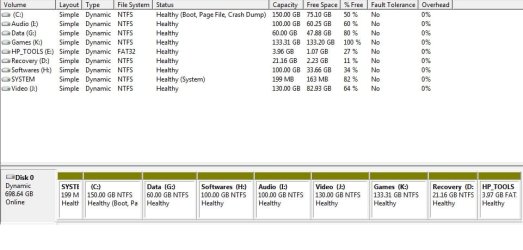
As shown in the disk layout, there are 9 partitions on Disk 1 which is dynamic.
1) Since basic disk can only have 4 primary disks, 3 primary and 1 extended etc, so will it convert all these disks to primary and extended/logical without any data loss?
2) Which disks would be primary partition and which one would be extended/logical partition?

Your help would be greatly appreciated.
 

Attachments
  • Disk.jpg
    Disk.jpg
    130.9 KB · Views: 4

My Computer

Computer type
Laptop
Computer Manufacturer/Model Number
HP
OS
Windows 7 Home Premium 64 bit
CPU
Core i5
Memory
6 GB
The problem is that you converted your HD to Dynamic which is only meant to be used to span a partition across multiple HD's. Apparently you didn't see the warning message when you added partitions.

You can only have four Primary partitions or 3 Primary and unlimited Logical. Had you asked us we would have advised you that to keep HP System, Recovery and Diagnostics Tools (OEM) partitions bootable you'd need to convert C to Logical to add any partitions adjacent to that. How to set partition as Primary or Logical.

The solution to reconvert to Basic non-destructively is to boot free Partition Wizard CD version 4.2 which is the last one which offers this as a free feature: pw422.zip ISO - Windows Live.

Download the ISO, rightclick to burn it to CD using Windows Image Burner, or use ImgBurn.

Back up the files on the newly created partitions which tipped disk to Dynamic, which will need to be deleted before disk will convert back to Basic. If Win7 won't boot you can Copy & Paste - in Windows Recovery Console.

Boot CD, delete all partitions you created in excess of four Primary partitions. Then follow these video steps: How to convert dynamic disk to basic disk with Partition Wizard?

After conversion to Basic, set C to Logical then create any new logical partitions adjacent to C.
How to set partition as Primary or Logical.
Partition Wizard Create Partition Video Help

Finally, you should seriously consider wiping the entire HD to do a superior Clean Reinstall - Factory OEM Windows 7 without the factory bloatware which on HP is the worst in the industry making the worst possible install of Win7. You can create 3 partitions during install for 7, 8 and Data.
 
Last edited:

My Computer

Computer Manufacturer/Model Number
HP, Dell, Gateway, Toshiba - 4 laptops and 2 desktops
OS
Vista, Windows7, Mint Mate, Zorin, Windows 8
CPU
from 1.6GHz Duo to i7
Monitor(s) Displays
2x HP w2207
Hard Drives
5x HDD, 7x SSD, 12x Externals
Keyboard
with trackball - no mices
Mouse
Trackball mice
Internet Speed
DSL 6000
Let us know how you are making out. You have excellent help above.
 

My Computer

Computer type
PC/Desktop
Computer Manufacturer/Model Number
Skylake Special #666
OS
Windows 10 Pro x64
CPU
Intel Core i7 6700K
Motherboard
Asus Sabertooth Z170 Mark 1
Memory
GSkill TridentZ RGB 16GB 3600 16-16-16-36
Graphics Card(s)
EVGA GTX 980 Ti SC x2
Sound Card
Realtek High Definition
Monitor(s) Displays
AOC G2460PG
Screen Resolution
1920 x 1080 144Hz
Hard Drives
Samsung 860 Pro 256GB, Seagate Barracuda 4TB x2
PSU
EVGA 1000 P2, EVGA White Custom Braided Cables
Case
Corsair Vengeance C70 Gunmetal Black
Cooling
Corsair H100i v2, Corsair ML120 x2, Thermal Grizzly Kryonaut
Keyboard
Logitech G910 Orion Spectrum
Mouse
Logitech G700s
Internet Speed
Verizon Fios Quantum Gateway 75/75
Antivirus
Windows Defender, Malwarebytes Free 3.8.3
Browser
Chrome
Other Info
Corsair SP120 x4, LG Blu-ray Drive, Durabrand HT-395 100 Watt Dolby Digital Amp, Corsair H2100 Wireless 7.1 Headset
Thanks Greg for excellent step by step instructions. Actually I partitioned the C drive(700 GB) when I bought this laptop about one and half years ago. I was not aware of this dynamic and basic disk problem.

So basically I cannot get away without deleting the partitions. I created partitions from C in this sequence: G, H, I, J, K. I can delete H, I, J, K without any fear of data loss as I can download it again from internet. I will backup G and then try to convert with C, D, E and G.

Thanks whs for your input as well. AddRam, I will report back but it may take couple of days.
 

My Computer

Computer type
Laptop
Computer Manufacturer/Model Number
HP
OS
Windows 7 Home Premium 64 bit
CPU
Core i5
Memory
6 GB
It will not convert with any more than four primary partitions, and there is no way to convert any partitions to Logical until the disk has been changed back to Basic.

Your data should always be backed up externally any way.
 
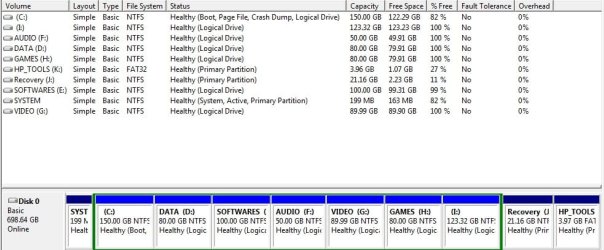
Today I converted the disk to basic and here is the process:

First I tried to convert without deleting any partition but it didn't work. It has already been mentioned but I was just curious to try it myself.

Then I deleted the partitions in the following sequence K, J, I, H, G so that I had following partitions at the end:
System Partition(199 MB)
C drive(150 GB)
Unallocated Space(deleted K, J, I, H, G)
D drive(Recovery)
E drive(HP Tools)

I tried to convert it again and it worked this time. All four working partitions were changed to primary.

Next step was to change the C drive to logical but the option was greyed out. There was option to change D, E drive to logical but I don't know why it was not available for C. Since I had already made my mind to install fresh copy of windows so I deleted C partition as well, whole unallocated space becomes one big chunk and then I created all logical partitions.

Before the above process of playing around with partitions I created bootable CD of partition wizard and bootable USB of Windows 7. I download it from the link provided by Greg.

After installation, I used windows product key from the sticker at the back of HP laptop and surprisingly it worked without any problem. I used this key for the first time.

Note: Windows didn't install the driver for ethernet and network controller. I have desktop pc as well so I downloaded the drivers using that system. If you don't have access to another system then download these drivers before starting the above process.

Thanks Greg and WHS for your guidance.
 

My Computer

Computer type
Laptop
Computer Manufacturer/Model Number
HP
OS
Windows 7 Home Premium 64 bit
CPU
Core i5
Memory
6 GB
I downloaded iso of Win 7 from the same tutorial Clean Reinstall.

There is system reserved partition of 199 MB and Windows is installed on different drive. Now the next step is to install windows 8.1 in I drive.
 

Attachments

  • Disk.jpg
    Disk.jpg
    154.7 KB · Views: 0

My Computer

Computer type
Laptop
Computer Manufacturer/Model Number
HP
OS
Windows 7 Home Premium 64 bit
CPU
Core i5
Memory
6 GB
I noticed that you have a lot of small partitions for files with various data areas. That is usually not a good use of disk space besides being quite messy.

I suggest you make one big data partition and seperate the different subjects in folders with subfolders. That will give you a bteer utilization of the available space.

The system partition, the C partition, recovery and tools partitions have to stay in seperate partitions though.
 

My Computer

Computer Manufacturer/Model Number
HP, Dell, Gateway, Toshiba - 4 laptops and 2 desktops
OS
Vista, Windows7, Mint Mate, Zorin, Windows 8
CPU
from 1.6GHz Duo to i7
Monitor(s) Displays
2x HP w2207
Hard Drives
5x HDD, 7x SSD, 12x Externals
Keyboard
with trackball - no mices
Mouse
Trackball mice
Internet Speed
DSL 6000
I know some space is being wasted due to lot of partitions but it is my preferred way to keep the data separate. The other most important aspect is the installation of more OS. Usually I play around with different OS so I just need to move around important data and can install the OS straightaway.

The other thing is the fragmentation. On one large disk, data can be written anywhere and access time would increase if it is not together. But partitions help to reduce the access time. Though it would not eliminate or stop the data fragmentation. Another usage of partitions is the disk defragmentation. Large partitions tend to take more time during disk defragmentation than the smaller ones.

I am not saying, it is definitely better way to utilise the large disks. This is my habit since the times when among circle of friends 6.4 GB hard disk was considered massive than 4.2 GB. Old habits die hard :)
 

My Computer

Computer type
Laptop
Computer Manufacturer/Model Number
HP
OS
Windows 7 Home Premium 64 bit
CPU
Core i5
Memory
6 GB
It is hard to argue against 'old habits' - so be it.

But I don't buy the performance argument. With that many partitions spread over the whole disk, some partitions will be in areas where access requires a bigger arm movement (thus being slower). With one large partition, those disk areas may not even be populated with data - it may be free space.
 

My Computer

Computer Manufacturer/Model Number
HP, Dell, Gateway, Toshiba - 4 laptops and 2 desktops
OS
Vista, Windows7, Mint Mate, Zorin, Windows 8
CPU
from 1.6GHz Duo to i7
Monitor(s) Displays
2x HP w2207
Hard Drives
5x HDD, 7x SSD, 12x Externals
Keyboard
with trackball - no mices
Mouse
Trackball mice
Internet Speed
DSL 6000
Back
Top