Convert FAT or FAT32 Volume to NTFS

How to Convert a FAT or FAT32 Volume to NTFS in Windows 7


   Information
This will show you how to convert a drive or partition volume with a FAT (FAT16) or FAT32 file system to a NTFS file system in Windows 7 without having to format the volume and lose your data on it.
   Note
Before you start to convert a FAT or FAT32 volume to NTFS, please consider the following limitations and requirements:
  • UDF and CDfs file systems are only used with optical media and cannot be converted to NTFS.
  • FAT12 is the only format used on floppy diskettes (as if these are used anymore ;)). This does not apply to a USB flash key though.
  • The conversion to NTFS is a one-way process. After you convert a drive or a partition to NTFS, you cannot convert it back to FAT or to FAT32 unless you format it again as FAT or FAT32.
  • The convert command requires that you have enough free space on the drive or on the partition that you want to convert to be able to convert it. If Convert.exe determines that there is not sufficient free space on the volume, it will not convert the volume.
  • If the files are being used on the volume that you are trying to convert, then you will be prompted with:
    "Convert cannot run because the volume is in use by another process. Convert may run if this volume is dismounted first. ALL OPENED HANDLES TO THIS VOLUME WOULD THEN BE INVALID. Would you like to force a dismount on this volume? <Y/N>"
    • Quit all the programs that are using the files on the drive, and then type Y at the command prompt to convert the drive to NTFS.
  • If the drive or partition volume that you are trying to convert is in use, then you will be prompted with:
    "Convert cannot gain exclusive access to the drive letter drive, so it cannot convert it now. Would you like to schedule it to be converted the next time the system restarts? <Y/N>"
    • To resolve this issue, type Y at the command prompt. The volume or drive will be converted to NTFS the next time that you restart the computer.
   Warning
Although the chance of corruption or data loss during the conversion is minimal, it is recommended that you backup any data that you do not want to lose on the volume that you want to convert before you start the conversion to be extra safe.

The only way to convert a NTFS disk back to a FAT or FAT32 disk is to format the disk.

Before you begin, note that the FAT32 file system has size limitations. In this version of Windows, you cannot create a FAT32 partition greater than 32 GB (32728 MB). In addition, you cannot store a file larger than 4 GB on a FAT32 partition. For more information, see Comparing NTFS and FAT file systems.


Here's How:
1. To Use a Elevated Command Prompt in Windows
A) Open an elevated command prompt.

B) Go to step 3.
2. To Use a Command Prompt at Boot
A) Open a command prompt at boot.

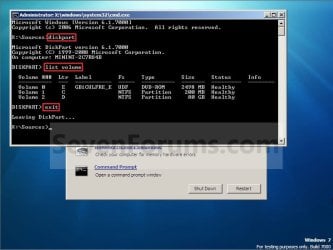
B) In the command prompt, type diskpart and press Enter. (see screenshot below)

C) In the command prompt, type list volume and press Enter. (see screenshot below)
NOTE: This will let you see what the drive letter is for the drive that you want to connvert since it may not always be the same drive letter that it is in Windows.

D) After making note of the drive letter, type exit and press Enter. (see screenshot below)
Command-1.jpg
E) Continue on to step 3 to convert the drive.
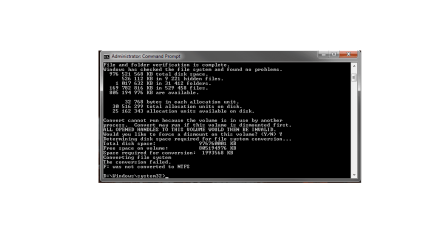
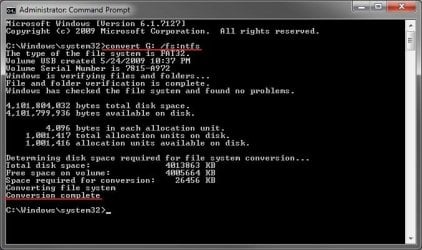
3. In the command prompt, type convert drive letter: /fs:ntfs and press Enter. (See screenshot below)
NOTE: Substitute drive letter for the drive letter of the FAT or FAT32 drive or partition that you want to convert to NTFS. For example, I want to convert my USB flash key with the drive letter G: , so I would type convert g: /fs:ntfs and press enter.
Command.jpg
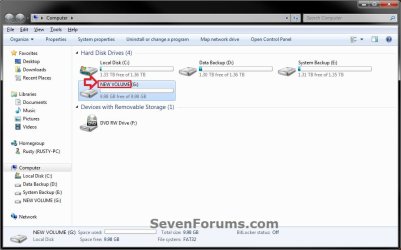
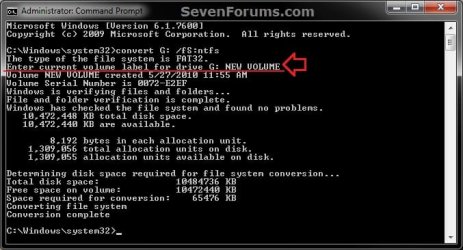
4. If prompted to Enter current volume label for drive (drive letter) (ex: G: ), then enter the name (ex: NEW VOLUME) of this drive letter as it is displayed in the Computer window and press Enter. (see screenshots below)
Current_Volume_Label-1.jpg

Current_Volume_Label-2.jpg
5. When the conversion to NTFS is complete, you receive the Conversion complete message. (See screenshot above)
NOTE: This may take a while to convert depending on full and large the drive is. It may also seem like it has hung at points, but be patient and let it finish.

6. Close the command prompt.
NOTE: If you used a command prompt at boot, then also close the System Recovery Options window and restart the computer.
That's it,
Shawn


Last edited:
Thanks a lot.
I'll try it and will post back.

Well now that I know that I ran it in elevated mode (note 1) it seems that my DOK is problematic - I cant format it only to exfat unless I'm using a 3'rd party utility.

(note 1) - http://www.sevenforums.com/1037016-post10.html


Downloaded the program, gave it a run through. I let it run into the option to "close" comes up after converting file system runs for a while, but no actual conversion happens. not sure if I'm using the program wrong in some form, or if it is just failing, though I suspect the latter since it seems to be just running the command prompt lines.

I think I would start over with removing all the data on the disk. I'll do so with the "clean all" command via diskpart. Look at this great tutorial, also from Brink - http://www.sevenforums.com/tutorials/52129-disk-clean-clean-all-diskpart-command.html
Please note that if you have any information on volume e: you must backup it before performing the "clean all" command!.

BTW you wrote that this subject became relevant due to a game requiring an NTFS format external over a FAT32 format. How come? Do you want to copy it's installation image which size is larger than 4GB?

I can download the relevant file after the transfer is complete. However, I'd like to save my files, but lack a lot of space on my main drive 427GB used on the external vs 50GB free on the local. Will making a back-up of the external to save to the C drive as an archive back-up be compressed enough to save all the files after the external is wiped and converted?
 

My Computer My Computer

At a glance

Windows 7 Ultimate x64Intel Core i5-4670K Haswell16GB DDR3 RAM 1600 MHz G.SKILLNVIDIA GTX760
Computer Manufacturer/Model Number
Custom
OS
Windows 7 Ultimate x64
CPU
Intel Core i5-4670K Haswell
Motherboard
ASUS Z87-PRO
Memory
16GB DDR3 RAM 1600 MHz G.SKILL
Graphics Card(s)
NVIDIA GTX760
PSU
CORSAIR HX SERIES HX850
Case
Cooler Master HAF 922
Cooling
Air
How many disks, internal & external, do you got?
What is the capacity of any of them, and how much free space on each?
What is the size of the data you want to backup?
 

My Computer My Computer

At a glance

Windows 7 Ultimate 32bitAMD Phenom II x4 965 3.4GHzG.SKILL F3-16000CL8D-4GBPIS (2GBx2)Inno3d GTX480 1.5GB GDDR5
OS
Windows 7 Ultimate 32bit
CPU
AMD Phenom II x4 965 3.4GHz
Motherboard
Gigabyte GA-890FXA-UD5 rev2.0
Memory
G.SKILL F3-16000CL8D-4GBPIS (2GBx2)
Graphics Card(s)
Inno3d GTX480 1.5GB GDDR5
Monitor(s) Displays
LG FLATRON W2486L
Screen Resolution
1920x1080@60Hz
Hard Drives
Western Digital Caviar Black WD1002FAEX 1TB 64MB 7200RPM Sata III x3
PSU
Enermax MODU82+ 625W
Case
Thermaltake Element G Middle Tower
Downloaded the program, gave it a run through. I let it run into the option to "close" comes up after converting file system runs for a while, but no actual conversion happens. not sure if I'm using the program wrong in some form, or if it is just failing, though I suspect the latter since it seems to be just running the command prompt lines.


I can download the relevant file after the transfer is complete. However, I'd like to save my files, but lack a lot of space on my main drive 427GB used on the external vs 50GB free on the local. Will making a back-up of the external to save to the C drive as an archive back-up be compressed enough to save all the files after the external is wiped and converted?

Asura,

You might see if you may be able to use a command prompt at boot to see if you may be able to convert the drive from FAT32 to NTFS instead using the tutorial. This way you will be doing it outside of Windows 7 in case something may be interfering with the conversion.
 

My Computer My Computer

At a glance

64-bit Windows 11 Pro for WorkstationsIntel i7-8700K OC'd to 5 GHz64 GB (4x16GB) G.SKILL TridentZ RGB DDR4 3600...ASUS ROG-STRIX-GTX1080TI-O11G-GAMING
Computer type
PC/Desktop
Computer Manufacturer/Model Number
Self built custom
OS
64-bit Windows 11 Pro for Workstations
CPU
Intel i7-8700K OC'd to 5 GHz
Motherboard
ASUS ROG Maximus XI Formula Z390
Memory
64 GB (4x16GB) G.SKILL TridentZ RGB DDR4 3600 MHz
Graphics Card(s)
ASUS ROG-STRIX-GTX1080TI-O11G-GAMING
Sound Card
Integrated
Monitor(s) Displays
2 x Samsung Odyssey G7 27"
Screen Resolution
2560x1440
Hard Drives
1TB Samsung 990 PRO M.2,
4TB Samsung 990 PRO PRO M.2,
TerraMaster F8 SSD Plus NAS
PSU
Seasonic Prime Titanium 850W
Case
Thermaltake Core P3
Cooling
Corsair Hydro H115i
Keyboard
Logitech wireless K800
Mouse
Logitech MX Master 4
Internet Speed
2 Gb/s Download and 100 Mb/s Upload
Antivirus
Malwarebyte Anti-Malware Premium
Browser
Google Chrome
Other Info
Logitech Z625 speaker system,
Logitech BRIO 4K Pro webcam,
HP Color LaserJet Pro MFP M477fdn,
APC SMART-UPS RT 1000 XL - SURT1000XLI,
Galaxy S23 Plus phone
Thank you for another great Tut, Brink
I just converted my external 1TB My Book to NTFS.
The whole process took ~ 4Minutes on a drive that was filled to ~2/3 capacity
To convert this drive, only 1.4GB space were necessary.
As an Info/reminder for fellow "converters"
With big drives like that there are periods in between where it looks like the process hangs (no change in the cmd window, no drive activity)
just leave it alone to do its job. If you interrupt the process you can pretty much assume you just created a nice paperweight

-DG
 

My Computer My Computer

At a glance

Windows 7 Ultimate x86DualCore AMD Athlon 64 X2, 2600 MHz 5200+Samsung 2GB DDR2Onboard NVIDIA GeForce 6150SE nForce 430
Computer Manufacturer/Model Number
HP m8000n
OS
Windows 7 Ultimate x86
CPU
DualCore AMD Athlon 64 X2, 2600 MHz 5200+
Motherboard
Asus M2N68-LA (Narra)
Memory
Samsung 2GB DDR2
Graphics Card(s)
Onboard NVIDIA GeForce 6150SE nForce 430
Sound Card
Onboard nVIDIA nForce 6100-430 (MCP61P)
Monitor(s) Displays
Westinghouse 19" LED
Screen Resolution
1280x1024
Hard Drives
SATA II Seagate Barracuda 500GB
USB II WD Elements 500GB
USB II WD My Book 1TB
USB II WD My Book 2TB
PSU
Stock (HP)
Case
Stock (HP)
Cooling
Stock
Keyboard
Logitech Classic KB 200
Mouse
Standard HP opticle USB mouse
You're most welcome David. Thank you for posting back with your results. :)
 

My Computer My Computer

At a glance

64-bit Windows 11 Pro for WorkstationsIntel i7-8700K OC'd to 5 GHz64 GB (4x16GB) G.SKILL TridentZ RGB DDR4 3600...ASUS ROG-STRIX-GTX1080TI-O11G-GAMING
Computer type
PC/Desktop
Computer Manufacturer/Model Number
Self built custom
OS
64-bit Windows 11 Pro for Workstations
CPU
Intel i7-8700K OC'd to 5 GHz
Motherboard
ASUS ROG Maximus XI Formula Z390
Memory
64 GB (4x16GB) G.SKILL TridentZ RGB DDR4 3600 MHz
Graphics Card(s)
ASUS ROG-STRIX-GTX1080TI-O11G-GAMING
Sound Card
Integrated
Monitor(s) Displays
2 x Samsung Odyssey G7 27"
Screen Resolution
2560x1440
Hard Drives
1TB Samsung 990 PRO M.2,
4TB Samsung 990 PRO PRO M.2,
TerraMaster F8 SSD Plus NAS
PSU
Seasonic Prime Titanium 850W
Case
Thermaltake Core P3
Cooling
Corsair Hydro H115i
Keyboard
Logitech wireless K800
Mouse
Logitech MX Master 4
Internet Speed
2 Gb/s Download and 100 Mb/s Upload
Antivirus
Malwarebyte Anti-Malware Premium
Browser
Google Chrome
Other Info
Logitech Z625 speaker system,
Logitech BRIO 4K Pro webcam,
HP Color LaserJet Pro MFP M477fdn,
APC SMART-UPS RT 1000 XL - SURT1000XLI,
Galaxy S23 Plus phone
Help needed converting FAT to NTFS

Guys

I've tried this a few times without any joy.

I use the elevated dos method, convert seems to scan the drive checking all is ok, then it seems to suggest that the volume is in use by another process (it isnt) and asks would I like to force a dismount - I say Y so that convert can get at the volume... but NO Convert cannot get exclusive access to the drive - do I want to schedule the conversion when I restart my pc.

I reply Y, and promptly power off after the message tells me this will happen automatically when I next power up.... and it NEVER happens.....

Anyone know why??? this is SOOOOOOOOO frustrating.....

george
 

My Computer My Computer

At a glance

Windows 7 UltimateIntel
Computer Manufacturer/Model Number
Toshiba Satellite Pro A120
OS
Windows 7 Ultimate
CPU
Intel
Hi george obviously something still is accessing the drive.
Try to reboot into Safe Mode so that those drivers that access said drive might not even be loaded and go from there.
Is it an external drive? if so, try to unplug it, reboot, plug it back in, open the elevated prompt and try it that way.
If that fails too, I would back up the drive somewhere and simply reformat it to NTFS either via Windows or through a 3rd party app like
BEST FREE Partition Manager Software for Windows supports all 32-bit & 64 bit Windows No-server OS.

-DG
 

My Computer My Computer

At a glance

Windows 7 Ultimate x86DualCore AMD Athlon 64 X2, 2600 MHz 5200+Samsung 2GB DDR2Onboard NVIDIA GeForce 6150SE nForce 430
Computer Manufacturer/Model Number
HP m8000n
OS
Windows 7 Ultimate x86
CPU
DualCore AMD Athlon 64 X2, 2600 MHz 5200+
Motherboard
Asus M2N68-LA (Narra)
Memory
Samsung 2GB DDR2
Graphics Card(s)
Onboard NVIDIA GeForce 6150SE nForce 430
Sound Card
Onboard nVIDIA nForce 6100-430 (MCP61P)
Monitor(s) Displays
Westinghouse 19" LED
Screen Resolution
1280x1024
Hard Drives
SATA II Seagate Barracuda 500GB
USB II WD Elements 500GB
USB II WD My Book 1TB
USB II WD My Book 2TB
PSU
Stock (HP)
Case
Stock (HP)
Cooling
Stock
Keyboard
Logitech Classic KB 200
Mouse
Standard HP opticle USB mouse
thanks for the quick reply.... and happy christmas to you too... i'm loving the avatar!!!

you know... I posted that message and followed the destructions.....

instead of rebooting the pc as I usually do, I switched it all off.

yep, you guessed, took 10 minutes... but was I glad it was doing the job...

moral of the story..... shut it all down and start over...

george
 

My Computer My Computer

At a glance

Windows 7 UltimateIntel
Computer Manufacturer/Model Number
Toshiba Satellite Pro A120
OS
Windows 7 Ultimate
CPU
Intel
Right..that's why I say Never give up...never surrender :D
Just sometimes you have to work your way around like shooting someone through the eye in the knee as we say over here.
I'm glad it worked
Happy Christmas to you too

-DG
 

My Computer My Computer

At a glance

Windows 7 Ultimate x86DualCore AMD Athlon 64 X2, 2600 MHz 5200+Samsung 2GB DDR2Onboard NVIDIA GeForce 6150SE nForce 430
Computer Manufacturer/Model Number
HP m8000n
OS
Windows 7 Ultimate x86
CPU
DualCore AMD Athlon 64 X2, 2600 MHz 5200+
Motherboard
Asus M2N68-LA (Narra)
Memory
Samsung 2GB DDR2
Graphics Card(s)
Onboard NVIDIA GeForce 6150SE nForce 430
Sound Card
Onboard nVIDIA nForce 6100-430 (MCP61P)
Monitor(s) Displays
Westinghouse 19" LED
Screen Resolution
1280x1024
Hard Drives
SATA II Seagate Barracuda 500GB
USB II WD Elements 500GB
USB II WD My Book 1TB
USB II WD My Book 2TB
PSU
Stock (HP)
Case
Stock (HP)
Cooling
Stock
Keyboard
Logitech Classic KB 200
Mouse
Standard HP opticle USB mouse
what is wrong, it does everything as supposed, untill it has finished to convert that, it just says F: name of the harddrive) was not converted to NTFS.

Untitled.png
 
Last edited by a moderator:

My Computer My Computer

At a glance

32 bit windows 7 e.g i quessNvidia gt 9500
OS
32 bit windows 7 e.g i quess
Graphics Card(s)
Nvidia gt 9500
Monitor(s) Displays
23,5" Packard bell and 28" Samsung TV
Cooling
Aero Cool
Hello Darian, and welcome to Seven Forums.

That error just means that the F: drive is in use and cannot be converted while in use. This could be caused if you had something running from or being saved to the F: drive for example.

You should be able to use step 2 to convert the drive using a command prompt at boot instead since it will not be in use at boot since Windows is not running at boot.

Hope this helps,
Shawn
 

My Computer My Computer

At a glance

64-bit Windows 11 Pro for WorkstationsIntel i7-8700K OC'd to 5 GHz64 GB (4x16GB) G.SKILL TridentZ RGB DDR4 3600...ASUS ROG-STRIX-GTX1080TI-O11G-GAMING
Computer type
PC/Desktop
Computer Manufacturer/Model Number
Self built custom
OS
64-bit Windows 11 Pro for Workstations
CPU
Intel i7-8700K OC'd to 5 GHz
Motherboard
ASUS ROG Maximus XI Formula Z390
Memory
64 GB (4x16GB) G.SKILL TridentZ RGB DDR4 3600 MHz
Graphics Card(s)
ASUS ROG-STRIX-GTX1080TI-O11G-GAMING
Sound Card
Integrated
Monitor(s) Displays
2 x Samsung Odyssey G7 27"
Screen Resolution
2560x1440
Hard Drives
1TB Samsung 990 PRO M.2,
4TB Samsung 990 PRO PRO M.2,
TerraMaster F8 SSD Plus NAS
PSU
Seasonic Prime Titanium 850W
Case
Thermaltake Core P3
Cooling
Corsair Hydro H115i
Keyboard
Logitech wireless K800
Mouse
Logitech MX Master 4
Internet Speed
2 Gb/s Download and 100 Mb/s Upload
Antivirus
Malwarebyte Anti-Malware Premium
Browser
Google Chrome
Other Info
Logitech Z625 speaker system,
Logitech BRIO 4K Pro webcam,
HP Color LaserJet Pro MFP M477fdn,
APC SMART-UPS RT 1000 XL - SURT1000XLI,
Galaxy S23 Plus phone
No problem using the elevated command prompt shortcut. This is what I got in the command prompt: "C:\windows\system32\>convert d:/fs:ntfs"
The type of the file system is FAT32
Enter the correct volume label for drive D: 319992332288
An incorrect volume label was entered for this drive
(The same message with commas)

My problem is the volume label. I right click on the drive letter and then on properties. It says capacity 319,992,332,288 bytes and 298GB. I entered the number with and without commas and I get an error message both times that I entered the wrong Volume label for this drive. I even tripled checked that I entered the correct drive letter. This is a 300GB backup SATA hard drive. My main drive is NTFS file system. I am the administrator. What happened is that I needed to do a fresh/clean Windows install due to a bad virus. I formatted the main drive but I left my backup drive alone but still connected to the motherboard. When I was done with the fresh install I noticed that I now have 2 hard drives with 2 different file systems in Windows 7 (32bit). The main drive is NTFS and the backup FAT32, What am I doing wrong?
 

My Computer My Computer

At a glance

Windows 7 Ultimate x64Intel E84004GB Kingston HyperX (4x1gb) 1066Mhz Model# KH...Galaxy GTS 450
Computer Manufacturer/Model Number
Custom Built
OS
Windows 7 Ultimate x64
CPU
Intel E8400
Motherboard
ASUS P5Q SE PLUS
Memory
4GB Kingston HyperX (4x1gb) 1066Mhz Model# KHX8500D2K2/2GN
Graphics Card(s)
Galaxy GTS 450
Sound Card
Stock
Monitor(s) Displays
Dell 1908FP, SONY TV KDS-60A3000 via HDMI Cable
Screen Resolution
1280x1024 (Native), TV (1080p) 1920x1080 (Recommended)
Hard Drives
WD3000HLFS 300GB SATA VelociRaptor,
WD3200AAKS SATA HDD
PSU
Antec TP-650 (650 watts)
Case
Antec 300
Cooling
7-120mm case fans
Keyboard
Logitech Wired Slim Keyboard
Mouse
Gigabyte Wired Advanced Wheel Mouse
Internet Speed
DSL
Other Info
Installed 120mm heatsink over CPU with a 120mm case fan using Artic Silver 5 thermal paste. I downloaded and installed the Win 7 Graphics Driver From The Nvidia web site.
Hello Timewarpone,

You just missed having a space between d: and /fs:ntfs in the command :)
 

My Computer My Computer

At a glance

64-bit Windows 11 Pro for WorkstationsIntel i7-8700K OC'd to 5 GHz64 GB (4x16GB) G.SKILL TridentZ RGB DDR4 3600...ASUS ROG-STRIX-GTX1080TI-O11G-GAMING
Computer type
PC/Desktop
Computer Manufacturer/Model Number
Self built custom
OS
64-bit Windows 11 Pro for Workstations
CPU
Intel i7-8700K OC'd to 5 GHz
Motherboard
ASUS ROG Maximus XI Formula Z390
Memory
64 GB (4x16GB) G.SKILL TridentZ RGB DDR4 3600 MHz
Graphics Card(s)
ASUS ROG-STRIX-GTX1080TI-O11G-GAMING
Sound Card
Integrated
Monitor(s) Displays
2 x Samsung Odyssey G7 27"
Screen Resolution
2560x1440
Hard Drives
1TB Samsung 990 PRO M.2,
4TB Samsung 990 PRO PRO M.2,
TerraMaster F8 SSD Plus NAS
PSU
Seasonic Prime Titanium 850W
Case
Thermaltake Core P3
Cooling
Corsair Hydro H115i
Keyboard
Logitech wireless K800
Mouse
Logitech MX Master 4
Internet Speed
2 Gb/s Download and 100 Mb/s Upload
Antivirus
Malwarebyte Anti-Malware Premium
Browser
Google Chrome
Other Info
Logitech Z625 speaker system,
Logitech BRIO 4K Pro webcam,
HP Color LaserJet Pro MFP M477fdn,
APC SMART-UPS RT 1000 XL - SURT1000XLI,
Galaxy S23 Plus phone
Enter the correct volume label for drive D: 319992332288
@Timewarpone: you entered the drive capacity instead of the label ;)

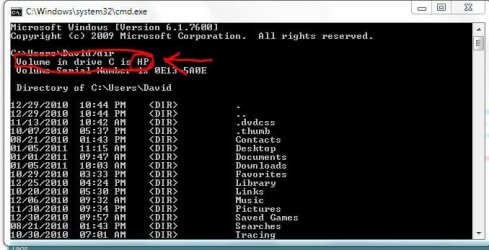
When you open the command prompt give it the command
Dir
first, scroll all the way up to the top and look, what it says under VOLUME that's your label
Capture.JPG

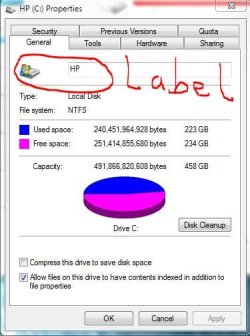
In your method, the label would be here:
Capture1.JPG

It's just to make sure that you have picked the drive you wanted to change :D

-DG
 

My Computer My Computer

At a glance

Windows 7 Ultimate x86DualCore AMD Athlon 64 X2, 2600 MHz 5200+Samsung 2GB DDR2Onboard NVIDIA GeForce 6150SE nForce 430
Computer Manufacturer/Model Number
HP m8000n
OS
Windows 7 Ultimate x86
CPU
DualCore AMD Athlon 64 X2, 2600 MHz 5200+
Motherboard
Asus M2N68-LA (Narra)
Memory
Samsung 2GB DDR2
Graphics Card(s)
Onboard NVIDIA GeForce 6150SE nForce 430
Sound Card
Onboard nVIDIA nForce 6100-430 (MCP61P)
Monitor(s) Displays
Westinghouse 19" LED
Screen Resolution
1280x1024
Hard Drives
SATA II Seagate Barracuda 500GB
USB II WD Elements 500GB
USB II WD My Book 1TB
USB II WD My Book 2TB
PSU
Stock (HP)
Case
Stock (HP)
Cooling
Stock
Keyboard
Logitech Classic KB 200
Mouse
Standard HP opticle USB mouse
Thanks For Your Help. Dummy me thought Volume Label meant how many bytes there were on the drive. After I entered the name of the drive it converted with no problems. The total conversion took about a minute and I never lost any files.

Why the back up drive went from NTFS to FAT32 after the fresh install of Windows will probably remain a deep dark secret for centuries to come.
 

My Computer My Computer

At a glance

Windows 7 Ultimate x64Intel E84004GB Kingston HyperX (4x1gb) 1066Mhz Model# KH...Galaxy GTS 450
Computer Manufacturer/Model Number
Custom Built
OS
Windows 7 Ultimate x64
CPU
Intel E8400
Motherboard
ASUS P5Q SE PLUS
Memory
4GB Kingston HyperX (4x1gb) 1066Mhz Model# KHX8500D2K2/2GN
Graphics Card(s)
Galaxy GTS 450
Sound Card
Stock
Monitor(s) Displays
Dell 1908FP, SONY TV KDS-60A3000 via HDMI Cable
Screen Resolution
1280x1024 (Native), TV (1080p) 1920x1080 (Recommended)
Hard Drives
WD3000HLFS 300GB SATA VelociRaptor,
WD3200AAKS SATA HDD
PSU
Antec TP-650 (650 watts)
Case
Antec 300
Cooling
7-120mm case fans
Keyboard
Logitech Wired Slim Keyboard
Mouse
Gigabyte Wired Advanced Wheel Mouse
Internet Speed
DSL
Other Info
Installed 120mm heatsink over CPU with a 120mm case fan using Artic Silver 5 thermal paste. I downloaded and installed the Win 7 Graphics Driver From The Nvidia web site.
That's got to be one of windows hidden secrets/unsolved mysterys LOL
Glad you got it sorted out
Thanks for the feedback

-DG
 

My Computer My Computer

At a glance

Windows 7 Ultimate x86DualCore AMD Athlon 64 X2, 2600 MHz 5200+Samsung 2GB DDR2Onboard NVIDIA GeForce 6150SE nForce 430
Computer Manufacturer/Model Number
HP m8000n
OS
Windows 7 Ultimate x86
CPU
DualCore AMD Athlon 64 X2, 2600 MHz 5200+
Motherboard
Asus M2N68-LA (Narra)
Memory
Samsung 2GB DDR2
Graphics Card(s)
Onboard NVIDIA GeForce 6150SE nForce 430
Sound Card
Onboard nVIDIA nForce 6100-430 (MCP61P)
Monitor(s) Displays
Westinghouse 19" LED
Screen Resolution
1280x1024
Hard Drives
SATA II Seagate Barracuda 500GB
USB II WD Elements 500GB
USB II WD My Book 1TB
USB II WD My Book 2TB
PSU
Stock (HP)
Case
Stock (HP)
Cooling
Stock
Keyboard
Logitech Classic KB 200
Mouse
Standard HP opticle USB mouse
Hay guys im new to the forums. I wanted to convert my external HDD its a Morespace 1TB i have it almost filled up i'm scared that if i convert it that my files might get lost some how. Also it asked me to Enter current volume label for drive e:. What does that mean also would that mess my hardrive up and make me loose everything. What are my chance of loosing everything if i change fat32 to ntfs on my hardrive thanks for your help in advance.
 

My Computer My Computer

At a glance

Windows 7 Ultimate 32bit.
OS
Windows 7 Ultimate 32bit.
Hi goku46 and welcome to SF.
Usually a convert from FAT to NTFS goes painless without any loss of data but you know...stuff can happen (like a power outage right while you're converting...or a dog rips out the USB or power cable of the external drive...or grams trips over it...so it is never wrong to have a backup somewhere.
As for the volume label just look 3 posts above yours (#93) I explained it there.
If you still have questions don't hesitate to ask ;)

-DG
 

My Computer My Computer

At a glance

Windows 7 Ultimate x86DualCore AMD Athlon 64 X2, 2600 MHz 5200+Samsung 2GB DDR2Onboard NVIDIA GeForce 6150SE nForce 430
Computer Manufacturer/Model Number
HP m8000n
OS
Windows 7 Ultimate x86
CPU
DualCore AMD Athlon 64 X2, 2600 MHz 5200+
Motherboard
Asus M2N68-LA (Narra)
Memory
Samsung 2GB DDR2
Graphics Card(s)
Onboard NVIDIA GeForce 6150SE nForce 430
Sound Card
Onboard nVIDIA nForce 6100-430 (MCP61P)
Monitor(s) Displays
Westinghouse 19" LED
Screen Resolution
1280x1024
Hard Drives
SATA II Seagate Barracuda 500GB
USB II WD Elements 500GB
USB II WD My Book 1TB
USB II WD My Book 2TB
PSU
Stock (HP)
Case
Stock (HP)
Cooling
Stock
Keyboard
Logitech Classic KB 200
Mouse
Standard HP opticle USB mouse
Hay guys i was able to convert my 1tb morespace hdd with no problem at all it took 5 min and it was finshed thanks for aall the help.
 

My Computer My Computer

At a glance

Windows 7 Ultimate 32bit.
OS
Windows 7 Ultimate 32bit.
Like I said it's usually a painless process as long as you don't interrupt it...but I'm a strong believer in Murphy's law (from experience :D

Glad it worked out for you
Thanks for the feedback
-DG
 

My Computer My Computer

At a glance

Windows 7 Ultimate x86DualCore AMD Athlon 64 X2, 2600 MHz 5200+Samsung 2GB DDR2Onboard NVIDIA GeForce 6150SE nForce 430
Computer Manufacturer/Model Number
HP m8000n
OS
Windows 7 Ultimate x86
CPU
DualCore AMD Athlon 64 X2, 2600 MHz 5200+
Motherboard
Asus M2N68-LA (Narra)
Memory
Samsung 2GB DDR2
Graphics Card(s)
Onboard NVIDIA GeForce 6150SE nForce 430
Sound Card
Onboard nVIDIA nForce 6100-430 (MCP61P)
Monitor(s) Displays
Westinghouse 19" LED
Screen Resolution
1280x1024
Hard Drives
SATA II Seagate Barracuda 500GB
USB II WD Elements 500GB
USB II WD My Book 1TB
USB II WD My Book 2TB
PSU
Stock (HP)
Case
Stock (HP)
Cooling
Stock
Keyboard
Logitech Classic KB 200
Mouse
Standard HP opticle USB mouse
Back
Top