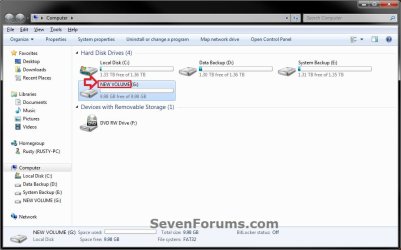
Convert FAT or FAT32 Volume to NTFS

How to Convert a FAT or FAT32 Volume to NTFS in Windows 7


   Information
This will show you how to convert a drive or partition volume with a FAT (FAT16) or FAT32 file system to a NTFS file system in Windows 7 without having to format the volume and lose your data on it.
   Note
Before you start to convert a FAT or FAT32 volume to NTFS, please consider the following limitations and requirements:
  • UDF and CDfs file systems are only used with optical media and cannot be converted to NTFS.
  • FAT12 is the only format used on floppy diskettes (as if these are used anymore ;)). This does not apply to a USB flash key though.
  • The conversion to NTFS is a one-way process. After you convert a drive or a partition to NTFS, you cannot convert it back to FAT or to FAT32 unless you format it again as FAT or FAT32.
  • The convert command requires that you have enough free space on the drive or on the partition that you want to convert to be able to convert it. If Convert.exe determines that there is not sufficient free space on the volume, it will not convert the volume.
  • If the files are being used on the volume that you are trying to convert, then you will be prompted with:
    "Convert cannot run because the volume is in use by another process. Convert may run if this volume is dismounted first. ALL OPENED HANDLES TO THIS VOLUME WOULD THEN BE INVALID. Would you like to force a dismount on this volume? <Y/N>"
    • Quit all the programs that are using the files on the drive, and then type Y at the command prompt to convert the drive to NTFS.
  • If the drive or partition volume that you are trying to convert is in use, then you will be prompted with:
    "Convert cannot gain exclusive access to the drive letter drive, so it cannot convert it now. Would you like to schedule it to be converted the next time the system restarts? <Y/N>"
    • To resolve this issue, type Y at the command prompt. The volume or drive will be converted to NTFS the next time that you restart the computer.
   Warning
Although the chance of corruption or data loss during the conversion is minimal, it is recommended that you backup any data that you do not want to lose on the volume that you want to convert before you start the conversion to be extra safe.

The only way to convert a NTFS disk back to a FAT or FAT32 disk is to format the disk.

Before you begin, note that the FAT32 file system has size limitations. In this version of Windows, you cannot create a FAT32 partition greater than 32 GB (32728 MB). In addition, you cannot store a file larger than 4 GB on a FAT32 partition. For more information, see Comparing NTFS and FAT file systems.


Here's How:
1. To Use a Elevated Command Prompt in Windows
A) Open an elevated command prompt.

B) Go to step 3.
2. To Use a Command Prompt at Boot
A) Open a command prompt at boot.

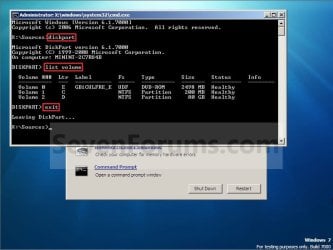
B) In the command prompt, type diskpart and press Enter. (see screenshot below)

C) In the command prompt, type list volume and press Enter. (see screenshot below)
NOTE: This will let you see what the drive letter is for the drive that you want to connvert since it may not always be the same drive letter that it is in Windows.

D) After making note of the drive letter, type exit and press Enter. (see screenshot below)
Command-1.jpg
E) Continue on to step 3 to convert the drive.
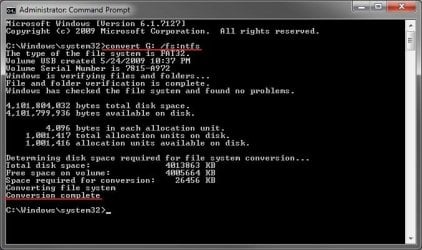
3. In the command prompt, type convert drive letter: /fs:ntfs and press Enter. (See screenshot below)
NOTE: Substitute drive letter for the drive letter of the FAT or FAT32 drive or partition that you want to convert to NTFS. For example, I want to convert my USB flash key with the drive letter G: , so I would type convert g: /fs:ntfs and press enter.
Command.jpg
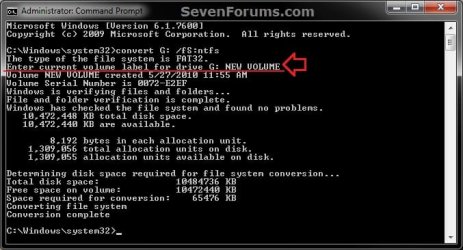
4. If prompted to Enter current volume label for drive (drive letter) (ex: G: ), then enter the name (ex: NEW VOLUME) of this drive letter as it is displayed in the Computer window and press Enter. (see screenshots below)
Current_Volume_Label-1.jpg

Current_Volume_Label-2.jpg
5. When the conversion to NTFS is complete, you receive the Conversion complete message. (See screenshot above)
NOTE: This may take a while to convert depending on full and large the drive is. It may also seem like it has hung at points, but be patient and let it finish.

6. Close the command prompt.
NOTE: If you used a command prompt at boot, then also close the System Recovery Options window and restart the computer.
That's it,
Shawn


Last edited:
Thank you for the awesome tutorial! I got my external hard drive converted to NTFS pretty smoothly, except for getting that inconsistency error. Keep up the good work!!
 

My Computer My Computer

At a glance

Windows 7 Home Premium 64-bitPentium(R) Dual-Core T4500 2.30GHz3GBMobile Inter(R) 4 Series Express Chipset Family
Computer Manufacturer/Model Number
Acer Aspire 5734Z
OS
Windows 7 Home Premium 64-bit
CPU
Pentium(R) Dual-Core T4500 2.30GHz
Memory
3GB
Graphics Card(s)
Mobile Inter(R) 4 Series Express Chipset Family
Sound Card
Realtek High Definition Audio
Screen Resolution
1366*768
That's great news Pimiimip. You're most welcome. :)
 

My Computer My Computer

At a glance

64-bit Windows 11 Pro for WorkstationsIntel i7-8700K OC'd to 5 GHz64 GB (4x16GB) G.SKILL TridentZ RGB DDR4 3600...ASUS ROG-STRIX-GTX1080TI-O11G-GAMING
Computer type
PC/Desktop
Computer Manufacturer/Model Number
Self built custom
OS
64-bit Windows 11 Pro for Workstations
CPU
Intel i7-8700K OC'd to 5 GHz
Motherboard
ASUS ROG Maximus XI Formula Z390
Memory
64 GB (4x16GB) G.SKILL TridentZ RGB DDR4 3600 MHz
Graphics Card(s)
ASUS ROG-STRIX-GTX1080TI-O11G-GAMING
Sound Card
Integrated
Monitor(s) Displays
2 x Samsung Odyssey G7 27"
Screen Resolution
2560x1440
Hard Drives
1TB Samsung 990 PRO M.2,
4TB Samsung 990 PRO PRO M.2,
TerraMaster F8 SSD Plus NAS
PSU
Seasonic Prime Titanium 850W
Case
Thermaltake Core P3
Cooling
Corsair Hydro H115i
Keyboard
Logitech wireless K800
Mouse
Logitech MX Master 4
Internet Speed
2 Gb/s Download and 100 Mb/s Upload
Antivirus
Malwarebyte Anti-Malware Premium
Browser
Google Chrome
Other Info
Logitech Z625 speaker system,
Logitech BRIO 4K Pro webcam,
HP Color LaserJet Pro MFP M477fdn,
APC SMART-UPS RT 1000 XL - SURT1000XLI,
Galaxy S23 Plus phone
How Long?

How long of a process is this, normally? My 8GB cruzer has been running for HOURS but I don't want to stop it in fear of bricking the drive...
 

My Computer My Computer

At a glance

Windows 7 (64-bit)
OS
Windows 7 (64-bit)
8GB ??? No idea but my 1TB external Hard drive was done in less than 10 minutes
 

My Computer My Computer

At a glance

Windows 7 Ultimate x86DualCore AMD Athlon 64 X2, 2600 MHz 5200+Samsung 2GB DDR2Onboard NVIDIA GeForce 6150SE nForce 430
Computer Manufacturer/Model Number
HP m8000n
OS
Windows 7 Ultimate x86
CPU
DualCore AMD Athlon 64 X2, 2600 MHz 5200+
Motherboard
Asus M2N68-LA (Narra)
Memory
Samsung 2GB DDR2
Graphics Card(s)
Onboard NVIDIA GeForce 6150SE nForce 430
Sound Card
Onboard nVIDIA nForce 6100-430 (MCP61P)
Monitor(s) Displays
Westinghouse 19" LED
Screen Resolution
1280x1024
Hard Drives
SATA II Seagate Barracuda 500GB
USB II WD Elements 500GB
USB II WD My Book 1TB
USB II WD My Book 2TB
PSU
Stock (HP)
Case
Stock (HP)
Cooling
Stock
Keyboard
Logitech Classic KB 200
Mouse
Standard HP opticle USB mouse
How long of a process is this, normally? My 8GB cruzer has been running for HOURS but I don't want to stop it in fear of bricking the drive...

Hello Sean, and welcome to Seven Forums.

A USB flash drive would be slower than a internal HDD since it is connect via USB, but that is a long time for even that. Was the USB drive encrypted or compressed? If so, that would take a while for it to finish.
 

My Computer My Computer

At a glance

64-bit Windows 11 Pro for WorkstationsIntel i7-8700K OC'd to 5 GHz64 GB (4x16GB) G.SKILL TridentZ RGB DDR4 3600...ASUS ROG-STRIX-GTX1080TI-O11G-GAMING
Computer type
PC/Desktop
Computer Manufacturer/Model Number
Self built custom
OS
64-bit Windows 11 Pro for Workstations
CPU
Intel i7-8700K OC'd to 5 GHz
Motherboard
ASUS ROG Maximus XI Formula Z390
Memory
64 GB (4x16GB) G.SKILL TridentZ RGB DDR4 3600 MHz
Graphics Card(s)
ASUS ROG-STRIX-GTX1080TI-O11G-GAMING
Sound Card
Integrated
Monitor(s) Displays
2 x Samsung Odyssey G7 27"
Screen Resolution
2560x1440
Hard Drives
1TB Samsung 990 PRO M.2,
4TB Samsung 990 PRO PRO M.2,
TerraMaster F8 SSD Plus NAS
PSU
Seasonic Prime Titanium 850W
Case
Thermaltake Core P3
Cooling
Corsair Hydro H115i
Keyboard
Logitech wireless K800
Mouse
Logitech MX Master 4
Internet Speed
2 Gb/s Download and 100 Mb/s Upload
Antivirus
Malwarebyte Anti-Malware Premium
Browser
Google Chrome
Other Info
Logitech Z625 speaker system,
Logitech BRIO 4K Pro webcam,
HP Color LaserJet Pro MFP M477fdn,
APC SMART-UPS RT 1000 XL - SURT1000XLI,
Galaxy S23 Plus phone
No, there was no encryption or compression on the drive. I got fed up with waiting so I closed the command prompt and, luckily, the disk management screen showed NTFS!
 

My Computer My Computer

At a glance

Windows 7 (64-bit)
OS
Windows 7 (64-bit)
That's great news. :party:
 

My Computer My Computer

At a glance

64-bit Windows 11 Pro for WorkstationsIntel i7-8700K OC'd to 5 GHz64 GB (4x16GB) G.SKILL TridentZ RGB DDR4 3600...ASUS ROG-STRIX-GTX1080TI-O11G-GAMING
Computer type
PC/Desktop
Computer Manufacturer/Model Number
Self built custom
OS
64-bit Windows 11 Pro for Workstations
CPU
Intel i7-8700K OC'd to 5 GHz
Motherboard
ASUS ROG Maximus XI Formula Z390
Memory
64 GB (4x16GB) G.SKILL TridentZ RGB DDR4 3600 MHz
Graphics Card(s)
ASUS ROG-STRIX-GTX1080TI-O11G-GAMING
Sound Card
Integrated
Monitor(s) Displays
2 x Samsung Odyssey G7 27"
Screen Resolution
2560x1440
Hard Drives
1TB Samsung 990 PRO M.2,
4TB Samsung 990 PRO PRO M.2,
TerraMaster F8 SSD Plus NAS
PSU
Seasonic Prime Titanium 850W
Case
Thermaltake Core P3
Cooling
Corsair Hydro H115i
Keyboard
Logitech wireless K800
Mouse
Logitech MX Master 4
Internet Speed
2 Gb/s Download and 100 Mb/s Upload
Antivirus
Malwarebyte Anti-Malware Premium
Browser
Google Chrome
Other Info
Logitech Z625 speaker system,
Logitech BRIO 4K Pro webcam,
HP Color LaserJet Pro MFP M477fdn,
APC SMART-UPS RT 1000 XL - SURT1000XLI,
Galaxy S23 Plus phone
omg!!! you know what it worked .. thank you so much... that thing was a pain in my arse, i wasn't able to copy huge files in my hdd.. but you made it possible. thank you ...

ps: it took ten mins to convert 500gb hdd with 435gb of data.. :P
 

My Computer My Computer

At a glance

Windows 7 Ultimate 32bit
OS
Windows 7 Ultimate 32bit
You're welcome Pwner, and welcome to Seven Forums. Thank you for posting back your results. :)
 

My Computer My Computer

At a glance

64-bit Windows 11 Pro for WorkstationsIntel i7-8700K OC'd to 5 GHz64 GB (4x16GB) G.SKILL TridentZ RGB DDR4 3600...ASUS ROG-STRIX-GTX1080TI-O11G-GAMING
Computer type
PC/Desktop
Computer Manufacturer/Model Number
Self built custom
OS
64-bit Windows 11 Pro for Workstations
CPU
Intel i7-8700K OC'd to 5 GHz
Motherboard
ASUS ROG Maximus XI Formula Z390
Memory
64 GB (4x16GB) G.SKILL TridentZ RGB DDR4 3600 MHz
Graphics Card(s)
ASUS ROG-STRIX-GTX1080TI-O11G-GAMING
Sound Card
Integrated
Monitor(s) Displays
2 x Samsung Odyssey G7 27"
Screen Resolution
2560x1440
Hard Drives
1TB Samsung 990 PRO M.2,
4TB Samsung 990 PRO PRO M.2,
TerraMaster F8 SSD Plus NAS
PSU
Seasonic Prime Titanium 850W
Case
Thermaltake Core P3
Cooling
Corsair Hydro H115i
Keyboard
Logitech wireless K800
Mouse
Logitech MX Master 4
Internet Speed
2 Gb/s Download and 100 Mb/s Upload
Antivirus
Malwarebyte Anti-Malware Premium
Browser
Google Chrome
Other Info
Logitech Z625 speaker system,
Logitech BRIO 4K Pro webcam,
HP Color LaserJet Pro MFP M477fdn,
APC SMART-UPS RT 1000 XL - SURT1000XLI,
Galaxy S23 Plus phone
Apologies for dragging up an old thread but found it on google and it seems an appropriate place for my question/problem. I used convert.exe to convert a 1TB external drive from fat32 to ntfs, had no problems or errors and had a message in the command prompt stating that the conversion had completed. However when I select the drive in my computer or using the drive management utility it still states that the format is FAT32. Any ideas?
 

My Computer My Computer

At a glance

xp
OS
xp
Apologies for dragging up an old thread but found it on google and it seems an appropriate place for my question/problem. I used convert.exe to convert a 1TB external drive from fat32 to ntfs, had no problems or errors and had a message in the command prompt stating that the conversion had completed. However when I select the drive in my computer or using the drive management utility it still states that the format is FAT32. Any ideas?


Hello Gerry, and welcome to Seven Forums.

You may need to backup and format the drive as NTFS then instead. :(
 

My Computer My Computer

At a glance

64-bit Windows 11 Pro for WorkstationsIntel i7-8700K OC'd to 5 GHz64 GB (4x16GB) G.SKILL TridentZ RGB DDR4 3600...ASUS ROG-STRIX-GTX1080TI-O11G-GAMING
Computer type
PC/Desktop
Computer Manufacturer/Model Number
Self built custom
OS
64-bit Windows 11 Pro for Workstations
CPU
Intel i7-8700K OC'd to 5 GHz
Motherboard
ASUS ROG Maximus XI Formula Z390
Memory
64 GB (4x16GB) G.SKILL TridentZ RGB DDR4 3600 MHz
Graphics Card(s)
ASUS ROG-STRIX-GTX1080TI-O11G-GAMING
Sound Card
Integrated
Monitor(s) Displays
2 x Samsung Odyssey G7 27"
Screen Resolution
2560x1440
Hard Drives
1TB Samsung 990 PRO M.2,
4TB Samsung 990 PRO PRO M.2,
TerraMaster F8 SSD Plus NAS
PSU
Seasonic Prime Titanium 850W
Case
Thermaltake Core P3
Cooling
Corsair Hydro H115i
Keyboard
Logitech wireless K800
Mouse
Logitech MX Master 4
Internet Speed
2 Gb/s Download and 100 Mb/s Upload
Antivirus
Malwarebyte Anti-Malware Premium
Browser
Google Chrome
Other Info
Logitech Z625 speaker system,
Logitech BRIO 4K Pro webcam,
HP Color LaserJet Pro MFP M477fdn,
APC SMART-UPS RT 1000 XL - SURT1000XLI,
Galaxy S23 Plus phone
Apologies for dragging up an old thread but found it on google and it seems an appropriate place for my question/problem. I used convert.exe to convert a 1TB external drive from fat32 to ntfs, had no problems or errors and had a message in the command prompt stating that the conversion had completed. However when I select the drive in my computer or using the drive management utility it still states that the format is FAT32. Any ideas?


Hello Gerry, and welcome to Seven Forums.

You may need to backup and format the drive as NTFS then instead. :(

Hey Brink, thanks for the reply. A strange occurrence to say the least but will just reformat.
 

My Computer My Computer

At a glance

xp
OS
xp
Strange indeed. Please let us know how it went. :)
 

My Computer My Computer

At a glance

64-bit Windows 11 Pro for WorkstationsIntel i7-8700K OC'd to 5 GHz64 GB (4x16GB) G.SKILL TridentZ RGB DDR4 3600...ASUS ROG-STRIX-GTX1080TI-O11G-GAMING
Computer type
PC/Desktop
Computer Manufacturer/Model Number
Self built custom
OS
64-bit Windows 11 Pro for Workstations
CPU
Intel i7-8700K OC'd to 5 GHz
Motherboard
ASUS ROG Maximus XI Formula Z390
Memory
64 GB (4x16GB) G.SKILL TridentZ RGB DDR4 3600 MHz
Graphics Card(s)
ASUS ROG-STRIX-GTX1080TI-O11G-GAMING
Sound Card
Integrated
Monitor(s) Displays
2 x Samsung Odyssey G7 27"
Screen Resolution
2560x1440
Hard Drives
1TB Samsung 990 PRO M.2,
4TB Samsung 990 PRO PRO M.2,
TerraMaster F8 SSD Plus NAS
PSU
Seasonic Prime Titanium 850W
Case
Thermaltake Core P3
Cooling
Corsair Hydro H115i
Keyboard
Logitech wireless K800
Mouse
Logitech MX Master 4
Internet Speed
2 Gb/s Download and 100 Mb/s Upload
Antivirus
Malwarebyte Anti-Malware Premium
Browser
Google Chrome
Other Info
Logitech Z625 speaker system,
Logitech BRIO 4K Pro webcam,
HP Color LaserJet Pro MFP M477fdn,
APC SMART-UPS RT 1000 XL - SURT1000XLI,
Galaxy S23 Plus phone
All good, backed everything up, formatted the drive and transferred everything back a across. Its now NTFS, would still love to figure out why the convert command said it had completed yet had done nothing but I'm just happy to have it sorted.
 

My Computer My Computer

At a glance

xp
OS
xp
That's great news. :party:

It may have been some form of corruption or permissions issue. Formatting just makes it easier and faster to fix when it's an option that you don't mind doing.
 

My Computer My Computer

At a glance

64-bit Windows 11 Pro for WorkstationsIntel i7-8700K OC'd to 5 GHz64 GB (4x16GB) G.SKILL TridentZ RGB DDR4 3600...ASUS ROG-STRIX-GTX1080TI-O11G-GAMING
Computer type
PC/Desktop
Computer Manufacturer/Model Number
Self built custom
OS
64-bit Windows 11 Pro for Workstations
CPU
Intel i7-8700K OC'd to 5 GHz
Motherboard
ASUS ROG Maximus XI Formula Z390
Memory
64 GB (4x16GB) G.SKILL TridentZ RGB DDR4 3600 MHz
Graphics Card(s)
ASUS ROG-STRIX-GTX1080TI-O11G-GAMING
Sound Card
Integrated
Monitor(s) Displays
2 x Samsung Odyssey G7 27"
Screen Resolution
2560x1440
Hard Drives
1TB Samsung 990 PRO M.2,
4TB Samsung 990 PRO PRO M.2,
TerraMaster F8 SSD Plus NAS
PSU
Seasonic Prime Titanium 850W
Case
Thermaltake Core P3
Cooling
Corsair Hydro H115i
Keyboard
Logitech wireless K800
Mouse
Logitech MX Master 4
Internet Speed
2 Gb/s Download and 100 Mb/s Upload
Antivirus
Malwarebyte Anti-Malware Premium
Browser
Google Chrome
Other Info
Logitech Z625 speaker system,
Logitech BRIO 4K Pro webcam,
HP Color LaserJet Pro MFP M477fdn,
APC SMART-UPS RT 1000 XL - SURT1000XLI,
Galaxy S23 Plus phone
it worked, but on restart my drive is missing

Hi all,

I followed this last night and it seemed to work like a dream. I converted a Western Digital drive and it took about 20 minutes and afterwards it showed up on My Computer as NTFS, and everything was still there.

This morning I've started up my computer and the drive is missing from My Computer, and from Disc Management, and not even a program like Acronis can see it.

What do I do?

Cheers,

Bob
 

My Computer My Computer

At a glance

windows 7 ultimate x64
OS
windows 7 ultimate x64
Hello Bob, and welcome to Seven Forums.

Is this an external or internall HDD?

If internal, check the cable connections to make sure that they are tight and not loose.

If external, turn off, disconnect, check the cable connections, reconnect, and turn on to see if it displays again.

Hope this helps for now,
Shawn
 

My Computer My Computer

At a glance

64-bit Windows 11 Pro for WorkstationsIntel i7-8700K OC'd to 5 GHz64 GB (4x16GB) G.SKILL TridentZ RGB DDR4 3600...ASUS ROG-STRIX-GTX1080TI-O11G-GAMING
Computer type
PC/Desktop
Computer Manufacturer/Model Number
Self built custom
OS
64-bit Windows 11 Pro for Workstations
CPU
Intel i7-8700K OC'd to 5 GHz
Motherboard
ASUS ROG Maximus XI Formula Z390
Memory
64 GB (4x16GB) G.SKILL TridentZ RGB DDR4 3600 MHz
Graphics Card(s)
ASUS ROG-STRIX-GTX1080TI-O11G-GAMING
Sound Card
Integrated
Monitor(s) Displays
2 x Samsung Odyssey G7 27"
Screen Resolution
2560x1440
Hard Drives
1TB Samsung 990 PRO M.2,
4TB Samsung 990 PRO PRO M.2,
TerraMaster F8 SSD Plus NAS
PSU
Seasonic Prime Titanium 850W
Case
Thermaltake Core P3
Cooling
Corsair Hydro H115i
Keyboard
Logitech wireless K800
Mouse
Logitech MX Master 4
Internet Speed
2 Gb/s Download and 100 Mb/s Upload
Antivirus
Malwarebyte Anti-Malware Premium
Browser
Google Chrome
Other Info
Logitech Z625 speaker system,
Logitech BRIO 4K Pro webcam,
HP Color LaserJet Pro MFP M477fdn,
APC SMART-UPS RT 1000 XL - SURT1000XLI,
Galaxy S23 Plus phone
Help Conversion Failed and i lost all my files

I followed the steps and came to conversion failed and ended up with an fat32 unformated disc when i perform error check after that. Need urgent help

Thanks
 

My Computer My Computer

At a glance

Windows 7 Home Premium 64bit
OS
Windows 7 Home Premium 64bit

My Computer My Computer

At a glance

64-bit Windows 11 Pro for WorkstationsIntel i7-8700K OC'd to 5 GHz64 GB (4x16GB) G.SKILL TridentZ RGB DDR4 3600...ASUS ROG-STRIX-GTX1080TI-O11G-GAMING
Computer type
PC/Desktop
Computer Manufacturer/Model Number
Self built custom
OS
64-bit Windows 11 Pro for Workstations
CPU
Intel i7-8700K OC'd to 5 GHz
Motherboard
ASUS ROG Maximus XI Formula Z390
Memory
64 GB (4x16GB) G.SKILL TridentZ RGB DDR4 3600 MHz
Graphics Card(s)
ASUS ROG-STRIX-GTX1080TI-O11G-GAMING
Sound Card
Integrated
Monitor(s) Displays
2 x Samsung Odyssey G7 27"
Screen Resolution
2560x1440
Hard Drives
1TB Samsung 990 PRO M.2,
4TB Samsung 990 PRO PRO M.2,
TerraMaster F8 SSD Plus NAS
PSU
Seasonic Prime Titanium 850W
Case
Thermaltake Core P3
Cooling
Corsair Hydro H115i
Keyboard
Logitech wireless K800
Mouse
Logitech MX Master 4
Internet Speed
2 Gb/s Download and 100 Mb/s Upload
Antivirus
Malwarebyte Anti-Malware Premium
Browser
Google Chrome
Other Info
Logitech Z625 speaker system,
Logitech BRIO 4K Pro webcam,
HP Color LaserJet Pro MFP M477fdn,
APC SMART-UPS RT 1000 XL - SURT1000XLI,
Galaxy S23 Plus phone
can anyone help me?
i tried to convert my fat32 verbatim hdd 700gb to a ntfs, but it wont convert, it says that it isnt clean.
so im performing a scan and trying to fix any problem in the unity

here's a screenshot:
 
Last edited by a moderator:

My Computer My Computer

At a glance

biscainho
OS
biscainho
Back
Top