Convert MBR Disk to GPT Disk

How to Convert a MBR Disk to a GPT Disk

   Information
A disk is a separate physical hard drive. This will show you how to convert a MBR (Master Boot Record) disk to a GPT (GUID - Globally Unique Identifer) disk in Windows Disk Manager or in a command prompt. By default Windows uses MBR disks.

While all Windows can boot from a MBR disk, you can only boot from a GPT disk if your motherboard has an enabled UEFI BIOS and you have an operating system (Windows 7 or Windows 8) that supports booting to GPT that is installed with UEFI.

You can still have a separate GPT disk as a data disk if your operating system (see below) supports reading a GPT disk, even if your system disk that Windows is installed on is still a MBR disk.


   Note
Differences Between MBR and GPT Disks:
  • MBR disks are supported (readable) by all Windows operating systems.
    • GPT disks are only supported (readable) by Windows server 2003 SP1 +, XP 64-bit, Vista, Windows 7, Windows Server 2008, Windows 8, and above.
  • MBR disks use the standard BIOS partition table.
    • GPT disks use UEFI.
  • MBR disks supports up to 2TB per single partition.
    • GPT disks supports up to 256TB per single partition in Windows.
  • MBR disks supports up to 4 Primary partitions or 3 Primary partitions and 1 Extended partition with up to 128 logical volumes in the extended partition.
    • GPT disks supports up to 128 Primary partitions.
  • Removable disks are MBR disks by default.
    • Removable disks cannot be converted into a GPT disk.
   Warning

  • You must be an administrator to do this in Windows.
  • Before you convert a disk, close any programs that are running on or from that disk.
  • Before you convert a disk, be sure to backup anything that you do not want to lose on that disk to a separate physical disk location first. Converting the disk requires that all partitions and volumes are deleted on the disk.
  • If you disable the Disk Defragmenter service, then you will get the error below when you try to do anything in Disk Management. If you get this error, then make sure that the Disk Defragmenter service is set to only Manual.
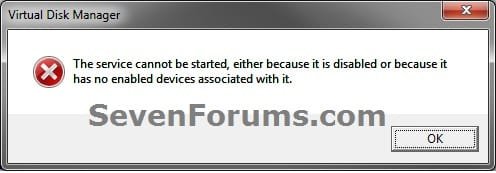
Error.jpg
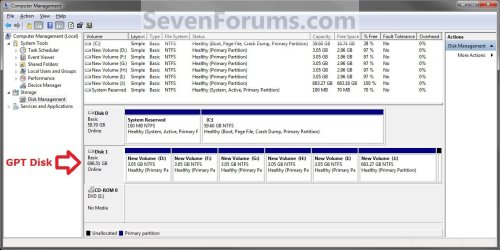
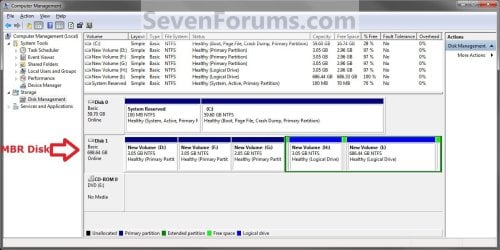
EXAMPLE: GPT disk vs MBR disk in Disk Management
GPT_Disk_Example.jpg

MBR_Disk_Example.jpg


OPTION ONE

In Disk Management


1. Open the Control Panel (icons view), and click on the Administrative Tools icon, then close the Control Panel window.

2. Click on Computer Management in Administrative Tools, then close the Administrative Tools window.

3. If prompted by UAC, click on Yes.

4. In the left pane under Storage, click on Disk Management. (See screenshot below)
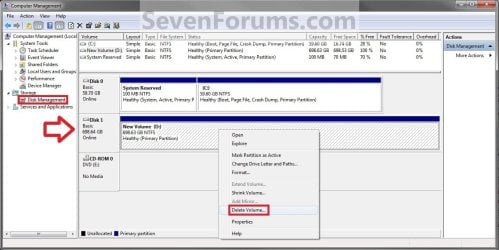
Step1.jpg
5. In the disk (ex: Disk 1) that you want to convert to a GPT disk, right click on each partition and volume on the disk and click on Delete Volume until the whole disk is unallocated space. (See screenshot above)

6. Right click on the disk (ex: Disk 1) that you want to convert to a GPT disk, and click on Convert to GPT Disk. (See screenshot below)
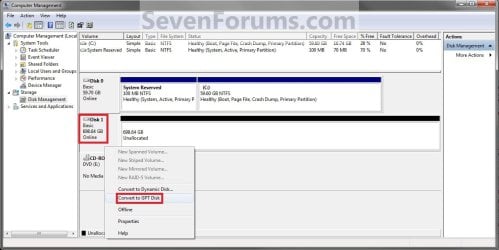
Step2.jpg
7. When finished shortly, you can confirm that the disk is a GPT disk if you right click on the disk and it has Convert to MPR Disk instead now. (See screenshot below)
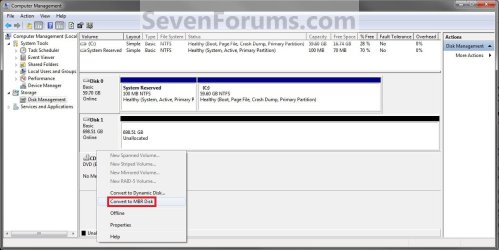
Step3.jpg
8. You can now create partitions on the now GPT disk if you like.

9. When done, close Disk Management.


OPTION TWO

In a Command Prompt


1. Open an elevated command prompt, and go to step 3 below.

OR

2. Open a command prompt at boot, and go to step 3 below.
Command_GPT.jpg
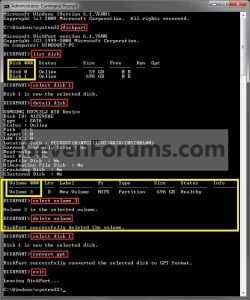
3. In the command prompt, type diskpart and press enter. (See screenshot above)

4. Type list disk and press enter.
NOTE: Make note of the disk number (ex: Disk 1) that you want to convert to a GPT disk.

5. Type select disk # and press enter.
NOTE: Substitute # with the actual disk number that you want to convert to a GPT disk. For example, select disk 1.

6. Do step 7 or 8 below for what you would like to do.

7. To Use the "Clean" Command to make Disk Unallocated
NOTE: This is the easiest method. It will wipe the disk clean all at once leaving it as unallocated space afterwards.
A) In the command prompt, type clean and press enter.

B) Go to step 9 below.
8. To Manually make Disk Unallocated
NOTE: This method has you manually delete each volume on the disk before converting the disk to GPT.
A) Type detail disk and press enter. If the disk does not have any volumes listed, then you can go to step 8E below.
NOTE: This will give you a list of all the volume numbers on the selected disk number that you will need to delete in steps 7 and 8 below.

B) Type select volume # and press enter.
NOTE: Substitute # with a volume number listed in step 8A. For example, select volume 3.

C) Type delete volume and press enter.

D) Repeat steps 8B and 8C for each volume # listed in step 8A until you have deleted all volume #'s.

E) When done, type select disk # and press enter.
NOTE: You would use the same one from step 5 above. For example, select disk 1.
9. Type convert gpt and press enter.

10. When done, type exit and press enter.

11. Close the command prompt.

12. You can now create partitions on the now GPT disk if you like for a data disk, or start installing the supported Windows if you like. (See information box at the top of the tutorial.).
NOTE: Restart the computer if you did step 2 instead.
That's it,
Shawn


Last edited:
Yo Brink, thanks for the article.

Tell me though, do you know if it's possible or not to have W7 64 install and boot on MBR and then if I have say 300GB unallocated on the same disk, partition that unallocated space as GPT but keep my first Windows partition as MBR? I have a laptop that I need to do this on for certain purposes that only support GPT. The laptop does not have UEFI.

Actually, just read this, interesting:
Booting from GPT
See towards the bottom in the Windows section. Looks like I might need to create a Hybrid MBR or DUET system, sounds painful but I think I'm going to give it a go.

Hello LazyD,

A disk can only be MBR or GPT, and not a mixture of both. :(

If able, could you elaborate more on what you were wanting to do? Maybe we may be able to come up with a solution or workaround.
 
Last edited:

My Computer My Computer

Computer type
PC/Desktop
Computer Manufacturer/Model Number
Self built custom
OS
64-bit Windows 11 Pro for Workstations
CPU
Intel i7-8700K OC'd to 5 GHz
Motherboard
ASUS ROG Maximus XI Formula Z390
Memory
64 GB (4x16GB) G.SKILL TridentZ RGB DDR4 3600 MHz
Graphics Card(s)
ASUS ROG-STRIX-GTX1080TI-O11G-GAMING
Sound Card
Integrated
Monitor(s) Displays
2 x Samsung Odyssey G7 27"
Screen Resolution
2560x1440
Hard Drives
1TB Samsung 990 PRO M.2,
4TB Samsung 990 PRO PRO M.2,
TerraMaster F8 SSD Plus NAS
PSU
Seasonic Prime Titanium 850W
Case
Thermaltake Core P3
Cooling
Corsair Hydro H115i
Keyboard
Logitech wireless K800
Mouse
Logitech MX Master 4
Internet Speed
2 Gb/s Download and 100 Mb/s Upload
Antivirus
Malwarebyte Anti-Malware Premium
Browser
Google Chrome
Other Info
Logitech Z625 speaker system,
Logitech BRIO 4K Pro webcam,
HP Color LaserJet Pro MFP M477fdn,
APC SMART-UPS RT 1000 XL - SURT1000XLI,
Galaxy S23 Plus phone
Hello,
I have a UEFI BIOS, but my Hard Disk is MBR. Would it work if I ran a Windows Backup, then ran the WinRE from the install disc, convert the drive to GPT and then restore the drive image? Or, will doing the whole process force the drive back into MBR again?
 

My Computer My Computer

Computer type
PC/Desktop
Computer Manufacturer/Model Number
Custom
OS
Microsoft Windows 7 Home Premium 64-bit Service Pack 1
CPU
AMD A10-6800K APU with Radeon(tm)™ HD Graphics 4100
Motherboard
ASRock FM2A85X Extreme4-M
Memory
(2) G.Skill F3-12800CL10-8GBXL
Graphics Card(s)
ASUS R7 250 Series (0x6610)
Sound Card
Realtek High Definition Audio
Monitor(s) Displays
Acer X213H LCD monitor, 21"
Screen Resolution
1920 x 1080 x 32 bits @ 60 Hz
Hard Drives
WD Black, 1.0TB, WDC WD1002FAEX-00Z3A0
PSU
Rosewill Quark-650
Case
Raidmax Comet SECC Steel ATX Mid Tower Computer Case
Cooling
1 x 80mm + 2 x 120mm + Stock cooler
Mouse
Gear Head Wireless Optical 5-button mouse
Internet Speed
FTTx 6000 / 1000
Antivirus
Avast! Free Antivirus 2015.10.0.2208
Browser
Google Chrome Version 40.0.2214.115
Other Info
*AMD Dual-Graphics
*Uses OpenDNS
*Uses Folding@Home
*HP 16x Super-Multi DVD Writer
*Superspeed 74-in-1 Card Reader
*Maximum overclock has not been determined.
Hello Honeycomb,

Unfortunately, when you restore the system image, it would return the disk back to how it was when the image was created. In this case, it would indeed go back to MBR. :(
 

My Computer My Computer

Computer type
PC/Desktop
Computer Manufacturer/Model Number
Self built custom
OS
64-bit Windows 11 Pro for Workstations
CPU
Intel i7-8700K OC'd to 5 GHz
Motherboard
ASUS ROG Maximus XI Formula Z390
Memory
64 GB (4x16GB) G.SKILL TridentZ RGB DDR4 3600 MHz
Graphics Card(s)
ASUS ROG-STRIX-GTX1080TI-O11G-GAMING
Sound Card
Integrated
Monitor(s) Displays
2 x Samsung Odyssey G7 27"
Screen Resolution
2560x1440
Hard Drives
1TB Samsung 990 PRO M.2,
4TB Samsung 990 PRO PRO M.2,
TerraMaster F8 SSD Plus NAS
PSU
Seasonic Prime Titanium 850W
Case
Thermaltake Core P3
Cooling
Corsair Hydro H115i
Keyboard
Logitech wireless K800
Mouse
Logitech MX Master 4
Internet Speed
2 Gb/s Download and 100 Mb/s Upload
Antivirus
Malwarebyte Anti-Malware Premium
Browser
Google Chrome
Other Info
Logitech Z625 speaker system,
Logitech BRIO 4K Pro webcam,
HP Color LaserJet Pro MFP M477fdn,
APC SMART-UPS RT 1000 XL - SURT1000XLI,
Galaxy S23 Plus phone
Brink, I have a laptop with Core i5, 1TB HDD and 16GB of ram that I bought for a VM lab. I've got W7 on 330GB at the start of the disk, this is so it can be used as a normal laptop for things that I need that for. So I have 600GB unallocated after that which I want to use as a datastore for the VMs.

I've installed VMWare ESXi 5.1 onto an 8GB Sandisk Cruzer Fit mini USB drive which stays in the laptop all the time. I boot to that whenever I want to start my ESXi server, all that works fine, the problem I'm having is getting that 600GB space available to ESXi which requires GPT. Formatting the drive in windows (in all possible ways) doesn't help, the disk has to (or has to appear to) become GPT at this point if I'm going to get further with this. ESXi can see the disk obviously, but it can't work with the partitions so only gives the option to format the whole thing which would get rid of my W7 install.

Anyway, did you read the link I posted, seriously read the Windows bit at the bottom, this guy reckons it can be done.
 

My Computer My Computer

OS
Windows 7 Pro SP1
LazyD,

Yeah, I even read it twice to make sure I didn't miss anything. It's a great idea, but I just don't see it working, or working very well.

If able, adding a second hard drive as a data drive, and converting it to GPT would be the safest bet for this to successfully work for you.
 

My Computer My Computer

Computer type
PC/Desktop
Computer Manufacturer/Model Number
Self built custom
OS
64-bit Windows 11 Pro for Workstations
CPU
Intel i7-8700K OC'd to 5 GHz
Motherboard
ASUS ROG Maximus XI Formula Z390
Memory
64 GB (4x16GB) G.SKILL TridentZ RGB DDR4 3600 MHz
Graphics Card(s)
ASUS ROG-STRIX-GTX1080TI-O11G-GAMING
Sound Card
Integrated
Monitor(s) Displays
2 x Samsung Odyssey G7 27"
Screen Resolution
2560x1440
Hard Drives
1TB Samsung 990 PRO M.2,
4TB Samsung 990 PRO PRO M.2,
TerraMaster F8 SSD Plus NAS
PSU
Seasonic Prime Titanium 850W
Case
Thermaltake Core P3
Cooling
Corsair Hydro H115i
Keyboard
Logitech wireless K800
Mouse
Logitech MX Master 4
Internet Speed
2 Gb/s Download and 100 Mb/s Upload
Antivirus
Malwarebyte Anti-Malware Premium
Browser
Google Chrome
Other Info
Logitech Z625 speaker system,
Logitech BRIO 4K Pro webcam,
HP Color LaserJet Pro MFP M477fdn,
APC SMART-UPS RT 1000 XL - SURT1000XLI,
Galaxy S23 Plus phone
Yes this wouldn't be a problem at all on a desktop but I can't add a second drive to this laptop.
 

My Computer My Computer

OS
Windows 7 Pro SP1
I'm afraid you may be out of luck then unless your motherboard has a UEFI firmware chip instead of BIOS. :(
 

My Computer My Computer

Computer type
PC/Desktop
Computer Manufacturer/Model Number
Self built custom
OS
64-bit Windows 11 Pro for Workstations
CPU
Intel i7-8700K OC'd to 5 GHz
Motherboard
ASUS ROG Maximus XI Formula Z390
Memory
64 GB (4x16GB) G.SKILL TridentZ RGB DDR4 3600 MHz
Graphics Card(s)
ASUS ROG-STRIX-GTX1080TI-O11G-GAMING
Sound Card
Integrated
Monitor(s) Displays
2 x Samsung Odyssey G7 27"
Screen Resolution
2560x1440
Hard Drives
1TB Samsung 990 PRO M.2,
4TB Samsung 990 PRO PRO M.2,
TerraMaster F8 SSD Plus NAS
PSU
Seasonic Prime Titanium 850W
Case
Thermaltake Core P3
Cooling
Corsair Hydro H115i
Keyboard
Logitech wireless K800
Mouse
Logitech MX Master 4
Internet Speed
2 Gb/s Download and 100 Mb/s Upload
Antivirus
Malwarebyte Anti-Malware Premium
Browser
Google Chrome
Other Info
Logitech Z625 speaker system,
Logitech BRIO 4K Pro webcam,
HP Color LaserJet Pro MFP M477fdn,
APC SMART-UPS RT 1000 XL - SURT1000XLI,
Galaxy S23 Plus phone
Can GPT & MBR co-exist on the same OS .
Almost out of space I decided to add a new 3TB int drive. It has been installed but has yet to be formatted.
Id like to use GPT on it. But only if win7 can work with both partition types together.
Thanks for the help
D
 

My Computer My Computer

Computer type
PC/Desktop
Computer Manufacturer/Model Number
Custom
OS
Windows 7 Ultimate x64
CPU
Intel CoreI5-3.10Ghz 3rdGen.
Motherboard
ASUS P8z77-VPro 16GB.DDR3@1333
Memory
Corsair 16GB.DDR3@1333
Graphics Card(s)
GTX8800
Hard Drives
3 Int / 1 Ext
Antivirus
Windows Security Essentials X64
Browser
Opera9.64 (Older is better) / FIrefox 19 / IE10 64 &32
Hello Daisuke, and welcome to Seven Forums.

Yes, you sure can have multiple GPT and MBR disks together. :)

It's just that a single disk (hard drive) can only be GPT or MBR, but not both.
 

My Computer My Computer

Computer type
PC/Desktop
Computer Manufacturer/Model Number
Self built custom
OS
64-bit Windows 11 Pro for Workstations
CPU
Intel i7-8700K OC'd to 5 GHz
Motherboard
ASUS ROG Maximus XI Formula Z390
Memory
64 GB (4x16GB) G.SKILL TridentZ RGB DDR4 3600 MHz
Graphics Card(s)
ASUS ROG-STRIX-GTX1080TI-O11G-GAMING
Sound Card
Integrated
Monitor(s) Displays
2 x Samsung Odyssey G7 27"
Screen Resolution
2560x1440
Hard Drives
1TB Samsung 990 PRO M.2,
4TB Samsung 990 PRO PRO M.2,
TerraMaster F8 SSD Plus NAS
PSU
Seasonic Prime Titanium 850W
Case
Thermaltake Core P3
Cooling
Corsair Hydro H115i
Keyboard
Logitech wireless K800
Mouse
Logitech MX Master 4
Internet Speed
2 Gb/s Download and 100 Mb/s Upload
Antivirus
Malwarebyte Anti-Malware Premium
Browser
Google Chrome
Other Info
Logitech Z625 speaker system,
Logitech BRIO 4K Pro webcam,
HP Color LaserJet Pro MFP M477fdn,
APC SMART-UPS RT 1000 XL - SURT1000XLI,
Galaxy S23 Plus phone
Great thats exactly what i needed to know thanks for the help and getting back to me so quickly.
Daisuke


Off Topic,
There seems to be beyond measure the amount of over complicated info on GPT and MBR.(on topic together) But that simple answer you provided me with. Even the forum that has answered my questions when need has risen over the past 10 years almost. Couldnt answer the question. Instead the person that replyed, started writing thats its possible to convert all my discs to GPT and heres how .... then pointed me to this topic on your forum.
Naturally even though its been about 10 years now. Its obvious that the level of compentence of the person that helped me has sunk down to passing the question off to another forum insteaad of doing the work and answering the question. I asked the exact same question. TY
 

My Computer My Computer

Computer type
PC/Desktop
Computer Manufacturer/Model Number
Custom
OS
Windows 7 Ultimate x64
CPU
Intel CoreI5-3.10Ghz 3rdGen.
Motherboard
ASUS P8z77-VPro 16GB.DDR3@1333
Memory
Corsair 16GB.DDR3@1333
Graphics Card(s)
GTX8800
Hard Drives
3 Int / 1 Ext
Antivirus
Windows Security Essentials X64
Browser
Opera9.64 (Older is better) / FIrefox 19 / IE10 64 &32
You're most welcome Daisuke. I'm glad it could help. :)
 

My Computer My Computer

Computer type
PC/Desktop
Computer Manufacturer/Model Number
Self built custom
OS
64-bit Windows 11 Pro for Workstations
CPU
Intel i7-8700K OC'd to 5 GHz
Motherboard
ASUS ROG Maximus XI Formula Z390
Memory
64 GB (4x16GB) G.SKILL TridentZ RGB DDR4 3600 MHz
Graphics Card(s)
ASUS ROG-STRIX-GTX1080TI-O11G-GAMING
Sound Card
Integrated
Monitor(s) Displays
2 x Samsung Odyssey G7 27"
Screen Resolution
2560x1440
Hard Drives
1TB Samsung 990 PRO M.2,
4TB Samsung 990 PRO PRO M.2,
TerraMaster F8 SSD Plus NAS
PSU
Seasonic Prime Titanium 850W
Case
Thermaltake Core P3
Cooling
Corsair Hydro H115i
Keyboard
Logitech wireless K800
Mouse
Logitech MX Master 4
Internet Speed
2 Gb/s Download and 100 Mb/s Upload
Antivirus
Malwarebyte Anti-Malware Premium
Browser
Google Chrome
Other Info
Logitech Z625 speaker system,
Logitech BRIO 4K Pro webcam,
HP Color LaserJet Pro MFP M477fdn,
APC SMART-UPS RT 1000 XL - SURT1000XLI,
Galaxy S23 Plus phone
Cooee Brink

I spent the evening reading your excellent post while enjoying a few of my homebrews, quite a good read

I dual boot with XP 32x86 & W7x64 with EasyBCD in W7, top software

I added 2x3TB HDD earlier this year & formatted them as MBR's, as I use my XP for everyday stuff & my W7 as my gaming rig

when I boot into XP my 3TB HDD's sees them as 2 seperate drives & the W7 only sees the 2TB portions of them, not the other 1TB

I will disconnect 1 of those 3TB HDD's & copy all the data to external drives

my question is, how do I get my full 3TB partion back in W7? do I go into disk management & delete those 2 partitions & it will show as 1 drive so I can convert it to GPT? I do not need to partion those HDD's as it will be all used for data (read .mkv files or .avi files; get the picture, or is that vids :))

thank you in advance

cheers
 

My Computer My Computer

Computer type
PC/Desktop
Computer Manufacturer/Model Number
custom build
OS
Windows 7 x64 Ultimate
CPU
i5 [email protected]
Motherboard
Asus P8Z68-V Pro/Gen 3
Memory
2x4GB Low profile Corsair Vengence
Graphics Card(s)
Sapphire 7970 OC v2@1180/1480
Sound Card
ASUS Zonar DSX
Monitor(s) Displays
27" Black Tune by Crossover & 22" Viewsonic
Screen Resolution
2560x1440 & 1680x1050
Hard Drives
1x 128GB Samsung 840 Pro
1x 640GB WD Black
3x 3TB Seagate Barracuda
PSU
XFX 850W Black Edition
Case
NZXT Phantom 820
Cooling
Noctua NH-D15
Keyboard
Razor Tarantula
Mouse
Logitech G500s
Internet Speed
5.5Mb/s down via satellite
Antivirus
Bitdefender Total Security 2014
Browser
Firefox
Hello beardrinksbeer, and welcome to Seven Forums.

The issue is that MBR only supports only up to 2TB partitions, so only 2TB of your 3TB HDD was being seen and used while it was formatted with the MBR file system. You could have two partitions on the 3TB with one a 2TB and the other 1TB to be able to use all 3TB on the HDD with MBR.

When you convert the 3TB HDD to have a GPT partition, then yes both XP (if 64-bit) and Windows 7 will see the HDD as one single 3TB HDD with all space available on one partition.

Hope this helps, :)
Shawn
 

My Computer My Computer

Computer type
PC/Desktop
Computer Manufacturer/Model Number
Self built custom
OS
64-bit Windows 11 Pro for Workstations
CPU
Intel i7-8700K OC'd to 5 GHz
Motherboard
ASUS ROG Maximus XI Formula Z390
Memory
64 GB (4x16GB) G.SKILL TridentZ RGB DDR4 3600 MHz
Graphics Card(s)
ASUS ROG-STRIX-GTX1080TI-O11G-GAMING
Sound Card
Integrated
Monitor(s) Displays
2 x Samsung Odyssey G7 27"
Screen Resolution
2560x1440
Hard Drives
1TB Samsung 990 PRO M.2,
4TB Samsung 990 PRO PRO M.2,
TerraMaster F8 SSD Plus NAS
PSU
Seasonic Prime Titanium 850W
Case
Thermaltake Core P3
Cooling
Corsair Hydro H115i
Keyboard
Logitech wireless K800
Mouse
Logitech MX Master 4
Internet Speed
2 Gb/s Download and 100 Mb/s Upload
Antivirus
Malwarebyte Anti-Malware Premium
Browser
Google Chrome
Other Info
Logitech Z625 speaker system,
Logitech BRIO 4K Pro webcam,
HP Color LaserJet Pro MFP M477fdn,
APC SMART-UPS RT 1000 XL - SURT1000XLI,
Galaxy S23 Plus phone
Cooee Brink & thanx for the welcome

I have the 3TB set up as 2TB & 1TB but W7 only sees the 2TB part, not the 1TB part; but the XP sees both & has them as 2 separate partitions.

how can W7 change the MBR to GPT when it only sees the 2TB part only?
 
Last edited by a moderator:

My Computer My Computer

Computer type
PC/Desktop
Computer Manufacturer/Model Number
custom build
OS
Windows 7 x64 Ultimate
CPU
i5 [email protected]
Motherboard
Asus P8Z68-V Pro/Gen 3
Memory
2x4GB Low profile Corsair Vengence
Graphics Card(s)
Sapphire 7970 OC v2@1180/1480
Sound Card
ASUS Zonar DSX
Monitor(s) Displays
27" Black Tune by Crossover & 22" Viewsonic
Screen Resolution
2560x1440 & 1680x1050
Hard Drives
1x 128GB Samsung 840 Pro
1x 640GB WD Black
3x 3TB Seagate Barracuda
PSU
XFX 850W Black Edition
Case
NZXT Phantom 820
Cooling
Noctua NH-D15
Keyboard
Razor Tarantula
Mouse
Logitech G500s
Internet Speed
5.5Mb/s down via satellite
Antivirus
Bitdefender Total Security 2014
Browser
Firefox
bear,

Double check in Disk Management to see if the 1TB partition has a drive letter assigned to it or not while in Windows 7. If not, then you could just add one.

If you wanted to convert the HDD to GPT, then Windows 7 will see all 3TB as one partition after doing the steps in the tutorial. :)
 

My Computer My Computer

Computer type
PC/Desktop
Computer Manufacturer/Model Number
Self built custom
OS
64-bit Windows 11 Pro for Workstations
CPU
Intel i7-8700K OC'd to 5 GHz
Motherboard
ASUS ROG Maximus XI Formula Z390
Memory
64 GB (4x16GB) G.SKILL TridentZ RGB DDR4 3600 MHz
Graphics Card(s)
ASUS ROG-STRIX-GTX1080TI-O11G-GAMING
Sound Card
Integrated
Monitor(s) Displays
2 x Samsung Odyssey G7 27"
Screen Resolution
2560x1440
Hard Drives
1TB Samsung 990 PRO M.2,
4TB Samsung 990 PRO PRO M.2,
TerraMaster F8 SSD Plus NAS
PSU
Seasonic Prime Titanium 850W
Case
Thermaltake Core P3
Cooling
Corsair Hydro H115i
Keyboard
Logitech wireless K800
Mouse
Logitech MX Master 4
Internet Speed
2 Gb/s Download and 100 Mb/s Upload
Antivirus
Malwarebyte Anti-Malware Premium
Browser
Google Chrome
Other Info
Logitech Z625 speaker system,
Logitech BRIO 4K Pro webcam,
HP Color LaserJet Pro MFP M477fdn,
APC SMART-UPS RT 1000 XL - SURT1000XLI,
Galaxy S23 Plus phone
Cooee Brink

the 1TB partition is unallocated in W7, but the options are greyed out. but this is good, I can transfer all the files over when in XP & then do what you wrote in your excellent tutorial :)

I am nearly ready to install W7 over XP; I will miss XP like I missed 98SE

thanx for all your help Brink :) cheers
 

My Computer My Computer

Computer type
PC/Desktop
Computer Manufacturer/Model Number
custom build
OS
Windows 7 x64 Ultimate
CPU
i5 [email protected]
Motherboard
Asus P8Z68-V Pro/Gen 3
Memory
2x4GB Low profile Corsair Vengence
Graphics Card(s)
Sapphire 7970 OC v2@1180/1480
Sound Card
ASUS Zonar DSX
Monitor(s) Displays
27" Black Tune by Crossover & 22" Viewsonic
Screen Resolution
2560x1440 & 1680x1050
Hard Drives
1x 128GB Samsung 840 Pro
1x 640GB WD Black
3x 3TB Seagate Barracuda
PSU
XFX 850W Black Edition
Case
NZXT Phantom 820
Cooling
Noctua NH-D15
Keyboard
Razor Tarantula
Mouse
Logitech G500s
Internet Speed
5.5Mb/s down via satellite
Antivirus
Bitdefender Total Security 2014
Browser
Firefox
Your most welcome Bear. Please let us know how it went. :)

If you like, you could still run your XP from a virtual machine in Windows 7.
 

My Computer My Computer

Computer type
PC/Desktop
Computer Manufacturer/Model Number
Self built custom
OS
64-bit Windows 11 Pro for Workstations
CPU
Intel i7-8700K OC'd to 5 GHz
Motherboard
ASUS ROG Maximus XI Formula Z390
Memory
64 GB (4x16GB) G.SKILL TridentZ RGB DDR4 3600 MHz
Graphics Card(s)
ASUS ROG-STRIX-GTX1080TI-O11G-GAMING
Sound Card
Integrated
Monitor(s) Displays
2 x Samsung Odyssey G7 27"
Screen Resolution
2560x1440
Hard Drives
1TB Samsung 990 PRO M.2,
4TB Samsung 990 PRO PRO M.2,
TerraMaster F8 SSD Plus NAS
PSU
Seasonic Prime Titanium 850W
Case
Thermaltake Core P3
Cooling
Corsair Hydro H115i
Keyboard
Logitech wireless K800
Mouse
Logitech MX Master 4
Internet Speed
2 Gb/s Download and 100 Mb/s Upload
Antivirus
Malwarebyte Anti-Malware Premium
Browser
Google Chrome
Other Info
Logitech Z625 speaker system,
Logitech BRIO 4K Pro webcam,
HP Color LaserJet Pro MFP M477fdn,
APC SMART-UPS RT 1000 XL - SURT1000XLI,
Galaxy S23 Plus phone
Cooee Brink

I shall let you know how it goes after I get everything done tomorrow as I am backing up my 2x3TB HDD's, it is a slow process, lucky my brain is slow today after all the beer I drank last night :)

but it gave me a thought, as I will have 2xW7 x64 on the same HDD, I can just clone over the gaming set-up I have for W7 & uninstall all the games to free up space & get easyBCD to manage the booting sequence; that will save me doing a fresh install over XP, just clone W7 over it, that will save time :)

I still have XP on another comp, if I want to go down memory lane :) but I ran compatability thingy on this good comp & everything should be OK. I even got my Lide 35 to work in W7 thanx to this site :) I used another comp that I put W7 on to check my scanner & printer to see if I could get them working be4 the jump to 7; no, not going to 8

cool site here, just wish my eyes could focus better :)

cheers
 

My Computer My Computer

Computer type
PC/Desktop
Computer Manufacturer/Model Number
custom build
OS
Windows 7 x64 Ultimate
CPU
i5 [email protected]
Motherboard
Asus P8Z68-V Pro/Gen 3
Memory
2x4GB Low profile Corsair Vengence
Graphics Card(s)
Sapphire 7970 OC v2@1180/1480
Sound Card
ASUS Zonar DSX
Monitor(s) Displays
27" Black Tune by Crossover & 22" Viewsonic
Screen Resolution
2560x1440 & 1680x1050
Hard Drives
1x 128GB Samsung 840 Pro
1x 640GB WD Black
3x 3TB Seagate Barracuda
PSU
XFX 850W Black Edition
Case
NZXT Phantom 820
Cooling
Noctua NH-D15
Keyboard
Razor Tarantula
Mouse
Logitech G500s
Internet Speed
5.5Mb/s down via satellite
Antivirus
Bitdefender Total Security 2014
Browser
Firefox
That sounds like a good plan.

:thumbsup:
 

My Computer My Computer

Computer type
PC/Desktop
Computer Manufacturer/Model Number
Self built custom
OS
64-bit Windows 11 Pro for Workstations
CPU
Intel i7-8700K OC'd to 5 GHz
Motherboard
ASUS ROG Maximus XI Formula Z390
Memory
64 GB (4x16GB) G.SKILL TridentZ RGB DDR4 3600 MHz
Graphics Card(s)
ASUS ROG-STRIX-GTX1080TI-O11G-GAMING
Sound Card
Integrated
Monitor(s) Displays
2 x Samsung Odyssey G7 27"
Screen Resolution
2560x1440
Hard Drives
1TB Samsung 990 PRO M.2,
4TB Samsung 990 PRO PRO M.2,
TerraMaster F8 SSD Plus NAS
PSU
Seasonic Prime Titanium 850W
Case
Thermaltake Core P3
Cooling
Corsair Hydro H115i
Keyboard
Logitech wireless K800
Mouse
Logitech MX Master 4
Internet Speed
2 Gb/s Download and 100 Mb/s Upload
Antivirus
Malwarebyte Anti-Malware Premium
Browser
Google Chrome
Other Info
Logitech Z625 speaker system,
Logitech BRIO 4K Pro webcam,
HP Color LaserJet Pro MFP M477fdn,
APC SMART-UPS RT 1000 XL - SURT1000XLI,
Galaxy S23 Plus phone
job done, well almost, the files take yonks to copy back

easy job with all this help, cheers
 

My Computer My Computer

Computer type
PC/Desktop
Computer Manufacturer/Model Number
custom build
OS
Windows 7 x64 Ultimate
CPU
i5 [email protected]
Motherboard
Asus P8Z68-V Pro/Gen 3
Memory
2x4GB Low profile Corsair Vengence
Graphics Card(s)
Sapphire 7970 OC v2@1180/1480
Sound Card
ASUS Zonar DSX
Monitor(s) Displays
27" Black Tune by Crossover & 22" Viewsonic
Screen Resolution
2560x1440 & 1680x1050
Hard Drives
1x 128GB Samsung 840 Pro
1x 640GB WD Black
3x 3TB Seagate Barracuda
PSU
XFX 850W Black Edition
Case
NZXT Phantom 820
Cooling
Noctua NH-D15
Keyboard
Razor Tarantula
Mouse
Logitech G500s
Internet Speed
5.5Mb/s down via satellite
Antivirus
Bitdefender Total Security 2014
Browser
Firefox
Back
Top