Convert to Windows XP Style

Change Windows 7 to Look and Function like Windows XP

   Information
While many of Windows 7's features are considering to be amazing and not to be missed, many people, including myself don't enjoy the new styles and wish to return to the styles of earlier times. Now, most Windows 7 users are going to urge you time and time again to stick with the Windows 7 style and attempt to convert with the masses. If you'd like to do that it's your prerogative, however, you shouldn't stick with Windows 7 just because everyone else is. If you want a different style, then get one!


To Convert to a Plain Classic Windows Style

(Available in every Version of Windows since 95)
Example:
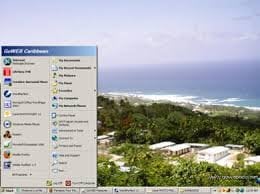
imagesQZS8XHO7.jpg

Note:
Not only will this change your theme and styles back to Windows XP, but it will also:
Decrease the requirements on your GPU (Aero disabled)
Reinstate the traditional Quick Launch toolbar
Reinstate the traditional Start Menu

Now, on with the conversion process:

  • Turning off Aero and all visual effects:
    • Start > Right Click Computer > Advanced System Settings > Settings > Performance (Settings Button) > Adjust for best performance
    • Not only will that turn off Aero, but it should also turn off the new taskbar.
  • Changing the theme to Windows Classic:
    • Start > Control Panel > Appearance & Personalization > Personalization > Windows Classic in "Basic & High Contrast Themes"
  • Fixing the taskbar items:
    • Right Click Taskbar > Properties > Change the drop down to never combine.
  • Replacing the quick launch toolbar:
    • Right Click Taskbar > Toolbars > New Toolbar > Enter this in Folder Name:
      %userprofile%\AppData\Roaming\Microsoft\Internet Explorer\Quick Launch
    • Now you can drag and drop things into your quick launch like you could in XP.
  • Changing the start menu back to XP style:
    • Download CSMenu & StartKiller
    • Install & Index CSMenu then Log Off & Back On
    • Start Menu > Right Click on “Show CSMenu” shortcut > “Pin to Taskbar”.
    • You should now see two start menu buttons (CSMenu is a bit smaller).
    • If you wish to keep both buttons, skip to the next Windows XP conversion. Otherwise:
    • Run the StartKiller.exe file, will auto-start after install.
    • Now only CSMenu is there.
    • To be certain StartKiller runs every time you run Windows: Right Click > Properties > Load on system start-up
  • Showing Icons on the desktop
    • To show icons on the desktop, simply right click on the item you wish to show and click show on desktop. If that option isn't there, you can also use the send to > create shortcut on desktop option.
  • Replacing the file menu & full location in Explorer:
    • Organize > Layout > Menu Bar
    • Organize > Folder & Search Options > View Tab > Display the full path in the title bar (Classic Only)
    • Save Settings: Organize > Folder & Search Options > View Tab > Apply to Folders
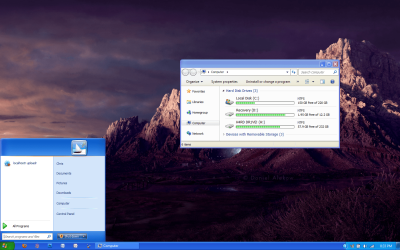
To Convert to Windows XP's Style

Example:
Luna_port_to_Windows_7__Aero__by_Satukoro.png

Download and Install this Theme using the related tutorials below.

   Tip
If you have anymore tips, please pm them to me and I will add them to the list


Last edited by a moderator:
Will this also give us the folder preview image like xp?
 

My Computer

Computer Manufacturer/Model Number
hpe-210y
OS
windows 7 ultimate x64
Monitor(s) Displays
asus
Now, most Windows 7 users are going to urge you time and time again to stick with the Windows 7 style and attempt to convert with the masses. If you'd like to do that it's your prerogative, however, you shouldn't stick with Windows 7 just because everyone else is. If you want a different style, then get one!

This is exactly right on target man!! :thumbsup:

You Rock :D
 

My Computer

Computer Manufacturer/Model Number
Acer || Meeeee
OS
XP Pro SP3 || Windows 7
CPU
Pentium-D || intel Core i5 3.2GHz ( 2 cores w/HT == 4 cpus )
Motherboard
Acer || ASUS
Memory
4GB DDR2-800MHz || 4GB DDR3-1600
Graphics Card(s)
onboard nVidia Geforce something or other
Sound Card
onboard
Monitor(s) Displays
1 21" crt
Screen Resolution
1152 x 864
Hard Drives
500GB sata2 Seagate 7200.12 || 1TB sata2 Seagate 7200.12
PSU
dont know || Ultra
Case
Acer || My old one
Cooling
fans || nicer fans
Keyboard
Acer || Microsoft <-- I LOVE this KB ^^
Mouse
Acer || Microsoft <-- I LOVE this mouse ^^
Internet Speed
Comcast || Comcast
Other Info
Companion PC || Main PC

I use these computers primarily for video game development; when I get my first release ready I'll let you know :-)

O/S Exp:
DOS, Windows 3.11 for workgroups, 95OSR2, 98SE (fav), XP Pro SP3 (fav), Windows 7 Home Premium (fav, ohh wow!!)

I have a copy of vista that came with my Acer but felt more comfortable with XP so I rebuilt it with XP Pro SP3

I don't know p
Thank you Thank you Thank you Thank you for this thread. I was tearing my hair out until I made some of the changes you put here. Gotta have my two toolbars top and bottom, quick launch and desktop (no visible icons on the desktop itself), or I can't function; and I had 3 Win7 machines to set up! Was going stark raving mad! Thank you Thank you Thank you Thank you for giving me back my sanity!
 

My Computer

Computer type
PC/Desktop
Computer Manufacturer/Model Number
Dell Dimension Optiplex and Latitude
OS
Win7 Pro 32-bit and XP Pro (17 windows machines)
CPU
Core 2 Duo i7 quad 1st gen i5 3rd gen Pentium 4
Motherboard
I don't know, Go by Dell brand name
Memory
1.5 GB to 8 GB in quad core
Graphics Card(s)
varies nVidia in the quad core laptop
Sound Card
varies
Monitor(s) Displays
Dell FP several models
Screen Resolution
Dell FP 1280 x 1024, 1600x900, 1920x1080
Hard Drives
Varies from 80 GB to 1TB
PSU
don't know what that is, sorry
Case
Dell chassis
Cooling
none
Keyboard
Dell
Mouse
Dell wireless and wired and many others
Internet Speed
XFINITY 1 GIG
Antivirus
varies
Browser
Firefox
Other Info
XP die-hard just starting into Win7.
Changing the start menu back to XP style:
Yeck! 20 bucks for a utility?

I'm currently scanning MajorGeeks.com - Download Freeware and Shareware Computer Utilities. for freeware alternative or will go with this advice:

WindowsXP style startmenu in windows7 - MajorGeeks Support Forums

Re: WindowsXP style startmenu in windows7
this might not be what you mean but after you click start and "all programs" comes up, right click that and in properties, start menu, there is an option to display and store recently opened programs. It works for me.
 
Last edited:

My Computer

Computer type
PC/Desktop
Computer Manufacturer/Model Number
All builds,AMD..ASRock,Asus.
OS
2000Pro,XP SP3 x86..W7 on next build
Not so grey matter...

you say:-

  • Replacing the quick launch toolbar:
    • Right Click Taskbar > Toolbars > New Toolbar > Enter this in Folder Name:
      %userprofile%\AppData\Roaming\Microsoft\Internet Explorer\Quick Launch
    • Now you can drag and drop things into your quick launch like you could in XP.
    when I do this the folder I am about to paste that into is on my E drive in a folder for the clasic shell download.
Obviously that is wrong, but the fact remains its not heading to a system folder, just where should that folder be saved to ?


DBenz
 

My Computer

Computer type
PC/Desktop
Computer Manufacturer/Model Number
Custom built
OS
Windows 7 64bit pro
CPU
Intel Core i7 4790
Motherboard
Gigabyte Z97P-D3 Intel Z97 Socket 1150 DDR3
Memory
32Gb DDR3
Graphics Card(s)
GeForce GTX970
Hard Drives
Samsung SSD for OS and WD green for data
Antivirus
Kaspersky Internet Security 2014
Browser
Firefox
Can I download and use"Windows XP "Royale Blue" Theme for Windows 7?
 

My Computer

Computer type
Laptop
Computer Manufacturer/Model Number
compaq
OS
windows Ultimate
Many Tanks

I am indebted to you. I spent hows browsing the web to discover how to do this and found a lot of convoluted and risky ways to do this but finally you showed the right way. Aero is an artists impression of a UI and if all I wanted to do was stare at a pretty picture it would be OK, but I actually spend up to 18 hours a day working on my computer and the aero I/F was causing considerable eye strain. Now I work again with out that. Why can't they simply have a button called "work mode" or if they wanted to be really adventurous they could have called it "Windows Classic Mode". Forcing people to suffer eye strain is not a good way to gain customers. Many people don't realise this but IBM and MS spent a lot of money researching windows type UI design for optimal user comfort back in the Windows 1 days, it's no coincidence that IBM's early windows OS and windows 3.1 look almost identical. Then they modernised it with Win95 & WinNT but retained the ergonomics. Finally they all had a lobotomy and came up with XP but left the escape button in there (Windows Classic Mode). Then some lobotomised manager/systems architect decided customers should like their user experience and scrapped both good UI design and the escape button. UI does after all stand for USER interface, not watchers IF
 

My Computer

Computer type
PC/Desktop
Computer Manufacturer/Model Number
Gigabyte
OS
Win7 64bit
CPU
i7
Motherboard
Gigabyte UD3
Memory
6G
Graphics Card(s)
NVidia
Hard Drives
SSD
Antivirus
TotalDefence
Browser
Firefox
Back
Top