Convince me !

I used to think like you ... That there's little chance that MS would be able to much improve on what WinXP x64 already made available. But, I was wrong. There's more than a few reasons to look at Win7:
  • Better memory management. I actually got it to install and run on an 8 year old Toshiba S3000 Satellite with only 800MHz proc, 20GB HDD, and 512MB memory. Didn't run real swift, but it ran and didn't crash. Oh, and didn't eat all the memory in the box. With IE 8 running, there was still some 200MB available.
  • Eye-candy - OK, obviously not your thing, but it might be for some.
  • Drivers ...
    • Video driver on the Toshiba, not so good
    • On my desktop (see system specs), everything was supported right off the DVD once I had refreshed the MBO BIOS. Video and network drivers where updateable from the H/W vendor. Nvidia works a treat. The NIC, from Asrock ... no issues.
    • On my Acer lappie - The only thing I have yet to get a driver for is the integrated video camera. I never used it before and I doubt I'll ever use it in the future. So not a big deal for me.
  • Faster/slower then XP? My experience is that every application is running at least as fast on Win7 as it ever did on XP.
  • Better power consumption. Under XP, I never did figure out how to get the i7 920 to "throttle down" when the system was idle - the CPU was always cranking away at 2.6GHz (+/-). I'm not talking about CPU usage as reported by the Task Manager - that, as expected, would always drop to near zero. Under Win7, it's like the various cores go to sleep until they are needed - presumably lowering power consumption and heat generation.
  • Vista drivers? There's only one piece of hardware I have for which Win7 doesn't have a driver - a monitor color calibration device. However, the vendor website has software designed for x64 OS. This software runs on WinXP, Vista 64, and on Win7 x64.
  • Does it use more memory, when idle, than WinXP. Ummmm .... yes, but so what. The memory management is sooo much better that when/if you run an app that needs more memory, Win7 seems pretty compliant about releasing some of the memory it's using so the app can get to it. Win7 seems to use what it needs (makes it run faster as it's not always going to disk for stuff) until such time that some application needs it. On my lappie (with only 2GB), I've never run into a situation where there wasn't enough memory to fit just one more thing in ... and that without a lot of page swapping. On the old Toshiba ... that's another question entirely :)
  • Stability? When first released, WinXP was not a shining example. It got better with SP2, but really didn't come into it's own until SP3. Win7 seems to have avoided much of those problems and nearly all of the problems encountered by early adopters of Vista. The various Win7 builds have been getting better and better. The RC (7100) was solid, but 7229 is so much more so and some who have it say that 7232 is better yet.
May I, humbly, suggest you install Win7 and see for yourself - dual boot maybe? I think maybe that experience will change your outlook a bit.
 

My Computer

Computer Manufacturer/Model Number
Cobbled together :)
OS
Win7 Ultimate, x64
CPU
i7 920, currently NOT OC
Motherboard
Asrock X58 Deluxe
Memory
OCZ Platinum 12GB (6 x 2GB) 240-Pin DDR3 SDRAM DDR3 1600
Graphics Card(s)
nvidia geforce 7600 gt
Sound Card
integrated
Monitor(s) Displays
Samsung SyncMaster 204t (dual monitors)
Screen Resolution
1600 x 1200
Hard Drives
WDC WD2000JS-00MHB0 ATA
WDC WD5000AAKS-65YGA0 ATA
PSU
750w
Cooling
Air, 4 120mm
thank you :)
 

My Computer

Computer Manufacturer/Model Number
HP G60t
OS
XP
CPU
P8600 Intel Core 2 DUO 2.4 Ghz
Memory
4 Go SDRAM DDR2
Graphics Card(s)
NVIDIA GEFORCE 9200 M GS
Sound Card
Realteck foolishness
Monitor(s) Displays
15'6"
Screen Resolution
WXGA
Hard Drives
SATA 320Go 5200 RPM
Internet Speed
56k
One thing that has not been mentioned is that as XP is now on limited support from Microsoft (major security updates only), It is in my opinion a poor choice for a new machine. I believe we will see hardware manufacturers winding down the support for XP over the next year or so

On an existing machine with a mature copy of XP it is a good OS but with the change in status and the hardware changes since it's design, I think the time has come to look forward with a new machine, not backwards.

I have been through a few of these transition periods over the years and found that a new machine should be fitted with the latest operating system for long term reliability.

This of course assumes that the latest OS is reliable and supported which 7, unlike Vista, appears to be. When XP first came out I remember downgrading hundreds of PCs pre-installed with XP to Win2000 and NT for reliability/compatibility reasons.
 

My Computers

System One System Two

  • Computer type
    PC/Desktop
    Computer Manufacturer/Model Number
    ChillBlast - Custom to my design
    OS
    Windows 11 Pro x64 [Latest Release and Release Preview]
    CPU
    Ryzen 9 5950X, 3.8 - 5.2 MHz
    Motherboard
    Asus Prime X570-Pro
    Memory
    64GB [2 x 32GB] DDR4 3200MHz
    Graphics Card(s)
    4GB NVIDIA GEFORCE GTX 1650 Ti
    Sound Card
    On-board SPDIF to 5.1 System + HDMI [5.1 system]
    Monitor(s) Displays
    32" UHD 32 Bit HDR Monitor + 43" UHD 4K 32Bit HDR TV
    Screen Resolution
    2 x 3840 x 2160 @60Hz
    Hard Drives
    1TB M2 SSD OS, 500GB Fast Access SSD, 2 x 8TB Data + Various Externals from 1TB to 4TB, 10TB NAS
    PSU
    NZXT C750 80 PLUS Gold 750W Modular PSU
    Case
    Workstation Case [Matt Black]
    Cooling
    NZXT Kraken X63 280mm CPU Cooler +2x Quiet Case fans
    Keyboard
    Logitech Wireless MX Keys & K400 + others
    Mouse
    Logitech Wireless MX Master 3S
    Internet Speed
    920 MB Down 50 MB Up
    Antivirus
    BitDefender Total Security Pro
    Browser
    Chrome (always run latest Non-Beta)
    Other Info
    Also run ...
    Laptop - Quad 8GB - Windows 10 Pro x64
    Nexus 7 Android tablet x2
    Samsung 10.2" tablet
    Blackview TAB 8 4G Android Tablet c/w Keyboard
    Wacom Intuos Pro Medium Pen Pad
    Wacom Intuos Pro Small Pen Pad
    Wacom Expresskeys Remote
    Loopdeck+ Graphics Controller
    Shuttle Pro v2 Control
  • Computer type
    Laptop
    System Manufacturer/Model Number
    Dell XPS 17 10750H
    OS
    Windows 11 Pro x64 Latest RP
    CPU
    Intel I7 10750H 5.0GHz
    Motherboard
    Dell XPS
    Memory
    32GB [2x16GB] DDR4 2933 MHz
    Graphics Card(s)
    nVidia GTX1650Ti 4 GB GDDR6
    Sound Card
    Stock [Realtek] 4 Speaker
    Monitor(s) Displays
    17" IPS UHD+ Infinity Edge Touchscreen
    Screen Resolution
    3840 x 2400
    Hard Drives
    2TB M2 NVMe, 4TB External + various 500GB & 1TB External NVMe (also have access to spinner HDD from
    PSU
    Stock
    Case
    Stock XPS Aluminium & Carbon Fibre
    Cooling
    Stock - Active Fan Control
    Keyboard
    Backlit + Various Logitech
    Mouse
    Stock Track Pad + Logitech MX Trackball
    Internet Speed
    72 MB Down 18MB Up
    Browser
    Chrome
    Other Info
    Also run ...
    Laptop - Quad 8GB - Windows 10 Pro x64
    Nexus 7 Android tablet x2
    10.2" tablet
    Sony Z3 Android Smartphone
    Wacom Intuos Pro Medium Pen Pad
    Wacom Intuos Pro Small Pen Pad
    Wacom Expresskeys Remote
    Loopdeck+ Graphics Controller
    Shuttle Pro v2 Control Pad
    10TB NAS
I used to think like you ... That there's little chance that MS would be able to much improve on what WinXP x64 already made available. But, I was wrong. There's more than a few reasons to look at Win7:
  • Better memory management. I actually got it to install and run on an 8 year old Toshiba S3000 Satellite with only 800MHz proc, 20GB HDD, and 512MB memory. Didn't run real swift, but it ran and didn't crash. Oh, and didn't eat all the memory in the box. With IE 8 running, there was still some 200MB available.
  • Eye-candy - OK, obviously not your thing, but it might be for some.
  • Drivers ...
    • Video driver on the Toshiba, not so good
    • On my desktop (see system specs), everything was supported right off the DVD once I had refreshed the MBO BIOS. Video and network drivers where updateable from the H/W vendor. Nvidia works a treat. The NIC, from Asrock ... no issues.
    • On my Acer lappie - The only thing I have yet to get a driver for is the integrated video camera. I never used it before and I doubt I'll ever use it in the future. So not a big deal for me.
  • Faster/slower then XP? My experience is that every application is running at least as fast on Win7 as it ever did on XP.
  • Better power consumption. Under XP, I never did figure out how to get the i7 920 to "throttle down" when the system was idle - the CPU was always cranking away at 2.6GHz (+/-). I'm not talking about CPU usage as reported by the Task Manager - that, as expected, would always drop to near zero. Under Win7, it's like the various cores go to sleep until they are needed - presumably lowering power consumption and heat generation.
  • Vista drivers? There's only one piece of hardware I have for which Win7 doesn't have a driver - a monitor color calibration device. However, the vendor website has software designed for x64 OS. This software runs on WinXP, Vista 64, and on Win7 x64.
  • Does it use more memory, when idle, than WinXP. Ummmm .... yes, but so what. The memory management is sooo much better that when/if you run an app that needs more memory, Win7 seems pretty compliant about releasing some of the memory it's using so the app can get to it. Win7 seems to use what it needs (makes it run faster as it's not always going to disk for stuff) until such time that some application needs it. On my lappie (with only 2GB), I've never run into a situation where there wasn't enough memory to fit just one more thing in ... and that without a lot of page swapping. On the old Toshiba ... that's another question entirely :)
  • Stability? When first released, WinXP was not a shining example. It got better with SP2, but really didn't come into it's own until SP3. Win7 seems to have avoided much of those problems and nearly all of the problems encountered by early adopters of Vista. The various Win7 builds have been getting better and better. The RC (7100) was solid, but 7229 is so much more so and some who have it say that 7232 is better yet.
May I, humbly, suggest you install Win7 and see for yourself - dual boot maybe? I think maybe that experience will change your outlook a bit.

Well put..if that doesnt convince him, nothing will lol :p
I got 7229 too..thought x86..and love it
 

My Computer

OS
Windows XP SP3/Windows 7 7229
CPU
Intel Core 2 Duo E6850 @3Ghz
Motherboard
Gigabyte P35-DS4
Memory
4GB DDR2 RAM 1066Mhz
Graphics Card(s)
BFG 8800GTX 768MB
Sound Card
Realtek HD Audio, Creative 5.1 Speakers
Monitor(s) Displays
Samsung SyncMaster 206BW (20" LCD)
Screen Resolution
1680x1050
Hard Drives
Samsung F1 SATAII 500GB, Seagate SATAII 750GB, Seagate SATAII 1TB External USB 2.0
PSU
Seasonic M12-700 700W
Case
Cooler Master MyStique Black
Cooling
4 Fans and my pal Sub-Zero
Mouse
Logitech G5
Internet Speed
20Mb/s
When XP first came out I remember downgrading hundreds of PCs pre-installed with XP to Win2000 and NT for reliability/compatibility reasons.

Yeah, I hated XP when it first came out just like I hated Vista when it first came out (and still do). I like Win7 much better, but I'm still having a hard time making the transition even with all the praise coming from you guys.
 

My Computer

Computer Manufacturer/Model Number
Too many to list.
OS
XP, Seven, 2008R2
CPU
AMD, Intel, VIA
Motherboard
Various
Memory
Corsair, Kingston, etc.
Graphics Card(s)
ATI, NVIDIA
Monitor(s) Displays
Samsung
Hard Drives
Maxtor, Western Digital
Keyboard
qwerty
Internet Speed
22 Mb/s @ home, 1 Gb/s @ server
Other Info
All of my systems still run fastest on XP 32-bit for the most part. Win7 is fun to play with, but I still prefer XP for raw speed, security, and functionality.
And not to forget its free! Till medio next year :)

Get 64 bit, its the future :)
 

My Computer

Computer Manufacturer/Model Number
Self assembled
OS
W7 64b - Leopard 10.6.2 - Ubuntu 10.10 (MBP Snow Leopard 10.6.3)
CPU
Intel E6600
Motherboard
Asus P5W DeluxeHome
Memory
4GB
Graphics Card(s)
nVidia 8800GTX
Sound Card
Onboard
Monitor(s) Displays
Samsung 24"
Screen Resolution
1920*1200
Hard Drives
3*250GB
PSU
Antec
Case
Antec
Cooling
3*Fan
Keyboard
Logitec
Mouse
Logitec
Internet Speed
25Mb
And not to forget its free! Till medio next year :)
While true, I don't think that will move the OP as he already has a copy of WinXP.
 

My Computer

Computer Manufacturer/Model Number
Cobbled together :)
OS
Win7 Ultimate, x64
CPU
i7 920, currently NOT OC
Motherboard
Asrock X58 Deluxe
Memory
OCZ Platinum 12GB (6 x 2GB) 240-Pin DDR3 SDRAM DDR3 1600
Graphics Card(s)
nvidia geforce 7600 gt
Sound Card
integrated
Monitor(s) Displays
Samsung SyncMaster 204t (dual monitors)
Screen Resolution
1600 x 1200
Hard Drives
WDC WD2000JS-00MHB0 ATA
WDC WD5000AAKS-65YGA0 ATA
PSU
750w
Cooling
Air, 4 120mm
stable and much faster

For me XP has been comfortable and stable enough. It was not any serious crash in few years. I have skipped Vista becouse my laptop 5 years old, with 1.25 GB RAM is not able tu run it and most comments on Vista was not encouraging. Now I use Win 7 RC and I noticed that it needs less RAM then XP with the same set of application I ususally keep open (550 vs. 850). It boots much faster and is stable. Installation was smooth and almost all devices work from the start. The only problems are my CD card reader (I think because of special driver covering in my case both PCMIA and card reader - solved so far by external usb reader) and still no solution for wake up (old graphic card and lack of driver for catalyst control).
What is actually big advantage it is ability to recover if I go too far with experiments I do every day. Two weeks of my experience with Win 7 convinced me that this system is an interesting improvement.
What can be serious obstacle to apply it next year is the price. I am not sure I am ready to pay 250 $ for it.
Maybe better solution will be to buy in future new notebook for some 800 $ with this system. It will be difficult to go back to XP when RC expires in March.
regards,
bjs
 

My Computer

Computer Manufacturer/Model Number
Gericom Blockbuster2
OS
Win 7, Home Premium
CPU
P4 3.2
Memory
1.25
Graphics Card(s)
ATI Mobility Radeon 9600/9700, 128
Internet Speed
DSL
If you dont have any problems with XP then stick with it. I am not sure if you are using XP x64 or not but thats a very solid alternative.

If you are looking for the latest and greatest and are a gamer etc etc then I think you might like Win 7 esp with DX 11.

There is no doubt Vista was a fail but it has gotten a LOT better after SP2 got released. Still I think Win 7 is great considering i jumped ship from XP 64 to Win 7 a few weeks ago and have not looked back. It just works!
 

My Computer

OS
Windows 7 x64 Pro
CPU
Intel 990X
Motherboard
Asus P6T Deluxe V2
Memory
CORSAIR XMS3 6GB SDRAM DDR3 1600 (7-7-7-20)
Graphics Card(s)
2 x BFG 285 GTX OCXs in SLI
Sound Card
X-fi Elite Pro
Monitor(s) Displays
HP LP 3065
Screen Resolution
2560 x 1600
Hard Drives
2 x 150 gb Velociraptors RAID 0
PSU
PC Power & Cooling 750W
Case
CM Stacker 832
Cooling
Stock cooler
Keyboard
Saitek Eclipse II
Mouse
Logitech MX Revolution

Attachments

  • xpvs7.png
    xpvs7.png
    30.2 KB · Views: 78

My Computer

Computer Manufacturer/Model Number
Too many to list.
OS
XP, Seven, 2008R2
CPU
AMD, Intel, VIA
Motherboard
Various
Memory
Corsair, Kingston, etc.
Graphics Card(s)
ATI, NVIDIA
Monitor(s) Displays
Samsung
Hard Drives
Maxtor, Western Digital
Keyboard
qwerty
Internet Speed
22 Mb/s @ home, 1 Gb/s @ server
Other Info
All of my systems still run fastest on XP 32-bit for the most part. Win7 is fun to play with, but I still prefer XP for raw speed, security, and functionality.
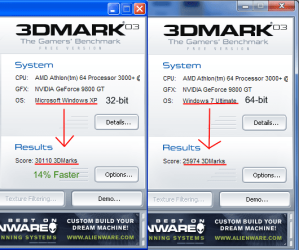
I hate to burst your bubble. Take a look at the following comparison. This is only one example.

Wow 3dmark03. Thats really current mate. No bubble bursting here but try running something like vantage and see if you can replicate the results. I would be curious.

There could be n number of reasons why I am not taking your screenshot seriously.

- You are running a NOT RTM version of the OS
- You are probably running a driver that for some reason got a bump in one software but lost some performance in other. That happens quite often.
- 3dmark03 is ancient.
- It could be your current hardware/software/driver configuration could be resulting in something like a 5000 score difference.
- ANd on top of it you really must look to non-syntehtic benchmarks as the final word mate aka games, real world apps. 3dmark is great and all to see if what you put together is in the same ballpark as the other machines out there with similar configurations but thats about it.
 

My Computer

OS
Windows 7 x64 Pro
CPU
Intel 990X
Motherboard
Asus P6T Deluxe V2
Memory
CORSAIR XMS3 6GB SDRAM DDR3 1600 (7-7-7-20)
Graphics Card(s)
2 x BFG 285 GTX OCXs in SLI
Sound Card
X-fi Elite Pro
Monitor(s) Displays
HP LP 3065
Screen Resolution
2560 x 1600
Hard Drives
2 x 150 gb Velociraptors RAID 0
PSU
PC Power & Cooling 750W
Case
CM Stacker 832
Cooling
Stock cooler
Keyboard
Saitek Eclipse II
Mouse
Logitech MX Revolution
+10 can someone link to some detailed info about this?

Sure,

I dont think anyone could give you more detailed information than Microsoft's developers themselves ;)

Here are the links to the best videos from Microsoft's developers talking about every architecture change they have made :)

Im sure you will find hundreds of reasons to dump XP after watching these Videos from the developers, Yes some are long but each one contains a fair amount of discussion on new features and architecture changes they made that make Vista and Win7 different to any previous Windows Operating System.

Mark Russinovich is one of Microsoft's top Kernel developers, His videos are the best ;)
He talks about various Kernel changes resulting in better performance handling and so forth in this Video:
Mark Russinovich: Inside Windows 7 | Going Deep | Channel 9

(LOL at the "we aint Microsoft unless were developing a death ray" :p )
new audio architecture and handling capability's:
Larry Osterman: Windows 7 Audio - What's New | Charles | Channel 9

This is part 5 of Kernel developer Dave Probert's "Going Deep: Kernel Architecture" talks, You can find the other videos linked on the description ;))
Dave Probert: Inside Windows 7 - User Mode Scheduler (UMS) | Going Deep | Channel 9

Services and Controller changes:
Chittur Subbaraman: Inside Windows 7 - Service Controller and Background Processing | Going Deep | Channel 9

DirectX:
Windows 7: Unlocking the GPU with Direct3D | pdc2008 | Channel 9

Graphics Architecture:
Windows 7 Graphics Architecture Overview - Part 1 | yochay | Channel 9
Windows 7 Graphics Architecture Overview - Part 2 | yochay | Channel 9
Windows 7 Graphics Architecture Overview - Part 3 | yochay | Channel 9

Multi-Touch:
Windows 7 Multi Touch Overview | yochay | Channel 9

Taskbar Advanced Features:
Windows 7 Taskbar: Advanced Features | yochay | Channel 9

There are hundreds of Videos from Microsoft available at Channel9, Nearly anything you every wanted to know/hear about from Microsoft's Developers can be found there ;)

Hope it helps

Steven
 
Real world gaming is slower in Win7 for the most part. So is overall performance of the UI.

The 3dmark benchmark was just an easy way to show the performance difference. 14% is pretty significant IMO.

My experience is that Win7 is not faster than XP. 64-bit is not faster than 32-bit since most apps are not 64-bit anyways.
 

My Computer

Computer Manufacturer/Model Number
Too many to list.
OS
XP, Seven, 2008R2
CPU
AMD, Intel, VIA
Motherboard
Various
Memory
Corsair, Kingston, etc.
Graphics Card(s)
ATI, NVIDIA
Monitor(s) Displays
Samsung
Hard Drives
Maxtor, Western Digital
Keyboard
qwerty
Internet Speed
22 Mb/s @ home, 1 Gb/s @ server
Other Info
All of my systems still run fastest on XP 32-bit for the most part. Win7 is fun to play with, but I still prefer XP for raw speed, security, and functionality.
Real world gaming is slower in Win7 for the most part. So is overall performance of the UI.

The 3dmark benchmark was just an easy way to show the performance difference. 14% is pretty significant IMO.

My experience is that Win7 is not faster than XP. 64-bit is not faster than 32-bit since most apps are not 64-bit anyways.

well for me, Crysis in faster on Win7 than on XP... both 32bit...
 

My Computer

OS
Windows XP SP3/Windows 7 7229
CPU
Intel Core 2 Duo E6850 @3Ghz
Motherboard
Gigabyte P35-DS4
Memory
4GB DDR2 RAM 1066Mhz
Graphics Card(s)
BFG 8800GTX 768MB
Sound Card
Realtek HD Audio, Creative 5.1 Speakers
Monitor(s) Displays
Samsung SyncMaster 206BW (20" LCD)
Screen Resolution
1680x1050
Hard Drives
Samsung F1 SATAII 500GB, Seagate SATAII 750GB, Seagate SATAII 1TB External USB 2.0
PSU
Seasonic M12-700 700W
Case
Cooler Master MyStique Black
Cooling
4 Fans and my pal Sub-Zero
Mouse
Logitech G5
Internet Speed
20Mb/s
I should have been a little more precise in my claims of faster performance under Win7 vs. WinXP.

Specifically, Adobe Lightroom 2.3 (64-bit version) the only application running/loaded (not even an email client or browser), converting 100 full sized RAW files from Canon 50D dSLR (each file ranging in size from 20MB to 27MB) to generate straight out of camera (SOOC) JPGs. Running on WinXP x64 and using the same collection of RAW files, timing was approx 1.95 JPGs generated per second. On Win7 x64, Build 7100 (the RC :)), timing was approx 2.15 JPGs generated per second. Not a significant difference, but it is illustrative and, for me, real-world and repeatable.

Time to perform/complete the above described operation was measured using a digital stopwatch. This could have introduced a small error if the run had been done only once. I repeated the run 3 times under each scenario to kind of smooth out that kind of thing.

BTW - all was done on the same machine. The Win7 was installed on and the scenario run completely from a slower drive (the RAWs were copied from a back-up to the intall drive in each case).
 

My Computer

Computer Manufacturer/Model Number
Cobbled together :)
OS
Win7 Ultimate, x64
CPU
i7 920, currently NOT OC
Motherboard
Asrock X58 Deluxe
Memory
OCZ Platinum 12GB (6 x 2GB) 240-Pin DDR3 SDRAM DDR3 1600
Graphics Card(s)
nvidia geforce 7600 gt
Sound Card
integrated
Monitor(s) Displays
Samsung SyncMaster 204t (dual monitors)
Screen Resolution
1600 x 1200
Hard Drives
WDC WD2000JS-00MHB0 ATA
WDC WD5000AAKS-65YGA0 ATA
PSU
750w
Cooling
Air, 4 120mm
well for me, Crysis in faster on Win7 than on XP... both 32bit...

Faster in XP for me.

srq2625,
Sure, I'd still prefer Win7 x64 to WinXP x64 any day.

My comparison was between WinXP 32-bit and Win7 64-bit. WinXP 32-bit is faster in a lot of things, and that's pretty sad if you ask me.

I'm hoping things will improve when I go dual core on my desktop. But I think they probably won't, because my laptop is already dual core and Windows XP runs faster on that too.

Here's a 7-zip benchmark, Ultra compressing a 200MB AVI file on my Desktop

WinXP 32-bit = 3:20
Win7 64-bit = 3:33

It took 13 seconds longer to compress the same file in Windows 7. And I even used the 64-bit version of 7-zip.
 

My Computer

Computer Manufacturer/Model Number
Too many to list.
OS
XP, Seven, 2008R2
CPU
AMD, Intel, VIA
Motherboard
Various
Memory
Corsair, Kingston, etc.
Graphics Card(s)
ATI, NVIDIA
Monitor(s) Displays
Samsung
Hard Drives
Maxtor, Western Digital
Keyboard
qwerty
Internet Speed
22 Mb/s @ home, 1 Gb/s @ server
Other Info
All of my systems still run fastest on XP 32-bit for the most part. Win7 is fun to play with, but I still prefer XP for raw speed, security, and functionality.
This is pretty simple, really.

OP, you need to change your thinking on what RAM is and what it's for. Here's a simple test for you that should 'convince' you.

1 - Install x32 7.
2 - Disable the page file entirely.
3 - ????
4 - Profit!

With 8GB, you could easily run x64 without a pagefile and it's much faster and responsive. No drive thrashing or ridiculous space wasted and not to mention fragmentation!

We're all fans of XP, it was a reliable work horse and stable to the end. But it's time to move on. Consider that 32bit OS' have been around for almost 30 years. There are kinks to work out in 7 but they will be resolved in short order. Get on board now or be left behind.
 

My Computer

Computer type
PC/Desktop
Computer Manufacturer/Model Number
Custom Build/Mod
OS
Windows 7 Home Premium x64
CPU
Intel QX9650 Extreme 4.0 GHz
Motherboard
ASUS Rampage Extreme Rev2
Memory
8GB (4x2) Corsair Dominator DDR3
Graphics Card(s)
2x Radeon R390X [8GB]
Sound Card
SupremeFX X-Fi
Monitor(s) Displays
Dell 2408WFP 26" Panel
Screen Resolution
1920x1200
Hard Drives
4x WD 2TB (8TB+ Total)
2x Crucial SSD 128GB (RAID-0)
1x LG Blu-ray read/write
1x Phillips LightScribe DVD read/write
PSU
Corsair HX1000
Case
CoolerMaster - Cosmos S
Cooling
Custom Liquid - 320mm rad w/ 3x 80mm fans, CPU/NB/SB Blocks
Keyboard
Logitech Illuminater Pro
Mouse
Logitech
Internet Speed
Fractional T1 - 125Mbps
Antivirus
ESET Security Suite / Microsoft Security Essentials
Browser
Cyberfox Intel x64
Other Info
OC'd to 5.0GHz @ 44c under full load
XP didn't have multi core support full stop since they weren't around then.

Processors were still in Mhz rather than Ghz never mind multi core support.

Then could you please explain to me why Cinebench R10 CPU benchmark finishes 4 seconds faster in Windows XP? (btw, my laptop is Pentium dual core and the power options are set to High Performance).

Where are the multicore improvements, because I don't see it.
 

My Computer

Computer Manufacturer/Model Number
Too many to list.
OS
XP, Seven, 2008R2
CPU
AMD, Intel, VIA
Motherboard
Various
Memory
Corsair, Kingston, etc.
Graphics Card(s)
ATI, NVIDIA
Monitor(s) Displays
Samsung
Hard Drives
Maxtor, Western Digital
Keyboard
qwerty
Internet Speed
22 Mb/s @ home, 1 Gb/s @ server
Other Info
All of my systems still run fastest on XP 32-bit for the most part. Win7 is fun to play with, but I still prefer XP for raw speed, security, and functionality.
Faster in XP for me.

srq2625,
Sure, I'd still prefer Win7 x64 to WinXP x64 any day.

My comparison was between WinXP 32-bit and Win7 64-bit. WinXP 32-bit is faster in a lot of things, and that's pretty sad if you ask me.

I'm hoping things will improve when I go dual core on my desktop. But I think they probably won't, because my laptop is already dual core and Windows XP runs faster on that too.

Here's a 7-zip benchmark, Ultra compressing a 200MB AVI file on my Desktop

WinXP 32-bit = 3:20
Win7 64-bit = 3:33

It took 13 seconds longer to compress the same file in Windows 7. And I even used the 64-bit version of 7-zip.

All you've proven is how well 7-zip works between XP and Windows 7. 7-zip is neither Microsoft nor is it bundled with Windows 7, so you've given nothing about the difference beftween XP and 7.

To properly gauge this, use Windows XP Compressed Folders and Windows 7 Compressed Folders to compress the same file. Repeat the test several times to help average out any margin of error, especially if you're using a manual stopwatch.

Then we will see the real difference between XP 32-bit and Windows 7 64-bit. Who knows, you may end up coming to the same conclusion as before. But you might not, either.

At least your result will be more believable if you're talking about testing the performance of Windows 7 and it's features. NOT the 3rd party utilities run on it.
 

My Computer

Computer type
PC/Desktop
Computer Manufacturer/Model Number
Virtual Machine
OS
Windows 7 Professional 32-bit SP1
CPU
AMD A4/A6
Motherboard
Intel Corporation 440BX Desktop Reference Platform
Memory
3.00GB EDO
Graphics Card(s)
VMware SVGA 3D
Sound Card
High Definition Audio Device
Monitor(s) Displays
Generic Non-PnP Monitor on VMware SVGA 3D
Screen Resolution
1440x900
Hard Drives
1 x 60GB VMware Virtual SATA Hard Drive ATA Device
Antivirus
Kaspersky Total Security
All you've proven is how well 7-zip works between XP and Windows 7. 7-zip is neither Microsoft nor is it bundled with Windows 7, so you've given nothing about the difference beftween XP and 7.

To properly gauge this, use Windows XP Compressed Folders and Windows 7 Compressed Folders to compress the same file.

I don't use the built in compression features (besides NTFS compression) if I can help it, because the performance and lack of features is horrific. I've already found that out by messing around with archives. I immediately installed 7-zip and WinRAR and now much happier. So, I think my test is valid (no doubt most people will be using these same tools).
 

My Computer

Computer Manufacturer/Model Number
Too many to list.
OS
XP, Seven, 2008R2
CPU
AMD, Intel, VIA
Motherboard
Various
Memory
Corsair, Kingston, etc.
Graphics Card(s)
ATI, NVIDIA
Monitor(s) Displays
Samsung
Hard Drives
Maxtor, Western Digital
Keyboard
qwerty
Internet Speed
22 Mb/s @ home, 1 Gb/s @ server
Other Info
All of my systems still run fastest on XP 32-bit for the most part. Win7 is fun to play with, but I still prefer XP for raw speed, security, and functionality.
Back
Top