
Solved Cool'and'Quiet, How can I tell if it is working?

OK, that's the last BIOS update. Check in your BIOS to be sure C-n-C is enabled.

Regards,
GEWB

That is what started this thread. If I enable C'n'Q, Windows 7 freezes at start up. I get to the Windows flags on a black background and there it sits.

I change C'n'Q back (disable) and everything seems to work (except C'n'Q).
 

My Computer My Computer

At a glance

Windows 7x32 Home Premium & XP SP3 x86Athlon 64FXCorsair CM2X1024-8500C5GeForce 7950X2 (Dual)
Computer Manufacturer/Model Number
Polywell
OS
Windows 7x32 Home Premium & XP SP3 x86
CPU
Athlon 64FX
Motherboard
ASUS M2N32SLI Delux
Memory
Corsair CM2X1024-8500C5
Graphics Card(s)
GeForce 7950X2 (Dual)
Monitor(s) Displays
ViewSonic A90f+ (Two)
Screen Resolution
1280x1024
Hard Drives
WD1500ADFD-00NLR1 (Originally Raid5)

Changed to three individual drives after HD crashed. May return to RAID5 if I locate a suitable HD.
PSU
TurboColl 1KW
Case
Polywell
Cooling
Cool'n'Quiet (Questionable Operation)
Keyboard
Logitech
Mouse
Logitech
Internet Speed
1GHertz (I think)
Other Info
Sony CD-RW CRX320EE

HP DVD Writer 1140d (may need to replace??)
You could also try multiplier of 14 and bus of 200
Which are also the default values for the FX-62,

techPowerUp! :: CPU Database : AMD Athlon 64 FX-62

Wouldn't happen to have any of the auto overclocking features in the bios (of which there are a few) enabled would you? Also what bios version are you running on the board? The Mainboard tab in CPUz should show it. Reason for asking is Asus has a beta bios listed for that board that has a fix for Cool and Quiet,

M2N32-SLI Deluxe BIOS 2209
Fix the CPU multiplier cannot be changed when Cool&Quiet is enabled.
File Size 762,33 (KBytes) 2009.09.21 update

You are correct, there are a few overclocking related options that may have been changed and may be related to my problem.

Without recording the configuration (when it was working fine), I reset the bios while troubleshooting a Windows 7 installation problem.

Can I do damage by changing these settings?

Could an incorrect combination of settings be the reason for W7 startup freezes with Cool'and'Quiet enabled?
 

My Computer My Computer

At a glance

Windows 7x32 Home Premium & XP SP3 x86Athlon 64FXCorsair CM2X1024-8500C5GeForce 7950X2 (Dual)
Computer Manufacturer/Model Number
Polywell
OS
Windows 7x32 Home Premium & XP SP3 x86
CPU
Athlon 64FX
Motherboard
ASUS M2N32SLI Delux
Memory
Corsair CM2X1024-8500C5
Graphics Card(s)
GeForce 7950X2 (Dual)
Monitor(s) Displays
ViewSonic A90f+ (Two)
Screen Resolution
1280x1024
Hard Drives
WD1500ADFD-00NLR1 (Originally Raid5)

Changed to three individual drives after HD crashed. May return to RAID5 if I locate a suitable HD.
PSU
TurboColl 1KW
Case
Polywell
Cooling
Cool'n'Quiet (Questionable Operation)
Keyboard
Logitech
Mouse
Logitech
Internet Speed
1GHertz (I think)
Other Info
Sony CD-RW CRX320EE

HP DVD Writer 1140d (may need to replace??)
Could an incorrect combination of settings be the reason for W7 startup freezes with Cool'and'Quiet enabled?

Quite possible. The fun part if it is, is figuring out which setting. It could also be something in Windows itself hat doesn't like when it is enabled.

Let's start with from within Windows. Start with opening Windows Update and check the update history, and see if there is anything there called,

ATK - system - ATK0110 ACPI UTILITY

which is actually an Asus driver (despite it not saying so), and is used by Windows/etc in communicating with the motherboard/bios. If it is there next look in Device Manager under system devices and check the properties and post back the version number of it.

P.S. You didn't happen to install any of the multitude of Asus monitoring/overclocking/etc utilities did you?
 

My Computer My Computer

At a glance

Win 7 Ultimate x64FX-8350 @ 4.6 GHz so farADATA XPG V1 Series Black 8GB DDR3 1600Sapphire R9 270x Dual-X
Computer type
PC/Desktop
Computer Manufacturer/Model Number
Me
OS
Win 7 Ultimate x64
CPU
FX-8350 @ 4.6 GHz so far
Motherboard
Asus M5A97 EVO
Memory
ADATA XPG V1 Series Black 8GB DDR3 1600
Graphics Card(s)
Sapphire R9 270x Dual-X
Sound Card
Xonar DGX w/ Corsair Vengence 1300
Monitor(s) Displays
Acer S232HL Abid
Screen Resolution
1920x1080
Hard Drives
120 GB OCZ Vertex 3
500 GB Seagate 7200.12
PSU
Antec Earthwatts 650W Green
Case
Antec Three Hundred
Cooling
Cooler Master 212 EVO
Keyboard
Logitech G510
Mouse
Logitech G500s
Internet Speed
35000/3000
Could an incorrect combination of settings be the reason for W7 startup freezes with Cool'and'Quiet enabled?
Quite possible. The fun part if it is, is figuring out which setting. It could also be something in Windows itself hat doesn't like when it is enabled.

Let's start with from within Windows. Start with opening Windows Update and check the update history, and see if there is anything there called,

ATK - system - ATK0110 ACPI UTILITY

which is actually an Asus driver (despite it not saying so), and is used by Windows/etc in communicating with the motherboard/bios. If it is there next look in Device Manager under system devices and check the properties and post back the version number of it.

P.S. You didn't happen to install any of the multitude of Asus monitoring/overclocking/etc utilities did you?

ATK - system - ATK0110 ACPI UTILITY is listed in both locations.

Yes at one time I had both the ASUS and the AMD Cool'and'Quiet Drivers loaded. I think I took both off and now have only that driver on the support DVD loaded.

-- I THINK --

Looking in "Downloads" there is nothing related to Cool'and'Quiet

PS: I am apparently mistaken about what I have loaded unto this computer. I just attempted to load the Motherboard Support CD and I get the message " Motherboard Support CD does not support this operating system (WNT_6.1H_MCE)".

I had XP on this computer previously; that has been removed.
 
Last edited:

My Computer My Computer

At a glance

Windows 7x32 Home Premium & XP SP3 x86Athlon 64FXCorsair CM2X1024-8500C5GeForce 7950X2 (Dual)
Computer Manufacturer/Model Number
Polywell
OS
Windows 7x32 Home Premium & XP SP3 x86
CPU
Athlon 64FX
Motherboard
ASUS M2N32SLI Delux
Memory
Corsair CM2X1024-8500C5
Graphics Card(s)
GeForce 7950X2 (Dual)
Monitor(s) Displays
ViewSonic A90f+ (Two)
Screen Resolution
1280x1024
Hard Drives
WD1500ADFD-00NLR1 (Originally Raid5)

Changed to three individual drives after HD crashed. May return to RAID5 if I locate a suitable HD.
PSU
TurboColl 1KW
Case
Polywell
Cooling
Cool'n'Quiet (Questionable Operation)
Keyboard
Logitech
Mouse
Logitech
Internet Speed
1GHertz (I think)
Other Info
Sony CD-RW CRX320EE

HP DVD Writer 1140d (may need to replace??)
What is the version number of the ATK one showing in Device Manager?
 

My Computer My Computer

At a glance

Win 7 Ultimate x64FX-8350 @ 4.6 GHz so farADATA XPG V1 Series Black 8GB DDR3 1600Sapphire R9 270x Dual-X
Computer type
PC/Desktop
Computer Manufacturer/Model Number
Me
OS
Win 7 Ultimate x64
CPU
FX-8350 @ 4.6 GHz so far
Motherboard
Asus M5A97 EVO
Memory
ADATA XPG V1 Series Black 8GB DDR3 1600
Graphics Card(s)
Sapphire R9 270x Dual-X
Sound Card
Xonar DGX w/ Corsair Vengence 1300
Monitor(s) Displays
Acer S232HL Abid
Screen Resolution
1920x1080
Hard Drives
120 GB OCZ Vertex 3
500 GB Seagate 7200.12
PSU
Antec Earthwatts 650W Green
Case
Antec Three Hundred
Cooling
Cooler Master 212 EVO
Keyboard
Logitech G510
Mouse
Logitech G500s
Internet Speed
35000/3000
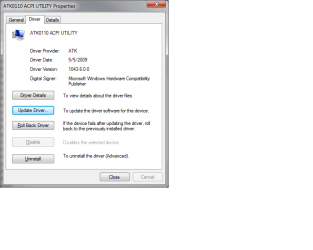
What is the version number of the ATK one showing in Device Manager?

It is 1043.2.15.37 dated 8/13/2004.

Does the fact that it is listed here mean that it is installed?
 

My Computer My Computer

At a glance

Windows 7x32 Home Premium & XP SP3 x86Athlon 64FXCorsair CM2X1024-8500C5GeForce 7950X2 (Dual)
Computer Manufacturer/Model Number
Polywell
OS
Windows 7x32 Home Premium & XP SP3 x86
CPU
Athlon 64FX
Motherboard
ASUS M2N32SLI Delux
Memory
Corsair CM2X1024-8500C5
Graphics Card(s)
GeForce 7950X2 (Dual)
Monitor(s) Displays
ViewSonic A90f+ (Two)
Screen Resolution
1280x1024
Hard Drives
WD1500ADFD-00NLR1 (Originally Raid5)

Changed to three individual drives after HD crashed. May return to RAID5 if I locate a suitable HD.
PSU
TurboColl 1KW
Case
Polywell
Cooling
Cool'n'Quiet (Questionable Operation)
Keyboard
Logitech
Mouse
Logitech
Internet Speed
1GHertz (I think)
Other Info
Sony CD-RW CRX320EE

HP DVD Writer 1140d (may need to replace??)
Be nice if Asus would provide the update for that for all their motherboards (or give it to Microsoft so it can go out through Windows Update), but there is an updated version of it available; dated from 2009 which is a fair bit newer than the one from 2004 you currently have. Easier to upload it here than to send you looking for it, that and it works for pretty much all Asus motherboards.

After downloading you can install it one of two ways,

1. Manually through Device Manager, http://www.sevenforums.com/tutorials/97061-driver-install-device-manager.html

2. Extract, open the 32 folder and double click on AsAcpiIns.exe to install.

Restart if asked but don't enable CnQ yet. Let Windows finish loading to complete the install, then restart and enable CnQ and see if it will now work.
 

Attachments

My Computer My Computer

At a glance

Win 7 Ultimate x64FX-8350 @ 4.6 GHz so farADATA XPG V1 Series Black 8GB DDR3 1600Sapphire R9 270x Dual-X
Computer type
PC/Desktop
Computer Manufacturer/Model Number
Me
OS
Win 7 Ultimate x64
CPU
FX-8350 @ 4.6 GHz so far
Motherboard
Asus M5A97 EVO
Memory
ADATA XPG V1 Series Black 8GB DDR3 1600
Graphics Card(s)
Sapphire R9 270x Dual-X
Sound Card
Xonar DGX w/ Corsair Vengence 1300
Monitor(s) Displays
Acer S232HL Abid
Screen Resolution
1920x1080
Hard Drives
120 GB OCZ Vertex 3
500 GB Seagate 7200.12
PSU
Antec Earthwatts 650W Green
Case
Antec Three Hundred
Cooling
Cooler Master 212 EVO
Keyboard
Logitech G510
Mouse
Logitech G500s
Internet Speed
35000/3000
Be nice if Asus would provide the update for that for all their motherboards (or give it to Microsoft so it can go out through Windows Update), but there is an updated version of it available; dated from 2009 which is a fair bit newer than the one from 2004 you currently have. Easier to upload it here than to send you looking for it, that and it works for pretty much all Asus motherboards.

After downloading you can install it one of two ways,

1. Manually through Device Manager, http://www.sevenforums.com/tutorials/97061-driver-install-device-manager.html

2. Extract, open the 32 folder and double click on AsAcpiIns.exe to install.

Restart if asked but don't enable CnQ yet. Let Windows finish loading to complete the install, then restart and enable CnQ and see if it will now work.

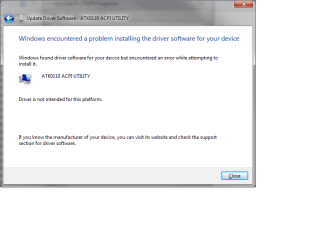
That sure seemed like it should/would work but it did not.

Updated Driver Date.png

Updated Driver.png
 

My Computer My Computer

At a glance

Windows 7x32 Home Premium & XP SP3 x86Athlon 64FXCorsair CM2X1024-8500C5GeForce 7950X2 (Dual)
Computer Manufacturer/Model Number
Polywell
OS
Windows 7x32 Home Premium & XP SP3 x86
CPU
Athlon 64FX
Motherboard
ASUS M2N32SLI Delux
Memory
Corsair CM2X1024-8500C5
Graphics Card(s)
GeForce 7950X2 (Dual)
Monitor(s) Displays
ViewSonic A90f+ (Two)
Screen Resolution
1280x1024
Hard Drives
WD1500ADFD-00NLR1 (Originally Raid5)

Changed to three individual drives after HD crashed. May return to RAID5 if I locate a suitable HD.
PSU
TurboColl 1KW
Case
Polywell
Cooling
Cool'n'Quiet (Questionable Operation)
Keyboard
Logitech
Mouse
Logitech
Internet Speed
1GHertz (I think)
Other Info
Sony CD-RW CRX320EE

HP DVD Writer 1140d (may need to replace??)
Your screen shot of the Details tab is showing the version I uploaded. Have you tried CnQ with it installed yet?
 

My Computer My Computer

At a glance

Win 7 Ultimate x64FX-8350 @ 4.6 GHz so farADATA XPG V1 Series Black 8GB DDR3 1600Sapphire R9 270x Dual-X
Computer type
PC/Desktop
Computer Manufacturer/Model Number
Me
OS
Win 7 Ultimate x64
CPU
FX-8350 @ 4.6 GHz so far
Motherboard
Asus M5A97 EVO
Memory
ADATA XPG V1 Series Black 8GB DDR3 1600
Graphics Card(s)
Sapphire R9 270x Dual-X
Sound Card
Xonar DGX w/ Corsair Vengence 1300
Monitor(s) Displays
Acer S232HL Abid
Screen Resolution
1920x1080
Hard Drives
120 GB OCZ Vertex 3
500 GB Seagate 7200.12
PSU
Antec Earthwatts 650W Green
Case
Antec Three Hundred
Cooling
Cooler Master 212 EVO
Keyboard
Logitech G510
Mouse
Logitech G500s
Internet Speed
35000/3000
Hello dustywoodworker-

Sorry I didn't get back sooner but the Weber grill was calling. Stormy seems to have things in order - I'll poke my nose in tomorrow.

Regards,
GEWB
 

My Computer My Computer

At a glance

Linux Mint / XP / Win7 Home, Pro, Ultimate / ...
Computer type
PC/Desktop
Computer Manufacturer/Model Number
(7 different computers booting up to 10 systems)
OS
Linux Mint / XP / Win7 Home, Pro, Ultimate / Win8.1 / Win10
Other Info
Four desktops, two laptops, one notebook and one tablet
Hello dustywoodworker-

Sorry I didn't get back sooner but the Weber grill was calling. Stormy seems to have things in order - I'll poke my nose in tomorrow.

Regards,
GEWB

No I had not because the 2nd screen shot says the driver was not loaded. A W7 compatibility issue.
 

My Computer My Computer

At a glance

Windows 7x32 Home Premium & XP SP3 x86Athlon 64FXCorsair CM2X1024-8500C5GeForce 7950X2 (Dual)
Computer Manufacturer/Model Number
Polywell
OS
Windows 7x32 Home Premium & XP SP3 x86
CPU
Athlon 64FX
Motherboard
ASUS M2N32SLI Delux
Memory
Corsair CM2X1024-8500C5
Graphics Card(s)
GeForce 7950X2 (Dual)
Monitor(s) Displays
ViewSonic A90f+ (Two)
Screen Resolution
1280x1024
Hard Drives
WD1500ADFD-00NLR1 (Originally Raid5)

Changed to three individual drives after HD crashed. May return to RAID5 if I locate a suitable HD.
PSU
TurboColl 1KW
Case
Polywell
Cooling
Cool'n'Quiet (Questionable Operation)
Keyboard
Logitech
Mouse
Logitech
Internet Speed
1GHertz (I think)
Other Info
Sony CD-RW CRX320EE

HP DVD Writer 1140d (may need to replace??)
Hello there, dww!

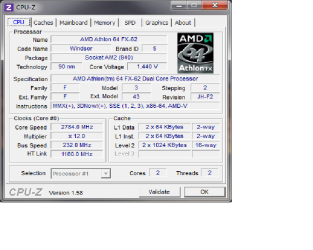
Well, you could check on the BIOS and you'll find if it's enabled or disabled, another way to check that out is to use CPU-Z on a idle state (don't do anything besides having the CPU-Z window open) and under Clocks, see if the core clock matches your actual processor speed.

IE: if your processor is an Athlon II X4 640, your core clock should be 3.0GHz, but with cool 'n' quiet enabled, in an idle state, the processor underclocks itself to save power.

This means that if you have CnC enabled, the processor's core clock could (could)! be 800MHz.

So I can conclude that Cool'n'Quiet has not throttled the CPU because my core speed is 2.78ghz. Therefore, Cool'n'Quiet is not operational (disabled).

Is there something like CPU-Z that I can use to display the temperatures that are displayed in the BIOS?
 

Attachments

  • CPU-Z  8312011.png
    CPU-Z 8312011.png
    29.7 KB · Views: 16

My Computer My Computer

At a glance

Windows 7x32 Home Premium & XP SP3 x86Athlon 64FXCorsair CM2X1024-8500C5GeForce 7950X2 (Dual)
Computer Manufacturer/Model Number
Polywell
OS
Windows 7x32 Home Premium & XP SP3 x86
CPU
Athlon 64FX
Motherboard
ASUS M2N32SLI Delux
Memory
Corsair CM2X1024-8500C5
Graphics Card(s)
GeForce 7950X2 (Dual)
Monitor(s) Displays
ViewSonic A90f+ (Two)
Screen Resolution
1280x1024
Hard Drives
WD1500ADFD-00NLR1 (Originally Raid5)

Changed to three individual drives after HD crashed. May return to RAID5 if I locate a suitable HD.
PSU
TurboColl 1KW
Case
Polywell
Cooling
Cool'n'Quiet (Questionable Operation)
Keyboard
Logitech
Mouse
Logitech
Internet Speed
1GHertz (I think)
Other Info
Sony CD-RW CRX320EE

HP DVD Writer 1140d (may need to replace??)
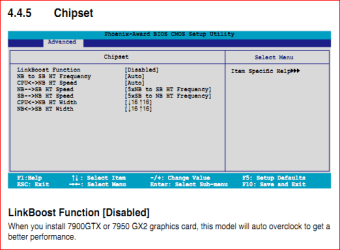
I'm wondering if the overclock on the bus speed is causing CnQ to not work. The CPU may be running close to its default speed of 2.8 GHz, but to get there the bus speed should be at 200 and the multiplier at 14; not the 232 and 12 that CPUz is showing. The one setting in the bios of yours that could be the cause of it not working is Nvidia's own setting called "Linkboost",

linkboost.PNG

which only shows up in the bios when 2 specific Nvidia video cards are used, the 7900 GTX and the 7950 GX2, one of which happens to be listed in your specs.

Ideally it shouldn't make any difference as mine is overclocked from 2.8 GHz to 3.3 GHz and CnQ works as it should with the CPU speed falling to 940 MHz when at idle, then again I also don't have a Nvidia chipset which again ideally shouldn't make any difference.
 

My Computer My Computer

At a glance

Win 7 Ultimate x64FX-8350 @ 4.6 GHz so farADATA XPG V1 Series Black 8GB DDR3 1600Sapphire R9 270x Dual-X
Computer type
PC/Desktop
Computer Manufacturer/Model Number
Me
OS
Win 7 Ultimate x64
CPU
FX-8350 @ 4.6 GHz so far
Motherboard
Asus M5A97 EVO
Memory
ADATA XPG V1 Series Black 8GB DDR3 1600
Graphics Card(s)
Sapphire R9 270x Dual-X
Sound Card
Xonar DGX w/ Corsair Vengence 1300
Monitor(s) Displays
Acer S232HL Abid
Screen Resolution
1920x1080
Hard Drives
120 GB OCZ Vertex 3
500 GB Seagate 7200.12
PSU
Antec Earthwatts 650W Green
Case
Antec Three Hundred
Cooling
Cooler Master 212 EVO
Keyboard
Logitech G510
Mouse
Logitech G500s
Internet Speed
35000/3000
I'm wondering if the overclock on the bus speed is causing CnQ to not work. The CPU may be running close to its default speed of 2.8 GHz, but to get there the bus speed should be at 200 and the multiplier at 14; not the 232 and 12 that CPUz is showing. The one setting in the bios of yours that could be the cause of it not working is Nvidia's own setting called "Linkboost",

View attachment 173107

which only shows up in the bios when 2 specific Nvidia video cards are used, the 7900 GTX and the 7950 GX2, one of which happens to be listed in your specs.

Ideally it shouldn't make any difference as mine is overclocked from 2.8 GHz to 3.3 GHz and CnQ works as it should with the CPU speed falling to 940 MHz when at idle, then again I also don't have a Nvidia chipset which again ideally shouldn't make any difference.

This is a major deviation from the subject being discussed here but would you please explain how you get a snip of a bios screen.
 

My Computer My Computer

At a glance

Windows 7x32 Home Premium & XP SP3 x86Athlon 64FXCorsair CM2X1024-8500C5GeForce 7950X2 (Dual)
Computer Manufacturer/Model Number
Polywell
OS
Windows 7x32 Home Premium & XP SP3 x86
CPU
Athlon 64FX
Motherboard
ASUS M2N32SLI Delux
Memory
Corsair CM2X1024-8500C5
Graphics Card(s)
GeForce 7950X2 (Dual)
Monitor(s) Displays
ViewSonic A90f+ (Two)
Screen Resolution
1280x1024
Hard Drives
WD1500ADFD-00NLR1 (Originally Raid5)

Changed to three individual drives after HD crashed. May return to RAID5 if I locate a suitable HD.
PSU
TurboColl 1KW
Case
Polywell
Cooling
Cool'n'Quiet (Questionable Operation)
Keyboard
Logitech
Mouse
Logitech
Internet Speed
1GHertz (I think)
Other Info
Sony CD-RW CRX320EE

HP DVD Writer 1140d (may need to replace??)
From the PDF manual for the motherboard. Section 4.4.5, page 4-27 to be precise.
 

Attachments

My Computer My Computer

At a glance

Win 7 Ultimate x64FX-8350 @ 4.6 GHz so farADATA XPG V1 Series Black 8GB DDR3 1600Sapphire R9 270x Dual-X
Computer type
PC/Desktop
Computer Manufacturer/Model Number
Me
OS
Win 7 Ultimate x64
CPU
FX-8350 @ 4.6 GHz so far
Motherboard
Asus M5A97 EVO
Memory
ADATA XPG V1 Series Black 8GB DDR3 1600
Graphics Card(s)
Sapphire R9 270x Dual-X
Sound Card
Xonar DGX w/ Corsair Vengence 1300
Monitor(s) Displays
Acer S232HL Abid
Screen Resolution
1920x1080
Hard Drives
120 GB OCZ Vertex 3
500 GB Seagate 7200.12
PSU
Antec Earthwatts 650W Green
Case
Antec Three Hundred
Cooling
Cooler Master 212 EVO
Keyboard
Logitech G510
Mouse
Logitech G500s
Internet Speed
35000/3000
I must apologize to those of you who have dedicated time and effort to help me resolve this problem. I apologize because the problem that I have been attempting to deal with is not Cool'and'Quiet as I stated but rather with PC Probe II.

As I watch the performance characteristics in the bios, I can see that Cool'and'Quet function are being performed. I do not have them visible on the desktop; this is the function of"ASUS PC Probe II" and NOT "Cool'and'Quiet".
 

My Computer My Computer

At a glance

Windows 7x32 Home Premium & XP SP3 x86Athlon 64FXCorsair CM2X1024-8500C5GeForce 7950X2 (Dual)
Computer Manufacturer/Model Number
Polywell
OS
Windows 7x32 Home Premium & XP SP3 x86
CPU
Athlon 64FX
Motherboard
ASUS M2N32SLI Delux
Memory
Corsair CM2X1024-8500C5
Graphics Card(s)
GeForce 7950X2 (Dual)
Monitor(s) Displays
ViewSonic A90f+ (Two)
Screen Resolution
1280x1024
Hard Drives
WD1500ADFD-00NLR1 (Originally Raid5)

Changed to three individual drives after HD crashed. May return to RAID5 if I locate a suitable HD.
PSU
TurboColl 1KW
Case
Polywell
Cooling
Cool'n'Quiet (Questionable Operation)
Keyboard
Logitech
Mouse
Logitech
Internet Speed
1GHertz (I think)
Other Info
Sony CD-RW CRX320EE

HP DVD Writer 1140d (may need to replace??)
Do yourself a favor and get rid of PC Probe, especially if it is from either the driver disk or the antiquated version (from 2007and for Vista) that Asus has available for download for your board. Personally I avoid it since the time I tested it and it couldn't read the voltages on my motherboard, not a good thing to have happen with the manufacturer's own monitoring software. If it is one of those old versions, that is probably also what is causing the hanging problems.

There are quite a few better and free alternatives you can use to monitor temps/voltages/etc,

SIW | System Information for Windows by Gabriel Topala

HWiNFO32 Download

CPUID - System & hardware benchmark, monitoring, reporting
 

My Computer My Computer

At a glance

Win 7 Ultimate x64FX-8350 @ 4.6 GHz so farADATA XPG V1 Series Black 8GB DDR3 1600Sapphire R9 270x Dual-X
Computer type
PC/Desktop
Computer Manufacturer/Model Number
Me
OS
Win 7 Ultimate x64
CPU
FX-8350 @ 4.6 GHz so far
Motherboard
Asus M5A97 EVO
Memory
ADATA XPG V1 Series Black 8GB DDR3 1600
Graphics Card(s)
Sapphire R9 270x Dual-X
Sound Card
Xonar DGX w/ Corsair Vengence 1300
Monitor(s) Displays
Acer S232HL Abid
Screen Resolution
1920x1080
Hard Drives
120 GB OCZ Vertex 3
500 GB Seagate 7200.12
PSU
Antec Earthwatts 650W Green
Case
Antec Three Hundred
Cooling
Cooler Master 212 EVO
Keyboard
Logitech G510
Mouse
Logitech G500s
Internet Speed
35000/3000
Thanks, I downloaded CPUID and it seems to be doing what I need. I gotta watch temperatures for a day or two to make sure they are not too high.

In fact, I need to study some to decide what is the correct (safe) range of temperatures. I have spent some time in the forums for overclockers. This has shown me a few things about clock rates and temperatures but I still have a lot to learn.

Now that I understand Cool'n'Quiet objectives, I have decided I want COOL even if it is not QUIET. I think my core temperatures could be lowered and I am willing to hear the fans if that is necessary.

CPUID.png

Thank you Stormy and GEWB. You have been great educators. Thank you for responding to my low tech questions.
 
Last edited:

My Computer My Computer

At a glance

Windows 7x32 Home Premium & XP SP3 x86Athlon 64FXCorsair CM2X1024-8500C5GeForce 7950X2 (Dual)
Computer Manufacturer/Model Number
Polywell
OS
Windows 7x32 Home Premium & XP SP3 x86
CPU
Athlon 64FX
Motherboard
ASUS M2N32SLI Delux
Memory
Corsair CM2X1024-8500C5
Graphics Card(s)
GeForce 7950X2 (Dual)
Monitor(s) Displays
ViewSonic A90f+ (Two)
Screen Resolution
1280x1024
Hard Drives
WD1500ADFD-00NLR1 (Originally Raid5)

Changed to three individual drives after HD crashed. May return to RAID5 if I locate a suitable HD.
PSU
TurboColl 1KW
Case
Polywell
Cooling
Cool'n'Quiet (Questionable Operation)
Keyboard
Logitech
Mouse
Logitech
Internet Speed
1GHertz (I think)
Other Info
Sony CD-RW CRX320EE

HP DVD Writer 1140d (may need to replace??)
I gotta watch temperatures for a day or two to make sure they are not too high.

I think my core temperatures could be lowered and I am willing to hear the fans if that is necessary.

Given the temps in your screen shot, those are not out of line at all. Don't even think about temp problems until those temps exceed 60C.

Regards,
GEWB
 

My Computer My Computer

At a glance

Linux Mint / XP / Win7 Home, Pro, Ultimate / ...
Computer type
PC/Desktop
Computer Manufacturer/Model Number
(7 different computers booting up to 10 systems)
OS
Linux Mint / XP / Win7 Home, Pro, Ultimate / Win8.1 / Win10
Other Info
Four desktops, two laptops, one notebook and one tablet
Don't know about silence but the fan should run at a lower RPM if the CPU temp is low enough and you enable this in the bios,

qfan.PNG

and set it to Optimal.
 

My Computer My Computer

At a glance

Win 7 Ultimate x64FX-8350 @ 4.6 GHz so farADATA XPG V1 Series Black 8GB DDR3 1600Sapphire R9 270x Dual-X
Computer type
PC/Desktop
Computer Manufacturer/Model Number
Me
OS
Win 7 Ultimate x64
CPU
FX-8350 @ 4.6 GHz so far
Motherboard
Asus M5A97 EVO
Memory
ADATA XPG V1 Series Black 8GB DDR3 1600
Graphics Card(s)
Sapphire R9 270x Dual-X
Sound Card
Xonar DGX w/ Corsair Vengence 1300
Monitor(s) Displays
Acer S232HL Abid
Screen Resolution
1920x1080
Hard Drives
120 GB OCZ Vertex 3
500 GB Seagate 7200.12
PSU
Antec Earthwatts 650W Green
Case
Antec Three Hundred
Cooling
Cooler Master 212 EVO
Keyboard
Logitech G510
Mouse
Logitech G500s
Internet Speed
35000/3000
Back
Top