
Copy files between hard drives - Please need help!

ZenixNet

Student IT
Power User
Local time
8:40 AM
Messages
331
Location
Ohio - U.S.A
Ok, so I have been trying to copy all files from one hard drive to the main one. Everytime I try and copy, there is always one file in the folder that windows gets stuck on copying. After a while, explorer stops responding and I have to hold the power button to turn the computer off.
I really need these files off the hard drive and onto the main one.
 

My Computer My Computer

Computer Manufacturer/Model Number
Dell XPS 8100
OS
Windows 7 Home Premium 64-bit
CPU
Intel Core i7 860 @ 2.80GHz
Motherboard
Dell Inc. 0T568R
Memory
8.0GB Dual-Channel DDR3 @ 529MHz 4-7-7-20
Graphics Card(s)
ATI Radeon HD 5770
Sound Card
Realtek High Definition Audio
Monitor(s) Displays
3 Widescreen HD Monitors
Screen Resolution
1600x800
Hard Drives
1000GB Seagate ST31000528AS (SCSI)
1500GB Western Digital WDC WD1001FALS-00J7B1 (SCSI)
PSU
750W
Case
-
Cooling
Fans
Keyboard
Logitech Illuminated Keyboard
Mouse
Logitech MX
Internet Speed
6MBS-15MBS Upload
Other Info
Laptop (Dell Studio 1537)
Intel Mobile Core 2 Duo T6400 @ 2.00GHz
4.0GB Dual-Channel DDR2
Try TeraCopy. (The free version is great.) Not only is it faster, it automatically skips any troublesome files and keeps on going. :)
 

My Computer My Computer

Computer Manufacturer/Model Number
Self
OS
Main - Windows 7 Pro SP1 64-Bit; 2nd - Windows Server 2008 R2
CPU
Main - Core i7 2600K; 2nd - Core i7 920
Motherboard
Main - Asus P8Z68-V Pro/Gen3; 2nd - Gigabyte GA-EX58-UDR3
Memory
Main - 16GB Corsair Vengeance; 2nd - 12GB Corsair Vengeance
Graphics Card(s)
Main - XFX Radeon 6870 1GB; 2nd - XFX Radeon 4870 1GB
Sound Card
Both: Onboard Realtek Azalia
Monitor(s) Displays
Main - Hann 25" + I-INC 25" + Acer 23"; 2nd - Upgrading Soon
Screen Resolution
Main - 1920x1080 (All Three Monitors); 2nd - Upgrading Soon
Hard Drives
Main - (1) Crucial M4 128GB (Boot)
Main - (1) Seagate 2TB 64MB Cache (Data)
Main - (1) Seagate 2TB 64MB Cache (Data Backup)
2nd - (1) Intel X25-M SSD 80GB (Boot)
2nd - (3) Seagate 1TB 32MB Cache (Data Backup)
2nd - (1) Seagate 320GB (Because)
PSU
Main - OCZ 600W Modular; 2nd - OCZ 600W
Case
Main - Thermaltake Element G; 2nd - NZXT something or other
Cooling
Main - Corsair H80; 2nd - Prolimatech Megahalems
Keyboard
Main - Razer Reclusa; 2nd - Old MS Keyboard
Mouse
Main - Logitech MX Revolution; 2nd - Old MS Mouse
Internet Speed
20Mbps Time-Warner Cable
EDIT: Oh, I see how it works, I am dragging files over but its staying at 0.0%, is there like a start button?
Is there some instructions on how to use Tera copy? Im kinda confused on it...
 

My Computer My Computer

Computer Manufacturer/Model Number
Dell XPS 8100
OS
Windows 7 Home Premium 64-bit
CPU
Intel Core i7 860 @ 2.80GHz
Motherboard
Dell Inc. 0T568R
Memory
8.0GB Dual-Channel DDR3 @ 529MHz 4-7-7-20
Graphics Card(s)
ATI Radeon HD 5770
Sound Card
Realtek High Definition Audio
Monitor(s) Displays
3 Widescreen HD Monitors
Screen Resolution
1600x800
Hard Drives
1000GB Seagate ST31000528AS (SCSI)
1500GB Western Digital WDC WD1001FALS-00J7B1 (SCSI)
PSU
750W
Case
-
Cooling
Fans
Keyboard
Logitech Illuminated Keyboard
Mouse
Logitech MX
Internet Speed
6MBS-15MBS Upload
Other Info
Laptop (Dell Studio 1537)
Intel Mobile Core 2 Duo T6400 @ 2.00GHz
4.0GB Dual-Channel DDR2
just select the files normally in Windows Explorer, then right-click drag them to the target, release and select Teracopy Here
 

My Computer My Computer

Computer Manufacturer/Model Number
Gateway FX-510X
OS
Windows 7 Ultimate x64 RTM
CPU
Intel(R) Pentium(R) D CPU 3.00GHz
Motherboard
Intel OEMD975XW2G1
Memory
6 GB dual channel DDR2 333 MHz
Graphics Card(s)
NVIDIA GeForce 7800 GTX 256 MB
Sound Card
Creative X-Fi Fatal1ty Extreme Gamer
Monitor(s) Displays
15" Planar PL170 LCD, 17" Gateway FPD1965 LCD
Screen Resolution
1280 x 1024
Hard Drives
64 GB SSD Crucial
2000 GB internal WDC
500 GB internal WDC
Teracopy isn't doing anything, It still is at 0.0%
 

My Computer My Computer

Computer Manufacturer/Model Number
Dell XPS 8100
OS
Windows 7 Home Premium 64-bit
CPU
Intel Core i7 860 @ 2.80GHz
Motherboard
Dell Inc. 0T568R
Memory
8.0GB Dual-Channel DDR3 @ 529MHz 4-7-7-20
Graphics Card(s)
ATI Radeon HD 5770
Sound Card
Realtek High Definition Audio
Monitor(s) Displays
3 Widescreen HD Monitors
Screen Resolution
1600x800
Hard Drives
1000GB Seagate ST31000528AS (SCSI)
1500GB Western Digital WDC WD1001FALS-00J7B1 (SCSI)
PSU
750W
Case
-
Cooling
Fans
Keyboard
Logitech Illuminated Keyboard
Mouse
Logitech MX
Internet Speed
6MBS-15MBS Upload
Other Info
Laptop (Dell Studio 1537)
Intel Mobile Core 2 Duo T6400 @ 2.00GHz
4.0GB Dual-Channel DDR2

My Computer My Computer

Computer type
PC/Desktop
Computer Manufacturer/Model Number
Dell OP7010
OS
Windows 7 Enterprise (x64); Windows Server 2008 R2 (x64)
Memory
16GB
Monitor(s) Displays
4 Dell 24" LCD
Screen Resolution
1280x1024
Keyboard
Dell
Mouse
Dell Optical
Internet Speed
40meg
Oh no! I forgot to say that this hard drive is FAILING. Please, I need these files!
EDIT: I think it is failing, it grinds, is very slow, but Windows says it is still good.
 

My Computer My Computer

Computer Manufacturer/Model Number
Dell XPS 8100
OS
Windows 7 Home Premium 64-bit
CPU
Intel Core i7 860 @ 2.80GHz
Motherboard
Dell Inc. 0T568R
Memory
8.0GB Dual-Channel DDR3 @ 529MHz 4-7-7-20
Graphics Card(s)
ATI Radeon HD 5770
Sound Card
Realtek High Definition Audio
Monitor(s) Displays
3 Widescreen HD Monitors
Screen Resolution
1600x800
Hard Drives
1000GB Seagate ST31000528AS (SCSI)
1500GB Western Digital WDC WD1001FALS-00J7B1 (SCSI)
PSU
750W
Case
-
Cooling
Fans
Keyboard
Logitech Illuminated Keyboard
Mouse
Logitech MX
Internet Speed
6MBS-15MBS Upload
Other Info
Laptop (Dell Studio 1537)
Intel Mobile Core 2 Duo T6400 @ 2.00GHz
4.0GB Dual-Channel DDR2
When ever I try and copy something from hard drive to hard drive, either Core 1 or Core 4 get's maxed to 100%, does this help?
 

My Computer My Computer

Computer Manufacturer/Model Number
Dell XPS 8100
OS
Windows 7 Home Premium 64-bit
CPU
Intel Core i7 860 @ 2.80GHz
Motherboard
Dell Inc. 0T568R
Memory
8.0GB Dual-Channel DDR3 @ 529MHz 4-7-7-20
Graphics Card(s)
ATI Radeon HD 5770
Sound Card
Realtek High Definition Audio
Monitor(s) Displays
3 Widescreen HD Monitors
Screen Resolution
1600x800
Hard Drives
1000GB Seagate ST31000528AS (SCSI)
1500GB Western Digital WDC WD1001FALS-00J7B1 (SCSI)
PSU
750W
Case
-
Cooling
Fans
Keyboard
Logitech Illuminated Keyboard
Mouse
Logitech MX
Internet Speed
6MBS-15MBS Upload
Other Info
Laptop (Dell Studio 1537)
Intel Mobile Core 2 Duo T6400 @ 2.00GHz
4.0GB Dual-Channel DDR2
How important is the data on the drive? I know you said you "need" them, but what I'm asking is do you need them bad enough that you'd pay (possibly big) money to get them back?

The reason I ask is that if the drive is indeed failing - and from your description it sounds like it is - your best chance is professional data recovery. If you are willing to pay for that your best option is to shut down the computer and disconnect the drive right now. The less you mess with it the better your chances of getting anything back.

If you're like most people, paying hundreds of dollars to get your stuff back may not be an option. In that case, you can let teracopy keep on trying and see what happens. (Or try the program WindowsStar mentioned. I'm not familiar with it but it's worth a shot.) Teracopy will eventually give up if nothing is happening, but just might start finding stuff it can save for you. If you are talking many gigabytes of data it might take a while.

An old trick is to leave the hard drive in your freezer overnight. Seal it tightly in a ziplock bag first. I know this sounds weird, but freezing the metal components of the drive sometimes releases whatever is binding and making the grinding noise.

As I said before, if you have the money and really - REALLY - need this stuff, turn it over to a professional data recovery company before you mess with it. The longer a dying drive runs the closer it gets to final total failure. :cry:
 

My Computer My Computer

Computer Manufacturer/Model Number
Self
OS
Main - Windows 7 Pro SP1 64-Bit; 2nd - Windows Server 2008 R2
CPU
Main - Core i7 2600K; 2nd - Core i7 920
Motherboard
Main - Asus P8Z68-V Pro/Gen3; 2nd - Gigabyte GA-EX58-UDR3
Memory
Main - 16GB Corsair Vengeance; 2nd - 12GB Corsair Vengeance
Graphics Card(s)
Main - XFX Radeon 6870 1GB; 2nd - XFX Radeon 4870 1GB
Sound Card
Both: Onboard Realtek Azalia
Monitor(s) Displays
Main - Hann 25" + I-INC 25" + Acer 23"; 2nd - Upgrading Soon
Screen Resolution
Main - 1920x1080 (All Three Monitors); 2nd - Upgrading Soon
Hard Drives
Main - (1) Crucial M4 128GB (Boot)
Main - (1) Seagate 2TB 64MB Cache (Data)
Main - (1) Seagate 2TB 64MB Cache (Data Backup)
2nd - (1) Intel X25-M SSD 80GB (Boot)
2nd - (3) Seagate 1TB 32MB Cache (Data Backup)
2nd - (1) Seagate 320GB (Because)
PSU
Main - OCZ 600W Modular; 2nd - OCZ 600W
Case
Main - Thermaltake Element G; 2nd - NZXT something or other
Cooling
Main - Corsair H80; 2nd - Prolimatech Megahalems
Keyboard
Main - Razer Reclusa; 2nd - Old MS Keyboard
Mouse
Main - Logitech MX Revolution; 2nd - Old MS Mouse
Internet Speed
20Mbps Time-Warner Cable
I think I'll get it done by a pro. I have never had a good time with Geek Squad, will I have take it to them or is there someone else?
 

My Computer My Computer

Computer Manufacturer/Model Number
Dell XPS 8100
OS
Windows 7 Home Premium 64-bit
CPU
Intel Core i7 860 @ 2.80GHz
Motherboard
Dell Inc. 0T568R
Memory
8.0GB Dual-Channel DDR3 @ 529MHz 4-7-7-20
Graphics Card(s)
ATI Radeon HD 5770
Sound Card
Realtek High Definition Audio
Monitor(s) Displays
3 Widescreen HD Monitors
Screen Resolution
1600x800
Hard Drives
1000GB Seagate ST31000528AS (SCSI)
1500GB Western Digital WDC WD1001FALS-00J7B1 (SCSI)
PSU
750W
Case
-
Cooling
Fans
Keyboard
Logitech Illuminated Keyboard
Mouse
Logitech MX
Internet Speed
6MBS-15MBS Upload
Other Info
Laptop (Dell Studio 1537)
Intel Mobile Core 2 Duo T6400 @ 2.00GHz
4.0GB Dual-Channel DDR2
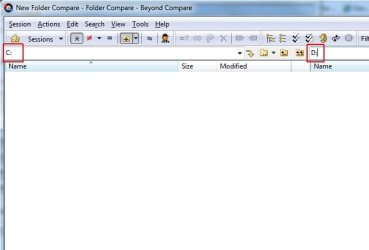
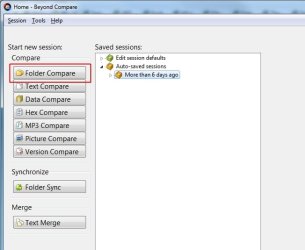
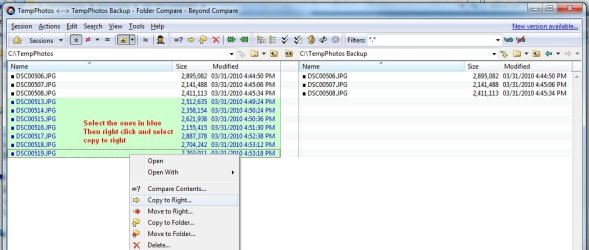
Here are screen shots to use Beyond Compare:
 

Attachments

  • BC1.jpg
    BC1.jpg
    30.1 KB · Views: 9
  • BC2.jpg
    BC2.jpg
    19.1 KB · Views: 7
  • BC3.jpg
    BC3.jpg
    72.2 KB · Views: 10

My Computer My Computer

Computer type
PC/Desktop
Computer Manufacturer/Model Number
Dell OP7010
OS
Windows 7 Enterprise (x64); Windows Server 2008 R2 (x64)
Memory
16GB
Monitor(s) Displays
4 Dell 24" LCD
Screen Resolution
1280x1024
Keyboard
Dell
Mouse
Dell Optical
Internet Speed
40meg
I would not consider Geek Squad to be "professional" data recovery. You will probably end up paying them $125 to have them stick the drive in a freezer and do the same thing I recommended earlier. :p

Google "Data recovery" and see what else is available locally. You may also check out national firms, who are much more likely to have the equipment necessary for a thorough job. I will warn you that it is likely to be quite expensive. :eek:
 

My Computer My Computer

Computer Manufacturer/Model Number
Self
OS
Main - Windows 7 Pro SP1 64-Bit; 2nd - Windows Server 2008 R2
CPU
Main - Core i7 2600K; 2nd - Core i7 920
Motherboard
Main - Asus P8Z68-V Pro/Gen3; 2nd - Gigabyte GA-EX58-UDR3
Memory
Main - 16GB Corsair Vengeance; 2nd - 12GB Corsair Vengeance
Graphics Card(s)
Main - XFX Radeon 6870 1GB; 2nd - XFX Radeon 4870 1GB
Sound Card
Both: Onboard Realtek Azalia
Monitor(s) Displays
Main - Hann 25" + I-INC 25" + Acer 23"; 2nd - Upgrading Soon
Screen Resolution
Main - 1920x1080 (All Three Monitors); 2nd - Upgrading Soon
Hard Drives
Main - (1) Crucial M4 128GB (Boot)
Main - (1) Seagate 2TB 64MB Cache (Data)
Main - (1) Seagate 2TB 64MB Cache (Data Backup)
2nd - (1) Intel X25-M SSD 80GB (Boot)
2nd - (3) Seagate 1TB 32MB Cache (Data Backup)
2nd - (1) Seagate 320GB (Because)
PSU
Main - OCZ 600W Modular; 2nd - OCZ 600W
Case
Main - Thermaltake Element G; 2nd - NZXT something or other
Cooling
Main - Corsair H80; 2nd - Prolimatech Megahalems
Keyboard
Main - Razer Reclusa; 2nd - Old MS Keyboard
Mouse
Main - Logitech MX Revolution; 2nd - Old MS Mouse
Internet Speed
20Mbps Time-Warner Cable
I'm trying WindowsStar solution right now, if not I'll take my drive into "LapTeck". It's a small computer store near me that has good reviews on Google.

EDIT: WindowsStar's program worked for the most part, until it froze on a 14 MB MPG video clip, now I cant get it to do anything.
 
Last edited:

My Computer My Computer

Computer Manufacturer/Model Number
Dell XPS 8100
OS
Windows 7 Home Premium 64-bit
CPU
Intel Core i7 860 @ 2.80GHz
Motherboard
Dell Inc. 0T568R
Memory
8.0GB Dual-Channel DDR3 @ 529MHz 4-7-7-20
Graphics Card(s)
ATI Radeon HD 5770
Sound Card
Realtek High Definition Audio
Monitor(s) Displays
3 Widescreen HD Monitors
Screen Resolution
1600x800
Hard Drives
1000GB Seagate ST31000528AS (SCSI)
1500GB Western Digital WDC WD1001FALS-00J7B1 (SCSI)
PSU
750W
Case
-
Cooling
Fans
Keyboard
Logitech Illuminated Keyboard
Mouse
Logitech MX
Internet Speed
6MBS-15MBS Upload
Other Info
Laptop (Dell Studio 1537)
Intel Mobile Core 2 Duo T6400 @ 2.00GHz
4.0GB Dual-Channel DDR2
I just froze my drive, nothing changed. Here is something I did find out, I can copy any file without problem expect MPG files recorded by a sony handycam.
 

My Computer My Computer

Computer Manufacturer/Model Number
Dell XPS 8100
OS
Windows 7 Home Premium 64-bit
CPU
Intel Core i7 860 @ 2.80GHz
Motherboard
Dell Inc. 0T568R
Memory
8.0GB Dual-Channel DDR3 @ 529MHz 4-7-7-20
Graphics Card(s)
ATI Radeon HD 5770
Sound Card
Realtek High Definition Audio
Monitor(s) Displays
3 Widescreen HD Monitors
Screen Resolution
1600x800
Hard Drives
1000GB Seagate ST31000528AS (SCSI)
1500GB Western Digital WDC WD1001FALS-00J7B1 (SCSI)
PSU
750W
Case
-
Cooling
Fans
Keyboard
Logitech Illuminated Keyboard
Mouse
Logitech MX
Internet Speed
6MBS-15MBS Upload
Other Info
Laptop (Dell Studio 1537)
Intel Mobile Core 2 Duo T6400 @ 2.00GHz
4.0GB Dual-Channel DDR2
Is the Sony you have a hard drive based camcorder or does it use mini-discs or flash media?
 

My Computer My Computer

Computer Manufacturer/Model Number
Self
OS
Main - Windows 7 Pro SP1 64-Bit; 2nd - Windows Server 2008 R2
CPU
Main - Core i7 2600K; 2nd - Core i7 920
Motherboard
Main - Asus P8Z68-V Pro/Gen3; 2nd - Gigabyte GA-EX58-UDR3
Memory
Main - 16GB Corsair Vengeance; 2nd - 12GB Corsair Vengeance
Graphics Card(s)
Main - XFX Radeon 6870 1GB; 2nd - XFX Radeon 4870 1GB
Sound Card
Both: Onboard Realtek Azalia
Monitor(s) Displays
Main - Hann 25" + I-INC 25" + Acer 23"; 2nd - Upgrading Soon
Screen Resolution
Main - 1920x1080 (All Three Monitors); 2nd - Upgrading Soon
Hard Drives
Main - (1) Crucial M4 128GB (Boot)
Main - (1) Seagate 2TB 64MB Cache (Data)
Main - (1) Seagate 2TB 64MB Cache (Data Backup)
2nd - (1) Intel X25-M SSD 80GB (Boot)
2nd - (3) Seagate 1TB 32MB Cache (Data Backup)
2nd - (1) Seagate 320GB (Because)
PSU
Main - OCZ 600W Modular; 2nd - OCZ 600W
Case
Main - Thermaltake Element G; 2nd - NZXT something or other
Cooling
Main - Corsair H80; 2nd - Prolimatech Megahalems
Keyboard
Main - Razer Reclusa; 2nd - Old MS Keyboard
Mouse
Main - Logitech MX Revolution; 2nd - Old MS Mouse
Internet Speed
20Mbps Time-Warner Cable
Hard Drive and a Flash Memory.
 

My Computer My Computer

Computer Manufacturer/Model Number
Dell XPS 8100
OS
Windows 7 Home Premium 64-bit
CPU
Intel Core i7 860 @ 2.80GHz
Motherboard
Dell Inc. 0T568R
Memory
8.0GB Dual-Channel DDR3 @ 529MHz 4-7-7-20
Graphics Card(s)
ATI Radeon HD 5770
Sound Card
Realtek High Definition Audio
Monitor(s) Displays
3 Widescreen HD Monitors
Screen Resolution
1600x800
Hard Drives
1000GB Seagate ST31000528AS (SCSI)
1500GB Western Digital WDC WD1001FALS-00J7B1 (SCSI)
PSU
750W
Case
-
Cooling
Fans
Keyboard
Logitech Illuminated Keyboard
Mouse
Logitech MX
Internet Speed
6MBS-15MBS Upload
Other Info
Laptop (Dell Studio 1537)
Intel Mobile Core 2 Duo T6400 @ 2.00GHz
4.0GB Dual-Channel DDR2
...I can copy any file without problem expect MPG files recorded by a sony handycam.

Is the Sony you have a hard drive based camcorder or does it use mini-discs or flash media?

Hard Drive and a Flash Memory.
Just a couple late-night random thoughts.

1) The Sony Handycam files may be located contiguously on the drive, coincidentally in the area of the platter(s) which is failing.

2) There may be some sort of file corruption taking place when the .mpg files are transferred to the computer or there is something peculiar to the way the Sony copies files which is throwing Windows .
for a loop

3) There may be a permissions problem with the files originating on the Sony Handycam.

If #1 is what is happening then it is just a straightforward data recovery problem, as in: The drive is failing and some data is not able to be read properly. All the earlier advice would still apply.

If the problem is #2, this presents a glimmer of hope. Is it possible to transfer any of the .mpg files back to the Sony, preferably using whatever program Sony provided (if any)?

For #3, try using "Take Ownership" and see if anything good happens.
 

My Computer My Computer

Computer Manufacturer/Model Number
Self
OS
Main - Windows 7 Pro SP1 64-Bit; 2nd - Windows Server 2008 R2
CPU
Main - Core i7 2600K; 2nd - Core i7 920
Motherboard
Main - Asus P8Z68-V Pro/Gen3; 2nd - Gigabyte GA-EX58-UDR3
Memory
Main - 16GB Corsair Vengeance; 2nd - 12GB Corsair Vengeance
Graphics Card(s)
Main - XFX Radeon 6870 1GB; 2nd - XFX Radeon 4870 1GB
Sound Card
Both: Onboard Realtek Azalia
Monitor(s) Displays
Main - Hann 25" + I-INC 25" + Acer 23"; 2nd - Upgrading Soon
Screen Resolution
Main - 1920x1080 (All Three Monitors); 2nd - Upgrading Soon
Hard Drives
Main - (1) Crucial M4 128GB (Boot)
Main - (1) Seagate 2TB 64MB Cache (Data)
Main - (1) Seagate 2TB 64MB Cache (Data Backup)
2nd - (1) Intel X25-M SSD 80GB (Boot)
2nd - (3) Seagate 1TB 32MB Cache (Data Backup)
2nd - (1) Seagate 320GB (Because)
PSU
Main - OCZ 600W Modular; 2nd - OCZ 600W
Case
Main - Thermaltake Element G; 2nd - NZXT something or other
Cooling
Main - Corsair H80; 2nd - Prolimatech Megahalems
Keyboard
Main - Razer Reclusa; 2nd - Old MS Keyboard
Mouse
Main - Logitech MX Revolution; 2nd - Old MS Mouse
Internet Speed
20Mbps Time-Warner Cable
Having any luck at all?
 

My Computer My Computer

Computer Manufacturer/Model Number
Self
OS
Main - Windows 7 Pro SP1 64-Bit; 2nd - Windows Server 2008 R2
CPU
Main - Core i7 2600K; 2nd - Core i7 920
Motherboard
Main - Asus P8Z68-V Pro/Gen3; 2nd - Gigabyte GA-EX58-UDR3
Memory
Main - 16GB Corsair Vengeance; 2nd - 12GB Corsair Vengeance
Graphics Card(s)
Main - XFX Radeon 6870 1GB; 2nd - XFX Radeon 4870 1GB
Sound Card
Both: Onboard Realtek Azalia
Monitor(s) Displays
Main - Hann 25" + I-INC 25" + Acer 23"; 2nd - Upgrading Soon
Screen Resolution
Main - 1920x1080 (All Three Monitors); 2nd - Upgrading Soon
Hard Drives
Main - (1) Crucial M4 128GB (Boot)
Main - (1) Seagate 2TB 64MB Cache (Data)
Main - (1) Seagate 2TB 64MB Cache (Data Backup)
2nd - (1) Intel X25-M SSD 80GB (Boot)
2nd - (3) Seagate 1TB 32MB Cache (Data Backup)
2nd - (1) Seagate 320GB (Because)
PSU
Main - OCZ 600W Modular; 2nd - OCZ 600W
Case
Main - Thermaltake Element G; 2nd - NZXT something or other
Cooling
Main - Corsair H80; 2nd - Prolimatech Megahalems
Keyboard
Main - Razer Reclusa; 2nd - Old MS Keyboard
Mouse
Main - Logitech MX Revolution; 2nd - Old MS Mouse
Internet Speed
20Mbps Time-Warner Cable
Nope, none at all
 

My Computer My Computer

Computer Manufacturer/Model Number
Dell XPS 8100
OS
Windows 7 Home Premium 64-bit
CPU
Intel Core i7 860 @ 2.80GHz
Motherboard
Dell Inc. 0T568R
Memory
8.0GB Dual-Channel DDR3 @ 529MHz 4-7-7-20
Graphics Card(s)
ATI Radeon HD 5770
Sound Card
Realtek High Definition Audio
Monitor(s) Displays
3 Widescreen HD Monitors
Screen Resolution
1600x800
Hard Drives
1000GB Seagate ST31000528AS (SCSI)
1500GB Western Digital WDC WD1001FALS-00J7B1 (SCSI)
PSU
750W
Case
-
Cooling
Fans
Keyboard
Logitech Illuminated Keyboard
Mouse
Logitech MX
Internet Speed
6MBS-15MBS Upload
Other Info
Laptop (Dell Studio 1537)
Intel Mobile Core 2 Duo T6400 @ 2.00GHz
4.0GB Dual-Channel DDR2
Since you obviously really want to get your stuff back, I would recommend professional data recovery. Wish I had a better answer. :(
 

My Computer My Computer

Computer Manufacturer/Model Number
Self
OS
Main - Windows 7 Pro SP1 64-Bit; 2nd - Windows Server 2008 R2
CPU
Main - Core i7 2600K; 2nd - Core i7 920
Motherboard
Main - Asus P8Z68-V Pro/Gen3; 2nd - Gigabyte GA-EX58-UDR3
Memory
Main - 16GB Corsair Vengeance; 2nd - 12GB Corsair Vengeance
Graphics Card(s)
Main - XFX Radeon 6870 1GB; 2nd - XFX Radeon 4870 1GB
Sound Card
Both: Onboard Realtek Azalia
Monitor(s) Displays
Main - Hann 25" + I-INC 25" + Acer 23"; 2nd - Upgrading Soon
Screen Resolution
Main - 1920x1080 (All Three Monitors); 2nd - Upgrading Soon
Hard Drives
Main - (1) Crucial M4 128GB (Boot)
Main - (1) Seagate 2TB 64MB Cache (Data)
Main - (1) Seagate 2TB 64MB Cache (Data Backup)
2nd - (1) Intel X25-M SSD 80GB (Boot)
2nd - (3) Seagate 1TB 32MB Cache (Data Backup)
2nd - (1) Seagate 320GB (Because)
PSU
Main - OCZ 600W Modular; 2nd - OCZ 600W
Case
Main - Thermaltake Element G; 2nd - NZXT something or other
Cooling
Main - Corsair H80; 2nd - Prolimatech Megahalems
Keyboard
Main - Razer Reclusa; 2nd - Old MS Keyboard
Mouse
Main - Logitech MX Revolution; 2nd - Old MS Mouse
Internet Speed
20Mbps Time-Warner Cable
Back
Top