How to copy files between two hard drives faster?

unifex

New member
Guru
VIP
Local time
7:12 PM
Messages
797
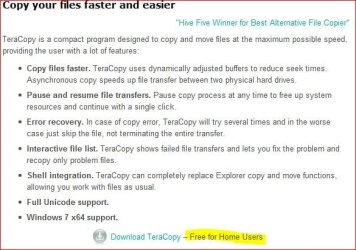
I attach a screenshot that is in fact the question. It shows that the speed of file copy operation between two different hard drives is about 20 MB/s. Same operation between different partitions on the same physical drive goes at twice the speed. This is way slower that the theoretical SATA speed of 3 Gb/s. Any suggestions of how to speed this up?
 

Attachments

  • explorer.jpg
    explorer.jpg
    30.2 KB · Views: 203

My Computer My Computer

At a glance

Windows 7 Ultimate (x64)Q66008 GBATI Radeon HD 2600 XT
Computer Manufacturer/Model Number
Dell Inspiron 530
OS
Windows 7 Ultimate (x64)
CPU
Q6600
Memory
8 GB
Graphics Card(s)
ATI Radeon HD 2600 XT
Monitor(s) Displays
Samsung Syncmaster P2450
Screen Resolution
1920x1080
Hard Drives
Samsung HD103UJ
Samsung HD501LJ
Internet Speed
25 Mb/s
lots of small files transfer slower than large files.
Are both drives internal SATA?
 

My Computer My Computer

At a glance

Windows 7 Ultimate 64bitIntel i7 3770K16GB DDR3 1333 Corsair XMS3XFX HD6950 2GB EyeFinity
Computer Manufacturer/Model Number
HAL-9000
OS
Windows 7 Ultimate 64bit
CPU
Intel i7 3770K
Motherboard
Asus Sabertooth Z77
Memory
16GB DDR3 1333 Corsair XMS3
Graphics Card(s)
XFX HD6950 2GB EyeFinity
Sound Card
Logitech G35 & Sennheiser PC135 & VIA HD
Monitor(s) Displays
23" HP 2310e, 23" Samsung B2230, 21.5" Viewsonic
Screen Resolution
5760x1080
Hard Drives
16TB of Storage
128GB & 256GB Crucial M4 SSD's, 2X 1TB WD Black, 3x 2TB WD, 3x 2TB Samsung F4, 1.5TB Seagate, WD 500GB,
PSU
Antec True Power New 650watt
Case
Cooler Master HAF-932
Cooling
Corsair H60 Hydro Cooler, 3x 230mm Fans, 2x120mm Fan
Keyboard
Logitech G15 and G13
Mouse
Logitech G700 Gaming Mouse
Internet Speed
50/10 Mbit
Other Info
Speakers : Alesis M1 Active Mk2 Studio Monitors , APC RS 1200 UPS, HP 4500DN Color Laser, HP P1006 mono Laser, Kodak 8500 Dye-Sub, Epson 1280 inkjet, Epson Worforce 610 MFC

My Computer My Computer

At a glance

Windows 7 Ultimate (x64)Q66008 GBATI Radeon HD 2600 XT
Computer Manufacturer/Model Number
Dell Inspiron 530
OS
Windows 7 Ultimate (x64)
CPU
Q6600
Memory
8 GB
Graphics Card(s)
ATI Radeon HD 2600 XT
Monitor(s) Displays
Samsung Syncmaster P2450
Screen Resolution
1920x1080
Hard Drives
Samsung HD103UJ
Samsung HD501LJ
Internet Speed
25 Mb/s

Attachments

  • terracopy.JPG
    terracopy.JPG
    49.4 KB · Views: 453
Last edited:

My Computer My Computer

At a glance

Windows 7 Professional 64-bit SP1 Build 7601Intel Core 2 Duo E8400 Wolfdale 775 LGA @ 4.0...Kingston & Corsair PC2-6400 CAS 4-4-4-12 Dual...NVIDIA GeForce 8800 GT G92 512 MB/256 Bit @70...
Computer type
PC/Desktop
Computer Manufacturer/Model Number
Custom Build
OS
Windows 7 Professional 64-bit SP1 Build 7601
CPU
Intel Core 2 Duo E8400 Wolfdale 775 LGA @ 4.00GHz
Motherboard
ASUSTeK Computer INC. P5Q SE (LGA775) Intel A3
Memory
Kingston & Corsair PC2-6400 CAS 4-4-4-12 Dual 6.00 GB
Graphics Card(s)
NVIDIA GeForce 8800 GT G92 512 MB/256 Bit @705Mhz/1026Mhz
Sound Card
Asus Xonar DS + 2.1 Edifier 530D
Monitor(s) Displays
Asus PA249 Pre-calibrated AH-IPS
Screen Resolution
16:10 1920 x 1200 @ 60 Hz
Hard Drives
SSD Integral P4 Series 120GB SATA-III
HDD WD Caviar 500Gb SATA-II
HDD WD Caviar 320Gb SATA-II
PSU
Cooler Master ATX Real Power M520RS-ASAA-A1
Case
Cooler Master CM690
Cooling
ZEROtherm-Accelero-Skythe
Keyboard
Microsoft Wired Keyboard 600
Mouse
GIGABYTE Force M7 Thor
Internet Speed
D-93.98Mb/s U-93.92Mb/s
Antivirus
Microsoft Security Essential
Browser
Mozila Firefox 42.0 & IE 11.0.20
Other Info
Microsoft Life Cam HD-3000
Skythe Kaze Master 5.25"
ASUS DRW-2014S1T
Perixx DX-1000XXL
Brother HL-2030
The 3GB/s Sata speed is irrelevant in this issue. It is all about your particular drives Read/Write speeds. Teracopy may speed it up some, but your drives are limited. If it is the same drive just different partitions, several things can cause it to copy slower from one partition to the other like fragmentation, partition size, file size. If you want top speeds when copying and moving files SSD's have the fastest Read/Write, Random Access times and depending on which SSD you get, some are faster than others. There are many factors when it comes to hard drive speed. Hard drives have always been the bottleneck to fast system until SSD's came out. Now the hard drive doesn't hold back the system as much and the technology in this field is expanding rapidly.
 

My Computer My Computer

At a glance

Windows 7 Ultimate x64Intel Pentium Dual Core T42004gb PC-6400Integrated Intel GMA 4500
Computer Manufacturer/Model Number
Asus K60IJ
OS
Windows 7 Ultimate x64
CPU
Intel Pentium Dual Core T4200
Motherboard
HP Laptop
Memory
4gb PC-6400
Graphics Card(s)
Integrated Intel GMA 4500
Sound Card
onboard(laptop)
Monitor(s) Displays
16"
Screen Resolution
1300 X 766 with true 720p HD support
Hard Drives
320GB 5400RPM
Mouse
Microsoft 3000 laptop mouse
Internet Speed
15mbit+ down and 768kbit up
Other Info
1TB external Western Digital Essentials HDD

My Computer My Computer

At a glance

Windows® 8 Pro (64-bit)Intel® Core™ i5 Processor 2467M (1.60GHz, 3MB...6GB DDR3 System Memory at 1,333MHz (on BD 4GB...AMD Radeon™ HD7550M 1GB DDR3 (Ext. Graphic)
Computer Manufacturer/Model Number
Samsung NP530U4B-S02IN
OS
Windows® 8 Pro (64-bit)
CPU
Intel® Core™ i5 Processor 2467M (1.60GHz, 3MB L3 Cache)
Motherboard
Samsung Electronics
Memory
6GB DDR3 System Memory at 1,333MHz (on BD 4GB + 2GB x 1)
Graphics Card(s)
AMD Radeon™ HD7550M 1GB DDR3 (Ext. Graphic)
Sound Card
Realtek High Definition Audio
Monitor(s) Displays
35.56cm (14.0) SuperBright 300nit HD LED Display
Screen Resolution
1366x768
Hard Drives
1TB S-ATA II Hard Drive (5400RPM) with ExpressCache 16GB SSD
Internet Speed
sucks
Antivirus
Microsoft Security Essentials
Browser
Google Chrome (Sync enabled)
The 3GB/s Sata speed is irrelevant in this issue. It is all about your particular drives Read/Write speeds.


Here's what I find on Samsung's web site regarding my drive :

Performance Specifications
Performance Specifications Average Seek time(typical) 8.9 ms
Data Transfer Rate / Media to/from Buffer(Max.) 175 MB/sec
Data Transfer Rate / Buffer to/from Host(Max.) 300 MB/sec
Average Latency 4.17 ms
Drive Ready Time(typical) 12 sec


How would that limit the possible file copy/move speeds and to what?
 

My Computer My Computer

At a glance

Windows 7 Ultimate (x64)Q66008 GBATI Radeon HD 2600 XT
Computer Manufacturer/Model Number
Dell Inspiron 530
OS
Windows 7 Ultimate (x64)
CPU
Q6600
Memory
8 GB
Graphics Card(s)
ATI Radeon HD 2600 XT
Monitor(s) Displays
Samsung Syncmaster P2450
Screen Resolution
1920x1080
Hard Drives
Samsung HD103UJ
Samsung HD501LJ
Internet Speed
25 Mb/s
I heard using the DOS command robocopy is good

I don't know how to use it cause I would love to.
 
Last edited:

My Computer My Computer

At a glance

windows 7 professional & ultimate 64bit laptops2.27 boost to 2.53 & 2.53 boost to 2.804GBIntel® Graphics Media Accelerator HD
Computer Manufacturer/Model Number
Gateway/NV7923u & NV79C52u Laptops
OS
windows 7 professional & ultimate 64bit laptops
CPU
2.27 boost to 2.53 & 2.53 boost to 2.80
Motherboard
Mobile Intel® HM55 Express Chipset ???
Memory
4GB
Graphics Card(s)
Intel® Graphics Media Accelerator HD
Sound Card
realtek High-definition audio support
Monitor(s) Displays
17.3 " HD 1600 x 900
Hard Drives
hatachi Travelstar 5400 500GB & west digital 500GB
Internet Speed
35MB fios
Robocopy or xcopy would be faster than using the shell, but not by much. If you're seeing drive-to-drive copy speeds of only 20MB a second, either you've got really poorly partitioned drives or one of them is just slow (or has a problem). Also make note that many vendors will quote transfer speeds from the disk *to or from cache*, which is not going to make much difference if there are lots of small files being copied (it might make a difference for one large sequential read or write, but smaller reads and writes aren't going to benefit much from larger disk caches).

It would be interesting for you to run a benchmarking utility against the drives, like HDTach or SiSoft Sandra, and see if one vastly outperforms the other, or if one falls down reading or writing a specific file pattern (size, location on disk, etc).
 

My Computer My Computer

At a glance

Windows 10 Pro x64Intel Core i7 4790K @ 4.5GHz32GB DDR3Nvidia GeForce GTX970
Computer type
PC/Desktop
Computer Manufacturer/Model Number
Custom
OS
Windows 10 Pro x64
CPU
Intel Core i7 4790K @ 4.5GHz
Motherboard
Asus Maximus Hero VII
Memory
32GB DDR3
Graphics Card(s)
Nvidia GeForce GTX970
Sound Card
Realtek HD Audio
Screen Resolution
1920x1200
Hard Drives
1x Samsung 250GB SSD
4x WD RE 2TB (RAIDZ)
PSU
Corsair AX760i
Case
Fractal Design Define R4
Cooling
Noctua NH-D15
OK, I was on vacation, but now I have downloaded Sandra Lite and HD Tune and got some benchmarking results.

I have two drives, the original system drive Samsung HD501LJ and the second drive added later Samsung HD103UJ.

Here are the Sandra results:

Read speeds: 95.42 MB/s (103UJ) vs 65 MB/s (501LJ)
Write speeds: no answer, error message - "remove all partitions and try again", not that I would actually do that.

The HD Tune results for transfer rate:

103UJ: Max. 119.8 MB/s, Min. 54.4 MB/s, Av. 93.7 MB/s
501LJ: Max. 80.7 MB/s, Min. 38.5 MB/s, Av. 64.3 MB/s

So I guess you were right, the two disks are rather different in their performance. However, still much better than 20MB/s, right?
 

My Computer My Computer

At a glance

Windows 7 Ultimate (x64)Q66008 GBATI Radeon HD 2600 XT
Computer Manufacturer/Model Number
Dell Inspiron 530
OS
Windows 7 Ultimate (x64)
CPU
Q6600
Memory
8 GB
Graphics Card(s)
ATI Radeon HD 2600 XT
Monitor(s) Displays
Samsung Syncmaster P2450
Screen Resolution
1920x1080
Hard Drives
Samsung HD103UJ
Samsung HD501LJ
Internet Speed
25 Mb/s
Now, I have just moved a large (4.3 GB) file between two partitions on the same disk (Samsung HD 103UJ). The speed was around 31 MB/s, then towards the end became 35 MB/s.

You mentioned bad partitioning of disks. What did you mean exactly?
 

My Computer My Computer

At a glance

Windows 7 Ultimate (x64)Q66008 GBATI Radeon HD 2600 XT
Computer Manufacturer/Model Number
Dell Inspiron 530
OS
Windows 7 Ultimate (x64)
CPU
Q6600
Memory
8 GB
Graphics Card(s)
ATI Radeon HD 2600 XT
Monitor(s) Displays
Samsung Syncmaster P2450
Screen Resolution
1920x1080
Hard Drives
Samsung HD103UJ
Samsung HD501LJ
Internet Speed
25 Mb/s
Drives that contain partitions not aligned to storage track boundaries (on most disks, this is diskpart using align=64), and/or are formatted using incorrect (or poorly-chosen) cluster sizes based on the type of data to be stored (8-16K clusters for volumes storing lots of small files, 64K clusters for volumes storing large files or meant for large sequential file copy operations). Windows 7 by default formats NTFS with 4K clusters, and aligned at 1024K, which is fine for OS disks (relatively speaking), but is likely not going to be fine for storage volumes (or heavily-used disks).
 

My Computer My Computer

At a glance

Windows 10 Pro x64Intel Core i7 4790K @ 4.5GHz32GB DDR3Nvidia GeForce GTX970
Computer type
PC/Desktop
Computer Manufacturer/Model Number
Custom
OS
Windows 10 Pro x64
CPU
Intel Core i7 4790K @ 4.5GHz
Motherboard
Asus Maximus Hero VII
Memory
32GB DDR3
Graphics Card(s)
Nvidia GeForce GTX970
Sound Card
Realtek HD Audio
Screen Resolution
1920x1200
Hard Drives
1x Samsung 250GB SSD
4x WD RE 2TB (RAIDZ)
PSU
Corsair AX760i
Case
Fractal Design Define R4
Cooling
Noctua NH-D15
Uniflex,
Robocopy is excellent, very solid, very fast, used by many network administrators.

Robocopy has more power and features than the earlier versions thereof.
 

My Computer My Computer

At a glance

MS Windows 7 Ultimate SP1 64-bitAMD A10-4600M6.00 GB Dual-Channel DDR3 @ 798MHz (11-11-12-28)AMD Radeon HD 7660G
Computer Manufacturer/Model Number
Toshiba Satellite S875D-S7239 laptop
OS
MS Windows 7 Ultimate SP1 64-bit
CPU
AMD A10-4600M
Motherboard
AMD Pumori (Socket FT1)
Memory
6.00 GB Dual-Channel DDR3 @ 798MHz (11-11-12-28)
Graphics Card(s)
AMD Radeon HD 7660G
Sound Card
High Definition Audio Device
Monitor(s) Displays
Generic PnP Monitor (1600x900@60Hz)
Screen Resolution
1600x900@60Hz
Hard Drives
SSD 119GB Corsair CSSD-V128GB2 ATA Device
Keyboard
Standard PS/2 Keyboard
Mouse
HP Wireless Optical Mobile Mouse Model FHA-3410
Internet Speed
What the local pub, local coffee shop offers.
Other Info
Optical Drive:MATSHITA BD-CMB UJ160B ATA Device


Also have an Asus ha1002xp netbook with Win 7 Ultimate installed.
I think that when I bought the second disk I simply used the Windows 7 tools to partition and format. I looked now briefly at how to re-partition, but the Shrink tool does not seem to have options that advanced. Any suggestions on a (hopefully free) good disk management app? And while we are at that, I think I can take all the data away from a drive, re-format and put the data back in, but can I do the same with the OS without re-installing?
 

My Computer My Computer

At a glance

Windows 7 Ultimate (x64)Q66008 GBATI Radeon HD 2600 XT
Computer Manufacturer/Model Number
Dell Inspiron 530
OS
Windows 7 Ultimate (x64)
CPU
Q6600
Memory
8 GB
Graphics Card(s)
ATI Radeon HD 2600 XT
Monitor(s) Displays
Samsung Syncmaster P2450
Screen Resolution
1920x1080
Hard Drives
Samsung HD103UJ
Samsung HD501LJ
Internet Speed
25 Mb/s
Right now i copy about 6 GB from the HDD - WD 6400 AAKS, to USB stick.
The copy speed is 4.42 MS/second
Isn't that to slow ??!! Can i improve the speed ?
The files are small, about 30 MB, each.
When i copy some bigger files from onn HDD to another ( i have 2 HDD WD 6400 AAKS ) is much faster.
Thanks.
 

My Computer My Computer

At a glance

Windows 7 Ultimate x64Intel7 4790K8 GB DDR3GTX 980Ti G1
Computer type
PC/Desktop
OS
Windows 7 Ultimate x64
CPU
Intel7 4790K
Motherboard
Gigabyte GA-Z97X UD5H
Memory
8 GB DDR3
Graphics Card(s)
GTX 980Ti G1
Sound Card
SoundBlaster X-FI XtremeGamer
Monitor(s) Displays
Samsung UE40JU6550 UHD
Screen Resolution
3840 X 2160
Hard Drives
1 SSD Intel 330
2 x Western Digital 6400 AAKS
1 x Western Digital 3200 AAKS
PSU
Corsair 750W
Case
Cooler Master HAF 922
First, it's good to keep in mind that USB is a "bursty" bus, it's not meant for sustained file transfer - if you want external transfer speeds that are consistently high, you use Firewire. Of course, I don't know of many fireware memory keys ;).

With that said, USB keys have their own speed limits based on the type of memory inside, and how it's ordered. Back to your numbers, 4.42MB/sec is ~35.5Mb/sec, so you need to know what the maximum transfer speed of that USB stick is. I'm betting it's probably between 35 - 40Mb/sec, as most non-HDD USB devices I've seen are not rated much faster than that.
 

My Computer My Computer

At a glance

Windows 10 Pro x64Intel Core i7 4790K @ 4.5GHz32GB DDR3Nvidia GeForce GTX970
Computer type
PC/Desktop
Computer Manufacturer/Model Number
Custom
OS
Windows 10 Pro x64
CPU
Intel Core i7 4790K @ 4.5GHz
Motherboard
Asus Maximus Hero VII
Memory
32GB DDR3
Graphics Card(s)
Nvidia GeForce GTX970
Sound Card
Realtek HD Audio
Screen Resolution
1920x1200
Hard Drives
1x Samsung 250GB SSD
4x WD RE 2TB (RAIDZ)
PSU
Corsair AX760i
Case
Fractal Design Define R4
Cooling
Noctua NH-D15
Right now i copy about 6 GB from the HDD - WD 6400 AAKS, to USB stick.
The copy speed is 4.42 MS/second
Isn't that to slow ??!! Can i improve the speed ?
The files are small, about 30 MB, each.
When i copy some bigger files from onn HDD to another ( i have 2 HDD WD 6400 AAKS ) is much faster.
Thanks.


4.42Mb/s is likely due to the USB stick, lots of them only reach that sort of speed. You have to pay a bit more for decent speeds of 20Mb/s+.

Your HD speeds being a bit low is probably mainly due to copying lots of small files, this really hits HD performance just about always. I would run ATTO disk benchmark (|MG| ATTO Disk Benchmark 2.46 Download) as it does read&write benchmarks at small to large file sizes.
 

My Computer My Computer

At a glance

Windows 7
OS
Windows 7
I think that when I bought the second disk I simply used the Windows 7 tools to partition and format. I looked now briefly at how to re-partition, but the Shrink tool does not seem to have options that advanced. Any suggestions on a (hopefully free) good disk management app? And while we are at that, I think I can take all the data away from a drive, re-format and put the data back in, but can I do the same with the OS without re-installing?

Use Partition Wizard.

You will not need to re-format your drive.

Free Download Magic Partition Manager Software – Partition Wizard Online
 

My Computer My Computer

At a glance

MS Windows 7 Ultimate SP1 64-bitAMD A10-4600M6.00 GB Dual-Channel DDR3 @ 798MHz (11-11-12-28)AMD Radeon HD 7660G
Computer Manufacturer/Model Number
Toshiba Satellite S875D-S7239 laptop
OS
MS Windows 7 Ultimate SP1 64-bit
CPU
AMD A10-4600M
Motherboard
AMD Pumori (Socket FT1)
Memory
6.00 GB Dual-Channel DDR3 @ 798MHz (11-11-12-28)
Graphics Card(s)
AMD Radeon HD 7660G
Sound Card
High Definition Audio Device
Monitor(s) Displays
Generic PnP Monitor (1600x900@60Hz)
Screen Resolution
1600x900@60Hz
Hard Drives
SSD 119GB Corsair CSSD-V128GB2 ATA Device
Keyboard
Standard PS/2 Keyboard
Mouse
HP Wireless Optical Mobile Mouse Model FHA-3410
Internet Speed
What the local pub, local coffee shop offers.
Other Info
Optical Drive:MATSHITA BD-CMB UJ160B ATA Device


Also have an Asus ha1002xp netbook with Win 7 Ultimate installed.
I'd like to add, that these problem seem to be confined to internal disks, strangely enough. I have an external hard drive connected via eSATA, and transfer rates to and from this device are way higher that between internal disks. This does not make sense at all. We are talking about same internal disks - with or without their formatting problems, but why would a transfer rate from the external drive be higher then between different partitions on the same internal drive?
 

My Computer My Computer

At a glance

Windows 7 Ultimate (x64)Q66008 GBATI Radeon HD 2600 XT
Computer Manufacturer/Model Number
Dell Inspiron 530
OS
Windows 7 Ultimate (x64)
CPU
Q6600
Memory
8 GB
Graphics Card(s)
ATI Radeon HD 2600 XT
Monitor(s) Displays
Samsung Syncmaster P2450
Screen Resolution
1920x1080
Hard Drives
Samsung HD103UJ
Samsung HD501LJ
Internet Speed
25 Mb/s
can't wait to read
 

My Computer My Computer

At a glance

windows 7 professional & ultimate 64bit laptops2.27 boost to 2.53 & 2.53 boost to 2.804GBIntel® Graphics Media Accelerator HD
Computer Manufacturer/Model Number
Gateway/NV7923u & NV79C52u Laptops
OS
windows 7 professional & ultimate 64bit laptops
CPU
2.27 boost to 2.53 & 2.53 boost to 2.80
Motherboard
Mobile Intel® HM55 Express Chipset ???
Memory
4GB
Graphics Card(s)
Intel® Graphics Media Accelerator HD
Sound Card
realtek High-definition audio support
Monitor(s) Displays
17.3 " HD 1600 x 900
Hard Drives
hatachi Travelstar 5400 500GB & west digital 500GB
Internet Speed
35MB fios
Back
Top