
Copy of Windows 7 Not Genuine, Blocking Updates?

jmw412

New member
Local time
6:06 PM
Messages
5
Ultimately I am trying to figure out why IE 11 won't install as it is standing between me and watching GoT via Roku, but there are a few other Windows updates that won't install either, and after some reading I wonder if Windows not being "genuine" is the culprit. The laptop is 5+ years old, I can't remember if I bought it with Windows already installed or if that was done after the laptop's arrival, but I do have that line of text in the bottom right of the screen saying "This copy of Windows is not genuine." I tried reading through some troubleshooting guides online, but figured it's time to consult the experts before I do any damage.


Code:
Diagnostic Report (1.9.0027.0):
-----------------------------------------
Windows Validation Data-->

Validation Code: 50
Cached Online Validation Code: N/A, hr = 0xc004f012
Windows Product Key: *****-*****-QCPVQ-KHRB8-RMV82
Windows Product Key Hash: +Rj3N34NLM2JqoBO/OzgzTZXgbY=
Windows Product ID: 00359-OEM-8992687-00095
Windows Product ID Type: 2
Windows License Type: OEM SLP
Windows OS version: 6.1.7601.2.00010300.1.0.003
ID: {EB08CB38-6282-4C8B-BA34-799EE7BF149E}(1)
Is Admin: Yes
TestCab: 0x0
LegitcheckControl ActiveX: N/A, hr = 0x80070002
Signed By: N/A, hr = 0x80070002
Product Name: Windows 7 Home Premium
Architecture: 0x00000009
Build lab: 7601.win7sp1_gdr.150316-1654
TTS Error: 
Validation Diagnostic: 
Resolution Status: N/A

Vista WgaER Data-->
ThreatID(s): N/A, hr = 0x80070002
Version: N/A, hr = 0x80070002

Windows XP Notifications Data-->
Cached Result: N/A, hr = 0x80070002
File Exists: No
Version: N/A, hr = 0x80070002
WgaTray.exe Signed By: N/A, hr = 0x80070002
WgaLogon.dll Signed By: N/A, hr = 0x80070002

OGA Notifications Data-->
Cached Result: N/A, hr = 0x80070002
Version: N/A, hr = 0x80070002
OGAExec.exe Signed By: N/A, hr = 0x80070002
OGAAddin.dll Signed By: N/A, hr = 0x80070002

OGA Data-->
Office Status: 109 N/A
OGA Version: N/A, 0x80070002
Signed By: N/A, hr = 0x80070002
Office Diagnostics: 025D1FF3-364-80041010_025D1FF3-229-80041010_025D1FF3-230-1_025D1FF3-517-80040154_025D1FF3-237-80040154_025D1FF3-238-2_025D1FF3-244-80070002_025D1FF3-258-3

Browser Data-->
Proxy settings: N/A
User Agent: Mozilla/4.0 (compatible; MSIE 8.0; Win32)
Default Browser: C:\Program Files (x86)\Mozilla Firefox\firefox.exe
Download signed ActiveX controls: Prompt
Download unsigned ActiveX controls: Disabled
Run ActiveX controls and plug-ins: Allowed
Initialize and script ActiveX controls not marked as safe: Disabled
Allow scripting of Internet Explorer Webbrowser control: Disabled
Active scripting: Allowed
Script ActiveX controls marked as safe for scripting: Allowed

File Scan Data-->
File Mismatch: C:\Windows\system32\sppwinob.dll[6.1.7601.17514], Hr = 0x80004005

Other data-->
Office Details: <GenuineResults><MachineData><UGUID>{EB08CB38-6282-4C8B-BA34-799EE7BF149E}</UGUID><Version>1.9.0027.0</Version><OS>6.1.7601.2.00010300.1.0.003</OS><Architecture>x64</Architecture><PKey>*****-*****-*****-*****-RMV82</PKey><PID>00359-OEM-8992687-00095</PID><PIDType>2</PIDType><SID>S-1-5-21-517728147-2322273481-3658995684</SID><SYSTEM><Manufacturer>Dell Inc.</Manufacturer><Model>Inspiron 1440                   </Model></SYSTEM><BIOS><Manufacturer>Dell Inc.</Manufacturer><Version>A07</Version><SMBIOSVersion major="2" minor="4"/><Date>20091221000000.000000+000</Date></BIOS><HWID>1E6F3B07018400F8</HWID><UserLCID>0409</UserLCID><SystemLCID>0409</SystemLCID><TimeZone>Pacific Standard Time(GMT-08:00)</TimeZone><iJoin>0</iJoin><SBID><stat>3</stat><msppid></msppid><name></name><model></model></SBID><OEM><OEMID>DELL  </OEMID><OEMTableID>WN09   </OEMTableID></OEM><GANotification/></MachineData><Software><Office><Result>109</Result><Products/><Applications/></Office></Software></GenuineResults>  

Spsys.log Content: 0x80070002

Licensing Data-->
Software licensing service version: 6.1.7601.17514

Name: Windows(R) 7, HomePremium edition
Description: Windows Operating System - Windows(R) 7, OEM_SLP channel
Activation ID: d2c04e90-c3dd-4260-b0f3-f845f5d27d64
Application ID: 55c92734-d682-4d71-983e-d6ec3f16059f
Extended PID: 00359-00178-926-800095-02-1033-7601.0000-1122015
Installation ID: 020015275941262750232922015194179415164014928631017013
Processor Certificate URL: http://go.microsoft.com/fwlink/?LinkID=88338
Machine Certificate URL: http://go.microsoft.com/fwlink/?LinkID=88339
Use License URL: http://go.microsoft.com/fwlink/?LinkID=88341
Product Key Certificate URL: http://go.microsoft.com/fwlink/?LinkID=88340
Partial Product Key: RMV82
License Status: Initial grace period
Time remaining: 39420 minute(s) (27 day(s))
Remaining Windows rearm count: 3
Trusted time: 25-Apr-15 12:25:40

Windows Activation Technologies-->
HrOffline: 0x00000000
HrOnline: N/A
HealthStatus: 0x0000000000000000
Event Time Stamp: N/A
ActiveX: Registered, Version: 7.1.7600.16395
Admin Service: Registered, Version: 7.1.7600.16395
HealthStatus Bitmask Output:


HWID Data-->
HWID Hash Current: NgAAAAIAAgABAAIAAAACAAAAAwABAAEAonbipHcWWJXosHp/SsJC4MpYVju+pNQarnFWD0bK

OEM Activation 1.0 Data-->
N/A

OEM Activation 2.0 Data-->
BIOS valid for OA 2.0: yes
Windows marker version: 0x20001
OEMID and OEMTableID Consistent: yes
BIOS Information: 
  ACPI Table Name	OEMID Value	OEMTableID Value
  APIC			DELL  		WN09   
  FACP			DELL  		WN09   
  HPET			DELL  		WN09   
  MCFG			DELL  		WN09   
  SLIC			DELL  		WN09   
  OSFR			DELL  		WN09   
  SSDT			PmRef		CpuPm
 

My Computer My Computer

At a glance

Windows 7 Home Premium 64bit w/ Service Pack 1Intel Core 2 Duo P7450 @ 2.13 GHz6.00 GB
Computer type
Laptop
Computer Manufacturer/Model Number
Dell Inspiron INSP1440
OS
Windows 7 Home Premium 64bit w/ Service Pack 1
CPU
Intel Core 2 Duo P7450 @ 2.13 GHz
Memory
6.00 GB
Antivirus
Avast 2015.10.2.2218
Browser
Chrome 42.0.2311.90 & Internet Explorer 8
File Scan Data-->
File Mismatch: C:\Windows\system32\sppwinob.dll[6.1.7601.17514], Hr = 0x80004005


Unusual error there!

Let's go at this from a slightly different angle...

Please follow the Windows Update Posting Instructions and post the requested data

If the file is too large (8MB compressed), remove the older CBSPersist cab files until the final file is below the limit - you can always post them separately after zipping them. (the forum doesn't allow the upload of bare CAB files, for a number of reasons)

Please also post the C:\Windows\windowsudpate.log file, and a new copy of the MGADiag report.
 

My Computer My Computer

At a glance

Win 7 x64 Home Premium (and x86 VirtualBox VM...i3 370M/i7 6500U8GB - finally :)/8GBit's an i3, dude!/dual Intel&nVidia
Computer type
Laptop
Computer Manufacturer/Model Number
Asus K52F or Lenovo B51-80
OS
Win 7 x64 Home Premium (and x86 VirtualBox VM)/Win10
CPU
i3 370M/i7 6500U
Motherboard
Asus/Lenovo
Memory
8GB - finally :)/8GB
Graphics Card(s)
it's an i3, dude!/dual Intel&nVidia
Sound Card
onboard
Monitor(s) Displays
15.6" built-in
Screen Resolution
1366x768/1920x1080
Hard Drives
750GB Seagate internal
Sundry external drives attached to other computers on the local network
1TB SSD on the Lenovo
PSU
n/a
Internet Speed
as much as I can get - usually on a dongle/phone, so <1MB/s
Antivirus
MSE/Defender
Browser
IE11/12/Edge/Chrome/FF(if I must)
Windows Update Posting run, trouble uploading CBS info

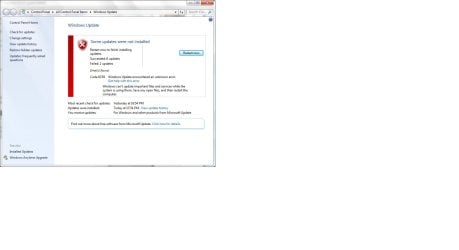
Followed the Windows Update Posting link. It says all but 2 installed, the 2 failed being IE 10 and IE 11, but when I restart it does the Failure to Configure loop and those same updates pop up as still needing to be done.

Code 9C59.jpg

As for posting the CBS info, CBS.log is 183MB and the most recent CBSPersist cab file is 16MB, zipping only seems to take it down by 1MB. Is there a preferred way to split these up so they can be uploaded?

Windows Update log attached:

View attachment 357361

New MGADiag report below:

Code:
Diagnostic Report (1.9.0027.0):
-----------------------------------------
Windows Validation Data-->

Validation Code: 0x8004FE21
Cached Online Validation Code: N/A, hr = 0xc004f012
Windows Product Key: *****-*****-QCPVQ-KHRB8-RMV82
Windows Product Key Hash: +Rj3N34NLM2JqoBO/OzgzTZXgbY=
Windows Product ID: 00359-OEM-8992687-00095
Windows Product ID Type: 2
Windows License Type: OEM SLP
Windows OS version: 6.1.7601.2.00010300.1.0.003
ID: {EB08CB38-6282-4C8B-BA34-799EE7BF149E}(3)
Is Admin: Yes
TestCab: 0x0
LegitcheckControl ActiveX: N/A, hr = 0x80070002
Signed By: N/A, hr = 0x80070002
Product Name: Windows 7 Home Premium
Architecture: 0x00000009
Build lab: 7601.win7sp1_gdr.150316-1654
TTS Error: 
Validation Diagnostic: 
Resolution Status: N/A

Vista WgaER Data-->
ThreatID(s): N/A, hr = 0x80070002
Version: N/A, hr = 0x80070002

Windows XP Notifications Data-->
Cached Result: N/A, hr = 0x80070002
File Exists: No
Version: N/A, hr = 0x80070002
WgaTray.exe Signed By: N/A, hr = 0x80070002
WgaLogon.dll Signed By: N/A, hr = 0x80070002

OGA Notifications Data-->
Cached Result: N/A, hr = 0x80070002
Version: N/A, hr = 0x80070002
OGAExec.exe Signed By: N/A, hr = 0x80070002
OGAAddin.dll Signed By: N/A, hr = 0x80070002

OGA Data-->
Office Status: 109 N/A
OGA Version: N/A, 0x80070002
Signed By: N/A, hr = 0x80070002
Office Diagnostics: 025D1FF3-364-80041010_025D1FF3-229-80041010_025D1FF3-230-1_025D1FF3-517-80040154_025D1FF3-237-80040154_025D1FF3-238-2_025D1FF3-244-80070002_025D1FF3-258-3

Browser Data-->
Proxy settings: N/A
User Agent: Mozilla/4.0 (compatible; MSIE 8.0; Win32)
Default Browser: C:\Program Files (x86)\Mozilla Firefox\firefox.exe
Download signed ActiveX controls: Prompt
Download unsigned ActiveX controls: Disabled
Run ActiveX controls and plug-ins: Allowed
Initialize and script ActiveX controls not marked as safe: Disabled
Allow scripting of Internet Explorer Webbrowser control: Disabled
Active scripting: Allowed
Script ActiveX controls marked as safe for scripting: Allowed

File Scan Data-->
File Mismatch: C:\Windows\system32\sppwinob.dll[6.1.7601.17514], Hr = 0x80092003

Other data-->
Office Details: <GenuineResults><MachineData><UGUID>{EB08CB38-6282-4C8B-BA34-799EE7BF149E}</UGUID><Version>1.9.0027.0</Version><OS>6.1.7601.2.00010300.1.0.003</OS><Architecture>x64</Architecture><PKey>*****-*****-*****-*****-RMV82</PKey><PID>00359-OEM-8992687-00095</PID><PIDType>2</PIDType><SID>S-1-5-21-517728147-2322273481-3658995684</SID><SYSTEM><Manufacturer>Dell Inc.</Manufacturer><Model>Inspiron 1440                   </Model></SYSTEM><BIOS><Manufacturer>Dell Inc.</Manufacturer><Version>A07</Version><SMBIOSVersion major="2" minor="4"/><Date>20091221000000.000000+000</Date></BIOS><HWID>1E6F3B07018400F8</HWID><UserLCID>0409</UserLCID><SystemLCID>0409</SystemLCID><TimeZone>Pacific Standard Time(GMT-08:00)</TimeZone><iJoin>0</iJoin><SBID><stat>3</stat><msppid></msppid><name></name><model></model></SBID><OEM><OEMID>DELL  </OEMID><OEMTableID>WN09   </OEMTableID></OEM><GANotification/></MachineData><Software><Office><Result>109</Result><Products/><Applications/></Office></Software></GenuineResults>  

Spsys.log Content: 0x80070002

Licensing Data-->
Software licensing service version: 6.1.7601.17514

Name: Windows(R) 7, HomePremium edition
Description: Windows Operating System - Windows(R) 7, OEM_SLP channel
Activation ID: d2c04e90-c3dd-4260-b0f3-f845f5d27d64
Application ID: 55c92734-d682-4d71-983e-d6ec3f16059f
Extended PID: 00359-00178-926-800095-02-1033-7601.0000-1122015
Installation ID: 020015275941262750232922015194179415164014928631017013
Processor Certificate URL: http://go.microsoft.com/fwlink/?LinkID=88338
Machine Certificate URL: http://go.microsoft.com/fwlink/?LinkID=88339
Use License URL: http://go.microsoft.com/fwlink/?LinkID=88341
Product Key Certificate URL: http://go.microsoft.com/fwlink/?LinkID=88340
Partial Product Key: RMV82
License Status: Initial grace period
Time remaining: 39060 minute(s) (27 day(s))
Remaining Windows rearm count: 3
Trusted time: 25-Apr-15 18:36:11

Windows Activation Technologies-->
HrOffline: 0x8004FE21
HrOnline: N/A
HealthStatus: 0x0000000000000080
Event Time Stamp: N/A
ActiveX: Registered, Version: 7.1.7600.16395
Admin Service: Registered, Version: 7.1.7600.16395
HealthStatus Bitmask Output:
Tampered File: %systemroot%\system32\sppwinob.dll


HWID Data-->
HWID Hash Current: NgAAAAIAAgABAAIAAAACAAAAAwABAAEAonbipHcWWJXosHp/SsJC4MpYVju+pNQarnFWD0bK

OEM Activation 1.0 Data-->
N/A

OEM Activation 2.0 Data-->
BIOS valid for OA 2.0: yes
Windows marker version: 0x20001
OEMID and OEMTableID Consistent: yes
BIOS Information: 
  ACPI Table Name	OEMID Value	OEMTableID Value
  APIC			DELL  		WN09   
  FACP			DELL  		WN09   
  HPET			DELL  		WN09   
  MCFG			DELL  		WN09   
  SLIC			DELL  		WN09   
  OSFR			DELL  		WN09   
  SSDT			PmRef		CpuPm
 

My Computer My Computer

At a glance

Windows 7 Home Premium 64bit w/ Service Pack 1Intel Core 2 Duo P7450 @ 2.13 GHz6.00 GB
Computer type
Laptop
Computer Manufacturer/Model Number
Dell Inspiron INSP1440
OS
Windows 7 Home Premium 64bit w/ Service Pack 1
CPU
Intel Core 2 Duo P7450 @ 2.13 GHz
Memory
6.00 GB
Antivirus
Avast 2015.10.2.2218
Browser
Chrome 42.0.2311.90 & Internet Explorer 8
We have a slight change in the report now...
Code:
[I]File Scan Data-->
File Mismatch: C:\Windows\system32\sppwinob.dll[6.1.7601.17514], Hr = 0x80092003

Tampered File: %systemroot%\system32\sppwinob.dll
[/I]
If you compress the CBS.log, it should come down to around 8-9MB - still too big for the forum, but you can upload it to DropBox/OneDrive, or another fileshare site, and post a link.
 

My Computer My Computer

At a glance

Win 7 x64 Home Premium (and x86 VirtualBox VM...i3 370M/i7 6500U8GB - finally :)/8GBit's an i3, dude!/dual Intel&nVidia
Computer type
Laptop
Computer Manufacturer/Model Number
Asus K52F or Lenovo B51-80
OS
Win 7 x64 Home Premium (and x86 VirtualBox VM)/Win10
CPU
i3 370M/i7 6500U
Motherboard
Asus/Lenovo
Memory
8GB - finally :)/8GB
Graphics Card(s)
it's an i3, dude!/dual Intel&nVidia
Sound Card
onboard
Monitor(s) Displays
15.6" built-in
Screen Resolution
1366x768/1920x1080
Hard Drives
750GB Seagate internal
Sundry external drives attached to other computers on the local network
1TB SSD on the Lenovo
PSU
n/a
Internet Speed
as much as I can get - usually on a dongle/phone, so <1MB/s
Antivirus
MSE/Defender
Browser
IE11/12/Edge/Chrome/FF(if I must)

My Computer My Computer

At a glance

Windows 7 Home Premium 64bit w/ Service Pack 1Intel Core 2 Duo P7450 @ 2.13 GHz6.00 GB
Computer type
Laptop
Computer Manufacturer/Model Number
Dell Inspiron INSP1440
OS
Windows 7 Home Premium 64bit w/ Service Pack 1
CPU
Intel Core 2 Duo P7450 @ 2.13 GHz
Memory
6.00 GB
Antivirus
Avast 2015.10.2.2218
Browser
Chrome 42.0.2311.90 & Internet Explorer 8
CheckSUR is OK.
The SFC summary shows the following problems.
Code:
Line 4573: 2015-04-25 17:32:08, Info                  CSI    00000325 [SR] Repairing 4 components
 Line 4574: 2015-04-25 17:32:08, Info                  CSI    00000326 [SR] Beginning Verify and Repair transaction
 Line 4577: 2015-04-25 17:32:08, Info                  CSI    00000328 [SR] Cannot repair member file [l:24{12}]"sppwinob.dll" of Microsoft-Windows-Security-SPP-Plugin-Windows, Version = 6.1.7601.17514, pA = PROCESSOR_ARCHITECTURE_AMD64 (9), Culture neutral, VersionScope = 1 nonSxS, PublicKeyToken = {l:8 b:31bf3856ad364e35}, Type neutral, TypeName neutral, PublicKey neutral in the store, hash mismatch
 Line 4580: 2015-04-25 17:32:08, Info                  CSI    0000032a [SR] Cannot repair member file [l:18{9}]"Setup.exe" of Microsoft-Windows-Setup-Component, Version = 6.1.7601.17514, pA = PROCESSOR_ARCHITECTURE_AMD64 (9), Culture neutral, VersionScope = 1 nonSxS, PublicKeyToken = {l:8 b:31bf3856ad364e35}, Type neutral, TypeName neutral, PublicKey neutral in the store, hash mismatch
 Line 4583: 2015-04-25 17:32:08, Info                  CSI    0000032c [SR] Cannot repair member file [l:24{12}]"d3dim700.dll" of Microsoft-Windows-DirectX-Direct3D, Version = 6.1.7600.16385, pA = PROCESSOR_ARCHITECTURE_INTEL (0), Culture neutral, VersionScope = 1 nonSxS, PublicKeyToken = {l:8 b:31bf3856ad364e35}, Type neutral, TypeName neutral, PublicKey neutral in the store, hash mismatch
 Line 4586: 2015-04-25 17:32:08, Info                  CSI    0000032e [SR] Cannot repair member file [l:28{14}]"mprmsg.dll.mui" of Microsoft-Windows-MPRMSG.Resources, Version = 6.1.7601.17514, pA = PROCESSOR_ARCHITECTURE_INTEL (0), Culture = [l:10{5}]"en-US", VersionScope = 1 nonSxS, PublicKeyToken = {l:8 b:31bf3856ad364e35}, Type neutral, TypeName neutral, PublicKey neutral in the store, hash mismatch
 
 .

I'll post a fix protocol later.
 

My Computer My Computer

At a glance

Win 7 x64 Home Premium (and x86 VirtualBox VM...i3 370M/i7 6500U8GB - finally :)/8GBit's an i3, dude!/dual Intel&nVidia
Computer type
Laptop
Computer Manufacturer/Model Number
Asus K52F or Lenovo B51-80
OS
Win 7 x64 Home Premium (and x86 VirtualBox VM)/Win10
CPU
i3 370M/i7 6500U
Motherboard
Asus/Lenovo
Memory
8GB - finally :)/8GB
Graphics Card(s)
it's an i3, dude!/dual Intel&nVidia
Sound Card
onboard
Monitor(s) Displays
15.6" built-in
Screen Resolution
1366x768/1920x1080
Hard Drives
750GB Seagate internal
Sundry external drives attached to other computers on the local network
1TB SSD on the Lenovo
PSU
n/a
Internet Speed
as much as I can get - usually on a dongle/phone, so <1MB/s
Antivirus
MSE/Defender
Browser
IE11/12/Edge/Chrome/FF(if I must)
I've uploaded a file - jmwaa.zip - to my OneDrive at Noel's OneDrive
Please download and save it.

Right-click on the saved file and select Extract all...
Change the target to C:\ and click on Extract
Close all windows (it would be a good idea to print these instructions!)

Now reboot to the Repair Environment - as soon as the machine restarts, start tapping F8 - this should bring up the Advanced Boot Menu, at the top of which should be the option 'Repair my Computer'
Pick that
You'll have to log in with your username and password.

Pick the option to use a Command Prompt
At the prompt type
DIR C:\jmwaa
hit the enter key - if you get a 'Not Found' error try
DIR D:\jmwaa
or
DIR E:\jmwaa


The drive letter in use when you find the folder will need to be substituted (for<drive>) into the following command...


XCOPY <drive>:\jmwaa <drive>:\windows\winsxs /y /i /s /v /h


(e.g. XCOPY P:\wfire P:\windows\winsxs /y /i /s /v /h )


run the command (it should take almost no time) and when the prompt returns, type
EXIT
and hit the Enter key to exit Command Prompt - reboot to Normal Mode Windows.

Now run SFC /SCANNOW in an Elevated Command Prompt
then reboot and upload the new CBS.log file to your reply
 

My Computer My Computer

At a glance

Win 7 x64 Home Premium (and x86 VirtualBox VM...i3 370M/i7 6500U8GB - finally :)/8GBit's an i3, dude!/dual Intel&nVidia
Computer type
Laptop
Computer Manufacturer/Model Number
Asus K52F or Lenovo B51-80
OS
Win 7 x64 Home Premium (and x86 VirtualBox VM)/Win10
CPU
i3 370M/i7 6500U
Motherboard
Asus/Lenovo
Memory
8GB - finally :)/8GB
Graphics Card(s)
it's an i3, dude!/dual Intel&nVidia
Sound Card
onboard
Monitor(s) Displays
15.6" built-in
Screen Resolution
1366x768/1920x1080
Hard Drives
750GB Seagate internal
Sundry external drives attached to other computers on the local network
1TB SSD on the Lenovo
PSU
n/a
Internet Speed
as much as I can get - usually on a dongle/phone, so <1MB/s
Antivirus
MSE/Defender
Browser
IE11/12/Edge/Chrome/FF(if I must)

My Computer My Computer

At a glance

Windows 7 Home Premium 64bit w/ Service Pack 1Intel Core 2 Duo P7450 @ 2.13 GHz6.00 GB
Computer type
Laptop
Computer Manufacturer/Model Number
Dell Inspiron INSP1440
OS
Windows 7 Home Premium 64bit w/ Service Pack 1
CPU
Intel Core 2 Duo P7450 @ 2.13 GHz
Memory
6.00 GB
Antivirus
Avast 2015.10.2.2218
Browser
Chrome 42.0.2311.90 & Internet Explorer 8
That's odd - only one of the four files was properly repaired :(
Code:
 Line 3450: 2015-04-26 02:31:42, Info                  CSI    00000320 [SR] Repairing 3 components
 Line 3451: 2015-04-26 02:31:42, Info                  CSI    00000321 [SR] Beginning Verify and Repair transaction
 Line 3454: 2015-04-26 02:31:42, Info                  CSI    00000323 [SR] Cannot repair member file [l:24{12}]"sppwinob.dll" of Microsoft-Windows-Security-SPP-Plugin-Windows, Version = 6.1.7601.17514, pA = PROCESSOR_ARCHITECTURE_AMD64 (9), Culture neutral, VersionScope = 1 nonSxS, PublicKeyToken = {l:8 b:31bf3856ad364e35}, Type neutral, TypeName neutral, PublicKey neutral in the store, hash mismatch
 Line 3457: 2015-04-26 02:31:42, Info                  CSI    00000325 [SR] Cannot repair member file [l:18{9}]"Setup.exe" of Microsoft-Windows-Setup-Component, Version = 6.1.7601.17514, pA = PROCESSOR_ARCHITECTURE_AMD64 (9), Culture neutral, VersionScope = 1 nonSxS, PublicKeyToken = {l:8 b:31bf3856ad364e35}, Type neutral, TypeName neutral, PublicKey neutral in the store, hash mismatch
 Line 3460: 2015-04-26 02:31:42, Info                  CSI    00000327 [SR] Cannot repair member file [l:24{12}]"d3dim700.dll" of Microsoft-Windows-DirectX-Direct3D, Version = 6.1.7600.16385, pA = PROCESSOR_ARCHITECTURE_INTEL (0), Culture neutral, VersionScope = 1 nonSxS, PublicKeyToken = {l:8 b:31bf3856ad364e35}, Type neutral, TypeName neutral, PublicKey neutral in the store, hash mismatch
Did you get any error messages during the copy? Did all four folder appear to copy OK?
I double-checked, and all uploaded files are correct, so all I can suggest is to try again.
 

My Computer My Computer

At a glance

Win 7 x64 Home Premium (and x86 VirtualBox VM...i3 370M/i7 6500U8GB - finally :)/8GBit's an i3, dude!/dual Intel&nVidia
Computer type
Laptop
Computer Manufacturer/Model Number
Asus K52F or Lenovo B51-80
OS
Win 7 x64 Home Premium (and x86 VirtualBox VM)/Win10
CPU
i3 370M/i7 6500U
Motherboard
Asus/Lenovo
Memory
8GB - finally :)/8GB
Graphics Card(s)
it's an i3, dude!/dual Intel&nVidia
Sound Card
onboard
Monitor(s) Displays
15.6" built-in
Screen Resolution
1366x768/1920x1080
Hard Drives
750GB Seagate internal
Sundry external drives attached to other computers on the local network
1TB SSD on the Lenovo
PSU
n/a
Internet Speed
as much as I can get - usually on a dongle/phone, so <1MB/s
Antivirus
MSE/Defender
Browser
IE11/12/Edge/Chrome/FF(if I must)
XCOPY & SCANNOW x 2, CBS x 3

Tried everything again.

No error message when I did XCOPY in repair environment, it said 5 files copied preceded by a lot of numbers. I tried to CTRL+C everything to paste here, but it didn't survive the reboots. Does Prnt Scrn work in repair mode or is there another way to capture the text so you can see everything? Otherwise I can run it a third time and zoom in with my phone to try sending an attached picture of everything in the command prompt when XCOPY is run...

After reboot and running SFC /SCANNOW it still says:

Windows Resource Protection found corrupt files but was unable to fix some of them.

Rebooted after that and latest CBS log below:

https://drive.google.com/file/d/0B3jR8YHbK3zuZVVtR0FYQ2NObVE/view?usp=sharing
 

My Computer My Computer

At a glance

Windows 7 Home Premium 64bit w/ Service Pack 1Intel Core 2 Duo P7450 @ 2.13 GHz6.00 GB
Computer type
Laptop
Computer Manufacturer/Model Number
Dell Inspiron INSP1440
OS
Windows 7 Home Premium 64bit w/ Service Pack 1
CPU
Intel Core 2 Duo P7450 @ 2.13 GHz
Memory
6.00 GB
Antivirus
Avast 2015.10.2.2218
Browser
Chrome 42.0.2311.90 & Internet Explorer 8
Back
Top