Okay i can get it to work using this extension:
https://sourceforge.net/projects/ao...rg/en/project/PasteFromWeb&use_mirror=vorboss
It adds a button in LO toolbar. Copy selection from webpage (highlight then Ctrl+C)
Click the button to paste.
Alernatively check options shown when pressing [Ctrl+shift+V]
Here's what I get when pasting the webpage:
There is a caveat. I had to use Palemoon to browse and copy from. I also tried Opera (old presto version) and MS Edge but images and formatting were horrible.
Install the plugin via Tools > Extension Manager and browse to the.odtfile. Correction. It's an .oxt file:
View attachment 400556
Apologies but using Windows 10 now so not tested on Windows 7.
I must be losing my muckin' farbles. I swear I replied to this but it vanished (or I was dreaming?).

Back to the
I'm already there with replacing Adobe Acrobat Standard (besides me refusing to have anything to do with cloud and subscription based programs, Adobe doesn't have Linux versions of their products). I'm now using PDF Studio Pro 12 (not a freebie, btw, but less expensive than Acrobat) and have removed al traces of Adobe from my system with the exception of Shockwave Player (still needed to watch YouTube videos, afik).
I'm now learning how to use LibreOffice (LO) and have actually replaced the Word icon in my Quick Launch menu yesterday with LibreOffice's (I won't uninstall MS Office for a while yet, just in case). So far, the only actual problems I've had with LibreOffice have been cosmetic or learning a new workflow, all of which are minor annoyances that I'll get over fairly quickly. Many things about LO I'm finding I like better than MS Office (good grief, like Yoda I sound now
). Even the copy/paste issue is mostly just increasing the amount of time it takes me to copy/paste an image rich web article (usually tutorials for later reference). I'm currently using LO pretty much all the time instead of MS Orifice, including laboriously working around the copy/paste issue by special pasting in unformatted text, then manually restoring formatting and inserting hyperlinks and images one at a time. The results are actually better than what I get in Word (mostly due to eliminating conflicting styles or styles that cripple ideal reformatting) but it is tedious.FireFox is the most popular browser in Linux and most distros include it but I do not like it because of its piddle poor handling of cookies. Almost every website feels it needs to put a cookie on my computer, even if all I'll ever do is lurk there. I realize most cookies are not bad and some are even necessary but I feel it's my cotton pickin' computer so I should be the one who determines what gets put on it or not. In IE 11 (hey, I like it; so sue me

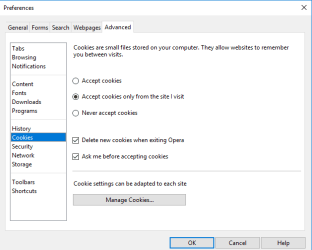
 ), I have IE 11 set to block all third party cookies and prompt me on all others. Firefox does not give me that option.
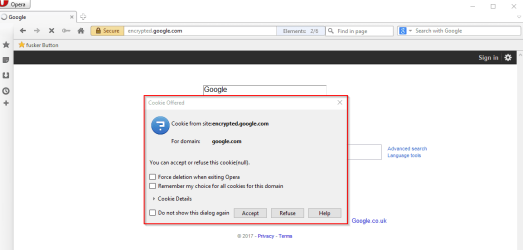
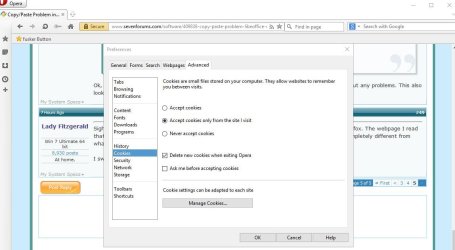
I cannot remember if I actually tried Palemoon (like I did Firefox) or merely decided against it because it is a derivative of Firefox with fewer features. I recently put Opera at the top of my "to try" list because of its alleged ability to handle cookies the way I want and its free VPN however, I haven't got around to trying it yet.
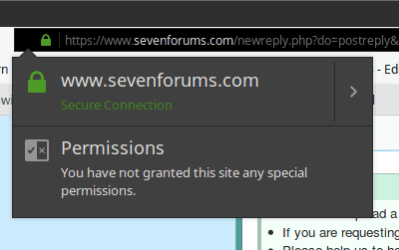
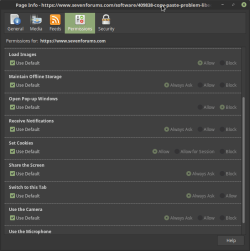
Going back to Palemoon, I'm not feeling especially adventuresome after the recent nonsense I've been dealing with (plus health is less than stellar) so let me hit you (and hopefully not hurt you) with a question before trying Palemoon and/or Opera. Does Palemoon handle cookies the way I want?
My Computer
- Computer type
- PC/Desktop
- Computer Manufacturer/Model Number
- Custom Build
- OS
- Win 7 Ultimate 64 bit
- CPU
- Intel i7-3930K
- Motherboard
- ASUS P9X79 WS
- Memory
- Kingston HyperX Genesis 32GB Kit (8x4GB Modules) 1600MHz DDR
- Graphics Card(s)
- MSI R7850 Twin Frozr 2GD5/OC Radeon HD 7850 2GB 256-bit GDDR
- Sound Card
- Asus Xonar Essence STX
- Monitor(s) Displays
- 3x Asus VG248QE 24", Vizio 32" TV
- Screen Resolution
- 1920 x 1080, ?
- Hard Drives
- Samsung 128GB 840 Pro SSD (1),
Samsung 4TB 850 EVO SSDs (4)
Samsung 4TB 850 EVO SSDs (16) external backup drives used in 2.5" hot swap bays in the computer.
- PSU
- Corsair HX750w
- Case
- Antec Two Hundred v2 (modified)
- Cooling
- Cooler Master GeminII S524 120mm (fan replaced with a 140mm)
- Keyboard
- Logitech G510s
- Mouse
- Logitech M525 (two in use)
- Internet Speed
- =< 32Mbps down, 8Mbps up
- Antivirus
- AVAST!, MBAM, SAS, Spybot S&D (all but MBAM free) Glary Util
- Browser
- IE11
- Other Info
- LSI 9211-8i HBA card (8 SATA III ports), 2.5" & 3.5" Hot Swap Bays, HooToo HT-CR001 PCI-E to USB 3.0 Internal Hub + 6 Slot Card Reader, and LG Model CH12LS28 BD-ROM Optical Drive. Also, ScanSnap S1500 ADF duplexing scanner, Canon 9000F flat bed scanner, Corsair SP2500 2.1 speakers, Samsung CLP 415nw laser color printer, Cyberpower PP2200SW UPS


 Oh well. I'll have to see later if it will work with another browser.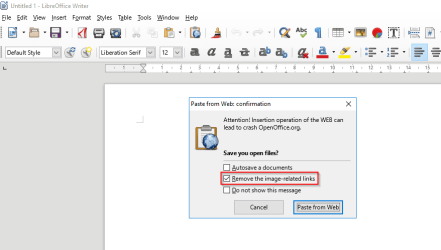
 .
.