External SSD Problem

ednja

New member
Local time
4:13 PM
Messages
8
I have a new 8TB external SSD with four different partitions in it of 2TB each. I was moving a large number of files from an
external hard drive to 2 different partitions of this SDD. I believe the issue I'm have is probably related to this: The external SSD is USB3.0 with no external power supply. It's powered from the USB. Instead of plugging it directly into the computer with the short connector that came with it, I plugged it into a USB2.0 hub which is connected to the computer with a 3 foot long usb cable. The external hard drive that I was moving data from is also plugged into this hub. It has it's own power supply, but I'm sure it would also draw some power from the usb and the extra length of cable would also be dropping some voltage. I was getting errors saying that a few of the files couldn't be moved because either the files were corrupted or the disk isn't readable. At first, I assumed the errors were about the hard drive I was moving from, but now I suspect that the
errors were about the SSD and probably because the supply voltage was unstable. It said the files were still moving but they obviously weren't because the amount remaining to move wasn't changing after half hour. I tried cancelling the move, but after waiting for half hour with no response, I had to hold the power button in to shutdown the computer.

After restarting, only two of the four partitions were visible in Windows explorer and only one of the two had the proper name. When I clicked on either of them, windows explorer became unresponsive again. I restarted the computer in safe mode and all four partitions appeared in explorer. I was able to click on them with no issue. I was able to look into the folders and open files.

I restarted the computer again but not in safe mode, this time I was able to access everything in all four partitions just like
in safe mode. However, I discovered there are some issues:

1. In the two partitions that I was moving files to at the time of the crash, the context menu no longer has "rename" when I
go to rename a file or folder. The other two partitions don't have this issue. Also in these same two partitions I can no longer create new folders.

2. When I right click any of the partitions and files and folders and select properties, the window opens, but there is no security tab in any of them. The security tab is there when I go to properties in my other drives.

I'm running Windows 7.

Here is what I've done so far:

1. I ran DISM /online /Cleanup-Image.
2. I ran sfc /scannow
3. I ran chkdsk /v /f /r C:
4. I checked for a restore point but there weren't any.

As far as I know, there were no problems found and the issue hasn't changed.

I'm thinking that formatting the SSD might fix it, but I don't know. I don't have experience with SSDs. Reformatting would
require backing up all the files and don't even know if it will work. I'd prefer that I could fix the problem another way.

I'm thinking that the problem isn't with Windows 7, but with the SSD itself, but again, I don't know.

- - - Updated - - -

Right after I posted this question, I thought of running chkdsk on the external SSD and it's finding a lot of corruption. I'll leave my post here and update it later.

- - - Updated - - -

- - - Updated - - -

I just noticed that the SSD context menus in two partitions are also missing "delete".

- - - Updated - - -

I'm not able to move the files off the SSD. I can only copy so it's taking more time. I'm wondering if the SSD is damaged.

- - - Updated - - -

When I try to move a folder from the SSD, I get this error message:

An unexpected error is keeping you from moving the folder. If you continue to receive this error, you can use the error to
search for help with this problem.
Error 0x80070570: The file or directory is corrupted and unreadable.

When I try to delete a folder from the SSD (in the partitions that still have "delete" in the context menu), I get this error message:

An Unexpected error is keeping you from deleting the folder. If you continue to receive this error, you can use the error
code to search for help with this problem.
Error 0x80071AC3: The operation could not be completed because the volume is dirty.
Please run chkdsk and try again.

I stopped running chkdsk because it seems that it will probably take days to get through everything. I'm working on copying the data from the SSD to a hard drive right now. After that is done, then I'll try repairing the SSD with reformatting.
 
Last edited:

My Computer

Computer type
PC/Desktop
OS
Windows 7 Ultimate x64
What is the model of the SSD and where did you get it?

Run CrystalDiskInfo and CrystalDiskMark on the SSD to see more about it and its capabilities.

I see a 8TB external SSD on Amazon for $900 US. This drive has a USB 3.1 Gen 2 connection.

Do not use USB 2.0 to transfer a lot of data. USB 2.0 is very slow compared to USB 3.0 and USB 3.1.

USB 2.0 < 0.5 Gbps
USB 3.0 = 5 Gbps
USB USB 3.1 Gen 2 = 10 Gbps
 

My Computers

System One System Two

  • Computer type
    PC/Desktop
    Computer Manufacturer/Model Number
    Custom build
    OS
    Windows 7 Home Premium 64-bits
    CPU
    AMD FX-8350
    Motherboard
    Gigabyte GA-990FXA-UD3 (AM3+)
    Memory
    GSKILL Ripjaw-X PC3 12800 8GB (2x4GB)
    Graphics Card(s)
    ASUS ROG STRIX GTX 1060 6GB
    Sound Card
    Integrated
    Monitor(s) Displays
    Asus VE228H (21.5-in)
    Screen Resolution
    1920x1080 60Hz
    Hard Drives
    SAMSUNG 870 EVO 2.5 Inch SATA SSD (1TB)
    SAMSUNG 870 EVO 2.5 Inch SATA SSD (1TB)
    SAMSUNG 870 EVO 2.5 Inch SATA SSD (1TB)
    PSU
    Corsair RM750x (750 watts)
    Case
    Corsair Carbide Series 200R
    Cooling
    Corsair Hydro Series H60 (CWCH60)
    Keyboard
    Logitech Elite
    Mouse
    Logitech M510 Wireless Mouse
    Internet Speed
    Comcast Gigabit Extra (1200Mbps down / 35Mbps up)
    Antivirus
    Malwarebytes
    Browser
    Firefox, Edge, Chrome
    Other Info
    ASUS DRW-24B1ST DVD-RW (24X) optical drive
    Seagate Expansion Desk (5TB) external SATA/USB HDD
    Comcast XB8 Internet Gateway
  • Computer type
    PC/Desktop
    System Manufacturer/Model Number
    Custom
    OS
    Windows 7 Pro (64-bit)
    CPU
    AMD Phenom II 960T X4
    Motherboard
    ASUS M4N82 Deluxe
    Memory
    Corsair XMS2 DDR2-800 8GB (4x2GB)
    Graphics Card(s)
    ASUS ENGTX560 DCII OC/2DI/1GD5 1GB
    Monitor(s) Displays
    Samsung 930B 19-inch LCD
    Screen Resolution
    1280x1024
    Hard Drives
    Samsung SSD 870 EVO 1000 GB (Windows 10)
    Seagate ST1000DM003 1000 GB (Windows 7)
    PSU
    Antec TruePower (new) TP-650
    Case
    Antec Three Hundred
    Cooling
    AMD stock cooler from FX8350
    Mouse
    Logitech M100
    Internet Speed
    Xfinity Gigabit Extra 1200/35 Mbps
It's a cheap SSD that I bought for about $80 Canadian on marketplace in Facebook. It's brand new and probably made in China. There is no brand name and no model number. I'm sure I'm taking a high risk for data security with it. Because it's so cheap priced, it's easy to write off as a loss if it fails.

I did a quick format on the first partition of the SSD. The delete and new folder functions are restored but there's still no
security tab in properties.

Right now I'm trying a full format on the first partition to see if that does better.

While I'm waiting for it to format, I'll check out CrystalDiskInfo and CrystalDiskMark.

Update: Okay, I tried CrystalDisk. CrystalDiskInfo sees the samsung SSD that I'm using for my drive C. It also sees my external hard drive, but it doesn't see my external SSD. CrystalDiskMark seems to be interacting with Drive C with apparently nothing to click on to go to another drive. I wasn't able to find a manual for it. Meanwhile, my full format is at 1%, so probably be sometime tomorrow when I can give an update on whether that does anything. After the full format, I plan to do quick formats on the other three partitions to see what that does.
 
Last edited:

My Computer

Computer type
PC/Desktop
OS
Windows 7 Ultimate x64
There is a saying "If it is too good to be true then it probably isn't". For your SSD:
  • The price was a small fraction of the going rate
  • The drive was divided up into four partitions instead of just one.
  • You don't even know the manufacturer

It possible someone is buying fake SSDs for maybe $20 CAD and selling them for $80 CAD. I'm not saying this is absolutely true so prove me wrong.

There are a lot of fake SSDs for sale on various web sites. Also note that the size of a drive can be faked electronically. In other words a drive can report its 8TB but actually be much smaller.

In the following YouTube video someone bought a 8TB SSD online. After he took it apart he found it actually contained four 32GB flash drives.

iWish: I bought an 8TB External Drive from Wish...and it went as well as you would expect
iWish: I bought an 8TB External Drive from Wish...and it went as well as you would expect - YouTube

------------------

5 Tools to Test and Detect Fake or Counterfeit USB Flash Drives
Page not found • Raymond.CC-bought-from-ebay-with-h2testw/
 

My Computers

System One System Two

  • Computer type
    PC/Desktop
    Computer Manufacturer/Model Number
    Custom build
    OS
    Windows 7 Home Premium 64-bits
    CPU
    AMD FX-8350
    Motherboard
    Gigabyte GA-990FXA-UD3 (AM3+)
    Memory
    GSKILL Ripjaw-X PC3 12800 8GB (2x4GB)
    Graphics Card(s)
    ASUS ROG STRIX GTX 1060 6GB
    Sound Card
    Integrated
    Monitor(s) Displays
    Asus VE228H (21.5-in)
    Screen Resolution
    1920x1080 60Hz
    Hard Drives
    SAMSUNG 870 EVO 2.5 Inch SATA SSD (1TB)
    SAMSUNG 870 EVO 2.5 Inch SATA SSD (1TB)
    SAMSUNG 870 EVO 2.5 Inch SATA SSD (1TB)
    PSU
    Corsair RM750x (750 watts)
    Case
    Corsair Carbide Series 200R
    Cooling
    Corsair Hydro Series H60 (CWCH60)
    Keyboard
    Logitech Elite
    Mouse
    Logitech M510 Wireless Mouse
    Internet Speed
    Comcast Gigabit Extra (1200Mbps down / 35Mbps up)
    Antivirus
    Malwarebytes
    Browser
    Firefox, Edge, Chrome
    Other Info
    ASUS DRW-24B1ST DVD-RW (24X) optical drive
    Seagate Expansion Desk (5TB) external SATA/USB HDD
    Comcast XB8 Internet Gateway
  • Computer type
    PC/Desktop
    System Manufacturer/Model Number
    Custom
    OS
    Windows 7 Pro (64-bit)
    CPU
    AMD Phenom II 960T X4
    Motherboard
    ASUS M4N82 Deluxe
    Memory
    Corsair XMS2 DDR2-800 8GB (4x2GB)
    Graphics Card(s)
    ASUS ENGTX560 DCII OC/2DI/1GD5 1GB
    Monitor(s) Displays
    Samsung 930B 19-inch LCD
    Screen Resolution
    1280x1024
    Hard Drives
    Samsung SSD 870 EVO 1000 GB (Windows 10)
    Seagate ST1000DM003 1000 GB (Windows 7)
    PSU
    Antec TruePower (new) TP-650
    Case
    Antec Three Hundred
    Cooling
    AMD stock cooler from FX8350
    Mouse
    Logitech M100
    Internet Speed
    Xfinity Gigabit Extra 1200/35 Mbps
Yes, I agree. Before I bought it, I thought it might be too good to be true. The guy didn't tell me it was divided into 4 partitions until just before I went to meet him. That made me suspicious of him. Then he wanted to meet infront of some stores - not at his home. That made me very suspicious of him. I knew there was a huge risk at that point, but I decided that I was willing to risk $80. As soon as I got home, I connected to the computer and saw that it does have 4 partitions and each one is said to be 2tb. I studied electronics and worked as a technician for a number of years and should have known better than to plug the drive into my usb hub and start using it. My old age is getting the better of me. This full format is taking a long time. It might take 3 days before the first partition is fully formatted. I'll let it keep running. Hopefully the power doesn't go out :D
 

My Computer

Computer type
PC/Desktop
OS
Windows 7 Ultimate x64
Two 2TB Solid State Drives compared. Hint one drive is fake.
Western Digital - $270
no name - $40

Start watching video at 10 minute mark

LIVE: Building Computers
LIVE: Building Computers - YouTube
 

My Computers

System One System Two

  • Computer type
    PC/Desktop
    Computer Manufacturer/Model Number
    Custom build
    OS
    Windows 7 Home Premium 64-bits
    CPU
    AMD FX-8350
    Motherboard
    Gigabyte GA-990FXA-UD3 (AM3+)
    Memory
    GSKILL Ripjaw-X PC3 12800 8GB (2x4GB)
    Graphics Card(s)
    ASUS ROG STRIX GTX 1060 6GB
    Sound Card
    Integrated
    Monitor(s) Displays
    Asus VE228H (21.5-in)
    Screen Resolution
    1920x1080 60Hz
    Hard Drives
    SAMSUNG 870 EVO 2.5 Inch SATA SSD (1TB)
    SAMSUNG 870 EVO 2.5 Inch SATA SSD (1TB)
    SAMSUNG 870 EVO 2.5 Inch SATA SSD (1TB)
    PSU
    Corsair RM750x (750 watts)
    Case
    Corsair Carbide Series 200R
    Cooling
    Corsair Hydro Series H60 (CWCH60)
    Keyboard
    Logitech Elite
    Mouse
    Logitech M510 Wireless Mouse
    Internet Speed
    Comcast Gigabit Extra (1200Mbps down / 35Mbps up)
    Antivirus
    Malwarebytes
    Browser
    Firefox, Edge, Chrome
    Other Info
    ASUS DRW-24B1ST DVD-RW (24X) optical drive
    Seagate Expansion Desk (5TB) external SATA/USB HDD
    Comcast XB8 Internet Gateway
  • Computer type
    PC/Desktop
    System Manufacturer/Model Number
    Custom
    OS
    Windows 7 Pro (64-bit)
    CPU
    AMD Phenom II 960T X4
    Motherboard
    ASUS M4N82 Deluxe
    Memory
    Corsair XMS2 DDR2-800 8GB (4x2GB)
    Graphics Card(s)
    ASUS ENGTX560 DCII OC/2DI/1GD5 1GB
    Monitor(s) Displays
    Samsung 930B 19-inch LCD
    Screen Resolution
    1280x1024
    Hard Drives
    Samsung SSD 870 EVO 1000 GB (Windows 10)
    Seagate ST1000DM003 1000 GB (Windows 7)
    PSU
    Antec TruePower (new) TP-650
    Case
    Antec Three Hundred
    Cooling
    AMD stock cooler from FX8350
    Mouse
    Logitech M100
    Internet Speed
    Xfinity Gigabit Extra 1200/35 Mbps
Hi Mr.Ed,
Those were some very informative videos you shared. I'm testing this drive for actual capacity now. It will end up taking a few days. This drive is slow like one of the videos says. I keep imagining that before the week is over, I'll be taking this drive apart to discover it's just 3 caseless usb sticks plugged into a caseless usb hub, with the circuit programmed to make Windows think it's 8TB when it's not even close. I'll update this at the end of the week. I still don't have a system tab in properties, but at this point it's not a concern. Thanks for your input on this.
 

My Computer

Computer type
PC/Desktop
OS
Windows 7 Ultimate x64
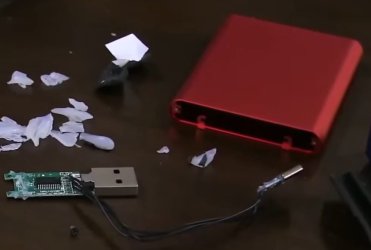
In the beginning of the video he was going to return the fake 2TB drive for a refund from Amazon. However, some live stream viewers donated money just so he could take the drive apart and see what was inside. He started doing that at about 2:40:00 in the video. Here is a screenshot of what he found inside. At the bottom left apparently is a flash drive with a USB A connector. Black wires run from it to a USB C connector at the lower right. Your drive may have four of something like that inside.
flash drive #2.jpg
 

My Computers

System One System Two

  • Computer type
    PC/Desktop
    Computer Manufacturer/Model Number
    Custom build
    OS
    Windows 7 Home Premium 64-bits
    CPU
    AMD FX-8350
    Motherboard
    Gigabyte GA-990FXA-UD3 (AM3+)
    Memory
    GSKILL Ripjaw-X PC3 12800 8GB (2x4GB)
    Graphics Card(s)
    ASUS ROG STRIX GTX 1060 6GB
    Sound Card
    Integrated
    Monitor(s) Displays
    Asus VE228H (21.5-in)
    Screen Resolution
    1920x1080 60Hz
    Hard Drives
    SAMSUNG 870 EVO 2.5 Inch SATA SSD (1TB)
    SAMSUNG 870 EVO 2.5 Inch SATA SSD (1TB)
    SAMSUNG 870 EVO 2.5 Inch SATA SSD (1TB)
    PSU
    Corsair RM750x (750 watts)
    Case
    Corsair Carbide Series 200R
    Cooling
    Corsair Hydro Series H60 (CWCH60)
    Keyboard
    Logitech Elite
    Mouse
    Logitech M510 Wireless Mouse
    Internet Speed
    Comcast Gigabit Extra (1200Mbps down / 35Mbps up)
    Antivirus
    Malwarebytes
    Browser
    Firefox, Edge, Chrome
    Other Info
    ASUS DRW-24B1ST DVD-RW (24X) optical drive
    Seagate Expansion Desk (5TB) external SATA/USB HDD
    Comcast XB8 Internet Gateway
  • Computer type
    PC/Desktop
    System Manufacturer/Model Number
    Custom
    OS
    Windows 7 Pro (64-bit)
    CPU
    AMD Phenom II 960T X4
    Motherboard
    ASUS M4N82 Deluxe
    Memory
    Corsair XMS2 DDR2-800 8GB (4x2GB)
    Graphics Card(s)
    ASUS ENGTX560 DCII OC/2DI/1GD5 1GB
    Monitor(s) Displays
    Samsung 930B 19-inch LCD
    Screen Resolution
    1280x1024
    Hard Drives
    Samsung SSD 870 EVO 1000 GB (Windows 10)
    Seagate ST1000DM003 1000 GB (Windows 7)
    PSU
    Antec TruePower (new) TP-650
    Case
    Antec Three Hundred
    Cooling
    AMD stock cooler from FX8350
    Mouse
    Logitech M100
    Internet Speed
    Xfinity Gigabit Extra 1200/35 Mbps
I had H2testw running on one of the partitions for a few days. It got to about 1/4 way through and I had to cancel because some other issue came up not related to this and had to restart my computer. I don't have another computer set up right now to run independent from my daily use. When I cancelled, it said that up to that point, it had put about 1.2TB of data on the partition, so maybe the capacity is much more than the 32GB reported in that video. I don't know. Maybe the H2testw program is being tricked.

While that was running, I was copying data manually to another one of the four partitions at the same time. There were a few write errors. After the Copy claimed to be completed, I took a look into the folders and some of the folders were empty. I checked the files in the folders that did have files in them. The small files worked (not corrupted). I had several compressed files that were more than 5GB each. Some of them worked but some of them were corrupted. Items in the context menus also went missing again.

This drive is garbage. It can't be trusted. When I bought it, I knew there wasn't something right but I had no idea that the problem could be this bad. I was imagining at the least that I'd have a working drive that would still be useful to me but maybe too slow for large amounts of data transfer. Instead I have a drive that is completely useless. I don't take these risks often, so the $80 isn't a problem. $20 would have been more acceptable for this lesson though lol. These guys give expensive lessons. I normally do a lot of research on things, but in this case, the idea that a manufacturer would be selling total junk like this didn't enter my mind. I'll get another computer set up but I can't do that right now, so I'll have to hold off for a while before getting around to it.

Right now I'm copying to only one of the partitions and doing nothing else with it to keep the current draw to minimum. So far there is no corruption (had to do a few reads from it to do this check so took some small risks it). I'm thinking that if I open it up, disconnect the usb power from it and add an external 5V power supply with sufficient current output, then I might be able to make use of it. But if the capacity of each partition... I mean flash drive is only 32Gb, I won't waste any more time with it.


- - - Updated - - -

I'm done testing this fake SSD without taking it apart. When I copied data to one usb stick inside it only, it still ended up having empty folders. some folders had data but others had none. I also noticed something really strange. In Windows explorer, looking at the left column, I could see the folder tree. If I clicked on some of the folders and I knew there were one or more subfolders in it, there were no subfolders showing in the right column. When the copy was about 3/4 way through it started having read/write errors and after I clicked "skip" on them, then it ended the copy.

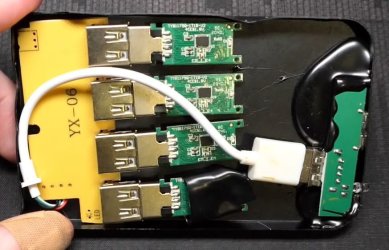
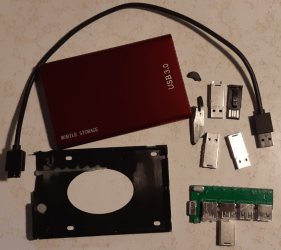
I took the unit apart. There is a 4 port hub pcb with 4 usb sticks. The 4 port hub pcb looks only has a few components on it:

1. 16pin chip that says
SL2 : 1A
USB 2.0 HUB
TT0119A21

2. 8 capacitors

3. 4 connectors for the usb sticks

4. 4 usb sticks (they have cases on them)

5. USB 3.0 input connector

6. Crystal that says 12.000

I connected one of the usb sticks to a USB 2.0 port on my PC. Windows explorer says it has a capacity of 2TB.

I'm now copying data to it to test it.

- - - Updated - - -

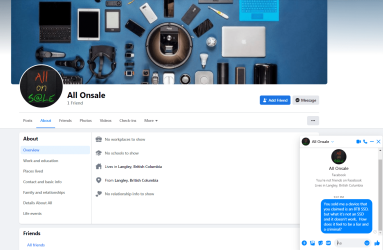
Here's a picture of the Facebook profile for the guy who sold me this great drive.
image.png
 

My Computer

Computer type
PC/Desktop
OS
Windows 7 Ultimate x64

My Computers

System One System Two

  • Computer type
    PC/Desktop
    Computer Manufacturer/Model Number
    Custom build
    OS
    Windows 7 Home Premium 64-bits
    CPU
    AMD FX-8350
    Motherboard
    Gigabyte GA-990FXA-UD3 (AM3+)
    Memory
    GSKILL Ripjaw-X PC3 12800 8GB (2x4GB)
    Graphics Card(s)
    ASUS ROG STRIX GTX 1060 6GB
    Sound Card
    Integrated
    Monitor(s) Displays
    Asus VE228H (21.5-in)
    Screen Resolution
    1920x1080 60Hz
    Hard Drives
    SAMSUNG 870 EVO 2.5 Inch SATA SSD (1TB)
    SAMSUNG 870 EVO 2.5 Inch SATA SSD (1TB)
    SAMSUNG 870 EVO 2.5 Inch SATA SSD (1TB)
    PSU
    Corsair RM750x (750 watts)
    Case
    Corsair Carbide Series 200R
    Cooling
    Corsair Hydro Series H60 (CWCH60)
    Keyboard
    Logitech Elite
    Mouse
    Logitech M510 Wireless Mouse
    Internet Speed
    Comcast Gigabit Extra (1200Mbps down / 35Mbps up)
    Antivirus
    Malwarebytes
    Browser
    Firefox, Edge, Chrome
    Other Info
    ASUS DRW-24B1ST DVD-RW (24X) optical drive
    Seagate Expansion Desk (5TB) external SATA/USB HDD
    Comcast XB8 Internet Gateway
  • Computer type
    PC/Desktop
    System Manufacturer/Model Number
    Custom
    OS
    Windows 7 Pro (64-bit)
    CPU
    AMD Phenom II 960T X4
    Motherboard
    ASUS M4N82 Deluxe
    Memory
    Corsair XMS2 DDR2-800 8GB (4x2GB)
    Graphics Card(s)
    ASUS ENGTX560 DCII OC/2DI/1GD5 1GB
    Monitor(s) Displays
    Samsung 930B 19-inch LCD
    Screen Resolution
    1280x1024
    Hard Drives
    Samsung SSD 870 EVO 1000 GB (Windows 10)
    Seagate ST1000DM003 1000 GB (Windows 7)
    PSU
    Antec TruePower (new) TP-650
    Case
    Antec Three Hundred
    Cooling
    AMD stock cooler from FX8350
    Mouse
    Logitech M100
    Internet Speed
    Xfinity Gigabit Extra 1200/35 Mbps
I attempted to copy 158GB of data over to one of the usb sticks. The Copy was completed. All of the files apparently copied over. I checked the files. The first files up to 65GB copied over without corruption. All the files copied over after that point are corrupted.

- - - Updated - - -

The capacity according to the ChipGenius program is 64GB for each usb stick.

- - - Updated - - -
 
Last edited:

My Computer

Computer type
PC/Desktop
OS
Windows 7 Ultimate x64
I attempted to copy 158GB of data over to one of the usb sticks. The Copy was completed. All of the files apparently copied over. I checked the files. The first files up to 65GB copied over without corruption. All the files copied over after that point are corrupted.

- - - Updated - - -

The capacity according to the ChipGenius program is 64GB for each usb stick.

- - - Updated - - -

I ran ChipGenius. It says the actual capacity of each usb stick is 64GB.

It looks like ChipGenius verified what you already knew from your tests. It looks like your so called 8TB SSD is actually four 64GB flash drives. You can use them if you want but since Windows thinks they are 2TB each then you would always have to be careful to not run out of space. It might be better to trash them.
 

My Computers

System One System Two

  • Computer type
    PC/Desktop
    Computer Manufacturer/Model Number
    Custom build
    OS
    Windows 7 Home Premium 64-bits
    CPU
    AMD FX-8350
    Motherboard
    Gigabyte GA-990FXA-UD3 (AM3+)
    Memory
    GSKILL Ripjaw-X PC3 12800 8GB (2x4GB)
    Graphics Card(s)
    ASUS ROG STRIX GTX 1060 6GB
    Sound Card
    Integrated
    Monitor(s) Displays
    Asus VE228H (21.5-in)
    Screen Resolution
    1920x1080 60Hz
    Hard Drives
    SAMSUNG 870 EVO 2.5 Inch SATA SSD (1TB)
    SAMSUNG 870 EVO 2.5 Inch SATA SSD (1TB)
    SAMSUNG 870 EVO 2.5 Inch SATA SSD (1TB)
    PSU
    Corsair RM750x (750 watts)
    Case
    Corsair Carbide Series 200R
    Cooling
    Corsair Hydro Series H60 (CWCH60)
    Keyboard
    Logitech Elite
    Mouse
    Logitech M510 Wireless Mouse
    Internet Speed
    Comcast Gigabit Extra (1200Mbps down / 35Mbps up)
    Antivirus
    Malwarebytes
    Browser
    Firefox, Edge, Chrome
    Other Info
    ASUS DRW-24B1ST DVD-RW (24X) optical drive
    Seagate Expansion Desk (5TB) external SATA/USB HDD
    Comcast XB8 Internet Gateway
  • Computer type
    PC/Desktop
    System Manufacturer/Model Number
    Custom
    OS
    Windows 7 Pro (64-bit)
    CPU
    AMD Phenom II 960T X4
    Motherboard
    ASUS M4N82 Deluxe
    Memory
    Corsair XMS2 DDR2-800 8GB (4x2GB)
    Graphics Card(s)
    ASUS ENGTX560 DCII OC/2DI/1GD5 1GB
    Monitor(s) Displays
    Samsung 930B 19-inch LCD
    Screen Resolution
    1280x1024
    Hard Drives
    Samsung SSD 870 EVO 1000 GB (Windows 10)
    Seagate ST1000DM003 1000 GB (Windows 7)
    PSU
    Antec TruePower (new) TP-650
    Case
    Antec Three Hundred
    Cooling
    AMD stock cooler from FX8350
    Mouse
    Logitech M100
    Internet Speed
    Xfinity Gigabit Extra 1200/35 Mbps
I deleted the partition on one of them and then created a partition that is less than the 64GB. I did that a few times, making the new partition a bit smaller each time, until H2testw ran without errors. I don't know how reliable it will be. It might be possible that H2testw doesn't check everything.
 

My Computer

Computer type
PC/Desktop
OS
Windows 7 Ultimate x64
I deleted the partition on one of them and then created a partition that is less than the 64GB. I did that a few times, making the new partition a bit smaller each time, until H2testw ran without errors. I don't know how reliable it will be. It might be possible that H2testw doesn't check everything.
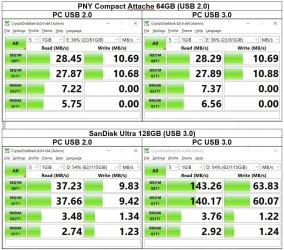
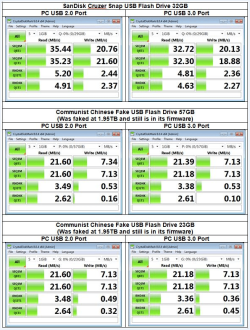
Since you have a known good partition now you might try to test its speed with CrystalDiskMark. You can compare the results with the two flash drives I show below.

FlashTest.jpg
 

My Computers

System One System Two

  • Computer type
    PC/Desktop
    Computer Manufacturer/Model Number
    Custom build
    OS
    Windows 7 Home Premium 64-bits
    CPU
    AMD FX-8350
    Motherboard
    Gigabyte GA-990FXA-UD3 (AM3+)
    Memory
    GSKILL Ripjaw-X PC3 12800 8GB (2x4GB)
    Graphics Card(s)
    ASUS ROG STRIX GTX 1060 6GB
    Sound Card
    Integrated
    Monitor(s) Displays
    Asus VE228H (21.5-in)
    Screen Resolution
    1920x1080 60Hz
    Hard Drives
    SAMSUNG 870 EVO 2.5 Inch SATA SSD (1TB)
    SAMSUNG 870 EVO 2.5 Inch SATA SSD (1TB)
    SAMSUNG 870 EVO 2.5 Inch SATA SSD (1TB)
    PSU
    Corsair RM750x (750 watts)
    Case
    Corsair Carbide Series 200R
    Cooling
    Corsair Hydro Series H60 (CWCH60)
    Keyboard
    Logitech Elite
    Mouse
    Logitech M510 Wireless Mouse
    Internet Speed
    Comcast Gigabit Extra (1200Mbps down / 35Mbps up)
    Antivirus
    Malwarebytes
    Browser
    Firefox, Edge, Chrome
    Other Info
    ASUS DRW-24B1ST DVD-RW (24X) optical drive
    Seagate Expansion Desk (5TB) external SATA/USB HDD
    Comcast XB8 Internet Gateway
  • Computer type
    PC/Desktop
    System Manufacturer/Model Number
    Custom
    OS
    Windows 7 Pro (64-bit)
    CPU
    AMD Phenom II 960T X4
    Motherboard
    ASUS M4N82 Deluxe
    Memory
    Corsair XMS2 DDR2-800 8GB (4x2GB)
    Graphics Card(s)
    ASUS ENGTX560 DCII OC/2DI/1GD5 1GB
    Monitor(s) Displays
    Samsung 930B 19-inch LCD
    Screen Resolution
    1280x1024
    Hard Drives
    Samsung SSD 870 EVO 1000 GB (Windows 10)
    Seagate ST1000DM003 1000 GB (Windows 7)
    PSU
    Antec TruePower (new) TP-650
    Case
    Antec Three Hundred
    Cooling
    AMD stock cooler from FX8350
    Mouse
    Logitech M100
    Internet Speed
    Xfinity Gigabit Extra 1200/35 Mbps
When I try running Crystal Disk Mark with the "known good" partition, I get an error message that says "Disk capacity is insufficient." I've also been working on another one of these fake usb sticks. Chip Genius says it's 64GB but H2testw still has errors when the partition is created at 25GB. It has no errors at 23GB.

Update: I forgot that I had copied data to this usb stick and it was filled to capacity. I deleted all of it and now Crystal Disk Mark is working. I'll post the results later on.

- - - Updated - - -

Here's a picture of the fake drive taken apart.
image.png

- - - Updated - - -

Here are my Crystal Disk Mark results.
image.png
 
Last edited:

My Computer

Computer type
PC/Desktop
OS
Windows 7 Ultimate x64
If you notice in my results the USB flash drive with a USB 2.0 interface showed about the same results whether plugged into a USB 2.0 or USB 3.0 port. That makes sense. However, when a USB flash drive with a USB 3.0 interface was plugged into a USB 3.0 interface the results were faster than when plugged into a USB 2.0 interface. That showed this flash drive was able to take advantage of the faster USB connection.

Your results were the same for both USB 2.0 and USB 3.0. That means the flash drives were probably USB 2.0.

One consolation is that your fake flash drives have a faster random write speed than my PNY 64GB USB 2.0 flash drive.
 

My Computers

System One System Two

  • Computer type
    PC/Desktop
    Computer Manufacturer/Model Number
    Custom build
    OS
    Windows 7 Home Premium 64-bits
    CPU
    AMD FX-8350
    Motherboard
    Gigabyte GA-990FXA-UD3 (AM3+)
    Memory
    GSKILL Ripjaw-X PC3 12800 8GB (2x4GB)
    Graphics Card(s)
    ASUS ROG STRIX GTX 1060 6GB
    Sound Card
    Integrated
    Monitor(s) Displays
    Asus VE228H (21.5-in)
    Screen Resolution
    1920x1080 60Hz
    Hard Drives
    SAMSUNG 870 EVO 2.5 Inch SATA SSD (1TB)
    SAMSUNG 870 EVO 2.5 Inch SATA SSD (1TB)
    SAMSUNG 870 EVO 2.5 Inch SATA SSD (1TB)
    PSU
    Corsair RM750x (750 watts)
    Case
    Corsair Carbide Series 200R
    Cooling
    Corsair Hydro Series H60 (CWCH60)
    Keyboard
    Logitech Elite
    Mouse
    Logitech M510 Wireless Mouse
    Internet Speed
    Comcast Gigabit Extra (1200Mbps down / 35Mbps up)
    Antivirus
    Malwarebytes
    Browser
    Firefox, Edge, Chrome
    Other Info
    ASUS DRW-24B1ST DVD-RW (24X) optical drive
    Seagate Expansion Desk (5TB) external SATA/USB HDD
    Comcast XB8 Internet Gateway
  • Computer type
    PC/Desktop
    System Manufacturer/Model Number
    Custom
    OS
    Windows 7 Pro (64-bit)
    CPU
    AMD Phenom II 960T X4
    Motherboard
    ASUS M4N82 Deluxe
    Memory
    Corsair XMS2 DDR2-800 8GB (4x2GB)
    Graphics Card(s)
    ASUS ENGTX560 DCII OC/2DI/1GD5 1GB
    Monitor(s) Displays
    Samsung 930B 19-inch LCD
    Screen Resolution
    1280x1024
    Hard Drives
    Samsung SSD 870 EVO 1000 GB (Windows 10)
    Seagate ST1000DM003 1000 GB (Windows 7)
    PSU
    Antec TruePower (new) TP-650
    Case
    Antec Three Hundred
    Cooling
    AMD stock cooler from FX8350
    Mouse
    Logitech M100
    Internet Speed
    Xfinity Gigabit Extra 1200/35 Mbps
Back
Top