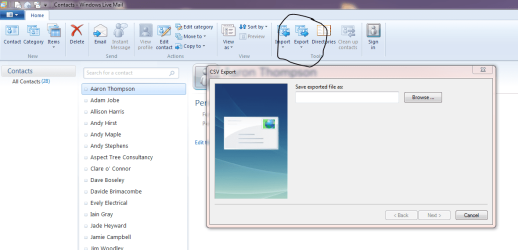
Its quite simple, selects contacts bottom left
click on export then chose to save as .csv
give your file a name and location to save
select which attributes you wish to save and your done
when you get onto new machine simply import them, in a similar fashion
I found this forum very useful for exporting Windows Live Mail emails and contacts to an external drive, thank you!!! Question: Contacts auto-saved in Excel format. I selected the 'CSV' option, but didn't see a format/program option. Is that normal? After I hose my laptop, and get set up, will my contacts import from the Excel folder back into Live Mail? Thank you for your time and advice.
My Computer
At a glance
Windows Home Premium 32bitAMD Quad-Core Processor 8A-3500M4 GB DDR3AMD Radeon HD 6620G, 512MB Graphics System Me...



 Question: Contacts auto-saved in Excel format. I selected the 'CSV' option, but didn't see a format/program option. Is that normal? After I hose my laptop, and get set up, will my contacts import from the Excel folder back into Live Mail? Thank you for your time and advice.

