CoreTemp autostart w/o UAC Prompt

EzioAuditore

Assassin
Guru
Local time
2:07 PM
Messages
1,036
Hello,

I installed CoreTemp, but the thing it doesn't autostart in a standard account by checking the option "Start with Windows" however I managed to auto-start it by creating a task in Task scheduler, but everytime it starts, our fellow Mr. UAC prompts up.

I've already tried the elevated shortcut option but it doesn't work.

So, has anyone manged to start it w/o the UAC prompt or if its simply impossible as of yet ?
 

My Computer My Computer

At a glance

Winbdows 7 ultimate x64 | Ubuntu 12.04 x64 LTSCore 2 Duo e7400 @ 2.90GHz3GB DDR2Asus Nvidia GTX 560Ti 1GB
Computer Manufacturer/Model Number
HCL
OS
Winbdows 7 ultimate x64 | Ubuntu 12.04 x64 LTS
CPU
Core 2 Duo e7400 @ 2.90GHz
Motherboard
Gigabyte G31M-ES2L
Memory
3GB DDR2
Graphics Card(s)
Asus Nvidia GTX 560Ti 1GB
Sound Card
On-board
Monitor(s) Displays
HCL eZeeBee 18.5" LCD
Screen Resolution
1366x768 @ 60Hz
Hard Drives
Western Digital 320GB
PSU
Corsair CX500 V2 500W
Cooling
Stock
Keyboard
Stock
Mouse
Stock
Internet Speed
15-25kBps D/L | 10kBps U/L | Hey Don't laugh
Nope...I gave up searching for a solution and just punch in my PW once a day :D
All the dev has to do would be have that program (or part of it) run as a service...that should do it.
Come to think of it...I had a program that let you run another program as service under XP...let me see if I can find it and I let you know if that worked.

-DG
 

My Computer My Computer

At a glance

Windows 7 Ultimate x86DualCore AMD Athlon 64 X2, 2600 MHz 5200+Samsung 2GB DDR2Onboard NVIDIA GeForce 6150SE nForce 430
Computer Manufacturer/Model Number
HP m8000n
OS
Windows 7 Ultimate x86
CPU
DualCore AMD Athlon 64 X2, 2600 MHz 5200+
Motherboard
Asus M2N68-LA (Narra)
Memory
Samsung 2GB DDR2
Graphics Card(s)
Onboard NVIDIA GeForce 6150SE nForce 430
Sound Card
Onboard nVIDIA nForce 6100-430 (MCP61P)
Monitor(s) Displays
Westinghouse 19" LED
Screen Resolution
1280x1024
Hard Drives
SATA II Seagate Barracuda 500GB
USB II WD Elements 500GB
USB II WD My Book 1TB
USB II WD My Book 2TB
PSU
Stock (HP)
Case
Stock (HP)
Cooling
Stock
Keyboard
Logitech Classic KB 200
Mouse
Standard HP opticle USB mouse
Thanks Sledge, feels good as im not the only one. :p
 

My Computer My Computer

At a glance

Winbdows 7 ultimate x64 | Ubuntu 12.04 x64 LTSCore 2 Duo e7400 @ 2.90GHz3GB DDR2Asus Nvidia GTX 560Ti 1GB
Computer Manufacturer/Model Number
HCL
OS
Winbdows 7 ultimate x64 | Ubuntu 12.04 x64 LTS
CPU
Core 2 Duo e7400 @ 2.90GHz
Motherboard
Gigabyte G31M-ES2L
Memory
3GB DDR2
Graphics Card(s)
Asus Nvidia GTX 560Ti 1GB
Sound Card
On-board
Monitor(s) Displays
HCL eZeeBee 18.5" LCD
Screen Resolution
1366x768 @ 60Hz
Hard Drives
Western Digital 320GB
PSU
Corsair CX500 V2 500W
Cooling
Stock
Keyboard
Stock
Mouse
Stock
Internet Speed
15-25kBps D/L | 10kBps U/L | Hey Don't laugh
I tried it via sc.exe (which worked just fine under Xp) but I can't seem to get it to work.
The program will establish itself as a service, but it won't start and if I try to start it manually an Error pops up something like this:
"The Service failed to respond in a timely fashion"

it was worth a shot but i assume it's not meant to be :D

-DG
 

My Computer My Computer

At a glance

Windows 7 Ultimate x86DualCore AMD Athlon 64 X2, 2600 MHz 5200+Samsung 2GB DDR2Onboard NVIDIA GeForce 6150SE nForce 430
Computer Manufacturer/Model Number
HP m8000n
OS
Windows 7 Ultimate x86
CPU
DualCore AMD Athlon 64 X2, 2600 MHz 5200+
Motherboard
Asus M2N68-LA (Narra)
Memory
Samsung 2GB DDR2
Graphics Card(s)
Onboard NVIDIA GeForce 6150SE nForce 430
Sound Card
Onboard nVIDIA nForce 6100-430 (MCP61P)
Monitor(s) Displays
Westinghouse 19" LED
Screen Resolution
1280x1024
Hard Drives
SATA II Seagate Barracuda 500GB
USB II WD Elements 500GB
USB II WD My Book 1TB
USB II WD My Book 2TB
PSU
Stock (HP)
Case
Stock (HP)
Cooling
Stock
Keyboard
Logitech Classic KB 200
Mouse
Standard HP opticle USB mouse

My Computer My Computer

At a glance

Winbdows 7 ultimate x64 | Ubuntu 12.04 x64 LTSCore 2 Duo e7400 @ 2.90GHz3GB DDR2Asus Nvidia GTX 560Ti 1GB
Computer Manufacturer/Model Number
HCL
OS
Winbdows 7 ultimate x64 | Ubuntu 12.04 x64 LTS
CPU
Core 2 Duo e7400 @ 2.90GHz
Motherboard
Gigabyte G31M-ES2L
Memory
3GB DDR2
Graphics Card(s)
Asus Nvidia GTX 560Ti 1GB
Sound Card
On-board
Monitor(s) Displays
HCL eZeeBee 18.5" LCD
Screen Resolution
1366x768 @ 60Hz
Hard Drives
Western Digital 320GB
PSU
Corsair CX500 V2 500W
Cooling
Stock
Keyboard
Stock
Mouse
Stock
Internet Speed
15-25kBps D/L | 10kBps U/L | Hey Don't laugh
Funny I never even thought about combining SC with srvany (especially since srvany isn't part of se7en while sc is)
but I'll try and see if that works as expected.
Thanks...I'll report back later.

-DG
 

My Computer My Computer

At a glance

Windows 7 Ultimate x86DualCore AMD Athlon 64 X2, 2600 MHz 5200+Samsung 2GB DDR2Onboard NVIDIA GeForce 6150SE nForce 430
Computer Manufacturer/Model Number
HP m8000n
OS
Windows 7 Ultimate x86
CPU
DualCore AMD Athlon 64 X2, 2600 MHz 5200+
Motherboard
Asus M2N68-LA (Narra)
Memory
Samsung 2GB DDR2
Graphics Card(s)
Onboard NVIDIA GeForce 6150SE nForce 430
Sound Card
Onboard nVIDIA nForce 6100-430 (MCP61P)
Monitor(s) Displays
Westinghouse 19" LED
Screen Resolution
1280x1024
Hard Drives
SATA II Seagate Barracuda 500GB
USB II WD Elements 500GB
USB II WD My Book 1TB
USB II WD My Book 2TB
PSU
Stock (HP)
Case
Stock (HP)
Cooling
Stock
Keyboard
Logitech Classic KB 200
Mouse
Standard HP opticle USB mouse
Sorry...didn't work either here's what I did:
#1 Download SrvAny.zip from here
SrvAny - Free software downloads and software reviews - CNET Download.com
and unpack the SrvAny.exe to the directory of your choice (I didn't use \system32 on purpose ;)
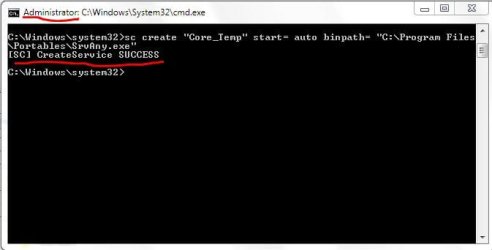
#2 start a commandline with admin rights and execute the command
sc create "Core_Temp" start= auto binPath= "C:\Program Files\Portables\SrvAny.exe"
(of course you need to use your own path there ;)
If you get the following message you can continue, otherwise check the syntax... there are spaces after "=" !!
[sc] CreateService SUCCESS
Capture.JPG
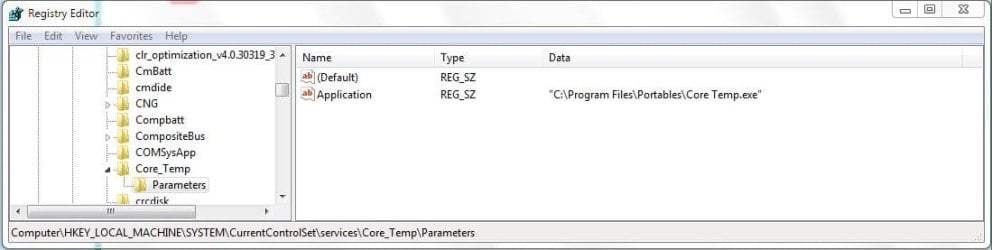
#3 Now start regedit as admin and navigate to
HKEY_LOCAL_MACHINE\SYSTEM\CurrentControlSet\services\Core_Temp
create a key underneath and call it Parameters
create a string inside Parameters and call it Application double click it and give it the path to your CoreTemp.exe
Capture.1.JPG


Just a word of caution: Even if it seems to work for now there is always a chance of having some kind of trouble later on. SrvAny.exe is not part of Windows 7 ....I guess only long term use really shows if that is potentially troublesome.
So if you don't have a recent backup, you're better off just punching in the password in the morning ;)

-DG
 
Last edited:

My Computer My Computer

At a glance

Windows 7 Ultimate x86DualCore AMD Athlon 64 X2, 2600 MHz 5200+Samsung 2GB DDR2Onboard NVIDIA GeForce 6150SE nForce 430
Computer Manufacturer/Model Number
HP m8000n
OS
Windows 7 Ultimate x86
CPU
DualCore AMD Athlon 64 X2, 2600 MHz 5200+
Motherboard
Asus M2N68-LA (Narra)
Memory
Samsung 2GB DDR2
Graphics Card(s)
Onboard NVIDIA GeForce 6150SE nForce 430
Sound Card
Onboard nVIDIA nForce 6100-430 (MCP61P)
Monitor(s) Displays
Westinghouse 19" LED
Screen Resolution
1280x1024
Hard Drives
SATA II Seagate Barracuda 500GB
USB II WD Elements 500GB
USB II WD My Book 1TB
USB II WD My Book 2TB
PSU
Stock (HP)
Case
Stock (HP)
Cooling
Stock
Keyboard
Logitech Classic KB 200
Mouse
Standard HP opticle USB mouse
So if you don't have a recent backup, you're better off just punching in the password in the morning ;)

Thanks Sledge for your efforts, but i don't feel comfortable w/ using some exe from unknown and untrusted source, I'll be better off w/ punching in the pass everytime.
 

My Computer My Computer

At a glance

Winbdows 7 ultimate x64 | Ubuntu 12.04 x64 LTSCore 2 Duo e7400 @ 2.90GHz3GB DDR2Asus Nvidia GTX 560Ti 1GB
Computer Manufacturer/Model Number
HCL
OS
Winbdows 7 ultimate x64 | Ubuntu 12.04 x64 LTS
CPU
Core 2 Duo e7400 @ 2.90GHz
Motherboard
Gigabyte G31M-ES2L
Memory
3GB DDR2
Graphics Card(s)
Asus Nvidia GTX 560Ti 1GB
Sound Card
On-board
Monitor(s) Displays
HCL eZeeBee 18.5" LCD
Screen Resolution
1366x768 @ 60Hz
Hard Drives
Western Digital 320GB
PSU
Corsair CX500 V2 500W
Cooling
Stock
Keyboard
Stock
Mouse
Stock
Internet Speed
15-25kBps D/L | 10kBps U/L | Hey Don't laugh
That's exactly how I see it...There is always hope that the dev one day brings out a version that installs itself as a service ( I wander why he didn't do it yet since it makes perfect sense...a lot of gadgets rely on CoreTemp already)

I checked his page and found this
Why does Core Temp require administrator privileges to run?
Core Temp requires direct access to hardware to be able to read temperature and other processor information.
In Windows you can only access hardware using a kernel mode driver. Since Core Temp doesn't install anything permanent on your system, it loads the driver at run time, this task requires administrator rights to achieve.

I just hope he puts out an alternative version that installs itself

On his page it says that it should work with the newest version...i just updated and now I'll reboot to verify..
 
Last edited:

My Computer My Computer

At a glance

Windows 7 Ultimate x86DualCore AMD Athlon 64 X2, 2600 MHz 5200+Samsung 2GB DDR2Onboard NVIDIA GeForce 6150SE nForce 430
Computer Manufacturer/Model Number
HP m8000n
OS
Windows 7 Ultimate x86
CPU
DualCore AMD Athlon 64 X2, 2600 MHz 5200+
Motherboard
Asus M2N68-LA (Narra)
Memory
Samsung 2GB DDR2
Graphics Card(s)
Onboard NVIDIA GeForce 6150SE nForce 430
Sound Card
Onboard nVIDIA nForce 6100-430 (MCP61P)
Monitor(s) Displays
Westinghouse 19" LED
Screen Resolution
1280x1024
Hard Drives
SATA II Seagate Barracuda 500GB
USB II WD Elements 500GB
USB II WD My Book 1TB
USB II WD My Book 2TB
PSU
Stock (HP)
Case
Stock (HP)
Cooling
Stock
Keyboard
Logitech Classic KB 200
Mouse
Standard HP opticle USB mouse
That's exactly how I see it...There is always hope that the dev one day brings out a version that installs itself as a service ( I wander why he didn't do it yet since it makes perfect sense...a lot of gadgets rely on CoreTemp already)

I checked his page and found this
Why does Core Temp require administrator privileges to run?
Core Temp requires direct access to hardware to be able to read temperature and other processor information.
In Windows you can only access hardware using a kernel mode driver. Since Core Temp doesn't install anything permanent on your system, it loads the driver at run time, this task requires administrator rights to achieve.

I just hope he puts out an alternative version that installs itself

On his page it says that it should work with the newest version...i just updated and now I'll reboot to verify..

Im already using the latest version-- 0.99.8. But it doesn't work, Mr. UAC prompts-up.
 

My Computer My Computer

At a glance

Winbdows 7 ultimate x64 | Ubuntu 12.04 x64 LTSCore 2 Duo e7400 @ 2.90GHz3GB DDR2Asus Nvidia GTX 560Ti 1GB
Computer Manufacturer/Model Number
HCL
OS
Winbdows 7 ultimate x64 | Ubuntu 12.04 x64 LTS
CPU
Core 2 Duo e7400 @ 2.90GHz
Motherboard
Gigabyte G31M-ES2L
Memory
3GB DDR2
Graphics Card(s)
Asus Nvidia GTX 560Ti 1GB
Sound Card
On-board
Monitor(s) Displays
HCL eZeeBee 18.5" LCD
Screen Resolution
1366x768 @ 60Hz
Hard Drives
Western Digital 320GB
PSU
Corsair CX500 V2 500W
Cooling
Stock
Keyboard
Stock
Mouse
Stock
Internet Speed
15-25kBps D/L | 10kBps U/L | Hey Don't laugh
Yep...doesn't work..That's OK, I'm done with this.
I won't run as admin permanently just for an app to start without interventions.

-DG
 

My Computer My Computer

At a glance

Windows 7 Ultimate x86DualCore AMD Athlon 64 X2, 2600 MHz 5200+Samsung 2GB DDR2Onboard NVIDIA GeForce 6150SE nForce 430
Computer Manufacturer/Model Number
HP m8000n
OS
Windows 7 Ultimate x86
CPU
DualCore AMD Athlon 64 X2, 2600 MHz 5200+
Motherboard
Asus M2N68-LA (Narra)
Memory
Samsung 2GB DDR2
Graphics Card(s)
Onboard NVIDIA GeForce 6150SE nForce 430
Sound Card
Onboard nVIDIA nForce 6100-430 (MCP61P)
Monitor(s) Displays
Westinghouse 19" LED
Screen Resolution
1280x1024
Hard Drives
SATA II Seagate Barracuda 500GB
USB II WD Elements 500GB
USB II WD My Book 1TB
USB II WD My Book 2TB
PSU
Stock (HP)
Case
Stock (HP)
Cooling
Stock
Keyboard
Logitech Classic KB 200
Mouse
Standard HP opticle USB mouse
I won't run as admin permanently just for an app to start without interventions.

So do I. :D:geek:
 

My Computer My Computer

At a glance

Winbdows 7 ultimate x64 | Ubuntu 12.04 x64 LTSCore 2 Duo e7400 @ 2.90GHz3GB DDR2Asus Nvidia GTX 560Ti 1GB
Computer Manufacturer/Model Number
HCL
OS
Winbdows 7 ultimate x64 | Ubuntu 12.04 x64 LTS
CPU
Core 2 Duo e7400 @ 2.90GHz
Motherboard
Gigabyte G31M-ES2L
Memory
3GB DDR2
Graphics Card(s)
Asus Nvidia GTX 560Ti 1GB
Sound Card
On-board
Monitor(s) Displays
HCL eZeeBee 18.5" LCD
Screen Resolution
1366x768 @ 60Hz
Hard Drives
Western Digital 320GB
PSU
Corsair CX500 V2 500W
Cooling
Stock
Keyboard
Stock
Mouse
Stock
Internet Speed
15-25kBps D/L | 10kBps U/L | Hey Don't laugh
Work around for autostarting CoreTemp with Windows 7

Found this while looking for a solution to this issue. No additional software required.

http://www.alcpu.com/forums/viewtopic.php?f=63&t=658

Here is the steps to follow in case the link goes down:


  1. Run core temp and
    disable 'Start Core Temp with windows'
    enable 'start minimized'
    enable 'enable plugins' if using the vista sidebar gadget or anything that needs CT access.
    all other options are at the discretion of the user.
    Click OK.
  2. Remove the program from the Startup folder or any RUN/STARTUP registry key. - Disabling 'start CT with Windows' should actually have removed the registry key entry anyway.
  3. Move Core Temp.exe to a directory that is NOT 'Programs x86' or anywhere else controlled by Windows. I created a directory in my 'Users/my login name' directory called 'startupapps' and put 'Core Temp.exe' in there. (Note: strictly speaking this is not required, but some have reported they needed to do this so I simply wrote what I tested and checked as working.)
  4. Launch the Task Scheduler (Control Panel -> Administration Tools -> Task Scheduler)
  5. From the Actions panel on the right, select Create Task...
  6. Give the Task a description of 'CoreTemp' (or anything else you feel like if you want to be cryptic)
  7. Go to the Security Options on the General tab
  8. Select an user account with administrative privileges
  9. Select the radio button Run only when user is logged on
  10. Check the box Run with highest privileges
  11. Go to the Triggers tab and click New...
  12. In Begin the task, select At log on
  13. In the Settings options, select All users
  14. In the Advanced Settings options, check the box Enabled
  15. Click OK to close the dialog
  16. Go to the Actions tab and click New...
  17. For Action, select Start a program
  18. In the Settings options, browse for the Program/Script you want to execute on startup
  19. Click OK to close the dialog
  20. Go to the Settings tab
  21. Check the box Run task as soon as possible after a scheduled start is missed
  22. Uncheck the box Stop the task if it runs longer than
  23. Click OK to save and close the task properties
  24. Logout.
  25. Login.
  26. Wait - Core Temp will eventually load - usually instantly, but may be up to 30 seconds or so.

Core Temp will now start when you login *without* any request for permissions even when UAC is enabled.
 

My Computer My Computer

At a glance

Windows 7 Ultimate x64 SP1Xeon W353012GB DDR3nVIDIA GeForce GTX 460
Computer Manufacturer/Model Number
HP Z400
OS
Windows 7 Ultimate x64 SP1
CPU
Xeon W3530
Motherboard
Hewlett-Packard 0B4Ch
Memory
12GB DDR3
Graphics Card(s)
nVIDIA GeForce GTX 460
Monitor(s) Displays
LG Flatron W2453V
Hard Drives
Kingston 64GB SSD SV100S264G
Seagate 1TB ST31000528AS
Cooling
HP Liquid Cooling
Welcome to Seven Forums norcoboy, nice post. Let's hope it works for the guys. If not, take a look here for some possible help. A Guy
 

My Computer My Computer

At a glance

Windows 10 Home x64INTEL Core i5-750 Quad-Core 3.37GHzHyperX Fury Black Series 8GB (2 x 4GB) 1866MhzEVGA GeForce GTX 750 Superclocked 1GB 128-Bit...
Computer type
PC/Desktop
OS
Windows 10 Home x64
CPU
INTEL Core i5-750 Quad-Core 3.37GHz
Motherboard
ASUS P7P55D
Memory
HyperX Fury Black Series 8GB (2 x 4GB) 1866Mhz
Graphics Card(s)
EVGA GeForce GTX 750 Superclocked 1GB 128-Bit GDDR5
Monitor(s) Displays
LG 32MA68HY 32" IPS
Screen Resolution
1920 x 1080
Hard Drives
Samsung 840 Evo 120GB, SEAGATE 500GB Barracuda® 7200.12, SATA 3 Gb/s, 7200 RPM, 16MB cache
PSU
ANTEC TruePower New TP-550, 80 PLUS, 550W
Case
ANTEC Three Hundred Illusion
Cooling
COOLER MASTER Hyper 212 Plus, 4 x 120mm 1 x 140mm Noctua's
Internet Speed
85 + Mbps
Antivirus
Avast
Browser
Vivaldi
Launch it with admin privileges at boot via task scheduler?
 

My Computer My Computer

At a glance

Win7 Ultimate x64 7601AMD Phenom II x4 955 Black Ed @ 3.608 Gig KingstonnVidia 295GTX, nVidia 9800GT
Computer Manufacturer/Model Number
Moi
OS
Win7 Ultimate x64 7601
CPU
AMD Phenom II x4 955 Black Ed @ 3.60
Motherboard
ASUSTeK M3N72-D
Memory
8 Gig Kingston
Graphics Card(s)
nVidia 295GTX, nVidia 9800GT
Screen Resolution
1680x1050 + 1280x1024 x2 + 1280x768
Hard Drives
500GB Spinpoint F3 x2 in Hardware RAID0
PSU
Thermaltake 850w
Cooling
Arctic Cooling
Keyboard
OCZ
Mouse
Ozone Smog
Do you guys have heat problems which would justify running CoreTemps at all times? I usually only run it when I build a machine, overclock and test for stable. Otherwise, I only run it when needed.
 

My Computer My Computer

At a glance

Windows 7 Ultimate x64Intel Q9550 2.83Ghz OC'd to 3.40Ghz8GB G.Skill PI DDR2-800, 4-4-4-12 timingsEVGA 1280MB Nvidia GeForce GTX570
Computer Manufacturer/Model Number
Self-Built in July 2009
OS
Windows 7 Ultimate x64
CPU
Intel Q9550 2.83Ghz OC'd to 3.40Ghz
Motherboard
Gigabyte GA-EP45-UD3R rev. 1.1, F12 BIOS
Memory
8GB G.Skill PI DDR2-800, 4-4-4-12 timings
Graphics Card(s)
EVGA 1280MB Nvidia GeForce GTX570
Sound Card
Realtek ALC899A 8 channel onboard audio
Monitor(s) Displays
23" Acer x233H
Screen Resolution
1920x1080
Hard Drives
Intel X25-M 80GB Gen 2 SSD
Western Digital 1TB Caviar Black, 32MB cache. WD1001FALS
PSU
Corsair 620HX modular
Case
Antec P182
Cooling
stock
Keyboard
ABS M1 Mechanical
Mouse
Logitech G9 Laser Mouse
Internet Speed
15/2 cable modem
Other Info
Windows and Linux enthusiast. Logitech G35 Headset.
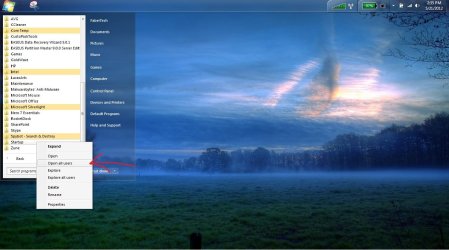
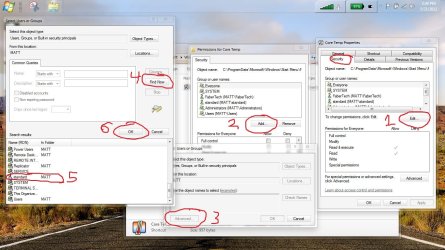
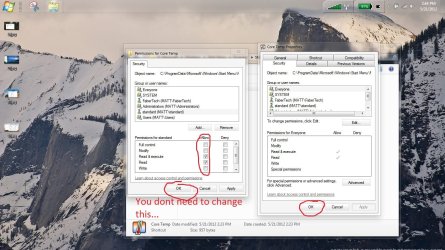
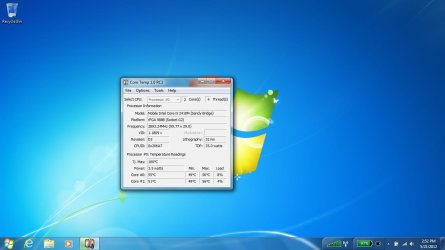
hi guys sorry im late

does this help? :cool:
 

Attachments

  • 1.jpg
    1.jpg
    120.3 KB · Views: 51
  • 2.jpg
    2.jpg
    106.8 KB · Views: 52
  • 3.jpg
    3.jpg
    124.1 KB · Views: 55
  • 4.jpg
    4.jpg
    155.3 KB · Views: 64
  • 5.jpg
    5.jpg
    161.5 KB · Views: 60
  • 6.jpg
    6.jpg
    62.3 KB · Views: 49

My Computer My Computer

At a glance

Windows 7 x64 / Windows Server 2008 / Linux (...AMD FX 8150 Eight-Core Processor 4.23 Ghz OCG.SKILL Ripjaws X Series 32GB (4 x 8GB) DDR3 ...2X Radeon HD 4870 CrossFire X
Computer type
PC/Desktop
Computer Manufacturer/Model Number
Pandora (computer name)
OS
Windows 7 x64 / Windows Server 2008 / Linux (Redhat & Deb distros) / OS X / More
CPU
AMD FX 8150 Eight-Core Processor 4.23 Ghz OC
Motherboard
ASUS SaberTooth 990FX
Memory
G.SKILL Ripjaws X Series 32GB (4 x 8GB) DDR3 SDRAM 1333
Graphics Card(s)
2X Radeon HD 4870 CrossFire X
Sound Card
Onboard and loving it
Monitor(s) Displays
2x HP w2480 Wide LCD
Screen Resolution
1920x1200 each
Hard Drives
RAID (6x0 Seagate Barracuda 7200 rpm 32 MB cache 500Gb SATA)
PSU
Antec 850 Watt
Case
Antec 900
Cooling
Lots of fans
Keyboard
Logitech
Mouse
Rat 9
Internet Speed
40 Mbps Down 5 Mbps Up
Antivirus
AVG
Browser
Chrome, Firefox, IE
Other Info
My main desktop
Do you guys have heat problems which would justify running CoreTemps at all times? I usually only run it when I build a machine, overclock and test for stable. Otherwise, I only run it when needed.

I have a core temp gadget. It requires core temp to start at boot. A Guy
 

My Computer My Computer

At a glance

Windows 10 Home x64INTEL Core i5-750 Quad-Core 3.37GHzHyperX Fury Black Series 8GB (2 x 4GB) 1866MhzEVGA GeForce GTX 750 Superclocked 1GB 128-Bit...
Computer type
PC/Desktop
OS
Windows 10 Home x64
CPU
INTEL Core i5-750 Quad-Core 3.37GHz
Motherboard
ASUS P7P55D
Memory
HyperX Fury Black Series 8GB (2 x 4GB) 1866Mhz
Graphics Card(s)
EVGA GeForce GTX 750 Superclocked 1GB 128-Bit GDDR5
Monitor(s) Displays
LG 32MA68HY 32" IPS
Screen Resolution
1920 x 1080
Hard Drives
Samsung 840 Evo 120GB, SEAGATE 500GB Barracuda® 7200.12, SATA 3 Gb/s, 7200 RPM, 16MB cache
PSU
ANTEC TruePower New TP-550, 80 PLUS, 550W
Case
ANTEC Three Hundred Illusion
Cooling
COOLER MASTER Hyper 212 Plus, 4 x 120mm 1 x 140mm Noctua's
Internet Speed
85 + Mbps
Antivirus
Avast
Browser
Vivaldi
^ I understand that. And I did the same thing at first when i wanted to make sure my overclock was stable and running well. But after a few days of everything being perfect, I just shut it down.

I guess it's no different then a temperature gauge in a car. It's always there telling me that things are just fine. I guess with the computer, I just don't want to constantly see it's fine. If problems arise, I can go take a look and determine whether heat is a problem. And I don't like gadgets, I don't use any.
 

My Computer My Computer

At a glance

Windows 7 Ultimate x64Intel Q9550 2.83Ghz OC'd to 3.40Ghz8GB G.Skill PI DDR2-800, 4-4-4-12 timingsEVGA 1280MB Nvidia GeForce GTX570
Computer Manufacturer/Model Number
Self-Built in July 2009
OS
Windows 7 Ultimate x64
CPU
Intel Q9550 2.83Ghz OC'd to 3.40Ghz
Motherboard
Gigabyte GA-EP45-UD3R rev. 1.1, F12 BIOS
Memory
8GB G.Skill PI DDR2-800, 4-4-4-12 timings
Graphics Card(s)
EVGA 1280MB Nvidia GeForce GTX570
Sound Card
Realtek ALC899A 8 channel onboard audio
Monitor(s) Displays
23" Acer x233H
Screen Resolution
1920x1080
Hard Drives
Intel X25-M 80GB Gen 2 SSD
Western Digital 1TB Caviar Black, 32MB cache. WD1001FALS
PSU
Corsair 620HX modular
Case
Antec P182
Cooling
stock
Keyboard
ABS M1 Mechanical
Mouse
Logitech G9 Laser Mouse
Internet Speed
15/2 cable modem
Other Info
Windows and Linux enthusiast. Logitech G35 Headset.
Back
Top