

- Local time
- 10:01 AM
- Messages
- 1,102
New to forum, inexpert user, so please be gentle.
It is long, but I tried to provide all relevant info.
Problem: 2 desktop shortcut icons today suddenly reverted to "generic" shortly after starting up my system and after a routine definitions update by my security suite (KIS2011, fully patched). (And it may have been a coincidence.)
The MBAM real-time protection module was NOT running at the time, nor was SmartDefrag open, so neither program was loaded into the memory at the time.
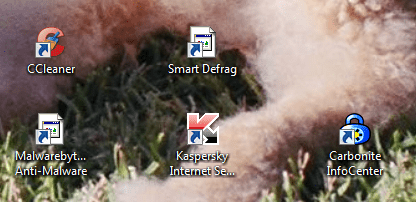
Attached screenshot from desktop shows 2 "generic" icons where normal ones had been just a few minutes earlier. The shortcuts and the programs themselves still work fine, as they had for months on this platform. I have never seen this before.
What I tried:
1) Rebooting - no joy
2) Deleting the generic ones and creating new ones from start > all programs, but they are "generic" there, too, and only created new generic ones.
3) Confirmed that both programs have full FW and AV permissions.
4) Uninstalled SmartDefrag, rebooted, reinstalled -- reproduced the same problem -- functional, but blank shortcut icon.
5) Looked in C:\ProgramFiles(x86), and the icons for the main EXE files for these programs are generic there, too.
But here is what I REALLY don't understand:
1) If I open both programs (even from their generic shortcuts) the SYSTEM TRAY icon for both of them looks totally normal.
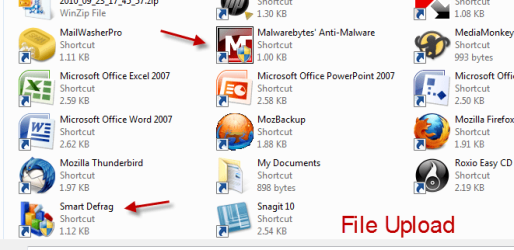
2) When I clicked on the "attach file" button at the KL forum to upload my screenshot of the desktop (see attached), the "File Upload" window ALSO shows totally normal icons. (see attached)!!!
Someone at the KL forum has suggested the following:
2 desktop shortcut icons revert to "generic" after KIS2011 update - Kaspersky Lab Forum
Rebuilding the Icon Cache Database
1. Close all folder windows that are currently open.
2. Launch Task Manager using the CTRL+SHIFT+ESC key sequence, or by running taskmgr.exe.
3. In the Process tab, right-click on the Explorer.exe process and select End Process.
4. Click the End process button when asked for confirmation.
5. From the File menu of Task Manager, select New Task (Run…)
6. Type CMD.EXE, and click OK
7. In the Command Prompt window, type the commands one by one and press ENTER after each command:
CD /d %userprofile%\AppData\Local
DEL IconCache.db /a
EXIT
8. In Task Manager, click File, select New Task (Run…)
9. Type EXPLORER.EXE, and click OK.
to see change you may need to reboot.
I do have an automatic restore point on the system from ~01:00 this morning (before the problem began). But, rollbacks often seem to cause their own issues, especially with AV programs. So, I don't want to turn a "minor" cosmetic issue (for now) into a major functional/stability issue...
So, here are my questions for you, please, aside from what actually caused this:
1) Would this suggested process likely resolve the issue?
2) Might this process create other (worse?) issues, or is it safe?
3) Is there another solution?
I eagerly await your expert advice.
Thank you very, very much,
MM
It is long, but I tried to provide all relevant info.
Problem: 2 desktop shortcut icons today suddenly reverted to "generic" shortly after starting up my system and after a routine definitions update by my security suite (KIS2011, fully patched). (And it may have been a coincidence.)
The MBAM real-time protection module was NOT running at the time, nor was SmartDefrag open, so neither program was loaded into the memory at the time.
Attached screenshot from desktop shows 2 "generic" icons where normal ones had been just a few minutes earlier. The shortcuts and the programs themselves still work fine, as they had for months on this platform. I have never seen this before.
What I tried:
1) Rebooting - no joy
2) Deleting the generic ones and creating new ones from start > all programs, but they are "generic" there, too, and only created new generic ones.
3) Confirmed that both programs have full FW and AV permissions.
4) Uninstalled SmartDefrag, rebooted, reinstalled -- reproduced the same problem -- functional, but blank shortcut icon.
5) Looked in C:\ProgramFiles(x86), and the icons for the main EXE files for these programs are generic there, too.
But here is what I REALLY don't understand:
1) If I open both programs (even from their generic shortcuts) the SYSTEM TRAY icon for both of them looks totally normal.
2) When I clicked on the "attach file" button at the KL forum to upload my screenshot of the desktop (see attached), the "File Upload" window ALSO shows totally normal icons. (see attached)!!!
Someone at the KL forum has suggested the following:
2 desktop shortcut icons revert to "generic" after KIS2011 update - Kaspersky Lab Forum
Rebuilding the Icon Cache Database
1. Close all folder windows that are currently open.
2. Launch Task Manager using the CTRL+SHIFT+ESC key sequence, or by running taskmgr.exe.
3. In the Process tab, right-click on the Explorer.exe process and select End Process.
4. Click the End process button when asked for confirmation.
5. From the File menu of Task Manager, select New Task (Run…)
6. Type CMD.EXE, and click OK
7. In the Command Prompt window, type the commands one by one and press ENTER after each command:
CD /d %userprofile%\AppData\Local
DEL IconCache.db /a
EXIT
8. In Task Manager, click File, select New Task (Run…)
9. Type EXPLORER.EXE, and click OK.
to see change you may need to reboot.
I do have an automatic restore point on the system from ~01:00 this morning (before the problem began). But, rollbacks often seem to cause their own issues, especially with AV programs. So, I don't want to turn a "minor" cosmetic issue (for now) into a major functional/stability issue...
So, here are my questions for you, please, aside from what actually caused this:
1) Would this suggested process likely resolve the issue?
2) Might this process create other (worse?) issues, or is it safe?
3) Is there another solution?
I eagerly await your expert advice.
Thank you very, very much,
MM
Attachments
My Computer
- Computer type
- PC/Desktop
- Computer Manufacturer/Model Number
- Dell Studio XPS 8500
- OS
- OEM Windows 7 Ult (x64) SP1
- CPU
- Intel Core-i7 3770 @ 3.4 GHz
- Motherboard
- "Dell" branded
- Memory
- 16 GB DDR3 SDRAM @ 1333 MHz
- Graphics Card(s)
- NVidia GeForce GT620 1 GB
- Sound Card
- THX TruStudio PC
- Monitor(s) Displays
- Dell U2410 Full HD
- Hard Drives
- 2.0 TB SATA2 @ 7200 RPM
- PSU
- 350W
- Keyboard
- MS 4000 Ergon - Wired
- Mouse
- Logitech Anywhere MX
- Internet Speed
- Cable HSI w/Turbo (router)
- Antivirus
- KIS-MBAM Premium-MBAE Premium
- Browser
- Fx (current version); IE
- Other Info
- And a Win7/64 Pro laptop; And a Win10/64 Pro desktop.



 They were fine for months. They just mysteriously reverted to blank/generic after an otherwise uneventful and routine boot and security def update yesterday. And they still worked normally -- it seems to be just an appearance issue.


