Corrupted SXS Component file, can't install SP1

krazied

New member
Local time
5:49 PM
Messages
5
Hi Folks,

I've been browsing your forums tonight and I am fairly positive someone here can help me. I have an ongoing issue that has prevented me from being able to to install Windows 7 SP1 on this computer.

I ran sfc /scannow several times in the last few days. It never ran 100% clean, but it never came back as failed either. I downloaded and ran the System Update Readiness tool earlier tonight.

I first started trying to install SP1 years ago, but it had failed over and over and I ended up downloading it from Microsoft's page. The install had failed again and then I forgot all about it until recently. Needless to say, even after all the sfc scans I did and running the SUR, the SP1 update still failed.

Troubleshooting.zip contains some logs that may or may not be of use. Please note that the current CBS log is more recent than either of the sfcdetails logs. I didn't see the point of running sfc again, when it is clear that I have a corrupted file that can't be fixed this way at present.

Microsoft's help page on the issue says I need to reinstall windows. I'd like to avoid that if possible. Think you can help me accomplish that?

Thank you in advance for your time and assistance in this matter.

Krazied
 

My Computer My Computer

Computer type
PC/Desktop
Computer Manufacturer/Model Number
Dell Inspiron 580
OS
Windows 7 Home Premium 64 bit
CPU
Intel Core i3 2.93 Ghz
Memory
8 GB
Unusual error there...
Code:
Summary:
Seconds executed: 489
 Found 1 errors
  CSI Manifest and S256H Do Not Match Total count: 1
  CSI Located Replacement: Invalid (S256H) Total count: 28

Unavailable repair files:
	winsxs\manifests\x86_microsoft-windows-b..ager-pcat.resources_31bf3856ad364e35_6.1.7600.16385_es-es_1f237cc3876b81ab.manifest

I need to have a look at your COMPONENTS registry hive

Please copy the C:\Windows\System32\config\COMPONENTS file (no extension) to your desktop and then compress it - upload the compressed file to your favoured fileshare site (preferably Dropbox or OneDrive) and post a link.
 

My Computer My Computer

Computer type
Laptop
Computer Manufacturer/Model Number
Asus K52F or Lenovo B51-80
OS
Win 7 x64 Home Premium (and x86 VirtualBox VM)/Win10
CPU
i3 370M/i7 6500U
Motherboard
Asus/Lenovo
Memory
8GB - finally :)/8GB
Graphics Card(s)
it's an i3, dude!/dual Intel&nVidia
Sound Card
onboard
Monitor(s) Displays
15.6" built-in
Screen Resolution
1366x768/1920x1080
Hard Drives
750GB Seagate internal
Sundry external drives attached to other computers on the local network
1TB SSD on the Lenovo
PSU
n/a
Internet Speed
as much as I can get - usually on a dongle/phone, so <1MB/s
Antivirus
MSE/Defender
Browser
IE11/12/Edge/Chrome/FF(if I must)

My Computer My Computer

Computer type
PC/Desktop
Computer Manufacturer/Model Number
Dell Inspiron 580
OS
Windows 7 Home Premium 64 bit
CPU
Intel Core i3 2.93 Ghz
Memory
8 GB
Let's see how that worked...

I've uploaded a file - kzdaa.zip - to my OneDrive at Noel's OneDrive
Please download and save it to your desktop.
Right-click on the file and select Extract All, and save to the default destination (which should be a folder on the desktop)

Create a new System Restore point

Open an Elevated Command Prompt, and run the following commands.

Code:
IF EXIST C:\Windows\System32\config\COMPONENTS.OLD1 DEL C:\Windows\System32\config\COMPONENTS.OLD1
REN C:\Windows\System32\config\COMPONENTS COMPONENTS.OLD1
COPY "%userprofile%\desktop\kzdaa\COMPONENTS" C:\Windows\System32\config
 
.

If you get an error with any command, STOP THERE - do not reboot! - post for instructions.

Assuming all commands go OK, reboot, and run another CheckSUR scan - post the new CheckSUR.log file.
 

My Computer My Computer

Computer type
Laptop
Computer Manufacturer/Model Number
Asus K52F or Lenovo B51-80
OS
Win 7 x64 Home Premium (and x86 VirtualBox VM)/Win10
CPU
i3 370M/i7 6500U
Motherboard
Asus/Lenovo
Memory
8GB - finally :)/8GB
Graphics Card(s)
it's an i3, dude!/dual Intel&nVidia
Sound Card
onboard
Monitor(s) Displays
15.6" built-in
Screen Resolution
1366x768/1920x1080
Hard Drives
750GB Seagate internal
Sundry external drives attached to other computers on the local network
1TB SSD on the Lenovo
PSU
n/a
Internet Speed
as much as I can get - usually on a dongle/phone, so <1MB/s
Antivirus
MSE/Defender
Browser
IE11/12/Edge/Chrome/FF(if I must)
Hi NoelDP,

Thank you again for your response.

I'm at work right now. I work full time. The computer with the issue is my father's. I'm a little hesitant to execute something that might error out and leave him dead in the water, unable to do his work during the week, especially when getting such an error may mean hours before I can get assistance to rectify the situation through the message boards.

That said, how do I go about finding your one drive so that I can at least download the file so it is at the ready when I'm ready to try to do this, possibly over the weekend?

Thanks,
Krazied
 

My Computer My Computer

Computer type
PC/Desktop
Computer Manufacturer/Model Number
Dell Inspiron 580
OS
Windows 7 Home Premium 64 bit
CPU
Intel Core i3 2.93 Ghz
Memory
8 GB
Sorry - forgot to create the link... Noel's OneDrive

If all goes well, it should take about two minutes plus the scantime for the CheckSUR.
There's really very little likelihood of anything going seriously wrong (but it's always possible!).

I'm not planning on going anywhere, so go for it when you're comfortable doing it.
 

My Computer My Computer

Computer type
Laptop
Computer Manufacturer/Model Number
Asus K52F or Lenovo B51-80
OS
Win 7 x64 Home Premium (and x86 VirtualBox VM)/Win10
CPU
i3 370M/i7 6500U
Motherboard
Asus/Lenovo
Memory
8GB - finally :)/8GB
Graphics Card(s)
it's an i3, dude!/dual Intel&nVidia
Sound Card
onboard
Monitor(s) Displays
15.6" built-in
Screen Resolution
1366x768/1920x1080
Hard Drives
750GB Seagate internal
Sundry external drives attached to other computers on the local network
1TB SSD on the Lenovo
PSU
n/a
Internet Speed
as much as I can get - usually on a dongle/phone, so <1MB/s
Antivirus
MSE/Defender
Browser
IE11/12/Edge/Chrome/FF(if I must)
Thanks! NoelDP,

I followed your instructions almost to the letter... I ran the CheckSUR before rebooting. The log is as follows:


=================================
Checking System Update Readiness.
Binary Version 6.1.7601.22471
Package Version 26.0
2015-10-19 20:58

Checking Windows Servicing Packages

Checking Package Manifests and Catalogs

Checking Package Watchlist

Checking Component Watchlist

Checking Packages

Checking Component Store

Summary:
Seconds executed: 476
No errors detected

So, I'm guessing I'll be good to go now; I am going to find out now :)

Krazied

Edit: In the process of installing SP1, it rebooted and is currently spinning its wheels on stage 1 of 2, preparing to configure windows screen. I'll let it keep going for another hour or so, if it doesn't shift to stage 2, I'll try to boot to safe mode. Hopefully I don't have any problems as Dad will need the comp in the morning. I might kick myself for not waiting for the weekend to do this.

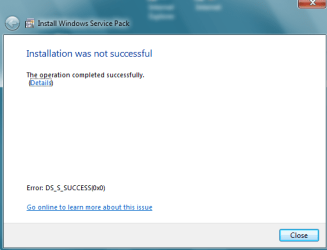
Edit2: So I thought SP1 would install fine, but alas, after leaving the computer for a while and returning and finding that it had rebooted past the configuration screen, it met me with an error screen (image attached). It also seemed like there were updates to install because the shield icon was by the shut down button, so I did that and it allegedly installed 1 update, though I've no idea what.
Upon rebooting, Windows Update wasn't showing any important updates, but Computer Properties did not reflect SP1, so I ran Checksur again. It made SP1 update reappear as an important update and was taking much longer than it usually did, so I force quit and rebooted in safe mode and ran sfc verification which ran clean. I rebooted again normal and ran checksur again and that time it ran like usual and ran clean.
I think my mistake was leaving Nortons active when I started trying to install SP1. I will try again later at some point. It's almost 2 am now and I have work in the morning so I'm headed to bed.
 

Attachments

  • sp1.PNG
    sp1.PNG
    11.9 KB · Views: 12
Last edited:

My Computer My Computer

Computer type
PC/Desktop
Computer Manufacturer/Model Number
Dell Inspiron 580
OS
Windows 7 Home Premium 64 bit
CPU
Intel Core i3 2.93 Ghz
Memory
8 GB
Having Norton installed is itself likely to cause problems with SP1 (didn't notice that before!) - I would suggest uninstalling it, and running the Norton Removal Toll before another attempt at SP1...

Download the Norton Removal Tool from here https://www-secure.symantec.com/nor...10133834EN&product=home&version=1&pvid=f-home

Close all other programs, then run the tool. When it's complete, reboot the machine whether it asks for it or not.

After the reboot, open an Elevated Command Prompt, and run the following command

NETSH WINSOCK RESET

You'll be advised to reboot - do so.
Then install MSE as a temporary (or permanent) replacement.
 

My Computer My Computer

Computer type
Laptop
Computer Manufacturer/Model Number
Asus K52F or Lenovo B51-80
OS
Win 7 x64 Home Premium (and x86 VirtualBox VM)/Win10
CPU
i3 370M/i7 6500U
Motherboard
Asus/Lenovo
Memory
8GB - finally :)/8GB
Graphics Card(s)
it's an i3, dude!/dual Intel&nVidia
Sound Card
onboard
Monitor(s) Displays
15.6" built-in
Screen Resolution
1366x768/1920x1080
Hard Drives
750GB Seagate internal
Sundry external drives attached to other computers on the local network
1TB SSD on the Lenovo
PSU
n/a
Internet Speed
as much as I can get - usually on a dongle/phone, so <1MB/s
Antivirus
MSE/Defender
Browser
IE11/12/Edge/Chrome/FF(if I must)
Hi NoelDP,

I did not follow through with your last instructions. I decided to take a day off from pulling my hair out. Oddly enough, I took a peek at the computer this morning and it says it is Service Pack 1 now. I rebooted a couple of times and it finished doing some updates and updating the components file. I rebooted into safe mode and ran sfc /scannow and saw that it moved a lot of files around, but it ran clean.

I THINK my problems may be solved thanks to your component file update fix. I will wait a few days before marking the thread solved just in case something rears its ugly head.

Krazied
 

My Computer My Computer

Computer type
PC/Desktop
Computer Manufacturer/Model Number
Dell Inspiron 580
OS
Windows 7 Home Premium 64 bit
CPU
Intel Core i3 2.93 Ghz
Memory
8 GB
SFC always shows a lot of file actions - mostly irrelevant since they've already been doe, but occasionally it actually fixes something that doesn't show up anywhere. :)

Glad it seems to be working now!
 

My Computer My Computer

Computer type
Laptop
Computer Manufacturer/Model Number
Asus K52F or Lenovo B51-80
OS
Win 7 x64 Home Premium (and x86 VirtualBox VM)/Win10
CPU
i3 370M/i7 6500U
Motherboard
Asus/Lenovo
Memory
8GB - finally :)/8GB
Graphics Card(s)
it's an i3, dude!/dual Intel&nVidia
Sound Card
onboard
Monitor(s) Displays
15.6" built-in
Screen Resolution
1366x768/1920x1080
Hard Drives
750GB Seagate internal
Sundry external drives attached to other computers on the local network
1TB SSD on the Lenovo
PSU
n/a
Internet Speed
as much as I can get - usually on a dongle/phone, so <1MB/s
Antivirus
MSE/Defender
Browser
IE11/12/Edge/Chrome/FF(if I must)
Back
Top