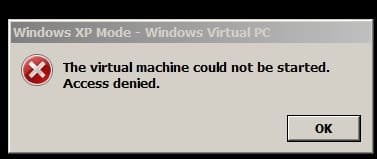
Could not enable XP virtual integration features in W7

klxdrt

New member
Member
VIP
Local time
11:44 AM
Messages
188
XP Virtual errors:

Recd error #1, then re-booted recd error #2
1) Could not enable integration features. (What "tools menu" & where is it located, path?)
2) The virtual machine could not be started, access denied. (was access denied because of #1 or something else?)
XP virtual worked fine earlier this week and has been working fine for months.

Any suggestions are appreciated.

cheers,

klxdrt
 

Attachments

  • could not enable integration features.jpg
    could not enable integration features.jpg
    20.2 KB · Views: 15
  • access denied.jpg
    access denied.jpg
    6.3 KB · Views: 15

My Computer

Computer type
PC/Desktop
Computer Manufacturer/Model Number
locally made
OS
w7 pro 32 bit w/XP virt enabled.
CPU
AMD A6-3650
Motherboard
ASUS F1A55-M CSM
Memory
4 GB DDR3 RAM
Graphics Card(s)
NVIDIA GeForce 210
Sound Card
NVIDIA High Definition Audio
Monitor(s) Displays
28" HD monitor
Screen Resolution
1680 x 1050 x 32 bits (4294967296 colors) @ 59 Hz
Hard Drives
2 x 500 GB Western Digital Blue Hard Drive
PSU
?
Case
?
Cooling
3-4 fans
Keyboard
big yellow keys
Mouse
logitec
Internet Speed
60 mb
Antivirus
panda
Browser
ff
Other Info
scanner, webcam, bw printer, fax modem, cd/dvd burner, PC usb ports: 2 usb3, 6 usb2 plus 7 port usb hub, 2 tb usb3, 1 Tb usb3, 500Mb usb2, 120Mb USB2 portable drives, asst of flash drives 250 Mb to 32 Gb. backup PC, office
Check if the hibernation file exists, if yes then delete it when XP Mode is closed and restart XP Mode.

Default location of the XP Mode hibernation file (Windows XP Mode.vsv):
Code:
[B]C:\Users\[SIZE="3"][COLOR="DarkRed"]Your_Username[/COLOR][/SIZE]\AppData\Local\Microsoft\Windows Virtual PC\Virtual Machines\Windows XP Mode.vsv[/B]

This should work.

Kari
 

My Computer

Computer type
Laptop
Computer Manufacturer/Model Number
HP ENVY 17-1150eg
OS
Windows 10 Pro x64 EN-GB
CPU
1.6 GHz Intel Core i7-720QM Processor
Memory
6 GB
Graphics Card(s)
ATI Mobility Radeon HD 5850 Graphics
Sound Card
Beats sound system with integrated subwoofer
Monitor(s) Displays
17" laptop display, 22" LED and 32" Full HD TV through HDMI
Screen Resolution
1600*900 (1), 1920*1080 (2&3)
Hard Drives
Internal: 2 x 500 GB SATA Hard Disk Drive 7200 rpm
External: 2TB for backups, 3TB USB3 network drive for media
Cooling
As Envy runs a bit warm, I have it on a Cooler Master pad
Keyboard
Logitech diNovo Media Desktop Laser (bluetooth)
Mouse
Logitech Performance Mouse MX
Internet Speed
50/10 Mbps VDSL
Antivirus
Windows Defender 4.3.9431.0
Browser
Maxthon 3.5.2., IE11
blocked from integration features

Keri,

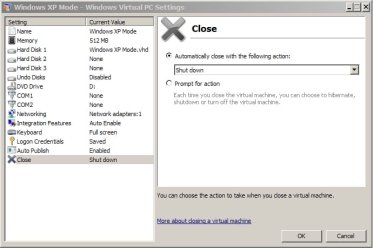
Thanks for your response. I had already, removed & re-installed XP & virtual machine and set it to: Shut Down vs hibernate.

W.E. & My comp would not let me see "app data". I use PD 7 for all my file/folder mgmt, I'm waiting for the reset of my S/N. That program lets me see-do-find everything during file/folder mgmt.

C:\Users\Your_Username\AppData\Local\Microsoft\Windows Virtual PC\Virtual Machines\Windows XP Mode.vsv

I just re-installed W7 XP virtual, re-installation was fast & simple.

No one in my area or colleagues or MS seems to know much about W7 XP virtual. I don't use it a lot, but it comes in handy when you have several GB of business & research files going back 30yr.

Do you guys know were, on the web, I can get more W7 XP virtual info esp operating settings?

See attached image for some settings I'm interested in knowing more about, esp from an operational position.

cheers,

klxdrt
 

Attachments

  • 3 vm settings set to shut down.jpg
    3 vm settings set to shut down.jpg
    35.3 KB · Views: 23

My Computer

Computer type
PC/Desktop
Computer Manufacturer/Model Number
locally made
OS
w7 pro 32 bit w/XP virt enabled.
CPU
AMD A6-3650
Motherboard
ASUS F1A55-M CSM
Memory
4 GB DDR3 RAM
Graphics Card(s)
NVIDIA GeForce 210
Sound Card
NVIDIA High Definition Audio
Monitor(s) Displays
28" HD monitor
Screen Resolution
1680 x 1050 x 32 bits (4294967296 colors) @ 59 Hz
Hard Drives
2 x 500 GB Western Digital Blue Hard Drive
PSU
?
Case
?
Cooling
3-4 fans
Keyboard
big yellow keys
Mouse
logitec
Internet Speed
60 mb
Antivirus
panda
Browser
ff
Other Info
scanner, webcam, bw printer, fax modem, cd/dvd burner, PC usb ports: 2 usb3, 6 usb2 plus 7 port usb hub, 2 tb usb3, 1 Tb usb3, 500Mb usb2, 120Mb USB2 portable drives, asst of flash drives 250 Mb to 32 Gb. backup PC, office
Go ahead and ask here. Kari is one of many helpful experts who will help if you ask exactly what you want to know. :D
 

My Computer

Computer type
PC/Desktop
Computer Manufacturer/Model Number
Bluethunder II
OS
Windows 7 x64 Ultimate and numerous virtual machines
CPU
AMD FX-8350 Vishera 32nm Technology @ 4.2 GHz default
Motherboard
ASUSTeK COMPUTER INC. SABERTOOTH 990FX R2.0 (Socket 942)
Memory
G Skill 32.0GB Dual-Channel DDR3 @ 1204MHz (11-13-13-31)
Graphics Card(s)
EVGA GeForce GTX 960 4GB Super SC ACX 2.0+ with Back Plate
Sound Card
Creative X-Fi Titanium HD Audiophile PCIe
Monitor(s) Displays
LG L227WTG x 3
Screen Resolution
1680 x 1050 16:10
Hard Drives
238GB Samsung850 PRO SATA Disk Device (SSD)
1863GB Seagate ST2000DM 001-1CH164 (SATA)
1397GB Seagate ST1500DL 003-9VT16L(SATA)
466GB Western Digital WDC WD50 03AZEX-00K1GA0 (SATA) x 2
932GB Seagate ST310005 28AS SATA Disk Device (SATA)
PSU
Enermax Revolution87+ 1000 Watts Gold Certified Power Supply
Case
Rocketfish Full Tower
Cooling
Cooler Master Hyper 212 EVO Push Pull 120mm Fans
Keyboard
Logitech K740
Mouse
Logitech G100S Laser LED + Logitech Gamepad F310
Internet Speed
500 mbs down and 30mbs up
Antivirus
Malwarebytes Pro & Avast and MSE on certain Virtual Machines
Browser
Firefox (Main) Chrome, Internet Explorer (Back Up)
Other Info
Logitech X 230 2.1 Stereo System and 5.1 Yamaha RX V2090
B&W DM6 Monitor Speakers + Center and Surround Speakers
Using Mouse Without Borders (Google it)
See attached image for some settings I'm interested in knowing more about, esp from an operational position.

Two things there what your screenshot reveals which I would change immediately.
  1. Assign more RAM to your virtual machine. If you only have 2 GB on your host, leave XP Mode as it is, with 512 MB. If you have 3 MB, raise XP Mode RAM to 1 MB and if your host has 4 GB or more you could even raise XP Mode RAM to 2 GB. According to my own tests and experience XP will not profit of more than 2GB RAM so anything over that would in my opinion be unnecessary, not better its performance.
  2. Enable Undo Disks. it is the most practical way to revert and eliminate all changes when something unwanted happens and go back to an earlier XP Mode.

Kari
 

My Computer

Computer type
Laptop
Computer Manufacturer/Model Number
HP ENVY 17-1150eg
OS
Windows 10 Pro x64 EN-GB
CPU
1.6 GHz Intel Core i7-720QM Processor
Memory
6 GB
Graphics Card(s)
ATI Mobility Radeon HD 5850 Graphics
Sound Card
Beats sound system with integrated subwoofer
Monitor(s) Displays
17" laptop display, 22" LED and 32" Full HD TV through HDMI
Screen Resolution
1600*900 (1), 1920*1080 (2&3)
Hard Drives
Internal: 2 x 500 GB SATA Hard Disk Drive 7200 rpm
External: 2TB for backups, 3TB USB3 network drive for media
Cooling
As Envy runs a bit warm, I have it on a Cooler Master pad
Keyboard
Logitech diNovo Media Desktop Laser (bluetooth)
Mouse
Logitech Performance Mouse MX
Internet Speed
50/10 Mbps VDSL
Antivirus
Windows Defender 4.3.9431.0
Browser
Maxthon 3.5.2., IE11
Kari's answer worked for me.
 

My Computer

Computer type
PC/Desktop
Computer Manufacturer/Model Number
custom build
OS
Windows 7 Professional x64
CPU
Intel core i7
Motherboard
unknown
Memory
16 gByte
Graphics Card(s)
unknown
Hard Drives
Hitachi HDS723020BLA642 ATA Device
WD 4TB external
Antivirus
Avast
Browser
I.E., Firefox, Chrome, Cliqz
Back
Top