Could this be a HDD failing, your take is needed.

24fps

New member
Member
Local time
1:49 AM
Messages
39
Hi all,

For some time now I would have the following issue. My computer would shutdown/freeze without any apparent reason. When it did it would not reboot. I could power it on but it would hang there, not going through POST.

Did a little research and find out that maybe something may not have been connected properly. So I unplugged all the external stuff and plugged it again. Ditto for all internal components (except for the CPU).

It was fine for a while but then it started again two days ago. I redid all the unplugging and plugging thing and it was fine. The problem would come back again and again at a faster pace.

Through all my unplugging and plugging I found out that when one particular drive was unplugged the computer would become stable again. I found that yesterday and no crash since then.

Basically I have three internal drive, my 5 year old IDE drive that is still hanging on after all this time. Two SATA drives, one 80gb as my system drive and another 320gb as a data drive.

Now the problem could be anything and before I experiment with a it bit I just thought I would ask here to see that if any of you has gone through the same type of problem what was the outcome.

Was it a faulty cable (power or SATA), the Mobo, the PSU or the drive itself?

Thanks,

Phil

ps, Don't mind my specs, they are for my laptop.
 

My Computer My Computer

At a glance

7 Ultimate x64Intel I7 Quad 920 2.66 ghz6 gig DDR3 1066 mhzNvidia GTX 280M
Computer Manufacturer/Model Number
Sager NP9280
OS
7 Ultimate x64
CPU
Intel I7 Quad 920 2.66 ghz
Memory
6 gig DDR3 1066 mhz
Graphics Card(s)
Nvidia GTX 280M
Sound Card
SB X-Fi Express Card
Screen Resolution
1920x1200
Hard Drives
3x Seagate 500 gb 7200 rpm Sata 2
Welcome,

The fact that you are posting and asking if it could be your hard drive, inidicates that you know it very well may be. I agree, although I have never experienced the problem, myself. Ofcourse, you should back up everything on a separate hard drive, before it is too late. You can, also tes the hard drive
Hard Drive Diagnostics Tools and Utilities (Storage) - TACKtech Corp.
Wish you luck.
 

My Computer My Computer

At a glance

Windows 10, Home Clean InstallIntel Core2 processsor Q8200(2.33Ghz 1333FSB)...6 gbATI Radeon 256MB HD3650
Computer type
PC/Desktop
Computer Manufacturer/Model Number
Dell XPS 420
OS
Windows 10, Home Clean Install
CPU
Intel Core2 processsor Q8200(2.33Ghz 1333FSB) Quad Core Tech
Motherboard
Dell
Memory
6 gb
Graphics Card(s)
ATI Radeon 256MB HD3650
Sound Card
Intergrated 7.1 Channel Audio
Monitor(s) Displays
Dell SP2009W 20"
Hard Drives
640 GB Serial ATA Hard drive
Cooling
Fan
Keyboard
Dell USB Keyboard
Mouse
Dell Premium Optical USB
Internet Speed
DSL 2.85
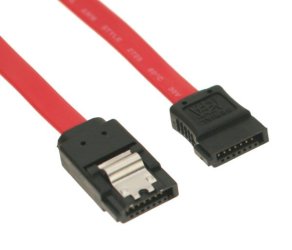
What sort of SATA data cables are you using? If you are using standard non-latching types, then it is very easy for them to work loose in their sockets. For best results, I use and recommend the latching type.
 

My Computer My Computer

At a glance

Windows 8.1 Pro RTM x64Intel Core-i5-3570K 4-core @ 3.4GHz (Ivy Brid...4 x 4GB DDR3-1600 Corsair Vengeance CMZ8GX3M2...MSI GeForce GTX770 Gaming OC 2GB
Computer type
PC/Desktop
Computer Manufacturer/Model Number
Dwarf Dwf/11/2012 r09/2013
OS
Windows 8.1 Pro RTM x64
CPU
Intel Core-i5-3570K 4-core @ 3.4GHz (Ivy Bridge) (OC 4.4GHz)
Motherboard
ASRock Z77 Extreme4-M
Memory
4 x 4GB DDR3-1600 Corsair Vengeance CMZ8GX3M2A1600C9B (16GB)
Graphics Card(s)
MSI GeForce GTX770 Gaming OC 2GB
Sound Card
Realtek High Definition on board solution (ALC 898)
Monitor(s) Displays
ViewSonic VA1912w Widescreen (VGA)
Screen Resolution
1440x900
Hard Drives
OCZ Agility 3 SSD 120GB SATA III x2 (RAID 0)
Samsung HD501LJ 500GB SATA II x2
Hitachi HDS721010CLA332 1TB SATA II
Iomega 1.5TB Ext USB 2.0
WD 2.0TB Ext USB 3.0
PSU
XFX Pro Series 850W Semi-Modular
Case
Gigabyte IF233
Cooling
1 x 120mm Front Inlet 1 x 120mm Rear Exhaust
Keyboard
Microsoft Comfort Curve Keyboard 3000 (USB)
Mouse
Microsoft Comfort Mouse 3000 for Business (USB)
Internet Speed
NetGear DG834Gv3 ADSL Modem/Router (Ethernet) ~4.0 Mb/s (O2)
Antivirus
Avast! 8.0.1497
Browser
IE 11
Other Info
Optical Drive: HL-DT-ST BD-RE BH10LS30 SATA Bluray
Lexmark S305 Printer/Scanner/Copier (USB)
WEI Score: 8.1/8.1/8.5/8.5/8.25
Asus Eee PC 1011PX Netbook (Windows 7 x86 Starter)
Hi Richc,

Actually no I am not sure. I've had HDD failure and I would discover that it is so because of I/O errors while writing to the drive or the drive simply won't boot or (one time only) it was the port on the Mobo that was faulty.

I've never had/seen/heard of a drive that slow goes away like this.

Thanks for your time though and I will check the diagnostic tool, maybe it will be of some help.

Phil
 

My Computer My Computer

At a glance

7 Ultimate x64Intel I7 Quad 920 2.66 ghz6 gig DDR3 1066 mhzNvidia GTX 280M
Computer Manufacturer/Model Number
Sager NP9280
OS
7 Ultimate x64
CPU
Intel I7 Quad 920 2.66 ghz
Memory
6 gig DDR3 1066 mhz
Graphics Card(s)
Nvidia GTX 280M
Sound Card
SB X-Fi Express Card
Screen Resolution
1920x1200
Hard Drives
3x Seagate 500 gb 7200 rpm Sata 2
Hi Dwarf,

No there is no latch on the cable but they do fit snuggly in. I remember once I had a port on the Mobo that if I so much as looked at it the cable would come loose, but that is not the case here. Heck, didn't even know that SATA cables with latches existed. Learn everyday I guess...

Thanks,

Phil
 

My Computer My Computer

At a glance

7 Ultimate x64Intel I7 Quad 920 2.66 ghz6 gig DDR3 1066 mhzNvidia GTX 280M
Computer Manufacturer/Model Number
Sager NP9280
OS
7 Ultimate x64
CPU
Intel I7 Quad 920 2.66 ghz
Memory
6 gig DDR3 1066 mhz
Graphics Card(s)
Nvidia GTX 280M
Sound Card
SB X-Fi Express Card
Screen Resolution
1920x1200
Hard Drives
3x Seagate 500 gb 7200 rpm Sata 2
Hope it is not too expensive to fix
 

My Computer My Computer

At a glance

Windows 10, Home Clean InstallIntel Core2 processsor Q8200(2.33Ghz 1333FSB)...6 gbATI Radeon 256MB HD3650
Computer type
PC/Desktop
Computer Manufacturer/Model Number
Dell XPS 420
OS
Windows 10, Home Clean Install
CPU
Intel Core2 processsor Q8200(2.33Ghz 1333FSB) Quad Core Tech
Motherboard
Dell
Memory
6 gb
Graphics Card(s)
ATI Radeon 256MB HD3650
Sound Card
Intergrated 7.1 Channel Audio
Monitor(s) Displays
Dell SP2009W 20"
Hard Drives
640 GB Serial ATA Hard drive
Cooling
Fan
Keyboard
Dell USB Keyboard
Mouse
Dell Premium Optical USB
Internet Speed
DSL 2.85
I found out that when one particular drive was unplugged the computer would become stable again.

Basically I have three internal drive, my 5 year old IDE drive that is still hanging on after all this time. Two SATA drives, one 80gb as my system drive and another 320gb as a data drive.

Since you have isolated the bad hard drive, a good diagnostic would be to first test the drive, as Richc46 suggested.

But you can do some at-home diagnostics too. You don't say which drive that is (the SATA or the IDE?) If it is one of the SATA drives you can install it on the cable the known good drive is on and see if you can POST. (If you disconnect the system drive the computer will not boot into the OS, of course, but it will POST). If the problem occurs then you can be pretty sure it is the HDD that is bad.

If the HDD is good then you would test the cable. Take the cable from the known "bad" drive and connect the known good drive with it. If the problem occurs then you can be pretty sure it is the cable that is bad.

If the cables are good then you test the SATA connectors. Simply plug the known "bad" drive into a different SATA plug and test.

If the IDE drive is the one that is bad, then you need to either try it in another computer, or try a new cable.

As for the power supply, you can try a different power supply connector to the drive to see if it is just a bad connection/circuit. Otherwise, if the power supply is failing or just getting old it may not have enough power to run all 3 hard drives. Power supplies typically only start to fail under a load and it is difficult for the lay person to test a PS under load without some pretty hefty lab equipment, so if you can borrow a supply you could test to try and eliminate the PS as a cause.

If all that passes then you are down to the motherboard.

Hope that helps.
 

My Computer My Computer

At a glance

Windows 7 64 Bit Home Premium SP1i7-3820GSkill F3-14900CL9Q - 16GBEVGA GeForce GTX660 - Driver 352.86
Computer type
PC/Desktop
Computer Manufacturer/Model Number
Home Built - Jan 2013
OS
Windows 7 64 Bit Home Premium SP1
CPU
i7-3820
Motherboard
Asus P9X79-PRO - Bios 4608
Memory
GSkill F3-14900CL9Q - 16GB
Graphics Card(s)
EVGA GeForce GTX660 - Driver 352.86
Sound Card
On board Realtek ALC898
Monitor(s) Displays
Acer S271HL
Screen Resolution
1920 x 1080
Hard Drives
#1- Samsung 840 Pro Series
#2- Western Digital WD1002FAEX Sata3 Black
#3- Western Digital WD1002FAEX Sata3 Black
PSU
Corsair CMPSU-850TX-V2 - 850 watt (by Seasonic)
Case
Corsair Obsidian 550D
Cooling
Standard 3 120mm case fans, Cooler Master Hyper 212 EVO
Keyboard
MS KC-0405
Mouse
Intellimouse 5-button
Internet Speed
56 Mbits/Sec (on a good day)
Antivirus
Avast & Malwarebytes
Browser
Firefox
Other Info
Asus DVD - DRW-24B1ST 24X
Hi Dwarf,

No there is no latch on the cable but they do fit snuggly in. I remember once I had a port on the Mobo that if I so much as looked at it the cable would come loose, but that is not the case here. Heck, didn't even know that SATA cables with latches existed. Learn everyday I guess...

Thanks,

Phil
Here you go.

SATA-Cable.jpg
 

My Computer My Computer

At a glance

Windows 8.1 Pro RTM x64Intel Core-i5-3570K 4-core @ 3.4GHz (Ivy Brid...4 x 4GB DDR3-1600 Corsair Vengeance CMZ8GX3M2...MSI GeForce GTX770 Gaming OC 2GB
Computer type
PC/Desktop
Computer Manufacturer/Model Number
Dwarf Dwf/11/2012 r09/2013
OS
Windows 8.1 Pro RTM x64
CPU
Intel Core-i5-3570K 4-core @ 3.4GHz (Ivy Bridge) (OC 4.4GHz)
Motherboard
ASRock Z77 Extreme4-M
Memory
4 x 4GB DDR3-1600 Corsair Vengeance CMZ8GX3M2A1600C9B (16GB)
Graphics Card(s)
MSI GeForce GTX770 Gaming OC 2GB
Sound Card
Realtek High Definition on board solution (ALC 898)
Monitor(s) Displays
ViewSonic VA1912w Widescreen (VGA)
Screen Resolution
1440x900
Hard Drives
OCZ Agility 3 SSD 120GB SATA III x2 (RAID 0)
Samsung HD501LJ 500GB SATA II x2
Hitachi HDS721010CLA332 1TB SATA II
Iomega 1.5TB Ext USB 2.0
WD 2.0TB Ext USB 3.0
PSU
XFX Pro Series 850W Semi-Modular
Case
Gigabyte IF233
Cooling
1 x 120mm Front Inlet 1 x 120mm Rear Exhaust
Keyboard
Microsoft Comfort Curve Keyboard 3000 (USB)
Mouse
Microsoft Comfort Mouse 3000 for Business (USB)
Internet Speed
NetGear DG834Gv3 ADSL Modem/Router (Ethernet) ~4.0 Mb/s (O2)
Antivirus
Avast! 8.0.1497
Browser
IE 11
Other Info
Optical Drive: HL-DT-ST BD-RE BH10LS30 SATA Bluray
Lexmark S305 Printer/Scanner/Copier (USB)
WEI Score: 8.1/8.1/8.5/8.5/8.25
Asus Eee PC 1011PX Netbook (Windows 7 x86 Starter)
@TVEblen

Thanks, these are very good pointers. Indeed it is the 320gb SATA drive, the IDE is fine, almost seems like it will run forever.

I doubt the problem is with the PSU though because your typical doesn't apply in this case. Most often the freeze/shutdown will happen when I am doing nothing in particular with my computer.

@Dwarf

Well these cables sure don't come standard because I have never seen them before.

Thanks
 

My Computer My Computer

At a glance

7 Ultimate x64Intel I7 Quad 920 2.66 ghz6 gig DDR3 1066 mhzNvidia GTX 280M
Computer Manufacturer/Model Number
Sager NP9280
OS
7 Ultimate x64
CPU
Intel I7 Quad 920 2.66 ghz
Memory
6 gig DDR3 1066 mhz
Graphics Card(s)
Nvidia GTX 280M
Sound Card
SB X-Fi Express Card
Screen Resolution
1920x1200
Hard Drives
3x Seagate 500 gb 7200 rpm Sata 2
Back
Top