Could you help me with using Excel?

Hi,

To see today's day use the function =Today() and under format cells select a custom format and put in 4 d's. Eg. dddd. That will make the cell show the day of the week.

To have multiple people able to access the spreadsheet at the same time go to Review > Share Workbook, and tick the check box for "allow multiple users to update..."

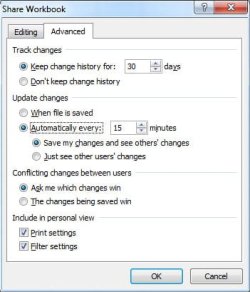
Then click on the advanced tab. Under Update changes select "Automatically" and set the number of minutes you would like the spreadsheet updated.

hth
Tanya
 

My Computer

Computer type
PC/Desktop
Computer Manufacturer/Model Number
Home Made
OS
Linux Mint 17 Cinnamon | Win 7 Ult x64
CPU
Intel I7-3770K @ 4.2ghz
Motherboard
ASRock Extreme 4
Memory
32GB G-Skill C10Q
Graphics Card(s)
EVGA GTX 670 2GB SC
Sound Card
Creative Fatality ExtremeGamer
Monitor(s) Displays
LG E2742V x 2
Screen Resolution
1920x1080
Hard Drives
256GB Vertex 4 SSD
2TB Seagate ST2000DM001
1TB Seagate ST1000DM003
PSU
Corsair HX 650
Case
HAF 932 advanced
Cooling
Corsair H100i liquid cooler
Keyboard
Logitech Wireless
Mouse
Logitech Wireless
Internet Speed
OptusNet NBN 100/40
Antivirus
Malwarebytes
Browser
Firefox 30
Other Info
Router: Sagemcom F@st 3846 Crippled by Optus.
Hi,

To see today's day use the function =Today() and under format cells select a custom format and put in 4 d's. Eg. dddd. That will make the cell show the day of the week.

To have multiple people able to access the spreadsheet at the same time go to Review > Share Workbook, and tick the check box for "allow multiple users to update..."

Then click on the advanced tab. Under Update changes select "Automatically" and set the number of minutes you would like the spreadsheet updated.

hth
Tanya

Thank you for your response.

Anyone know the answers to the other questions?

Also the answer to this additional question...

I created an in cell drop-down menu, you only realise it is a drop-down menu when you click the cell as the down arrow shows.

Is it possible to have the down arrow showing permanently so users are aware it is a drop-down menu before actually clicking the cell.
 

My Computer

OS
Windows 7 Professional 64bit
Anyone know the answers to the other questions?

I thought I'd covered all of them. What did I miss?

I created an in cell drop-down menu, you only realise it is a drop-down menu when you click the cell as the down arrow shows.

Is it possible to have the down arrow showing permanently so users are aware it is a drop-down menu before actually clicking the cell.

Using data validation "list" - No you can't. Using form controls and VBA code, yes you can.

I generally just insert a down arrow in the adjacent cell, and use a description of "Select xyz:" so it becomes apparent that it is a select list. I agree, it is a pain in the bum.
 

My Computer

Computer type
PC/Desktop
Computer Manufacturer/Model Number
Home Made
OS
Linux Mint 17 Cinnamon | Win 7 Ult x64
CPU
Intel I7-3770K @ 4.2ghz
Motherboard
ASRock Extreme 4
Memory
32GB G-Skill C10Q
Graphics Card(s)
EVGA GTX 670 2GB SC
Sound Card
Creative Fatality ExtremeGamer
Monitor(s) Displays
LG E2742V x 2
Screen Resolution
1920x1080
Hard Drives
256GB Vertex 4 SSD
2TB Seagate ST2000DM001
1TB Seagate ST1000DM003
PSU
Corsair HX 650
Case
HAF 932 advanced
Cooling
Corsair H100i liquid cooler
Keyboard
Logitech Wireless
Mouse
Logitech Wireless
Internet Speed
OptusNet NBN 100/40
Antivirus
Malwarebytes
Browser
Firefox 30
Other Info
Router: Sagemcom F@st 3846 Crippled by Optus.
Anyone know the answers to the other questions?

I thought I'd covered all of them. What did I miss?

I created an in cell drop-down menu, you only realise it is a drop-down menu when you click the cell as the down arrow shows.

Is it possible to have the down arrow showing permanently so users are aware it is a drop-down menu before actually clicking the cell.

Using data validation "list" - No you can't. Using form controls and VBA code, yes you can.

I generally just insert a down arrow in the adjacent cell, and use a description of "Select xyz:" so it becomes apparent that it is a select list. I agree, it is a pain in the bum.

Erm the refresh button as the idea is a user presses this button prior to making a call as then it shows them if someone is available.

Also any ideas on automatic input for availability.

Also thanks, I'll use a combo box for the drop-down menu.
 

My Computer

OS
Windows 7 Professional 64bit
Hi,

Sorry, I thought the auto update interval on the sharing dialogue would suit your needs. Since, every time it updates the workbook, it also refreshes what you see (that is, it behaves exactly like a refresh button).

Look at the image below; The "And see others' changes". This is effectively a refresh option.

A refresh button can be achieved using VBA code. What it would do is load the worksheet from it source location. But since it is possible there are unsaved changes, it must first save the workbook.

The code would go something like this...

'below code for saving and closing the workbook
Workbooks("book1.xls").Activate
ActiveWorkbook.Save
ActiveWorkbook.Close

'opening workbook
Workbooks.Open Filename:="c:\book1.xls"

---
You must activate it before attempting to close it. Insert full path to file name.

Now, as to automatically inputting availability;

This implies that there is a fixed availability list. Where does this availability come from? If it's automatic it has to be stored somewhere. If it's static you would just update it and save the sheet.

If you want them to have the same availability for the whole week, then just get them to enter the first day and use formulas to replicate the availability across the rest of the week.

If I am on the wrong track, please explain what you mean by "automatic availability".


Tanya
 

Attachments

  • sf2.JPG
    sf2.JPG
    52.1 KB · Views: 12

My Computer

Computer type
PC/Desktop
Computer Manufacturer/Model Number
Home Made
OS
Linux Mint 17 Cinnamon | Win 7 Ult x64
CPU
Intel I7-3770K @ 4.2ghz
Motherboard
ASRock Extreme 4
Memory
32GB G-Skill C10Q
Graphics Card(s)
EVGA GTX 670 2GB SC
Sound Card
Creative Fatality ExtremeGamer
Monitor(s) Displays
LG E2742V x 2
Screen Resolution
1920x1080
Hard Drives
256GB Vertex 4 SSD
2TB Seagate ST2000DM001
1TB Seagate ST1000DM003
PSU
Corsair HX 650
Case
HAF 932 advanced
Cooling
Corsair H100i liquid cooler
Keyboard
Logitech Wireless
Mouse
Logitech Wireless
Internet Speed
OptusNet NBN 100/40
Antivirus
Malwarebytes
Browser
Firefox 30
Other Info
Router: Sagemcom F@st 3846 Crippled by Optus.
Back
Top