CPU Always at 99% Maximum

Justin3177

New member
Local time
11:24 PM
Messages
4
My CPU is always at 99% Maximum and My fans are very loud I don't know what to do i've tryed updating drivers, cleaning out stuff, nothing seems to be working.
resourcemonitor.png


taskmanager.png
 

My Computer

Computer Manufacturer/Model Number
Toshiba/Satellite L555
OS
64bit
CPU
Pentium(R) Dual-Core CPU T4400
Memory
4GB
My CPU is always at 99% Maximum and My fans are very loud I don't know what to do i've tryed updating drivers, cleaning out stuff, nothing seems to be working.

resourcemonitor.png


taskmanager.png

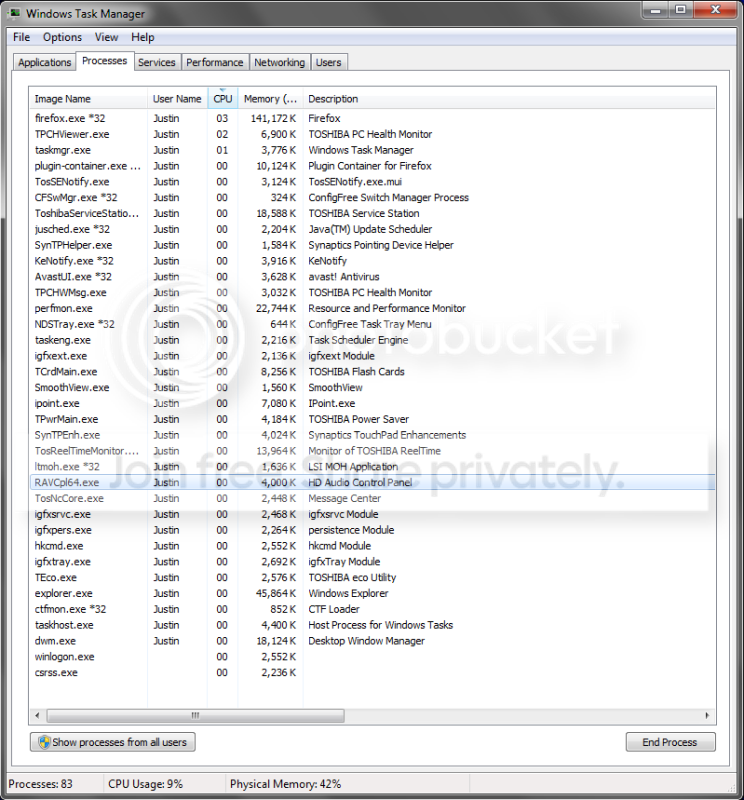
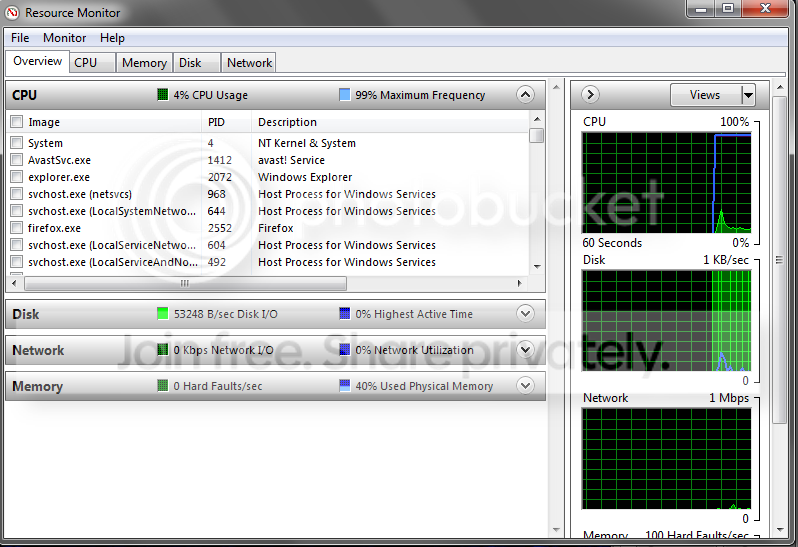
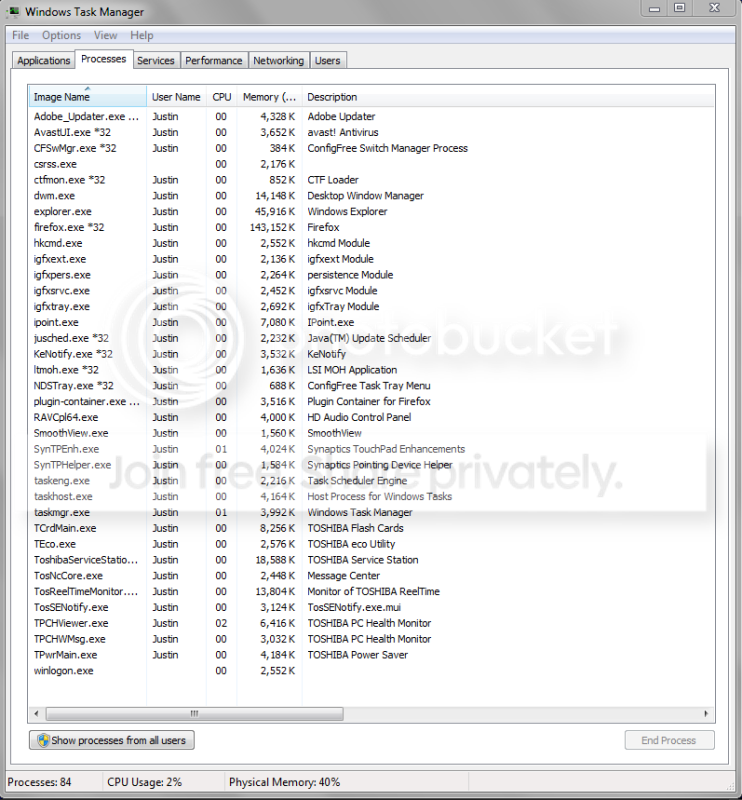
Your fans are loud because you are at 99%. In task manager it shows a 2% cpu usage, but in perfmon 99%. It also shows a HD read/write storm. Do you have a pagefile? What apps are you running that would require that much HD activity?

We need more info
 

My Computer

Computer Manufacturer/Model Number
HP Pavillion dv-7 1005 Tx
OS
Win 8 Release candidate 8400
CPU
[email protected]
Memory
4 gigs
Graphics Card(s)
Nvidia 9600M
Sound Card
HD built-in
Monitor(s) Displays
17" Wxga
Screen Resolution
1440x900
Cooling
none
Internet Speed
45Mb down 5Mb up
I'm not sure the only thing open is firefox
 

My Computer

Computer Manufacturer/Model Number
Toshiba/Satellite L555
OS
64bit
CPU
Pentium(R) Dual-Core CPU T4400
Memory
4GB
Last edited:

My Computer

Computer Manufacturer/Model Number
HP Pavillion dv-7 1005 Tx
OS
Win 8 Release candidate 8400
CPU
[email protected]
Memory
4 gigs
Graphics Card(s)
Nvidia 9600M
Sound Card
HD built-in
Monitor(s) Displays
17" Wxga
Screen Resolution
1440x900
Cooling
none
Internet Speed
45Mb down 5Mb up
cpusnapshot.png
 

My Computer

Computer Manufacturer/Model Number
Toshiba/Satellite L555
OS
64bit
CPU
Pentium(R) Dual-Core CPU T4400
Memory
4GB
Frequency at 99% Ken, not usage.

Almost looks like whatever power options required for lowering CPU speed are disabled or the minimal usage being shown is just enough to stop the CPU from slowing down. I'd start with checking the power plan settings,

http://www.sevenforums.com/tutorials/774-power-plan-select.html

which even if set correctly could possibly be affected by Toshiba's own power saving application (TPwrMain.exe).
 

My Computer

Computer type
PC/Desktop
Computer Manufacturer/Model Number
Me
OS
Win 7 Ultimate x64
CPU
FX-8350 @ 4.6 GHz so far
Motherboard
Asus M5A97 EVO
Memory
ADATA XPG V1 Series Black 8GB DDR3 1600
Graphics Card(s)
Sapphire R9 270x Dual-X
Sound Card
Xonar DGX w/ Corsair Vengence 1300
Monitor(s) Displays
Acer S232HL Abid
Screen Resolution
1920x1080
Hard Drives
120 GB OCZ Vertex 3
500 GB Seagate 7200.12
PSU
Antec Earthwatts 650W Green
Case
Antec Three Hundred
Cooling
Cooler Master 212 EVO
Keyboard
Logitech G510
Mouse
Logitech G500s
Internet Speed
35000/3000
Your Task Manager snips are not very telling as long as you do not show "Peocesses for all users" - the button on the bottom left. And then click on the CPU button until the most used processes are shown on top.
And for the Resource Monitor you should show the page from the CPU button - also prioritized by CPU usage.
 

My Computer

Computer Manufacturer/Model Number
HP, Dell, Gateway, Toshiba - 4 laptops and 2 desktops
OS
Vista, Windows7, Mint Mate, Zorin, Windows 8
CPU
from 1.6GHz Duo to i7
Monitor(s) Displays
2x HP w2207
Hard Drives
5x HDD, 7x SSD, 12x Externals
Keyboard
with trackball - no mices
Mouse
Trackball mice
Internet Speed
DSL 6000
if i put it on power saver mode it drops to like 54% usage I normally have it on high performance
 

My Computer

Computer Manufacturer/Model Number
Toshiba/Satellite L555
OS
64bit
CPU
Pentium(R) Dual-Core CPU T4400
Memory
4GB
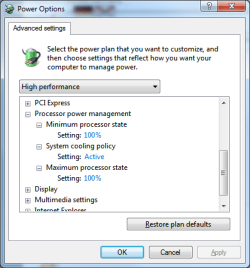
You just answered your own question as to why the CPU is running at full speed all the time. This is the default CPU power settings under high performance,

poweroptions.png

The CPU will never throttle down when at idle. If you don't want it to run full speed all the time (not great if you're running it on the battery) then either set it to Balanced or set the minimum processor state lower than 100%.
 

My Computer

Computer type
PC/Desktop
Computer Manufacturer/Model Number
Me
OS
Win 7 Ultimate x64
CPU
FX-8350 @ 4.6 GHz so far
Motherboard
Asus M5A97 EVO
Memory
ADATA XPG V1 Series Black 8GB DDR3 1600
Graphics Card(s)
Sapphire R9 270x Dual-X
Sound Card
Xonar DGX w/ Corsair Vengence 1300
Monitor(s) Displays
Acer S232HL Abid
Screen Resolution
1920x1080
Hard Drives
120 GB OCZ Vertex 3
500 GB Seagate 7200.12
PSU
Antec Earthwatts 650W Green
Case
Antec Three Hundred
Cooling
Cooler Master 212 EVO
Keyboard
Logitech G510
Mouse
Logitech G500s
Internet Speed
35000/3000
What you need to check are cpu/gpu/hdd temperatures and fan speed settings. Obviously, the fan is getting cranked up because the cpu is running full throttle all the time and it needs to control temps. Fan speeds can be adjusted (depending on the mobo) in the bios or via 3rd party apps like Speedfan, there are OEM specific power management tools too for this purpose. Temperatures can be checked with speedfan or other apps like realtemp etc.

You can also create custom power plans and adjust that max processor state to your liking. Also, use balanced or power saver for non-cpu intensive tasks and shift to high performance when you need the juice.
 

My Computer

Computer Manufacturer/Model Number
Too many to describe...
OS
Windows 7 x64 pro/ Windows 7 x86 Pro/ XP SP3 x86
You have 83 processes running. That seem very high to me.
 

My Computer

Computer type
PC/Desktop
Computer Manufacturer/Model Number
Home made Desktop
OS
Windows 10 Pro. 64/ version 1709 Windows 7 Pro/64
CPU
Intel i7-6800K @ 4.3
Motherboard
ASUS X-99 Deluxe II
Memory
Corsair Platinum 16 gig @2400
Graphics Card(s)
EVGA GTX 1070 OC
Monitor(s) Displays
Asus 27" LED LCD/VE278Q
Screen Resolution
1920-1080 or 1280-720 HDMI
Hard Drives
INTEL SSD 730-240 Gb Sata 3.0/
PSU
EVGA Platium 1200W
Case
Phanteks Luxe Tempered Glass 8 fans/ one radiator
Cooling
XSPC/ Water Cooled CPU
Keyboard
Das 4 Professional
Mouse
Logitech M705/MX Anywhere 2-S
Internet Speed
100 mbits
Antivirus
Microsoft Security Essentials/ Malwarebytes Premium 3.0/ SAS
Browser
I.E. 11 default/Firefox/ ISP Time Warner Cable/Spectrum
Other Info
LG BluRay Burner/
Sound system-KLipsch-THX/
Icy Dock ssd Hot Swap bays.
Back
Top