
Solved Cpu constantly hot (Mainly when gaming)?

DailyGamer

New member
Local time
12:56 AM
Messages
14
~System Info in the picture~ Hi guys i have a problem with my cpu temps /: its get extremly hot , it idles around like 40's high 40's sometimes and i have reapplied thermal paste several times, and my cpu fan is on securely trust me, i am currently using radio shack thermal paste (Silicon) i don't know if that has anything to do with it , i was told to purchase a thermal pad but... i picked up thermal paste before i was told that.. and my cpu fan is a standard stock dell, i game all the time.. i play games like battlefield 3 , recently tera online and minecraft... they all run fine! no lag or anything at all for that matter but see when i was playing tera today my cpu temp hit 78 usually wouldn't go over that and my cores were hitting 95's+ quite sure this isn't normal but.. i mean usually if the cpu gets too hot it would cause some lag or loss of framerates maybe? my game usually plays perfect.. maybe a couple lag spikes here and there quite sure from my internet since my family is on netflix have the time.. anyways i need help guys is this safe to play? do i need to upgrade to cpu liquid cooler? i don't really have money right now so bare with me /: is there anything i could possibly do to fix this problem without spending alot of money... i don't really have money for a liquid fan but if its recommended please tell me... i would really just like to know the problem? and also awnsers to questions like these am i safe to keep playing games like bf3 or tera without ending up with a burnt chip, i don't have 300$ to replace a chip, i'm just a High school graduate.... /: Thanks in advance
 

Attachments
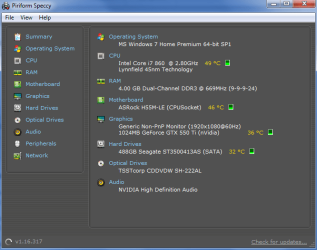
  • System info.png
    System info.png
    21 KB · Views: 100

My Computer

Computer Manufacturer/Model Number
ALLPCZONE
OS
MS Windows 7 Home Premium 64-bit SP1
CPU
Intel Core i7 860 Lynnfield
Motherboard
ASRock H55M-LE
Memory
(2) DDR3 DUAL 2g sticks
Graphics Card(s)
NVIDIA GeForce GTX 550 Ti
Sound Card
NVIDIA High Definition Audio
Monitor(s) Displays
ELETT221
Screen Resolution
1920x1080
Hard Drives
ST3500413AS Seagate Sata
PSU
600 watt cosair ( not positive )
Case
bcc voyager mid-tower atx
Cooling
Stock Intel Standard Cpu Cooler - And The Fan On My Case
Keyboard
HID Keyboard Device
Mouse
HID-compliant mouse
Internet Speed
Comcast High-Speed Internet
Other Info
Built Computer
First off; don't use your computer if it is getting that hot.
How to install cup compound.
Arctic Silver Incorporated - Route to Product Instructions for Arctic Silver 5
More information is needed.
1. What case do you have?
2. What fans do you have and where are they located and which way are they moving the air?
3. Where is your tower located. ie. Under desk or on top of dest, ect?
4. What cpu cooler are you using?
--------------------------------
Please fill in your specs so we can see they in lower left of your post.
 

My Computer

Computer type
PC/Desktop
Computer Manufacturer/Model Number
Home made Desktop
OS
Windows 10 Pro. 64/ version 1709 Windows 7 Pro/64
CPU
Intel i7-6800K @ 4.3
Motherboard
ASUS X-99 Deluxe II
Memory
Corsair Platinum 16 gig @2400
Graphics Card(s)
EVGA GTX 1070 OC
Monitor(s) Displays
Asus 27" LED LCD/VE278Q
Screen Resolution
1920-1080 or 1280-720 HDMI
Hard Drives
INTEL SSD 730-240 Gb Sata 3.0/
PSU
EVGA Platium 1200W
Case
Phanteks Luxe Tempered Glass 8 fans/ one radiator
Cooling
XSPC/ Water Cooled CPU
Keyboard
Das 4 Professional
Mouse
Logitech M705/MX Anywhere 2-S
Internet Speed
100 mbits
Antivirus
Microsoft Security Essentials/ Malwarebytes Premium 3.0/ SAS
Browser
I.E. 11 default/Firefox/ ISP Time Warner Cable/Spectrum
Other Info
LG BluRay Burner/
Sound system-KLipsch-THX/
Icy Dock ssd Hot Swap bays.
1. BCC VOYAGER MID-TOWER ATX
2.(SpeedFan Results) CPU0 Fan 2109 RPM , Sys Fan 0 RPM , Aux1 Fan 0 RPM , Aux2 Fan 0 RPM so i guess cpu fan and the big case fan? and obviously a fan on my graphics card nvidia 550 ti
3.Its located under my desk in a open space not backed up against a wall tho
4.Intel Standard Processor Cooling Fan

Yeah i built this computer... basicly and i built it cheap... /: so... please help!
 

My Computer

Computer Manufacturer/Model Number
ALLPCZONE
OS
MS Windows 7 Home Premium 64-bit SP1
CPU
Intel Core i7 860 Lynnfield
Motherboard
ASRock H55M-LE
Memory
(2) DDR3 DUAL 2g sticks
Graphics Card(s)
NVIDIA GeForce GTX 550 Ti
Sound Card
NVIDIA High Definition Audio
Monitor(s) Displays
ELETT221
Screen Resolution
1920x1080
Hard Drives
ST3500413AS Seagate Sata
PSU
600 watt cosair ( not positive )
Case
bcc voyager mid-tower atx
Cooling
Stock Intel Standard Cpu Cooler - And The Fan On My Case
Keyboard
HID Keyboard Device
Mouse
HID-compliant mouse
Internet Speed
Comcast High-Speed Internet
Other Info
Built Computer
Daily Gamer,

The temps shown in the snip are perfectly ok.

You can help us to help you by filling out your system specs. Please use this procedure. You will find that Speccy provides much info.
Update your SevenForums System Specs
User CP (located on the top menu bar) |
Your Profile | Edit System Spec
(left-hand column)

To gather info, use Speccy (my favorite) or SIW or System Info

In the System Manufacturer Block, enter:
Manufacturer and Model and
ADD the word laptop, desktop, netbook or tablet.
For example:
Toshiba Satellite L305D notebook.

Provide full windows version info, for example:
MS Windows 7 Ultimate SP1 64-bit

Use the “Other Info” block for Optical Reader,
Mouse, touchpad, wifi adapter, speakers, monitor, etc

Scroll down and click on SAVE CHANGES.
===============================================================

The easy and cheap solution:

Remove power from computer.
Remove cover from computer.
Leave the cover off.
Direct a floor fan/desktop fan or table fan at your computer.
Leave the cover off.
Be sure that computer is not up against a wall.

I use CoreTemp and its gadget to keep an eye on my temps during these sommer months.

Core Temp
 

My Computer

Computer Manufacturer/Model Number
Toshiba Satellite S875D-S7239 laptop
OS
MS Windows 7 Ultimate SP1 64-bit
CPU
AMD A10-4600M
Motherboard
AMD Pumori (Socket FT1)
Memory
6.00 GB Dual-Channel DDR3 @ 798MHz (11-11-12-28)
Graphics Card(s)
AMD Radeon HD 7660G
Sound Card
High Definition Audio Device
Monitor(s) Displays
Generic PnP Monitor (1600x900@60Hz)
Screen Resolution
1600x900@60Hz
Hard Drives
SSD 119GB Corsair CSSD-V128GB2 ATA Device
Keyboard
Standard PS/2 Keyboard
Mouse
HP Wireless Optical Mobile Mouse Model FHA-3410
Internet Speed
What the local pub, local coffee shop offers.
Other Info
Optical Drive:MATSHITA BD-CMB UJ160B ATA Device


Also have an Asus ha1002xp netbook with Win 7 Ultimate installed.
Could you at least tell me what the problem is? and how i can fix it.. even if it involves purchasing things? i don't really recommend doing your "easy and cheap solution" I'd rather fix it fast and efficient even if that involves money.. i just really don't have money to be spending on a computer.. considering i already bought this one thinking it work fine.. it works perfect but everyone is telling my my temps are too high and i'm worried about my cpu burning up.... /:
 

My Computer

Computer Manufacturer/Model Number
ALLPCZONE
OS
MS Windows 7 Home Premium 64-bit SP1
CPU
Intel Core i7 860 Lynnfield
Motherboard
ASRock H55M-LE
Memory
(2) DDR3 DUAL 2g sticks
Graphics Card(s)
NVIDIA GeForce GTX 550 Ti
Sound Card
NVIDIA High Definition Audio
Monitor(s) Displays
ELETT221
Screen Resolution
1920x1080
Hard Drives
ST3500413AS Seagate Sata
PSU
600 watt cosair ( not positive )
Case
bcc voyager mid-tower atx
Cooling
Stock Intel Standard Cpu Cooler - And The Fan On My Case
Keyboard
HID Keyboard Device
Mouse
HID-compliant mouse
Internet Speed
Comcast High-Speed Internet
Other Info
Built Computer
without having your hardware directly in front of me on a test bench I can not answer your question.

I wish you good luck in you search.
 

My Computer

Computer Manufacturer/Model Number
Toshiba Satellite S875D-S7239 laptop
OS
MS Windows 7 Ultimate SP1 64-bit
CPU
AMD A10-4600M
Motherboard
AMD Pumori (Socket FT1)
Memory
6.00 GB Dual-Channel DDR3 @ 798MHz (11-11-12-28)
Graphics Card(s)
AMD Radeon HD 7660G
Sound Card
High Definition Audio Device
Monitor(s) Displays
Generic PnP Monitor (1600x900@60Hz)
Screen Resolution
1600x900@60Hz
Hard Drives
SSD 119GB Corsair CSSD-V128GB2 ATA Device
Keyboard
Standard PS/2 Keyboard
Mouse
HP Wireless Optical Mobile Mouse Model FHA-3410
Internet Speed
What the local pub, local coffee shop offers.
Other Info
Optical Drive:MATSHITA BD-CMB UJ160B ATA Device


Also have an Asus ha1002xp netbook with Win 7 Ultimate installed.
Alright Good Sir, i have updated my specs like you have told me :)! Any good news!??
 

My Computer

Computer Manufacturer/Model Number
ALLPCZONE
OS
MS Windows 7 Home Premium 64-bit SP1
CPU
Intel Core i7 860 Lynnfield
Motherboard
ASRock H55M-LE
Memory
(2) DDR3 DUAL 2g sticks
Graphics Card(s)
NVIDIA GeForce GTX 550 Ti
Sound Card
NVIDIA High Definition Audio
Monitor(s) Displays
ELETT221
Screen Resolution
1920x1080
Hard Drives
ST3500413AS Seagate Sata
PSU
600 watt cosair ( not positive )
Case
bcc voyager mid-tower atx
Cooling
Stock Intel Standard Cpu Cooler - And The Fan On My Case
Keyboard
HID Keyboard Device
Mouse
HID-compliant mouse
Internet Speed
Comcast High-Speed Internet
Other Info
Built Computer
In my mind 95C+ for a cpu is hot. The reviews I have read on your case indicate that it cools very good. I'm I correct in assuming that all your fans are working correctly? As karlsnooks has mentioned a external fan would be a way of isolating whether your case is cooling properly. Location is very important; their must a clean shot for ambient air to get in and out of the case. If all these are good I would suspect cpu cooler or mounting. Did you go to the web site and understand the proper way to install a cpu and cooler. As karlsnooks has pointed out their are many things that can cause this problem. Cable management is also something that may need addressed. Cables running all over interfering with air flow can cause problems. All these things are speculation on my part because I can't see or test your computer.
 

My Computer

Computer type
PC/Desktop
Computer Manufacturer/Model Number
Home made Desktop
OS
Windows 10 Pro. 64/ version 1709 Windows 7 Pro/64
CPU
Intel i7-6800K @ 4.3
Motherboard
ASUS X-99 Deluxe II
Memory
Corsair Platinum 16 gig @2400
Graphics Card(s)
EVGA GTX 1070 OC
Monitor(s) Displays
Asus 27" LED LCD/VE278Q
Screen Resolution
1920-1080 or 1280-720 HDMI
Hard Drives
INTEL SSD 730-240 Gb Sata 3.0/
PSU
EVGA Platium 1200W
Case
Phanteks Luxe Tempered Glass 8 fans/ one radiator
Cooling
XSPC/ Water Cooled CPU
Keyboard
Das 4 Professional
Mouse
Logitech M705/MX Anywhere 2-S
Internet Speed
100 mbits
Antivirus
Microsoft Security Essentials/ Malwarebytes Premium 3.0/ SAS
Browser
I.E. 11 default/Firefox/ ISP Time Warner Cable/Spectrum
Other Info
LG BluRay Burner/
Sound system-KLipsch-THX/
Icy Dock ssd Hot Swap bays.
Thanks for the responce LayBack Bear are you talking about 95C+ on the cpu? Or the cores? because my cores usually always hit 95C+( Only when gaming ) and my pc hits 78 didn't use to /: i think it may be because of this radio shack thermal paste ( Silicon ) i've read some reviews on it saying that it dries out fast and isn't very good espically when gaming i was thinking about grabbing some artic silver 5? sound good? O:
 

My Computer

Computer Manufacturer/Model Number
ALLPCZONE
OS
MS Windows 7 Home Premium 64-bit SP1
CPU
Intel Core i7 860 Lynnfield
Motherboard
ASRock H55M-LE
Memory
(2) DDR3 DUAL 2g sticks
Graphics Card(s)
NVIDIA GeForce GTX 550 Ti
Sound Card
NVIDIA High Definition Audio
Monitor(s) Displays
ELETT221
Screen Resolution
1920x1080
Hard Drives
ST3500413AS Seagate Sata
PSU
600 watt cosair ( not positive )
Case
bcc voyager mid-tower atx
Cooling
Stock Intel Standard Cpu Cooler - And The Fan On My Case
Keyboard
HID Keyboard Device
Mouse
HID-compliant mouse
Internet Speed
Comcast High-Speed Internet
Other Info
Built Computer
IMHO 95+ on cpu cores is to hot. I don't know what P/C temps means, can you explain? Keep in mind that cpu and gpu temps mean very little at idle. They should be judged under load. Prime 95 for the cpu and Furmark for the gpu are programs that I use to load them. HW Monitor and Real Temp are programs I use to monitor temps. Their are many new thermal compounds that I haven't used.
I use AS-5 because it has always worked for me. I use their method to install it. To much compound used can really jack up the temps. To give you some idea of inside case temps; the inside of may case is the same as ambient temps in the room. That tells me that air flow in and out and thru the case is good. I use a Infared thermometer to get temps off of many things inside and outside of the computer. Gaming put a load on your cpu and gpu which creates heat. Sometimes more than normal cooling can handle. That is why I don't use OEM cooling. Their are many things that need to be figured into cooling that only you can do. You need to spend the time to research, trial and error to see what works for your computer. Sometimes they are small things that add up. Such are I never let the tower sit on carpet. IMHO stock cpu coolers are not good enough for heavy gaming.
 

My Computer

Computer type
PC/Desktop
Computer Manufacturer/Model Number
Home made Desktop
OS
Windows 10 Pro. 64/ version 1709 Windows 7 Pro/64
CPU
Intel i7-6800K @ 4.3
Motherboard
ASUS X-99 Deluxe II
Memory
Corsair Platinum 16 gig @2400
Graphics Card(s)
EVGA GTX 1070 OC
Monitor(s) Displays
Asus 27" LED LCD/VE278Q
Screen Resolution
1920-1080 or 1280-720 HDMI
Hard Drives
INTEL SSD 730-240 Gb Sata 3.0/
PSU
EVGA Platium 1200W
Case
Phanteks Luxe Tempered Glass 8 fans/ one radiator
Cooling
XSPC/ Water Cooled CPU
Keyboard
Das 4 Professional
Mouse
Logitech M705/MX Anywhere 2-S
Internet Speed
100 mbits
Antivirus
Microsoft Security Essentials/ Malwarebytes Premium 3.0/ SAS
Browser
I.E. 11 default/Firefox/ ISP Time Warner Cable/Spectrum
Other Info
LG BluRay Burner/
Sound system-KLipsch-THX/
Icy Dock ssd Hot Swap bays.
Well this is what i can suggest Manage cables so its Air flow is Proper Buy arctic silver 5 thermal compound it sells for 10 dollars on newegg check local stores if you dont want to buy online and make sure its Arctic Silver 5 if you want to upgrade to water cooling for cheap Go with a Corsair h80 Also 100 Dollars on Newegg or again check Local stores there is a video corsair has on Youtube for Installation on the H80 instead of understand the instructions if you have any questions im here too help.
Corsair H80 Install Video - How-to Install the Hydro Series H80 and H100 Liquid CPU Coolers - YouTube
 

My Computer

Computer type
PC/Desktop
Computer Manufacturer/Model Number
Custom Build
OS
Windows 7 Pro SP1 x64
CPU
Intel Core i5 4670k @3.4 Ghz
Motherboard
Gigabyte Z87X-D3H
Memory
Corsair XMS3 16GB 1333 Mhz 9/9/9
Graphics Card(s)
Asus 7850 2GB Edition 860/1200
Sound Card
Logitech z506 Speakers / Logitech G930 Headset
Monitor(s) Displays
Asus VE278H / Vizio E320-A0
Screen Resolution
1920x1080 (Asus) / 1366x768 (Vizio)
Hard Drives
120GB OCZ Vertex 3 SSD
1TB Seagate HDD
PSU
Corsair RM 650 Watts
Case
Fractal Define R4 Black Pearl
Cooling
1x140mm Front Intake Fan 1x140mm Rear Exhaust Fan
Keyboard
Cooler Master Quickfire TK Cherry Mx Blue
Mouse
Razer Naga Blue
Internet Speed
Wired Ethernet 15 PING 35.00 Mbps Download 10.00 Mbps Upload
Antivirus
Eset Smart Security 8
Browser
Google Chrome
Other Info
Just ask me if i missed something
If I had the room I would install a H100 push pull using 4 Nocuta 120's.
 

My Computer

Computer type
PC/Desktop
Computer Manufacturer/Model Number
Home made Desktop
OS
Windows 10 Pro. 64/ version 1709 Windows 7 Pro/64
CPU
Intel i7-6800K @ 4.3
Motherboard
ASUS X-99 Deluxe II
Memory
Corsair Platinum 16 gig @2400
Graphics Card(s)
EVGA GTX 1070 OC
Monitor(s) Displays
Asus 27" LED LCD/VE278Q
Screen Resolution
1920-1080 or 1280-720 HDMI
Hard Drives
INTEL SSD 730-240 Gb Sata 3.0/
PSU
EVGA Platium 1200W
Case
Phanteks Luxe Tempered Glass 8 fans/ one radiator
Cooling
XSPC/ Water Cooled CPU
Keyboard
Das 4 Professional
Mouse
Logitech M705/MX Anywhere 2-S
Internet Speed
100 mbits
Antivirus
Microsoft Security Essentials/ Malwarebytes Premium 3.0/ SAS
Browser
I.E. 11 default/Firefox/ ISP Time Warner Cable/Spectrum
Other Info
LG BluRay Burner/
Sound system-KLipsch-THX/
Icy Dock ssd Hot Swap bays.
If the CPU is getting that hot then most likely the clips that hold the fan housing on aren't secured properly. I've built quite a few PC's and when I see temps like that it's usually the clips not being secured correctly which creates a gap between the CPU and the heat sink.

It's an easy mistake to make as it's hard to see if they are in all the way.

I would replace the TIM with something better, artic silver, OCZ freeze, are good ones to use as are many others. Then make sure those clips are secured properly which sometimes isn't easy to get right.
 

My Computer

Computer type
PC/Desktop
Computer Manufacturer/Model Number
Home built
OS
Windows 7 Ult, Windows 8.1 Pro,
CPU
Q9650-4.275GHz, E8600 4.5GHz, E6750-3.8GHz
Motherboard
Evga 780i FTW
Memory
G.Skill PC2 9600 1200Mhz 5 5 5 15 2T
Graphics Card(s)
GTX480
Sound Card
Asus Xonar D2
Monitor(s) Displays
HannsG
Screen Resolution
1680X1050
Hard Drives
GSkill Phoenix Pro 120GB SSD
PSU
ThermalTake Toughpower 1000Watt modular
Case
ThermalTake XaserV
Cooling
Xigmatek S1283
Keyboard
Logitech G15
Mouse
Logitech G9
Internet Speed
T1
That's another reason I don't like Intel o.e. fan on cpu; 4 push pins that snap in place, no screws. Once they snap in place you can't adjust them.
 

My Computer

Computer type
PC/Desktop
Computer Manufacturer/Model Number
Home made Desktop
OS
Windows 10 Pro. 64/ version 1709 Windows 7 Pro/64
CPU
Intel i7-6800K @ 4.3
Motherboard
ASUS X-99 Deluxe II
Memory
Corsair Platinum 16 gig @2400
Graphics Card(s)
EVGA GTX 1070 OC
Monitor(s) Displays
Asus 27" LED LCD/VE278Q
Screen Resolution
1920-1080 or 1280-720 HDMI
Hard Drives
INTEL SSD 730-240 Gb Sata 3.0/
PSU
EVGA Platium 1200W
Case
Phanteks Luxe Tempered Glass 8 fans/ one radiator
Cooling
XSPC/ Water Cooled CPU
Keyboard
Das 4 Professional
Mouse
Logitech M705/MX Anywhere 2-S
Internet Speed
100 mbits
Antivirus
Microsoft Security Essentials/ Malwarebytes Premium 3.0/ SAS
Browser
I.E. 11 default/Firefox/ ISP Time Warner Cable/Spectrum
Other Info
LG BluRay Burner/
Sound system-KLipsch-THX/
Icy Dock ssd Hot Swap bays.
I fixed it guys!!!! XD the clamps on the heatsink weren't secured i thought i heard snaps but it wasn't all the way down i bought artic silver 5 also my cpu idles around 37C and while gaming it never exceeds 55 Which in my opinon is extremely good, yeah i hate the intel snap heatsink its confusing... /: thinking later down the road i'ma put a water cooler in it, since i pretty much game all the time
 

My Computer

Computer Manufacturer/Model Number
ALLPCZONE
OS
MS Windows 7 Home Premium 64-bit SP1
CPU
Intel Core i7 860 Lynnfield
Motherboard
ASRock H55M-LE
Memory
(2) DDR3 DUAL 2g sticks
Graphics Card(s)
NVIDIA GeForce GTX 550 Ti
Sound Card
NVIDIA High Definition Audio
Monitor(s) Displays
ELETT221
Screen Resolution
1920x1080
Hard Drives
ST3500413AS Seagate Sata
PSU
600 watt cosair ( not positive )
Case
bcc voyager mid-tower atx
Cooling
Stock Intel Standard Cpu Cooler - And The Fan On My Case
Keyboard
HID Keyboard Device
Mouse
HID-compliant mouse
Internet Speed
Comcast High-Speed Internet
Other Info
Built Computer
I fixed it guys!!!! XD the clamps on the heatsink weren't secured i thought i heard snaps but it wasn't all the way down i bought artic silver 5 also my cpu idles around 37C and while gaming it never exceeds 55 Which in my opinon is extremely good, yeah i hate the intel snap heatsink its confusing... /: thinking later down the road i'ma put a water cooler in it, since i pretty much game all the time

That's great to hear if you want water cooling Corsair H80 is always a Good Route that's not expensive
 

My Computer

Computer type
PC/Desktop
Computer Manufacturer/Model Number
Custom Build
OS
Windows 7 Pro SP1 x64
CPU
Intel Core i5 4670k @3.4 Ghz
Motherboard
Gigabyte Z87X-D3H
Memory
Corsair XMS3 16GB 1333 Mhz 9/9/9
Graphics Card(s)
Asus 7850 2GB Edition 860/1200
Sound Card
Logitech z506 Speakers / Logitech G930 Headset
Monitor(s) Displays
Asus VE278H / Vizio E320-A0
Screen Resolution
1920x1080 (Asus) / 1366x768 (Vizio)
Hard Drives
120GB OCZ Vertex 3 SSD
1TB Seagate HDD
PSU
Corsair RM 650 Watts
Case
Fractal Define R4 Black Pearl
Cooling
1x140mm Front Intake Fan 1x140mm Rear Exhaust Fan
Keyboard
Cooler Master Quickfire TK Cherry Mx Blue
Mouse
Razer Naga Blue
Internet Speed
Wired Ethernet 15 PING 35.00 Mbps Download 10.00 Mbps Upload
Antivirus
Eset Smart Security 8
Browser
Google Chrome
Other Info
Just ask me if i missed something
Glad you got it fixed. My next cooler will be a H80 with this case I have. Isn't it amazing what 4 little push pin snaps can do. Happy computing.
 

My Computer

Computer type
PC/Desktop
Computer Manufacturer/Model Number
Home made Desktop
OS
Windows 10 Pro. 64/ version 1709 Windows 7 Pro/64
CPU
Intel i7-6800K @ 4.3
Motherboard
ASUS X-99 Deluxe II
Memory
Corsair Platinum 16 gig @2400
Graphics Card(s)
EVGA GTX 1070 OC
Monitor(s) Displays
Asus 27" LED LCD/VE278Q
Screen Resolution
1920-1080 or 1280-720 HDMI
Hard Drives
INTEL SSD 730-240 Gb Sata 3.0/
PSU
EVGA Platium 1200W
Case
Phanteks Luxe Tempered Glass 8 fans/ one radiator
Cooling
XSPC/ Water Cooled CPU
Keyboard
Das 4 Professional
Mouse
Logitech M705/MX Anywhere 2-S
Internet Speed
100 mbits
Antivirus
Microsoft Security Essentials/ Malwarebytes Premium 3.0/ SAS
Browser
I.E. 11 default/Firefox/ ISP Time Warner Cable/Spectrum
Other Info
LG BluRay Burner/
Sound system-KLipsch-THX/
Icy Dock ssd Hot Swap bays.
Back
Top