Solved CPU Fan is too Loud

lostsoul62

Banned
Local time
7:23 PM
Messages
380
Location
AZ
I go into the BIOS and no matter what I do under POWER and set the fan to any speed or anything it won't do anything to the fan speed. Is there anyway to slow this fan down because it is screeming.
 

My Computer My Computer

OS
Windows 7 x64 RC1, Vista Ultimate, XP Pro
CPU
AMD 955
Memory
4 gigs - 1333
Graphics Card(s)
5750
Monitor(s) Displays
i-inc 28"
Screen Resolution
1920x1200
Hard Drives
2 SATA2 750 GB - 1 SATA2 1TB - 1 SATA3 1TB - 1 USB3 2TB - 1 USB3 500 GB, SSD 60 GB
Internet Speed
7 Megs
I'm sure it is possible to do it in the bios but since you havent mentioned what mobo you have, you can use this,

SpeedFan - Access temperature sensor in your computer

it should be compatible with your cpu.

It's actaully what i use, even though there is an option in my bios to do that, speed fan is just really easy to turn on and off when you want it.
Be carefull tho as it is possible to turn the fans off completely, and when you have reduced the fan speed be sure to check your temperture to makes sure you havent put it too low, use somehting like hwmonitor or you can use the temps displayed in speedfan.

CPUID - System & hardware benchmark, monitoring, reporting

All free programs btw.
 

My Computer My Computer

OS
Windows 7 Ultimate 64bit
I'm sure it is possible to do it in the bios but since you havent mentioned what mobo you have, you can use this,

SpeedFan - Access temperature sensor in your computer

it should be compatible with your cpu.

It's actaully what i use, even though there is an option in my bios to do that, speed fan is just really easy to turn on and off when you want it.
Be carefull tho as it is possible to turn the fans off completely, and when you have reduced the fan speed be sure to check your temperture to makes sure you havent put it too low, use somehting like hwmonitor or you can use the temps displayed in speedfan.

I found out that my 4 wire CPU fan was put on a 3 prong on my motherboard not giving me access to my BOIS setting for my fan speed so I move it to the CPU 4 prong on my motherboard and now I can change the fan speed and now it is quit and not driving me crazy.
 

My Computer My Computer

OS
Windows 7 x64 RC1, Vista Ultimate, XP Pro
CPU
AMD 955
Memory
4 gigs - 1333
Graphics Card(s)
5750
Monitor(s) Displays
i-inc 28"
Screen Resolution
1920x1200
Hard Drives
2 SATA2 750 GB - 1 SATA2 1TB - 1 SATA3 1TB - 1 USB3 2TB - 1 USB3 500 GB, SSD 60 GB
Internet Speed
7 Megs
Dear lostsoul62,
Just to round off things about a noisy CPU fan, in tropical climes like India (Asia) OR even in some states in the US of A where heat plays a major role, this article warns that a CPU above allowed temperatures will make the fan louder!


SPEEDFAN gives the temps. too which i have cross-checked with "Speccy"and both tally well Speccy(free) : Speccy - System Information - Free Download

The answer is 1) move the CPU to a cooler place in the room,2) install a more powerful cpu fan AND/ORgo for liquid cooling.

When it comes to the PCU fan, one has to replace the entire unit and not the fan alone. Article : Fan Noise - How to Troubleshoot a Noisy Computer Fan

Regards,
Sreedhav
 

My Computer My Computer

Computer Manufacturer/Model Number
Sony Vaio C series VPCCB35FN laptop
OS
MS Windows 7 Home Premium 64-bit SP1
CPU
IntelCore [email protected]; Sandy Bridge 32nm Tech.
Motherboard
Sony Vaio Version:C609NJYJ
Memory
4096Mb RAM; Single ChannelDDR3@665MHz; DRAM Freq:662MHz
Graphics Card(s)
AMD Radeon HD 6630M; GPU:Whistler;BIOS Core&mem Clock:123.36
Sound Card
REALTEK High Definition Audio Device; INTEL Display Card
Monitor(s) Displays
Generic PnP Intel HD;Resolution:1920*1040 Pixels; BPP:32bits
Screen Resolution
Current Resolution:1920*1080 Pixels; Monitor Frequency:60Hz
Hard Drives
Internal HD:TOSHIBA MK5061GSY; Real Size:488 GB;NTFS; 3 Partitions; SATA; HEADS:16

External HDD: WD Elements 1023 PORTABLE; Estimated Size: 1TB; NTFS; 3 Partitions
Cooling
Lateral Exhaust with a Cooling Pad Placed Beneath.
Keyboard
Logitech Bluetooth+ Generic Integrated K-B
Mouse
Logitech Bluetooth
Internet Speed
2MBPS
Other Info
1)Trend Micro Titanium Maximum Security Suite Version:3
2)SAS-PRO

3)MBAM--PRO


4)WATERFOX+IE9 +WOT+LINKEXTEND+ DRWEBCUREIT LINK CHECKER

5)SPYWAREBLASTER

6) WINPATROL PLUS

7) SANDBOXIE and
8) A BIT OF COMMON SENSE.
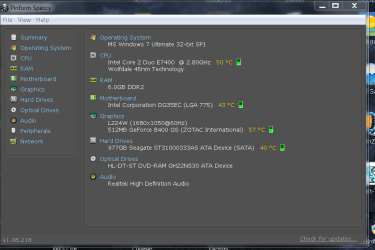
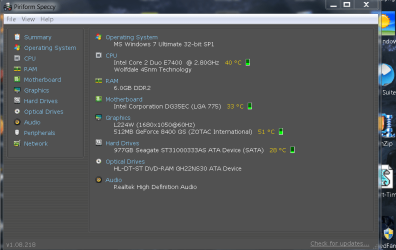
I am posting two snaps showing the effect of room temperature and a cooled room temp. can do to a cabinet hosting the CPU,PSU, HDD and MOBO!

The first one is after Three hours of non-stop work at room temp. and the second is after 45minutes of chilling the room at 26 degrees centigrade (78.8 Fahrenheit)with the ceiling fan on. You can see the dramatic reductions in temps.I read that Texas, Florida and Louisiana are consistently hot in summer every year!

regards,
Sreedhav
 

Attachments

  • SPECCY-1.png
    SPECCY-1.png
    34.9 KB · Views: 710
  • speccy-2.png
    speccy-2.png
    40.4 KB · Views: 376

My Computer My Computer

Computer Manufacturer/Model Number
Sony Vaio C series VPCCB35FN laptop
OS
MS Windows 7 Home Premium 64-bit SP1
CPU
IntelCore [email protected]; Sandy Bridge 32nm Tech.
Motherboard
Sony Vaio Version:C609NJYJ
Memory
4096Mb RAM; Single ChannelDDR3@665MHz; DRAM Freq:662MHz
Graphics Card(s)
AMD Radeon HD 6630M; GPU:Whistler;BIOS Core&mem Clock:123.36
Sound Card
REALTEK High Definition Audio Device; INTEL Display Card
Monitor(s) Displays
Generic PnP Intel HD;Resolution:1920*1040 Pixels; BPP:32bits
Screen Resolution
Current Resolution:1920*1080 Pixels; Monitor Frequency:60Hz
Hard Drives
Internal HD:TOSHIBA MK5061GSY; Real Size:488 GB;NTFS; 3 Partitions; SATA; HEADS:16

External HDD: WD Elements 1023 PORTABLE; Estimated Size: 1TB; NTFS; 3 Partitions
Cooling
Lateral Exhaust with a Cooling Pad Placed Beneath.
Keyboard
Logitech Bluetooth+ Generic Integrated K-B
Mouse
Logitech Bluetooth
Internet Speed
2MBPS
Other Info
1)Trend Micro Titanium Maximum Security Suite Version:3
2)SAS-PRO

3)MBAM--PRO


4)WATERFOX+IE9 +WOT+LINKEXTEND+ DRWEBCUREIT LINK CHECKER

5)SPYWAREBLASTER

6) WINPATROL PLUS

7) SANDBOXIE and
8) A BIT OF COMMON SENSE.
There's a thing called anti vibration Fan screw.
They come cheap and are very handy. Always better to put them even if your fan doest make sound. as it increases overall stability.

YBL
 

My Computer My Computer

Computer Manufacturer/Model Number
AMD _(Assembled)_
OS
Dual Booting Windows 7 64-Bit Ultimate Edition and Fedora 16.
CPU
AMD Phenom X4 925
Motherboard
MSI 785g-E53
Memory
4gb DDR3 G.skill RipJaws
Graphics Card(s)
ATI Radeon HD 6770
Sound Card
Realtek
Monitor(s) Displays
Dell IN2020M LED
Screen Resolution
1600*900 20"
Hard Drives
Seagate 500 Gibs
External 320 Gb Western Digital(Got Glitchy)
PSU
Cooler Master
Case
Cooler Master
Cooling
Cooler Master
Keyboard
Logitech K100
Mouse
Razor Death Adder v2 3500 dPi (Razer Goliathus Pad)
Internet Speed
Back to college Internet with Cyberroam X|
There's a thing called anti vibration Fan screw.
They come cheap and are very handy. Always better to put them even if your fan doest make sound. as it increases overall stability.

YBL

Dear YBL,
That's a top advise! I stay very close to chennai(180KMs). Are there any specific outlets from where i can get them? IF you can provide the address anywhere in India, i can use the courier service to get the delivery!

regards,
Sreedhav
 

My Computer My Computer

Computer Manufacturer/Model Number
Sony Vaio C series VPCCB35FN laptop
OS
MS Windows 7 Home Premium 64-bit SP1
CPU
IntelCore [email protected]; Sandy Bridge 32nm Tech.
Motherboard
Sony Vaio Version:C609NJYJ
Memory
4096Mb RAM; Single ChannelDDR3@665MHz; DRAM Freq:662MHz
Graphics Card(s)
AMD Radeon HD 6630M; GPU:Whistler;BIOS Core&mem Clock:123.36
Sound Card
REALTEK High Definition Audio Device; INTEL Display Card
Monitor(s) Displays
Generic PnP Intel HD;Resolution:1920*1040 Pixels; BPP:32bits
Screen Resolution
Current Resolution:1920*1080 Pixels; Monitor Frequency:60Hz
Hard Drives
Internal HD:TOSHIBA MK5061GSY; Real Size:488 GB;NTFS; 3 Partitions; SATA; HEADS:16

External HDD: WD Elements 1023 PORTABLE; Estimated Size: 1TB; NTFS; 3 Partitions
Cooling
Lateral Exhaust with a Cooling Pad Placed Beneath.
Keyboard
Logitech Bluetooth+ Generic Integrated K-B
Mouse
Logitech Bluetooth
Internet Speed
2MBPS
Other Info
1)Trend Micro Titanium Maximum Security Suite Version:3
2)SAS-PRO

3)MBAM--PRO


4)WATERFOX+IE9 +WOT+LINKEXTEND+ DRWEBCUREIT LINK CHECKER

5)SPYWAREBLASTER

6) WINPATROL PLUS

7) SANDBOXIE and
8) A BIT OF COMMON SENSE.
Thanks mate.
This is for you. cant find them cheaper than that. And have my words on the site i trust it.

YBL
 

My Computer My Computer

Computer Manufacturer/Model Number
AMD _(Assembled)_
OS
Dual Booting Windows 7 64-Bit Ultimate Edition and Fedora 16.
CPU
AMD Phenom X4 925
Motherboard
MSI 785g-E53
Memory
4gb DDR3 G.skill RipJaws
Graphics Card(s)
ATI Radeon HD 6770
Sound Card
Realtek
Monitor(s) Displays
Dell IN2020M LED
Screen Resolution
1600*900 20"
Hard Drives
Seagate 500 Gibs
External 320 Gb Western Digital(Got Glitchy)
PSU
Cooler Master
Case
Cooler Master
Cooling
Cooler Master
Keyboard
Logitech K100
Mouse
Razor Death Adder v2 3500 dPi (Razer Goliathus Pad)
Internet Speed
Back to college Internet with Cyberroam X|
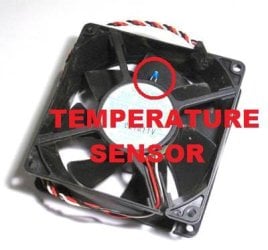
SOLVED!! Just scrape the grime off the bare-metal parts of the system’s internal temperature sensor... and VOALA! Mine was a little blue diode-looking “pin” with two legs peeping out of the desktop system fan itself.
 

Attachments

  • fan.jpg
    fan.jpg
    20.2 KB · Views: 8

My Computer My Computer

Computer type
PC/Desktop
Computer Manufacturer/Model Number
Dell
OS
Windows 7 Ultimate
CPU
Intel
Memory
2GB
Graphics Card(s)
Intel
Back
Top