cpu fan rpm slowly gets higher and higher

jian57

New member
Local time
12:47 PM
Messages
7
This has been happening for around 3 days. When I start the computer (desktop) up, the rpm is normal but it slowly starts to speed up. After around 5 minutes, the fan starts moving at a average of 4000rpm and it's really starting to worry me.
I thought it might have been something to do with dust inside the heatsink so I cleaned the dust with a vaccum cleaner. After that, it still wouldn't slow down so I changed the thermal paste. It now slows down a bit but still run at the average of 4000rpm.
I also tweaked with the bios a bit but still no luck.
Help?
 

My Computer My Computer

At a glance

windows 7
OS
windows 7

My Computer My Computer

At a glance

Win 7 Pro 64-bitIntel i5 2.4 Ghz8GB DDR3Intel HD 3000
Computer type
Laptop
Computer Manufacturer/Model Number
Sony Vaio VPCEB47GM Laptop
OS
Win 7 Pro 64-bit
CPU
Intel i5 2.4 Ghz
Memory
8GB DDR3
Graphics Card(s)
Intel HD 3000
Sound Card
IDT High Definition
Monitor(s) Displays
15.6 WGXA Anti-Glare LED
Screen Resolution
1280x800
Hard Drives
640Gb 7200rpm
Antivirus
MSE
Browser
Opera (primary) with IE9 backup
yes, I have. And there seems to be a corresponding rise with the fan rpm.
 

My Computer My Computer

At a glance

windows 7
OS
windows 7

My Computer My Computer

At a glance

Windows 10 Pro. 64/ version 1709 Windows 7 Pr...Intel i7-6800K @ 4.3Corsair Platinum 16 gig @2400EVGA GTX 1070 OC
Computer type
PC/Desktop
Computer Manufacturer/Model Number
Home made Desktop
OS
Windows 10 Pro. 64/ version 1709 Windows 7 Pro/64
CPU
Intel i7-6800K @ 4.3
Motherboard
ASUS X-99 Deluxe II
Memory
Corsair Platinum 16 gig @2400
Graphics Card(s)
EVGA GTX 1070 OC
Monitor(s) Displays
Asus 27" LED LCD/VE278Q
Screen Resolution
1920-1080 or 1280-720 HDMI
Hard Drives
INTEL SSD 730-240 Gb Sata 3.0/
PSU
EVGA Platium 1200W
Case
Phanteks Luxe Tempered Glass 8 fans/ one radiator
Cooling
XSPC/ Water Cooled CPU
Keyboard
Das 4 Professional
Mouse
Logitech M705/MX Anywhere 2-S
Internet Speed
100 mbits
Antivirus
Microsoft Security Essentials/ Malwarebytes Premium 3.0/ SAS
Browser
I.E. 11 default/Firefox/ ISP Time Warner Cable/Spectrum
Other Info
LG BluRay Burner/
Sound system-KLipsch-THX/
Icy Dock ssd Hot Swap bays.
When was the last time you cleaned your computer with compressed air?
 

My Computer My Computer

At a glance

Windows 7 Professional x64 Service Pack 1AMD Athlon X4 6456GB DDR3 1066Sapphire Radeon HD 5670 512MB GDDR5
Computer type
PC/Desktop
Computer Manufacturer/Model Number
HP Pavilion P7-1010
OS
Windows 7 Professional x64 Service Pack 1
CPU
AMD Athlon X4 645
Motherboard
Foxxcon N-Alvorix RS880
Memory
6GB DDR3 1066
Graphics Card(s)
Sapphire Radeon HD 5670 512MB GDDR5
Sound Card
Realtek Integrated Audio
Monitor(s) Displays
HP 2011x
Screen Resolution
1600x900
Hard Drives
1. Crucial M4 128GB SSD
2. 1TB Seagate Barracuda 7200.12 RPM
3. 1TB Western Digital Caviar Green 5400RPM
PSU
Seasonic S12 II Bronze 380 Watt
Case
HP OEM
Cooling
Coolermaster Heatsink, AVC Case Fan
Keyboard
HP OEM- Made by Chicony
Mouse
HP OEM- Made by Logitech
Internet Speed
20MBit Down/4 Up
Antivirus
Microsoft Security Essentials
Browser
Internet Explorer 10
yes, I have. And there seems to be a corresponding rise with the fan rpm.
If your fan speed is increasing with a corresponding increase in CPU temp, that is normal and good.
The "system" is trying to keep the CPU temp down so it won't overheat.

If you have cleaned everything, and made sure ALL FANS are working OK, check Task Manager to see if you have something running that is using a lot of CPU.

Start Task Manager (Right click on the taskbar)
- click the "Show processes from all users"
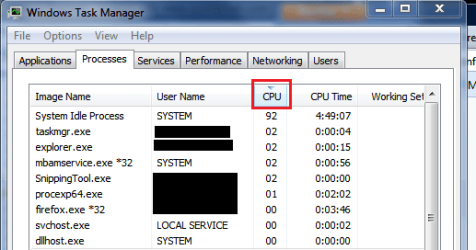
- click the "CPU" heading so the highest numbers are sorted to the top of the list

Post a screen print of what you see when the fan is running fast.
http://www.sevenforums.com/tutorials/9733-screenshots-files-upload-post-seven-forums.html#post93869

Here is an example showing 92% CPU usage for "System Idle Process".

TMUSP01.PNG
 

My Computer My Computer

At a glance

Multi-Boot W7_Pro_x64 W8.1_Pro_x64 W10_Pro_x6...AMD Athlon II x4 6206GB GSkill DDR2 800AMD 4670 GPU + AMD 4200 IGP
Computer type
PC/Desktop
Computer Manufacturer/Model Number
home built
OS
Multi-Boot W7_Pro_x64 W8.1_Pro_x64 W10_Pro_x64 +Linux_VMs +Chromium_VM
CPU
AMD Athlon II x4 620
Motherboard
Gigabyte GA-MA785G-UD3H
Memory
6GB GSkill DDR2 800
Graphics Card(s)
AMD 4670 GPU + AMD 4200 IGP
Sound Card
on board Realtek ALC889A
Monitor(s) Displays
RCA 40" LCD TV, Insignia 32" LCD TV, HP 15" LCD monitor
Screen Resolution
1680 x 1050
Hard Drives
OCZ Vertex 3 120GB,
Samsung F3 1TB (3),
Several others - WD, Seagate, Hitachi, ...
PSU
Corsair 500 W
Case
Rosewill mid tower
Cooling
CM 90mm rifle
Keyboard
Gyration wireless, Logitech wireless, Dell USB wired
Mouse
Gyration wireless, Logitech wireless, V7 USB wired
Internet Speed
Spectrum - 100Mbps D / 10Mbps U
Antivirus
Avast, MBAM3, EMET, WinPatrol
Browser
Pale Moon, Firefox, IE
Other Info
2 multi-boot PC's
Mainly HTPC/Office/Gen purpose (no gaming).
Trendnet USB KVM.
LG DVD burner/Blue Ray Player.
Tray system for removable SATA backup drives.

Not currently OCd, under-volted.
I use Hybrid sleep, rarely re-boot or shutdown.

Hauppauge HD-PVR, Avermedia PCIe TV Tuner, Hauppauge PCI TV Tuner.
When was the last time you cleaned your computer with compressed air?
I cleaned it just a few days ago.

yes, I have. And there seems to be a corresponding rise with the fan rpm.
If your fan speed is increasing with a corresponding increase in CPU temp, that is normal and good.
The "system" is trying to keep the CPU temp down so it won't overheat.

If you have cleaned everything, and made sure ALL FANS are working OK, check Task Manager to see if you have something running that is using a lot of CPU.

Start Task Manager (Right click on the taskbar)
- click the "Show processes from all users"
- click the "CPU" heading so the highest numbers are sorted to the top of the list

Post a screen print of what you see when the fan is running fast.
http://www.sevenforums.com/tutorials/9733-screenshots-files-upload-post-seven-forums.html#post93869

Here is an example showing 92% CPU usage for "System Idle Process".

View attachment 262300

Here is the screenshot:
2d9hrb.png


And I will fill in my specs later.
 

My Computer My Computer

At a glance

windows 7
OS
windows 7
88% CPU usage for System Idle process should not be a problem that would cause overheating.
If you keep Task Manager open, does the fan speed and CPU temp decrease?
There is some malware that hides itself when Task Manager is opened so the user doesn't see it, and CPU usage looks OK...
 

My Computer My Computer

At a glance

Multi-Boot W7_Pro_x64 W8.1_Pro_x64 W10_Pro_x6...AMD Athlon II x4 6206GB GSkill DDR2 800AMD 4670 GPU + AMD 4200 IGP
Computer type
PC/Desktop
Computer Manufacturer/Model Number
home built
OS
Multi-Boot W7_Pro_x64 W8.1_Pro_x64 W10_Pro_x64 +Linux_VMs +Chromium_VM
CPU
AMD Athlon II x4 620
Motherboard
Gigabyte GA-MA785G-UD3H
Memory
6GB GSkill DDR2 800
Graphics Card(s)
AMD 4670 GPU + AMD 4200 IGP
Sound Card
on board Realtek ALC889A
Monitor(s) Displays
RCA 40" LCD TV, Insignia 32" LCD TV, HP 15" LCD monitor
Screen Resolution
1680 x 1050
Hard Drives
OCZ Vertex 3 120GB,
Samsung F3 1TB (3),
Several others - WD, Seagate, Hitachi, ...
PSU
Corsair 500 W
Case
Rosewill mid tower
Cooling
CM 90mm rifle
Keyboard
Gyration wireless, Logitech wireless, Dell USB wired
Mouse
Gyration wireless, Logitech wireless, V7 USB wired
Internet Speed
Spectrum - 100Mbps D / 10Mbps U
Antivirus
Avast, MBAM3, EMET, WinPatrol
Browser
Pale Moon, Firefox, IE
Other Info
2 multi-boot PC's
Mainly HTPC/Office/Gen purpose (no gaming).
Trendnet USB KVM.
LG DVD burner/Blue Ray Player.
Tray system for removable SATA backup drives.

Not currently OCd, under-volted.
I use Hybrid sleep, rarely re-boot or shutdown.

Hauppauge HD-PVR, Avermedia PCIe TV Tuner, Hauppauge PCI TV Tuner.
No, the fan doesn't decrease. It runs normally.
 

My Computer My Computer

At a glance

windows 7
OS
windows 7
Back
Top