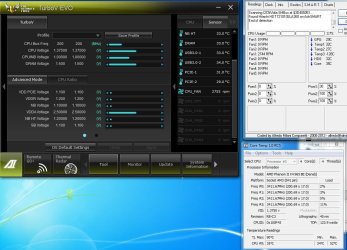
CPU FAN Running at 2700 RPM

Pantz

New member
Member
VIP
Local time
11:35 AM
Messages
318
CPU FAN Running at 2700 RPM (100 % )
Hello Everyone, a new Asus sabertooth 99FX R2 Motherboard.
Here are my system Specs are below . Everything is running at Default, and Windows 7X64 is updated.

i am really starting to like this new MB, since i change from another manufacturer after being with them for years.

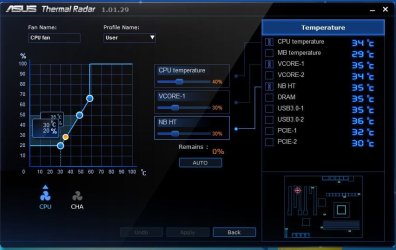
i have a small issue, my CPU FAN is running @ 100 % 2700 RPM ...... and its a bit loud, but i do not hear it when i am gaming.
only when the machine is at idle.... i would like to adjust it down, but i dont know the best, easiest and safest way to do this.

i have 4 options
1 Asus AI suite
2 BIOS
3 Speedfan
4 Zalman fan controller 2

i would like to bring down the RPM to about 50% , what is the best and safest way to accomplish this

Thanks in Advance
 

Attachments
  • Asus Fan Speed.JPG
    Asus Fan Speed.JPG
    133.6 KB · Views: 25
Last edited:

My Computer My Computer

At a glance

Genuine windows 7X64AMD 8320 FX Processor8 Gigs Corsair Vengance DDR3 1886 MHZEVGA GTX 750 Ti FTW
Computer type
PC/Desktop
Computer Manufacturer/Model Number
Personal build
OS
Genuine windows 7X64
CPU
AMD 8320 FX Processor
Motherboard
Asus Sabertoothe 990 FX R2.0 AM2+/AM2 AMD MB
Memory
8 Gigs Corsair Vengance DDR3 1886 MHZ
Graphics Card(s)
EVGA GTX 750 Ti FTW
Sound Card
On board
Monitor(s) Displays
ASUS VE247H 24 inch
Screen Resolution
HDMI
Hard Drives
Samsung 120GB 2.5-inch SSD 840 SATA III
PSU
Corsair 750 Watts
Case
Gigabyte case
Cooling
Zellman CNPS 10 Extreme
Internet Speed
50megs
Antivirus
AVG Free
Is it an aftermarket fan?
Usually you do not need speedfan to control it's speed and you can set the way in which the fan operates. Have you read the motherboards manual? It should be a section where you can modify PWM values or set the fan to voltage regulation.
 

My Computer My Computer

At a glance

Windows 7 professional X64AMD A10-5800K OC@ 4.4Ghz.8GB Kingston HyperX Blu 1333mhzXFX HD7870 2GB Core Edition
Computer type
PC/Desktop
OS
Windows 7 professional X64
CPU
AMD A10-5800K OC@ 4.4Ghz.
Motherboard
Gigabyte F2A85X-UP4
Memory
8GB Kingston HyperX Blu 1333mhz
Graphics Card(s)
XFX HD7870 2GB Core Edition
Monitor(s) Displays
Acer AL2216W
Screen Resolution
1680x1050
Hard Drives
Seagate Barracuda 500gb 7200rpm
Seagate Barracuda 1.5TB 7200rpm
PSU
Cooler Master Silent Pro M 850W
Case
Thermaltake Commander MS-I
Cooling
Cooler Master N520
Mouse
Logitech M504
Internet Speed
10Mbps

My Computer My Computer

At a glance

Windows 10 Home x64INTEL Core i5-750 Quad-Core 3.37GHzHyperX Fury Black Series 8GB (2 x 4GB) 1866MhzEVGA GeForce GTX 750 Superclocked 1GB 128-Bit...
Computer type
PC/Desktop
OS
Windows 10 Home x64
CPU
INTEL Core i5-750 Quad-Core 3.37GHz
Motherboard
ASUS P7P55D
Memory
HyperX Fury Black Series 8GB (2 x 4GB) 1866Mhz
Graphics Card(s)
EVGA GeForce GTX 750 Superclocked 1GB 128-Bit GDDR5
Monitor(s) Displays
LG 32MA68HY 32" IPS
Screen Resolution
1920 x 1080
Hard Drives
Samsung 840 Evo 120GB, SEAGATE 500GB Barracuda® 7200.12, SATA 3 Gb/s, 7200 RPM, 16MB cache
PSU
ANTEC TruePower New TP-550, 80 PLUS, 550W
Case
ANTEC Three Hundred Illusion
Cooling
COOLER MASTER Hyper 212 Plus, 4 x 120mm 1 x 140mm Noctua's
Internet Speed
85 + Mbps
Antivirus
Avast
Browser
Vivaldi
You should be able to use the zalman fan controller i have one with no issues controlling my RPM what CPU cooler do you have?
 

My Computer My Computer

At a glance

Windows 7 Pro SP1 x64Intel Core i5 4670k @3.4 GhzCorsair XMS3 16GB 1333 Mhz 9/9/9Asus 7850 2GB Edition 860/1200
Computer type
PC/Desktop
Computer Manufacturer/Model Number
Custom Build
OS
Windows 7 Pro SP1 x64
CPU
Intel Core i5 4670k @3.4 Ghz
Motherboard
Gigabyte Z87X-D3H
Memory
Corsair XMS3 16GB 1333 Mhz 9/9/9
Graphics Card(s)
Asus 7850 2GB Edition 860/1200
Sound Card
Logitech z506 Speakers / Logitech G930 Headset
Monitor(s) Displays
Asus VE278H / Vizio E320-A0
Screen Resolution
1920x1080 (Asus) / 1366x768 (Vizio)
Hard Drives
120GB OCZ Vertex 3 SSD
1TB Seagate HDD
PSU
Corsair RM 650 Watts
Case
Fractal Define R4 Black Pearl
Cooling
1x140mm Front Intake Fan 1x140mm Rear Exhaust Fan
Keyboard
Cooler Master Quickfire TK Cherry Mx Blue
Mouse
Razer Naga Blue
Internet Speed
Wired Ethernet 15 PING 35.00 Mbps Download 10.00 Mbps Upload
Antivirus
Eset Smart Security 8
Browser
Google Chrome
Other Info
Just ask me if i missed something
Is it an aftermarket fan?
Usually you do not need speedfan to control it's speed and you can set the way in which the fan operates. Have you read the motherboards manual? It should be a section where you can modify PWM values or set the fan to voltage regulation.

yes Erick i read the manual, and its a aftermarket fan ::: Zalman, leading the world of Quiet Computing Solutions :::
i will uninstall speedfan and re read the manual again..

Also Yes to A GUY

Did you connect the fan to the correct CPU fan header? Have you installed the TUF Thermal Radar software? As Erick said, you can control the CPU fan speed. You can also use the CPU Q-Fan setting. You have multiple options in BIOS. A Guy

If you do not have it, download the manual here:

https://www.asus.com/Motherboards/SABERTOOTH_990FX_R20/#support_Download_30

A Guy


You should be able to use the zalman fan controller i have one with no issues controlling my RPM what CPU cooler do you have?

Ascendents i have a Zalman cooler
::: Zalman, leading the world of Quiet Computing Solutions :::


OK Thanks for all the suggestions guys, i will consult the manual again and see if i can reduce the fanspeed using the BIOS....
will post back later
 

My Computer My Computer

At a glance

Genuine windows 7X64AMD 8320 FX Processor8 Gigs Corsair Vengance DDR3 1886 MHZEVGA GTX 750 Ti FTW
Computer type
PC/Desktop
Computer Manufacturer/Model Number
Personal build
OS
Genuine windows 7X64
CPU
AMD 8320 FX Processor
Motherboard
Asus Sabertoothe 990 FX R2.0 AM2+/AM2 AMD MB
Memory
8 Gigs Corsair Vengance DDR3 1886 MHZ
Graphics Card(s)
EVGA GTX 750 Ti FTW
Sound Card
On board
Monitor(s) Displays
ASUS VE247H 24 inch
Screen Resolution
HDMI
Hard Drives
Samsung 120GB 2.5-inch SSD 840 SATA III
PSU
Corsair 750 Watts
Case
Gigabyte case
Cooling
Zellman CNPS 10 Extreme
Internet Speed
50megs
Antivirus
AVG Free
Speedfan doesn't work ''right out of the box'' you have to configure it a lot for it to work properly. And to be honest, tweaking in the BIOS is far more simple.
 

My Computer My Computer

At a glance

Windows 7 professional X64AMD A10-5800K OC@ 4.4Ghz.8GB Kingston HyperX Blu 1333mhzXFX HD7870 2GB Core Edition
Computer type
PC/Desktop
OS
Windows 7 professional X64
CPU
AMD A10-5800K OC@ 4.4Ghz.
Motherboard
Gigabyte F2A85X-UP4
Memory
8GB Kingston HyperX Blu 1333mhz
Graphics Card(s)
XFX HD7870 2GB Core Edition
Monitor(s) Displays
Acer AL2216W
Screen Resolution
1680x1050
Hard Drives
Seagate Barracuda 500gb 7200rpm
Seagate Barracuda 1.5TB 7200rpm
PSU
Cooler Master Silent Pro M 850W
Case
Thermaltake Commander MS-I
Cooling
Cooler Master N520
Mouse
Logitech M504
Internet Speed
10Mbps
Did you connect the fan to the correct CPU fan header? Have you installed the TUF Thermal Radar software? As Erick said, you can control the CPU fan speed. You can also use the CPU Q-Fan setting. You have multiple options in BIOS. A Guy

If you do not have it, download the manual here:

https://www.asus.com/Motherboards/SABERTOOTH_990FX_R20/#support_Download_30

A Guy
I would go to the AI suite but you can do that in the bios as well but if you have a Zalman speed control and it isn't on a direct header you can tone it down if your case has a fan speed regulator try that mine works pretty good but I usually keeps fans kinda high because want to make sure to get that max cool

Also keep in mind when going into the bios of the Sabertooth your speeds increase your overclock is higher then it was when set these are little things I noticed about these boards and your 965BE is maxing out at 53c that pretty darn high for a none OC maybe your chip is going bad my 965be Maxed at 38c most of the time and it was @ 4Ghz thought I would point that out to you Max temp looked pretty high right there
 

My Computer My Computer

At a glance

Windows 10 Home Premium 64bit sp1Intel I7-6700K @ 4.6 Ghz 1.344 volts everyday OC32GB G-Skill TridentZ 3200mhz 16-18-18-38 DDR4Sli Gigabyte Windforce GTX 980 G1
Computer type
PC/Desktop
Computer Manufacturer/Model Number
CoreI7-6700K MrFingerIII Special Builds
OS
Windows 10 Home Premium 64bit sp1
CPU
Intel I7-6700K @ 4.6 Ghz 1.344 volts everyday OC
Motherboard
Asrock Fatality K6 Z170 Socket 1151
Memory
32GB G-Skill TridentZ 3200mhz 16-18-18-38 DDR4
Graphics Card(s)
Sli Gigabyte Windforce GTX 980 G1
Sound Card
AC97 Creative Rage Tactic 3D Headphones Bluetooth
Monitor(s) Displays
27" Asus ROG Swift PG278Q G-Sync 48" Vizio Smart HD TV
Screen Resolution
2560x1440p 27"- 48" Currently Gaming at 2560x1440p Res 2K
Hard Drives
250GB Samsung Evo840SSD Seagate baracuda 500 GB WD Mybook 500Gb 1TB Seagate Barracuda
PSU
HX1050w Corsair Silver 80plus certified crosfire/sli
Case
Enthod Pro Full Tower
Cooling
Corsair H110i GT 280 mm High Performance WaterBlock
Keyboard
Logitech wireless keyboard
Mouse
Logitech wireless mouse
Internet Speed
Cox Cable 100+ mb
Antivirus
WebRoot Spysweeper with Antivirus
Browser
IE-10, Chrome, Opera
Other Info
My Other Rig is a AMD FX8320E @4.6Ghz 16GB Ballistic Sport Ram
Mobo Asrock Fatality 990FX 120GB OCZ SSD 1TB Seagate Barracuda Corsair H75 Cooling PSU Corsair CX750
GPU GTX Gigabyte 970G1
I would go to the AI suite
Only if you really like bloatware, or at least that is how I have found it any time I tested it. Asus may make good hardware, but they still have a long way to go with their software.

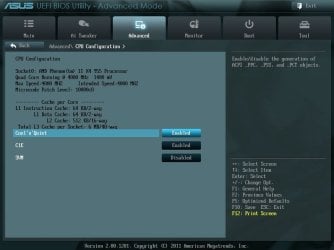
As mentioned by A Guy, there is no need for any software to control the fan speed as everything you need is in the bios. The big one is making sure that Cool and Quiet is enabled in the bios,

130318112957.jpg

That should slow the fan down (and lower the CPU speed) when the computer is idle, as well as the computer will use less electricity. If it doesn't then try adjusting the Q-Fan settings,

130318113013.jpg
 

My Computer My Computer

At a glance

Win 7 Ultimate x64FX-8350 @ 4.6 GHz so farADATA XPG V1 Series Black 8GB DDR3 1600Sapphire R9 270x Dual-X
Computer type
PC/Desktop
Computer Manufacturer/Model Number
Me
OS
Win 7 Ultimate x64
CPU
FX-8350 @ 4.6 GHz so far
Motherboard
Asus M5A97 EVO
Memory
ADATA XPG V1 Series Black 8GB DDR3 1600
Graphics Card(s)
Sapphire R9 270x Dual-X
Sound Card
Xonar DGX w/ Corsair Vengence 1300
Monitor(s) Displays
Acer S232HL Abid
Screen Resolution
1920x1080
Hard Drives
120 GB OCZ Vertex 3
500 GB Seagate 7200.12
PSU
Antec Earthwatts 650W Green
Case
Antec Three Hundred
Cooling
Cooler Master 212 EVO
Keyboard
Logitech G510
Mouse
Logitech G500s
Internet Speed
35000/3000
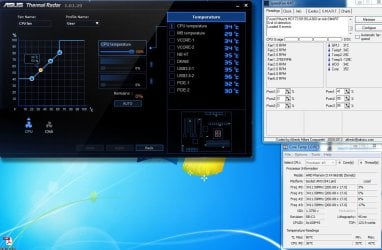
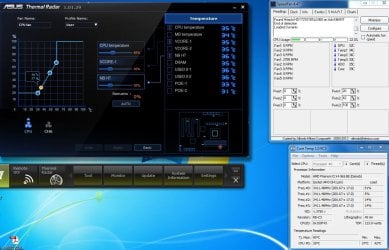
Hello again, Solarstarshines i also noticed that my temp was at 52C with no OC i dont know what happened there but the max temp is really 42 C (see attatchment )

I booted up my PC and looked again at my Fan Speed (see attachments ) still running at 2700 RPM

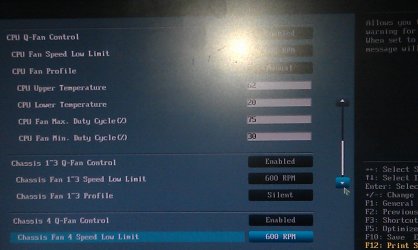
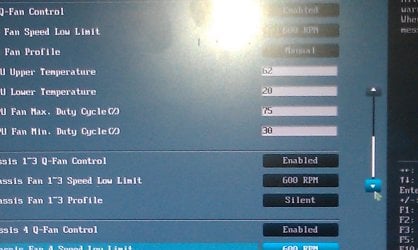
i rebooted and went into my BIOS and made sure Cool and quiet was enabled... it was, then
manually (user settings ) set the fan speed to 60% or there about's applied the setting for user

See attachments

And still my CPU fan is @ 2700 RPM, am i not doing something right ?, am i missing something,? ...
My CPU Fan has only a 3 pin connector going to the CPU Fan Header.....could that be the reason why i cannot adjust my Fan Speed ? may be i need a CPU fan with a 4 pin connector ?

Thank in advance.....
 

Attachments

  • Asus Fan Speed 3_18.JPG
    Asus Fan Speed 3_18.JPG
    135.5 KB · Views: 12
  • Asus Fan Speed 3_18 A.JPG
    Asus Fan Speed 3_18 A.JPG
    57.4 KB · Views: 11
  • Asus Fan Speed 3_18 B.JPG
    Asus Fan Speed 3_18 B.JPG
    60.2 KB · Views: 9
  • after BIOS  adjustments Asus Fan Speed 3_18 B.JPG
    after BIOS adjustments Asus Fan Speed 3_18 B.JPG
    146.9 KB · Views: 10
  • IMAG0443.jpg
    IMAG0443.jpg
    349.8 KB · Views: 10
  • IMAG0444.jpg
    IMAG0444.jpg
    326.3 KB · Views: 7

My Computer My Computer

At a glance

Genuine windows 7X64AMD 8320 FX Processor8 Gigs Corsair Vengance DDR3 1886 MHZEVGA GTX 750 Ti FTW
Computer type
PC/Desktop
Computer Manufacturer/Model Number
Personal build
OS
Genuine windows 7X64
CPU
AMD 8320 FX Processor
Motherboard
Asus Sabertoothe 990 FX R2.0 AM2+/AM2 AMD MB
Memory
8 Gigs Corsair Vengance DDR3 1886 MHZ
Graphics Card(s)
EVGA GTX 750 Ti FTW
Sound Card
On board
Monitor(s) Displays
ASUS VE247H 24 inch
Screen Resolution
HDMI
Hard Drives
Samsung 120GB 2.5-inch SSD 840 SATA III
PSU
Corsair 750 Watts
Case
Gigabyte case
Cooling
Zellman CNPS 10 Extreme
Internet Speed
50megs
Antivirus
AVG Free
My CPU Fan has only a 3 pin connector going to the CPU Fan Header

Yes. You need a 4 pin/PWM fan for it to be controlled by the bios.
 

My Computer My Computer

At a glance

Win 7 Ultimate x64FX-8350 @ 4.6 GHz so farADATA XPG V1 Series Black 8GB DDR3 1600Sapphire R9 270x Dual-X
Computer type
PC/Desktop
Computer Manufacturer/Model Number
Me
OS
Win 7 Ultimate x64
CPU
FX-8350 @ 4.6 GHz so far
Motherboard
Asus M5A97 EVO
Memory
ADATA XPG V1 Series Black 8GB DDR3 1600
Graphics Card(s)
Sapphire R9 270x Dual-X
Sound Card
Xonar DGX w/ Corsair Vengence 1300
Monitor(s) Displays
Acer S232HL Abid
Screen Resolution
1920x1080
Hard Drives
120 GB OCZ Vertex 3
500 GB Seagate 7200.12
PSU
Antec Earthwatts 650W Green
Case
Antec Three Hundred
Cooling
Cooler Master 212 EVO
Keyboard
Logitech G510
Mouse
Logitech G500s
Internet Speed
35000/3000
No they will be controlled just fine, The 4th pin is for PWM.

PWM (Pulse width modulation) Is the ability to adjust the rotation speed on the fly without changing the input voltage delivered to the cooling fan.

Your motherboard will be able to control them with voltage.

You can control a 3-pin fan connected to your mobo - be it on a 4-pin or 3-pin connector - via software like Speedfan. etc. Fans connected to the mobo are usually controlled by bios, but can be overridden by software. Take your cpu for instance with a 3-pin fan connected. Your bios has a listing of thermal limits (Tcase) for all CPU's that is supports, so when it detects your cpu the bios might be setup for instance so if CPU temp > 75% of Tcase set fan to 12v (or 100%); if CPU temp < 50% it might just send 5v. for 3-pin connectors the rpm reading is meaningless to the system itself, it's just an output signal for the user to interpret.

With PWM 4-pin fans however it's a different case. The fan is pulsed with 12v or nothing at all, and those pulses go for a set length of time, a width if you may... hence the name pulse-width modulation. PWM is more efficient as the fan is not constantly receiving voltage. both 3-pin and PWM fans adjust speed according to the same table of temps, just the control of speed is handled differently. ;)
 

My Computer My Computer

At a glance

Windows 7 Ultimate 64bitAMD Phenom Quad core 9950 black edition16Gb2x XFX Radeon 5850
Computer type
PC/Desktop
Computer Manufacturer/Model Number
Self Built
OS
Windows 7 Ultimate 64bit
CPU
AMD Phenom Quad core 9950 black edition
Motherboard
Gigabyte
Memory
16Gb
Graphics Card(s)
2x XFX Radeon 5850
Sound Card
PCI Express X-Fi Titanium / Logitech G35
Monitor(s) Displays
2x HP 2410i
Screen Resolution
1920x1080
Hard Drives
2x 500Gb Seagate
1x 300Gb Seagate
1x 1Tb Seagate
2x 1Tb Hitatchi
PSU
Jean Tech Storm 700W
Case
Cooler Master COSMOS S
Cooling
Akasa Evo Blue Pro
Keyboard
Logitech G15
Mouse
Mad Catz M.M.O. 7
Internet Speed
12mb
I've had trouble getting Zalman.......3 pin fans to run slower on some motherboards. If software fails, the Fanmate 2 should do the job.
 

My Computer My Computer

At a glance

Windows 7 Home Premium 64 bitIntel Core i7-4790G.SKILL 8GB (2 x 4GB) DDR3 F3-10666CL9D-8GBNTAMD Radeon R7 250
Computer type
PC/Desktop
Computer Manufacturer/Model Number
Custom Build
OS
Windows 7 Home Premium 64 bit
CPU
Intel Core i7-4790
Motherboard
GA-Z87X-D3H
Memory
G.SKILL 8GB (2 x 4GB) DDR3 F3-10666CL9D-8GBNT
Graphics Card(s)
AMD Radeon R7 250
Sound Card
Realtek ALC892
Monitor(s) Displays
Samsung UN32EH5000, Dell 1703FPT
Screen Resolution
1920 x 1080, 1280 x 1024
Hard Drives
WD5003AZEX
WD10EZEX
Samsung HD103SJ
Samsung 128 GB 840 PRO
PSU
SeaSonic M12II SS-500GM
Case
Fractal Design Define R4
Cooling
Zalman CNPS9900ALED
Keyboard
Logitech K800
Mouse
Logitech M705
Internet Speed
16 Mbps
Antivirus
Avast
Browser
Firefox
Other Info
Bose Companion 2 Multimedia Speakers
Hello again Ahhhh ok..... so i guess i would need to get a NEW CPU FAN with a 4 pin connector ? any suggestions on a quiet 4 pin CPU Fan ?

Thanks in advance
 

My Computer My Computer

At a glance

Genuine windows 7X64AMD 8320 FX Processor8 Gigs Corsair Vengance DDR3 1886 MHZEVGA GTX 750 Ti FTW
Computer type
PC/Desktop
Computer Manufacturer/Model Number
Personal build
OS
Genuine windows 7X64
CPU
AMD 8320 FX Processor
Motherboard
Asus Sabertoothe 990 FX R2.0 AM2+/AM2 AMD MB
Memory
8 Gigs Corsair Vengance DDR3 1886 MHZ
Graphics Card(s)
EVGA GTX 750 Ti FTW
Sound Card
On board
Monitor(s) Displays
ASUS VE247H 24 inch
Screen Resolution
HDMI
Hard Drives
Samsung 120GB 2.5-inch SSD 840 SATA III
PSU
Corsair 750 Watts
Case
Gigabyte case
Cooling
Zellman CNPS 10 Extreme
Internet Speed
50megs
Antivirus
AVG Free
Is this the Fan controller you're using? Make sure you dont plug in the cpu fan on the motherboard itself and connect the fan controller to the motherboard and the other end with the cpu fan connecter

ZALMAN FAN MATE 2 Controller, Panel - Newegg.com
 

My Computer My Computer

At a glance

Windows 7 Pro SP1 x64Intel Core i5 4670k @3.4 GhzCorsair XMS3 16GB 1333 Mhz 9/9/9Asus 7850 2GB Edition 860/1200
Computer type
PC/Desktop
Computer Manufacturer/Model Number
Custom Build
OS
Windows 7 Pro SP1 x64
CPU
Intel Core i5 4670k @3.4 Ghz
Motherboard
Gigabyte Z87X-D3H
Memory
Corsair XMS3 16GB 1333 Mhz 9/9/9
Graphics Card(s)
Asus 7850 2GB Edition 860/1200
Sound Card
Logitech z506 Speakers / Logitech G930 Headset
Monitor(s) Displays
Asus VE278H / Vizio E320-A0
Screen Resolution
1920x1080 (Asus) / 1366x768 (Vizio)
Hard Drives
120GB OCZ Vertex 3 SSD
1TB Seagate HDD
PSU
Corsair RM 650 Watts
Case
Fractal Define R4 Black Pearl
Cooling
1x140mm Front Intake Fan 1x140mm Rear Exhaust Fan
Keyboard
Cooler Master Quickfire TK Cherry Mx Blue
Mouse
Razer Naga Blue
Internet Speed
Wired Ethernet 15 PING 35.00 Mbps Download 10.00 Mbps Upload
Antivirus
Eset Smart Security 8
Browser
Google Chrome
Other Info
Just ask me if i missed something

My Computer My Computer

At a glance

Genuine windows 7X64AMD 8320 FX Processor8 Gigs Corsair Vengance DDR3 1886 MHZEVGA GTX 750 Ti FTW
Computer type
PC/Desktop
Computer Manufacturer/Model Number
Personal build
OS
Genuine windows 7X64
CPU
AMD 8320 FX Processor
Motherboard
Asus Sabertoothe 990 FX R2.0 AM2+/AM2 AMD MB
Memory
8 Gigs Corsair Vengance DDR3 1886 MHZ
Graphics Card(s)
EVGA GTX 750 Ti FTW
Sound Card
On board
Monitor(s) Displays
ASUS VE247H 24 inch
Screen Resolution
HDMI
Hard Drives
Samsung 120GB 2.5-inch SSD 840 SATA III
PSU
Corsair 750 Watts
Case
Gigabyte case
Cooling
Zellman CNPS 10 Extreme
Internet Speed
50megs
Antivirus
AVG Free
Yeah give it a try it is a much better option in my opinion i have it in the front of my case and just route the cable through the case to plug it in and have the knob in the front makes it easier to adjust with a min rpm of 1200 and a max of 2500 im using a zalman cpu cooler as well so you should have the same rpm i use 1500 rpm on mine hope this helps.
 

My Computer My Computer

At a glance

Windows 7 Pro SP1 x64Intel Core i5 4670k @3.4 GhzCorsair XMS3 16GB 1333 Mhz 9/9/9Asus 7850 2GB Edition 860/1200
Computer type
PC/Desktop
Computer Manufacturer/Model Number
Custom Build
OS
Windows 7 Pro SP1 x64
CPU
Intel Core i5 4670k @3.4 Ghz
Motherboard
Gigabyte Z87X-D3H
Memory
Corsair XMS3 16GB 1333 Mhz 9/9/9
Graphics Card(s)
Asus 7850 2GB Edition 860/1200
Sound Card
Logitech z506 Speakers / Logitech G930 Headset
Monitor(s) Displays
Asus VE278H / Vizio E320-A0
Screen Resolution
1920x1080 (Asus) / 1366x768 (Vizio)
Hard Drives
120GB OCZ Vertex 3 SSD
1TB Seagate HDD
PSU
Corsair RM 650 Watts
Case
Fractal Define R4 Black Pearl
Cooling
1x140mm Front Intake Fan 1x140mm Rear Exhaust Fan
Keyboard
Cooler Master Quickfire TK Cherry Mx Blue
Mouse
Razer Naga Blue
Internet Speed
Wired Ethernet 15 PING 35.00 Mbps Download 10.00 Mbps Upload
Antivirus
Eset Smart Security 8
Browser
Google Chrome
Other Info
Just ask me if i missed something

My Computer My Computer

At a glance

Genuine windows 7X64AMD 8320 FX Processor8 Gigs Corsair Vengance DDR3 1886 MHZEVGA GTX 750 Ti FTW
Computer type
PC/Desktop
Computer Manufacturer/Model Number
Personal build
OS
Genuine windows 7X64
CPU
AMD 8320 FX Processor
Motherboard
Asus Sabertoothe 990 FX R2.0 AM2+/AM2 AMD MB
Memory
8 Gigs Corsair Vengance DDR3 1886 MHZ
Graphics Card(s)
EVGA GTX 750 Ti FTW
Sound Card
On board
Monitor(s) Displays
ASUS VE247H 24 inch
Screen Resolution
HDMI
Hard Drives
Samsung 120GB 2.5-inch SSD 840 SATA III
PSU
Corsair 750 Watts
Case
Gigabyte case
Cooling
Zellman CNPS 10 Extreme
Internet Speed
50megs
Antivirus
AVG Free
Ah i am using a different cpu cooler it should still work though shutdown your computer and connect the fan controller and power back on dont worry about bios settings just go in windows i use hwmonitor to check fan rpms and temps you can find the download below and the cpu cooler i use if you are curios it cools really well but its a sharp cooler and has cut me before so be careful if you buy it.

CPU Cooler - ZALMAN CNPS9500A-LED CPU Cooler - Newegg.com

HWMonitor - CPUID - System & hardware benchmark, monitoring, reporting
 

My Computer My Computer

At a glance

Windows 7 Pro SP1 x64Intel Core i5 4670k @3.4 GhzCorsair XMS3 16GB 1333 Mhz 9/9/9Asus 7850 2GB Edition 860/1200
Computer type
PC/Desktop
Computer Manufacturer/Model Number
Custom Build
OS
Windows 7 Pro SP1 x64
CPU
Intel Core i5 4670k @3.4 Ghz
Motherboard
Gigabyte Z87X-D3H
Memory
Corsair XMS3 16GB 1333 Mhz 9/9/9
Graphics Card(s)
Asus 7850 2GB Edition 860/1200
Sound Card
Logitech z506 Speakers / Logitech G930 Headset
Monitor(s) Displays
Asus VE278H / Vizio E320-A0
Screen Resolution
1920x1080 (Asus) / 1366x768 (Vizio)
Hard Drives
120GB OCZ Vertex 3 SSD
1TB Seagate HDD
PSU
Corsair RM 650 Watts
Case
Fractal Define R4 Black Pearl
Cooling
1x140mm Front Intake Fan 1x140mm Rear Exhaust Fan
Keyboard
Cooler Master Quickfire TK Cherry Mx Blue
Mouse
Razer Naga Blue
Internet Speed
Wired Ethernet 15 PING 35.00 Mbps Download 10.00 Mbps Upload
Antivirus
Eset Smart Security 8
Browser
Google Chrome
Other Info
Just ask me if i missed something
Last edited:

My Computer My Computer

At a glance

Windows 7 Home Premium 64 bitIntel Core i7-4790G.SKILL 8GB (2 x 4GB) DDR3 F3-10666CL9D-8GBNTAMD Radeon R7 250
Computer type
PC/Desktop
Computer Manufacturer/Model Number
Custom Build
OS
Windows 7 Home Premium 64 bit
CPU
Intel Core i7-4790
Motherboard
GA-Z87X-D3H
Memory
G.SKILL 8GB (2 x 4GB) DDR3 F3-10666CL9D-8GBNT
Graphics Card(s)
AMD Radeon R7 250
Sound Card
Realtek ALC892
Monitor(s) Displays
Samsung UN32EH5000, Dell 1703FPT
Screen Resolution
1920 x 1080, 1280 x 1024
Hard Drives
WD5003AZEX
WD10EZEX
Samsung HD103SJ
Samsung 128 GB 840 PRO
PSU
SeaSonic M12II SS-500GM
Case
Fractal Design Define R4
Cooling
Zalman CNPS9900ALED
Keyboard
Logitech K800
Mouse
Logitech M705
Internet Speed
16 Mbps
Antivirus
Avast
Browser
Firefox
Other Info
Bose Companion 2 Multimedia Speakers
Have you tried the fan controller on your current zalman cpu cooler?
 

My Computer My Computer

At a glance

Windows 7 Pro SP1 x64Intel Core i5 4670k @3.4 GhzCorsair XMS3 16GB 1333 Mhz 9/9/9Asus 7850 2GB Edition 860/1200
Computer type
PC/Desktop
Computer Manufacturer/Model Number
Custom Build
OS
Windows 7 Pro SP1 x64
CPU
Intel Core i5 4670k @3.4 Ghz
Motherboard
Gigabyte Z87X-D3H
Memory
Corsair XMS3 16GB 1333 Mhz 9/9/9
Graphics Card(s)
Asus 7850 2GB Edition 860/1200
Sound Card
Logitech z506 Speakers / Logitech G930 Headset
Monitor(s) Displays
Asus VE278H / Vizio E320-A0
Screen Resolution
1920x1080 (Asus) / 1366x768 (Vizio)
Hard Drives
120GB OCZ Vertex 3 SSD
1TB Seagate HDD
PSU
Corsair RM 650 Watts
Case
Fractal Define R4 Black Pearl
Cooling
1x140mm Front Intake Fan 1x140mm Rear Exhaust Fan
Keyboard
Cooler Master Quickfire TK Cherry Mx Blue
Mouse
Razer Naga Blue
Internet Speed
Wired Ethernet 15 PING 35.00 Mbps Download 10.00 Mbps Upload
Antivirus
Eset Smart Security 8
Browser
Google Chrome
Other Info
Just ask me if i missed something
Back
Top