Fan RPM readout issues.

TacticalTimbo

New member
Member
Local time
11:53 AM
Messages
82
I've got a Gigabyte GA-Z97P-D3 motherboard with identical Noctua 3 pin fans connected to both the CPU and sys1 headers. Until recently they both reported RPM, now it's only the CPU header that reports. I believe this data comes from pin 3...

I've tried switching the fans around, with no change, proving the fan isn't to blame. I even tried connecting the fan to sys2 header, with no RPM reading there either, making the header look blameless.

Finally I tried connecting a 4 pin Corsair fan I had lying around, this time I got a read out from the sys1 fan header...

I don't understand why it was happy pumping out RPM data from my 3 pin Noctua for a time, until all a sudden it needs a 4 pin to do this!? Especially as the CPU header is still happily churning out RPM data using the Identical 3 pin fan!?
 

My Computer

Computer Manufacturer/Model Number
Custom build
OS
Windows 7 64-bit
CPU
Core i7 3930K @Stock
Motherboard
Asus Rampage IV Extreme
Memory
G.SKILL Z 1600Mhz 16GB
Graphics Card(s)
Nvidia GTX 580
Sound Card
Asus Xonar DX
Monitor(s) Displays
Dell S2409W
Screen Resolution
1920x1080p
Hard Drives
Crucial M4 128GB, Western Digital WD6400AAKS (X2)
PSU
Corsair Professional Series Gold AX850
Case
CM Storm Trooper
Cooling
Corsair H100
Keyboard
Microsoft Sidewinder X6
Mouse
Logitech G9x
Other Info
HITACHI/LG BH20N Blu-ray Rewriter
I've managed to find a different Cooler Master 3 pin fan, and this sits pretty stable at between 593-633 RPM, when idle.

I found that the Noctua NF-P12 would show under load with prime95, giving crazy readings between 63-2600RPM (more than the fan's physically capable of producing), though on average being 800ish RPM... Why is this happening?
 

My Computer

Computer Manufacturer/Model Number
Custom build
OS
Windows 7 64-bit
CPU
Core i7 3930K @Stock
Motherboard
Asus Rampage IV Extreme
Memory
G.SKILL Z 1600Mhz 16GB
Graphics Card(s)
Nvidia GTX 580
Sound Card
Asus Xonar DX
Monitor(s) Displays
Dell S2409W
Screen Resolution
1920x1080p
Hard Drives
Crucial M4 128GB, Western Digital WD6400AAKS (X2)
PSU
Corsair Professional Series Gold AX850
Case
CM Storm Trooper
Cooling
Corsair H100
Keyboard
Microsoft Sidewinder X6
Mouse
Logitech G9x
Other Info
HITACHI/LG BH20N Blu-ray Rewriter
What software are you using to read the fan's RPM?
 

My Computer

Computer type
PC/Desktop
Computer Manufacturer/Model Number
Mellon Labs (custom build)
OS
Win 7 Pro x64/Win 10 Pro x64 dual boot
CPU
AMD FX 8350 Vishera @ 4200
Motherboard
ASUS M5A97 R2.0
Memory
16 GB Mushkin Blackline DDR3-2400 @ 1866 (9-10-10-10-31)
Graphics Card(s)
XFX Radeon R9 280 Double D Black Edition
Sound Card
Realtek HD Audio on MB. Sounds great.
Monitor(s) Displays
Acer 24", Acer 22"
Screen Resolution
3840 x 1080
Hard Drives
1 x Mushkin Chronos 120 GB SSD (Win 10)
1 x Samsung 850 EVO 250 GB SSD (Win 7)
1 x WD 1TB SATA Blue
1 x WD 1TB SATA Green
PSU
Corsair TX-750
Case
CoolerMaster HAF 912+
Cooling
Coolermaster Seidon 240M Liquid AIO. 6 case fans
Keyboard
Logitech G710+
Mouse
Logitech G500s
Internet Speed
Much better since I got fiber, but still way overpriced.
Antivirus
MSE, Malware Bytes for scanning
Browser
Firefox
Other Info
Corsair VOID USB headphones.

A Mellon Labs X-1 - LCD Smartie driven system status display.

Brought to you by the letter E
What software are you using to read the fan's RPM?

I'm using the PC health section of my Gigabyte's UEFI/BIOS, and HWMonitor; behaviour seems to be reported similarly by both.
 

My Computer

Computer Manufacturer/Model Number
Custom build
OS
Windows 7 64-bit
CPU
Core i7 3930K @Stock
Motherboard
Asus Rampage IV Extreme
Memory
G.SKILL Z 1600Mhz 16GB
Graphics Card(s)
Nvidia GTX 580
Sound Card
Asus Xonar DX
Monitor(s) Displays
Dell S2409W
Screen Resolution
1920x1080p
Hard Drives
Crucial M4 128GB, Western Digital WD6400AAKS (X2)
PSU
Corsair Professional Series Gold AX850
Case
CM Storm Trooper
Cooling
Corsair H100
Keyboard
Microsoft Sidewinder X6
Mouse
Logitech G9x
Other Info
HITACHI/LG BH20N Blu-ray Rewriter
Sounds to me as though your motherboard's fan sensor is giving the weird readings. What do the fan speeds show in BIOS?
 

My Computer

Computer type
PC/Desktop
Computer Manufacturer/Model Number
Mellon Labs (custom build)
OS
Win 7 Pro x64/Win 10 Pro x64 dual boot
CPU
AMD FX 8350 Vishera @ 4200
Motherboard
ASUS M5A97 R2.0
Memory
16 GB Mushkin Blackline DDR3-2400 @ 1866 (9-10-10-10-31)
Graphics Card(s)
XFX Radeon R9 280 Double D Black Edition
Sound Card
Realtek HD Audio on MB. Sounds great.
Monitor(s) Displays
Acer 24", Acer 22"
Screen Resolution
3840 x 1080
Hard Drives
1 x Mushkin Chronos 120 GB SSD (Win 10)
1 x Samsung 850 EVO 250 GB SSD (Win 7)
1 x WD 1TB SATA Blue
1 x WD 1TB SATA Green
PSU
Corsair TX-750
Case
CoolerMaster HAF 912+
Cooling
Coolermaster Seidon 240M Liquid AIO. 6 case fans
Keyboard
Logitech G710+
Mouse
Logitech G500s
Internet Speed
Much better since I got fiber, but still way overpriced.
Antivirus
MSE, Malware Bytes for scanning
Browser
Firefox
Other Info
Corsair VOID USB headphones.

A Mellon Labs X-1 - LCD Smartie driven system status display.

Brought to you by the letter E
Sounds to me as though your motherboard's fan sensor is giving the weird readings. What do the fan speeds show in BIOS?

Same thing as HW Monitor app in Windows environment; mostly just 0 RPM, but then after some time, once it's warmed up no doubt, it gives erratic readings between 0-2500 RPM (without the audible revving to back this up) .
 

My Computer

Computer Manufacturer/Model Number
Custom build
OS
Windows 7 64-bit
CPU
Core i7 3930K @Stock
Motherboard
Asus Rampage IV Extreme
Memory
G.SKILL Z 1600Mhz 16GB
Graphics Card(s)
Nvidia GTX 580
Sound Card
Asus Xonar DX
Monitor(s) Displays
Dell S2409W
Screen Resolution
1920x1080p
Hard Drives
Crucial M4 128GB, Western Digital WD6400AAKS (X2)
PSU
Corsair Professional Series Gold AX850
Case
CM Storm Trooper
Cooling
Corsair H100
Keyboard
Microsoft Sidewinder X6
Mouse
Logitech G9x
Other Info
HITACHI/LG BH20N Blu-ray Rewriter
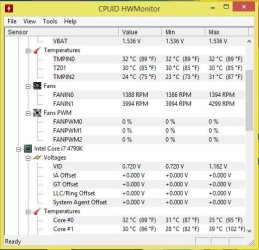
Right now it's calming the RPM is over 4000, simply not possible from this fan, and nowhere near the noise there'd be, if it really was... (see pic)
 

Attachments

  • fanrpm.JPG
    fanrpm.JPG
    53.9 KB · Views: 8

My Computer

Computer Manufacturer/Model Number
Custom build
OS
Windows 7 64-bit
CPU
Core i7 3930K @Stock
Motherboard
Asus Rampage IV Extreme
Memory
G.SKILL Z 1600Mhz 16GB
Graphics Card(s)
Nvidia GTX 580
Sound Card
Asus Xonar DX
Monitor(s) Displays
Dell S2409W
Screen Resolution
1920x1080p
Hard Drives
Crucial M4 128GB, Western Digital WD6400AAKS (X2)
PSU
Corsair Professional Series Gold AX850
Case
CM Storm Trooper
Cooling
Corsair H100
Keyboard
Microsoft Sidewinder X6
Mouse
Logitech G9x
Other Info
HITACHI/LG BH20N Blu-ray Rewriter
Looks like you have a borked fan sensor then. Swapping out fans proved that it wasn't a fan problem, and it happens in BIOS too. The only thing that I can conclude is a bad sensor on the motherboard.
 

My Computer

Computer type
PC/Desktop
Computer Manufacturer/Model Number
Mellon Labs (custom build)
OS
Win 7 Pro x64/Win 10 Pro x64 dual boot
CPU
AMD FX 8350 Vishera @ 4200
Motherboard
ASUS M5A97 R2.0
Memory
16 GB Mushkin Blackline DDR3-2400 @ 1866 (9-10-10-10-31)
Graphics Card(s)
XFX Radeon R9 280 Double D Black Edition
Sound Card
Realtek HD Audio on MB. Sounds great.
Monitor(s) Displays
Acer 24", Acer 22"
Screen Resolution
3840 x 1080
Hard Drives
1 x Mushkin Chronos 120 GB SSD (Win 10)
1 x Samsung 850 EVO 250 GB SSD (Win 7)
1 x WD 1TB SATA Blue
1 x WD 1TB SATA Green
PSU
Corsair TX-750
Case
CoolerMaster HAF 912+
Cooling
Coolermaster Seidon 240M Liquid AIO. 6 case fans
Keyboard
Logitech G710+
Mouse
Logitech G500s
Internet Speed
Much better since I got fiber, but still way overpriced.
Antivirus
MSE, Malware Bytes for scanning
Browser
Firefox
Other Info
Corsair VOID USB headphones.

A Mellon Labs X-1 - LCD Smartie driven system status display.

Brought to you by the letter E
Looks like you have a borked fan sensor then. Swapping out fans proved that it wasn't a fan problem, and it happens in BIOS too. The only thing that I can conclude is a bad sensor on the motherboard.

Would you expect both sys1 and sys2 headers to be affected, because they both misbehave with either of my Noctua fans? At the same time both Noctua fans don't misbehave on the CPU fan header.
If the sensor was borked, why would a 4 pin Corsair, and a 3 pin Cooler Master both act normally?
 

My Computer

Computer Manufacturer/Model Number
Custom build
OS
Windows 7 64-bit
CPU
Core i7 3930K @Stock
Motherboard
Asus Rampage IV Extreme
Memory
G.SKILL Z 1600Mhz 16GB
Graphics Card(s)
Nvidia GTX 580
Sound Card
Asus Xonar DX
Monitor(s) Displays
Dell S2409W
Screen Resolution
1920x1080p
Hard Drives
Crucial M4 128GB, Western Digital WD6400AAKS (X2)
PSU
Corsair Professional Series Gold AX850
Case
CM Storm Trooper
Cooling
Corsair H100
Keyboard
Microsoft Sidewinder X6
Mouse
Logitech G9x
Other Info
HITACHI/LG BH20N Blu-ray Rewriter
Would you expect both sys1 and sys2 headers to be affected, because they both misbehave with either of my Noctua fans? At the same time both Noctua fans don't misbehave on the CPU fan header.
If the sensor was borked, why would a 4 pin Corsair, and a 3 pin Cooler Master both act normally?
Perhaps I misread your posts...

If the Corsair and the Cooler Master fans both work fine, the problem could be in the Noctua fans themselves. Perhaps they are drawing more current than the fan header can supply, or are simply incompatible with the fan sensor chip, which I seriously doubt.

As for why they work on the CPU fan header with no problems, I honestly don't know.
 

My Computer

Computer type
PC/Desktop
Computer Manufacturer/Model Number
Mellon Labs (custom build)
OS
Win 7 Pro x64/Win 10 Pro x64 dual boot
CPU
AMD FX 8350 Vishera @ 4200
Motherboard
ASUS M5A97 R2.0
Memory
16 GB Mushkin Blackline DDR3-2400 @ 1866 (9-10-10-10-31)
Graphics Card(s)
XFX Radeon R9 280 Double D Black Edition
Sound Card
Realtek HD Audio on MB. Sounds great.
Monitor(s) Displays
Acer 24", Acer 22"
Screen Resolution
3840 x 1080
Hard Drives
1 x Mushkin Chronos 120 GB SSD (Win 10)
1 x Samsung 850 EVO 250 GB SSD (Win 7)
1 x WD 1TB SATA Blue
1 x WD 1TB SATA Green
PSU
Corsair TX-750
Case
CoolerMaster HAF 912+
Cooling
Coolermaster Seidon 240M Liquid AIO. 6 case fans
Keyboard
Logitech G710+
Mouse
Logitech G500s
Internet Speed
Much better since I got fiber, but still way overpriced.
Antivirus
MSE, Malware Bytes for scanning
Browser
Firefox
Other Info
Corsair VOID USB headphones.

A Mellon Labs X-1 - LCD Smartie driven system status display.

Brought to you by the letter E
Back
Top