
CPU L2 cache not known to win 7

musiclover7

New member
Power User
Local time
9:52 AM
Messages
210
Location
Stoughton, WI
Again, this is another tweak I found in Yamicsoft Windows 7 manager. I have yet to make changes, am just exploring the software.

On the top in this picture, it states that you can manually set file caching memory settings, and below that that it is necessary to manually set the processor L2 cache. Anyone know if this is really the case?
 

My Computer

Computer Manufacturer/Model Number
Custom
OS
Windows 7 Ultimate
CPU
Amd 5400+ dual core overclocked to 3.0 ghz
Motherboard
EVGA 590 sli aM2
Memory
8gb 5-5-5-5-15 g-skill
Graphics Card(s)
Nvidia 9800gt 512mb
Sound Card
M-Audio Delta 2496
Monitor(s) Displays
Acer 22 inch lcd
Screen Resolution
1680 x 1050
Hard Drives
Hmm

4.0 terabytes total..
PSU
650 watts
Case
Antec Sonata II
Cooling
Zallmen Xpu cooler
Keyboard
some rubbish I found in my garage
Mouse
logitech
Internet Speed
caps at about 650kb down, 50kb up . Gigabit local network.
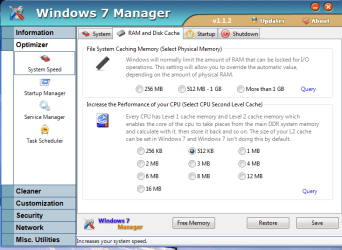
Pic did not go with post for some reason
 

Attachments

  • Yamicsoft.png
    Yamicsoft.png
    30.4 KB · Views: 565

My Computer

Computer Manufacturer/Model Number
Custom
OS
Windows 7 Ultimate
CPU
Amd 5400+ dual core overclocked to 3.0 ghz
Motherboard
EVGA 590 sli aM2
Memory
8gb 5-5-5-5-15 g-skill
Graphics Card(s)
Nvidia 9800gt 512mb
Sound Card
M-Audio Delta 2496
Monitor(s) Displays
Acer 22 inch lcd
Screen Resolution
1680 x 1050
Hard Drives
Hmm

4.0 terabytes total..
PSU
650 watts
Case
Antec Sonata II
Cooling
Zallmen Xpu cooler
Keyboard
some rubbish I found in my garage
Mouse
logitech
Internet Speed
caps at about 650kb down, 50kb up . Gigabit local network.
No there is no need for Windows to know about L* cache levels. Only the CPU can make use of those areas. The RAM is what the OS manages, the CPU manages L* caches.

The above settings sets: (It only matters if Windows cannot detect the size automatically.)
Detailed Explanation of SecondLevelDataCache

This setting in not needed on newer computers (Newer then P2s)
 

My Computer

Computer type
PC/Desktop
Computer Manufacturer/Model Number
Alienware Aurora ALX R4
OS
Windows 10 Pro (x64)
CPU
Intel Core i7-3930K (3.2GHz - 4.5GHz)
Motherboard
Alienware Aurora-R4 x79
Memory
4x Samsung 4GB PC3-12800 DDR3 (16GB 1600MHz)
Graphics Card(s)
Nvidia Geforce GTX 690
Sound Card
SteelSeries Siberia Elite
Monitor(s) Displays
Dell UltraSharp U3011
Screen Resolution
2560x1600
Hard Drives
Samsung 850 Pro 256 GB, Seagate 1TB Desktop Hybrid HDD, 2x Western Digital 4TB Green HDD
PSU
875W Some Dell PSU <.<
Case
Alienware Aurora ALX
Cooling
Custom Liquid Cooling (EK CPU & GPU blocks) dual EK 480RAD
Keyboard
Logitech G710+ Mechanical
Mouse
Logitech G700s
Internet Speed
Verizon Fios (50 mbps average)
Other Info
Server: Intel NUC D54250WYK: i5-4250U, 16GB, 256 GB mSATA, Windows Server 2012 R2
The caching that can be managed by the OS is strictly its own caching function, i.e. blocks read form disk, etc. It can also tell a storage controller to set its writeback caching on and off. But as Logicearth stated, CPU caches are managed and used by the CPU itself.
 

My Computer

Computer Manufacturer/Model Number
Custom workstation /// Lenovo X61t tablet notebook
OS
Windows 7 RTM x64
CPU
Core i7 980X @ 4.04GHz OC /// Core Duo L7500 @ 1.6GHz
Motherboard
Asus P6T6 WS Revolution ///
Memory
12GB G. Skill @ DDR-1600 OC /// 4GB
Graphics Card(s)
Saphire HD4870 Toxic 1GB /// Intel Mobile GMA X3100
Monitor(s) Displays
Dual Eizo 24" SX2461W /// 12"
Screen Resolution
1920x1200 /// 1400x1050
Hard Drives
Workstation:
5x 750GB Barracuda-11 on Areca ARC-1220;
4x 1.5TB Barracuda-11 on Intel ICH10R;
Volumes:
300GB RAID 0, 2.7TB RAID 10 on Intel;
100GB RAID 0, 1.4TB RAID 10 on Areca ///
Notebook: G.Skill Titan 256GB SSD
PSU
Tagan ITZ 1100
Case
GHS-1500 ///
Cooling
Thermalright IFX-14 + a slew of stealth fans ///
Keyboard
Logitech Edge ///
Mouse
Logitech Wireless Optical Trackball
Internet Speed
5Mbps down / 820Kbps up
Other Info
Main use: photography;
DVD Drive: L.G GGW-H20L Blu-Ray / DVD;
OC: QPI/DRAM @ 1.33v, CPU @ 1.293v, DRAM Bus @ 1.65v, CPU PLL @ 1.88v, CPU mult = 25x, BCLK = 160, DDR3-1604 @ 7-8-7-24
Again, this is another tweak I found in Yamicsoft Windows 7 manager. I have yet to make changes, am just exploring the software.
MusicLover7 - This represents a small part of what I was talking about earlier today in another thread.

You are using the right approach though. Investigate what the settings mean. Unless you have a specific need to change one, do not. The default setting is the default for a reason.

For the most part, the default settings are "loose", allowing for the widest range of normal operating conditions (flexibility). Tighten one end of the rope too much, the rope might snap when pulled.

Some of the settings are useless.
 
Back
Top