
CPU Monitoring Software

bigmck

Very Senior Member
Guru
Gold Member
VIP
Local time
9:54 AM
Messages
4,745
Location
Houston, Texas
I have an Intel Pentium 4 3.0 Ghtz processor. I confirmed this by going to Computer and clicking on Properties. What is puzzling me is that I have tried to find a program that would tell me CPU temp, etc. I have D/L Core Temp, Real Temp and about ten others. Even though in the instructions of the program it says it works on WIndows 7 single core Intel CPU's every one I have downloaded gives me an error "Does not work on CPU detected. -- Geniune Intel". I had someone build the computer for me, I suppose he could have substitued a different CPU, but I even have the box the CPU supposedly came in. I am at a loss as to why I keep getting this error. Any ideas?
 

My Computer My Computer

Computer type
PC/Desktop
Computer Manufacturer/Model Number
Custom Build
OS
Windows 7 Home Premium 32-Bit - Build 7600 SP1
CPU
Intel Core i3-2120 3.30Ghz
Motherboard
Asus P8Z68-V LX Intel Z68 Socket H2 ATX
Memory
Kingston 4 GB DDR3 1333 mhz
Graphics Card(s)
AMD Radeon HD6670
Sound Card
Sound Blaster Audigy SE 24-Bit
Monitor(s) Displays
Asus VE228
Screen Resolution
1440 X 900
Hard Drives
OCZ Vertex 3 120 GB Sata 3 SSD ==
Kingston SH103/S3 120 G Hyper X 120 GB SSD ==
Western Digital 500 GB Caviar Green 7200 RPM ==
PSU
Corsair CX600M == 600 Watt
Case
NZXT Apollo - Silver with Clear Side Panel
Cooling
Three 120 mm Fans
Keyboard
Microsoft Natural 4000
Mouse
Microsoft Custom Optical 3000
Internet Speed
AT&T Fiber Optic Wireless Network
Antivirus
Microsoft Security Essentials
Browser
Chrome
Other Info
120 mm Blue LED Fan -- Three Blue LED Lazer Light Sticks
My Computer My Computer

OS
Windows 7 home premium 64 bit
CPU
AMD X6 1090T
Motherboard
GA-890GPA-UD3H
Memory
Corsair DDR3 1600
Graphics Card(s)
ATI 5870
Sound Card
Xonar DX1
Monitor(s) Displays
LG 23" TFT
Hard Drives
2 X 2250 WD HARD DRIVES
PSU
Be Quiet 650W
Case
Silverstone Fortress F01
Cooling
3 X 120mm Xigmatec fans 1 X silverstone 140MM
Use Winkey + Pause to open the System Dialog and it will tell you what processor it is.

HWMonitor seems to show my temps OK, but I have 4 cores and it shows all 4. If you have not tried it, you might.

Many motherboard CDs come with monitoring software, I know ASUS does.

I suppose there is always the possibility the sensor necessary is not supported on the motherboard.
 

My Computer My Computer

Computer Manufacturer/Model Number
Homebuilt
OS
Windows 7 x64
CPU
i7-2600K
Motherboard
Asus P8Z77-v Pro
Memory
8 G
Graphics Card(s)
GTX 480
Sound Card
Onboard
Monitor(s) Displays
LG W2753V
Screen Resolution
1920x1080
Hard Drives
Crucial M4 128 G SSD
Use Winkey + Pause to open the System Dialog and it will tell you what processor it is.

HWMonitor seems to show my temps OK, but I have 4 cores and it shows all 4. If you have not tried it, you might.

Many motherboard CDs come with monitoring software, I know ASUS does.

I suppose there is always the possibility the sensor necessary is not supported on the motherboard.

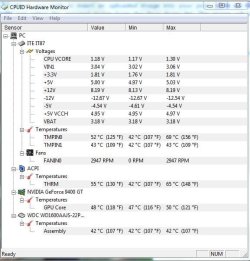
I d/l HWMonitor and it works, except for one thing. It does not show the CPU on it. You have mentioned that there might not be a sensor on the Motherboard for it. Here is what HWMonitor looks like for me.

Notice this example has the CPU under the ACPI. CPUID
Where as mine skips that and goes to the graphic card. Any ideas?
 

Attachments

  • HWMonitor.jpg
    HWMonitor.jpg
    54.5 KB · Views: 26

My Computer My Computer

Computer type
PC/Desktop
Computer Manufacturer/Model Number
Custom Build
OS
Windows 7 Home Premium 32-Bit - Build 7600 SP1
CPU
Intel Core i3-2120 3.30Ghz
Motherboard
Asus P8Z68-V LX Intel Z68 Socket H2 ATX
Memory
Kingston 4 GB DDR3 1333 mhz
Graphics Card(s)
AMD Radeon HD6670
Sound Card
Sound Blaster Audigy SE 24-Bit
Monitor(s) Displays
Asus VE228
Screen Resolution
1440 X 900
Hard Drives
OCZ Vertex 3 120 GB Sata 3 SSD ==
Kingston SH103/S3 120 G Hyper X 120 GB SSD ==
Western Digital 500 GB Caviar Green 7200 RPM ==
PSU
Corsair CX600M == 600 Watt
Case
NZXT Apollo - Silver with Clear Side Panel
Cooling
Three 120 mm Fans
Keyboard
Microsoft Natural 4000
Mouse
Microsoft Custom Optical 3000
Internet Speed
AT&T Fiber Optic Wireless Network
Antivirus
Microsoft Security Essentials
Browser
Chrome
Other Info
120 mm Blue LED Fan -- Three Blue LED Lazer Light Sticks
Since I do not run a P4, I do not know what the readout should be. I can tell you my readouts are different that yours in several areas, but the available sensors are probably different.

Perhaps in your situation, the Temperatures TMPIN0/1 are the CPU temps at different points.

You might try doing something to tax the CPU then see if those readings go up also.

I just have to assume if the software does not list the temps that the sensors are not available or supported.
 

My Computer My Computer

Computer Manufacturer/Model Number
Homebuilt
OS
Windows 7 x64
CPU
i7-2600K
Motherboard
Asus P8Z77-v Pro
Memory
8 G
Graphics Card(s)
GTX 480
Sound Card
Onboard
Monitor(s) Displays
LG W2753V
Screen Resolution
1920x1080
Hard Drives
Crucial M4 128 G SSD
Since I do not run a P4, I do not know what the readout should be. I can tell you my readouts are different that yours in several areas, but the available sensors are probably different.

Perhaps in your situation, the Temperatures TMPIN0/1 are the CPU temps at different points.

You might try doing something to tax the CPU then see if those readings go up also.

I just have to assume if the software does not list the temps that the sensors are not available or supported.

Thanks for your help
 

My Computer My Computer

Computer type
PC/Desktop
Computer Manufacturer/Model Number
Custom Build
OS
Windows 7 Home Premium 32-Bit - Build 7600 SP1
CPU
Intel Core i3-2120 3.30Ghz
Motherboard
Asus P8Z68-V LX Intel Z68 Socket H2 ATX
Memory
Kingston 4 GB DDR3 1333 mhz
Graphics Card(s)
AMD Radeon HD6670
Sound Card
Sound Blaster Audigy SE 24-Bit
Monitor(s) Displays
Asus VE228
Screen Resolution
1440 X 900
Hard Drives
OCZ Vertex 3 120 GB Sata 3 SSD ==
Kingston SH103/S3 120 G Hyper X 120 GB SSD ==
Western Digital 500 GB Caviar Green 7200 RPM ==
PSU
Corsair CX600M == 600 Watt
Case
NZXT Apollo - Silver with Clear Side Panel
Cooling
Three 120 mm Fans
Keyboard
Microsoft Natural 4000
Mouse
Microsoft Custom Optical 3000
Internet Speed
AT&T Fiber Optic Wireless Network
Antivirus
Microsoft Security Essentials
Browser
Chrome
Other Info
120 mm Blue LED Fan -- Three Blue LED Lazer Light Sticks
Back
Top