Solved CPU running at 100%

JohnJ0218

New member
Local time
2:08 PM
Messages
9
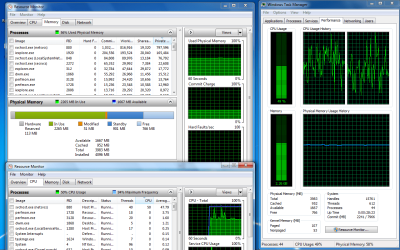
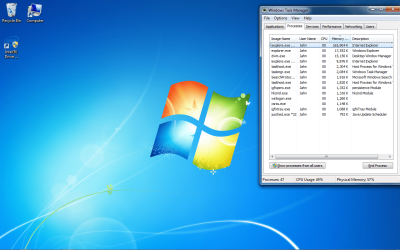
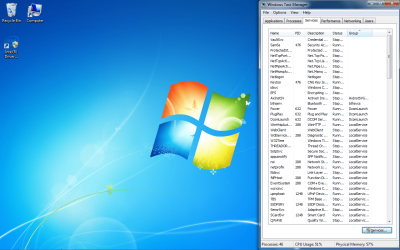
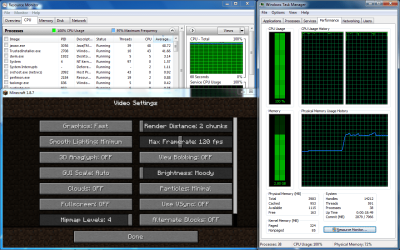
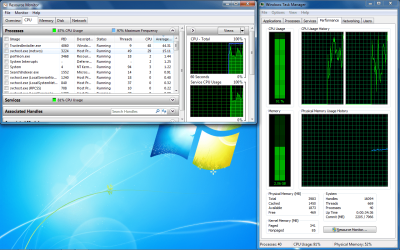
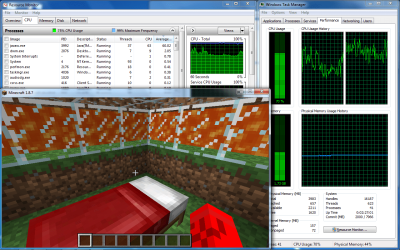
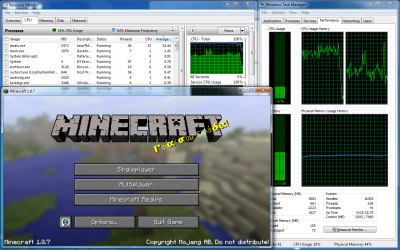
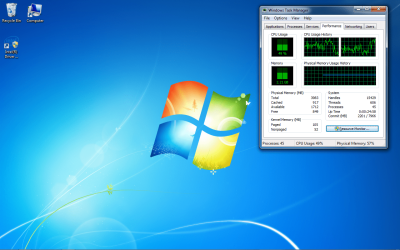
I just format both my main harddrive and the system allocation and reinstalled Windows 7 HP. My CPU is running at 50% to 100% depending on what i am doing. I have 4 gigs of ram. i cant even run minecraft on the lowest settings without any lag
 

Attachments
  • WTM CPU.png
    WTM CPU.png
    268.8 KB · Views: 4
  • WTM Performance.png
    WTM Performance.png
    74.7 KB · Views: 4
  • WTM Processes.png
    WTM Processes.png
    248 KB · Views: 4
  • WTM Services.png
    WTM Services.png
    227.6 KB · Views: 4

My Computer

Computer type
Laptop
Computer Manufacturer/Model Number
Dell Latitude E4300
OS
Windows 7 Home Premium Service Pack 1 x64
CPU
Intel Core 2 Duo CPU P9400 @ 2.4GHz
Motherboard
?
Memory
4096MB RAM
Graphics Card(s)
Mobile Intel 4 Series Express Chipset Family
Browser
IE

My Computer

Computer type
PC/Desktop
Computer Manufacturer/Model Number
Lenovo IdeaCenter 450
OS
Windows 10 Pro X64
CPU
Intel Quad Core i7-4770 @ 3.4Ghz
Memory
16.0GB PC3-12800 DDR3 SDRAM 1600 MHz
Graphics Card(s)
Intel Integrated HD Graphics
Sound Card
Realtek HD Audio
Monitor(s) Displays
HP 22" LCD
Screen Resolution
1680 x 1050
Hard Drives
250GB Samsung EVO SATA-3 SSD
2TB Seagate ST2000DM001 SATA-2
1.5TB Seagate ST3150041AS SATA
Keyboard
Dell USB
Mouse
Lenovo USB
Internet Speed
Cable via Road Runner 3MB Upload, 30MB Download
Antivirus
Windows Defender, MBAM Pro, MBAE
Browser
Seamonkey
Other Info
UEFI/GPT
PLDS DVD-RW DH16AERSH
Hi yep Internet explorer has some sort of bug just kill the process that goes out of control when you notice it,
I'm starting to use Pale moon more :)
 

My Computer

Computer type
PC/Desktop
Computer Manufacturer/Model Number
Custom assembled by me :}
OS
Win-7-Pro64bit 7-H-Prem-64bit
CPU
i7-5930K 2nd i9-9940x both water blocked VRM's too
Motherboard
ASUS SABERTOOTH X99 2nd ASUS x299 Apex
Memory
Trident-z 3200C14 2nd Trident-z 3600C16
Graphics Card(s)
EVGA 1080ti ftw3 2nd Titan Xp both water blocked
Sound Card
Built-in Realtek
Monitor(s) Displays
1-AOC G2460PG 24"G-Sync 144Hz/ 2nd 1-ASUS VG248QE 24" 144Hz
Screen Resolution
1920 x 1080 144Hz
Hard Drives
2-Samsung M.2 Evo & Evo Plus
2-Samsung 850 EVO 500GB SSD's/ 3-2.5 W.D. Black 1tb-&3-1tb/3-3.5 WD Black 1tb hdd's
PSU
EVGA SuperNOVA 1000-P2 2nd 1200-P2
Case
2-Corsair Obsidian Series 450D Black ATX Mid Tower
Cooling
Custom water loops
Keyboard
Logitech G710+/ 2nd Logitech G910
Mouse
2-RedDragon M901 Perdition 16400 dpi Gaming mouse = wired
Internet Speed
Comcast Ping 19ms 89.31mbps download speed 6.12mbps upload
Antivirus
Malwarebytes Pro/ Superantispyware Pro
Browser
FireFox & Pale moon
Other Info
2nd ASUS X299 Apex/Intel i9-9940x with Custom water loop/7H-Prem-x64/Corsair 450D case/Ram Trident-z 3600C16 4x8gb / Samsung970Evo plus 500gb SSD/Dual ssd EZ swap evo/PSU EVGA SuperNova 1200w-P2 80+Platinum/GPU Titan Xp /8-ML-140 on push-pull on 2-280GTX rads
Looks to me like the windows update memory leak that many users seem to be experiencing.

From your screenshots:

svchost.exe (netsvcs) is the cuplrit. To test - try stopping the windows update service and stop then restart the BITS service.

Does that return memory/ CPU usage to normal levels?
 

My Computer

Computer type
Laptop
Computer Manufacturer/Model Number
ASUS
OS
Microsoft Windows 7 Home Premium 64-bit 7601 Multiprocessor Free Service Pack 1
CPU
AMD C-60 APU with Radeon(tm) HD Graphics
Motherboard
ASUSTeK COMPUTER INC. X501U
Memory
4.00 GB
Graphics Card(s)
AMD Radeon HD 6290 Graphics
Sound Card
(1) AMD High Definition Audio Device (2) Realtek High Defi
Screen Resolution
1366 x 768 x 32 bits (4294967296 colors) @ 60 Hz
Hard Drives
Hitachi HTS545050A7E380 SATA Disk Device
Antivirus
Comodo CIS & FW, SecureAplus App Whitelisting, Threatfire
Browser
Cyberfox 64bit, Opera 64bit, Airfox
Other Info
Spy-The-Spy, HitmanPro.Alert, Norton Connect Safe, MJRegWatcher, BitDefender TrafficLight, Voodoo Shield, Zemana AntiMalware
svchost.exe (netsvcs) seems to be the problem. When I kill it from processes, my cpu drops down to 9%. But games such as minecraft jump it back up to 100% and I get terrible lag.
 

My Computer

Computer type
Laptop
Computer Manufacturer/Model Number
Dell Latitude E4300
OS
Windows 7 Home Premium Service Pack 1 x64
CPU
Intel Core 2 Duo CPU P9400 @ 2.4GHz
Motherboard
?
Memory
4096MB RAM
Graphics Card(s)
Mobile Intel 4 Series Express Chipset Family
Browser
IE

Attachments

  • Sys_Con_Start.png
    Sys_Con_Start.png
    68.8 KB · Views: 3

My Computer

Computer type
Laptop
Computer Manufacturer/Model Number
Dell Latitude E4300
OS
Windows 7 Home Premium Service Pack 1 x64
CPU
Intel Core 2 Duo CPU P9400 @ 2.4GHz
Motherboard
?
Memory
4096MB RAM
Graphics Card(s)
Mobile Intel 4 Series Express Chipset Family
Browser
IE
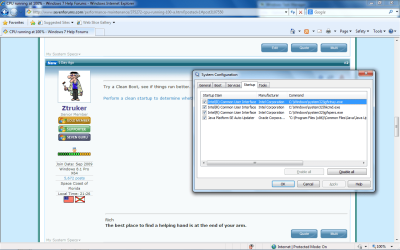
Follow STep1 of the link I gave you, see how things run then.
 

My Computer

Computer type
PC/Desktop
Computer Manufacturer/Model Number
Lenovo IdeaCenter 450
OS
Windows 10 Pro X64
CPU
Intel Quad Core i7-4770 @ 3.4Ghz
Memory
16.0GB PC3-12800 DDR3 SDRAM 1600 MHz
Graphics Card(s)
Intel Integrated HD Graphics
Sound Card
Realtek HD Audio
Monitor(s) Displays
HP 22" LCD
Screen Resolution
1680 x 1050
Hard Drives
250GB Samsung EVO SATA-3 SSD
2TB Seagate ST2000DM001 SATA-2
1.5TB Seagate ST3150041AS SATA
Keyboard
Dell USB
Mouse
Lenovo USB
Internet Speed
Cable via Road Runner 3MB Upload, 30MB Download
Antivirus
Windows Defender, MBAM Pro, MBAE
Browser
Seamonkey
Other Info
UEFI/GPT
PLDS DVD-RW DH16AERSH
Follow STep1 of the link I gave you, see how things run then.

I followed step one and nothing was running by microsoft processes on start up. This is how it runs with Minecraft running.
 

Attachments

  • Mine_RM_WTM.png
    Mine_RM_WTM.png
    77.2 KB · Views: 2

My Computer

Computer type
Laptop
Computer Manufacturer/Model Number
Dell Latitude E4300
OS
Windows 7 Home Premium Service Pack 1 x64
CPU
Intel Core 2 Duo CPU P9400 @ 2.4GHz
Motherboard
?
Memory
4096MB RAM
Graphics Card(s)
Mobile Intel 4 Series Express Chipset Family
Browser
IE
svchost.exe (netsvcs) seems to be the problem. When I kill it from processes, my cpu drops down to 9%. But games such as minecraft jump it back up to 100% and I get terrible lag.

I meant stop the windows update service to test. (Possibly also restart BITS) - Not kill svchost.exe!

That's just to see if memory usage returms to normal levels. If it doesn't then it's not the problem.

Minecraft - I know nothing about it.

Other than that stick with ZTrucker's advice.
 

My Computer

Computer type
Laptop
Computer Manufacturer/Model Number
ASUS
OS
Microsoft Windows 7 Home Premium 64-bit 7601 Multiprocessor Free Service Pack 1
CPU
AMD C-60 APU with Radeon(tm) HD Graphics
Motherboard
ASUSTeK COMPUTER INC. X501U
Memory
4.00 GB
Graphics Card(s)
AMD Radeon HD 6290 Graphics
Sound Card
(1) AMD High Definition Audio Device (2) Realtek High Defi
Screen Resolution
1366 x 768 x 32 bits (4294967296 colors) @ 60 Hz
Hard Drives
Hitachi HTS545050A7E380 SATA Disk Device
Antivirus
Comodo CIS & FW, SecureAplus App Whitelisting, Threatfire
Browser
Cyberfox 64bit, Opera 64bit, Airfox
Other Info
Spy-The-Spy, HitmanPro.Alert, Norton Connect Safe, MJRegWatcher, BitDefender TrafficLight, Voodoo Shield, Zemana AntiMalware
svchost.exe (netsvcs) seems to be the problem. When I kill it from processes, my cpu drops down to 9%. But games such as minecraft jump it back up to 100% and I get terrible lag.

I meant stop the windows update service to test. (Possibly also restart BITS) - Not kill svchost.exe!

That's just to see if memory usage returms to normal levels. If it doesn't then it's not the problem.

Minecraft - I know nothing about it.

Other than that stick with ZTrucker's advice.

this is windows update service off.
 

Attachments

  • win_update_off.png
    win_update_off.png
    155.4 KB · Views: 1

My Computer

Computer type
Laptop
Computer Manufacturer/Model Number
Dell Latitude E4300
OS
Windows 7 Home Premium Service Pack 1 x64
CPU
Intel Core 2 Duo CPU P9400 @ 2.4GHz
Motherboard
?
Memory
4096MB RAM
Graphics Card(s)
Mobile Intel 4 Series Express Chipset Family
Browser
IE
Also Command Prompt is not giving me Administrative Privilages to resart BITS.
 

My Computer

Computer type
Laptop
Computer Manufacturer/Model Number
Dell Latitude E4300
OS
Windows 7 Home Premium Service Pack 1 x64
CPU
Intel Core 2 Duo CPU P9400 @ 2.4GHz
Motherboard
?
Memory
4096MB RAM
Graphics Card(s)
Mobile Intel 4 Series Express Chipset Family
Browser
IE
Try running cmd as admin (start menu search - cmd - right click when it shows and "run as administrator")
 

My Computer

Computer type
PC/Desktop
Computer Manufacturer/Model Number
Custom Build
OS
Windows 7 Ultimate x64 SP1
CPU
AMD Phenom 2 1090T
Motherboard
Gigabyte GA-890FXA-UD5
Memory
2x8GB Kingston HyperX Fury Black 1600Mhz Unganged
Graphics Card(s)
MSI GTX 970 Gaming 4G
Sound Card
Realtek On-Board HD 7.1 Audio / Logitech G35
Monitor(s) Displays
3xAcer GD245HQ
Screen Resolution
1920x1080
Hard Drives
Samsung 850 Pro 512GB SSD - OS /
WD Caviar Black SATA 3 - 1 TBx2 - Dynamic RAID 0 /
WD Caviar Green SATA 2 - 640GBx2 - Dynamic RAID 0 /
WD Caviar Green SATA 2 - 640GB - Internal Backup /
Seagate Barracude SATA 3 - 3TB - External Backup/ Sync
PSU
HighPower 1000W
Case
Cooler Master HAF 932
Cooling
Noctua NH-D14
Keyboard
Logitech G19
Mouse
Logitech G500
Internet Speed
100/4 Mbit Cable (100GB quota)
Antivirus
ZoneAlarm Extreme Security / MBAM Pro / MBAE Free / SAS Free
Browser
IE 11 - Firefox - Chrome
Other Info
Logitech F710/ G27/ G940/ Z5500 // TrackIR 5 // Nvidia 3D Surround Vision
Start> Run

type

services.msc

try stopping / starting services that way.

Windows Update (wuauserv)
BITS (Background Intelligent Transfer Service)

You should be able to stop both to test.

Also check your account level.

Start> Run

type

netplwiz

Press Enter

Highlight your username and choose "Properties" then "Group Membership"
 

My Computer

Computer type
Laptop
Computer Manufacturer/Model Number
ASUS
OS
Microsoft Windows 7 Home Premium 64-bit 7601 Multiprocessor Free Service Pack 1
CPU
AMD C-60 APU with Radeon(tm) HD Graphics
Motherboard
ASUSTeK COMPUTER INC. X501U
Memory
4.00 GB
Graphics Card(s)
AMD Radeon HD 6290 Graphics
Sound Card
(1) AMD High Definition Audio Device (2) Realtek High Defi
Screen Resolution
1366 x 768 x 32 bits (4294967296 colors) @ 60 Hz
Hard Drives
Hitachi HTS545050A7E380 SATA Disk Device
Antivirus
Comodo CIS & FW, SecureAplus App Whitelisting, Threatfire
Browser
Cyberfox 64bit, Opera 64bit, Airfox
Other Info
Spy-The-Spy, HitmanPro.Alert, Norton Connect Safe, MJRegWatcher, BitDefender TrafficLight, Voodoo Shield, Zemana AntiMalware
Try running cmd as admin (start menu search - cmd - right click when it shows and "run as administrator")

This is what happened when I ran as admin and reset bits.
 

Attachments

  • BITS_Reset.png
    BITS_Reset.png
    145.6 KB · Views: 0

My Computer

Computer type
Laptop
Computer Manufacturer/Model Number
Dell Latitude E4300
OS
Windows 7 Home Premium Service Pack 1 x64
CPU
Intel Core 2 Duo CPU P9400 @ 2.4GHz
Motherboard
?
Memory
4096MB RAM
Graphics Card(s)
Mobile Intel 4 Series Express Chipset Family
Browser
IE
Start> Run

type

services.msc

try stopping / starting services that way.

Windows Update (wuauserv)
BITS (Background Intelligent Transfer Service)

You should be able to stop both to test.

Also check your account level.

Start> Run

type

netplwiz

Press Enter

Highlight your username and choose "Properties" then "Group Membership"


This is what happened after I turned off windows update and BITS.
 

Attachments

  • service_off_bit_off.png
    service_off_bit_off.png
    146.4 KB · Views: 0

My Computer

Computer type
Laptop
Computer Manufacturer/Model Number
Dell Latitude E4300
OS
Windows 7 Home Premium Service Pack 1 x64
CPU
Intel Core 2 Duo CPU P9400 @ 2.4GHz
Motherboard
?
Memory
4096MB RAM
Graphics Card(s)
Mobile Intel 4 Series Express Chipset Family
Browser
IE
Ztruker, GokAy, and Callender, this all helped to bring my cpu down to normal. I am putting this as solved. Looks to be an issue that the processor just can't handle Minecraft. Thanks to all of y'all.
 

My Computer

Computer type
Laptop
Computer Manufacturer/Model Number
Dell Latitude E4300
OS
Windows 7 Home Premium Service Pack 1 x64
CPU
Intel Core 2 Duo CPU P9400 @ 2.4GHz
Motherboard
?
Memory
4096MB RAM
Graphics Card(s)
Mobile Intel 4 Series Express Chipset Family
Browser
IE
Back
Top