Solved CPU speed question

realflow100

New member
Member
VIP
Local time
4:37 PM
Messages
252
How would I slow a processor down to "Half" it's original speed? Do I divide the frequency in half? or is there some other more complicated matter involved? this applies to multi-core or single core.
 

My Computer

Computer type
PC/Desktop
Computer Manufacturer/Model Number
HP Elite 8300 compaq SFF
OS
Windows 7 Pro x64
CPU
i7 3770k 3.5ghz up to 3.9ghz turbo boost 4 core 8 thread CPU
Motherboard
HP Elite 8300 compaq SFF OEM board
Memory
32GB 4x8GB DDR3 1600mhz CL9 patriot viper gaming ram
Graphics Card(s)
ZOTAC GTX 1650 low profile overclocked GPU
Sound Card
realtek integrated HD audio
Monitor(s) Displays
23" acer gaming 144hz 1ms monitor
Screen Resolution
1920x1080 @120hz/144hz
Hard Drives
ADATA 128GB SSD
ADAtA 256GB SSD
x1 Seagate 250GB 7200 RPM drive
x1 Seagate 500GB 7200 RPM drive
PSU
430w thermaltake smart
Case
HP Elite 8300 compaq SFF
Cooling
Stock + new thermal paste
Keyboard
REDRAGON mechanical blue switch
Mouse
ZELOTES wired T-90 mouse
Internet Speed
10MB/s (80mbps) download good internet
Antivirus
in-use/other
Browser
IE11 + firefox + Google Chrome randomly switches between
Other Info
Info updated

power supply doesnt fit but still works with adapter its just sitting on the desk behind the computer wires going into the case where the old power supply was.

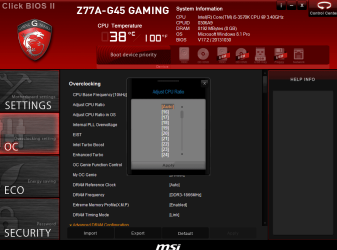
You would access your BIOS, if it allows you to you can change the speed. Most branded computers do not allow much. Here is an example how it looks on my bios

cpu setting in bios.PNG
 

My Computer

Computer type
PC/Desktop
Computer Manufacturer/Model Number
Dude Build
OS
Windows 10 Pro X64
CPU
Intel(R) Core(TM) i5-3570K CPU OC@ 4.5GHZ Turbo
Motherboard
MSI Z77A-G45 Gaming
Memory
8.00 GB DDR3 1600Mhz
Graphics Card(s)
MSI Gaming X GTX 1070
Sound Card
Realtek High Definition
Monitor(s) Displays
Dell S23O9W, HP L1710
Screen Resolution
DELL-1920 x 1080 HP-1280 x1024
Hard Drives
Crucial m4 256 SSD, WD 7200RPM 500GB WD 1TB
PSU
Seasonic X650 GOLD
Case
Zalman Z12
Cooling
Antec Kuhler 920
Keyboard
Logitech
Mouse
MSI DS100 Interceptor
Internet Speed
50 down and 5 up
Antivirus
MSE
Browser
Chrome, IE 11
Other Info
Logitech X-620 Speakers
I have a silly question.
Why would one want to do such a thing.

How would I slow a processor down to "Half" it's original speed
 

My Computer

Computer type
PC/Desktop
Computer Manufacturer/Model Number
Home made Desktop
OS
Windows 10 Pro. 64/ version 1709 Windows 7 Pro/64
CPU
Intel i7-6800K @ 4.3
Motherboard
ASUS X-99 Deluxe II
Memory
Corsair Platinum 16 gig @2400
Graphics Card(s)
EVGA GTX 1070 OC
Monitor(s) Displays
Asus 27" LED LCD/VE278Q
Screen Resolution
1920-1080 or 1280-720 HDMI
Hard Drives
INTEL SSD 730-240 Gb Sata 3.0/
PSU
EVGA Platium 1200W
Case
Phanteks Luxe Tempered Glass 8 fans/ one radiator
Cooling
XSPC/ Water Cooled CPU
Keyboard
Das 4 Professional
Mouse
Logitech M705/MX Anywhere 2-S
Internet Speed
100 mbits
Antivirus
Microsoft Security Essentials/ Malwarebytes Premium 3.0/ SAS
Browser
I.E. 11 default/Firefox/ ISP Time Warner Cable/Spectrum
Other Info
LG BluRay Burner/
Sound system-KLipsch-THX/
Icy Dock ssd Hot Swap bays.
Good question, I guess to save power maybe.
 

My Computer

Computer type
PC/Desktop
Computer Manufacturer/Model Number
Dude Build
OS
Windows 10 Pro X64
CPU
Intel(R) Core(TM) i5-3570K CPU OC@ 4.5GHZ Turbo
Motherboard
MSI Z77A-G45 Gaming
Memory
8.00 GB DDR3 1600Mhz
Graphics Card(s)
MSI Gaming X GTX 1070
Sound Card
Realtek High Definition
Monitor(s) Displays
Dell S23O9W, HP L1710
Screen Resolution
DELL-1920 x 1080 HP-1280 x1024
Hard Drives
Crucial m4 256 SSD, WD 7200RPM 500GB WD 1TB
PSU
Seasonic X650 GOLD
Case
Zalman Z12
Cooling
Antec Kuhler 920
Keyboard
Logitech
Mouse
MSI DS100 Interceptor
Internet Speed
50 down and 5 up
Antivirus
MSE
Browser
Chrome, IE 11
Other Info
Logitech X-620 Speakers

My Computer

Computer type
PC/Desktop
Computer Manufacturer/Model Number
Alienware Aurora ALX R4
OS
Windows 10 Pro (x64)
CPU
Intel Core i7-3930K (3.2GHz - 4.5GHz)
Motherboard
Alienware Aurora-R4 x79
Memory
4x Samsung 4GB PC3-12800 DDR3 (16GB 1600MHz)
Graphics Card(s)
Nvidia Geforce GTX 690
Sound Card
SteelSeries Siberia Elite
Monitor(s) Displays
Dell UltraSharp U3011
Screen Resolution
2560x1600
Hard Drives
Samsung 850 Pro 256 GB, Seagate 1TB Desktop Hybrid HDD, 2x Western Digital 4TB Green HDD
PSU
875W Some Dell PSU <.<
Case
Alienware Aurora ALX
Cooling
Custom Liquid Cooling (EK CPU & GPU blocks) dual EK 480RAD
Keyboard
Logitech G710+ Mechanical
Mouse
Logitech G700s
Internet Speed
Verizon Fios (50 mbps average)
Other Info
Server: Intel NUC D54250WYK: i5-4250U, 16GB, 256 GB mSATA, Windows Server 2012 R2
Here we are busting our humps to push it passed 5 GHz and someone wants to cut their cpu in half :doh:
 

My Computer

Computer type
PC/Desktop
Computer Manufacturer/Model Number
Skylake Special #666
OS
Windows 10 Pro x64
CPU
Intel Core i7 6700K
Motherboard
Asus Sabertooth Z170 Mark 1
Memory
GSkill TridentZ RGB 16GB 3600 16-16-16-36
Graphics Card(s)
EVGA GTX 980 Ti SC x2
Sound Card
Realtek High Definition
Monitor(s) Displays
AOC G2460PG
Screen Resolution
1920 x 1080 144Hz
Hard Drives
Samsung 860 Pro 256GB, Seagate Barracuda 4TB x2
PSU
EVGA 1000 P2, EVGA White Custom Braided Cables
Case
Corsair Vengeance C70 Gunmetal Black
Cooling
Corsair H100i v2, Corsair ML120 x2, Thermal Grizzly Kryonaut
Keyboard
Logitech G910 Orion Spectrum
Mouse
Logitech G700s
Internet Speed
Verizon Fios Quantum Gateway 75/75
Antivirus
Windows Defender, Malwarebytes Free 3.8.3
Browser
Chrome
Other Info
Corsair SP120 x4, LG Blu-ray Drive, Durabrand HT-395 100 Watt Dolby Digital Amp, Corsair H2100 Wireless 7.1 Headset
Here we are busting our humps to push it passed 5 GHz and someone wants to cut their cpu in half :doh:

Cause, it does not need to stay at 5ghz while I browse the intertubes.
 

My Computer

Computer type
PC/Desktop
Computer Manufacturer/Model Number
Alienware Aurora ALX R4
OS
Windows 10 Pro (x64)
CPU
Intel Core i7-3930K (3.2GHz - 4.5GHz)
Motherboard
Alienware Aurora-R4 x79
Memory
4x Samsung 4GB PC3-12800 DDR3 (16GB 1600MHz)
Graphics Card(s)
Nvidia Geforce GTX 690
Sound Card
SteelSeries Siberia Elite
Monitor(s) Displays
Dell UltraSharp U3011
Screen Resolution
2560x1600
Hard Drives
Samsung 850 Pro 256 GB, Seagate 1TB Desktop Hybrid HDD, 2x Western Digital 4TB Green HDD
PSU
875W Some Dell PSU <.<
Case
Alienware Aurora ALX
Cooling
Custom Liquid Cooling (EK CPU & GPU blocks) dual EK 480RAD
Keyboard
Logitech G710+ Mechanical
Mouse
Logitech G700s
Internet Speed
Verizon Fios (50 mbps average)
Other Info
Server: Intel NUC D54250WYK: i5-4250U, 16GB, 256 GB mSATA, Windows Server 2012 R2
Here we are busting our humps to push it passed 5 GHz and someone wants to cut their cpu in half :doh:

Cause, it does not need to stay at 5ghz while I browse the intertubes.

No it needs to boost past 6

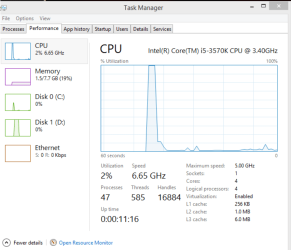
surfing at 5g.PNG

I use speed step. This is a real ss I got, although I could never validate at that speed. Just a weird spike
 

My Computer

Computer type
PC/Desktop
Computer Manufacturer/Model Number
Dude Build
OS
Windows 10 Pro X64
CPU
Intel(R) Core(TM) i5-3570K CPU OC@ 4.5GHZ Turbo
Motherboard
MSI Z77A-G45 Gaming
Memory
8.00 GB DDR3 1600Mhz
Graphics Card(s)
MSI Gaming X GTX 1070
Sound Card
Realtek High Definition
Monitor(s) Displays
Dell S23O9W, HP L1710
Screen Resolution
DELL-1920 x 1080 HP-1280 x1024
Hard Drives
Crucial m4 256 SSD, WD 7200RPM 500GB WD 1TB
PSU
Seasonic X650 GOLD
Case
Zalman Z12
Cooling
Antec Kuhler 920
Keyboard
Logitech
Mouse
MSI DS100 Interceptor
Internet Speed
50 down and 5 up
Antivirus
MSE
Browser
Chrome, IE 11
Other Info
Logitech X-620 Speakers
Now that`s the spirit :D

I Love the smell of CPU in the morning.
 
Last edited:

My Computer

Computer type
PC/Desktop
Computer Manufacturer/Model Number
Skylake Special #666
OS
Windows 10 Pro x64
CPU
Intel Core i7 6700K
Motherboard
Asus Sabertooth Z170 Mark 1
Memory
GSkill TridentZ RGB 16GB 3600 16-16-16-36
Graphics Card(s)
EVGA GTX 980 Ti SC x2
Sound Card
Realtek High Definition
Monitor(s) Displays
AOC G2460PG
Screen Resolution
1920 x 1080 144Hz
Hard Drives
Samsung 860 Pro 256GB, Seagate Barracuda 4TB x2
PSU
EVGA 1000 P2, EVGA White Custom Braided Cables
Case
Corsair Vengeance C70 Gunmetal Black
Cooling
Corsair H100i v2, Corsair ML120 x2, Thermal Grizzly Kryonaut
Keyboard
Logitech G910 Orion Spectrum
Mouse
Logitech G700s
Internet Speed
Verizon Fios Quantum Gateway 75/75
Antivirus
Windows Defender, Malwarebytes Free 3.8.3
Browser
Chrome
Other Info
Corsair SP120 x4, LG Blu-ray Drive, Durabrand HT-395 100 Watt Dolby Digital Amp, Corsair H2100 Wireless 7.1 Headset
jeeze that bios is like a full blown OS! Mine is more like a bios from 2004 Can't even touch the CPU speed other than enabling and disabling intel speedstep

using min and max CPU power in control paenl on the power saver power plan does seem to alter the clock speed though. lowest i got was 1333mhz or so at 0% min and 0% max i can also set a low performance balanced and high performance checkbox on my GPU

and when i disable idle states (enabling hidden power plan option via registry)
my CPU always locks at it's highest turbo frequency. 2.415Ghz which is amazing and makes everything much more snappy and doesn't change the temperature by a single degree

but i still dont know how to cut my CPU speed exactly in "half" (testing)
 

My Computer

Computer type
PC/Desktop
Computer Manufacturer/Model Number
HP Elite 8300 compaq SFF
OS
Windows 7 Pro x64
CPU
i7 3770k 3.5ghz up to 3.9ghz turbo boost 4 core 8 thread CPU
Motherboard
HP Elite 8300 compaq SFF OEM board
Memory
32GB 4x8GB DDR3 1600mhz CL9 patriot viper gaming ram
Graphics Card(s)
ZOTAC GTX 1650 low profile overclocked GPU
Sound Card
realtek integrated HD audio
Monitor(s) Displays
23" acer gaming 144hz 1ms monitor
Screen Resolution
1920x1080 @120hz/144hz
Hard Drives
ADATA 128GB SSD
ADAtA 256GB SSD
x1 Seagate 250GB 7200 RPM drive
x1 Seagate 500GB 7200 RPM drive
PSU
430w thermaltake smart
Case
HP Elite 8300 compaq SFF
Cooling
Stock + new thermal paste
Keyboard
REDRAGON mechanical blue switch
Mouse
ZELOTES wired T-90 mouse
Internet Speed
10MB/s (80mbps) download good internet
Antivirus
in-use/other
Browser
IE11 + firefox + Google Chrome randomly switches between
Other Info
Info updated

power supply doesnt fit but still works with adapter its just sitting on the desk behind the computer wires going into the case where the old power supply was.

My Computer

Computer type
PC/Desktop
Computer Manufacturer/Model Number
Dude Build
OS
Windows 10 Pro X64
CPU
Intel(R) Core(TM) i5-3570K CPU OC@ 4.5GHZ Turbo
Motherboard
MSI Z77A-G45 Gaming
Memory
8.00 GB DDR3 1600Mhz
Graphics Card(s)
MSI Gaming X GTX 1070
Sound Card
Realtek High Definition
Monitor(s) Displays
Dell S23O9W, HP L1710
Screen Resolution
DELL-1920 x 1080 HP-1280 x1024
Hard Drives
Crucial m4 256 SSD, WD 7200RPM 500GB WD 1TB
PSU
Seasonic X650 GOLD
Case
Zalman Z12
Cooling
Antec Kuhler 920
Keyboard
Logitech
Mouse
MSI DS100 Interceptor
Internet Speed
50 down and 5 up
Antivirus
MSE
Browser
Chrome, IE 11
Other Info
Logitech X-620 Speakers
it tries to install but says my platform is not supported at end of installation. (I have an OEM board so no intel overclocking tool will install) unless the XTU.msi is modified using Orca msi modifier tool but that will be pointless because the program itself would fail to run properly on an unsupported board

guess my CPU is not supported by any overclocking or under-clocking tool that exists.

only way would be to manufacture the same CPU at higher or lower clock speed through modified circuitry

then desolder old CPU and resolder new CPU on which nobody is going to bother with.

I have been 100% assured my processor is very stable. Ran GPU RAM and CPU tests simultaneously at 100% load for 24 hours and temperature never rose above 49-50*C for CPU or GPU.

played games like crysis 3 and metro last light and there has been no issues with stability what-so-ever.
ram is 100% stable as far as i know.
 
Last edited:

My Computer

Computer type
PC/Desktop
Computer Manufacturer/Model Number
HP Elite 8300 compaq SFF
OS
Windows 7 Pro x64
CPU
i7 3770k 3.5ghz up to 3.9ghz turbo boost 4 core 8 thread CPU
Motherboard
HP Elite 8300 compaq SFF OEM board
Memory
32GB 4x8GB DDR3 1600mhz CL9 patriot viper gaming ram
Graphics Card(s)
ZOTAC GTX 1650 low profile overclocked GPU
Sound Card
realtek integrated HD audio
Monitor(s) Displays
23" acer gaming 144hz 1ms monitor
Screen Resolution
1920x1080 @120hz/144hz
Hard Drives
ADATA 128GB SSD
ADAtA 256GB SSD
x1 Seagate 250GB 7200 RPM drive
x1 Seagate 500GB 7200 RPM drive
PSU
430w thermaltake smart
Case
HP Elite 8300 compaq SFF
Cooling
Stock + new thermal paste
Keyboard
REDRAGON mechanical blue switch
Mouse
ZELOTES wired T-90 mouse
Internet Speed
10MB/s (80mbps) download good internet
Antivirus
in-use/other
Browser
IE11 + firefox + Google Chrome randomly switches between
Other Info
Info updated

power supply doesnt fit but still works with adapter its just sitting on the desk behind the computer wires going into the case where the old power supply was.
Except your processor does support over/under-clocking tools. Intel SpeedStep and Turbo boost are already active on your system. You can use the built-in tools in Windows to control SpeedStep.

But if you want more control you need to pay for that.
 

My Computer

Computer type
PC/Desktop
Computer Manufacturer/Model Number
Alienware Aurora ALX R4
OS
Windows 10 Pro (x64)
CPU
Intel Core i7-3930K (3.2GHz - 4.5GHz)
Motherboard
Alienware Aurora-R4 x79
Memory
4x Samsung 4GB PC3-12800 DDR3 (16GB 1600MHz)
Graphics Card(s)
Nvidia Geforce GTX 690
Sound Card
SteelSeries Siberia Elite
Monitor(s) Displays
Dell UltraSharp U3011
Screen Resolution
2560x1600
Hard Drives
Samsung 850 Pro 256 GB, Seagate 1TB Desktop Hybrid HDD, 2x Western Digital 4TB Green HDD
PSU
875W Some Dell PSU <.<
Case
Alienware Aurora ALX
Cooling
Custom Liquid Cooling (EK CPU & GPU blocks) dual EK 480RAD
Keyboard
Logitech G710+ Mechanical
Mouse
Logitech G700s
Internet Speed
Verizon Fios (50 mbps average)
Other Info
Server: Intel NUC D54250WYK: i5-4250U, 16GB, 256 GB mSATA, Windows Server 2012 R2
Did you try setting it to min 50% and max 50% in the power plan ?
 

My Computer

Computer type
PC/Desktop
Computer Manufacturer/Model Number
Skylake Special #666
OS
Windows 10 Pro x64
CPU
Intel Core i7 6700K
Motherboard
Asus Sabertooth Z170 Mark 1
Memory
GSkill TridentZ RGB 16GB 3600 16-16-16-36
Graphics Card(s)
EVGA GTX 980 Ti SC x2
Sound Card
Realtek High Definition
Monitor(s) Displays
AOC G2460PG
Screen Resolution
1920 x 1080 144Hz
Hard Drives
Samsung 860 Pro 256GB, Seagate Barracuda 4TB x2
PSU
EVGA 1000 P2, EVGA White Custom Braided Cables
Case
Corsair Vengeance C70 Gunmetal Black
Cooling
Corsair H100i v2, Corsair ML120 x2, Thermal Grizzly Kryonaut
Keyboard
Logitech G910 Orion Spectrum
Mouse
Logitech G700s
Internet Speed
Verizon Fios Quantum Gateway 75/75
Antivirus
Windows Defender, Malwarebytes Free 3.8.3
Browser
Chrome
Other Info
Corsair SP120 x4, LG Blu-ray Drive, Durabrand HT-395 100 Watt Dolby Digital Amp, Corsair H2100 Wireless 7.1 Headset
yeah but that's not exactly half my CPU speed. i divided 2.41Ghz by 2 and i get less than 0% and 0% less than 1333mhz about 1207mhz or so. so 0% and 0% dont make my CPU go to 0mhz. rather to the lowest stepping it supports... it seems no software was made for this CPU/board so nothing can over/underclock it because no one's designed a program that can detect it correctly.. i dont have money for expensive professional overclocking utilities.
 
Last edited:

My Computer

Computer type
PC/Desktop
Computer Manufacturer/Model Number
HP Elite 8300 compaq SFF
OS
Windows 7 Pro x64
CPU
i7 3770k 3.5ghz up to 3.9ghz turbo boost 4 core 8 thread CPU
Motherboard
HP Elite 8300 compaq SFF OEM board
Memory
32GB 4x8GB DDR3 1600mhz CL9 patriot viper gaming ram
Graphics Card(s)
ZOTAC GTX 1650 low profile overclocked GPU
Sound Card
realtek integrated HD audio
Monitor(s) Displays
23" acer gaming 144hz 1ms monitor
Screen Resolution
1920x1080 @120hz/144hz
Hard Drives
ADATA 128GB SSD
ADAtA 256GB SSD
x1 Seagate 250GB 7200 RPM drive
x1 Seagate 500GB 7200 RPM drive
PSU
430w thermaltake smart
Case
HP Elite 8300 compaq SFF
Cooling
Stock + new thermal paste
Keyboard
REDRAGON mechanical blue switch
Mouse
ZELOTES wired T-90 mouse
Internet Speed
10MB/s (80mbps) download good internet
Antivirus
in-use/other
Browser
IE11 + firefox + Google Chrome randomly switches between
Other Info
Info updated

power supply doesnt fit but still works with adapter its just sitting on the desk behind the computer wires going into the case where the old power supply was.
You still haven't told us why in the world you would want to do that. Plus, if your system specs are right, you have an Acer computer which means you have a locked BIOS and none of the options you need are available to you. With your computer it can't be done.
 

My Computers

System One System Two

  • Computer type
    PC/Desktop
    Computer Manufacturer/Model Number
    ALWAYS UNDER CONSTRUCTION
    OS
    Windows 11 Pro
    CPU
    Ryzen 9 5900X
    Motherboard
    Asus X570 Crosshair Viii Hero
    Memory
    32GB G Skill DDR4-3600
    Graphics Card(s)
    EVGA RTX 3080 FTW 3 Ultra
    Sound Card
    On Board/Sennheiser PC37X Headset
    Monitor(s) Displays
    3 X Asus 27"
    Screen Resolution
    2560x1440
    Hard Drives
    2 X 1 TB NVME drives
    PSU
    EVGA 850
    Case
    Phanteks Eclipse P400A
    Cooling
    EVGA 280 AIO
    Keyboard
    Logitech G510s/ Logitech G13
    Mouse
    Logitech G502
    Internet Speed
    24/1
    Antivirus
    ESET/MBAM Pro/SAS Pro
    Browser
    Chrome/ Firefox/ Edge
  • Computer type
    Laptop
    System Manufacturer/Model Number
    Dell 16 Plus
    OS
    Windows 11 Pro
    CPU
    Intel Ultra 9 288V
    Memory
    32 GB LPDDR5X 8533
    Monitor(s) Displays
    16" Mini-LED HDR600 Touch 90 Hz
    Screen Resolution
    2560X1600
    Hard Drives
    1 TB NVME
i just wanted to see if it would match the speed of another computer i have for an experiment. nothing fancy. but it seems i cant even lower the clock enough for it to be half as fast.
 

My Computer

Computer type
PC/Desktop
Computer Manufacturer/Model Number
HP Elite 8300 compaq SFF
OS
Windows 7 Pro x64
CPU
i7 3770k 3.5ghz up to 3.9ghz turbo boost 4 core 8 thread CPU
Motherboard
HP Elite 8300 compaq SFF OEM board
Memory
32GB 4x8GB DDR3 1600mhz CL9 patriot viper gaming ram
Graphics Card(s)
ZOTAC GTX 1650 low profile overclocked GPU
Sound Card
realtek integrated HD audio
Monitor(s) Displays
23" acer gaming 144hz 1ms monitor
Screen Resolution
1920x1080 @120hz/144hz
Hard Drives
ADATA 128GB SSD
ADAtA 256GB SSD
x1 Seagate 250GB 7200 RPM drive
x1 Seagate 500GB 7200 RPM drive
PSU
430w thermaltake smart
Case
HP Elite 8300 compaq SFF
Cooling
Stock + new thermal paste
Keyboard
REDRAGON mechanical blue switch
Mouse
ZELOTES wired T-90 mouse
Internet Speed
10MB/s (80mbps) download good internet
Antivirus
in-use/other
Browser
IE11 + firefox + Google Chrome randomly switches between
Other Info
Info updated

power supply doesnt fit but still works with adapter its just sitting on the desk behind the computer wires going into the case where the old power supply was.
I have enabled the option in power plan through registry (Enable Throttle States) which made my CPU use a bare minimum 0.1 watts on idle! Wow!! Less than the power of stereo desktop speakers on standby!! I can finally match almost exactly any CPU that's lower than mine! (GPU still wont match though.. only has power saver balanced and high performance option)
going to do some testing and experiments with CPU usage and determine intricate bottlenecks with some software.
 

My Computer

Computer type
PC/Desktop
Computer Manufacturer/Model Number
HP Elite 8300 compaq SFF
OS
Windows 7 Pro x64
CPU
i7 3770k 3.5ghz up to 3.9ghz turbo boost 4 core 8 thread CPU
Motherboard
HP Elite 8300 compaq SFF OEM board
Memory
32GB 4x8GB DDR3 1600mhz CL9 patriot viper gaming ram
Graphics Card(s)
ZOTAC GTX 1650 low profile overclocked GPU
Sound Card
realtek integrated HD audio
Monitor(s) Displays
23" acer gaming 144hz 1ms monitor
Screen Resolution
1920x1080 @120hz/144hz
Hard Drives
ADATA 128GB SSD
ADAtA 256GB SSD
x1 Seagate 250GB 7200 RPM drive
x1 Seagate 500GB 7200 RPM drive
PSU
430w thermaltake smart
Case
HP Elite 8300 compaq SFF
Cooling
Stock + new thermal paste
Keyboard
REDRAGON mechanical blue switch
Mouse
ZELOTES wired T-90 mouse
Internet Speed
10MB/s (80mbps) download good internet
Antivirus
in-use/other
Browser
IE11 + firefox + Google Chrome randomly switches between
Other Info
Info updated

power supply doesnt fit but still works with adapter its just sitting on the desk behind the computer wires going into the case where the old power supply was.
Back
Top