CPU temperature gadget

gohardsupreme

New member
Local time
10:24 AM
Messages
133
Does such a thing exist? i have seen ones that work but require an accompanying program to function. I can't seem to find a stand alone gadget to monitor temperatures.
 

My Computer

Computer Manufacturer/Model Number
Gateway T-1628
OS
windows 7 home premium sp1 x86
CPU
AMD Turion 64 x2 Mobile Technology 2.0 GHz
Motherboard
GATEWAY (Socket M2/S1G1) ATI RS690/RS690M Chipset
Memory
3gb DDR2 RAM
Graphics Card(s)
ATI Radeon x1200 series
Sound Card
SigmaTel High Def audio
Monitor(s) Displays
Generic PnP Monitor
Screen Resolution
1280x800
Hard Drives
250gb Western Digital
Does such a thing exist? i have seen ones that work but require an accompanying program to function. I can't seem to find a stand alone gadget to monitor temperatures.

something like speedfan maybe ?
 

My Computer

Computer Manufacturer/Model Number
built my own
OS
win7 ultimate / virtual box
CPU
Intel Core i7 3770K,1155, Ivy Bridge
Motherboard
MSI Z77A-G43
Memory
GSkill Ripjaws Z Series 1600 CL 9.0 16GB
Graphics Card(s)
KFA2 GeForce GTX 670 EX OC 2048MB GDDR5 PCI-E gfx card
Sound Card
onboard Nvidia HDMI audio
Monitor(s) Displays
ASUS VK222H 22" widescreen LCD monitor
Screen Resolution
1680x1050
Hard Drives
Kingston 128gb SSD
OCZ Vertex 90gb SSD
500GB WDCaviar 16mb 5000KS
320GB WDCaviar 16mb 3200AAKS sata 2
1TB Samsung 16mb HD103SJ sata 2
PSU
Corsair HX 750W ATX2.2 Modular
Cooling
Antec 25 Kuhler H2O 620
Keyboard
logitech
Mouse
logitech MX518
Internet Speed
7mb adsl
sort of. I like the functions of speedfan but i would prefer having a sidebar gadget. something like all cpu meter with a thermometer
 

My Computer

Computer Manufacturer/Model Number
Gateway T-1628
OS
windows 7 home premium sp1 x86
CPU
AMD Turion 64 x2 Mobile Technology 2.0 GHz
Motherboard
GATEWAY (Socket M2/S1G1) ATI RS690/RS690M Chipset
Memory
3gb DDR2 RAM
Graphics Card(s)
ATI Radeon x1200 series
Sound Card
SigmaTel High Def audio
Monitor(s) Displays
Generic PnP Monitor
Screen Resolution
1280x800
Hard Drives
250gb Western Digital
try everest ultimate and sfkilla's everest sidebar gadget. SFKilla - Everest Meter
he hasn't posted a new version yet but i have attached the beta version that i have been using for ages with no probs
 
Last edited:

My Computer

Computer Manufacturer/Model Number
OnSpiderPark
OS
Windows Seven Home Premium x64
CPU
Intel Pentium D 925 Dual Core 3.0Ghz
Motherboard
MSI G31M3-F Intel® G31 Intel® ICH7
Memory
2x 2048MB Dual Channel DDR2 800Mhz (Low Profile)
Graphics Card(s)
ATI Radeon HD4350 512MB
Monitor(s) Displays
LG 22" Widescreen
Screen Resolution
1680x1050
Hard Drives
350GB SATA
Case
ASUS VENTO M2
Cooling
Akasa AK-965 Intel COOLER Akasa 80mm case fan
Internet Speed
4.8Mb
try everest ultimate and sfkilla's everest sidebar gadget. SFKilla - Everest Meter
he hasn't posted a new version yet but i have attached the beta version that i have been using for ages with no probs

everest is a little confusing having to type in all the values and such. from what i can tell there is no gadget that displays temperature without having some program running in the background. would it be possible to create a gadget that would do what im looking for?
 

My Computer

Computer Manufacturer/Model Number
Gateway T-1628
OS
windows 7 home premium sp1 x86
CPU
AMD Turion 64 x2 Mobile Technology 2.0 GHz
Motherboard
GATEWAY (Socket M2/S1G1) ATI RS690/RS690M Chipset
Memory
3gb DDR2 RAM
Graphics Card(s)
ATI Radeon x1200 series
Sound Card
SigmaTel High Def audio
Monitor(s) Displays
Generic PnP Monitor
Screen Resolution
1280x800
Hard Drives
250gb Western Digital
OrbLog

This site (I use google to translate from German to English) has a few gadgets that I use. One monitors temps and cpu core load, one monitors gpu temps, and a few others that I find useful.
 
Last edited:

My Computer

OS
Windows 7
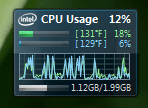
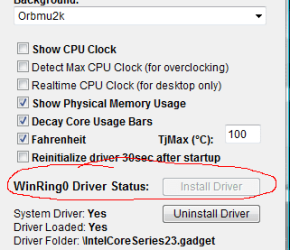
I use that cpu gadget found at Orblog also. As long as you have an intel cpu it works perfectly for what you are looking for. Also shows mem usage. Just make sure you go into the settings and install the temp. driver.
 

Attachments

  • gadget.PNG
    gadget.PNG
    24.6 KB · Views: 391,978
  • gadget_settings.PNG
    gadget_settings.PNG
    15 KB · Views: 392,154

My Computer

Computer Manufacturer/Model Number
Toshiba Satellite A135S4487
OS
Windows 7 Ultimate (32-bit)
CPU
Intel Mobile Core 2 Duo T5500 @ 1.66 GHz
Motherboard
Intel i945GM Chipset
Memory
2.0GB Dual Channel DDR2 @ 266 MHz 4-4-4-12
Graphics Card(s)
Mobile Intel 945 Express Chipset Family
Sound Card
Realtek High Definition Audio
Monitor(s) Displays
Generic PnP Monitor, Samsung 46" LCD
Screen Resolution
1280 x 800, 1920 x 1080
Hard Drives
100GB Hitachi ATA Device (IDE)
120GB Western Digital USB
250GB External USB
Keyboard
Microsoft Wireless Comfort Keyboard 5000
Mouse
Microsoft Wireless Mouse 5000
Internet Speed
DSL
I use that cpu gadget found at Orblog also. As long as you have an intel cpu it works perfectly for what you are looking for. Also shows mem usage. Just make sure you go into the settings and install the temp. driver.

That would be perfect but sadly i dont have an intel chip
 

My Computer

Computer Manufacturer/Model Number
Gateway T-1628
OS
windows 7 home premium sp1 x86
CPU
AMD Turion 64 x2 Mobile Technology 2.0 GHz
Motherboard
GATEWAY (Socket M2/S1G1) ATI RS690/RS690M Chipset
Memory
3gb DDR2 RAM
Graphics Card(s)
ATI Radeon x1200 series
Sound Card
SigmaTel High Def audio
Monitor(s) Displays
Generic PnP Monitor
Screen Resolution
1280x800
Hard Drives
250gb Western Digital
Take a look at:
Core Temp

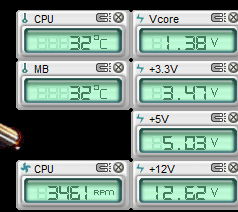
You may try the ASUS web site and check under downloads for PC Probe or PC ProbeII. Since you have ATI chipset it may work. It looks like this on my desktop

Probe.PNG

Jim :cool:
 

My Computer

Computer type
PC/Desktop
Computer Manufacturer/Model Number
Home Built
OS
Windows 8.1 Pro w/Media Center 64bit, Windows 7 HP 64bit
CPU
Phenom II X6 1100T
Motherboard
ASUS M5A99X EVO
Memory
Crucial Balistic 8gb DDR3-1866 CL9
Graphics Card(s)
MSI R6850 Cyclone IGD5 PE
Sound Card
On Board
Monitor(s) Displays
ASUS VE258Q 25" LED with DVI-HDMI-DisplayPort
Screen Resolution
1920 x 1080
Hard Drives
Two WD Cavier Black 2TB Sata III, WD My Book Essential 2TB USB 3.0
PSU
Seasonic X650 80 Plus GOLD Modular
Case
Corsair 400R
Cooling
Antec Kuhler H2O 620, Two 120mm and four 140mm
Keyboard
Logitech K120
Mouse
Logitech Marble Mouse USB, Logitech Precision Game Pad
Internet Speed
15MB
Antivirus
Norton IS 2013, Malwarebytes Pro Beta 2
Browser
IE-11, FF-27
Other Info
APC UPS ES 750, Netgear WNR3500L Gigabit & Wireless N Router with SamKnows Test Program, Motorola SB6120 Gigabit Cable Modem. Brother HL-2170W Laser Printer, Epson V300 Scanner
I use that cpu gadget found at Orblog also. As long as you have an intel cpu it works perfectly for what you are looking for. Also shows mem usage. Just make sure you go into the settings and install the temp. driver.

That would be perfect but sadly i dont have an intel chip


Oops. Sorry. Should have looked at your system specs before I posted.
 

My Computer

Computer Manufacturer/Model Number
Toshiba Satellite A135S4487
OS
Windows 7 Ultimate (32-bit)
CPU
Intel Mobile Core 2 Duo T5500 @ 1.66 GHz
Motherboard
Intel i945GM Chipset
Memory
2.0GB Dual Channel DDR2 @ 266 MHz 4-4-4-12
Graphics Card(s)
Mobile Intel 945 Express Chipset Family
Sound Card
Realtek High Definition Audio
Monitor(s) Displays
Generic PnP Monitor, Samsung 46" LCD
Screen Resolution
1280 x 800, 1920 x 1080
Hard Drives
100GB Hitachi ATA Device (IDE)
120GB Western Digital USB
250GB External USB
Keyboard
Microsoft Wireless Comfort Keyboard 5000
Mouse
Microsoft Wireless Mouse 5000
Internet Speed
DSL
try rainmeter mate... its alot more than the temp...latest version 1.1 or the beta 1.2 ...its dead easy to use and bring urdesktop to life....check it out here Rainmeter.net
 

My Computer

OS
windows 7 ultimate

My Computer

Computer Manufacturer/Model Number
myself
OS
SEVEN x64
CPU
Q9450 @ 3.6GHZ 1.34v
Motherboard
ASUS P5K PREMIUM P35
Memory
8GB 1066 buffalo firestix @ 1152mhz CL5
Graphics Card(s)
Sapphire HD 5970 + GTX260 (physX)
Sound Card
Creative X-FI Xtreme Gamer
Monitor(s) Displays
SAMSUNG 20'' & SAMSUNG 23'' (dual screens)
Screen Resolution
2048x1152 & 1680x1050
Hard Drives
1x seagate 160gb IDE & 1x seagate 160gb SATA
PSU
XCILIO 850w (78A)
Case
CM590 1x 120x38mm & 2x92x38mm / 4x 120x25mm
Cooling
AC7 PRO @ 92x38mm blower, Lamptron military bus bay controll
Keyboard
LOGITECH E110
Mouse
logitech NX5
Internet Speed
2MB
Other Info
its a continual ''work in progress''....
Take a look at:
Core Temp

You may try the ASUS web site and check under downloads for PC Probe or PC ProbeII. Since you have ATI chipset it may work. It looks like this on my desktop

View attachment 51585

Jim :cool:
That looks great but when i tried to install i was told it only supports asus motherboards. something which i dont have. Digi, i have seen rainmeter and it does bring a desktop to life unfortunetly i found it confusing and wasnt exactly sure how t make it work. for now im using speed fan and found a version of all cpu gadget that gives the average temperature of both my cores. Having each one individually would be better but i can live with this for now.
 
Last edited:

My Computer

Computer Manufacturer/Model Number
Gateway T-1628
OS
windows 7 home premium sp1 x86
CPU
AMD Turion 64 x2 Mobile Technology 2.0 GHz
Motherboard
GATEWAY (Socket M2/S1G1) ATI RS690/RS690M Chipset
Memory
3gb DDR2 RAM
Graphics Card(s)
ATI Radeon x1200 series
Sound Card
SigmaTel High Def audio
Monitor(s) Displays
Generic PnP Monitor
Screen Resolution
1280x800
Hard Drives
250gb Western Digital
Back
Top