Very high sudden CPU temperature

VXER

█║▌│║▌
Hey
So today i did a fresh OS install when finishing everything started up Steam and lunched GTAV,Steam started installing "first time" _CommonRedist which include directx and vcredist,suddenly during that installation i heard the fan noise go loud like never before,toke a look at Speccy and the CPU's temp was at 85c-88c,it never came this high,it reaches max 71c when playing GTAV+Firefox+Jetaudio,idle is 30ish.
Have Corsair Hydro H80i for cooler,so far this is what i did:
1-Applied new thermal paste,temps got just a bit lower (it did nothing).
2-Removed the H80i and used stock cooler with new thermal paste,temp idle 52c-56c
3-Installed AVAST,found nothing.
What's going on ? is the H80i broke ? could it be a virus ?
Are the idle and max temps with the stock cooler normal:
Idle 52c-56c
Gaming (GTAV+Firefox) 74c-78c (GPU 55c,MB 28c) ?
 
Last edited:

My Computer

Computer type
PC/Desktop
Computer Manufacturer/Model Number
Custom Build
OS
Windows 7 Home Premium
CPU
Intel Core i7 4790
Motherboard
Asus MAXIMUS VII RANGER z97
Memory
Kingston HyperX Beast 16GB 2400Mhz
Graphics Card(s)
Gigabyte 970 4GB G1 GAMING
Monitor(s) Displays
LG 23 Cinema 3D 1080p
Screen Resolution
1920x1080 60Hz
Hard Drives
Samsung 840 EVO 250GB SSD / WD Blue 500GB HDD / Seagate 1TB HDD USB
PSU
EVGA SuperNova 850w G2 Gold
Case
Corsair 300R Custom
Cooling
Corsair Hydro H80i
Keyboard
Alienware TactX
Mouse
Alienware TactX
Antivirus
Bitdefender
Browser
Mozilla FireFox
Other Info
Razer Vespula
If you stock cooler keep the temps lower than the H80 I can think of two things.

1. Deffective H80
2. The H80 is not installed correctly.
 

My Computer

Computer type
PC/Desktop
Computer Manufacturer/Model Number
Home made Desktop
OS
Windows 10 Pro. 64/ version 1709 Windows 7 Pro/64
CPU
Intel i7-6800K @ 4.3
Motherboard
ASUS X-99 Deluxe II
Memory
Corsair Platinum 16 gig @2400
Graphics Card(s)
EVGA GTX 1070 OC
Monitor(s) Displays
Asus 27" LED LCD/VE278Q
Screen Resolution
1920-1080 or 1280-720 HDMI
Hard Drives
INTEL SSD 730-240 Gb Sata 3.0/
PSU
EVGA Platium 1200W
Case
Phanteks Luxe Tempered Glass 8 fans/ one radiator
Cooling
XSPC/ Water Cooled CPU
Keyboard
Das 4 Professional
Mouse
Logitech M705/MX Anywhere 2-S
Internet Speed
100 mbits
Antivirus
Microsoft Security Essentials/ Malwarebytes Premium 3.0/ SAS
Browser
I.E. 11 default/Firefox/ ISP Time Warner Cable/Spectrum
Other Info
LG BluRay Burner/
Sound system-KLipsch-THX/
Icy Dock ssd Hot Swap bays.

My Computer

Computer type
PC/Desktop
Computer Manufacturer/Model Number
Custom assembled by me :}
OS
Win-7-Pro64bit 7-H-Prem-64bit
CPU
i7-5930K 2nd i9-9940x both water blocked VRM's too
Motherboard
ASUS SABERTOOTH X99 2nd ASUS x299 Apex
Memory
Trident-z 3200C14 2nd Trident-z 3600C16
Graphics Card(s)
EVGA 1080ti ftw3 2nd Titan Xp both water blocked
Sound Card
Built-in Realtek
Monitor(s) Displays
1-AOC G2460PG 24"G-Sync 144Hz/ 2nd 1-ASUS VG248QE 24" 144Hz
Screen Resolution
1920 x 1080 144Hz
Hard Drives
2-Samsung M.2 Evo & Evo Plus
2-Samsung 850 EVO 500GB SSD's/ 3-2.5 W.D. Black 1tb-&3-1tb/3-3.5 WD Black 1tb hdd's
PSU
EVGA SuperNOVA 1000-P2 2nd 1200-P2
Case
2-Corsair Obsidian Series 450D Black ATX Mid Tower
Cooling
Custom water loops
Keyboard
Logitech G710+/ 2nd Logitech G910
Mouse
2-RedDragon M901 Perdition 16400 dpi Gaming mouse = wired
Internet Speed
Comcast Ping 19ms 89.31mbps download speed 6.12mbps upload
Antivirus
Malwarebytes Pro/ Superantispyware Pro
Browser
FireFox & Pale moon
Other Info
2nd ASUS X299 Apex/Intel i9-9940x with Custom water loop/7H-Prem-x64/Corsair 450D case/Ram Trident-z 3600C16 4x8gb / Samsung970Evo plus 500gb SSD/Dual ssd EZ swap evo/PSU EVGA SuperNova 1200w-P2 80+Platinum/GPU Titan Xp /8-ML-140 on push-pull on 2-280GTX rads
If you stock cooler keep the temps lower than the H80 I can think of two things.

1. Deffective H80
2. The H80 is not installed correctly.
1-That might be it.
2-Not a chance.

Hi,
Did you get windows updated ?
http://www.sevenforums.com/windows-...ate-ive-tried-multiple-fixes.html#post3283907

Open resource monitor and see if svchost.exe is acting up.
I'm not sure how this is related to my issue,after installing all apps and configuring them as i have always done for like the 50th time when doing a fresh OS install everything was fine,it happened when Steam was installing directx and vcredist (coincidence?) And i had Windows Updates "never check" long before this went down.


I need to know two things,are my idle and max temps with the stock normal ? could this issue be related to bad software or virus ?
 

My Computer

Computer type
PC/Desktop
Computer Manufacturer/Model Number
Custom Build
OS
Windows 7 Home Premium
CPU
Intel Core i7 4790
Motherboard
Asus MAXIMUS VII RANGER z97
Memory
Kingston HyperX Beast 16GB 2400Mhz
Graphics Card(s)
Gigabyte 970 4GB G1 GAMING
Monitor(s) Displays
LG 23 Cinema 3D 1080p
Screen Resolution
1920x1080 60Hz
Hard Drives
Samsung 840 EVO 250GB SSD / WD Blue 500GB HDD / Seagate 1TB HDD USB
PSU
EVGA SuperNova 850w G2 Gold
Case
Corsair 300R Custom
Cooling
Corsair Hydro H80i
Keyboard
Alienware TactX
Mouse
Alienware TactX
Antivirus
Bitdefender
Browser
Mozilla FireFox
Other Info
Razer Vespula
I just ran "Performance test" and the temp went to 91c WTF,this is with the stock fan :confused:

EDIT:
I just did a full format (using disk part) and did a reset for BIOS (removing the battery) and the idle temp is still the same 52c,something ain't right here.
 
Last edited:

My Computer

Computer type
PC/Desktop
Computer Manufacturer/Model Number
Custom Build
OS
Windows 7 Home Premium
CPU
Intel Core i7 4790
Motherboard
Asus MAXIMUS VII RANGER z97
Memory
Kingston HyperX Beast 16GB 2400Mhz
Graphics Card(s)
Gigabyte 970 4GB G1 GAMING
Monitor(s) Displays
LG 23 Cinema 3D 1080p
Screen Resolution
1920x1080 60Hz
Hard Drives
Samsung 840 EVO 250GB SSD / WD Blue 500GB HDD / Seagate 1TB HDD USB
PSU
EVGA SuperNova 850w G2 Gold
Case
Corsair 300R Custom
Cooling
Corsair Hydro H80i
Keyboard
Alienware TactX
Mouse
Alienware TactX
Antivirus
Bitdefender
Browser
Mozilla FireFox
Other Info
Razer Vespula
Hi,
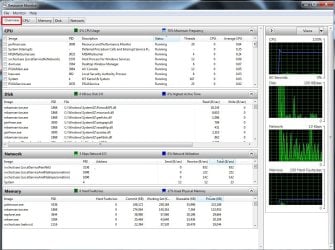
Like I said prior open resource monitor and the overview section and post a screen shot like this
Just click Start and type in the search box resource monitor
resource monitor overview.jpg
 

My Computer

Computer type
PC/Desktop
Computer Manufacturer/Model Number
Custom assembled by me :}
OS
Win-7-Pro64bit 7-H-Prem-64bit
CPU
i7-5930K 2nd i9-9940x both water blocked VRM's too
Motherboard
ASUS SABERTOOTH X99 2nd ASUS x299 Apex
Memory
Trident-z 3200C14 2nd Trident-z 3600C16
Graphics Card(s)
EVGA 1080ti ftw3 2nd Titan Xp both water blocked
Sound Card
Built-in Realtek
Monitor(s) Displays
1-AOC G2460PG 24"G-Sync 144Hz/ 2nd 1-ASUS VG248QE 24" 144Hz
Screen Resolution
1920 x 1080 144Hz
Hard Drives
2-Samsung M.2 Evo & Evo Plus
2-Samsung 850 EVO 500GB SSD's/ 3-2.5 W.D. Black 1tb-&3-1tb/3-3.5 WD Black 1tb hdd's
PSU
EVGA SuperNOVA 1000-P2 2nd 1200-P2
Case
2-Corsair Obsidian Series 450D Black ATX Mid Tower
Cooling
Custom water loops
Keyboard
Logitech G710+/ 2nd Logitech G910
Mouse
2-RedDragon M901 Perdition 16400 dpi Gaming mouse = wired
Internet Speed
Comcast Ping 19ms 89.31mbps download speed 6.12mbps upload
Antivirus
Malwarebytes Pro/ Superantispyware Pro
Browser
FireFox & Pale moon
Other Info
2nd ASUS X299 Apex/Intel i9-9940x with Custom water loop/7H-Prem-x64/Corsair 450D case/Ram Trident-z 3600C16 4x8gb / Samsung970Evo plus 500gb SSD/Dual ssd EZ swap evo/PSU EVGA SuperNova 1200w-P2 80+Platinum/GPU Titan Xp /8-ML-140 on push-pull on 2-280GTX rads
If you have an idle temp of 52C, you have a cooling problem of some kind, or else the CPU is working hard during idle (which is what Thrashzone is trying to see - I think).

With an AIO watercooler, I can't get my PC to idle above 30C in a warm room, and it rarely breaks 45C during serious gaming. It won't even get to 52C on a stress test.

You have an Intel 4790 which uses less TDP than my CPU. Your CPU should perform better than mine temp-wise by a long shot. Do you have a low CPU fan speed enabled in BIOS (often called "Quite Mode" or something similar)?

Check your CPU fan speed in BIOS, and open up something like HWMonitor and check the speeds listed there. Maybe something has gone wrong with your CPU fan controller.
 

My Computer

Computer type
PC/Desktop
Computer Manufacturer/Model Number
Mellon Labs (custom build)
OS
Win 7 Pro x64/Win 10 Pro x64 dual boot
CPU
AMD FX 8350 Vishera @ 4200
Motherboard
ASUS M5A97 R2.0
Memory
16 GB Mushkin Blackline DDR3-2400 @ 1866 (9-10-10-10-31)
Graphics Card(s)
XFX Radeon R9 280 Double D Black Edition
Sound Card
Realtek HD Audio on MB. Sounds great.
Monitor(s) Displays
Acer 24", Acer 22"
Screen Resolution
3840 x 1080
Hard Drives
1 x Mushkin Chronos 120 GB SSD (Win 10)
1 x Samsung 850 EVO 250 GB SSD (Win 7)
1 x WD 1TB SATA Blue
1 x WD 1TB SATA Green
PSU
Corsair TX-750
Case
CoolerMaster HAF 912+
Cooling
Coolermaster Seidon 240M Liquid AIO. 6 case fans
Keyboard
Logitech G710+
Mouse
Logitech G500s
Internet Speed
Much better since I got fiber, but still way overpriced.
Antivirus
MSE, Malware Bytes for scanning
Browser
Firefox
Other Info
Corsair VOID USB headphones.

A Mellon Labs X-1 - LCD Smartie driven system status display.

Brought to you by the letter E
@ThrashZone
YXAtxEc.jpg


@Mellon Head
If i disable XMP temp goes down with the stock fan to idle 48-50c ,updating Steam and downloading some updates from Windows Updates using Firefox 50-64c with the stock fan,with the H80i to 85c.
Yes all fans are set on 2000rpm,cpu fan on max.
I have no idea what to do here,could the CPU itself be damaged ?

ummmm just ran GTA with the stock cooler and the temp reached 92c :sick:
 
Last edited:

My Computer

Computer type
PC/Desktop
Computer Manufacturer/Model Number
Custom Build
OS
Windows 7 Home Premium
CPU
Intel Core i7 4790
Motherboard
Asus MAXIMUS VII RANGER z97
Memory
Kingston HyperX Beast 16GB 2400Mhz
Graphics Card(s)
Gigabyte 970 4GB G1 GAMING
Monitor(s) Displays
LG 23 Cinema 3D 1080p
Screen Resolution
1920x1080 60Hz
Hard Drives
Samsung 840 EVO 250GB SSD / WD Blue 500GB HDD / Seagate 1TB HDD USB
PSU
EVGA SuperNova 850w G2 Gold
Case
Corsair 300R Custom
Cooling
Corsair Hydro H80i
Keyboard
Alienware TactX
Mouse
Alienware TactX
Antivirus
Bitdefender
Browser
Mozilla FireFox
Other Info
Razer Vespula
Hi,
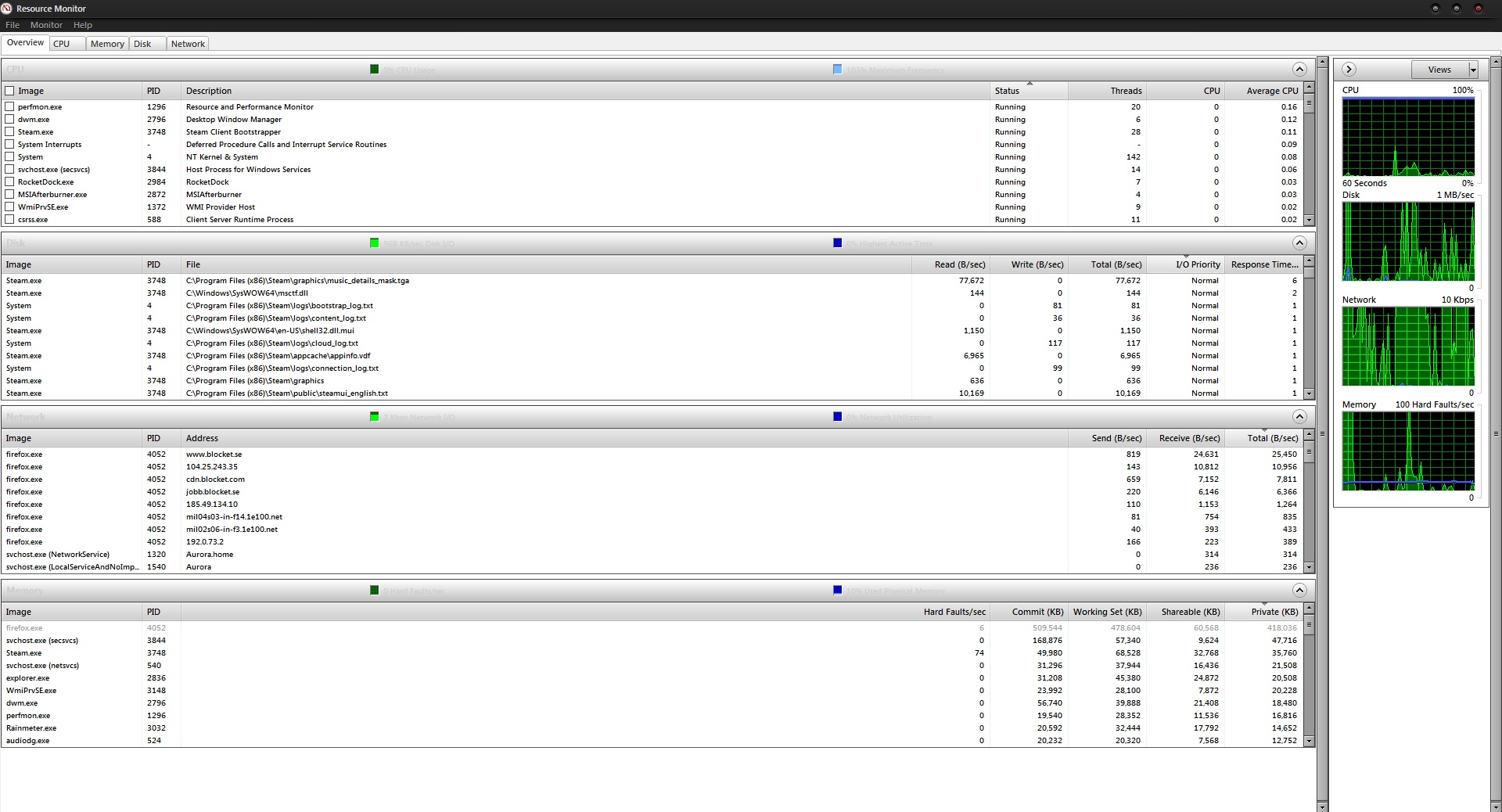
Beside Steam using some Disk and Firefox blocket.se using network the cpu look calm ?
Possibly wait till the cpu has high activity before taking a screen shot.
 

My Computer

Computer type
PC/Desktop
Computer Manufacturer/Model Number
Custom assembled by me :}
OS
Win-7-Pro64bit 7-H-Prem-64bit
CPU
i7-5930K 2nd i9-9940x both water blocked VRM's too
Motherboard
ASUS SABERTOOTH X99 2nd ASUS x299 Apex
Memory
Trident-z 3200C14 2nd Trident-z 3600C16
Graphics Card(s)
EVGA 1080ti ftw3 2nd Titan Xp both water blocked
Sound Card
Built-in Realtek
Monitor(s) Displays
1-AOC G2460PG 24"G-Sync 144Hz/ 2nd 1-ASUS VG248QE 24" 144Hz
Screen Resolution
1920 x 1080 144Hz
Hard Drives
2-Samsung M.2 Evo & Evo Plus
2-Samsung 850 EVO 500GB SSD's/ 3-2.5 W.D. Black 1tb-&3-1tb/3-3.5 WD Black 1tb hdd's
PSU
EVGA SuperNOVA 1000-P2 2nd 1200-P2
Case
2-Corsair Obsidian Series 450D Black ATX Mid Tower
Cooling
Custom water loops
Keyboard
Logitech G710+/ 2nd Logitech G910
Mouse
2-RedDragon M901 Perdition 16400 dpi Gaming mouse = wired
Internet Speed
Comcast Ping 19ms 89.31mbps download speed 6.12mbps upload
Antivirus
Malwarebytes Pro/ Superantispyware Pro
Browser
FireFox & Pale moon
Other Info
2nd ASUS X299 Apex/Intel i9-9940x with Custom water loop/7H-Prem-x64/Corsair 450D case/Ram Trident-z 3600C16 4x8gb / Samsung970Evo plus 500gb SSD/Dual ssd EZ swap evo/PSU EVGA SuperNova 1200w-P2 80+Platinum/GPU Titan Xp /8-ML-140 on push-pull on 2-280GTX rads
But at that rate the temp is 50-65c,if i push it more then I'll have to run GTAV and that will get the temp to 75-92c.
 

My Computer

Computer type
PC/Desktop
Computer Manufacturer/Model Number
Custom Build
OS
Windows 7 Home Premium
CPU
Intel Core i7 4790
Motherboard
Asus MAXIMUS VII RANGER z97
Memory
Kingston HyperX Beast 16GB 2400Mhz
Graphics Card(s)
Gigabyte 970 4GB G1 GAMING
Monitor(s) Displays
LG 23 Cinema 3D 1080p
Screen Resolution
1920x1080 60Hz
Hard Drives
Samsung 840 EVO 250GB SSD / WD Blue 500GB HDD / Seagate 1TB HDD USB
PSU
EVGA SuperNova 850w G2 Gold
Case
Corsair 300R Custom
Cooling
Corsair Hydro H80i
Keyboard
Alienware TactX
Mouse
Alienware TactX
Antivirus
Bitdefender
Browser
Mozilla FireFox
Other Info
Razer Vespula
Hi,
What was the temperature at the time of the screen shot ?
 

My Computer

Computer type
PC/Desktop
Computer Manufacturer/Model Number
Custom assembled by me :}
OS
Win-7-Pro64bit 7-H-Prem-64bit
CPU
i7-5930K 2nd i9-9940x both water blocked VRM's too
Motherboard
ASUS SABERTOOTH X99 2nd ASUS x299 Apex
Memory
Trident-z 3200C14 2nd Trident-z 3600C16
Graphics Card(s)
EVGA 1080ti ftw3 2nd Titan Xp both water blocked
Sound Card
Built-in Realtek
Monitor(s) Displays
1-AOC G2460PG 24"G-Sync 144Hz/ 2nd 1-ASUS VG248QE 24" 144Hz
Screen Resolution
1920 x 1080 144Hz
Hard Drives
2-Samsung M.2 Evo & Evo Plus
2-Samsung 850 EVO 500GB SSD's/ 3-2.5 W.D. Black 1tb-&3-1tb/3-3.5 WD Black 1tb hdd's
PSU
EVGA SuperNOVA 1000-P2 2nd 1200-P2
Case
2-Corsair Obsidian Series 450D Black ATX Mid Tower
Cooling
Custom water loops
Keyboard
Logitech G710+/ 2nd Logitech G910
Mouse
2-RedDragon M901 Perdition 16400 dpi Gaming mouse = wired
Internet Speed
Comcast Ping 19ms 89.31mbps download speed 6.12mbps upload
Antivirus
Malwarebytes Pro/ Superantispyware Pro
Browser
FireFox & Pale moon
Other Info
2nd ASUS X299 Apex/Intel i9-9940x with Custom water loop/7H-Prem-x64/Corsair 450D case/Ram Trident-z 3600C16 4x8gb / Samsung970Evo plus 500gb SSD/Dual ssd EZ swap evo/PSU EVGA SuperNova 1200w-P2 80+Platinum/GPU Titan Xp /8-ML-140 on push-pull on 2-280GTX rads
50c-65c
 

My Computer

Computer type
PC/Desktop
Computer Manufacturer/Model Number
Custom Build
OS
Windows 7 Home Premium
CPU
Intel Core i7 4790
Motherboard
Asus MAXIMUS VII RANGER z97
Memory
Kingston HyperX Beast 16GB 2400Mhz
Graphics Card(s)
Gigabyte 970 4GB G1 GAMING
Monitor(s) Displays
LG 23 Cinema 3D 1080p
Screen Resolution
1920x1080 60Hz
Hard Drives
Samsung 840 EVO 250GB SSD / WD Blue 500GB HDD / Seagate 1TB HDD USB
PSU
EVGA SuperNova 850w G2 Gold
Case
Corsair 300R Custom
Cooling
Corsair Hydro H80i
Keyboard
Alienware TactX
Mouse
Alienware TactX
Antivirus
Bitdefender
Browser
Mozilla FireFox
Other Info
Razer Vespula
Hi,
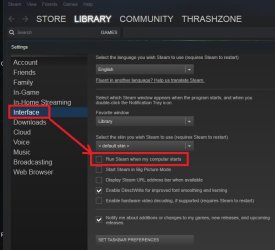
Take Steam off of starting with windows and restart see how the temp is after.
steam off start with windows.jpg
 

My Computer

Computer type
PC/Desktop
Computer Manufacturer/Model Number
Custom assembled by me :}
OS
Win-7-Pro64bit 7-H-Prem-64bit
CPU
i7-5930K 2nd i9-9940x both water blocked VRM's too
Motherboard
ASUS SABERTOOTH X99 2nd ASUS x299 Apex
Memory
Trident-z 3200C14 2nd Trident-z 3600C16
Graphics Card(s)
EVGA 1080ti ftw3 2nd Titan Xp both water blocked
Sound Card
Built-in Realtek
Monitor(s) Displays
1-AOC G2460PG 24"G-Sync 144Hz/ 2nd 1-ASUS VG248QE 24" 144Hz
Screen Resolution
1920 x 1080 144Hz
Hard Drives
2-Samsung M.2 Evo & Evo Plus
2-Samsung 850 EVO 500GB SSD's/ 3-2.5 W.D. Black 1tb-&3-1tb/3-3.5 WD Black 1tb hdd's
PSU
EVGA SuperNOVA 1000-P2 2nd 1200-P2
Case
2-Corsair Obsidian Series 450D Black ATX Mid Tower
Cooling
Custom water loops
Keyboard
Logitech G710+/ 2nd Logitech G910
Mouse
2-RedDragon M901 Perdition 16400 dpi Gaming mouse = wired
Internet Speed
Comcast Ping 19ms 89.31mbps download speed 6.12mbps upload
Antivirus
Malwarebytes Pro/ Superantispyware Pro
Browser
FireFox & Pale moon
Other Info
2nd ASUS X299 Apex/Intel i9-9940x with Custom water loop/7H-Prem-x64/Corsair 450D case/Ram Trident-z 3600C16 4x8gb / Samsung970Evo plus 500gb SSD/Dual ssd EZ swap evo/PSU EVGA SuperNova 1200w-P2 80+Platinum/GPU Titan Xp /8-ML-140 on push-pull on 2-280GTX rads
I've already done that,I'm not sure how this is software related.
Cleared BIOS,no OC.
fresh OS install.
 

My Computer

Computer type
PC/Desktop
Computer Manufacturer/Model Number
Custom Build
OS
Windows 7 Home Premium
CPU
Intel Core i7 4790
Motherboard
Asus MAXIMUS VII RANGER z97
Memory
Kingston HyperX Beast 16GB 2400Mhz
Graphics Card(s)
Gigabyte 970 4GB G1 GAMING
Monitor(s) Displays
LG 23 Cinema 3D 1080p
Screen Resolution
1920x1080 60Hz
Hard Drives
Samsung 840 EVO 250GB SSD / WD Blue 500GB HDD / Seagate 1TB HDD USB
PSU
EVGA SuperNova 850w G2 Gold
Case
Corsair 300R Custom
Cooling
Corsair Hydro H80i
Keyboard
Alienware TactX
Mouse
Alienware TactX
Antivirus
Bitdefender
Browser
Mozilla FireFox
Other Info
Razer Vespula

My Computer

Computer type
PC/Desktop
Computer Manufacturer/Model Number
Custom assembled by me :}
OS
Win-7-Pro64bit 7-H-Prem-64bit
CPU
i7-5930K 2nd i9-9940x both water blocked VRM's too
Motherboard
ASUS SABERTOOTH X99 2nd ASUS x299 Apex
Memory
Trident-z 3200C14 2nd Trident-z 3600C16
Graphics Card(s)
EVGA 1080ti ftw3 2nd Titan Xp both water blocked
Sound Card
Built-in Realtek
Monitor(s) Displays
1-AOC G2460PG 24"G-Sync 144Hz/ 2nd 1-ASUS VG248QE 24" 144Hz
Screen Resolution
1920 x 1080 144Hz
Hard Drives
2-Samsung M.2 Evo & Evo Plus
2-Samsung 850 EVO 500GB SSD's/ 3-2.5 W.D. Black 1tb-&3-1tb/3-3.5 WD Black 1tb hdd's
PSU
EVGA SuperNOVA 1000-P2 2nd 1200-P2
Case
2-Corsair Obsidian Series 450D Black ATX Mid Tower
Cooling
Custom water loops
Keyboard
Logitech G710+/ 2nd Logitech G910
Mouse
2-RedDragon M901 Perdition 16400 dpi Gaming mouse = wired
Internet Speed
Comcast Ping 19ms 89.31mbps download speed 6.12mbps upload
Antivirus
Malwarebytes Pro/ Superantispyware Pro
Browser
FireFox & Pale moon
Other Info
2nd ASUS X299 Apex/Intel i9-9940x with Custom water loop/7H-Prem-x64/Corsair 450D case/Ram Trident-z 3600C16 4x8gb / Samsung970Evo plus 500gb SSD/Dual ssd EZ swap evo/PSU EVGA SuperNova 1200w-P2 80+Platinum/GPU Titan Xp /8-ML-140 on push-pull on 2-280GTX rads
Yes of course,and even if i did not have Corsair link installed the temp won't go so high,not even close to it.
As i have said,the temp is much higher with the H80i,it reaches 75c on idle with it,so I'm no longer using the H80i,I'm using the stock fan for now.
 

My Computer

Computer type
PC/Desktop
Computer Manufacturer/Model Number
Custom Build
OS
Windows 7 Home Premium
CPU
Intel Core i7 4790
Motherboard
Asus MAXIMUS VII RANGER z97
Memory
Kingston HyperX Beast 16GB 2400Mhz
Graphics Card(s)
Gigabyte 970 4GB G1 GAMING
Monitor(s) Displays
LG 23 Cinema 3D 1080p
Screen Resolution
1920x1080 60Hz
Hard Drives
Samsung 840 EVO 250GB SSD / WD Blue 500GB HDD / Seagate 1TB HDD USB
PSU
EVGA SuperNova 850w G2 Gold
Case
Corsair 300R Custom
Cooling
Corsair Hydro H80i
Keyboard
Alienware TactX
Mouse
Alienware TactX
Antivirus
Bitdefender
Browser
Mozilla FireFox
Other Info
Razer Vespula
Hi,
Could very well be a bad cpu ?

As stated the liquid coolers are :cool:
But as you have tried 2 and are still seeing high temperatures cpu is likely
Where was all these components bought from exactly ?
 

My Computer

Computer type
PC/Desktop
Computer Manufacturer/Model Number
Custom assembled by me :}
OS
Win-7-Pro64bit 7-H-Prem-64bit
CPU
i7-5930K 2nd i9-9940x both water blocked VRM's too
Motherboard
ASUS SABERTOOTH X99 2nd ASUS x299 Apex
Memory
Trident-z 3200C14 2nd Trident-z 3600C16
Graphics Card(s)
EVGA 1080ti ftw3 2nd Titan Xp both water blocked
Sound Card
Built-in Realtek
Monitor(s) Displays
1-AOC G2460PG 24"G-Sync 144Hz/ 2nd 1-ASUS VG248QE 24" 144Hz
Screen Resolution
1920 x 1080 144Hz
Hard Drives
2-Samsung M.2 Evo & Evo Plus
2-Samsung 850 EVO 500GB SSD's/ 3-2.5 W.D. Black 1tb-&3-1tb/3-3.5 WD Black 1tb hdd's
PSU
EVGA SuperNOVA 1000-P2 2nd 1200-P2
Case
2-Corsair Obsidian Series 450D Black ATX Mid Tower
Cooling
Custom water loops
Keyboard
Logitech G710+/ 2nd Logitech G910
Mouse
2-RedDragon M901 Perdition 16400 dpi Gaming mouse = wired
Internet Speed
Comcast Ping 19ms 89.31mbps download speed 6.12mbps upload
Antivirus
Malwarebytes Pro/ Superantispyware Pro
Browser
FireFox & Pale moon
Other Info
2nd ASUS X299 Apex/Intel i9-9940x with Custom water loop/7H-Prem-x64/Corsair 450D case/Ram Trident-z 3600C16 4x8gb / Samsung970Evo plus 500gb SSD/Dual ssd EZ swap evo/PSU EVGA SuperNova 1200w-P2 80+Platinum/GPU Titan Xp /8-ML-140 on push-pull on 2-280GTX rads
Can you see this high temperature from BIOS?
High temperature means high usage. What process is using the CPU at high rate?
 

My Computers

System One System Two

  • Computer type
    PC/Desktop
    Computer Manufacturer/Model Number
    custom build
    OS
    Windows 7 HP 64
    CPU
    i5 6600K - 800MHz to 4200MHz
    Motherboard
    GA-Z170-HD3P
    Memory
    4+4G GSkill DDR4 3000
    Graphics Card(s)
    IG - Intel 530
    Monitor(s) Displays
    Samsung 226BW
    Screen Resolution
    1680x1050
    Hard Drives
    (1) -1 SM951 – 128GB M.2 AHCI PCIe SSD drive for Windows 7 and Lubuntu
    (2) -1 WD SATA 3 - 1T for Data
    (3) -1 WD SATA 3 - 1T for backup
    PSU
    Thermaltake 450W TR2 gold
    Keyboard
    Old and good Chicony mechanical keyboard
    Mouse
    Logitech mX performance - 9 buttons (had to disable some)
    Internet Speed
    500Mb/s
    Browser
    Firefox 64
    Other Info
    TinyWall firewall
  • Computer type
    Laptop
    System Manufacturer/Model Number
    Asus Q550LF
    OS
    Windows 7 Pro
    CPU
    i7-4500U 800MHz to 3.0GHz
    Motherboard
    Asus Q550LF
    Memory
    (4+4)G DDR3 1600
    Graphics Card(s)
    IG intel 4400 + NVIDIA GeForce GT 745M
    Sound Card
    Realtek
    Monitor(s) Displays
    LG Display LP156WF4-SPH1
    Screen Resolution
    1920 x 1080
    Hard Drives
    BX500 120G SSD for Windows and programs +
    1T HDD for data
    Internet Speed
    500 Mb/s
    Browser
    Firefox
    Other Info
    TinyWall firewall
Hi,
Could very well be a bad cpu ?

As stated the liquid coolers are :cool:
But as you have tried 2 and are still seeing high temperatures cpu is likely
Where was all these components bought from exactly ?
It could be that the on-die temp sensor has malfunctioned and is giving false readings. No way that thing should idle at 52 - 55C, unless the HSF isn't fitted properly, or there is no thermal compound.

I can't see any reason other than those three things. Unless the CPU itself is damaged and reporting a bad temp.
 

My Computer

Computer type
PC/Desktop
Computer Manufacturer/Model Number
Mellon Labs (custom build)
OS
Win 7 Pro x64/Win 10 Pro x64 dual boot
CPU
AMD FX 8350 Vishera @ 4200
Motherboard
ASUS M5A97 R2.0
Memory
16 GB Mushkin Blackline DDR3-2400 @ 1866 (9-10-10-10-31)
Graphics Card(s)
XFX Radeon R9 280 Double D Black Edition
Sound Card
Realtek HD Audio on MB. Sounds great.
Monitor(s) Displays
Acer 24", Acer 22"
Screen Resolution
3840 x 1080
Hard Drives
1 x Mushkin Chronos 120 GB SSD (Win 10)
1 x Samsung 850 EVO 250 GB SSD (Win 7)
1 x WD 1TB SATA Blue
1 x WD 1TB SATA Green
PSU
Corsair TX-750
Case
CoolerMaster HAF 912+
Cooling
Coolermaster Seidon 240M Liquid AIO. 6 case fans
Keyboard
Logitech G710+
Mouse
Logitech G500s
Internet Speed
Much better since I got fiber, but still way overpriced.
Antivirus
MSE, Malware Bytes for scanning
Browser
Firefox
Other Info
Corsair VOID USB headphones.

A Mellon Labs X-1 - LCD Smartie driven system status display.

Brought to you by the letter E
"on-die temp sensor" where is that located at ? CPU or MB ?
 

My Computer

Computer type
PC/Desktop
Computer Manufacturer/Model Number
Custom Build
OS
Windows 7 Home Premium
CPU
Intel Core i7 4790
Motherboard
Asus MAXIMUS VII RANGER z97
Memory
Kingston HyperX Beast 16GB 2400Mhz
Graphics Card(s)
Gigabyte 970 4GB G1 GAMING
Monitor(s) Displays
LG 23 Cinema 3D 1080p
Screen Resolution
1920x1080 60Hz
Hard Drives
Samsung 840 EVO 250GB SSD / WD Blue 500GB HDD / Seagate 1TB HDD USB
PSU
EVGA SuperNova 850w G2 Gold
Case
Corsair 300R Custom
Cooling
Corsair Hydro H80i
Keyboard
Alienware TactX
Mouse
Alienware TactX
Antivirus
Bitdefender
Browser
Mozilla FireFox
Other Info
Razer Vespula
Back
Top