CPU temperatures problems

Chronox

New member
Member
Local time
3:03 PM
Messages
50
Location
Barranquilla
Hi people !

First of all im sorry if this is posted in a wrong section...

Well right now im gettin problems with my CPU temperatures..

They rise to 70-75 Celsius when playing games, and 50-60 while in Stand-By.

Here are my system Specs:

AMD Athlon 64 X2 5200+
MCP61PM-HM (Nettle3)
3GB DDR2 RAM
ECS Nvidia GeForce 9800 GT Green Edition 1GB DDR3
Integrated Realtek ALC888S Audio
500 GB SATA 7200 rpm
CoolerMaster eXtreme Power Plus 600W

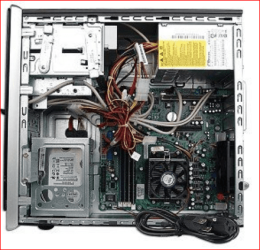
This is my PC before i bought the GPU and PSU :P
HP Pavilion a6532f Desktop PC Product Specifications HP Pavilion a6532f Desktop PC - HP Customer Care (United States - English)

My pc is about 3 years old now and i need to know if i should go to the technician :P

Thx for your help !
 

My Computer

Computer Manufacturer/Model Number
HP Pavilion a6532f
OS
Windows 7 Home Premium SP1 32 bit
CPU
AMD Athlon 64 X2 Dual Core 5200+ @ 2.71 GHz
Motherboard
MCP61PM-HM (Nettle3)
Memory
2GB DDR2 RAM @ 3** MHz (2 Sticks of 1 GB each, SAMSUNG)
Graphics Card(s)
ECS Nvidia GeForce 9800 GT Green Edition 1GB DDR3
Sound Card
Integrated Realtek ALC888S Audio
Monitor(s) Displays
HP w2007
Screen Resolution
1680*1050
Hard Drives
SAMSUNG 500 GB SATA 7200 rpm
PSU
CoolerMaster eXtreme Power Plus 600W
Case
Mid Size ATX
Cooling
Default rear(back) fan pulling air out.
Keyboard
Genius random(cheap) USB keyboard
Mouse
Microsoft random(cheap) USB Mouse
Internet Speed
2 MBPS / ASDL
Your spec's show only one case fan is that correct. Tell us what you have for cooling. Also what case do you have.
 

My Computer

Computer type
PC/Desktop
Computer Manufacturer/Model Number
Home made Desktop
OS
Windows 10 Pro. 64/ version 1709 Windows 7 Pro/64
CPU
Intel i7-6800K @ 4.3
Motherboard
ASUS X-99 Deluxe II
Memory
Corsair Platinum 16 gig @2400
Graphics Card(s)
EVGA GTX 1070 OC
Monitor(s) Displays
Asus 27" LED LCD/VE278Q
Screen Resolution
1920-1080 or 1280-720 HDMI
Hard Drives
INTEL SSD 730-240 Gb Sata 3.0/
PSU
EVGA Platium 1200W
Case
Phanteks Luxe Tempered Glass 8 fans/ one radiator
Cooling
XSPC/ Water Cooled CPU
Keyboard
Das 4 Professional
Mouse
Logitech M705/MX Anywhere 2-S
Internet Speed
100 mbits
Antivirus
Microsoft Security Essentials/ Malwarebytes Premium 3.0/ SAS
Browser
I.E. 11 default/Firefox/ ISP Time Warner Cable/Spectrum
Other Info
LG BluRay Burner/
Sound system-KLipsch-THX/
Icy Dock ssd Hot Swap bays.
When was the last time you popped it open and cleaned out the dust bunnies? If it has been a while you may find that the heatsinks on the CPU and video card are clogged, which can and will lead to higher temperatures. If you have never done that sort of thing here is a fairly good how-to,


About the only thing I would suggest that he didn't do is to stick a pencil or something in the fan to stop it from spinning when blowing on it with the air as it can damage the fan from the excessive RPM's.

If you haven't done that sort of thing before or you're uncomfortable doing it yourself, then by all means take it in to be done. Be advised though it will cost quite a bit more than the $10 or less a can of air can be bought for.
 

My Computer

Computer type
PC/Desktop
Computer Manufacturer/Model Number
Me
OS
Win 7 Ultimate x64
CPU
FX-8350 @ 4.6 GHz so far
Motherboard
Asus M5A97 EVO
Memory
ADATA XPG V1 Series Black 8GB DDR3 1600
Graphics Card(s)
Sapphire R9 270x Dual-X
Sound Card
Xonar DGX w/ Corsair Vengence 1300
Monitor(s) Displays
Acer S232HL Abid
Screen Resolution
1920x1080
Hard Drives
120 GB OCZ Vertex 3
500 GB Seagate 7200.12
PSU
Antec Earthwatts 650W Green
Case
Antec Three Hundred
Cooling
Cooler Master 212 EVO
Keyboard
Logitech G510
Mouse
Logitech G500s
Internet Speed
35000/3000
Good call stormy13. I noticed the video card has been changed from a GT-6150 to GT-9800 and the power supply too. The reason I asked about the fans is how many and are they working. Their are many things that can cause cpu to over heat so I start at the basics.
1. As stormy stated, clean everything.
2. Are the fans working and how many do you have.
3. Have you change anything and how long ago before this problem started.
The GT-9800 creates a lot of heat that must be remove from the case or every thing gets hotter.
Your GPU will run that hot 70 to 80c when humping them gaming but your CPU should not.
When we know these things are correct we can get deeper into the problem.
Please get back to us.

Galaxy GeForce 9800 GT 1024MB review | test
 

My Computer

Computer type
PC/Desktop
Computer Manufacturer/Model Number
Home made Desktop
OS
Windows 10 Pro. 64/ version 1709 Windows 7 Pro/64
CPU
Intel i7-6800K @ 4.3
Motherboard
ASUS X-99 Deluxe II
Memory
Corsair Platinum 16 gig @2400
Graphics Card(s)
EVGA GTX 1070 OC
Monitor(s) Displays
Asus 27" LED LCD/VE278Q
Screen Resolution
1920-1080 or 1280-720 HDMI
Hard Drives
INTEL SSD 730-240 Gb Sata 3.0/
PSU
EVGA Platium 1200W
Case
Phanteks Luxe Tempered Glass 8 fans/ one radiator
Cooling
XSPC/ Water Cooled CPU
Keyboard
Das 4 Professional
Mouse
Logitech M705/MX Anywhere 2-S
Internet Speed
100 mbits
Antivirus
Microsoft Security Essentials/ Malwarebytes Premium 3.0/ SAS
Browser
I.E. 11 default/Firefox/ ISP Time Warner Cable/Spectrum
Other Info
LG BluRay Burner/
Sound system-KLipsch-THX/
Icy Dock ssd Hot Swap bays.
Your CPU max temp is 74°C, so you are operating at a dangerous level, this needs to be fixed before you damage the CPU.
AMD Athlon 64 X2 5200+

After following all of the good recommendations above, if your temps aren't down to 30°C when at an idle, you may need to check you CPU-cooler thermal paste.
This has to be put on correctly or the temps may get worse, so you might consider taking it to a technician as you mentioned.

Best plan is to give it a thorough cleaning first, then check CPU temps again.


My Computer

Computer type
PC/Desktop
Computer Manufacturer/Model Number
76~2.0
OS
Windows 7 Ult x64 - SP1/ Windows 8 Pro x64
CPU
Intel Core i5-3570K 4.6GHz
Motherboard
Gigabyte GA-Z77X UD3H, f18
Memory
8GB (2X4GB) DDR3 1600 Corsair Vengeance CL8 1.5v
Graphics Card(s)
Sapphire HD 7770 Vapor-X OC 1GB DDR5
Sound Card
Onboard VIA VT2021
Monitor(s) Displays
22" LCD Dell
Screen Resolution
1680x1050
Hard Drives
Samsung 840Pro 128GB SSD,
Seagate Barracuda 500GB SATA2 7200rpm 32MB cache, Seagate Barracuda 1TB SATA2 7200rpm 32MB cache,
PSU
Corsair HX650W
Case
Cooler Master Storm Scout
Cooling
Corsair H80 2x12cm Noctua NF P12 , 2x14cm case fans
Keyboard
Logitech Wave
Mouse
CM Sentinel
Internet Speed
Dismal
Antivirus
Avast
Browser
Opera Next
Other Info
Haswell laptop: HP Envy 17t-j, i7-4700MQ, GeForce 740M 2GB DDR3, 17.3" Full HD 1920x1080, 16GB RAM, Samsung 840 Pro 128GB, 1TB Hitachi 7200 HDD,
Desktop: eSATA ports,
External eSATA Seagate 500GB SATA2 7200rpm,
External WD USB 500GB
Hi guys !

Thanks for the quick replies.

Well i ve got only 1 small fan cooler in the back of the Case ( THIS CASE HP Pavilion a6532f Desktop PC Product Specifications HP Pavilion a6532f Desktop PC - HP Customer Care (United States - English) )

Only 1 Fan (default random fan) pulling out hot air, and the CPU/GPU default coolers.

Here are my GPU specs :

http://www.conversense.net/online-s...ge=tpflypage.tpl&category_id=15&product_id=42

I cleaned the CPU and motherboard like 2 times this past 3 months lol.

I noticed the problems after installing both the GPU and PSU.. Maybe i should change the thermal paste since almost 3 years have passed.. or install some addicional fan cases..
 

My Computer

Computer Manufacturer/Model Number
HP Pavilion a6532f
OS
Windows 7 Home Premium SP1 32 bit
CPU
AMD Athlon 64 X2 Dual Core 5200+ @ 2.71 GHz
Motherboard
MCP61PM-HM (Nettle3)
Memory
2GB DDR2 RAM @ 3** MHz (2 Sticks of 1 GB each, SAMSUNG)
Graphics Card(s)
ECS Nvidia GeForce 9800 GT Green Edition 1GB DDR3
Sound Card
Integrated Realtek ALC888S Audio
Monitor(s) Displays
HP w2007
Screen Resolution
1680*1050
Hard Drives
SAMSUNG 500 GB SATA 7200 rpm
PSU
CoolerMaster eXtreme Power Plus 600W
Case
Mid Size ATX
Cooling
Default rear(back) fan pulling air out.
Keyboard
Genius random(cheap) USB keyboard
Mouse
Microsoft random(cheap) USB Mouse
Internet Speed
2 MBPS / ASDL
Hi Chronox

If you can install another fan in the front of the case to push air in, that will be of great help.
If you know how to replace the thermal paste between the cpu and heatsink, i would say, give it a go.
If you haven't tried it, here is a good guide to get you started.
The original thermal paste on new computers is not always the best. I have seen some shockers, before i started building them myself.
When you have the heatsink off, that would be a perfect time to give it a really good clean too.
As they say, "every bit helps".

Jon
 

My Computer

Computer Manufacturer/Model Number
Home build
OS
Win7 Ultimate x64
CPU
3820
Motherboard
Rampage IV formula
Memory
12 GB kit
Graphics Card(s)
XFX nVidia GeForce GTX 560
Sound Card
On board card
Monitor(s) Displays
LG 27" x 2
Screen Resolution
1920 x 1080
Hard Drives
1 x OCZ Vertex 4 , 256Gb
PSU
875W Thermal Take
Case
Antec P160W
Cooling
Noctua
Keyboard
Logitech Wave Pro
Mouse
Logitech
Internet Speed
1.5 Mb
Other Info
Logitech G25 steering wheel, Logitech Extreme 3D Pro joystick.
Logitech surround sound speaker system.
spinifex nice idea, but with that HP case an extra fan i the front just isn't going to happen. This is what that model looks like on the inside,

a6532f.PNG

You get down to it there isn't a whole lot of room for much of anything. It also doesn't help that HP insists on using inverted ATX cases with what looks like little to no thought for cooling. Then again they would rather sell you a new computer than allow you to upgrade anything in an older one, so why make it easy.

I noticed the problems after installing both the GPU and PSU

With how little room there is, good possibility. I assume this is the PSU you got,

Newegg.com - COOLER MASTER eXtreme Power RS600-PCARE3-US 600W ATX12V V2.3 SLI Ready CrossFire Ready Power Supply

If not it doesn't matter much as they will all be basically the same with regards to the fan in them. When you put it in the case did you put it in with the fan facing down, or facing up into the top of the case? Ideally it should be facing down to help with pulling warm air out. Looking at the service manual for it it should be facing down as ATX power supplies normal only mount one way (the 4 mounting holes are the same on all ATX cases and power supplies).

If it is facing down there is also the small problem of where it is in relation to the video card, which due to the case has its fan facing up where in a normal case it is facing the down. This will case the two fans (PSU and video card) to fight each other, as the fan on the video card is pulling air in from the same small space that the PSU fan is. Unfortunately unless someone else has a better idea, if that is what is happening the only way I can really see to fix it is another case.
 

My Computer

Computer type
PC/Desktop
Computer Manufacturer/Model Number
Me
OS
Win 7 Ultimate x64
CPU
FX-8350 @ 4.6 GHz so far
Motherboard
Asus M5A97 EVO
Memory
ADATA XPG V1 Series Black 8GB DDR3 1600
Graphics Card(s)
Sapphire R9 270x Dual-X
Sound Card
Xonar DGX w/ Corsair Vengence 1300
Monitor(s) Displays
Acer S232HL Abid
Screen Resolution
1920x1080
Hard Drives
120 GB OCZ Vertex 3
500 GB Seagate 7200.12
PSU
Antec Earthwatts 650W Green
Case
Antec Three Hundred
Cooling
Cooler Master 212 EVO
Keyboard
Logitech G510
Mouse
Logitech G500s
Internet Speed
35000/3000
I have modified this case by putting the hard drive in the 3.5 bay and removing the HD bracket and putting as big a fan as will fit in the front of the case. Might work in that case or not the ones i have modded were a little different.
 

My Computer

Computer Manufacturer/Model Number
Custom Build
OS
Window's 7 Ultimate 64bit
CPU
E8400 Lapped
Motherboard
P5Q Pro Turbo Asus
Memory
Kingston 4 gig
Graphics Card(s)
2=ATI 5670Video Crossfire / HVR2250 TV Tuner Card
Sound Card
HDMI sound
Monitor(s) Displays
Sony 46"
Screen Resolution
1280x720
Hard Drives
1 WD 160gig YS, 1 Black Edition 320gig and one 250gig WD YS Model plus external Caviar Black 640gig Drives
PSU
Antec 550 Modular
Case
Antec Custom 180B
Cooling
X-1283 Lapped Artic Silver 5
Keyboard
Wave Combo Logitech
Mouse
Logitech LX-8
Internet Speed
5mb down 768 up
Other Info
Custom side fan in case, plus moved middle lower fan to the front of hard drives , also installed a second intake fan in lower two optical drive slots. Rear fans are controlled by Fan mate controllers. temps inside case are monitored by probe and temps coming out the top exhaust are also monitored, temps as of right now 20c inside and 22.7 out the exhaust. Front intake fans are controlled by Asu
Okay we have got down to how many fans and do they work. I think that was note 2. in my previous posts. One fan is not going to get the job done. (PERIOD). If you can't figure out a way of installing more case fans you need another case. Tell us how much money you have to spend on a case and we will help you pick one. Remember step at a time. Power supply, you got that covered. Step 2 a case that will cool. I don't care what it looks like, does it cool? Step at a time and we will get you there.
 

My Computer

Computer type
PC/Desktop
Computer Manufacturer/Model Number
Home made Desktop
OS
Windows 10 Pro. 64/ version 1709 Windows 7 Pro/64
CPU
Intel i7-6800K @ 4.3
Motherboard
ASUS X-99 Deluxe II
Memory
Corsair Platinum 16 gig @2400
Graphics Card(s)
EVGA GTX 1070 OC
Monitor(s) Displays
Asus 27" LED LCD/VE278Q
Screen Resolution
1920-1080 or 1280-720 HDMI
Hard Drives
INTEL SSD 730-240 Gb Sata 3.0/
PSU
EVGA Platium 1200W
Case
Phanteks Luxe Tempered Glass 8 fans/ one radiator
Cooling
XSPC/ Water Cooled CPU
Keyboard
Das 4 Professional
Mouse
Logitech M705/MX Anywhere 2-S
Internet Speed
100 mbits
Antivirus
Microsoft Security Essentials/ Malwarebytes Premium 3.0/ SAS
Browser
I.E. 11 default/Firefox/ ISP Time Warner Cable/Spectrum
Other Info
LG BluRay Burner/
Sound system-KLipsch-THX/
Icy Dock ssd Hot Swap bays.
Hi guys !

Thanks for your replies again :)

@spinifex
Look at Stormy13's Pic, looks like i cant add a fan in the front pulling in air, unless sandman can do us a favor and post his modified case pic :P, also i will see if i can go to a technician and give a the pc a good clean and thermal paste change.


@stormy13
Hmm its a possibility... I will open the case and see if the PSU case is facing the GPU and where it is pulling air, i will post again when i do it :)


@sandman
Can you post your modified case pic please :D ? (inside and outside :) )


@Layback Bear
Well right now i count with.. like 70$ ? i can get some more i think :P, but i want to add some cooling fans, since its kinda cheap, also remember than i live in Colombia, and electronic supplies are more expensive and hard to get.

Oh btw people the temperature in my city is about 27-31 Celcius during the day and like 24 during the night :P with high humidity, in case this helps a bit..

Juan.
 

My Computer

Computer Manufacturer/Model Number
HP Pavilion a6532f
OS
Windows 7 Home Premium SP1 32 bit
CPU
AMD Athlon 64 X2 Dual Core 5200+ @ 2.71 GHz
Motherboard
MCP61PM-HM (Nettle3)
Memory
2GB DDR2 RAM @ 3** MHz (2 Sticks of 1 GB each, SAMSUNG)
Graphics Card(s)
ECS Nvidia GeForce 9800 GT Green Edition 1GB DDR3
Sound Card
Integrated Realtek ALC888S Audio
Monitor(s) Displays
HP w2007
Screen Resolution
1680*1050
Hard Drives
SAMSUNG 500 GB SATA 7200 rpm
PSU
CoolerMaster eXtreme Power Plus 600W
Case
Mid Size ATX
Cooling
Default rear(back) fan pulling air out.
Keyboard
Genius random(cheap) USB keyboard
Mouse
Microsoft random(cheap) USB Mouse
Internet Speed
2 MBPS / ASDL
@stormy13, now i have seen the case, i understand the problem.:eek:

@Layback Bear, a more suitable case is the way to go for sure, pending affordability.:)

@Chronox, looks like you have a bit of a challenge ahead. Good luck mate.:thumbsup:
 

My Computer

Computer Manufacturer/Model Number
Home build
OS
Win7 Ultimate x64
CPU
3820
Motherboard
Rampage IV formula
Memory
12 GB kit
Graphics Card(s)
XFX nVidia GeForce GTX 560
Sound Card
On board card
Monitor(s) Displays
LG 27" x 2
Screen Resolution
1920 x 1080
Hard Drives
1 x OCZ Vertex 4 , 256Gb
PSU
875W Thermal Take
Case
Antec P160W
Cooling
Noctua
Keyboard
Logitech Wave Pro
Mouse
Logitech
Internet Speed
1.5 Mb
Other Info
Logitech G25 steering wheel, Logitech Extreme 3D Pro joystick.
Logitech surround sound speaker system.

My Computer

Computer type
PC/Desktop
Computer Manufacturer/Model Number
Me
OS
Win 7 Ultimate x64
CPU
FX-8350 @ 4.6 GHz so far
Motherboard
Asus M5A97 EVO
Memory
ADATA XPG V1 Series Black 8GB DDR3 1600
Graphics Card(s)
Sapphire R9 270x Dual-X
Sound Card
Xonar DGX w/ Corsair Vengence 1300
Monitor(s) Displays
Acer S232HL Abid
Screen Resolution
1920x1080
Hard Drives
120 GB OCZ Vertex 3
500 GB Seagate 7200.12
PSU
Antec Earthwatts 650W Green
Case
Antec Three Hundred
Cooling
Cooler Master 212 EVO
Keyboard
Logitech G510
Mouse
Logitech G500s
Internet Speed
35000/3000
Looks pretty neat, thanks stormy..

Any cooling system recomendations you can give me ?

Thx, Juan !
 

My Computer

Computer Manufacturer/Model Number
HP Pavilion a6532f
OS
Windows 7 Home Premium SP1 32 bit
CPU
AMD Athlon 64 X2 Dual Core 5200+ @ 2.71 GHz
Motherboard
MCP61PM-HM (Nettle3)
Memory
2GB DDR2 RAM @ 3** MHz (2 Sticks of 1 GB each, SAMSUNG)
Graphics Card(s)
ECS Nvidia GeForce 9800 GT Green Edition 1GB DDR3
Sound Card
Integrated Realtek ALC888S Audio
Monitor(s) Displays
HP w2007
Screen Resolution
1680*1050
Hard Drives
SAMSUNG 500 GB SATA 7200 rpm
PSU
CoolerMaster eXtreme Power Plus 600W
Case
Mid Size ATX
Cooling
Default rear(back) fan pulling air out.
Keyboard
Genius random(cheap) USB keyboard
Mouse
Microsoft random(cheap) USB Mouse
Internet Speed
2 MBPS / ASDL
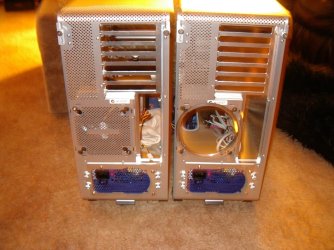
Juan, if cost is prohibitive, there are case/fan mods you can do.
I realise the pics i am posting are not of the same case, but it's to give you food for thought.
These are some i have done over the years.

Put a bigger fan on the heatsink, by using an adaptor.
Cut the grating out for better airflow.
Cut some holes in the side cover and added a couple of fans.
 

Attachments

  • IMGP0620.JPG
    IMGP0620.JPG
    285 KB · Views: 0
  • IMGP0899.JPG
    IMGP0899.JPG
    620.3 KB · Views: 2
  • IMGP1025.JPG
    IMGP1025.JPG
    498 KB · Views: 0

My Computer

Computer Manufacturer/Model Number
Home build
OS
Win7 Ultimate x64
CPU
3820
Motherboard
Rampage IV formula
Memory
12 GB kit
Graphics Card(s)
XFX nVidia GeForce GTX 560
Sound Card
On board card
Monitor(s) Displays
LG 27" x 2
Screen Resolution
1920 x 1080
Hard Drives
1 x OCZ Vertex 4 , 256Gb
PSU
875W Thermal Take
Case
Antec P160W
Cooling
Noctua
Keyboard
Logitech Wave Pro
Mouse
Logitech
Internet Speed
1.5 Mb
Other Info
Logitech G25 steering wheel, Logitech Extreme 3D Pro joystick.
Logitech surround sound speaker system.
My temporary (sort of permanent) solution to my overcrowded ACER case is to leave the side off and use a small personal fan (4 inch blades) blowing air into the side. I use it on warm days and when video encoding for hours.

It might not look pretty but VERY effective. The fan cost me $10.
My Quad Intel Q8300 runs 100% for hours not exceeding 50 Celsius core temps.
My HDD is kept very cool as well.

PS: my next computer will be custom built with heaps of cooling.
 

My Computer

Computer type
PC/Desktop
Computer Manufacturer/Model Number
Own build
OS
Windows 7x64 Home Premium SP1
CPU
Intel i7 2600k
Motherboard
ASUS P8Z68 Deluxe
Memory
G.Skill Ripjaws (DDR3-1600) 2x4GB
Graphics Card(s)
Nvidia GeForce GTS 450; Intel HD Graphics 3000(GT2+)
Monitor(s) Displays
Dell Ultrasharp IPS panel U2311H, Samsung SyncMaster P2350
Screen Resolution
1920x1080
Hard Drives
Samsung 850 Pro SSD 256GB, Samsung SSD 840 120GB, Seagates 1TB Barracuda ST31000528AS x2
PSU
Seasonic M12II 520W
Case
Lian Li Lancool PC-K60
Cooling
Case: 1x120mm, 3x140mm CPU: Hyper 212+
Keyboard
Logitech MK520 (wireless)
Mouse
Logitech MK520
Internet Speed
6-7 Mbps
Antivirus
Norton Security Premium, Malwarebytes on 2 (MSE on 3rd PC)
Browser
FireFox
Other Info
Audio: Logitech Z523 2.1
Is this your case? HP Pavilion a6532f Athlon 64 X2 5200+ 2.7GHz 3GB 500GB DVD±RW DL Vista Home Premium - Open Box a6532f KT374AA

looks like you could cut a hole in front of case and add a 120mm fan.

It also looks like a btx form factor- and prior case suggestions wont fit.

The front cover should come off in one piece, usually by pushing some tabs-

The case itself may even have a fan mount- if not cut a hole and drill 4 screw holes for a new fan- pretty doesnt count as you will also be reworking the front cover- get a blue fan and will look great-

Also looks like the hdd is mounted vertical- maybe you could move it up to a 5.25 (cd rom) bay with an adapter-

Cut the front cover too- The fan needs to breath both in and out- get or make a ring bigger than the hole for the fan- cover it with a black nylon (glue material to ring), tape the new hole hider/filter over the hole and clean every month or so.

By black nylon I mean steal a pair of black nylons from your wife or girlfriend...

___________________________________________________________________


Also since fans and labor are cheap maybe buy an after market cooler as that one looks like a piece of cr&p.

Post some pictures for us both before and after :-)

Bill
 

My Computer

Computer Manufacturer/Model Number
homey
OS
Windows 7 Home Premium 64bit
CPU
c2d e8400
Motherboard
asus p5k
Memory
8gb Dominator ddr2
Graphics Card(s)
8800gts
Sound Card
onboard
Monitor(s) Displays
samsung 22"
Hard Drives
velociraptor

wd backup
PSU
600
Case
antec 900
Cooling
gemin2
Correct, install more fans would be cheaper if you can. The Corsair 600T will be my next case. It might be a little over what you want to spend. It is about $150.00. Go online and watch some videos on it before you say no. Both a good power supply and case will allow you to expand in the future. Their for you won't have to go through this again. I have never owned a case that I didn't add fans. So a case that will allow you to do that is a great choice. Check out the Google.
Google
 

My Computer

Computer type
PC/Desktop
Computer Manufacturer/Model Number
Home made Desktop
OS
Windows 10 Pro. 64/ version 1709 Windows 7 Pro/64
CPU
Intel i7-6800K @ 4.3
Motherboard
ASUS X-99 Deluxe II
Memory
Corsair Platinum 16 gig @2400
Graphics Card(s)
EVGA GTX 1070 OC
Monitor(s) Displays
Asus 27" LED LCD/VE278Q
Screen Resolution
1920-1080 or 1280-720 HDMI
Hard Drives
INTEL SSD 730-240 Gb Sata 3.0/
PSU
EVGA Platium 1200W
Case
Phanteks Luxe Tempered Glass 8 fans/ one radiator
Cooling
XSPC/ Water Cooled CPU
Keyboard
Das 4 Professional
Mouse
Logitech M705/MX Anywhere 2-S
Internet Speed
100 mbits
Antivirus
Microsoft Security Essentials/ Malwarebytes Premium 3.0/ SAS
Browser
I.E. 11 default/Firefox/ ISP Time Warner Cable/Spectrum
Other Info
LG BluRay Burner/
Sound system-KLipsch-THX/
Icy Dock ssd Hot Swap bays.
The front cover should come off in one piece, usually by pushing some tabs-

The case itself may even have a fan mount- if not cut a hole and drill 4 screw holes for a new fan- pretty doesnt count as you will also be reworking the front cover- get a blue fan and will look great-

Also looks like the hdd is mounted vertical- maybe you could move it up to a 5.25 (cd rom) bay with an adapter-

Cut the front cover too- The fan needs to breath both in and out- get or make a ring bigger than the hole for the fan- cover it with a black nylon (glue material to ring), tape the new hole hider/filter over the hole and clean every month or so.

By black nylon I mean steal a pair of black nylons from your wife or girlfriend...

___________________________________________________________________


Also since fans and labor are cheap maybe buy an after market cooler as that one looks like a piece of cr&p.

Post some pictures for us both before and after :-)

Bill

An alternative to black nylon, so you won't upset your girlfriend/wife, is to buy/make something like this. Less chance of cutting your fingers and changing the suggested blue fan, red.
 

My Computer

Computer Manufacturer/Model Number
Home build
OS
Win7 Ultimate x64
CPU
3820
Motherboard
Rampage IV formula
Memory
12 GB kit
Graphics Card(s)
XFX nVidia GeForce GTX 560
Sound Card
On board card
Monitor(s) Displays
LG 27" x 2
Screen Resolution
1920 x 1080
Hard Drives
1 x OCZ Vertex 4 , 256Gb
PSU
875W Thermal Take
Case
Antec P160W
Cooling
Noctua
Keyboard
Logitech Wave Pro
Mouse
Logitech
Internet Speed
1.5 Mb
Other Info
Logitech G25 steering wheel, Logitech Extreme 3D Pro joystick.
Logitech surround sound speaker system.
An alternative to black nylon, so you won't upset your girlfriend/wife, is to buy/make something like this. Less chance of cutting your fingers and changing the suggested blue fan, red.


Nice-one of those would look even better with the blue fan :D (just get one with a filter too, or filters can be added underneath any of the covers)
 

My Computer

Computer Manufacturer/Model Number
homey
OS
Windows 7 Home Premium 64bit
CPU
c2d e8400
Motherboard
asus p5k
Memory
8gb Dominator ddr2
Graphics Card(s)
8800gts
Sound Card
onboard
Monitor(s) Displays
samsung 22"
Hard Drives
velociraptor

wd backup
PSU
600
Case
antec 900
Cooling
gemin2
Back
Top