CPU Usage at 25% even when Idle?

Uly5

New member
Local time
12:39 AM
Messages
16
Hi,
I notice the last few days my PC has been running slow. When I looked at the Windows task Manager my CPU Performance seems to be at 20-30%...Mostly 25%...Even when Idle with no Applications running in the background.
This isn't normal is it? In the past when I have looked at my CPU Performance it was always under 5% when Idle.
My Blue Hard Drive light on my case seems to be on most of the time as well?
Thanks
Uly.
 

My Computer

Computer type
PC/Desktop
Computer Manufacturer/Model Number
Custom Build
OS
Windows 7 Home Premium 64bit
CPU
Intel i7-2600k @3.4 GHz
Motherboard
Asus P8Z68-V LE
Memory
2 x 8 GB GB Corsair Vengence 1600mhz DDR3
Graphics Card(s)
Nvidia 8800 GT
Hard Drives
1 TB Western Digital Caviar Green
Antivirus
Kaspersky Internet Security 2015
Browser
Mozilla Firefox
Hello and welcome Uly5 for starters I would run these if you haven't already

http://www.sevenforums.com/tutorials/1538-sfc-scannow-command-system-file-checker.html

http://www.sevenforums.com/tutorials/433-disk-check.html< if necessary include the /f and /r in the command line as per Option2

http://www.superantispyware.com/

http://www.malwarebytes.org/products/malwarebytes_free/

http://www.bleepingcomputer.com/download/adwcleaner/

ADW download from bleeping computer delete any rubbish found with themalware scans

(NBIf one is running Kaspersky security it may rant about ADW - just ignore it ordisable Kaspersky while the ADW is being used)
Also check in msconfig - Start > type msconfig and see what is starting up in the Start up tab and I would look at the running processes in the task manager.

Lets do that first then move on.
 

My Computer

Computer type
PC/Desktop
Computer Manufacturer/Model Number
Own build (new) Desk1 / Asus ROG Win 7 / Desk2 1st build
OS
Desk1 7 Home Prem / Desk2 10 Pro / Main lap Asus ROG 10 Pro 2 laptop Toshiba 7 Pro Asus P2520 7 & 10
CPU
Desk1 i5 3750K / Laptop i7 GTX 860M / Desk2 i5 2500
Motherboard
Desk1 Asus P877-V / Desk2 Gigabyte H67 UD3H / Laptop ?
Memory
Desk1 8GB (1866) / Desk2 16GB (1333) / Laptop 8Gb DDR3
Graphics Card(s)
Desk 1& 2NVidia GTX 650 & Laptops on board Intel
Sound Card
Desk 1 & 2 -XONAR DG Realtek High Def audio Laptop
Monitor(s) Displays
Desk 1 Benq HD 2450 / Desk2 Philips 24" / Laptop 17.5"
Screen Resolution
1920x1080 D1 & D2 & Laptop 1
Hard Drives
Desk1 Samsung 120GB 830 SSD
Asus ROG 256GB 850 Pro SSD
Desk2 Samsung 840 256 SSD
Toshiba 120GB EVO
PSU
Desk 1 Corsair HX 1050/ Laptop ? / Desk 2 Corsair HX 650
Case
Desk 1 Cooler HAF XM ? Toshiba laptop / Desk2 Coolermaster
Cooling
Fans on all Desk1 -2 Desk2 - all Coolermasters 5 Laptop ?
Keyboard
Desk 1 MS Sidewinder X6 Desk 2 MS Sidewinder X 4
Mouse
Desk 1&2 - Gigabyte MS 900 gamer - laptop - Logitec wireless
Internet Speed
ADSL2+
Other Info
One other Desktop (tester) and spare Toshba laptop both with SSD's
Running Kaspersky 2016 ISS on all machines config'd identically
Logitec audio stereo systems on each machine (x3)
Canon MG5250MFC
Router/modem TP-Link running WPA2SK
OK,

-did sfc scannow and it fixed a couple of things.

-super anti-spyware (Full Scan done in last 48 hours, found nothing major...Can do again if you like?)

- Malwarebytes ( Full Scan done in last 48 hours, found nothing major...Can do again if you like?)

- adwcleaner...found 1 registry entry fixed.

- Disk check...haven't done it yet...will do it tomorrow morning.

- msconfig...I only have 4 applications in startup...can't see anything unusual there.

- running processes in the task manager... been looking at that all day today...can't see anything unusual there...but I am no expert with that.

Nothing that we have done so far has changed the CPU Usage...still around 25% on average.

Thanks for your help so far.

Uly


My Computer

Computer type
PC/Desktop
Computer Manufacturer/Model Number
Custom Build
OS
Windows 7 Home Premium 64bit
CPU
Intel i7-2600k @3.4 GHz
Motherboard
Asus P8Z68-V LE
Memory
2 x 8 GB GB Corsair Vengence 1600mhz DDR3
Graphics Card(s)
Nvidia 8800 GT
Hard Drives
1 TB Western Digital Caviar Green
Antivirus
Kaspersky Internet Security 2015
Browser
Mozilla Firefox
No don't worry about the scans again Uly and the Start up tab I persobally have nothing ticked and it makes no difference.

Now I am going offline for a bit (bed) but this might be worth a look through for you as I find it handy to speed things up in 7 and I do it with every install I do
http://www.sevenforums.com/tutorials/11728-optimize-windows-7-a.html will get back tomorrow sometime.
 

My Computer

Computer type
PC/Desktop
Computer Manufacturer/Model Number
Own build (new) Desk1 / Asus ROG Win 7 / Desk2 1st build
OS
Desk1 7 Home Prem / Desk2 10 Pro / Main lap Asus ROG 10 Pro 2 laptop Toshiba 7 Pro Asus P2520 7 & 10
CPU
Desk1 i5 3750K / Laptop i7 GTX 860M / Desk2 i5 2500
Motherboard
Desk1 Asus P877-V / Desk2 Gigabyte H67 UD3H / Laptop ?
Memory
Desk1 8GB (1866) / Desk2 16GB (1333) / Laptop 8Gb DDR3
Graphics Card(s)
Desk 1& 2NVidia GTX 650 & Laptops on board Intel
Sound Card
Desk 1 & 2 -XONAR DG Realtek High Def audio Laptop
Monitor(s) Displays
Desk 1 Benq HD 2450 / Desk2 Philips 24" / Laptop 17.5"
Screen Resolution
1920x1080 D1 & D2 & Laptop 1
Hard Drives
Desk1 Samsung 120GB 830 SSD
Asus ROG 256GB 850 Pro SSD
Desk2 Samsung 840 256 SSD
Toshiba 120GB EVO
PSU
Desk 1 Corsair HX 1050/ Laptop ? / Desk 2 Corsair HX 650
Case
Desk 1 Cooler HAF XM ? Toshiba laptop / Desk2 Coolermaster
Cooling
Fans on all Desk1 -2 Desk2 - all Coolermasters 5 Laptop ?
Keyboard
Desk 1 MS Sidewinder X6 Desk 2 MS Sidewinder X 4
Mouse
Desk 1&2 - Gigabyte MS 900 gamer - laptop - Logitec wireless
Internet Speed
ADSL2+
Other Info
One other Desktop (tester) and spare Toshba laptop both with SSD's
Running Kaspersky 2016 ISS on all machines config'd identically
Logitec audio stereo systems on each machine (x3)
Canon MG5250MFC
Router/modem TP-Link running WPA2SK
Ran Disk Check (Only Scan and Automatically Attempt to Fix Errors) - Not sure if it fixed anything? The CPU Usage is still at around 25%.

Had a quick look thru -
"How to Optimize Windows 7". Will do some of them over the next few days.

Uly


My Computer

Computer type
PC/Desktop
Computer Manufacturer/Model Number
Custom Build
OS
Windows 7 Home Premium 64bit
CPU
Intel i7-2600k @3.4 GHz
Motherboard
Asus P8Z68-V LE
Memory
2 x 8 GB GB Corsair Vengence 1600mhz DDR3
Graphics Card(s)
Nvidia 8800 GT
Hard Drives
1 TB Western Digital Caviar Green
Antivirus
Kaspersky Internet Security 2015
Browser
Mozilla Firefox
OK I think I have fixed the Problem?? :)

I opened Resource Monitor and clicked on the CPU tab and then on the cpu tab below to get the most used processes to the top. I found that WMPNET.EXE was using the most processes...so I ended WMPNET.EXE and the CPU Usage dropped right back to between 0-5 percent...average of about 3%...which is what I am used to seeing. So then I ran services.msc went down to WMPNET.EXE and clicked Properties and disabled Windows Media Player Network Service.

So far it seems that the CPU Usage problem is fixed and CPU Usage is back down to between 0-5 percent. So have I done this right and have I caused any other problems by disabling Windows Media Player Network Service (WMPNET.EXE)?

I'm not entirely sure what Windows Media Player Network Service (WMPNET.EXE) does? I may have change the settings by installing Windows Essentials 2012 a few weeks back? Not Sure?

Is it ok to leave this thread open for another 24 hours so I can make sure this problem is fixed?

Anymore advice is most welcome.

Uly
 

My Computer

Computer type
PC/Desktop
Computer Manufacturer/Model Number
Custom Build
OS
Windows 7 Home Premium 64bit
CPU
Intel i7-2600k @3.4 GHz
Motherboard
Asus P8Z68-V LE
Memory
2 x 8 GB GB Corsair Vengence 1600mhz DDR3
Graphics Card(s)
Nvidia 8800 GT
Hard Drives
1 TB Western Digital Caviar Green
Antivirus
Kaspersky Internet Security 2015
Browser
Mozilla Firefox
Leave the thread open as long as you like mate and yes that was a good find now the process is explained a bit here Fix wmpnetwk.exe In Windows 7 and here wmpnetwk.exe keeps tying up my resources!!! - Forums - CNET I don't think it will have much in the way of difference to how you work the machine only it seems you need it for streaming music or whatever - something I cannot commnet on because I have never had the need.

The Optiimise tutorial I strongly urge you to get rid of the clutter that you can and I am wondering too it might be an idea to run this
http://www.sevenforums.com/tutorials/433-disk-check.html< if necessary include the /f and /r in the command line as per Option2 (insafe mode is a wise way to go)
and if you haven't got it this is the very best disk clean up going https://www.piriform.com/ccleaner/download
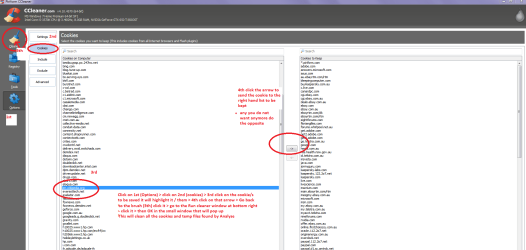
just remember that after the program Analyses you need to go to Options > Cookies > and save the ones that have passwords for sites you use to the right hand column - see my pic and if not sure of what to do post back;)
 

Attachments

  • CCcookies.PNG
    CCcookies.PNG
    130.9 KB · Views: 9

My Computer

Computer type
PC/Desktop
Computer Manufacturer/Model Number
Own build (new) Desk1 / Asus ROG Win 7 / Desk2 1st build
OS
Desk1 7 Home Prem / Desk2 10 Pro / Main lap Asus ROG 10 Pro 2 laptop Toshiba 7 Pro Asus P2520 7 & 10
CPU
Desk1 i5 3750K / Laptop i7 GTX 860M / Desk2 i5 2500
Motherboard
Desk1 Asus P877-V / Desk2 Gigabyte H67 UD3H / Laptop ?
Memory
Desk1 8GB (1866) / Desk2 16GB (1333) / Laptop 8Gb DDR3
Graphics Card(s)
Desk 1& 2NVidia GTX 650 & Laptops on board Intel
Sound Card
Desk 1 & 2 -XONAR DG Realtek High Def audio Laptop
Monitor(s) Displays
Desk 1 Benq HD 2450 / Desk2 Philips 24" / Laptop 17.5"
Screen Resolution
1920x1080 D1 & D2 & Laptop 1
Hard Drives
Desk1 Samsung 120GB 830 SSD
Asus ROG 256GB 850 Pro SSD
Desk2 Samsung 840 256 SSD
Toshiba 120GB EVO
PSU
Desk 1 Corsair HX 1050/ Laptop ? / Desk 2 Corsair HX 650
Case
Desk 1 Cooler HAF XM ? Toshiba laptop / Desk2 Coolermaster
Cooling
Fans on all Desk1 -2 Desk2 - all Coolermasters 5 Laptop ?
Keyboard
Desk 1 MS Sidewinder X6 Desk 2 MS Sidewinder X 4
Mouse
Desk 1&2 - Gigabyte MS 900 gamer - laptop - Logitec wireless
Internet Speed
ADSL2+
Other Info
One other Desktop (tester) and spare Toshba laptop both with SSD's
Running Kaspersky 2016 ISS on all machines config'd identically
Logitec audio stereo systems on each machine (x3)
Canon MG5250MFC
Router/modem TP-Link running WPA2SK
Ok Thanks Mate for all your help it is very much been appreciated plus I have learnt heaps of new stuff :-)

My CPU Usage has been at 0-3% most of the time except when running applications ect. Seems a lot faster now too...very happy!

I will have a look at and do the things you recommended in your last post over the next few days.

Cheers ICIT2LOL

Have a good weekend Mate :-)

Uly
 

My Computer

Computer type
PC/Desktop
Computer Manufacturer/Model Number
Custom Build
OS
Windows 7 Home Premium 64bit
CPU
Intel i7-2600k @3.4 GHz
Motherboard
Asus P8Z68-V LE
Memory
2 x 8 GB GB Corsair Vengence 1600mhz DDR3
Graphics Card(s)
Nvidia 8800 GT
Hard Drives
1 TB Western Digital Caviar Green
Antivirus
Kaspersky Internet Security 2015
Browser
Mozilla Firefox
No probs Uly glad it got sorted and in any case you basically did it yourself;)

There is a ton more in the tutorials and hey maybe you might like to get stuck in and help out others yourself - I have to admit I get a buzz out of it as I can no longer ride the bike or do my woodwork because of a wrecked shoulder - gold prospecting:( So my life long interest in electronics has got me into building machines and doing what we do here in the forum.
John:)
 

My Computer

Computer type
PC/Desktop
Computer Manufacturer/Model Number
Own build (new) Desk1 / Asus ROG Win 7 / Desk2 1st build
OS
Desk1 7 Home Prem / Desk2 10 Pro / Main lap Asus ROG 10 Pro 2 laptop Toshiba 7 Pro Asus P2520 7 & 10
CPU
Desk1 i5 3750K / Laptop i7 GTX 860M / Desk2 i5 2500
Motherboard
Desk1 Asus P877-V / Desk2 Gigabyte H67 UD3H / Laptop ?
Memory
Desk1 8GB (1866) / Desk2 16GB (1333) / Laptop 8Gb DDR3
Graphics Card(s)
Desk 1& 2NVidia GTX 650 & Laptops on board Intel
Sound Card
Desk 1 & 2 -XONAR DG Realtek High Def audio Laptop
Monitor(s) Displays
Desk 1 Benq HD 2450 / Desk2 Philips 24" / Laptop 17.5"
Screen Resolution
1920x1080 D1 & D2 & Laptop 1
Hard Drives
Desk1 Samsung 120GB 830 SSD
Asus ROG 256GB 850 Pro SSD
Desk2 Samsung 840 256 SSD
Toshiba 120GB EVO
PSU
Desk 1 Corsair HX 1050/ Laptop ? / Desk 2 Corsair HX 650
Case
Desk 1 Cooler HAF XM ? Toshiba laptop / Desk2 Coolermaster
Cooling
Fans on all Desk1 -2 Desk2 - all Coolermasters 5 Laptop ?
Keyboard
Desk 1 MS Sidewinder X6 Desk 2 MS Sidewinder X 4
Mouse
Desk 1&2 - Gigabyte MS 900 gamer - laptop - Logitec wireless
Internet Speed
ADSL2+
Other Info
One other Desktop (tester) and spare Toshba laptop both with SSD's
Running Kaspersky 2016 ISS on all machines config'd identically
Logitec audio stereo systems on each machine (x3)
Canon MG5250MFC
Router/modem TP-Link running WPA2SK
No probs Uly glad it got sorted and in any case you basically did it yourself
I guess so mate but there were a few things you said that made me take another look at the CPU processes again :-)

Yeah i'll try to help out if I see any thing as I surf through the forums now and again...I'm no expert...I know a little about hardware and bit about fixing PC Problems (Lots of PC problems in the past lol). I have a number of health problems and don't work anymore. I wouldn't be able to do justice to the people that need help as I can't be there to help as much as I would like because of the health issues. :-( It's a really great thing you guys do helping us out when we have computer problems...very much appreciated :-)

Sorry to hear about your shoulder John it's not much fun...I got a bad back, shoulder and neck too on top of my other health issues :-(

Are you saying you did gold prospecting in the past? That's very cool mate :-) My Sister's young boy is into Gems and stuff. Got him a Metal detector for this Christmas...he should have fun with it :-)

I like the hardware side of PC's more than the software side. Saving up for a MSI 970 video card and a Solid State Drive & Better PSU next year.

Cheers

Uly
 

My Computer

Computer type
PC/Desktop
Computer Manufacturer/Model Number
Custom Build
OS
Windows 7 Home Premium 64bit
CPU
Intel i7-2600k @3.4 GHz
Motherboard
Asus P8Z68-V LE
Memory
2 x 8 GB GB Corsair Vengence 1600mhz DDR3
Graphics Card(s)
Nvidia 8800 GT
Hard Drives
1 TB Western Digital Caviar Green
Antivirus
Kaspersky Internet Security 2015
Browser
Mozilla Firefox
Hmm funny that too Uly my son when he was younger also was into gems and semi precious stuff and I still am too. I made a couple of trips to Lightning Ridge on the bike when I was still able to ride and it was such an interesting pace and scratching through some of the mulluck heaps was real fun especially when you found even the tiniest but of colour.

My detector was a Whites MXT similar to this (US$ price) http://www.whiteselectronics.com/mxt I have still got it and the 9" circular and 8x6" elliptical coils plus all the gadgets and add ons like rechargebable batteries etc etc cost me about $1300 all up but never found much with it as I had only been prospecting for a bout 12 months before I did the shoulder:(

Yes well I am more hardware orientated too so hey don't think you cannot take part every little bit helps. I do up little ditties for dong stuff like testing PSU's cleaning laptops etc cos I tried doing tutorials but they are too fiddly for me. So if I would suggest you just take one particular piece of hardware and study it and it then becomes something you can contribute with and I think it would do you good too - I do it takes my mind off the constant shoulder pain and even when I was severely depressed few years ago it helped me by giving me a purpose in life.

Now seeing you are up for a new card and PSU next year I would push you in the direction of NVidia and also an Asus brand one too the PSU I have always used Corsair simply because they are so good and have a an excellent track record. Anyway if you want there are links to PSU makers because most of the brands are actually made by a few dedicated companies and even if Jones & Co made the 850watt model of a brand the 650 watt might be made by Brown Bros Ltd say for an example the Corsair model range.

To give you an idea of one of my ditties -

Using HW Info

PART A:

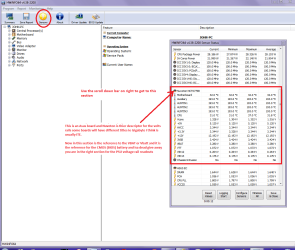
You can test the volts onthe PSU with HW Info HWiNFO,HWiNFO32/64 - Download <download the right bit version and close the right hand window select Sensorsand scroll down to the power section where you will see what the volts aredoing see my pic. In my pic the section (Nuvoton)with VBATT is a dead give away you are in the section for the rail voltages.There are other section titles and one that pops up often is ITE

Now the voltage on thedifferent rails have to be within 5% =+/- of what is required or the machinewill not work properly if at all.

See this for the railvoltage info

http://www.tomshardware.com/reviews/power-supply-specifications-atx-reference,3061.html (Section 2.)

The original right handwindow shows the machine running and is handy for that but for looking at thecomponents in some detail close it and use the main left hand side panel

FOR OTHER COMPONENTS

PART B:

Open each small squarewith + in it on the section the components are in and then click on theindividual component/s (it willhighlight in blue) - in the right hand side will appear all sorts of detailsincluding brands speeds and other essential info that particular device. Seepic for example.
and I would post this pic with this

I reckon you could do this too it is easy once you get going and it is a shame to waste a talent you have doing nothing at all;)
 

Attachments

  • HW INFO DESKTOP PSU.PNG
    HW INFO DESKTOP PSU.PNG
    157.7 KB · Views: 1

My Computer

Computer type
PC/Desktop
Computer Manufacturer/Model Number
Own build (new) Desk1 / Asus ROG Win 7 / Desk2 1st build
OS
Desk1 7 Home Prem / Desk2 10 Pro / Main lap Asus ROG 10 Pro 2 laptop Toshiba 7 Pro Asus P2520 7 & 10
CPU
Desk1 i5 3750K / Laptop i7 GTX 860M / Desk2 i5 2500
Motherboard
Desk1 Asus P877-V / Desk2 Gigabyte H67 UD3H / Laptop ?
Memory
Desk1 8GB (1866) / Desk2 16GB (1333) / Laptop 8Gb DDR3
Graphics Card(s)
Desk 1& 2NVidia GTX 650 & Laptops on board Intel
Sound Card
Desk 1 & 2 -XONAR DG Realtek High Def audio Laptop
Monitor(s) Displays
Desk 1 Benq HD 2450 / Desk2 Philips 24" / Laptop 17.5"
Screen Resolution
1920x1080 D1 & D2 & Laptop 1
Hard Drives
Desk1 Samsung 120GB 830 SSD
Asus ROG 256GB 850 Pro SSD
Desk2 Samsung 840 256 SSD
Toshiba 120GB EVO
PSU
Desk 1 Corsair HX 1050/ Laptop ? / Desk 2 Corsair HX 650
Case
Desk 1 Cooler HAF XM ? Toshiba laptop / Desk2 Coolermaster
Cooling
Fans on all Desk1 -2 Desk2 - all Coolermasters 5 Laptop ?
Keyboard
Desk 1 MS Sidewinder X6 Desk 2 MS Sidewinder X 4
Mouse
Desk 1&2 - Gigabyte MS 900 gamer - laptop - Logitec wireless
Internet Speed
ADSL2+
Other Info
One other Desktop (tester) and spare Toshba laptop both with SSD's
Running Kaspersky 2016 ISS on all machines config'd identically
Logitec audio stereo systems on each machine (x3)
Canon MG5250MFC
Router/modem TP-Link running WPA2SK
Hi John,

Wow that's a nice Metal Detector you got yourself there :-) The one we got my sisters Little boy is more of a cheaper one...about $80 from Masters. If he takes a liking to it then we might get him a better on in a few years time :-) Sad you never found much...there has been some big gold finds in the last few years i hear.

Yeah I understand how being in pain all the time could get one depressed. It's not fun at all. Thankfully I have never gotten depressed over my illnesses....I've been able to see my health problems as a blessing...being in bad health has taught me a lot and how to appreciate what I have :-) Having a passion that you are interested in is a great way of taking your mind off the pain...I am an Artist and I try to Draw and Paint when my body allows me too.

Yeah I like Asus video cards. My Nvidia 8800gts is getting a bit long in the tooth so I need to do something soon about a new video card. Unfortunately it's going to come down what I can get that's on special at the time I have the money for it ( living on a Pension is Hard). But it will be an Asus, MSI or Evga card...Shooting for a nvidia 970 if I can afford it.

Ok looks like a I got a lot of reading to do :-)

I'm not sure If I Have a talent for PC Hardware...but I certainly have an interest in it. due to my Illness es I can't read for long periods of time any longer ( I normally get a Software program to read stuff to me these days). So I'm not going to be able to study PC Hard ware properly. Any spare time I have and when my Body feels ok then I try to Draw and Paint as I might be able to get into the Art Industry if my health returns as Computer Game Artist or in the Movie Industry etc. That's what I'm shooting for anyway.

I definitely will be reading what you've posted and I will try to follow your posts on these forums...I reckon I could learn a fair bit from you :-)
 

My Computer

Computer type
PC/Desktop
Computer Manufacturer/Model Number
Custom Build
OS
Windows 7 Home Premium 64bit
CPU
Intel i7-2600k @3.4 GHz
Motherboard
Asus P8Z68-V LE
Memory
2 x 8 GB GB Corsair Vengence 1600mhz DDR3
Graphics Card(s)
Nvidia 8800 GT
Hard Drives
1 TB Western Digital Caviar Green
Antivirus
Kaspersky Internet Security 2015
Browser
Mozilla Firefox
Actually mate the size of the detector makes no difference the best find I had was with one I got from EBay - yes ruddy EBay for $60 and that was $2 coin LOL!! I will give you a little tip one of the best hunting grounds for the young bloke is around showground's and near where they buy food etc cos people very often drop coins at those locales;) They always show pics of people on beaches but to me that takes too much time unless you are a canny sort.
Actually if one gets really serious then it is down in Victoria there are the better hunting grounds if you are looking for nuggets, although not far from where I live is the very first palce tha payable gold was ever dug in Oz a place called Ophir. The biggets gold nugget ever found in the world was at a place called Hill End near Bathurst https://en.wikipedia.org/wiki/Bernhardt_Holtermann

Anyway back on topic the GPU mate it really does depend on budget of course but I found the Asus GTX 650Ti excellent and I use it in all my desktops (was $165 at the time) although I think it has been superseded by the Asus GTX 750 (about $199) ASUS GeForce GTX 750 Ti Strix 2GB [STRIX-GTX750TI-OC-2GD5] - $199.00 : PC Case Gear though for general work I guess tis would be no slouch Gigabyte GeForce GT 730 2GB [GV-N730-2GI] - $89.00 : PC Case Gear
This is a site I used a lot and I now also use these two Online Computer Store ? Cheap Australian Computer Shop | Shopping Express and Centre Com : Best PC Hardware Prices! the latter very good and have just got a new 27" Asus monitor from there for a saving of about $150!!

The 970 mate you are looking at some serious money - around $550 - 600 but take a look at those sites they have specials and clearances that sometimes are surprisingly reasonable. MInd you this is only a step down from what you wish I guess Asus GeForce GTX 960 2GB Strix 2GB GDDR5 Graphics Card | Centre Com : Best PC Hardware Prices! and mate personally I am not a fan of MSI or EVGA although thre will be others who will not agree with me I am just an Asus buyer;)

Now the interest in hardware well it needs some grounding in basic components but Wikipedia is good for that and I am sure you can do it and it doesn't have to be done all at once;)

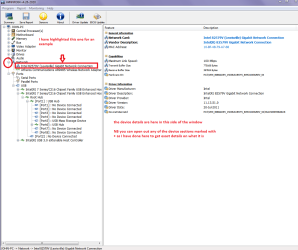
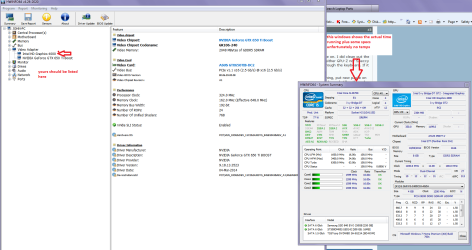
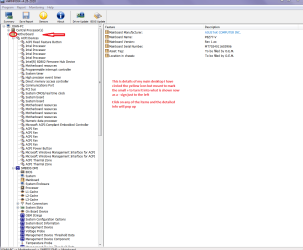
That ditty of mine well it is a very useful tool for getting details of on board components not just the PSU that I linked see pics
 

Attachments

  • HW INFO NETWORK.PNG
    HW INFO NETWORK.PNG
    127.7 KB · Views: 0
  • HW INFO GPU.PNG
    HW INFO GPU.PNG
    229.4 KB · Views: 0
  • HW INFO MOBO.PNG
    HW INFO MOBO.PNG
    141.1 KB · Views: 0

My Computer

Computer type
PC/Desktop
Computer Manufacturer/Model Number
Own build (new) Desk1 / Asus ROG Win 7 / Desk2 1st build
OS
Desk1 7 Home Prem / Desk2 10 Pro / Main lap Asus ROG 10 Pro 2 laptop Toshiba 7 Pro Asus P2520 7 & 10
CPU
Desk1 i5 3750K / Laptop i7 GTX 860M / Desk2 i5 2500
Motherboard
Desk1 Asus P877-V / Desk2 Gigabyte H67 UD3H / Laptop ?
Memory
Desk1 8GB (1866) / Desk2 16GB (1333) / Laptop 8Gb DDR3
Graphics Card(s)
Desk 1& 2NVidia GTX 650 & Laptops on board Intel
Sound Card
Desk 1 & 2 -XONAR DG Realtek High Def audio Laptop
Monitor(s) Displays
Desk 1 Benq HD 2450 / Desk2 Philips 24" / Laptop 17.5"
Screen Resolution
1920x1080 D1 & D2 & Laptop 1
Hard Drives
Desk1 Samsung 120GB 830 SSD
Asus ROG 256GB 850 Pro SSD
Desk2 Samsung 840 256 SSD
Toshiba 120GB EVO
PSU
Desk 1 Corsair HX 1050/ Laptop ? / Desk 2 Corsair HX 650
Case
Desk 1 Cooler HAF XM ? Toshiba laptop / Desk2 Coolermaster
Cooling
Fans on all Desk1 -2 Desk2 - all Coolermasters 5 Laptop ?
Keyboard
Desk 1 MS Sidewinder X6 Desk 2 MS Sidewinder X 4
Mouse
Desk 1&2 - Gigabyte MS 900 gamer - laptop - Logitec wireless
Internet Speed
ADSL2+
Other Info
One other Desktop (tester) and spare Toshba laptop both with SSD's
Running Kaspersky 2016 ISS on all machines config'd identically
Logitec audio stereo systems on each machine (x3)
Canon MG5250MFC
Router/modem TP-Link running WPA2SK
That's a great Idea - Showgrounds! We have one not too far away. I will let my Sisters Boy know about that. Excellent Idea :-)

Yeah I normally Shop at Mwave, PC Case Gear or Umart. I'll checkout the links you provided too.

I need a decent Video card for Flight Simulator 10 (FSX). It has to have good Bandwidth for FSX and I like what the 970 provides. A good cross for a high performance card and price. I have been saving my pennies for awhile now and should be able to get one late this year or early next year. I want to buy a decent card as I tend not to upgrade them very often...as you can see with my poor old 8800gts still chugging along lol. I don't put a lot of stock in brand names as you can see with my poor old Albatron 8800gts...It's kept going where I have replaced nearly all my other hardware 3 times over. Maybe I got lucky? I like Asus, MSI and I hear EVGA cards are good. I might go for the Asus Strix Video Card as I have an Asus motherboard...it would just make sense. We'll see...

I am still going through the other stuff you posted :-)

Cheers

Uly
 

My Computer

Computer type
PC/Desktop
Computer Manufacturer/Model Number
Custom Build
OS
Windows 7 Home Premium 64bit
CPU
Intel i7-2600k @3.4 GHz
Motherboard
Asus P8Z68-V LE
Memory
2 x 8 GB GB Corsair Vengence 1600mhz DDR3
Graphics Card(s)
Nvidia 8800 GT
Hard Drives
1 TB Western Digital Caviar Green
Antivirus
Kaspersky Internet Security 2015
Browser
Mozilla Firefox
Yep mate just think what the Sydney site for the Easter show would be like ;) probably pick up bills as well LOL!!

Yes those tow sites I linked Uly are really good and better than PC Case Gear who have got a tad overpriced but also keep a look out on EBay for all three as they are on it and there they don't charge postage which from PCCG is a real killer.

Actually I have tried gaming and my last buy was Sniper but I cannot work it out not being able to get out of training camp.
My favourites are the flight sims though I must admit but again there seems to be a ton of Xbox and Nintendo stuff but not a lot for PC gaming. I like the combat ones as the just flying ones are a bit boring to be honest.

I did have one once that was based around the conflict in Bosnia but it included navigation and stuff like that and I am not that clever enough I just want to go in and blast away or drop bombs;)

I think too that keeping it Asus does help in my mind too and perhaps one day I shall be able to get this Asus ROG laptop to do something with. That Strix looks the goods but if I were getting something I would probably plump for this one Asus GeForce GTX 960 2GB Strix 2GB GDDR5 Graphics Card | Centre Com : Best PC Hardware Prices! not as much memory and probably a few other details but the extra cost doesn't justify it at the moment.
 

My Computer

Computer type
PC/Desktop
Computer Manufacturer/Model Number
Own build (new) Desk1 / Asus ROG Win 7 / Desk2 1st build
OS
Desk1 7 Home Prem / Desk2 10 Pro / Main lap Asus ROG 10 Pro 2 laptop Toshiba 7 Pro Asus P2520 7 & 10
CPU
Desk1 i5 3750K / Laptop i7 GTX 860M / Desk2 i5 2500
Motherboard
Desk1 Asus P877-V / Desk2 Gigabyte H67 UD3H / Laptop ?
Memory
Desk1 8GB (1866) / Desk2 16GB (1333) / Laptop 8Gb DDR3
Graphics Card(s)
Desk 1& 2NVidia GTX 650 & Laptops on board Intel
Sound Card
Desk 1 & 2 -XONAR DG Realtek High Def audio Laptop
Monitor(s) Displays
Desk 1 Benq HD 2450 / Desk2 Philips 24" / Laptop 17.5"
Screen Resolution
1920x1080 D1 & D2 & Laptop 1
Hard Drives
Desk1 Samsung 120GB 830 SSD
Asus ROG 256GB 850 Pro SSD
Desk2 Samsung 840 256 SSD
Toshiba 120GB EVO
PSU
Desk 1 Corsair HX 1050/ Laptop ? / Desk 2 Corsair HX 650
Case
Desk 1 Cooler HAF XM ? Toshiba laptop / Desk2 Coolermaster
Cooling
Fans on all Desk1 -2 Desk2 - all Coolermasters 5 Laptop ?
Keyboard
Desk 1 MS Sidewinder X6 Desk 2 MS Sidewinder X 4
Mouse
Desk 1&2 - Gigabyte MS 900 gamer - laptop - Logitec wireless
Internet Speed
ADSL2+
Other Info
One other Desktop (tester) and spare Toshba laptop both with SSD's
Running Kaspersky 2016 ISS on all machines config'd identically
Logitec audio stereo systems on each machine (x3)
Canon MG5250MFC
Router/modem TP-Link running WPA2SK
Back
Top