Solved CPU Usage High at idle...Please Help..

corp2212

New member
Member
Local time
5:59 PM
Messages
38
Location
VA, USA
Hello Everyone,

Firstly, please forgive me if any of the below requests are ignorant, I am new to the world of troubleshooting Windows 7 this thoroughly.

Overview:

I have had a perpetual issue with CPU Usage and have tried several different methods of eradicating the issue without much success. After a lot of trial and error I do believe the issue lies with open services/processes that I am not confident of disabling. Could someone please help me understand or locate the resource hog.

Specs:

I currently have a new system: AS ROCK Z77 OC Formula Motherboard, Intel Core i7-3770 Ivy Bridge, 2 x Velociraptor 10000 RPM HDDs, 1 x Seagate 1TB 5400 RPM HDD, 1 x 160GB Seagate 5400 RPM HDD, 16GB DDR3 RAM, Nvidia GTX 670 GPU (4GB Version).

Core Issue:

When I first installed Windows my CPU usage was 0 at idle, now its 15%-25% at idle, and I can’t seem to find out why. Some may say around 20% isn't that bad but this is how it started with my previous system and then towards the end i had it at 90%+ and i had NO way to resolve that, so i want to address this problem before it gets out of hand.

CoreTemp manifests the following:

Core 0: 46-49C
Core 1: 49-53C
Core 2: 46-49C
Core 3: 43-46C

Processes:

I have 83 processes running and my memory usage is 2.46GB.

Here are screenshots of my Process view:


Process1.jpg


Process2.jpg


I have no viruses detected and either way my PC is hardly 3 days old.

In Conclusion:

I immensely appreciate any help and if necessary am willing to provide monetary compensation to anyone who can resolve this issue. I desperately need a solution to this problem due to past experiences (with Irrational CPU Usage) that have made my work environment impossible.

Thanks so much in advance.

UPDATE: Pardon my ignorance but as of the 8th of January 2013 it is now conclusive that the problem lies with Trojans which have infected my backup data as opposed to running services/processes as i earlier suggested.

Viruses Detected:

1) Win32.Sality.3 (B) and
2) Autorun.inf
 
Last edited:

My Computer

OS
Windows 7 Home Premium 64 Bit - SP1
CPU
I7 3770 Ivy Bridge
Motherboard
AS ROCK OCZ Z77 Formula
Memory
16GB DDR3
Graphics Card(s)
Nvidia GTX 670 4GB Version
Sound Card
Creative Sound Blaster Z
Monitor(s) Displays
KDS 23" Wide Screen Monitor
Screen Resolution
1920 x 1200
Hard Drives
2 x 10000 RPM Velociraptor 600 GB HDDs
1 x 5400 RPM SeaGate 1 TB HDD
1 x 5400 RPM SeaGate 160GB HDD
1 x External 5400 RPM SeaGate 750GB HDD
PSU
Corsair Professional Series HX 850 Watt ATX/EPS Modular 80
Case
ThermalTake Armor Series
Cooling
Arctic Silver 5 3.5G Polysynthetic Silver Thermal Grease CPU
Keyboard
Logiteh G510 Keyboard with LCD
Mouse
Logitech M310 Wireless Mouse
Internet Speed
512 KBPS High Speed Brodband

My Computer

Computer type
PC/Desktop
Computer Manufacturer/Model Number
Home made Desktop
OS
Windows 10 Pro. 64/ version 1709 Windows 7 Pro/64
CPU
Intel i7-6800K @ 4.3
Motherboard
ASUS X-99 Deluxe II
Memory
Corsair Platinum 16 gig @2400
Graphics Card(s)
EVGA GTX 1070 OC
Monitor(s) Displays
Asus 27" LED LCD/VE278Q
Screen Resolution
1920-1080 or 1280-720 HDMI
Hard Drives
INTEL SSD 730-240 Gb Sata 3.0/
PSU
EVGA Platium 1200W
Case
Phanteks Luxe Tempered Glass 8 fans/ one radiator
Cooling
XSPC/ Water Cooled CPU
Keyboard
Das 4 Professional
Mouse
Logitech M705/MX Anywhere 2-S
Internet Speed
100 mbits
Antivirus
Microsoft Security Essentials/ Malwarebytes Premium 3.0/ SAS
Browser
I.E. 11 default/Firefox/ ISP Time Warner Cable/Spectrum
Other Info
LG BluRay Burner/
Sound system-KLipsch-THX/
Icy Dock ssd Hot Swap bays.
hi, welcome to this forum,
first take a screen shot from your system rate from here:
Control Panel\All Control Panel Items\Performance Information and Tools

i want to make sure all your drivers are installed properly,
(make sure your graphic driver has installed)

also use msconfig in start and manage your start up programs. uncheck any unwanted programs. just run any vital programs like your antivirus and internetdownload manager...others can be run when they are needed.

do what i said and report back the situation
 

My Computer

OS
Windows 7 Ultimate x64
CPU
core i7.

My Computer

OS
Windows 7 Home Premium 64 Bit - SP1
CPU
I7 3770 Ivy Bridge
Motherboard
AS ROCK OCZ Z77 Formula
Memory
16GB DDR3
Graphics Card(s)
Nvidia GTX 670 4GB Version
Sound Card
Creative Sound Blaster Z
Monitor(s) Displays
KDS 23" Wide Screen Monitor
Screen Resolution
1920 x 1200
Hard Drives
2 x 10000 RPM Velociraptor 600 GB HDDs
1 x 5400 RPM SeaGate 1 TB HDD
1 x 5400 RPM SeaGate 160GB HDD
1 x External 5400 RPM SeaGate 750GB HDD
PSU
Corsair Professional Series HX 850 Watt ATX/EPS Modular 80
Case
ThermalTake Armor Series
Cooling
Arctic Silver 5 3.5G Polysynthetic Silver Thermal Grease CPU
Keyboard
Logiteh G510 Keyboard with LCD
Mouse
Logitech M310 Wireless Mouse
Internet Speed
512 KBPS High Speed Brodband
hi, welcome to this forum,
first take a screen shot from your system rate from here:
Control Panel\All Control Panel Items\Performance Information and Tools

i want to make sure all your drivers are installed properly,
(make sure your graphic driver has installed)

also use msconfig in start and manage your start up programs. uncheck any unwanted programs. just run any vital programs like your antivirus and internetdownload manager...others can be run when they are needed.

do what i said and report back the situation

Hello, here is the screenshot you requested:

PINT.jpg


The above screenshot is a good example of what i mean, either im totally out of synch with today's technology or i shouldn't have a score of 5.9?


I have the latest drivers installed for my Graphics Card and Sound Driver, i always download the latest ones and check for updates every few weeks.

About MsConfig.exe, could you help me disable those that are not needed? I meddled with it earlier and it caused issues so i would love some help there.

Here are screenshots of the Services.msc window:

Services1.jpg

Services2.jpg

Services3.jpg

Services4.jpg

Let me know what you think, and i really appreciate the help.
 

My Computer

OS
Windows 7 Home Premium 64 Bit - SP1
CPU
I7 3770 Ivy Bridge
Motherboard
AS ROCK OCZ Z77 Formula
Memory
16GB DDR3
Graphics Card(s)
Nvidia GTX 670 4GB Version
Sound Card
Creative Sound Blaster Z
Monitor(s) Displays
KDS 23" Wide Screen Monitor
Screen Resolution
1920 x 1200
Hard Drives
2 x 10000 RPM Velociraptor 600 GB HDDs
1 x 5400 RPM SeaGate 1 TB HDD
1 x 5400 RPM SeaGate 160GB HDD
1 x External 5400 RPM SeaGate 750GB HDD
PSU
Corsair Professional Series HX 850 Watt ATX/EPS Modular 80
Case
ThermalTake Armor Series
Cooling
Arctic Silver 5 3.5G Polysynthetic Silver Thermal Grease CPU
Keyboard
Logiteh G510 Keyboard with LCD
Mouse
Logitech M310 Wireless Mouse
Internet Speed
512 KBPS High Speed Brodband
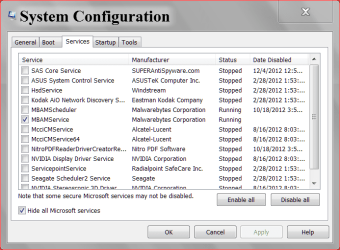
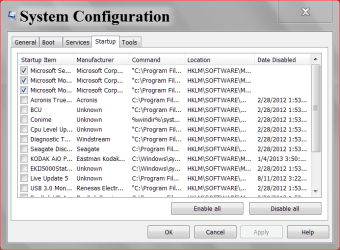
First off don't mess with Microsoft Services. It will not help.
Do this.
msconfig
Notice in the top picture, lower left corner check mark in Hide all Microsoft Services.

1 4 2013 two.PNG

Capture.1 4 2013.PNG

You will still be able to use all programs that aren't checked they just won't be running in the background when not in use.
You may select a few different than me. You may want for example to have some things check for updates automatically which I don't and so on. I do all my updates manually. You can always add back a check mark if you so desire later. You always want all active protection programs (security programs) check as I do.
 

My Computer

Computer type
PC/Desktop
Computer Manufacturer/Model Number
Home made Desktop
OS
Windows 10 Pro. 64/ version 1709 Windows 7 Pro/64
CPU
Intel i7-6800K @ 4.3
Motherboard
ASUS X-99 Deluxe II
Memory
Corsair Platinum 16 gig @2400
Graphics Card(s)
EVGA GTX 1070 OC
Monitor(s) Displays
Asus 27" LED LCD/VE278Q
Screen Resolution
1920-1080 or 1280-720 HDMI
Hard Drives
INTEL SSD 730-240 Gb Sata 3.0/
PSU
EVGA Platium 1200W
Case
Phanteks Luxe Tempered Glass 8 fans/ one radiator
Cooling
XSPC/ Water Cooled CPU
Keyboard
Das 4 Professional
Mouse
Logitech M705/MX Anywhere 2-S
Internet Speed
100 mbits
Antivirus
Microsoft Security Essentials/ Malwarebytes Premium 3.0/ SAS
Browser
I.E. 11 default/Firefox/ ISP Time Warner Cable/Spectrum
Other Info
LG BluRay Burner/
Sound system-KLipsch-THX/
Icy Dock ssd Hot Swap bays.
First off don't mess with Microsoft Services. It will not help.
Do this.
msconfig
Notice in the top picture, lower left corner check mark in Hide all Microsoft Services.

View attachment 248612

View attachment 248613

You will still be able to use all programs that aren't checked they just won't be running in the background when not in use.
You may select a few different than me. You may want for example to have some things check for updates automatically which I don't and so on. I do all my updates manually. You can always add back a check mark if you so desire later. You always want all active protection programs (security programs) check as I do.

Thank you for your input.

The following are the only non Microsoft services/ programs running:

Do you think i can disable any of the following without causing issues? I am especially skeptical of the ones in ORANGE and i know for sure i cant disable the ones in RED (in my opinion that is, i am not an expert by any means and could be terribly wrong), Please let me know!

Services

Adobe Flash Player Update Service
CFosSpeed System Service
Inel Content Protection HECI Service
Creative Alchemy AL6 Licensing Service
Creative Audio Service
Sound Blaster Service
Intel Rapid Storage Technology
Intel Management and Security Application Local Management Service
Mozilla Maintenance Service
Nvidia Display Driver Service
Nvida Sterioscopic 3D Driver Service
SmartView Software Updater Service

Startup

Realtek Audio Manager
Intel Common User Interface

THXCfg64
Intel Common User Interface
Internet Download Manager
Cdloader2
Skype
Intel USB 3.0 Monitor
Creative Updreg
SmartviewAgent
Microsoft Office 2010
PowerReg

Thanks again in advance.
 

My Computer

OS
Windows 7 Home Premium 64 Bit - SP1
CPU
I7 3770 Ivy Bridge
Motherboard
AS ROCK OCZ Z77 Formula
Memory
16GB DDR3
Graphics Card(s)
Nvidia GTX 670 4GB Version
Sound Card
Creative Sound Blaster Z
Monitor(s) Displays
KDS 23" Wide Screen Monitor
Screen Resolution
1920 x 1200
Hard Drives
2 x 10000 RPM Velociraptor 600 GB HDDs
1 x 5400 RPM SeaGate 1 TB HDD
1 x 5400 RPM SeaGate 160GB HDD
1 x External 5400 RPM SeaGate 750GB HDD
PSU
Corsair Professional Series HX 850 Watt ATX/EPS Modular 80
Case
ThermalTake Armor Series
Cooling
Arctic Silver 5 3.5G Polysynthetic Silver Thermal Grease CPU
Keyboard
Logiteh G510 Keyboard with LCD
Mouse
Logitech M310 Wireless Mouse
Internet Speed
512 KBPS High Speed Brodband
see, those that are came with your drivers, they should get start with win log on, like Nvidia,intel,realtek , and so on. but the programs that you just installed them like yahoomessenger, skype,office,powerreg, these are useless in everyday start up, every time you need them just click on their icon.
and i should say your computer specification is perfect.
 

My Computer

OS
Windows 7 Ultimate x64
CPU
core i7.
You can see what I have selected. Adobe Flash Player can be left checked if you don't want to do it manually. My Start Ups are mouse, keyboard, and security. My NON Microsoft Services is Security. That is Malwarebytes in my case. You can Google the rest and decide whether you want them checked or not. Try it the way I have mine and I think you will like it. You can always add a check mark to something in the future if you decide to. The final decision is yours.
 

My Computer

Computer type
PC/Desktop
Computer Manufacturer/Model Number
Home made Desktop
OS
Windows 10 Pro. 64/ version 1709 Windows 7 Pro/64
CPU
Intel i7-6800K @ 4.3
Motherboard
ASUS X-99 Deluxe II
Memory
Corsair Platinum 16 gig @2400
Graphics Card(s)
EVGA GTX 1070 OC
Monitor(s) Displays
Asus 27" LED LCD/VE278Q
Screen Resolution
1920-1080 or 1280-720 HDMI
Hard Drives
INTEL SSD 730-240 Gb Sata 3.0/
PSU
EVGA Platium 1200W
Case
Phanteks Luxe Tempered Glass 8 fans/ one radiator
Cooling
XSPC/ Water Cooled CPU
Keyboard
Das 4 Professional
Mouse
Logitech M705/MX Anywhere 2-S
Internet Speed
100 mbits
Antivirus
Microsoft Security Essentials/ Malwarebytes Premium 3.0/ SAS
Browser
I.E. 11 default/Firefox/ ISP Time Warner Cable/Spectrum
Other Info
LG BluRay Burner/
Sound system-KLipsch-THX/
Icy Dock ssd Hot Swap bays.
see, those that are came with your drivers, they should get start with win log on, like Nvidia,intel,realtek , and so on. but the programs that you just installed them like yahoomessenger, skype,office,powerreg, these are useless in everyday start up, every time you need them just click on their icon.
and i should say your computer specification is perfect.

Thank you, i have disabled everything unnecessary, i still have 15-20% CPU Usage at idle :(. What else could it be?
 

My Computer

OS
Windows 7 Home Premium 64 Bit - SP1
CPU
I7 3770 Ivy Bridge
Motherboard
AS ROCK OCZ Z77 Formula
Memory
16GB DDR3
Graphics Card(s)
Nvidia GTX 670 4GB Version
Sound Card
Creative Sound Blaster Z
Monitor(s) Displays
KDS 23" Wide Screen Monitor
Screen Resolution
1920 x 1200
Hard Drives
2 x 10000 RPM Velociraptor 600 GB HDDs
1 x 5400 RPM SeaGate 1 TB HDD
1 x 5400 RPM SeaGate 160GB HDD
1 x External 5400 RPM SeaGate 750GB HDD
PSU
Corsair Professional Series HX 850 Watt ATX/EPS Modular 80
Case
ThermalTake Armor Series
Cooling
Arctic Silver 5 3.5G Polysynthetic Silver Thermal Grease CPU
Keyboard
Logiteh G510 Keyboard with LCD
Mouse
Logitech M310 Wireless Mouse
Internet Speed
512 KBPS High Speed Brodband
You can see what I have selected. Adobe Flash Player can be left checked if you don't want to do it manually. My Start Ups are mouse, keyboard, and security. My NON Microsoft Services is Security. That is Malwarebytes in my case. You can Google the rest and decide whether you want them checked or not. Try it the way I have mine and I think you will like it. You can always add a check mark to something in the future if you decide to. The final decision is yours.

NON MS is now taken care off and so were down to MS Services only. In your opinion would you conclude that a/ a few MS Services is/are responsible for this problem? If yes ill try and get rid of them one by one to see what happens.
 

My Computer

OS
Windows 7 Home Premium 64 Bit - SP1
CPU
I7 3770 Ivy Bridge
Motherboard
AS ROCK OCZ Z77 Formula
Memory
16GB DDR3
Graphics Card(s)
Nvidia GTX 670 4GB Version
Sound Card
Creative Sound Blaster Z
Monitor(s) Displays
KDS 23" Wide Screen Monitor
Screen Resolution
1920 x 1200
Hard Drives
2 x 10000 RPM Velociraptor 600 GB HDDs
1 x 5400 RPM SeaGate 1 TB HDD
1 x 5400 RPM SeaGate 160GB HDD
1 x External 5400 RPM SeaGate 750GB HDD
PSU
Corsair Professional Series HX 850 Watt ATX/EPS Modular 80
Case
ThermalTake Armor Series
Cooling
Arctic Silver 5 3.5G Polysynthetic Silver Thermal Grease CPU
Keyboard
Logiteh G510 Keyboard with LCD
Mouse
Logitech M310 Wireless Mouse
Internet Speed
512 KBPS High Speed Brodband
CPU Usage with 70-80 Processes running...

Also, with 70-80 Processes running what should the CPU and memory usage be at according to you gentlemen?
 

My Computer

OS
Windows 7 Home Premium 64 Bit - SP1
CPU
I7 3770 Ivy Bridge
Motherboard
AS ROCK OCZ Z77 Formula
Memory
16GB DDR3
Graphics Card(s)
Nvidia GTX 670 4GB Version
Sound Card
Creative Sound Blaster Z
Monitor(s) Displays
KDS 23" Wide Screen Monitor
Screen Resolution
1920 x 1200
Hard Drives
2 x 10000 RPM Velociraptor 600 GB HDDs
1 x 5400 RPM SeaGate 1 TB HDD
1 x 5400 RPM SeaGate 160GB HDD
1 x External 5400 RPM SeaGate 750GB HDD
PSU
Corsair Professional Series HX 850 Watt ATX/EPS Modular 80
Case
ThermalTake Armor Series
Cooling
Arctic Silver 5 3.5G Polysynthetic Silver Thermal Grease CPU
Keyboard
Logiteh G510 Keyboard with LCD
Mouse
Logitech M310 Wireless Mouse
Internet Speed
512 KBPS High Speed Brodband
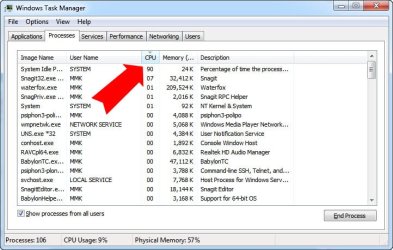
to see what program uses your cpu, just sort it by that then you can end the process if it is a non microsoft program
take a snapshot of the taskmanager sorted list
also you can use process explorer from here:Overview - Process Hacker
 

Attachments

  • 1-6-2013 12-09-51 AM.jpg
    1-6-2013 12-09-51 AM.jpg
    59.4 KB · Views: 11

My Computer

OS
Windows 7 Ultimate x64
CPU
core i7.
to see what program uses your cpu, just sort it by that then you can end the process if it is a non microsoft program
take a snapshot of the taskmanager sorted list
also you can use process explorer from here:Overview - Process Hacker

Hey,

Heres a screenshot of my task manager, at this point my CPU still ranges from 15%-25%, i dont see any CPU usage? Your thoughts?

TaskManager.jpg
 

My Computer

OS
Windows 7 Home Premium 64 Bit - SP1
CPU
I7 3770 Ivy Bridge
Motherboard
AS ROCK OCZ Z77 Formula
Memory
16GB DDR3
Graphics Card(s)
Nvidia GTX 670 4GB Version
Sound Card
Creative Sound Blaster Z
Monitor(s) Displays
KDS 23" Wide Screen Monitor
Screen Resolution
1920 x 1200
Hard Drives
2 x 10000 RPM Velociraptor 600 GB HDDs
1 x 5400 RPM SeaGate 1 TB HDD
1 x 5400 RPM SeaGate 160GB HDD
1 x External 5400 RPM SeaGate 750GB HDD
PSU
Corsair Professional Series HX 850 Watt ATX/EPS Modular 80
Case
ThermalTake Armor Series
Cooling
Arctic Silver 5 3.5G Polysynthetic Silver Thermal Grease CPU
Keyboard
Logiteh G510 Keyboard with LCD
Mouse
Logitech M310 Wireless Mouse
Internet Speed
512 KBPS High Speed Brodband
Maybe you should just leave well enough alone. If it isn't broken, do not go on goose hunt chases trying to solve a problem that is not there.
 

My Computer

Computer type
PC/Desktop
Computer Manufacturer/Model Number
Alienware Aurora ALX R4
OS
Windows 10 Pro (x64)
CPU
Intel Core i7-3930K (3.2GHz - 4.5GHz)
Motherboard
Alienware Aurora-R4 x79
Memory
4x Samsung 4GB PC3-12800 DDR3 (16GB 1600MHz)
Graphics Card(s)
Nvidia Geforce GTX 690
Sound Card
SteelSeries Siberia Elite
Monitor(s) Displays
Dell UltraSharp U3011
Screen Resolution
2560x1600
Hard Drives
Samsung 850 Pro 256 GB, Seagate 1TB Desktop Hybrid HDD, 2x Western Digital 4TB Green HDD
PSU
875W Some Dell PSU <.<
Case
Alienware Aurora ALX
Cooling
Custom Liquid Cooling (EK CPU & GPU blocks) dual EK 480RAD
Keyboard
Logitech G710+ Mechanical
Mouse
Logitech G700s
Internet Speed
Verizon Fios (50 mbps average)
Other Info
Server: Intel NUC D54250WYK: i5-4250U, 16GB, 256 GB mSATA, Windows Server 2012 R2
Strange...

IMPORTANT: Something weird i just discovered with process hacker and task manager...

If you see the image below: It says Yahoo Messenger is taking up 12.98 CPU, which is not really possible, im now beginning to think this is a trojan:

PHY.jpg


I then EXITED Yahoo messenger and the CPU usage dropped to zero but within a second another program took it, Internet download manager, which normally only takes 1 or lesser CPU.


PHIDMAN.jpg


I then quit Internet Download manager and it then said Firefox is taking up 12.60 CPU whereas if you refer to the previous image, you'll see that Firefox is only taking up 0.39! Is this Trojan?


PHFX.jpg


I am really eager to see what you gentlemen think about this?
 

My Computer

OS
Windows 7 Home Premium 64 Bit - SP1
CPU
I7 3770 Ivy Bridge
Motherboard
AS ROCK OCZ Z77 Formula
Memory
16GB DDR3
Graphics Card(s)
Nvidia GTX 670 4GB Version
Sound Card
Creative Sound Blaster Z
Monitor(s) Displays
KDS 23" Wide Screen Monitor
Screen Resolution
1920 x 1200
Hard Drives
2 x 10000 RPM Velociraptor 600 GB HDDs
1 x 5400 RPM SeaGate 1 TB HDD
1 x 5400 RPM SeaGate 160GB HDD
1 x External 5400 RPM SeaGate 750GB HDD
PSU
Corsair Professional Series HX 850 Watt ATX/EPS Modular 80
Case
ThermalTake Armor Series
Cooling
Arctic Silver 5 3.5G Polysynthetic Silver Thermal Grease CPU
Keyboard
Logiteh G510 Keyboard with LCD
Mouse
Logitech M310 Wireless Mouse
Internet Speed
512 KBPS High Speed Brodband
No. Your computer is just doing work. There is no such thing as idle.
 

My Computer

Computer type
PC/Desktop
Computer Manufacturer/Model Number
Alienware Aurora ALX R4
OS
Windows 10 Pro (x64)
CPU
Intel Core i7-3930K (3.2GHz - 4.5GHz)
Motherboard
Alienware Aurora-R4 x79
Memory
4x Samsung 4GB PC3-12800 DDR3 (16GB 1600MHz)
Graphics Card(s)
Nvidia Geforce GTX 690
Sound Card
SteelSeries Siberia Elite
Monitor(s) Displays
Dell UltraSharp U3011
Screen Resolution
2560x1600
Hard Drives
Samsung 850 Pro 256 GB, Seagate 1TB Desktop Hybrid HDD, 2x Western Digital 4TB Green HDD
PSU
875W Some Dell PSU <.<
Case
Alienware Aurora ALX
Cooling
Custom Liquid Cooling (EK CPU & GPU blocks) dual EK 480RAD
Keyboard
Logitech G710+ Mechanical
Mouse
Logitech G700s
Internet Speed
Verizon Fios (50 mbps average)
Other Info
Server: Intel NUC D54250WYK: i5-4250U, 16GB, 256 GB mSATA, Windows Server 2012 R2
No. Your computer is just doing work. There is no such thing as idle.

Something is wrong, im not just bringing this up because 15-25% of my CPU is always busy, its because this is how it started with my older PC and it soon went from 15-25-45-90 and eventually i couldnt use it anymore. There is no reason why my PC should range from 15-25% when idle and the discrepancy is the screenshots manifested above clearly suggest something is amiss, i need to find out what that is before it gets out of hand.

Thanks for your help, any further insight would be greatly appreciated.
 
Last edited:

My Computer

OS
Windows 7 Home Premium 64 Bit - SP1
CPU
I7 3770 Ivy Bridge
Motherboard
AS ROCK OCZ Z77 Formula
Memory
16GB DDR3
Graphics Card(s)
Nvidia GTX 670 4GB Version
Sound Card
Creative Sound Blaster Z
Monitor(s) Displays
KDS 23" Wide Screen Monitor
Screen Resolution
1920 x 1200
Hard Drives
2 x 10000 RPM Velociraptor 600 GB HDDs
1 x 5400 RPM SeaGate 1 TB HDD
1 x 5400 RPM SeaGate 160GB HDD
1 x External 5400 RPM SeaGate 750GB HDD
PSU
Corsair Professional Series HX 850 Watt ATX/EPS Modular 80
Case
ThermalTake Armor Series
Cooling
Arctic Silver 5 3.5G Polysynthetic Silver Thermal Grease CPU
Keyboard
Logiteh G510 Keyboard with LCD
Mouse
Logitech M310 Wireless Mouse
Internet Speed
512 KBPS High Speed Brodband
Maybe you should just leave well enough alone. If it isn't broken, do not go on goose hunt chases trying to solve a problem that is not there.

I do believe its broken and it could do much more damage if i dont find an answer soon just like it did in the past. I'd appreciate any insight to this problem.
 

My Computer

OS
Windows 7 Home Premium 64 Bit - SP1
CPU
I7 3770 Ivy Bridge
Motherboard
AS ROCK OCZ Z77 Formula
Memory
16GB DDR3
Graphics Card(s)
Nvidia GTX 670 4GB Version
Sound Card
Creative Sound Blaster Z
Monitor(s) Displays
KDS 23" Wide Screen Monitor
Screen Resolution
1920 x 1200
Hard Drives
2 x 10000 RPM Velociraptor 600 GB HDDs
1 x 5400 RPM SeaGate 1 TB HDD
1 x 5400 RPM SeaGate 160GB HDD
1 x External 5400 RPM SeaGate 750GB HDD
PSU
Corsair Professional Series HX 850 Watt ATX/EPS Modular 80
Case
ThermalTake Armor Series
Cooling
Arctic Silver 5 3.5G Polysynthetic Silver Thermal Grease CPU
Keyboard
Logiteh G510 Keyboard with LCD
Mouse
Logitech M310 Wireless Mouse
Internet Speed
512 KBPS High Speed Brodband
check your system with kasper rescue disk:
download the kasper rescue disk from here: Free Virus Scan
then write it on a cd or copy it to a flash, then boot your system with this cd, let it check your system when you are out of os.
if you are infected it will clean your system by 100%
let me know the progress
Hope it helps,
 

My Computer

OS
Windows 7 Ultimate x64
CPU
core i7.
Back
Top