well there are many posts complaining about this very same problem-ill be stating shortly-but none i came across states a proper solution
now leme state the problem more accurately.
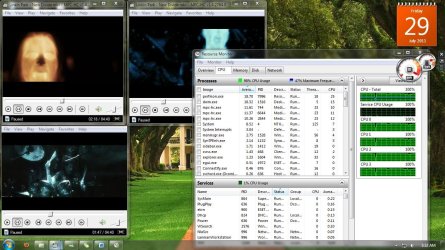
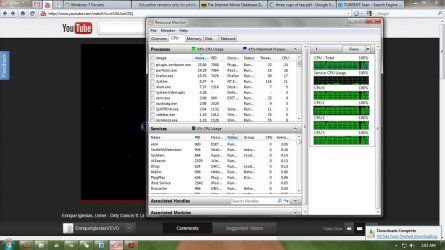
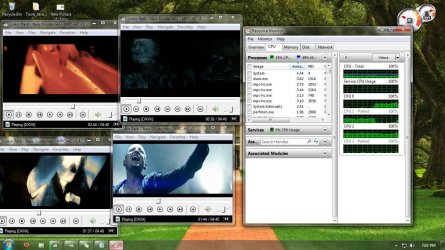
so whenever im normal browsing(none video) on firefox things run smoothly, but when i start watching some video, after a short while the cpu usage shoots to 70,80 and 97-100(pic attached) and things slow down, start hanging and response exacerbates.i tried playing some video from my pc on a video player(duh),media player classic and for that matter i choose the heaviest video i had (true HD 1080p) and ran 3-4 instances of the video simulatenously and within 30secs the usage shot to 95-100. please dont say this is quite a cpu intensive task cuz last time that this happened i switched to safe mode and ran 5-6!! instances of the same and the cpu usage was lingering at 40-ish! so i thought something must have gone wrong with the os, a virus or something might have caused the corruption although i had eset nod32 . so i went through the pain of backing up all my settings, data and preferences, reinstalled a new os and (almost)all the software i had in the previous setup. then i repeated the same test again and ran 3-4 instance of the video in standard windows mode(not safe mode) everything was working seamlessly even the video browsing.(i've attached the pic of this as well)
this eliminate the possibility of a system overheating or cooling problem and has definitely got to do with the software.
some more facts:
before this infection whenever i used to do some normal browsing the cpu usage would be around 3-4 and now as i type this(without any video or heavy program running along side) its 12-14 (pic attached)
please guide me through this nuisance.
i promise ill switch to linux as soon as i find spare time. any info helping me decide as to which version (openSUSE, linuxmint11 or ubuntu) would be the best to migrate.
but for no i need help.
now leme state the problem more accurately.
so whenever im normal browsing(none video) on firefox things run smoothly, but when i start watching some video, after a short while the cpu usage shoots to 70,80 and 97-100(pic attached) and things slow down, start hanging and response exacerbates.i tried playing some video from my pc on a video player(duh),media player classic and for that matter i choose the heaviest video i had (true HD 1080p) and ran 3-4 instances of the video simulatenously and within 30secs the usage shot to 95-100. please dont say this is quite a cpu intensive task cuz last time that this happened i switched to safe mode and ran 5-6!! instances of the same and the cpu usage was lingering at 40-ish! so i thought something must have gone wrong with the os, a virus or something might have caused the corruption although i had eset nod32 . so i went through the pain of backing up all my settings, data and preferences, reinstalled a new os and (almost)all the software i had in the previous setup. then i repeated the same test again and ran 3-4 instance of the video in standard windows mode(not safe mode) everything was working seamlessly even the video browsing.(i've attached the pic of this as well)
this eliminate the possibility of a system overheating or cooling problem and has definitely got to do with the software.
some more facts:
before this infection whenever i used to do some normal browsing the cpu usage would be around 3-4 and now as i type this(without any video or heavy program running along side) its 12-14 (pic attached)
please guide me through this nuisance.
i promise ill switch to linux as soon as i find spare time. any info helping me decide as to which version (openSUSE, linuxmint11 or ubuntu) would be the best to migrate.
but for no i need help.
Attachments
My Computer
- Computer Manufacturer/Model Number
- Hp g62 363tu
- OS
- Windows 7 Ultimate x64
- CPU
- i5 2.5~
- Motherboard
- h55
- Memory
- 2gb
- Graphics Card(s)
- -
- Sound Card
- realtek
- Hard Drives
- 500gb